Sales Automation
•
monday CRM Alternatives: 7 Better Options for Sales Teams
For small sales teams, pick an AI-led CRM for automated follow-up, a pipeline-first CRM for reps, or a free marketing-connected CRM to start.

If I were choosing a monday CRM alternative today, I’d split the list into three groups: K3X for small teams that want AI-led follow-up and integrations, Pipedrive for a standard sales pipeline, and HubSpot CRM for a free starting point with marketing tied in. monday CRM starts at about $12/user/month with a 3-user minimum, so small teams often look elsewhere on cost, setup time, or outreach limits.
The short version: K3X fits teams of 1–9, Pipedrive fits pipeline-led reps, and HubSpot CRM fits teams that want $0 entry. The other options - Attio, Close, Zoho CRM, and Salesflare - make more sense when your team has a clear setup style, outbound motion, or data model in mind.
What should I take from this list?
I’d read this list as a buyer’s filter, not a feature dump. The main question is not “Which CRM has more tools?” It’s which one cuts the most rep work for my team size and sales motion.
The article’s main point is simple: monday CRM is often used as a sales workspace built from boards, while these seven options start from leads, contacts, deals, or outbound work. That’s why teams often switch.
Which tools stand out right away?
For most buyers, three names do the first round of sorting:
K3X if I want AI agents to run follow-up, email, SMS, and calling for a 1–9 person team
Pipedrive if I want a sales-first pipeline with less setup
HubSpot CRM if I want a free base and plan to connect sales with marketing
That gives me a fast path. I would only move to Close if my team is call-heavy, Zoho CRM if I need lower-cost CRM depth, Attio if I want more control over the data model, and Salesflare if I want less manual data entry.
Why do teams move off monday CRM?
The article points to four common reasons: cost, setup, automation limits, and outreach gaps. Those are the parts I’d focus on first in any buying process.
The pricing issue is easy to see. monday CRM paid plans start around $12 per user/month and require 3 seats, so even a solo founder can end up paying for extra capacity. Higher sales features often push teams into higher tiers.
The setup issue is more about fit. monday CRM starts from a board structure, so teams often spend time shaping it into a sales workflow. If I want a CRM that already thinks in deals, contacts, and pipeline stages, that setup work can feel like drag.
The outreach issue matters too. The article says monday CRM lacks native calling, SMS, and cold-email execution, which can push teams into extra tools. For small sales teams, that often means more tabs, more sync issues, and more admin.
Which alternative fits which team?
Here’s the cleanest way I’d group them:
K3X: small teams that want AI-led execution
Pipedrive: reps that want a visual pipeline
HubSpot CRM: teams that want free CRM plus marketing
Attio: teams that care about CRM structure and custom setup
Close: outbound teams that live on calls and SMS
Zoho CRM: cost-aware teams that want a sales-first CRM with more built-in channels
Salesflare: small B2B teams that want the CRM to fill itself in
That grouping is more useful than scanning long feature lists. It maps tools to work style.
What pricing patterns matter most?
The biggest pricing split is between free-entry tools, low-cost pipeline tools, and higher-cost outbound systems.
HubSpot CRM and Attio start at $0
Pipedrive and Zoho CRM start around $14–$15/user/month
K3X starts at $20/user/month
Salesflare starts at $29/user/month
Close starts at $49/user/month
The seat minimum matters as much as list price. monday CRM’s 3-seat minimum changes the math for solo reps and two-person teams. Tools with no seat minimum are often easier to justify early.
What is the core tradeoff across this list?
The article frames the list around one split: some tools mostly track sales work, while others help carry it out.
I think that’s the right way to read it. Pipedrive, Attio, and Salesflare lean more toward structure and visibility. K3X, Close, and Zoho CRM lean more toward doing outreach inside the system. HubSpot CRM sits between those two camps.
That distinction matters because two CRMs can have similar price tags but very different labor costs once reps start using them every day.
Which option would I shortlist first?
If I had to narrow this to three names fast, I’d shortlist:
K3X for a small team that wants AI to handle follow-up
Pipedrive for a sales team that wants a standard pipeline
HubSpot CRM for a team that wants a free start and marketing tie-in
That matches the article’s own ranking and keeps the first pass simple. The other four are more situational.
How hard is it to move off monday CRM?
The article’s estimate is 2–4 weeks for most teams. Data import is not the hard part; cleanup, mapping, rebuilds, and user testing take most of the time.
A few numbers stand out:
Export data:1–2 hours
Field cleanup and mapping:2–3 hours
Import into the new CRM:under 1 hour
Rebuild pipelines:1–2 days
Rebuild automations:4–10 hours
Parallel run:14–30 days
If I were planning a switch, I’d pay the most attention to automation rebuilds and report checks. That is where timing slips.
What is the bottom line?
My read is simple: monday CRM is still fine for teams that need sales and delivery in one workspace, but it is not the cleanest fit for many small sales teams. If I want a CRM that starts from pipeline work or outbound execution, these seven options make more sense.
If I want the shortest answer, here it is: choose K3X for AI-led follow-up, Pipedrive for a standard pipeline, and HubSpot CRM for a free entry point. Then look at Close, Zoho CRM, Attio, or Salesflare only if your team has a more specific setup or outbound need.
Why is K3X the top monday CRM alternative for small sales teams?

K3X is built for 1–9-person sales teams that want the system to do sales work for them, not just store data. Instead of setting up boards, recipes, and trigger chains by hand, reps can describe the result they want in plain language and let K3X carry it out across email, SMS, and calls. Learn more at k3x.ai/features.
That changes how work gets done day to day. With monday CRM, teams usually design the process first and then wire up the automation. With K3X, they define the outcome and the system handles the steps, timing, and follow-up logic.
"Follow up every inbound lead within 5 minutes until they book or decline,"
In that example, K3X can turn one instruction into a multi-channel follow-up process automatically. More detail is available at /blog/what-is-a-prompt-driven-crm.
On cost and time savings, K3X also stands out for small teams. K3X says users save an average of 8 hours per week per sales rep and that the platform has automated more than 312,000 hours of sales and support work [5]. Pricing starts at $20 per seat/month with no seat minimums [5], while monday CRM Pro is listed at $28 per seat/month with a 3-seat minimum [2].
There are tradeoffs. K3X is newer, has fewer native integrations than larger vendors, requires AI credit tracking as usage grows, and is not a fit for 100+ seat deployments for small teams. For more on AI-led follow-up, see /blog/crm-follow-up-automation-ai.
Those gaps in setup time, pricing, and automation style are why small teams often compare monday CRM with sales-focused options like K3X.
Why do people look for monday CRM alternatives?
People look for monday CRM alternatives because monday CRM starts from a project-management structure, while many sales teams want a CRM built for leads, contacts, and deals from day one[2][1]. The gap shows up fast when reps need pipeline movement, follow-up, and outreach to happen with less manual setup.
monday CRM is built on a project-management base, so sales teams often have to turn a task board into a CRM[2][1]. In practice, that means more setup work to make boards behave like a sales process. Many teams want actions to run on their own, not a board they have to reshape into a workflow.
Sales teams usually want linked lead, contact, and deal records that move cleanly through each pipeline stage. That’s a better fit for day-to-day sales work than a layout rooted in project tracking. Because of that, buyers often compare monday CRM with tools made for pipeline work, not project management.
Cost is another common reason. All paid plans require at least three seats, so small teams can end up paying for capacity they won’t use[2][7]. For a solo founder or a two-person sales team, that minimum can mean paying for one extra seat every month.
Automation caps also matter. monday CRM increases automation limits by plan tier, but lower-tier plans can hit those limits fast if a team depends on frequent follow-up, routing, reminders, or status changes[2][7]. For smaller teams, the issue isn’t only which features exist. It’s how much manual work still falls on reps once the workflow volume grows.
Another sticking point is outreach. monday CRM lacks native calling, SMS, and cold-email execution, so teams often have to add other tools to cover those jobs[1][2]. That can leave reps juggling separate apps for scheduling, outreach, calling, and support instead of staying in one sales workspace.
The seven alternatives below address these limits in different ways, from AI-native automation to sales-native pipelines.
1. K3X
K3X fits small sales teams that want follow-up and outreach to run on its own, without setting up workflows. For teams with 1 to 9 seats, the main difference from monday CRM is simple: instead of managing boards, triggers, and recipes, users can describe the outcome they want in plain language and let the system handle email, SMS, and calls.
That setup matters for teams that care more about execution than CRM admin work. K3X includes email, SMS, and a power dialer in the base product, while monday CRM depends on add-ons for all three.
Best for: Small sales teams (1–9 seats) that want AI agents to run follow-up and outreach automatically, with no workflow configuration required.
Pricing: $20/seat/month for 1–9-person teams. This includes 1,000 usage credits, built-in email, SMS, and power dialer, unlimited integrations, and no long-term contracts. A 14-day free trial is available at k3x.ai/pricing. [5]
Pros:
Prompt-based automation replaces workflow builders
Native email, SMS, and calling are included in the base price
Setup takes under one hour, with no long-term contract required
Cons:
Smaller native integration catalog than established CRMs [5]
AI credit usage needs monitoring; not built for 100+ seat or deep-governance deployments [5]
If you want a more pipeline-first CRM instead of AI-led execution, compare Pipedrive next.
Why is Pipedrive a stronger monday CRM alternative for pipeline-focused sales teams?

Pipedrive is the better fit for sales teams that want a standard pipeline CRM with less setup. It is built around deals first, while monday CRM gives teams a more open workspace that often needs more configuration before it feels sales-ready [4][8].
Pipedrive uses a deal-centered data model. Contacts, organizations, emails, activities, and notes all attach to one deal record, so reps can see the full sales picture in one place [4]. For teams that live inside the pipeline all day, that structure cuts down on clicking around and makes follow-up work more direct.
Cost is another clear difference. Pipedrive's Essential plan starts at about $14–$15 per seat/month with no seat minimums, while monday CRM's Standard plan costs about $17–$20 per seat/month and still requires three seats [2][4]. That means a solo rep or small team can start with Pipedrive at a lower monthly cost.
Pipedrive also tends to be useful faster. Its pipeline stages and activity types come preconfigured, so most teams can start working on day one without much rebuilding [4][8]. monday CRM gives more room to shape the workspace, but that flexibility usually means more setup before the system matches a sales team's process.
For outreach, Pipedrive includes more built-in sales tools at the plan level many teams actually buy. Its Advanced plan adds native email sequences and follow-up actions tied to activities, while monday CRM often relies on third-party integrations to handle similar work [1][2][4]. If a team wants basic outbound motion inside the CRM, that can reduce tool sprawl.
Best for: Sales teams that want a purpose-built pipeline tool with structured deal tracking, activity reminders, and native email sequences without building their CRM from scratch.
Pricing: Essential about $14–$15/seat/month · Advanced about $34/seat/month · Professional about $49/seat/month. No seat minimums. [4][6]
Pros:
Deal-centered model keeps deal history, communication, and tasks in one record
No seat minimums, so one rep can start on Essential
Native email sequences on Advanced can replace simple outbound tools
Cons:
Automation still needs manual setup for triggers and rules
Post-sale work is limited, so teams that need delivery boards may still use monday CRM alongside it
If you need a free CRM with more marketing coverage, compare HubSpot CRM next.
Why is HubSpot CRM a better monday CRM alternative for teams that want a free start?
HubSpot CRM is a better fit for teams that want to start at $0 with a CRM built for contacts, deals, and marketing. Its free plan includes unlimited users, unlimited contacts, deal tracking, and meeting scheduling, while monday CRM does not offer a permanent free plan and sets a three-seat minimum on paid plans [3][8][2][7]. For small sales teams that also want basic marketing in the same system, HubSpot gives you more out of the box.
CRM Data Model
HubSpot uses a contact-and-deal model from day one. monday CRM starts with boards, so sales teams often need to shape that structure into a CRM workflow.
That gap tends to show up more as the database grows. If your team expects higher contact volume, cleaner pipeline reporting, or tighter links between sales and marketing activity, HubSpot usually feels more natural over time.
Pricing and Seat Minimums
HubSpot’s free tier has no seat minimum and does not expire, which makes it easier for small teams to start without a contract [2][7]. monday CRM requires at least three paid seats on every plan [2][7].
Once you move past free, pricing climbs. HubSpot Starter begins at about $20/seat/month, and Sales Hub Professional is about $90/seat/month [2][8]. That pricing path can work for a small team, but costs can climb fast as usage grows.
Setup: Manual Configuration
HubSpot usually takes more time to set up. Teams often spend 4 to 6 weeks configuring pipelines, automation rules, and integrations [7].
monday CRM is often live in 1 to 2 weeks [7]. The tradeoff is that HubSpot gives you more built-in sales structure, while monday CRM can feel lighter at the start but may need more shaping later.
Native Execution: Email, Calling, SMS
HubSpot includes native email tracking, templates, sequences in Sales Hub, and meeting scheduling. monday CRM does not include native email sequencing, calling, or SMS [1][2].
There is one limit worth noting: HubSpot does not include native cold email sending, so outbound-heavy teams may still need another tool for prospecting [2]. If your workflow depends on high-volume outbound, that matters.
Best for: Teams of 1–15 people that want a free CRM base with connected marketing and native email sequences, and can manage a 4- to 6-week setup.
Pricing: Free ($0) · Starter ~$20/seat/month · Sales Hub Professional ~$90/seat/month [2][8]. No seat minimum on the free tier.
Pros:
Free plan includes unlimited users and unlimited contacts [3][8]
Contact-and-deal model fits sales and marketing in one system
Native email tracking and sequences are available in Sales Hub [2]
Cons:
Paid plans get expensive fast, especially at Sales Hub Professional [2]
Full setup often takes 4 to 6 weeks[7]
If you want more flexibility and a lighter marketing layer, Attio is the next comparison.
4. Attio

Attio is a better fit than monday CRM for teams that want a CRM-first setup. It starts with sales objects like contacts, companies, and deals, while monday CRM starts with boards and columns[1][4].
Sales-Native Data Model
Attio uses native CRM objects for contacts, companies, and deals[1]. monday CRM uses a boards-and-columns setup[4]. For teams that have outgrown a board-based system, that difference can matter a lot because relationship data is easier to organize in a CRM built for that job.
The main point is simple: Attio gives sales teams a cleaner structure for tracking people, accounts, and pipeline data. Where K3X leans into prompt-driven execution, Attio leans into CRM structure.
Pricing, Setup, and Execution
Attio has a free plan at $0 with no seat minimum[1]. That stands in contrast to monday CRM, which has a 3-seat minimum on every paid plan[2][7]. Attio’s paid plans go up to $69 per seat/month[1].
Setup is still hands-on. Teams need to build pipelines and views manually, much like they do in monday CRM[1][4]. So while the data model is more sales-focused, the initial admin work does not disappear.
Attio also does not include built-in calling, SMS, or email sequences for native sales execution[1]. If your reps need those channels in one place, you’ll need separate tools.
Best for: Teams that want a CRM-first data model and a free plan with no seat minimum.
Pricing: Free ($0, no seat minimum) · Paid plans up to $69/seat/month[1]
Pros:
CRM-first data model with native objects for contacts, companies, and deals[1]
Free tier with no seat minimum[1]
More CRM-specific structure than monday CRM’s board-based setup[1][4]
Cons:
No native calling, SMS, or email sequences for built-in sales execution[1]
If you need stronger built-in execution, Close is the next option to compare.
Why is Close a better monday CRM alternative for high-volume outbound teams?
Close is a better fit than monday CRM for high-volume outbound teams because calling, email, and SMS are built into the CRM. If your team wants every touch logged in one place, Close handles that out of the box, while monday CRM often needs extra tools to match the same workflow. Close still needs manual setup, though, while K3X is aimed at small teams that want to describe the outcome and let AI agents carry it out.
Sales-Native Data Model
Close is built for inside sales rather than adapted from project management. Its lead record logs calls, texts, and emails into one communication history automatically[2][3], so reps can see the full thread without bouncing between tabs or tools.
Pricing and Seat Minimums
Close starts at $49/user/month on the Startup plan, with no seat minimum[2]. Its Professional and Business plans run $99–$139+/user/month[1][2], so the starting cost is higher than monday CRM’s lower-tier plans.
Setup Model
Close wins on built-in execution, not on workflow flexibility. Setup is still manual, but the system is geared toward sales teams and can be configured in less than a day[1][3].
Native Execution: Email, Calling, SMS
This is where Close pulls ahead. It includes a power dialer, SMS, email sequences, and voicemail drops, and sequences stop on their own when a prospect replies[1][2][3]. monday CRM does not match that with native features alone[2][4].
Best for: B2B sales teams doing high-volume outbound and needing calling, SMS, and email sequences in one system.
Pricing: Startup plan at $49/user/month (1-user minimum) · Professional/Business plans at $99–$139+/user/month[1][2]
Pros:
Native power dialer, SMS, and email sequences are included in the base plan[1][3]
No seat minimum; one rep can start on the Startup plan[2]
One lead record logs the full communication history automatically[2][3]
Cons:
Higher per-user cost than monday CRM’s entry-level plans[2]
Pipeline and sequence setup are manual; there is no prompt-based setup[1][3]
If Close’s entry price is too high, Zoho CRM is the next option.
6. Zoho CRM

Zoho CRM is the lower-cost pick for teams that want a sales-first CRM with built-in outreach tools. It fits better than monday CRM when you want a standard CRM setup for leads, contacts, accounts, and deals, rather than a board system you have to shape into a CRM.
Sales-Native Data Model
Zoho is built as a CRM from the start. It tracks leads, contacts, accounts, and deals without asking users to rebuild that structure in boards and columns [9].
It also includes custom objects on all plans [1]. For sales teams that need a standard database structure and room to add their own fields and record types, that gives Zoho more flexibility than monday CRM.
Pricing and Seat Minimums
Zoho costs less for small teams and solo operators. It has a free plan for up to 3 users, and paid plans start at about $14 per user/month for Standard and $23 per user/month for Professional, which includes workflow automation [3].
Enterprise and Ultimate plans go up to $52 per user/month [1]. By contrast, monday CRM’s Pro plan costs $28 per seat/month with a 3-seat minimum, so a solo founder pays at least $84/month [2].
Setup Model: Prompts vs. Manual Config
Zoho uses manual setup rather than prompt-based setup. That means it usually takes more time to get running than monday CRM, but you get a more standard CRM structure in return.
Typical onboarding takes 1 to 4 weeks [1][8]. Teams that need same-day setup will likely find Zoho too heavy.
Native Execution: Email, Calling, and SMS
Zoho includes native email, calling, and SMS tools. It also includes Zia, Zoho’s AI assistant, for lead scoring, deal prediction, and email sentiment analysis [9][3].
monday CRM does not include native calling, SMS, or email sequencing [1][2]. If your team wants to run outreach inside the CRM without stitching together extra apps, Zoho is the stronger option.
Best for: Teams that want a low-cost, sales-native CRM with deep customization and built-in communication tools, and are willing to spend time on setup.
Pricing: Free for up to 3 users · Standard at about $14/user/month · Professional at about $23/user/month · Enterprise and Ultimate up to $52/user/month (annual billing) [1][3]
Pros:
Purpose-built CRM data model with custom objects on all plans [1][9]
Free tier for up to 3 users, and no mandatory paid-seat minimum [3][8]
Cons:
Setup takes 1 to 4 weeks, and the interface is heavier than monday CRM [3][8]
The learning curve can be steep for non-technical reps [3][8]
If you want something lighter and simpler than Zoho, Salesflare is next.
7. Salesflare

Salesflare fits small B2B sales teams that want the CRM to update itself as much as possible. It pulls in email, calendar, and contact data on its own, which cuts rep admin work and keeps records current.
Compared with monday CRM, the main difference is simple: Salesflare is built around sales records first, while monday CRM starts from a board-style setup. For teams that are tired of cleaning up records by hand, that matters day to day.
Sales-native data model
Salesflare uses a standard CRM setup built around contacts, companies, opportunities, and pipelines. That gives small B2B teams a cleaner deal history and less manual record work than monday CRM’s board-based layout.
Pricing and seat minimums
Salesflare has no seat minimum, which makes it easier for a solo rep or very small team to get started. Its Growth plan starts at $29/user/month, Pro at $49/user/month, and Enterprise at $99/user/month, all billed annually.
By comparison, monday CRM’s Pro plan starts at $28/seat/month with a 3-seat minimum. That means a solo rep would pay at least $84/month before getting access to that tier.
Native execution
Salesflare’s edge over monday CRM is how it handles day-to-day sales work. It pulls activity from email, calendar, and LinkedIn, updates contact records without manual entry, and flags follow-up reminders based on relationship signals.
If your team wants less upkeep than Zoho or Attio, Salesflare is the lighter choice. The tradeoff is that its edge is about lower admin load, not a broader feature set.
Best for: Small B2B sales teams that want their CRM to stay current with little manual data entry and less admin overhead than a board-based tool.
Its advantage over monday CRM is operational, not breadth: less admin, cleaner records, and faster daily use.
Pros:
Automatic activity capture from email, calendar, and LinkedIn keeps records current without rep input [9][5]
Sales-native structure gives cleaner deal history and less manual updating than monday CRM’s board layout [1][2]
No seat minimum, so one rep can start without paying for unused seats
Cons:
Automation depth is lighter than Close or K3X; teams that need prompt-driven or sequence-heavy outreach will hit limits fast
Teams that depend on heavy calling or SMS should confirm channel fit before switching
How do the top monday CRM alternatives compare side by side?
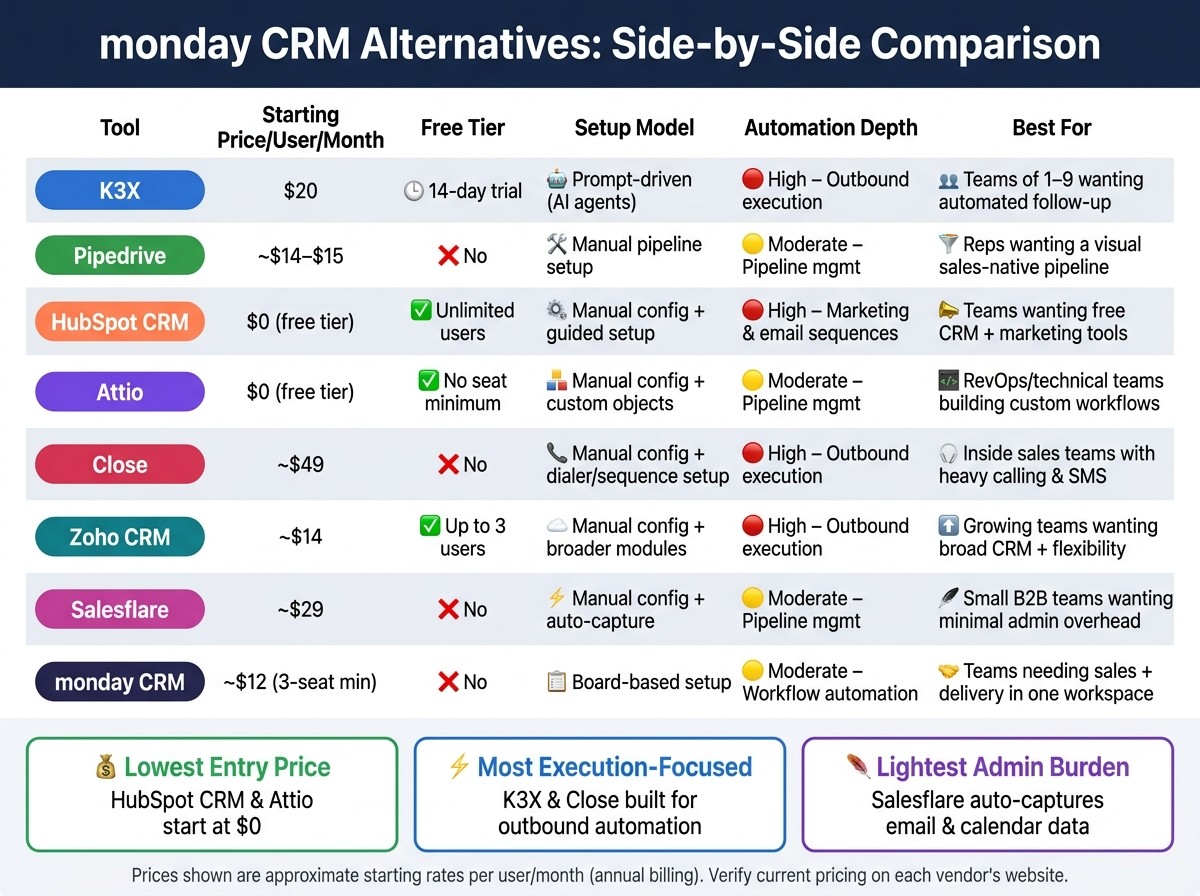
monday CRM Alternatives: Side-by-Side Comparison for Sales Teams
The main split is simple: some CRMs do sales work, while others mainly track and organize it. If you're comparing options, focus on three things first: setup effort, how much the system can automate, and how much work reps still need to do by hand.
The table below shows that difference at a glance. Tools like K3X, Close, and Zoho CRM lean more toward execution, while Pipedrive, Attio, and Salesflare focus more on pipeline management and record-keeping. HubSpot CRM sits in the middle, with a free core product and stronger marketing automation than most sales-first tools.
Tool | Starting price per user/month | Free tier | Setup model | Automation depth | Best for |
|---|---|---|---|---|---|
K3X | $20 | 14-day free trial | Prompt-driven; AI agents execute actions directly | High for outbound execution | Teams of 1–9 that want outcomes executed automatically |
Pipedrive | ~$14–$15 | No | Manual pipeline and activity setup | Moderate for pipeline management | Reps who want a visual, sales-native pipeline |
HubSpot CRM | $0 (free tier) | Yes, unlimited users | Manual config; guided setup | High for marketing and email sequences | Teams that want a free CRM base with marketing tools |
Attio | $0 (free tier) | Yes, no seat minimum | Manual config; custom objects and data-model customization | Moderate for pipeline management | RevOps and technical teams building custom workflows |
Close | ~$49 | No | Manual config; outbound sequence and dialer setup | High for outbound execution | Inside sales teams with heavy calling and SMS volume |
Zoho CRM | ~$14 | Yes, up to 3 users | Manual config; broader modules and heavier admin work | High for outbound execution | Growing teams that want broad CRM features and flexibility |
Salesflare | ~$29 | No | Manual config; auto-capture from email and calendar | Moderate for pipeline management | Small B2B teams that want minimal admin overhead |
A few patterns stand out.
Lowest entry price:HubSpot CRM and Attio start at $0, while Zoho CRM starts at about $14 per user/month and Pipedrive at about $14–$15.
Highest manual setup load:Attio and Zoho CRM usually ask for more admin work up front because they give teams more control over objects, modules, and workflow design.
Most sales execution focus:K3X and Close are aimed more directly at outbound teams that want the system to help run motions, not just log them.
Lightest admin burden for small teams:Salesflare stands out for teams that want email and calendar data pulled in with less manual entry.
In practice, the choice often comes down to this: if your team wants a CRM that acts more like an operating system for outbound work, look at tools in the execution camp. If your team already has a process and mainly needs structure, visibility, and reporting, the pipeline-management camp will usually fit better.
K3X, monday CRM, or Pipedrive: which one should you pick?
Pick K3X for automated follow-up, monday CRM for sales-to-delivery handoff, and Pipedrive for a standard sales pipeline. The fastest way to choose is by team need, not by feature count.
Choose K3X if missed follow-up and admin work are the main pain points. Its AI agents handle outreach across email, SMS, and calling without workflow setup. If you need sales plus delivery in one place, stay with monday CRM. If you want a classic pipeline, go with Pipedrive.
Stay with monday CRM if your sales process needs a handoff into delivery and your team already works in monday.com. That setup gives both teams shared visibility in one workspace.
Choose Pipedrive if you want a sales-native CRM with structured pipeline management and built-in sequencing. It fits teams that want a more standard deal-flow setup.
The table below sums up the fastest path based on team need.
Decision | Best fit |
|---|---|
Choose K3X | Teams of 1–9 that want follow-up and outreach handled automatically |
Stay with monday CRM | Teams that need shared visibility across sales and delivery in one workspace |
Choose Pipedrive | Teams that want a mature, sales-native pipeline with built-in sequencing |
How long does it take to move off monday CRM?
Most teams can move off monday CRM in 2–4 weeks. The data import itself is short, but field cleanup, pipeline rebuilds, automation setup, and user testing take most of the time.
If monday CRM is the wrong fit, the move is usually more about cleanup and rebuild work than raw data transfer. Export your data before canceling monday CRM so you keep access to contacts, deals, and activity logs.
The import can finish in under 4 hours, but that rarely decides the timeline. Because monday CRM starts as a board-based system, field mapping and pipeline rebuilds usually take the longest. Teams that standardize fields before import tend to finish faster.
Migration Step | Estimated Time |
|---|---|
Export data | 1–2 hours [8] |
Clean and map fields | 2–3 hours [8] |
Import into new CRM | Under 1 hour [8] |
Rebuild pipelines and stages | 1–2 days [8] |
Rebuild automations | 4–10 hours (manual) [5] |
Reconnect tools | 1–2 hours [8] |
Redirect forms and lead routing | |
Train users and check reports | 2–4 weeks [8] |
The biggest time sink is rebuilding automations. That step can take 4–10 hours of manual setup [5], especially if your team uses custom lead routing, status changes, task triggers, or notification rules.
Plan for a 14–30 day parallel run where both systems stay live at the same time [8]. That gives sales, ops, and management time to test reports, confirm workflows, and catch field issues before the cutover. Skipping the parallel run increases launch risk.
Frequently asked questions about monday CRM alternatives
If you want the short version, buyers usually narrow this down by team size, monthly cost, setup time, and whether the CRM can handle outreach without extra tools.
What is the best monday CRM alternative for small teams?
K3X is the top pick for teams of 1–9 that want AI agents to handle follow-up on their behalf. Pipedrive is the main second choice for teams that want a more manual pipeline and less automation.
Is there a cheaper alternative to monday CRM?
Yes. monday CRM has a 3-seat minimum, so small teams can end up paying for seats they do not use [7]. That changes the math fast for a 1- or 2-person team.
Here are the lower-cost options buyers compare most:
Zoho CRM offers a free tier for up to 3 users [3].
HubSpot offers a free tier with unlimited users [4].
Pipedrive starts at about $14 per seat per month with no seat minimum [7].
Price is part of the decision, but teams often find that migration time and cleanup work carry just as much weight.
What is the easiest CRM to switch to from monday CRM?
Pipedrive is usually the easiest move for sales-led teams because it needs less configuration. HubSpot is close behind, helped by guided onboarding and a free tier [4][8].
In practice, this matters most for teams that want to rebuild their pipeline fast and avoid a long setup project.
Is monday CRM a sales-native CRM or a project-management tool?
monday CRM is a project-management tool adapted for sales, not a sales-native CRM. Out of the box, it does not include native cold email infrastructure, built-in calling, or sales-specific reporting [2].
That gap is often why sales teams compare it against tools built first for pipeline management and rep activity.
Which monday CRM alternative has the best built-in calling for sales teams?
Close is the strongest option for built-in calling. It includes a power dialer and native SMS for $49 per user per month [2][3]. For teams that care most about phone-heavy outbound work, that is the main draw.
K3X also includes a power dialer, plus email and SMS, for $20 per seat per month [5]. For teams of 1–9, that makes it the lower-cost option.
Does any monday CRM alternative combine sales and marketing in one free plan?
HubSpot CRM is the only option on this list with a permanent free tier that covers both sales pipeline tracking and basic marketing tools, with no seat minimum [3][8]. That makes it a practical fit for teams that want one system for both functions before paying for more features.
The trade-off is that fuller automation requires a paid Sales Hub tier.
Final verdict: which monday CRM alternative should you use?
K3X is the best fit for 1–9 person teams that want sales work done for them, not just tracked. Choose it if your main goal is automated follow-ups, pipeline updates, and outreach across channels. Choose Pipedrive if you want a clean pipeline view and simple sales process management. Choose HubSpot CRM if a free starting point and a broader marketing and service stack matter more. Stay with monday CRM if your sales and delivery teams already run inside monday.com.
K3X stands out because it focuses on execution instead of setup. For small teams, that matters. Rather than asking users to build triggers, sequences, and workflow logic, K3X uses AI agents to run follow-up and outreach across email, SMS, and calls [5].
Pipedrive is the best second option for sales-led teams that want a visual pipeline and activity-based selling without much overhead [10][3]. It works well when the team wants structure and visibility, but still plans to handle most outreach manually.
HubSpot CRM makes more sense when the free core product is the deciding factor or when the team wants sales, marketing, and service tools in one system [9][3]. It is a better fit for companies that expect CRM to sit inside a broader go-to-market stack.
If you want to compare K3X on its own, review K3X pricing or features.