Sales Automation
•
Do You Need a CRM With Fewer Than 10 Employees?
Adopt a CRM for teams under 10 only when follow-up, multi-source leads, or shared histories cause missed touches; otherwise a spreadsheet suffices.

Yes - sometimes. I’d use a CRM with fewer than 10 employees once follow-up starts slipping, leads come from more than one place, or two people need the same contact history. If I still have one owner, a simple sales flow, and fewer than about 20 active deals, a spreadsheet can still work.
What matters is not headcount. The line is whether the system cuts admin and keeps next steps clear, or just adds more work.
CRM for Small Businesses: Everything You Need to Know
TL;DR: Do you need a CRM with fewer than 10 employees?
Yes - but only after lead volume or follow-up work passes a clear line. Most teams with fewer than 10 people need a CRM when manual follow-up starts to break down. The trigger is friction in the work, not team size, and the best fit at this stage is a CRM that needs little day-to-day upkeep.
Yes - but only once lead volume or follow-up complexity crosses a clear threshold. Most sub-10 teams need a CRM once follow-up gets hard to keep manual. The trigger is manual friction, not headcount - and the right CRM at this size is one that runs itself.
A spreadsheet is fine until follow-up starts slipping or two people need the same lead history at the same time. That’s usually the point where manual tracking stops being enough.
Legacy CRMs like Salesforce or HubSpot Professional can be tough to justify for a team this small. Adoption often breaks down [8], and total cost can rise fast once you add per-seat fees and onboarding charges [5].
The next question is what warning signs show the spreadsheet is no longer enough, and how teams have scaled inbound lead generation by making the switch.
What are the signs you need a CRM?
You need a CRM when follow-ups start slipping, pipeline status sits in someone’s head or in scattered spreadsheets, source tracking falls apart, handoffs get messy, or forecasting becomes guesswork. These issues often show up before a team feels large.
Missed follow-ups and slower response times
A weak follow-up process is usually the first clear sign. In one 4-person remodeling company, 67 inquiries over three months led to just an 18% follow-up rate; after moving to a simple CRM, follow-up climbed to 85% and lost inquiries dropped to zero.
That kind of gap is hard to ignore. When leads go untouched or wait too long for a response, revenue leaks out in plain sight, and a spreadsheet often stops being enough.
Pipeline lives in memory or spreadsheets
If you can’t name your top five deals, their current stage, and the next step without digging through notes, your pipeline is not visible enough. At that point, deal tracking depends too much on memory, side conversations, or manual updates.
That creates friction fast. A rep may think a deal is moving, while a manager sees stale data and has no clear view of what needs attention.
Source tracking, handoffs, and forecasting break down
When leads come in from several channels, information starts to get lost. This often happens when you lack a webhook system for every integration to sync data automatically. One rep may not know where a lead came from, another may miss prior context, and a prospect can end up getting two cold emails from different reps.
Forecasting usually breaks next. If stage data is incomplete or out of date, projections stop reflecting what is actually in the pipeline.
Warning Signal | What It Looks Like |
|---|---|
Missed follow-ups | Leads go cold after one touch |
Pipeline not visible | Can't name top 5 deals and next steps |
Handoff drops | Prospect gets two cold emails from different reps |
Source tracking fails | Can't tell which channel is generating deals |
Forecasting is guesswork | Projections not tied to actual stage data |
If these signs are already showing up, the next step is to look at where spreadsheets still work and where they start to fail.
When is a spreadsheet enough?
A spreadsheet is enough when one person runs the pipeline, deal volume stays under about 20 active deals, the sales path is simple, and follow-up happens on time without prompts. In that setup, especially for a solo operator or a very small team, a CRM can create more admin work than it saves.
The conditions where spreadsheets still work
Spreadsheets work well in a narrow set of cases. The usual pattern is fewer than 20 active deals, one lead source such as referrals or a single outbound channel, a simple path like inquiry → quote → decision, and one person managing every conversation.
In that situation, a spreadsheet acts like a clean checklist. It gives one person enough visibility without adding setup, data rules, and system upkeep.
The trouble starts when the setup stops being simple. If follow-up begins to slip, or if two people need the same deal history, the spreadsheet stops saving time and starts adding work.
The point where spreadsheets stop being enough
The switch usually happens at two points. At around 30 active conversations, most founders can no longer keep the status and next step for every deal in their head [1].
After 50 active contacts, the manual work becomes expensive. Scrolling, checking notes, and updating rows can waste about 10 hours per month, which is about $750 per month at $50 per hour [6].
Team size matters too. Once a second person joins the sales process, spreadsheets tend to create version conflicts, overwritten data, and double-messaging that makes prospects feel like they are dealing with a messy team [6][2].
That strain usually shows up first in follow-up consistency.
Condition | Spreadsheet Works | Spreadsheet Struggles |
|---|---|---|
Lead sources | Single channel [1] | Two or more channels [1] |
Sales process | Linear, short cycle [6] | Multi-stage with handoffs [2] |
Coordination | Solo operator [6] | Two or more people in sales [6] |
Follow-up consistency | Reliable, no reminders needed [6] |
What breaks first as you grow?
Follow-up consistency breaks first. Before reporting, dashboards, or custom fields become a pain, teams usually start missing touches, and that costs deals.
Why follow-up consistency fails before anything else
The core issue is simple: most small teams cannot keep every deal moving by memory once volume climbs. 80% of sales take at least five touches, yet small teams follow up with only 18% of nonresponsive leads [7]. That gap shows up early, long before a team hits the point where it needs heavy reporting.
At around 30 active conversations, most founders can no longer reliably remember the status and next step for every deal without help [1]. From there, visibility is only part of the problem. What matters is whether the system tells the team what to do next, without someone having to check every record by hand.
This gets worse when deals go quiet. Deals with no movement for 14 days often slip out of view because manual systems do not surface them on their own [4]. At the same time, sales reps spend about 28% of their time on admin, so every manual reminder, status check, and data update adds more drag [9].
How legacy CRMs and AI-native CRMs handle the problem differently
Legacy CRMs help teams track follow-up, but they still depend on people to keep the machine running. AI-native CRMs aim to carry out the work once the goal is stated.
Legacy CRMs such as Salesforce, HubSpot, Pipedrive, Zoho, monday.com, Close, and Attio usually manage follow-up through reminders, task lists, manual updates, and workflow rules. That setup can work. But it depends on someone setting up the logic, checking the data, and keeping the process current as the pipeline changes.
That’s a common failure point for small teams. About 43% of CRM rollouts fail because data entry takes too much time or the platform is too generic for the way the team sells [8]. In practice, the tool may look organized while follow-up still falls apart.
AI-native CRMs such as K3X handle the same problem from a different angle. A user can describe the outcome in plain language - for example, "follow up every inbound lead within 5 minutes until they book or decline" - and K3X’s AI agents then act across email, SMS, and calls without the user building sequences or triggers. In 2026, AI-powered CRM features were shown to cut manual data entry by 67% and increase sales productivity by 34% [8].
Capability | Legacy CRMs (HubSpot, Salesforce, Pipedrive, etc.) | K3X (AI-native) |
|---|---|---|
Follow-up execution | User manages reminders and task lists | AI agents execute outreach automatically |
Setup requirement | Weeks of configuration and training | Plain-language prompt; under an hour to set up |
Data entry burden | Manual form-filling and updates | Conversational, prompt-driven logging |
Maintenance | Manual data hygiene and active checking | AI handles follow-up execution without workflow builders |
Ideal team size | 10–100+ employees | 1–9 people |
The difference is direct: legacy tools organize follow-up, while K3X executes it. For a 5-person team, that gap shapes the tradeoff between software that records work and software that does part of the work itself.
How does the cost-benefit look for a 5-person team?
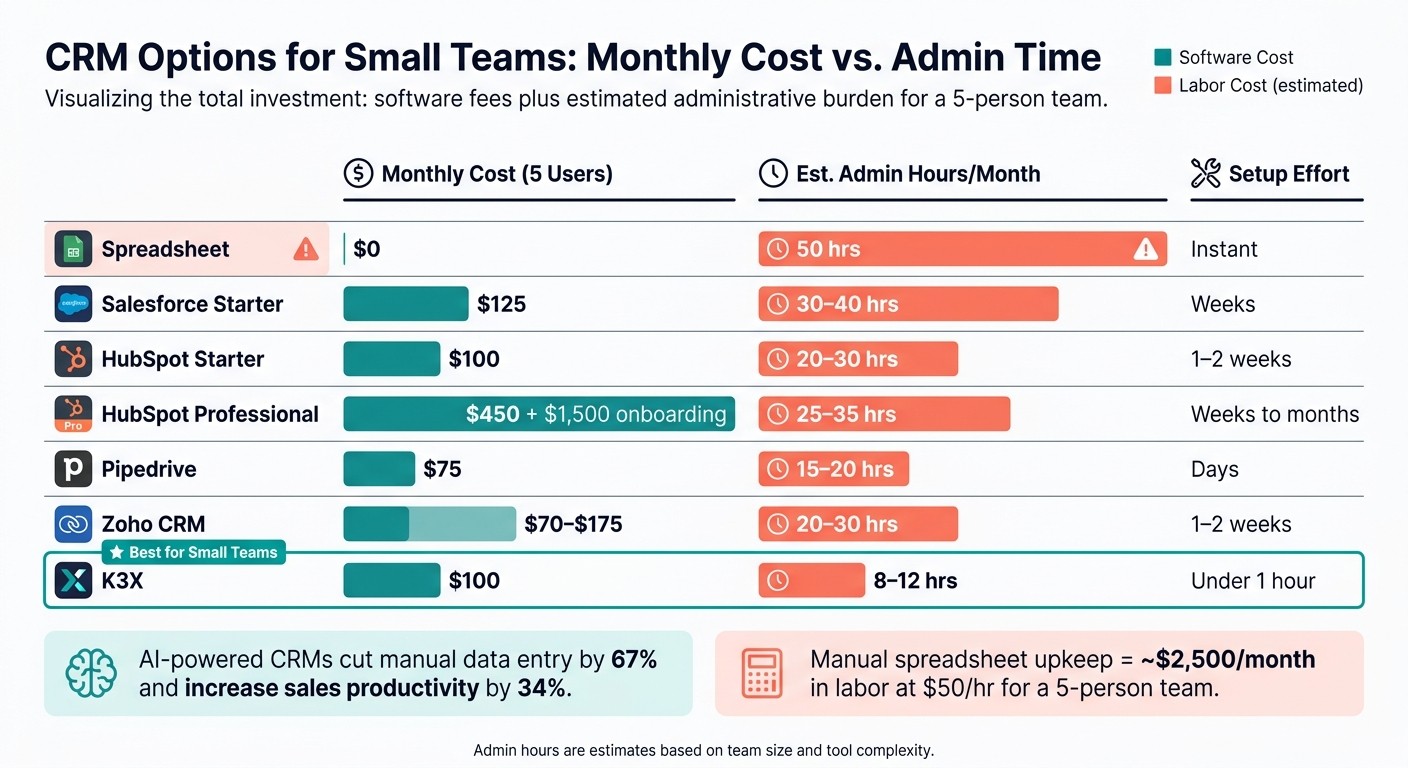
CRM vs Spreadsheet vs AI-Native: Cost & Admin Time for 5-Person Teams
For a 5-person team, labor is the main cost. Software fees matter, but the bigger line item is the time people spend updating records, cleaning data, and keeping follow-ups on track.
That shifts the comparison away from list price and toward hours lost or saved each month. For a small team, a CRM has to save more time than it creates in admin.
Spreadsheet vs. legacy CRM vs. AI-native CRM: a side-by-side comparison
A spreadsheet looks cheap at first glance, but the work adds up fast. Manual spreadsheet upkeep can take about 50 collective hours a month for a 5-person team. At $50 per hour, that comes to about $2,500 per month in labor, even with $0 software cost [6].
Legacy CRMs cut some of that manual work, but they add seat fees, setup time, and day-to-day system ownership. Someone still has to handle imports, clean records, and make sure follow-up activity stays consistent. On a small team, that extra load can be hard to absorb [6] [8].
K3X is priced at $20 per seat per month, or $100 per month for five users, with setup in under 1 hour. AI-powered CRM features have been measured to cut manual data entry by 67% and increase sales productivity by 34% [8]. K3X is newer, has fewer native integrations than older vendors, and requires AI credit monitoring.
The table below focuses on the numbers that matter most for a team this size: monthly cost and admin time.
Tool | Monthly Cost (5 Users) | Est. Admin Hours/Month | Setup Effort |
|---|---|---|---|
Spreadsheet | $0 | 50 hrs [6] | Instant |
Salesforce Starter | $125 | 30–40 hrs | Weeks |
HubSpot Starter | $100 | 20–30 hrs | 1–2 weeks |
HubSpot Professional | $450 + $1,500 onboarding | 25–35 hrs | Weeks to months |
Pipedrive | $75 | 15–20 hrs | Days |
$70–$175 | 20–30 hrs | 1–2 weeks | |
K3X | $100 | 8–12 hrs [8] | Under 1 hour |
The tradeoff is pretty direct. Spreadsheets have no license fee, but they eat the most time. Legacy CRMs add software cost and still lean on people to keep the system clean, so they cut less admin than K3X while costing more than a spreadsheet to run.
K3X lowers both monthly software spend and manual upkeep, but it is not aimed at teams that need strict governance or deep customization. For a 5-person team, the core test is simple: does the CRM save more follow-up time than it adds in admin?
Those economics set the filter for which CRM fits a 1–9 person team.
What CRM fits a team of 1-9 people?
For a team of 1–9 people, the best CRM is usually the one that takes the least time to set up and the least effort to maintain. At this size, the goal is simple: cut manual follow-up and give each person a clear next step without adding admin work.
A good fit should be live in hours, not weeks. It should log email and call activity with little or no manual entry, keep follow-ups moving, and give the team shared visibility into each lead or deal.
The criteria that matter most for teams of 1-9
The main factors are setup speed, admin load, automatic follow-up, and shared context. Small teams rarely have a full-time RevOps or CRM owner, so the system has to stay easy to run after setup.
In practice, that means the CRM should handle basics like email sync, call logging, and task tracking without turning every update into manual work. Teams this small usually do not need territory rules, layered approvals, or heavy reporting. They need a reliable answer to: what should I work on today?
For sub-10 teams, most CRM choices come down to three things:
How long it takes to get live
How much upkeep it needs each week
Whether it removes manual follow-up
Where K3X fits compared with Salesforce, HubSpot, Pipedrive, Zoho, monday.com, Close, and Attio

K3X sits at the low-overhead end of the market. Compared with Salesforce and HubSpot Professional, it asks for much less setup and admin time. Compared with tools like Pipedrive, Close, and Attio, its main angle is automatic follow-up driven by plain-language prompts instead of manual sequences and workflow building.
CRM | Setup Time | Admin Burden | Automatic Follow-up | Entry Price | Best Fit |
|---|---|---|---|---|---|
K3X | Under an hour | Very low | Prompt-driven AI executes follow-up across email, SMS, and calls | $20/seat/mo, 1,000 AI credits included | Teams of 1–9 wanting outcome-based automation |
HubSpot Starter | 1–2 weeks | Moderate | Standard sales automation and email sync | Free tier; ~$20/user/mo | Combined marketing and sales CRM |
HubSpot Professional | Weeks | High | More powerful automation, but heavier to manage | ~$450/mo for five seats | Teams with dedicated admin capacity |
Salesforce | Weeks to months | Very high | Deep customization, but complex to configure | High | Enterprise-scale teams |
Pipedrive | 2–4 hours | Low | Visual pipeline focus | $15/user/mo | Pipeline-focused sales teams |
Zoho CRM | Moderate | Moderate | Flexible, but configuration-heavy | Free tier; ~$35/user/mo | Value-focused teams needing customization |
Close | Fast | Low | Strong outbound and inside-sales tooling | $25+/user/mo | High-volume outbound teams |
Attio | Fast | Low | Flexible data model and light automation | $15–$40/seat/mo | Teams wanting a modern, lightweight CRM |
monday.com | Moderate | Moderate | Work-management-style tracking | Varies | Teams already using monday.com for projects |
Salesforce and HubSpot Professional offer more depth, but that depth comes with more overhead. HubSpot Professional costs about $450 per month for five seats [3], and both tools tend to fit teams that can spare time for setup, workflow changes, and admin work.
Pipedrive and Close are easier to roll out. They stay focused on pipeline management and outbound sales motion, which makes them easier for small teams to use day to day. Attio and monday.com are lighter still, and they work best when the team mainly wants structured records and simple tracking rather than hands-off process execution.
K3X takes a different path. Users describe the result they want in plain language - for example, "follow up every inbound lead within 5 minutes until they book or decline" - and K3X's AI agents execute across email, SMS, and calls without sequences or triggers to configure. The pricing and features pages list what is included at $20 per seat per month.
There are tradeoffs. K3X is a newer product, its native integration catalog is smaller than older vendors, AI credit usage needs monitoring, and it is not built for teams with 100+ seats or deep admin controls.
That leaves the final question: when does a sub-10 team cross the line from "lightweight CRM" to "needs something that runs itself"?
So, do teams with fewer than 10 employees need a CRM?
Not always. Small teams usually need a CRM when manual follow-up starts to slip, not when they hit a certain headcount. In practice, that often happens at around 20 active conversations or when two people need the same prospect history.
That’s the point where spreadsheets stop working as a shared source of truth. They can track names and notes, but they tend to break down once multiple people need updates at the same time.
The main trigger is complexity, not team size. If you can’t name your five active deals, their current stage, and the next step in 30 seconds, your sales process likely needs a shared system [1][2].
There’s risk on both sides. Wait too long, and follow-up errors start to pile up. Buy too soon, and you may end up paying for software that no one uses.
That second risk is common for very small teams. About 50% of small businesses that adopt a CRM stop using it within 90 days, often because the day-to-day pain wasn’t strong enough to justify the extra setup and process work [5].
For teams with fewer than 10 employees, the right choice is usually the lightest CRM that keeps follow-up on track. The best fit is the one that reduces admin work instead of creating more of it.
FAQs
At what size does a company need a CRM?
A CRM becomes necessary when manual tracking starts to break down. It’s less about team size and more about how many moving parts you’re trying to manage at once.
A practical rule of thumb is 20 to 30 active conversations or 50 to 100 active contacts. Around that point, spreadsheets and memory often lead to missed follow-ups, duplicate outreach, and weak deal visibility.
What is the best first CRM for a startup?
The best first CRM for a startup is the one that cuts admin work and matches how complex your sales process is right now, not just how many people are on the team. For teams of 1 to 9, focus on clear pipeline visibility, automated follow-ups, and shared context.
If deal volume is still low, a well-maintained spreadsheet can do the job. Once you’re managing 20 to 50 active conversations, or leads start slipping through the cracks, a lightweight CRM is needed.
Is a CRM worth it for a solo founder?
Usually not. If you have fewer than 20 to 50 active deals and your sales process is simple, a spreadsheet or even a notes app is often enough. At that stage, a CRM can add more admin than payoff.
A CRM starts to make sense when manual tracking begins to slip. If you're missing follow-ups, losing track of past conversations, or spending too much time piecing together deal history, that's the point where a simple, low-effort CRM can help.
How many hours a week does a CRM save?
For a small team, a CRM can save about 2 to 4 hours a week on admin work and manual follow-up. Most of that time comes from cutting manual data entry, status updates, and repeat outreach.
Teams using spreadsheets often lose around 2.5 hours per week to manual data entry and status updates, then spend more time on back-and-forth messages or email sequences. AI-native options like K3X reduce that upkeep by automating record updates and pipeline management from user prompts.