Sales Automation
•
AI SDR vs AI CRM: What's the Difference and Which Do You Need?
AI SDRs source new prospects while AI CRMs fix missed follow-up — for most small teams, buy the AI CRM first.

My short answer: an AI SDR is for net-new outbound and an AI CRM is for working leads you already have. For most small sales teams on July 6, 2026, I’d buy the AI CRM first because missed follow-up usually costs more than weak cold outreach.
One-line verdict: if your team is dropping inbound leads, missing follow-ups, or letting deals stall, start with the CRM; if your follow-up process is already tight and you need more top-of-funnel volume, add an AI SDR next.
I’d frame the choice like this:
AI SDR = finds people not in your system and runs cold outreach
AI CRM = works leads, deals, and customers already in your system
Main question = are you short on new names or are you failing to work the names you already have?
The article’s main point is simple: most small teams have an execution problem before they have a sourcing problem. The numbers back that up. 52% of sales reps never make a second follow-up attempt, while 80% of deals need 5–12 touchpoints to close. That gap points to leads sitting idle, not just too little outbound.
I’d also keep the tool boundary clear. An AI SDR pulls from outside sources like Apollo and LinkedIn and tries to book meetings. An AI CRM works from your internal history - emails, calls, stages, and inbound leads - to keep pipeline moving and cut drop-off.
What I’d take from the article:
Buy the CRM first if your team is small and follow-up is inconsistent
Buy the SDR first only if your inbound process is already tight and you need more outbound volume
Do not treat them as substitutes because they solve different sales jobs
A few details matter in practice.
AI SDRs help with list building, enrichment, account research, and outbound messaging. Their upside is more activity at the top of the funnel. Their risk is deliverability. The article notes inbox providers like Google and Yahoo enforce a 0.1% spam complaint limit for bulk senders, so sending more can hurt if inbox health is weak.
AI CRMs help with follow-up, stage movement, activity logging, and churn risk. Their upside is cleaner execution on leads you already paid to get. Their weak point is thin data or a fuzzy ICP; if your records are incomplete, the system has less to work with.
The article also makes a practical buying point for small teams. 45% of contacts never make it into the CRM, and inbound response delays can drag on for hours or days. If the lead never gets logged or worked, outbound volume will not fix that leak.
I’d summarize the software landscape this way:
CRM systems with AI layers:Salesforce, HubSpot, Pipedrive, Zoho, monday.com, Close, Attio
AI-native CRM angle in the article:K3X is positioned as a prompt-driven CRM for teams of 1–9 people, not as an AI SDR
If I were choosing based on the article alone, my rule would be:
Fix lead response and follow-up first
Tighten pipeline ownership and stage movement
Then add outbound automation
Bottom line: the article argues that small teams should usually start with an AI CRM because more revenue is lost from unworked leads than from too little prospecting. I think that is the right takeaway for most teams unless outbound is already your only clear bottleneck.
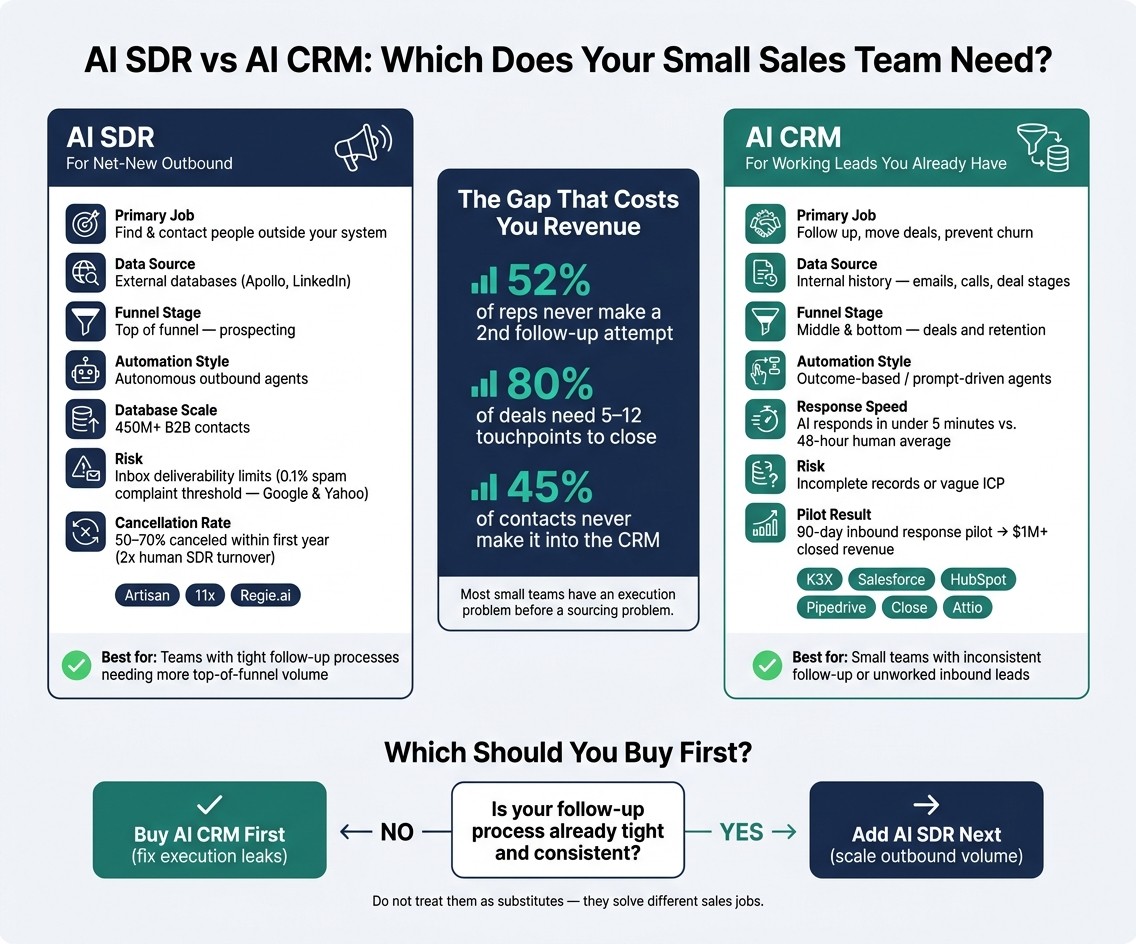
AI SDR vs AI CRM: Which Does Your Small Sales Team Need?
AI Won’t Replace Your SDRs | The Ultimate Sales Automation Strategy
What is an AI SDR and what is an AI CRM?
An AI SDR is a tool for outbound prospecting. It finds new contacts, fills in missing data, and sends personalized cold outreach until a meeting is booked or the prospect opts out. An AI CRM is your system of record for leads and customers you already know about, using AI to handle follow-up, pipeline work, and retention.
For most small teams, the bigger problem is not a lack of cold outbound. It’s inbound leads that never get worked. That gap starts with the kind of data each tool uses.
AI SDRs are built for outbound work that changes from contact to contact, like account research, lead qualification, and reply handling. Traditional sales engagement tools and CRMs, by contrast, are built around fixed sequences and repeatable process.
The clearest line between them is the data source. An AI SDR pulls from outside prospecting databases such as Apollo or LinkedIn to find people who have never heard of your company. An AI CRM works from internal history such as emails, calls, deal stages, and inbound leads. That split in data is what shapes what each tool can automate next.
How does an AI SDR work compared with an AI CRM?
An AI SDR focuses on net-new pipeline. An AI CRM works the leads and customers you already have, handling follow-up, deal movement, and retention.
The split is simple. An AI SDR finds and researches prospects outside your CRM, then runs outbound until someone replies, books a meeting, or opts out. An AI CRM starts once a lead is already in your system and uses activity history to keep deals moving and reduce drop-off.
How does an AI SDR build pipeline?
An AI SDR builds pipeline by finding contacts, checking the data, adding context, and then running outreach. Its job is top-of-funnel acquisition, not deal management.
It usually starts with external contact databases and filters for your ICP using fields like industry, company revenue, and technographics. Some of these databases cover more than 450 million B2B contacts [2][4]. From there, the system enriches records across more than one data source to verify emails and add signals like job changes or recent funding.
It also pulls research from company websites, LinkedIn, and news sources so outreach has some context behind it. Then it sends messages across channels until the prospect replies, books, or opts out. The main gain here is output: one rep can work more researched accounts each week instead of spending hours on manual list building.
There’s still a limit, though. Outbound tools need deliverability controls so teams stay within inbox provider thresholds [5]. If that piece is weak, volume can hurt results.
In short, AI SDRs handle acquisition. AI CRMs handle conversion after the lead enters your system.
How does an AI CRM work with existing leads?
An AI CRM works from the activity already tied to a lead or account. It records calls, emails, and SMS, then uses that history to push follow-up, move deals when buying signals show up, and flag customer risk before churn is easy to spot.
This matters most for small teams. Slow first response and stalled deals are common places where pipeline leaks without much warning [3]. An AI CRM is meant to close that gap by acting on lead activity as it happens, instead of waiting for a rep to update fields or launch a sequence.
Legacy systems like HubSpot, Salesforce, and Pipedrive depend on rule-based setup. You have to define the conditions, branches, and next steps yourself. AI-native CRMs shift toward outcome-based execution, where the user sets the goal and the system handles more of the work.
A prompt-driven CRM pushes that model further. Instead of building workflows, sequences, or triggers, the user describes the outcome in plain language. K3X is an AI-native, prompt-driven CRM built for teams of 1–9 people. Users state the result they want, and AI agents carry out follow-up across email, SMS, and calls without manual workflow setup.
That gap is easiest to see in day-to-day execution:
AI SDR: sources new contacts, enriches records, researches accounts, and runs outbound
AI CRM: works inbound leads and open deals, logs activity, pushes follow-up, and helps prevent churn
Legacy CRM: depends on user-built rules and manual setup for most actions
AI-native CRM: acts on goals and activity history with less manual configuration
That difference shows up most clearly in how each tool handles triggers, ownership, and follow-up.
How do AI SDRs and AI CRMs compare with traditional sales tools?
AI SDRs, AI CRMs, and older sales tools solve different parts of the sales job. An AI SDR focuses on net-new outbound prospecting, an AI CRM handles follow-up and pipeline work inside your existing book of business, and a traditional CRM mainly stores records and logs activity.
The clearest differences show up in setup, ownership, and day-to-day labor. AI SDRs are built to find leads and send cold outreach with less human input. AI CRMs act as the system of record and use agents to move known leads through follow-up, deal stages, and retention work. Traditional sales engagement tools can automate timing and tasks, but people still write the copy and set the logic.
Each category also tends to fail in its own way. AI SDRs often hit inbox-deliverability limits when send volume gets ahead of trust signals. Traditional CRMs tend to slow down under admin work and weak user adoption. AI CRMs usually struggle when the data is thin or the ideal customer profile is not clear.
Here is how AI SDRs, AI CRMs, and traditional tools differ in practice.
Table: AI SDR vs AI CRM vs Traditional CRM
AI SDR | AI CRM | Traditional CRM | |
|---|---|---|---|
Primary purpose | Outbound pipeline generation | Relationship management and lead execution | Data storage and logging |
Funnel stage | Top of funnel: prospecting | Middle and bottom: deals and retention | All stages, passively |
Data source | External prospecting databases | Internal activity history | Internal activity history |
Setup model | Prompt-to-action; fast to launch | Integrated; outcome-based | Workflow-heavy; admin-led |
Automation style | Autonomous agents | Agentic or predictive | Rules-based workflows |
Typical buyer | Sales and growth teams | Founders and lean sales teams | IT and operations |
When it breaks | Inbox-deliverability limits | Incomplete records or vague ICP | Low user adoption and admin fatigue |
For small teams, K3X fits in the AI CRM column, not the AI SDR column. It is meant for teams that need to work leads they already have, not just source new names at the top of the funnel.
Table: K3X vs Salesforce, HubSpot, Pipedrive, Zoho, monday.com, Close, and Attio

K3X | Salesforce | HubSpot | Pipedrive | Zoho CRM | monday.com | Close | Attio | |
|---|---|---|---|---|---|---|---|---|
Setup style | Prompt-to-action; no workflow builders or sequences to configure | Workflow-heavy; often needs consultants | Modular and visual; moderate learning curve | Simple and linear | Suite-integrated; moderate | Project-board-based; moderate | Communication-first | Object-based; flexible |
Calling / dialer | Built-in power dialer | Requires third-party integration | Built-in | Requires integration | Built-in via Zia | Requires integration | Native power dialer | Requires integration |
Admin burden | Low | Very high | Moderate | Low | Moderate | Moderate | Low | Moderate |
Pricing model | $20/seat/month; no long-term contracts | Custom enterprise pricing | Free tier; paid plans scale steeply | From ~$14/seat/month | From ~$14/seat/month | Per-seat; project-tool pricing | From ~$49/seat/month | Per-seat; usage-based add-ons |
Best fit | Teams of 1–9 needing fast execution | Enterprise with complex reporting needs | Teams needing marketing and CRM in one | Visual pipeline management | Broad features on a budget | Project and sales hybrid workflows | Inside sales teams with high call volume | Teams needing a flexible data model |
K3X is priced for small teams that want to get live fast. It costs $20 per seat per month, includes 1,000 AI credits, comes with a built-in power dialer, supports unlimited integrations, does not require a long-term contract, and can be set up in under an hour.
The trade-offs are straightforward. K3X is still a young product, its native integration catalog is smaller than older vendors, AI credit use needs to be watched, and it is not built for enterprises that need 100+ seats or deep admin governance.
What are real examples of AI SDR and AI CRM tools?
AI SDRs and AI CRMs do different jobs. AI SDR tools focus on outbound prospecting and meeting booking at the top of the funnel, while AI CRM tools work leads already in your system and help with follow-up, pipeline updates, and retention.
That split matters when you're comparing software. A tool built to send outbound emails is not the same thing as a CRM that manages deal stages, contact history, and post-demo follow-up.
Examples of AI SDR tools
AI SDR tools are built for outbound execution. They usually handle prospecting, data enrichment, personalized sequences, and meeting booking.
Artisan (Ava) combines contact data, enrichment, and sequencing in one product. Its self-serve tiers start at about $375/month [1]. 11x (Alice/Jordan) splits work by channel: Alice handles inbound qualification, while Jordan handles voice outbound. Regie.ai is more focused on sequence writing and outbound execution than on full prospecting infrastructure.
There’s also a clear operating risk with this category. Google and Yahoo enforce a 0.1% spam complaint limit for bulk senders [5]. That means teams using AI SDRs at scale need to watch deliverability closely, especially when volume climbs. On top of that, 50% to 70% of AI SDR tools are canceled in their first year, about 2x the turnover rate of human SDRs [7][8].
AI CRM tools pick up later in the funnel, once the lead already exists in your system.
Examples of AI CRM tools and CRM alternatives
AI CRM tools focus on pipeline and follow-up, not cold outbound. Some are built from scratch around AI, while others are older CRM systems that have added AI features.
K3X is an AI-native, prompt-driven CRM for teams with 1–9 people. Users describe what they want in plain language, and AI agents carry out work across email, SMS, and calls without workflow builders, sequences, or triggers. The trade-offs are clear: it’s a young product, it has a smaller native integration catalog than older vendors, it requires AI credit monitoring, and it is not built for 100+ seats or deep admin governance.
Other products take a different route. Salesforce, HubSpot, Pipedrive, Zoho, monday.com, Close, and Attio are older CRM systems of record that now include AI layers. Their AI functions sit on top of more established data models, admin controls, and app ecosystems.
Salesforce's Agentforce is aimed at larger teams that want predictive scoring and generative account plans. Pricing is listed at $2 per conversation or $500 per 100,000 Flex Credits [8]. HubSpot's Breeze adds predictive lead scoring and AI-based forecasting to HubSpot’s SMB CRM suite. Pipedrive includes an AI Sales Assistant for activity suggestions, while Close is geared toward fast-moving inside sales teams and includes a native power dialer.
The table below puts the main differences in one place.
Tool | Category | Primary use case | Pricing note |
|---|---|---|---|
Artisan (Ava) | AI SDR | Outbound prospecting, enrichment, and sequencing | Self-serve tiers start at approximately $375/month [1] |
11x (Alice/Jordan) | AI SDR | Alice handles inbound qualification; Jordan handles voice outbound | Varies by plan |
Regie.ai | AI SDR | Personalized sequence writing and outbound execution | Varies by plan |
K3X | AI CRM | Prompt-driven system of record for small teams | $20 per seat/month with 1,000 AI credits |
Salesforce (Agentforce) | Traditional CRM + AI | Enterprise system of record with predictive scoring and account plans | $2 per conversation or $500 per 100,000 Flex Credits [8] |
HubSpot (Breeze) | Traditional CRM + AI | SMB CRM with predictive lead scoring and forecasting | Varies by plan |
Pipedrive | Traditional CRM + AI | Pipeline management with AI Sales Assistant | Varies by plan |
Close | Traditional CRM + AI | High-velocity inside sales with a native power dialer | Varies by plan |
Zoho | Traditional CRM + AI | Broad feature set with added AI capabilities | Varies by plan |
monday.com | Traditional CRM + AI | Project and sales hybrid workflows with added AI | Varies by plan |
Attio | Traditional CRM + AI | Flexible object-based data model with added AI | Varies by plan |
Why does this choice matter for small teams?
For small teams, this choice matters because revenue often slips through the cracks in follow-up, not just at the top of the funnel. An AI SDR helps generate new pipeline, while an AI CRM helps protect the pipeline you already have, so follow-up is usually the first area to fix.
Where is revenue actually leaking?
The leak is clear in the data. Small teams often lose more revenue from leads they already have than from leads they never sourced in the first place.
52% of reps never make a second follow-up attempt, even though 80% of deals need 5–12 touchpoints to close [6]. On top of that, 45% of contacts never make it into the CRM [6]. If a contact is never logged, it usually never gets worked.
Why should small teams buy the CRM first?
Small teams should usually buy the CRM first because faster follow-up can recover revenue that is already within reach. Once that gap is visible, the order becomes pretty straightforward: fix response and routing first, then layer on outbound.
AI agents can respond in under 5 minutes, while the average human response time is 48 hours [6][2]. In early 2026, a 90-day pilot focused on replying to inbound leads within two minutes produced more than $1 million in closed revenue [5]. Fix follow-up first, then add outbound.
How does K3X compare with legacy CRM platforms for small teams?
For teams with 1 to 9 people, the main difference is simple: K3X is built to do follow-up work, while legacy CRM platforms are built to store data and support workflows. That changes setup time, admin work, and how much the system can handle before someone has to build rules manually.
In K3X, a user can describe the goal in plain language, and AI agents handle follow-up across email, SMS, and calls. Legacy CRM tools can also automate work, but they usually need fields, triggers, pipeline logic, and workflow rules set up first. For a small team without a CRM admin, that setup load can matter as much as the feature list.
When is K3X a better fit than Salesforce, HubSpot, Pipedrive, Zoho, monday.com, Close, or Attio?
K3X is a better fit for small teams that want automated follow-up for leads already in the system and do not have a dedicated admin. It starts at $20 per seat per month, includes 1,000 AI credits and a built-in power dialer, has no long-term contracts, and can be set up in under an hour.
Salesforce, HubSpot, Pipedrive, Zoho, and monday.com make more sense when a team needs deeper reporting, a broader app ecosystem, or tighter governance. They can automate tasks, but small teams usually still need to define data fields, triggers, and workflow rules before anything runs.
The side-by-side view makes the tradeoff clear.
Dimension | K3X | Legacy CRMs |
|---|---|---|
Primary job | Execute follow-up from a prompt | Store records and support workflow-based automation |
Setup | Under an hour | Often more involved |
Admin burden | Low | Higher |
Automation style | Intent-based | Rules/workflow-based |
Built-in calling | Yes, with a power dialer | Often depends on integrations or add-ons |
Best fit | 1–9 person teams | Larger teams or teams with complex reporting and governance |
When are legacy CRMs or specialist tools the better fit?
Legacy CRMs are the better fit when a team needs enterprise governance, deep reporting, or a larger integration footprint. K3X is still young, has a smaller native integration catalog, and requires teams to monitor AI credit use. It is also not built for companies that need 100+ seats or deep admin governance.
Specialist tools also have clearer use cases. Close fits teams focused on high-volume calling, while Attio fits teams that need flexible data modeling. If your team already runs on Salesforce or HubSpot, it usually makes sense to keep that stack. K3X is better suited as a first CRM for small teams that want the system to handle follow-up work.
Those differences depend on a few CRM terms worth defining next.
Related CRM terms to know
These terms help separate tools that create pipeline from tools that work leads already in your CRM. That’s the core split in this article: AI SDRs create pipeline, while AI CRMs manage and move it.
Prompt-driven CRM is a system where a user describes the result they want in plain English, and AI agents handle the work. There’s no need to build workflows, set triggers, or map sequence logic by hand. A rep states the outcome, and the system carries it out. For a deeper look at how this works, see What Is a Prompt-Driven CRM?
AI-native CRM automation means AI sits inside the core product rather than being added later as an extra feature. In practice, that means the system can score leads, flag churn risk, read email intent, and update records on its own instead of depending on manual if-then rules.
Sales engagement is the layer that sends and tracks outreach across email, phone, and LinkedIn, then logs that activity back to the CRM. If your team misses follow-ups or lets leads go cold, CRM Follow-Up Automation with AI shows how this works day to day.
The last term matters most for small teams. Outcome-based operations means tracking booked meetings, pipeline, and revenue instead of emails sent or calls made. For lean teams, that distinction supports the buyer logic in this article: fix revenue outcomes first, then add volume.
These definitions make the platform comparison easier to read.
Which Should a Small Team Buy First?
Buy the AI CRM first. For most small teams, the bigger problem is missed follow-up on existing leads, not a lack of new outbound volume. If follow-up, deal tracking, or ICP definition is weak, outbound automation just sends more leads into a messy process instead of turning them into revenue.
That’s the split in plain terms: one tool helps create pipeline, and the other helps work it. Small teams usually get the first lift by fixing how they handle leads already in the system.
The follow-up numbers make that pretty clear. 52% of sales reps never make a second follow-up attempt, even though 80% of deals require 5–12 touchpoints to close [6]. If your team stops after one touch, the issue is not lead flow. It’s execution.
That’s why the first purchase should usually be the CRM. It helps the team track deals, manage follow-up, and define who they should sell to. After that process is working, an AI SDR becomes the logical next step to add more outreach volume without piling more work onto a broken system.
The terms below explain why that split matters in practice.