Sales Automation
•
Best CRM for Solopreneurs in 2026: Run Sales Without an Admin
An AI-first CRM that automates follow-up is the best choice for solopreneurs who don't want nightly admin.

For most solopreneurs in 2026, I’d pick K3X if the main goal is to cut follow-up work with the least setup. I’d pick Folk for contact-led selling and Pipedrive for a clear deal pipeline.
The short version is simple: K3X is the best fit when you want the CRM to do more of the follow-up work, while the other tools are better at helping you track work you still need to do yourself.
The 3 BEST CRMs for Solopreneurs: Breakcold vs Folk vs Less Annoying CRM
Top CRM Pick for Solopreneurs in 2026
K3X is the top choice for solopreneurs in 2026. It works best for people who want follow-up handled from a plain-language prompt, without building workflows, setting triggers, or managing sequences.
K3X is a strong fit if you don’t have time for CRM admin. You describe the outcome in plain language, and its AI agents handle follow-ups across email, SMS, and calls. That matters most when follow-up slips into late hours - or doesn’t happen at all.
Top pick: K3X - plain-language follow-up with under-an-hour setup.
Runner-up: Folk - better for relationship-first solopreneurs who live in Gmail and LinkedIn.
Runner-up: Pipedrive - better for solopreneurs with active pipelines who need a visible deal tracker.
The ranking below uses solopreneur-specific criteria: setup time, follow-up automation, upkeep, pricing, and payback speed.
What Makes a CRM Actually Work for a Solopreneur?
A CRM works for a solopreneur if it saves more time than it adds. If it does not cut late-night follow-up work, it fails the test.
The first check is manual admin work. If you still have to log notes, contacts, and activity by hand every day, the CRM is a bad fit for a one-person business. Many AI-native CRM tools can pull in contact data from email, LinkedIn, and meeting activity on their own, and that matters because 37% of CRM users say poor data quality from manual entry has cost them revenue [4].
The next check is fit. Some solo businesses are pipeline-driven, so they need a clean deal tracker with clear stage movement. Others are relationship-driven, so they get more use from contact timelines, interaction history, and enrichment data [11].
Setup speed matters too. A solo CRM should be fast to get live, not something that turns into a side job. The right tool should help cut weekly contact management time from 5–8 hours to under 1 hour [1][9]. The six CRMs below are judged against those filters.
1. K3X

K3X ranks first because it turns sales follow-up into a plain-language prompt instead of a setup project. It is an AI-native CRM built for solo operators and very small teams, and it works best when you want the system to handle outreach with very little manual work.
You describe the result you want in simple terms - for example, "follow up every inbound lead within 5 minutes until they book or decline" - and K3X’s AI agents carry it out across email, SMS, and calls. There are no sequences, triggers, or automation rules to build first.
That matters for sales and revenue operators who do not want to spend hours inside a workflow builder. In practice, K3X leans toward speed and low upkeep, while tools like HubSpot, Pipedrive, Close, and Salesforce give you more admin control.
K3X also keeps email, SMS, calling, and dialing in one system, so you do not have to piece together separate tools. Pricing starts at $20 per seat/month, includes 1,000 AI credits, and does not require a long-term contract. The vendor lists full product details at k3x.ai/features and pricing at k3x.ai/pricing.
The tradeoff is straightforward. K3X gives up some deep admin control in exchange for less setup and less day-to-day maintenance. Its native integrations are fewer than what you get with HubSpot or Pipedrive, AI credit use needs watching as outreach volume grows, and it is not built for enterprise teams that need 100+ seats or strict admin governance.
If your team wants more hands-on control or a lighter contact-management layer, the next options lean more in that direction.
K3X | |
|---|---|
Best for | Solopreneurs who want follow-up and outreach to run with minimal manual setup |
Pricing | $20/seat/month, 14-day free trial |
Channels | Email, SMS, calls, plus a built-in power dialer |
Setup | Under 1 hour |
Commitment | None - month-to-month |
Pros: No workflow builder required; multi-channel outreach is included at the base price; AI agents can adjust to lead behavior.
Cons: Fewer native integrations than HubSpot or Pipedrive; AI credit use needs monitoring at higher outreach volume.
2. Folk
Folk is best for solopreneurs who manage a small, active network and want a CRM that stays simple. It cuts day-to-day admin, gives you a clean contact database, and many users can get started in under 30 minutes.[2][5][6]
Follow-up happens through Folk Mail, which supports personalized, tracked emails with merge fields. Its Chrome extension lets you pull contacts from LinkedIn in one click and auto-enrich both contact and company records, which cuts manual data entry.[1][2][3]
Against HubSpot Free, Folk feels cleaner and more centered on relationship management. Against K3X, it gives up multi-channel outreach in exchange for lighter contact management. That trade-off matters if you want less CRM upkeep, but Folk does not handle phone or SMS follow-up on its own, so calling needs a separate tool.
Pricing can climb fast as your contact list grows. The free plan caps contacts at about 200, and paid plans use per-seat pricing, so costs go up once you add a contractor or part-time teammate.[3][8][11]
If you want visible deal stages and a more standard sales pipeline, the next option is Pipedrive.
Folk | |
|---|---|
Best for | Solopreneurs managing a small contact list, not high-volume pipelines |
Pricing | |
Built-in outreach | Email (Folk Mail); LinkedIn via Chrome extension |
Setup time | Under 30 minutes |
Key limitation | No built-in calling or SMS; lower-tier contact caps push you to paid plans |
Pros: Fast setup. One-click LinkedIn capture and automatic enrichment cut manual entry. Clean interface with low day-to-day upkeep.
Cons: No built-in calling or SMS. Lower-tier contact caps push you to paid plans as your network grows.
3. Pipedrive

Pipedrive is a good fit for solopreneurs who already sell through clear stages and want to see the next step for each deal at a glance. Its visual deal board and activity-based approach push you to set a next action on every open opportunity.
That works well if you want structure and reminders. It works less well if you want the CRM to run lead follow-up on its own.
The main tradeoff is manual follow-up. The Essential plan starts at about $14–$15 per user/month and stays mostly manual, while automation starts on the Advanced plan at about $29–$34 per user/month.[9][1] Pipedrive’s AI Sales Assistant can suggest what to do next, but it does not do the work for you.[9][1]
Compared with K3X, the gap is pretty clear. K3X can run follow-up from a plain-language prompt, while Pipedrive asks you to build the workflow and keep it up to date yourself. Pipedrive also does not include native calling or SMS on standard solo plans, so it tends to make more sense for email-led sales processes built around deal stages.[3][7]
That makes it a solid option for solopreneurs who want prompts and pipeline discipline, not a system that handles follow-up in the background.
If you want a lighter place to start, the next option gives up some structure in exchange for simplicity.
Pipedrive | |
|---|---|
Best for | Solopreneurs with a defined, multi-stage B2B pipeline |
Pricing | Starts around $14–$15/user/month; automation starts on Advanced at about $29–$34/user/month; no permanent free tier.[2][7][10][11] |
Built-in outreach | Email only; no native calling or SMS on standard solo plans |
Setup time | Under 30 minutes |
Key limitation | Hands-off follow-up requires an upgrade, so the cost goes up once manual reminders stop being enough |
Pros: Clean visual pipeline. Fast setup and CSV import. Activity-based reminders help prevent deals from going cold.
Cons: Automation and sequences sit behind higher-tier plans. It is less useful for relationship-led work that does not follow a clean deal-stage model.
4. HubSpot Free CRM
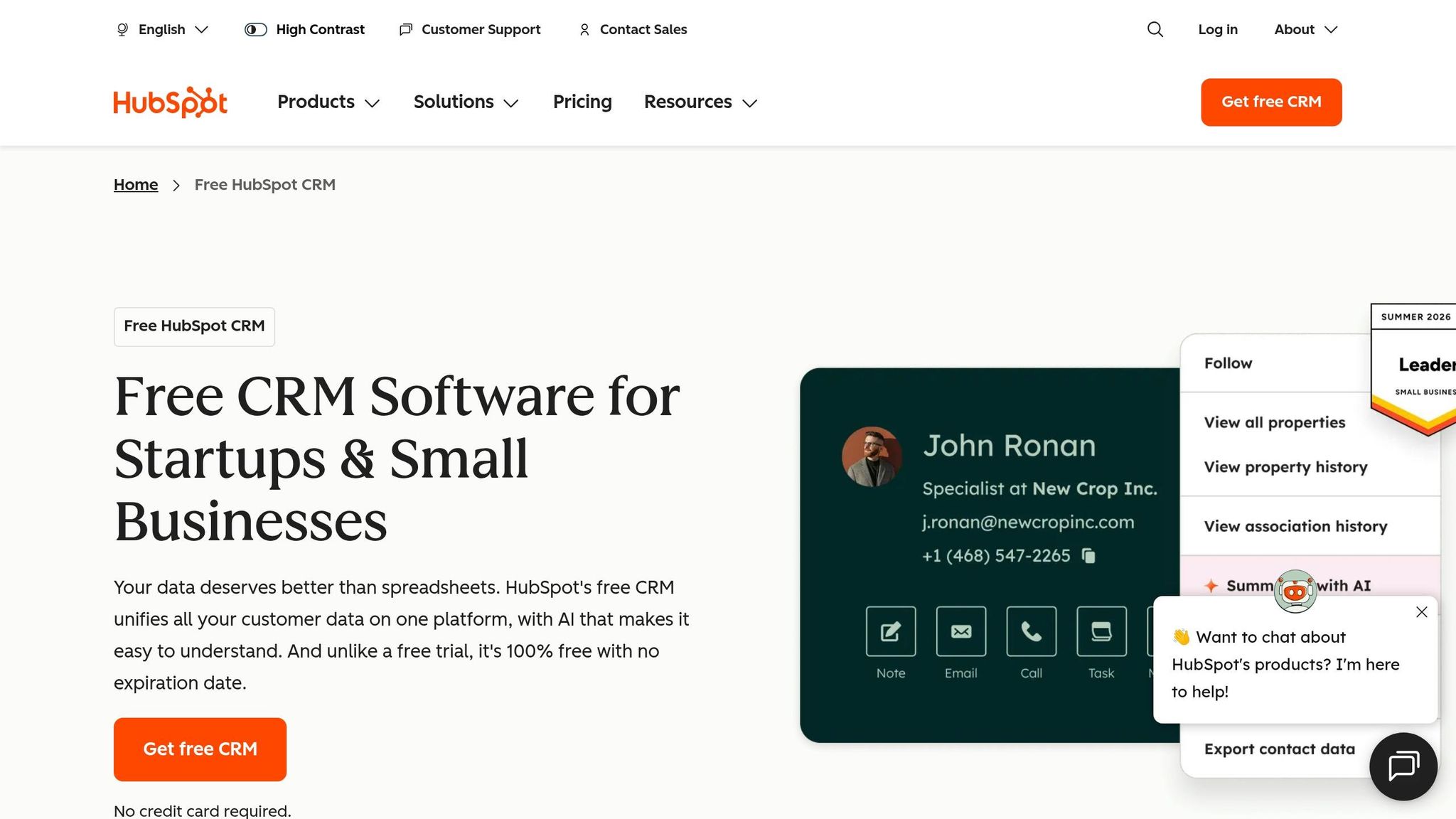
HubSpot Free CRM is a good fit for solo operators who want a no-cost place to store contacts and track deals. You can usually get it running in about 30 minutes, but the free plan does not handle outreach on its own, so follow-up stays manual.[5][2]
The free tier includes up to 1,000,000 contacts and unlimited users, along with Gmail/Outlook integration, a meeting scheduler, live chat, and web forms.[2][12] For a one-person business, that covers the basics of contact capture and organization. It does not cover after-hours follow-up or hands-off lead nurturing.
Where HubSpot Free draws the line is automation. Automated sequences sit behind Sales Hub Starter at $15–$20/user/month, and the free plan is limited to 5 email templates and 1 deal pipeline.[2][1] By contrast, K3X uses prompt-driven AI agents for follow-up and data entry, while HubSpot Free leaves both tasks manual unless you move to a paid tier.[14][2]
If you outgrow the free plan and need more automation, costs can climb to about $400–$800/month on higher tiers.[5] So the tradeoff is straightforward: free contact management, paid automation.
HubSpot Free CRM | |
|---|---|
Best for | Solopreneurs who need a free contact and pipeline organizer and can handle follow-up manually |
Pricing | $0 for the free tier; Sales Hub Starter starts at $15–$20/user/month[2][1] |
Included tools | Gmail/Outlook integration, meeting scheduler, live chat, web forms[2][12] |
Setup time | |
Key limitation | Automated sequences are paid-only, and the free tier allows just 5 email templates and 1 deal pipeline[2] |
Pros: Free entry point with up to 1,000,000 contacts and unlimited users. Email sync, scheduling, forms, and live chat cut down on manual capture work.[2][8]
Cons: Automated follow-up is not part of the free plan. Persistent upsell prompts can make the product feel heavy for a solo business.[11]
5. Less Annoying CRM
Less Annoying CRM is a good fit if you want a simple system for contacts, deals, and reminders without a lot of setup. It costs $15/user/month with one flat plan and no tiers or add-ons.[3]
This tool works well for solopreneurs who do not want to spend much time on CRM upkeep. It gives you the basics: contact management, pipeline tracking, and next-step reminders. Setup takes under 30 minutes, which matters if you want to get running fast instead of tinkering with fields and workflows.
Compared with K3X, it is simpler and more manual. Compared with Pipedrive, it has a lighter pipeline structure and less day-to-day overhead. That makes it a practical choice for people who want less CRM admin than Pipedrive or HubSpot, but do not need AI-led outreach.
The main tradeoff is outreach. Reminders help you stay on top of follow-up, but the system does not send follow-up messages for you. In plain terms, Less Annoying CRM cuts admin work, not outreach work.
Less Annoying CRM | |
|---|---|
Best for | Solopreneurs who want simple CRM basics without extra complexity |
Pricing | $15/user/month, flat rate, no tiers |
Core fit | Contact management, pipeline tracking, and reminders |
Setup time | Under 30 minutes |
Main limitation | Follow-up still requires manual outreach |
Pros: Simple enough to use every day. Stays focused on the CRM basics most solopreneurs need. Helps reduce the chance that leads get missed.
Cons: Reminders keep you on track, but follow-up is still manual. It is not the right fit if you want hands-off follow-up.
If you want the same simplicity with more relationship context and more room to shape workflows, Attio is next.
6. Attio

Attio is a good fit for solopreneurs who need custom records and unusual workflows, not just a simple contact database. Its core strength is flexibility, but that comes with more setup than a lighter CRM.
Attio’s Lists can show people, deals, or custom records in either board or table views. That gives you room to shape the CRM around your process instead of forcing your process into a preset layout. The tradeoff is simple: you’ll spend more time setting it up than you would with a basic CRM. If you want flexibility more than a low-admin setup, Attio makes sense.
Its automations can trigger from email opens, stage changes, or dates, so it can handle reminders and workflow steps. It does not handle outreach in the same way K3X does. Attio syncs natively with Gmail and Outlook and pulls contact context from email and calendar activity, which cuts down on manual data entry. Full setup usually takes 2–4 hours. Compared with K3X, Attio offers more structure and more room to shape workflows, but it also asks for more setup and upkeep. It fits better when workflow flexibility matters more than fast time-to-value.
Attio offers a free tier for up to 3 seats. Paid plans start at about $29 to $34 per user/month, and the Pro tier runs about $69 to $89 per user/month for advanced automations and reporting [3][13][2].
Attio | |
|---|---|
Best for | Solopreneurs with technical or nonstandard workflows |
Pricing | Free up to 3 seats; paid from about $29 to $34/user/month |
Built-in outreach | Email sync and automation; no native calling or SMS |
Setup time | 2–4 hours for full configuration |
Main limitation | No built-in calling or SMS; paid tiers get expensive quickly |
Pros: Highly customizable data objects and relationship graphs fit nonstandard workflows. Automatic contact enrichment from email and calendar reduces manual entry. Native Stripe and GitHub integrations help solopreneurs connect CRM data with billing or product activity.
Cons: No built-in calling or SMS, so you’ll need third-party tools for those channels. The free tier is limited, and paid plans can get expensive for a one-person business.
Use the table below to compare setup time, automation depth, and channel coverage.
How Do These CRMs Compare for One-Person Businesses?
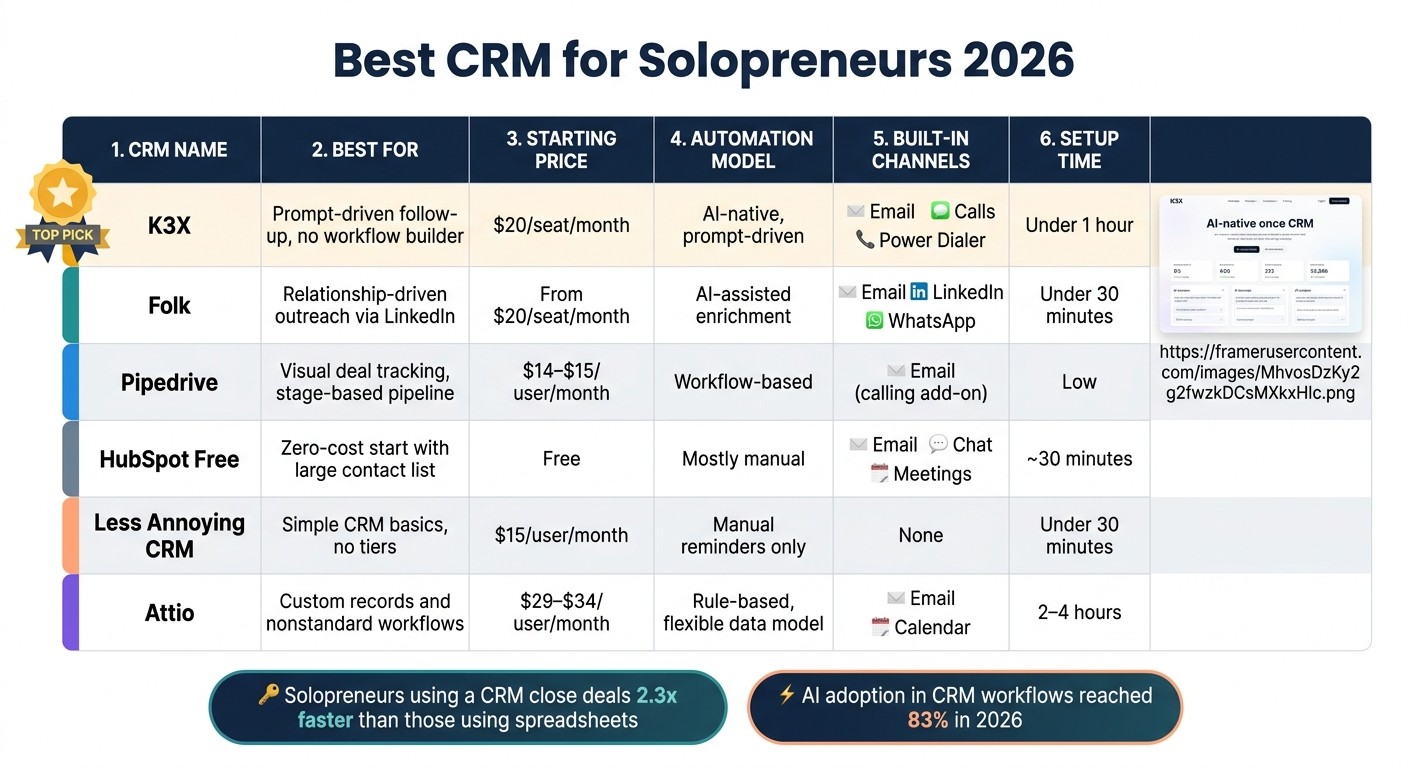
Best CRM for Solopreneurs 2026: Side-by-Side Comparison
For a one-person business, the biggest difference is simple: how much follow-up the CRM takes off your plate. If follow-up slips to the evening or gets missed, the best option is the one that cuts the most admin from your day.
CRM | Best For | Starting Price (July 2026) | Automation Model | Built-in Channels | Setup Load | Main Tradeoff |
|---|---|---|---|---|---|---|
K3X | Prompt-driven follow-up with no workflow builder | $20/seat/month | AI-native, prompt-driven | Email, SMS, calling, power dialer | Under 1 hour | Young product; smaller native-integration catalog |
Folk | Relationship-driven outreach from LinkedIn | From $20/seat/month | AI-assisted enrichment | Email, LinkedIn, WhatsApp | Very low | Basic pipeline visualization |
Pipedrive | Visual deal tracking and workflow-based structure | $14–$15/user/month | Workflow-based | Email, calling add-on | Low | No permanent free plan |
HubSpot Free | Starting from zero with a large contact list | Free | Mostly manual | Email, chat, meetings | Low | Automation is gated behind paid tiers |
Less Annoying CRM | Basic CRM without tiers or add-ons | $15/user/month | Manual reminders | None | Under 30 minutes | Follow-up still requires manual outreach |
Attio | Custom records and workflows | $29–$34/user/month | Rule-based automations, flexible data model | Email, calendar | Low to moderate | No native calling or SMS; more setup than lighter options |
The main split here is automation versus organization. K3X handles follow-up from a plain-language prompt, while the other tools mostly help you track work and still leave outreach in your hands. HubSpot Free has the lowest entry cost at $0, but it stays mostly manual unless you move to a paid plan.
Setup time matters more than most solo operators expect. A CRM that takes too long to configure often turns into shelfware. K3X and Folk are the fastest to get live, while Attio gives you more control over records and workflows but needs more configuration before you start seeing time savings.
Price is easy to compare, but time savings are the real test. HubSpot Free starts at $0. Less Annoying CRM is $15/user/month. K3X starts at $20/seat/month, and Attio starts around $29–$34/user/month. For a solopreneur, a higher monthly cost can still make sense if it saves enough hours each week to cover the spend.
Next, use these differences to decide which features matter most in your own workflow.
What Should Solopreneurs Look for in a CRM?
A solopreneur CRM should save time on follow-up and data entry without adding more work. If it feels like another job to manage, it’s probably the wrong fit.
The first filter is automation that runs automatically. A CRM should handle routine follow-up after you set the goal once. If you have to map every step by hand before anything happens, the tool is slowing you down instead of helping.
The second filter is setup speed. The right tool should go live fast and connect to your email, calendar, and outreach channels without a lot of manual configuration. For a solo operator, long setup time usually means the CRM sits half-finished while deals and messages keep moving.
Price comes after time savings. You should pay more only when the tool cuts enough manual work to justify the cost, not because it includes a pile of features you won’t touch. A simple rule works well here: if you’re sending the same follow-up by hand again and again, it may be time to pay for automation.
Before you commit, check for clean CSV export so you can leave without losing your data [8]. That step matters more than it seems, because switching later is much easier when your contacts, notes, and deal records can move with you.
Use these filters to sort tools that save time from tools that just organize work.
FAQ: CRM for Solopreneurs
Use these answers to tell the difference between a free starting point and a tool that cuts down late-night follow-up work.
What CRM do solopreneurs actually use?
Most solopreneurs start with HubSpot Free. As deals pile up, many switch to Pipedrive for tighter pipeline control or Folk for lighter contact management with less day-to-day admin.
The pattern is simple: free tools work at first, then solo operators move when upkeep starts eating time. Solopreneurs who use a CRM close deals 2.3x faster than those using spreadsheets [5].
What is the cheapest CRM for solopreneurs?
HubSpot Free is the lowest-cost broad option in this guide. It gives solo users a no-cost entry point for contact and deal tracking.
If you need a paid plan, Pipedrive Essential starts at $14/month [10]. HubSpot Sales Hub Starter starts at $15–$20 per user/month [2] if you need automation.
Can a CRM really run itself for a one-person business?
No. A CRM can cut manual work, but it still needs one person to own it.
K3X gets closest to a hands-off setup. You define an outcome in plain language, and its AI agents handle follow-up across email, SMS, and calls without workflow setup. AI adoption in CRM workflows reached 83% in 2026 [4], but no tool is fully self-running.
Should solopreneurs start free or pay for automation from day one?
Start free if you can keep follow-up current without spending your evenings cleaning up records and nudging deals forward. Pay for automation once repeat follow-up starts taking time away from selling.
A simple rule helps here: if your CRM still depends on nightly cleanup, free has stopped being cheap.
Which CRM Should Most Solopreneurs Choose?
Most solopreneurs should choose the CRM that fits how they sell day to day. The right pick usually comes down to one thing: whether your work runs on relationships, pipeline stages, or follow-up that happens with little manual work.
Use the comparison table first, then match your choice to your main sales motion.
Choose K3X if follow-up eats up too much of your time and you want that work handled without much setup. It fits best when you want deals to keep moving without doing admin every night.
If you do not want AI to handle follow-up, pick the option that lines up with how you work.
Choose Folk if your sales process is relationship-led and built around personal outreach.
Choose Pipedrive if you manage a stage-based pipeline and need clear next steps in front of you.
If keeping costs down matters more than saving time, HubSpot Free is the fallback. Start with HubSpot Free if price comes first and manual follow-up is fine for now.
Choose Less Annoying CRM if you want simple contact and pipeline tracking without tiers or add-ons. Choose Attio if your workflow does not fit a standard CRM shape and you need custom records.
The best CRM for a solopreneur is the one you will keep using without extra cleanup.