Sales Automation
•
CRM Follow-Up Automation: How AI Chases Every Lead So You Don't Have To
Small sales teams should choose outcome-based AI CRMs over rule-based platforms to automate fast, persistent email, SMS and call follow-ups.

AI follow-up automation fixes the main sales problem for small teams: leads stop getting contacted after the first touch. In plain terms, the system sends follow-ups across email, SMS, and call steps until the lead replies, books, or opts out.
If I compare AI-led follow-up with tools like HubSpot, Salesforce, Pipedrive, and Zoho, the short verdict is simple: fixed sequences run on schedules, while AI-led systems keep working toward an end result.
I’d frame the article this way: manual follow-up breaks under workload, fixed workflows help but still miss context, and AI-native CRM follow-up shifts the job from building sequences to setting an outcome and reviewing what happened.
The main facts are hard to ignore:
That is the gap the article is addressing. The issue is not lead volume. It is missed timing, too few touches, and too much manual work for small teams.
The article’s strongest point is the distinction between time-based automation and outcome-based automation. In tools like Salesforce, HubSpot, Pipedrive, Zoho, monday.com, Close, and Attio, teams often build workflows with delays, templates, and branches. In K3X, the model described is simpler: write a prompt such as “follow up within 5 minutes, then every 2 days until they book or say no” and let the CRM execute it.
That makes the buyer question easier to evaluate. If I want step-by-step control, a legacy CRM may still fit better. If I want the CRM to keep pursuing each lead with less setup, AI-led follow-up is the better fit.
A few numbers in the article help make that case concrete. Manual follow-up is shown as taking about 13 hours per week [9], with average lead response around 47 hours [3]. Automated follow-up is framed as contacting leads in under 5 minutes and keeping touches going to 5–8 attempts instead of 1–2 [8][10][11].
I would keep the takeaway narrow and practical: small teams lose deals when follow-up depends on memory, and CRM automation closes that gap by making persistence automatic. The article is less about AI as a concept and more about whether a sales team wants to build workflows by hand or set a goal once and let the CRM keep chasing it.
For a reader evaluating software, the cleanest summary is this: HubSpot, Salesforce, Pipedrive, Zoho, monday.com, Close, and Attio are built around rules and sequences; K3X is positioned around prompt-led outcome pursuit at $20 per seat per month. That does not make one model right for every team, but it does make the trade-off clear.
If I were reducing the whole piece to one line, I’d say this: AI CRM follow-up automation matters because most teams stop too early, and the system does not.
How to Automate Lead Follow-Up Using AI (Email, SMS & Ads)
TL;DR: How a CRM can follow up with leads for you
Most deals take five or more follow-ups to close, yet many small sales teams stop after just one or two touches [1]. A CRM with follow-up automation fixes that gap by sending and managing outreach across email, SMS, and calls until the lead replies, books a call, or opts out.
With a prompt-driven CRM like K3X, you set the goal once instead of building a full sequence by hand. The system then drafts messages, spaces out touches, and stops outreach when the lead responds, books a meeting, or opts out.
Why do most leads never get a follow-up?
Most leads don’t get a follow-up because manual process falls apart under day-to-day load. When leads arrive from forms, email, chat, DMs, and phone calls, small teams miss the next step unless a system handles it on its own.
What breaks in manual follow-up?
Manual follow-up breaks because it relies on reminders, memory, and spare time. Those are usually the first things to slip when newer tasks pile up.
Reps also lose time to admin work instead of outreach. In a small company, the same person may be handling sales, delivery, ops, and billing in the same week, so a five-touch or seven-touch cadence often stalls out halfway through. The issue isn’t effort. It’s limited time and too many moving parts.
What the numbers say about speed and persistence
The data is blunt: most teams stop too soon, and many never start at all. That creates a big gap between how buying works and how follow-up gets done in practice.
48% of salespeople never make a single follow-up attempt after the first contact, and 44% give up after just one follow-up attempt [1][2]. At the same time, 80% of sales require at least five follow-up contacts to close [1][2].
Response time also has a direct effect on outcomes. Contacting a lead within 5 minutes makes them 9x more likely to convert than waiting an hour [6][12]. Yet the average small business takes 47 hours to respond to a new lead, and 38% of leads never receive a follow-up at all [3][12].
Put simply, slow replies and inconsistent outreach cost deals. For small teams, that usually shows up as missed messages, late first contact, and too few touches to get a reply.
Why legacy CRMs still leave gaps
Legacy CRMs like Salesforce, HubSpot, and Zoho can automate follow-up, but they often need workflows, sequences, rules, and regular upkeep. That setup works, but it still leaves room for missed timing and stale logic.
The bigger gap is how the automation works. In many legacy CRMs, follow-up is time-based, not behavior-based. A sequence sends on a set schedule whether the lead opened the email, clicked the link, replied, or came back to the site.
That’s the gap CRM follow-up automation aims to fix.
What is CRM follow-up automation?
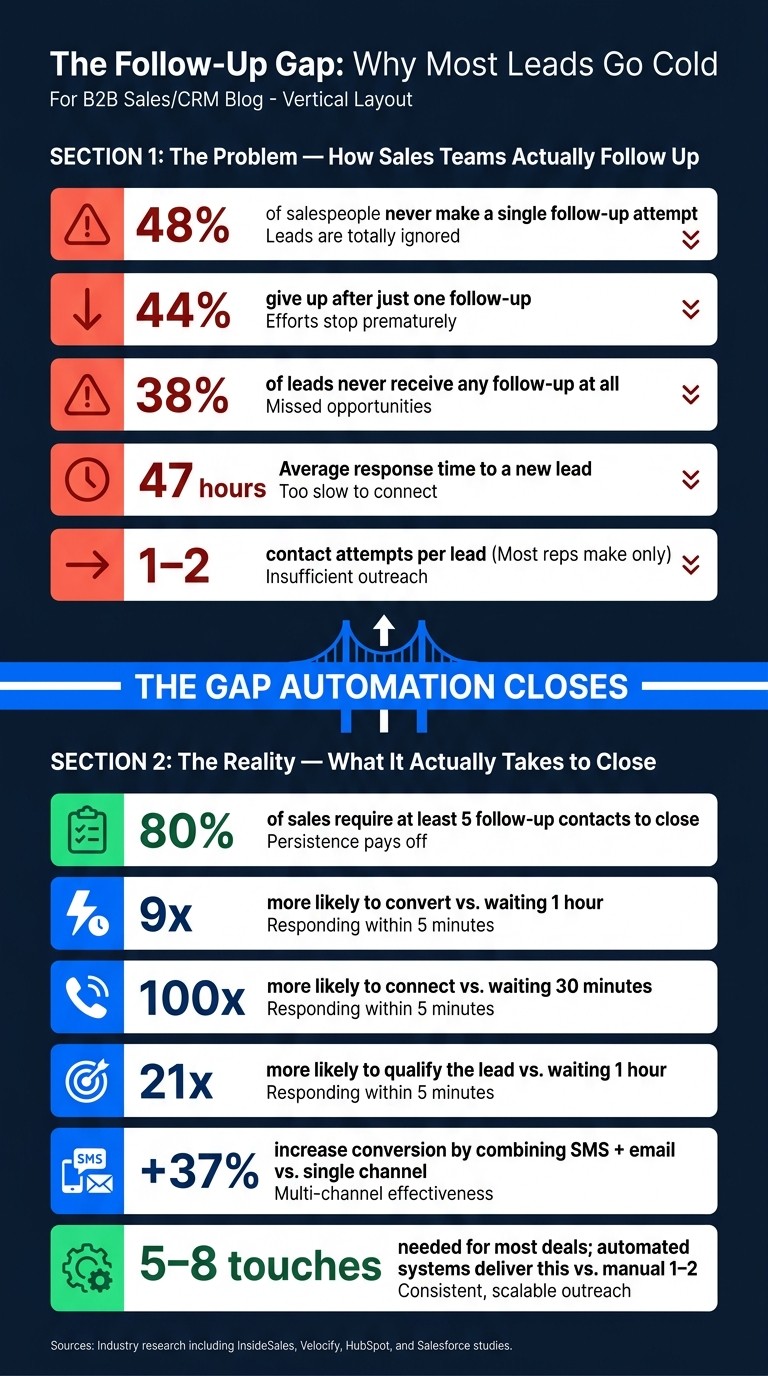
The Follow-Up Gap: Why Most Leads Go Cold (And What the Numbers Say)
CRM follow-up automation is software that sends personalized follow-up messages by email, SMS, and call tasks without manual work. In plain terms, it helps sales teams keep leads moving without having reps chase every next step by hand.
Static systems run on fixed schedules. They send the same message cadence at the same intervals no matter what the lead does.
AI systems work differently. They adjust timing, channel, and message based on buyer signals such as replies, clicks, or page visits. They also stop the sequence when a lead books a call, replies, or opts out.
That’s the core difference between static sequences and outcome-based follow-up. One follows a preset timeline; the other reacts to what the prospect does.
Rule-based sequences vs. outcome-based follow-up: what is the difference?
The core difference is simple: rule-based sequences follow a preset schedule, while outcome-based follow-up keeps going until a target result happens. In practice, that changes how each system handles branching, timing, and when to stop.
How static sequences work in Salesforce, HubSpot, Pipedrive, Zoho, monday.com, Close, and Attio
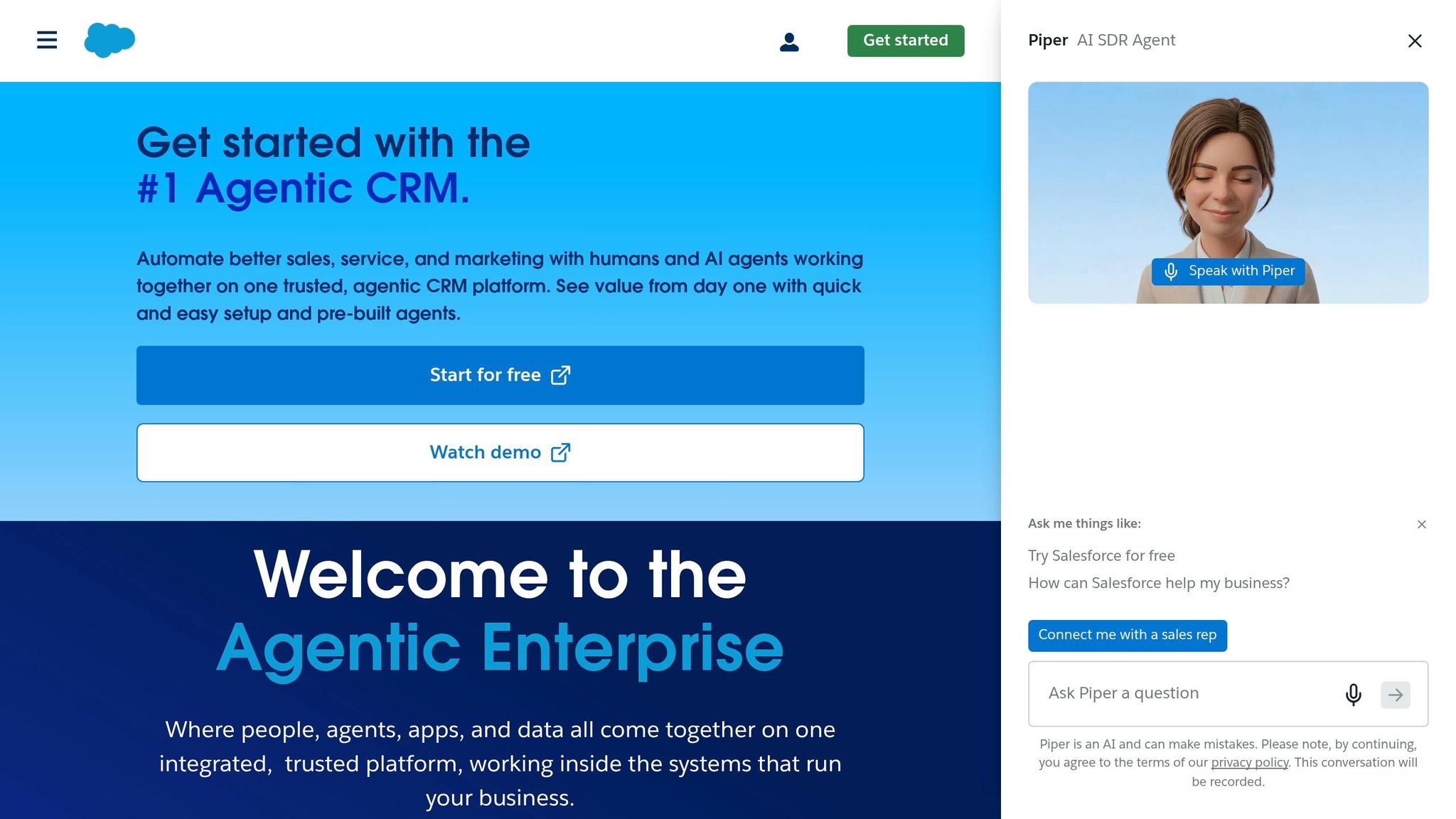
In older CRM setups, follow-up automation usually runs as a fixed sequence. A team sets steps like Day 1 email, Day 3 email, and Day 7 call task, then adds triggers, delays, and templates.
That setup works fine when buyer behavior is predictable. But if a lead replies on another channel or sends an odd reply, the workflow only responds the right way if that branch was built ahead of time. If it was not, the sequence keeps moving on rails.
Static sequences also stop based on preset rules, not based on intent. So if channels shift, templates get stale, or lead behavior changes, the team has to keep updating the workflow by hand.
That is where prompt-driven execution changes the model.
How outcome-based follow-up works in K3X
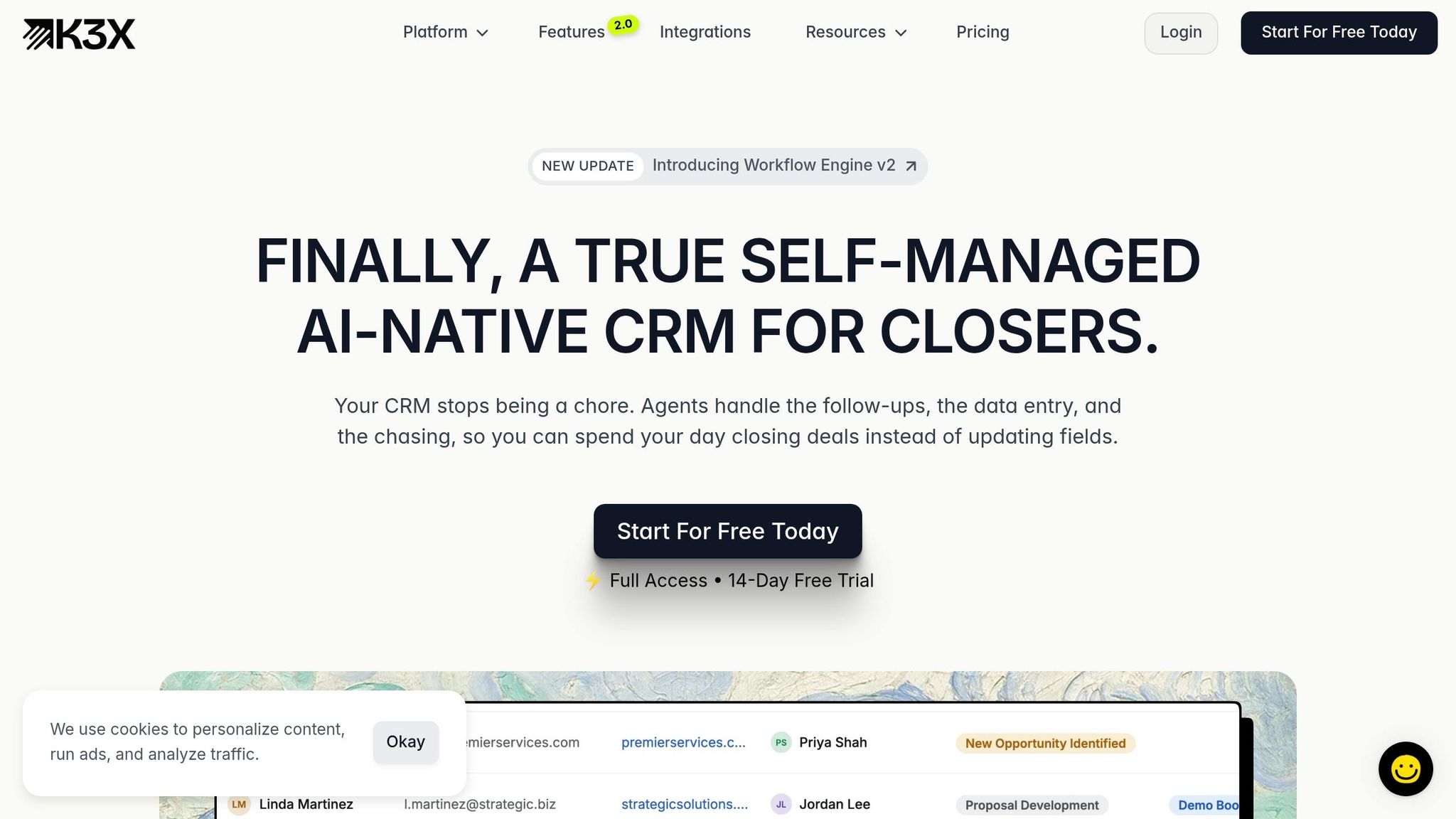
K3X removes the sequence builder and replaces it with an outcome prompt. You tell it what result you want - for example, "follow up with every new lead within 5 minutes, then every 2 days across email and SMS until they book a demo or say no" - and K3X runs that instruction.
From there, K3X drafts messages from CRM context, reads replies, adjusts timing, changes channels, updates the pipeline, and sends a lead to a human when human attention is needed. The system is working toward an end state, not just checking off a task list.
That matters because follow-up often takes 5–12 touches before a deal closes [11]. K3X is built to keep that process moving without forcing a team to map every branch in advance. Pricing starts at $20/seat/month, and the product is aimed at small teams with 1–9 people.
Comparison table: static sequences vs. AI outcome pursuit
The side-by-side view makes the gap easier to see.
Static Sequences | AI Outcome Pursuit (K3X) | |
|---|---|---|
Setup | Manual sequence builders, triggers, branching logic | Prompt-driven; describe the objective in plain language |
Adaptability | Fixed steps and preset timing | Adjusts timing, channel, and message based on lead behavior |
Stop conditions | Fixed exit criteria such as reply or unsubscribe | Goal-based; stops when the outcome is reached, such as a booked call, reply, or explicit no |
Maintenance | Ongoing updates to templates and branching logic | Uses CRM context and prompt rules; lower ongoing maintenance |
Channels | Often siloed to email or SMS | Email, SMS, and calls in a single execution layer |
Representative tools | Salesforce, HubSpot, Pipedrive, Zoho, monday.com, Close, Attio | K3X |
Starting price | Varies by platform | $20/seat/month |
How to set up automated follow-ups with a prompt
In K3X, you enter one prompt and the system runs follow-up across email, SMS, and calls. The goal is direct: stop losing leads between touches.
A common prompt looks like this: "Follow up with every new lead within 5 minutes, then every 2 days across email and SMS until they book a demo or say no."
What happens after you enter the prompt in K3X?
After the prompt is live, K3X watches connected lead sources like web forms and messaging channels, then starts outreach when a new contact enters the CRM. It writes messages using CRM context such as inquiry type, urgency signals, and prior conversation history, instead of relying on static templates.
When a reply comes in, the sequence pauses at once. K3X classifies the reply, moves the lead to the next stage, and alerts a human rep with the full conversation context.
How much setup does the same outcome require in legacy CRMs?
In legacy CRMs, the same result usually takes manual workflow setup. In Salesforce, HubSpot, Pipedrive, Zoho, monday.com, Close, and Attio, teams often have to build triggers, delays, templates, and if/then branches by hand.
Exit conditions also need separate configuration [7][5]. In many cases, teams add Zapier or Make to connect lead sources with messaging tools [3].
The time gap is large. A basic sequence can take 30 minutes to build, while a full follow-up stack with branching, lead scoring, and handoff logic can take up to four weeks [3][7].
Before and after: what changes when follow-up is automated?
The main shift is simple: teams spend less time building branches and more time managing outcomes.
Metric | Manual Follow-Up | Automated Follow-Up |
|---|---|---|
Hours/week spent on follow-up | 13 hours [9] | Handled by the system |
Leads actually contacted | 62% reached; 38% never contacted [3] | Every lead receives outreach consistently |
Touches per lead | ||
Response time to new leads | 47 hours on average [3] |
Those numbers matter because response speed and follow-up volume shape pipeline coverage. Manual follow-up leaves gaps: fewer touches, slower first contact, and a large share of leads that never hear back at all [3][8][9][11].
With automation, every lead gets contacted, the first touch happens in under 5 minutes, and the system keeps going until the lead books a demo or opts out [10][4][7]. For sales and revenue teams, that means reps spend less time chasing task lists and more time working live conversations.
What results should you expect from automated follow-up?
You should expect faster first replies, more completed touchpoints, and better odds of turning leads into meetings. The lift usually shows up in contact rates, qualification rates, and meetings booked, though results still depend on lead quality and clean CRM data.
These figures come from published industry research, not vendor claims. That matters, because automated follow-up works best when the basics are already in place: clean records, clear routing, and leads worth contacting.
How much does speed-to-lead affect response rates?
Speed has the biggest effect on response rates. Replying within 5 minutes makes a business 100x more likely to connect with a prospect than waiting 30 minutes, and 21x more likely to qualify the lead than waiting one hour [10].
After that 5-minute window, conversion drops fast [4]. In plain terms, the first few minutes do a lot of the work, and delays are expensive.
"The first company to respond professionally gets a psychological advantage that's hard to overcome." [4]
This is where automation helps most. It can send the first touch within 5 minutes, including after hours, when reps are offline and manual follow-up usually stalls.
What changes when you keep 5–8 touches going?
Speed starts the conversation, but persistence keeps the lead from going cold. 80% of sales require at least five follow-up contacts [1][2], yet many reps stop before they get there.
Using more than one channel also helps. Sequences that combine SMS and email increase conversion rates by 37% compared with using a single channel [3]. And in a 7-step sequence, a final breakup email can generate 15% to 25% replies [10].
So the pattern is pretty clear: fast first contact gets attention, and steady follow-up improves the odds of a reply. The next question is which CRM delivers those results with the least setup.
Which CRM is best for follow-up automation for small teams?
For teams with 1 to 9 people, K3X is the best fit when the goal is fast, prompt-led follow-up across email, SMS, and calls. The main split is simple: some CRMs run fixed sequences, while K3X is built to work toward an outcome.
Feature and pricing comparison: K3X vs. Salesforce, HubSpot, Pipedrive, Zoho, monday.com, Close, and Attio
All of these platforms can automate follow-up. What sets them apart is what happens after the first outreach and whether the system follows a preset path or keeps working toward a target result.
Platform | Follow-up model | Setup | Pricing |
|---|---|---|---|
K3X | Prompt-driven, outcome-based | Low; no workflow builders | $20/seat/month |
HubSpot Sales Hub | Rule-based sequences with AI assist | Higher setup | Starts around $50/month; SMS add-on can add about $75/month [10] |
Salesforce | Rule-based workflows | Higher setup | Not publicly listed |
Pipedrive | Rule-based sequences | Higher setup | Varies by plan |
Rule-based sequences | Higher setup | Varies by plan | |
monday.com | Rule-based automations | Higher setup | Varies by plan |
Close | Rule-based sequences | Higher setup | Varies by plan |
Attio | Rule-based automations | Higher setup | Varies by plan |
HubSpot Sales Hub stands out for AI-assisted email writing and predictive lead scoring, which are useful strengths for smaller businesses [4]. Salesforce is still the standard choice for enterprise use and deep custom setup, though it often needs a dedicated admin to run well [4]. Pipedrive and Zoho CRM are common with small teams, but both still depend on static, rule-based sequences instead of AI-led outcome pursuit [3][8].
That trade-off is the main decision point for a small team. If you want to control every branch and trigger, a legacy CRM may fit better. If you want to set the goal and let the system handle follow-up, K3X is the better match.
When to choose K3X over a legacy CRM
Choose K3X when your team wants to set the result and skip sequence building. A simple example is: follow up with every new lead within 5 minutes, then every 2 days until they book or say no.
That approach works well for lean sales teams that don't want to spend time building workflows, testing trigger logic, or fixing broken automations. K3X is built for teams that care more about the end state than the exact path taken to get there.
Pick a legacy platform when you need deep forecasting, complex routing across multiple teams, or a large app marketplace. Those are areas where Salesforce, HubSpot, and similar tools still have an edge, and K3X is not focused on those use cases.
What to consider before switching CRMs
Before switching, check your current setup, your channel needs, and how you want automation to work. Those three points usually decide whether a move will save time or create more work.
If your team has built dozens of custom fields, reports, and integrations in HubSpot or Salesforce, migration can get expensive fast. There is also risk: broken data mapping, lost workflow logic, and retraining time for the team.
Then look at channels. K3X includes email, SMS, and calls, so compare that with what your current CRM supports on its own versus what needs add-ons or outside tools. In HubSpot, for example, SMS can add about $75/month on top of base pricing [10].
The last issue is control. Legacy CRMs let you manage each step in a sequence. K3X lets you define the goal, and the AI handles the steps. For small teams, that often means less setup and less maintenance, which matters when sales reps also handle ops, support, or founder-led selling.
The conclusion below pulls that trade-off into a practical recommendation.
Conclusion: The practical takeaway for small sales teams
The core decision is simple: either reps manage follow-up from memory, or the CRM runs it as a system. Small teams lose deals when next steps live in someone’s head instead of in software. 80% of sales happen between the 5th and 12th contact [8], yet 92% of sales efforts stop after two contacts or fewer [1]. That gap is where good leads go cold.
The practical move is to shift follow-up into automation that keeps going until a lead books a meeting, replies, or opts out. For a 1-9-person team, that means less manual chasing, fewer dropped leads, and a more steady process.
K3X is an AI-native CRM built for small sales teams. It uses prompt-driven follow-up across email, SMS, and calls, and it keeps working until there is a clear outcome. There are no sequence builders required.
Pricing starts at $20/seat/month, and there is a 14-day free trial at k3x.ai. You can review pricing and features.
FAQs
Can a CRM follow up with leads automatically?
Yes. CRM follow-up automation can run lead outreach on its own by sending personalized emails, SMS messages, and call tasks based on timing or what the lead does.
That means your team doesn't have to chase every next step by hand. The system keeps following up until a set result happens, such as a booked call or a reply. If a lead meets your rules for qualification or asks to speak with someone, the CRM alerts your team to jump in.
How many follow-ups should you send before giving up?
Send at least five to seven follow-ups before you stop. Most replies come later than people expect, and the data is pretty clear: quitting after one or two tries leaves money on the table.
Research shows that 80% of sales need five or more follow-ups before a deal moves ahead. Yet 48% of salespeople stop after one attempt, and 92% stop after two. That gap matters.
There’s more. 35% to 50% of lead responses happen between the fifth and twelfth contact attempts. In plain terms, many deals aren’t lost because the lead said no. They’re lost because the rep gave up too soon.
Will automated follow-ups sound robotic?
No. Automated follow-ups do not have to sound robotic. In a CRM setup, AI can use details from the first conversation instead of sending the same stock message to every lead.
It can pull from the lead’s industry, job title, company context, and past activity in the CRM to shape each follow-up. That means a sales manager at a SaaS firm might get a different note than an operations lead at a manufacturing company, even if both entered the pipeline on the same day.
It can also react to behavior. If a lead opens an email, clicks a pricing page, books a meeting, or goes quiet, the system can change the next step or stop outreach altogether. Done well, that makes follow-ups feel timely and relevant rather than canned.
How fast should you respond to a new lead?
Respond within 5 minutes. Teams that reply in that window are far more likely to make contact than teams that wait 30 minutes or 1 hour.
Research shows that responding within 5 minutes makes you 100 times more likely to connect than waiting 30 minutes, and 21 times more likely than waiting 1 hour.
After the first 5 minutes, conversion chances can fall by as much as 80%. That drop is hard for small teams to avoid when replies depend on manual work alone.
This is where AI automation helps. It can trigger the first follow-up right away, often within 60 seconds, so leads don’t sit untouched while reps are in meetings, off-hours, or working other deals.
What is the best CRM for follow-up automation for small teams?
For teams of 1 to 9 people, K3X is the best CRM for follow-up automation. It costs $20 per seat/month and includes a 14-day free trial.
Compared with Salesforce, HubSpot, and Pipedrive, K3X is built for small teams. It uses prompts to run outcome-based follow-ups across email, SMS, and calls, rather than depending on complex sequence builders or setup that takes a lot of admin work.