Sales Automation
•
What Is a Conversational CRM? Talking to Your Sales System
Conversational CRM either runs via natural-language commands or treats customer messaging as the primary record—choose the model that fits your workflow.

A conversational CRM is a CRM that people use through plain-language text or voice instead of mostly clicking fields, tabs, and forms. In market use, the term also means a messaging-first CRM that turns WhatsApp, SMS, or Instagram DM chats into CRM records.
If I had to simplify it, I’d put tools into two buckets: CRMs you talk to and CRMs built around customer chat. That split is the main thing I’d want clear before I compare products.
The short takeaway: Salesforce, HubSpot, Zoho, Close, and Attio mostly add AI to a standard CRM structure, while tools like Chatarmin and K3X lean more toward conversation as the working layer.
Einstein Copilot: Conversational AI for Your CRM | Salesforce Product Launch

What does “conversational CRM” mean?
It usually means one of two things. Either I can run the CRM by typing or speaking what I want, or customer chat channels feed data into the CRM without manual logging.
That distinction matters because the two models fix different problems. One cuts user admin inside the CRM. The other pulls customer conversations into the record as they happen.
In plain terms:
Control-surface model: I tell the CRM what to do in natural language.
Messaging-first model: customer chats are the main source of CRM activity.
How is it different from a standard CRM with AI?
A standard CRM with AI still leans on forms, dashboards, pipelines, and workflow builders. A conversational CRM moves more of that work into language-based commands or message-driven records.
That means the line is not “has AI” versus “doesn’t have AI.” The line is whether the AI acts inside the system or mainly assists while I still finish the work myself.
For example, if I type “Move Acme to negotiation and set a follow-up for July 15”, a conversation-first system should update the record and create the task. In many standard CRMs, the assistant may suggest the step, but I still need to click through screens and save changes.
Why does this matter for sales teams?
It matters because CRM admin still eats time. The article cites data that sales reps spend only 28% of their week selling, while about 17% of total time goes to data entry, and some agents spend 40% of their time moving through screens to find data.
For a small team, that drag shows up fast. If I have only 1 to 9 users, I usually do not have a dedicated CRM admin, so setup and upkeep hit sellers directly.
The claimed time savings are not tiny. The article says a prompt-driven interface can save 25 to 52 hours per rep per year compared with older form-based workflows.
Which tools fit each type?
Most named tools sit on a standard CRM base with AI layered on top. A smaller group uses conversation or chat as the main working model.
Here’s the clean read:
Salesforce Sales Cloud: AI features through Einstein and Agentforce, but still dashboard- and workflow-heavy. The article lists pricing at about $165/user/month.
HubSpot CRM: AI drafting and summaries inside a standard workflow setup. The article lists entry pricing at $45/user/month.
Zoho CRM: Zia answers questions and predicts outcomes, but the product still runs through forms and pipelines.
Close and Attio: newer CRM products with AI features, though pipelines remain the main interface.
Chatarmin: messaging-first, centered on WhatsApp threads and shared inbox work.
K3X: prompt-driven CRM for teams of 1 to 9 people, priced at $20/seat/month with 1,000 AI credits and a 14-day free trial, per the article.
The article also notes tradeoffs for K3X: it is a young product, has a smaller native integration list, needs teams to watch AI credit use, and is not aimed at 100+ seat enterprise setups.
When does a messaging-first CRM make sense?
It makes sense when sales or support work happens inside chat apps. If most customer contact runs through WhatsApp, SMS, or Instagram DM, a messaging-first CRM may fit better than a form-heavy pipeline tool.
The article gives a strong data point here: WhatsApp has more than 2 billion monthly active users, and reported open rates run between 70% and 95%, versus under 20% for email. That points to a clear fit for D2C brands and chat-heavy markets.
What should I check before I buy one?
I’d start with one question: Can the system do the work, or does it only suggest the work? That gets to the core difference fast.
After that, I’d check:
whether conversation is the main interface or just an assistant layer
whether automations still depend on if-then builders and triggers
whether email, SMS, and calling are built in or added through plugins
whether the system surfaces overdue tasks or stale leads without me asking
whether it syncs both ways with my current tools
how pricing works across seats, credits, and add-ons
whether contract terms are monthly or annual
whether audit, admin, and compliance controls fit my team size
The article’s buying advice is practical: ask each vendor to show one live workflow from start to finish, like lead follow-up or no-show recovery. If the demo falls back to workflow builders for most of the job, I’d treat it as a standard CRM with an AI layer, not a conversation-first CRM.
What’s the bottom line?
A conversational CRM is not one fixed product category. It is either a CRM that I operate through natural language or a CRM that treats customer messaging as the main record source.
For buyers, the plain test is simple: does conversation run the system, or sit beside it? That answer tells me more than the label does.
What Is a Conversational CRM?
A conversational CRM can mean two different things. It can be a CRM you operate with natural language, or a CRM where messaging channels are the main place work happens.
In one model, conversation is the way you control the system. In the other, conversation is the source of customer data.
The Two Meanings of Conversational CRM
Meaning | What It Describes | Key Signal to Look For |
|---|---|---|
Control surface | Natural language (voice or text) replaces clicks, tabs, and forms as the way users operate the CRM | Voice or text commands |
Messaging-centric | WhatsApp, SMS, or Instagram DM is the main workspace, and the dialogue itself is the primary source of data | Messaging workspace |
Here is what each model looks like in practice.
In the control-surface model, the AI acts on the user's command. A prompt like "Move the Acme deal to negotiation" updates the database in seconds.[3]
In the messaging-centric model, the CRM logs customer messages in real time, so data entry happens on its own.
The next section explains how the control-surface model works in practice.
How Does a Conversational CRM Work?
A conversational CRM turns a typed or spoken request into an action inside the CRM. Instead of making the user click through fields and menus, the system reads the request, pulls out the needed details, and updates records or starts follow-up work in the background.
In practice, that can mean finding contacts, moving a deal to a new stage, logging activity, or starting outreach across email, SMS, and calls. That difference matters. Some CRMs add a chat box on top of the old interface, while others let conversation run the system itself.
The flow is fairly simple. The AI identifies the user’s intent, extracts the details, and sends the action to the CRM. If a user says, “I'll follow up on the 15th,” the system reads the date and creates a follow-up task on its own. The message itself becomes the record.
More advanced systems go a step further. They can spot missed follow-ups or overdue tasks and suggest the next move before the user asks.
Chat Interface vs. Conversation as the Primary Control Surface
The short version: a chat assistant helps inside a standard CRM, while a conversational control surface lets the user run the CRM through language. That’s the line that separates “AI added to CRM” from “CRM operated by conversation.”
Many CRMs now include AI assistants that summarize deals or draft emails. But the user still has to move through dashboards, open tabs, fill in fields, and click Save to finish the job. That’s a chat assistant, not a conversational control surface.
A conversational-first system works in a different way. The user states the outcome, and the system plans and carries out the work across channels. The user does not need to build rules, sequences, or triggers by hand. You see the gap in day-to-day work, not just in the screen layout.
Capability | Chat Assistant (e.g., Salesforce, HubSpot) | Conversational Control Surface |
|---|---|---|
Data entry | Manual - user fills forms after AI suggestions | Automatic - AI extracts from conversation |
Workflow setup | User builds rules and triggers | User describes the outcome |
AI role | Suggests actions | Executes actions |
Primary interface | Dashboards, tabs, and buttons | Natural language (text or voice) |
Admin required | Often yes, for workflow configuration | Usually lower - outcome-based control |
Conversational CRM vs. Standard CRM: How They Compare
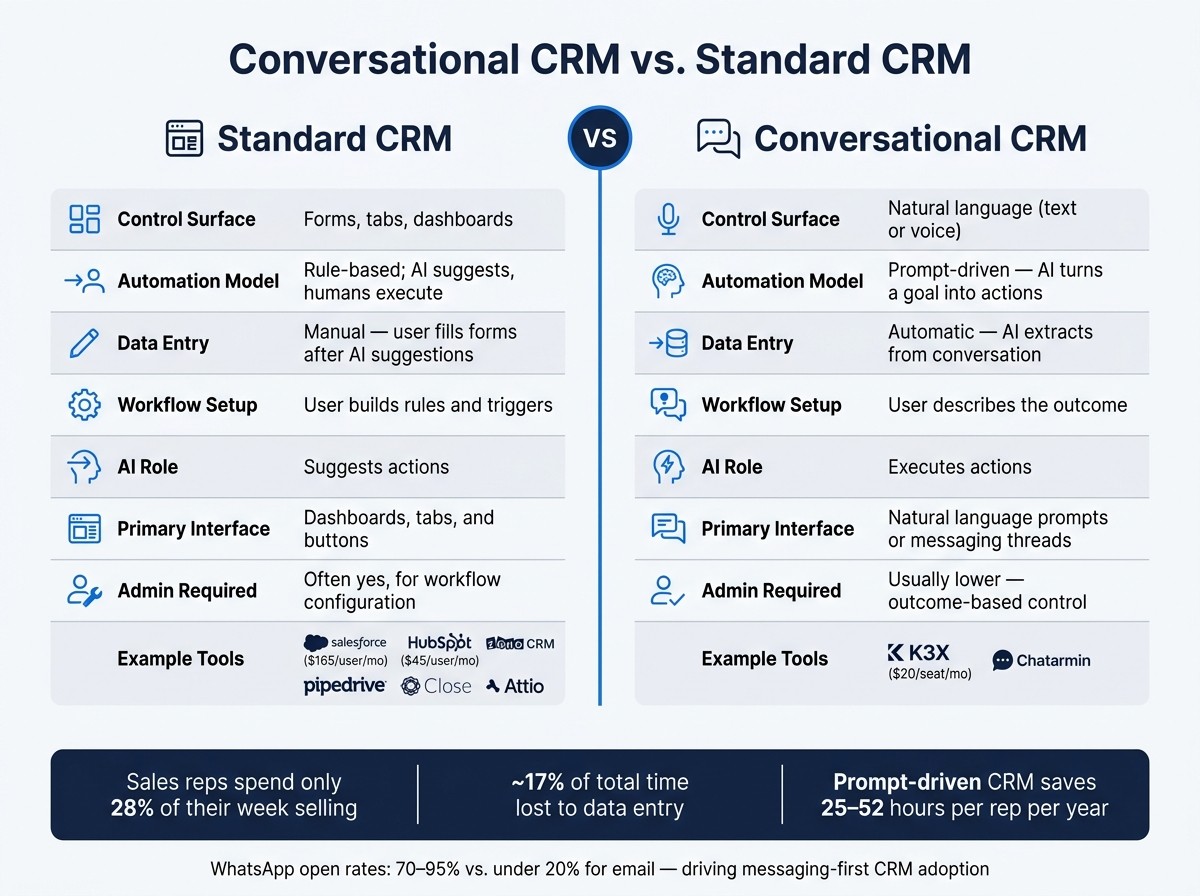
Conversational CRM vs Standard CRM: Key Differences at a Glance
A conversational CRM reduces navigation and manual data entry. A standard CRM still leans on forms, tabs, and workflow setup. That difference matters because the interface changes in a conversational CRM, while a standard CRM keeps the same interface and adds automation around it.
This comparison is about the control surface of the CRM. It is not about messaging-first inbox tools.
In practice, the gap shows up in three places: setup time, admin work, and how much users must configure by hand.
Comparison Table: Conversational CRM vs. Standard CRM
A prompt-driven CRM works from plain-language requests. A standard CRM stack works through forms, menus, and rule-based workflows.
Platform | Control Surface | Automation Model | Setup/Admin Burden |
|---|---|---|---|
K3X | Natural language prompts | Prompt-driven - AI turns a goal into actions | Under an hour; no workflow builder or triggers |
Salesforce Sales Cloud | Forms, tabs, dashboards | Rule-based; AI suggests, humans execute | High admin overhead |
HubSpot CRM | Forms, dashboards, sequences | Rule-based workflows | Moderate; more configuration than K3X |
Pipedrive, Zoho, monday.com, Close, Attio | Forms, menus, tabs, dashboards | Rule-based workflows | Requires manual setup and ongoing maintenance |
Salesforce and HubSpot provide deeper governance, security controls, and a larger ecosystem. K3X uses prompts to carry out actions without workflow builders, while older CRM products need more configuration.
The next section names tools that use each model in practice.
Real Examples of Conversational CRM Tools
There are two different kinds of "conversational CRM" in the market. Some tools add chat or AI on top of a standard CRM, while a smaller group uses conversation as the main way people run work.
Tools That Add Conversational Features to a Standard CRM
These tools add AI or chat features, but the core product still depends on records, pipelines, tabs, and workflows.
Salesforce Sales Cloud adds AI through Einstein and Agentforce, including record access in Slack and AI-generated call highlights [1]. The base system still runs on dashboards, tabs, and rule-based workflows. Pricing starts at about $165 per user/month [2].
HubSpot includes AI tools that draft replies and summarize interactions. Those features sit next to its standard sequences and workflow builder rather than replacing them. Entry pricing starts at $45 per user/month [2].
Zoho CRM includes Zia, an AI assistant that answers record questions and predicts deal outcomes. It is available on higher-tier plans inside Zoho's existing form-and-pipeline setup.
Close and Attio are newer CRMs with AI features. Close focuses on built-in calling and SMS logging, while Attio pulls up relationship data for users automatically. Even so, both still use structured pipelines as the main control surface.
These tools still depend on structured records and delayed logging.
Tools That Use Conversation as the Main Operating Model
A smaller set of tools uses conversation as the primary workspace, not an add-on.
Messaging-centric CRMs like Chatarmin fit this second model. The workspace centers on WhatsApp threads and shared inboxes, and the CRM record comes from the conversation instead of being entered in a separate step. WhatsApp has over 2 billion monthly active users, and reported open rates run between 70% and 95%, versus under 20% for email [2]. That setup fits D2C brands in messaging-heavy markets that sell and support inside chat.
K3X is an AI-native, prompt-driven CRM for teams of 1–9 people. Users describe the outcome they want - for example, "follow up every inbound lead within 5 minutes until they book or decline" - and K3X's AI agents carry that out across email, SMS, and calls without workflow builders or triggers to set up. Pricing is $20 per seat/month, including 1,000 AI credits, a built-in power dialer, and unlimited integrations, with no long-term contracts. A 14-day free trial is available on K3X's pricing page. Limits: it is still a young product, has a smaller native integration catalog, needs teams to watch AI credit usage, and is not built for 100+ seat enterprises or deep admin governance.
Tool | Conversational Model | Primary Interface | Best Fit |
|---|---|---|---|
Salesforce + Einstein/Agentforce | AI layer over standard CRM | Dashboards, tabs, Slack | Enterprise teams |
HubSpot | AI assist + standard workflows | Forms, sequences, dashboards | SMB to mid-market |
Zoho CRM + Zia | AI assistant within pipeline CRM | Forms, menus, dashboards | SMB, budget-conscious teams |
Close / Attio | Modern CRM with AI features | Pipelines, activity feeds | Small to mid-size sales teams |
Chatarmin | Messaging-first, WhatsApp-centric | Chat threads, shared inbox | D2C, WhatsApp-heavy markets |
K3X | Prompt-driven, AI-native | Natural language prompts | Teams of 1–9 people |
That gap matters most for teams with limited setup time and little admin support.
Why Does Conversational CRM Matter for Small Teams?
Conversational CRM matters for small teams because it cuts admin work without needing a full-time CRM manager. That matters because sales reps spend only 28% of their week selling, while about 17% of total time goes to data entry [3].
For a small team, that gap hits hard. If a rep spends more time updating records than talking to buyers, the CRM starts to feel like extra work instead of help.
Data on the Setup and Admin Burden of Standard CRM
Standard CRMs still depend on manual logging, field updates, and workflow upkeep. Small teams usually have to handle that work themselves, which adds drag fast.
Sales agents can spend 40% of their time moving through screens just to find data [4]. For a team with only a few users, that overhead becomes the main ROI issue. The question is not just what the CRM can do. It is how much work the team must do to keep it running.
What Does This Mean for ROI on Teams With 1–9 Users?
For teams with 1–9 users, ROI depends more on fit than on feature count. A system has to match the team’s time, headcount, and day-to-day pace.
The biggest difference often comes from the control surface: prompt-driven use versus forms, tabs, and manual navigation. That is where time savings show up. A prompt-driven interface can recover 25 to 52 hours per rep per year compared with older form-filling workflows [3].
K3X is one factual example. It is an AI-native, prompt-driven CRM built for teams of 1–9 people. It handles plain-language actions across email, SMS, and calls, and it does so without workflow builders or trigger setup.
There are tradeoffs. K3X is young, has a smaller native integration catalog than incumbent vendors, needs AI credit monitoring, and is not built for enterprise teams that need 100+ seats or deep admin governance. You can find more details in our common questions.
That sets up the related terms: prompt-driven CRM and AI-native CRM.
How Conversational CRM Relates to Prompt-Driven and AI-Native CRM
These labels overlap, and vendors don’t use them in a consistent way. The term by itself won’t tell you how a CRM actually works, so it helps to separate how users control the system from where the system gets data and runs work.
Conversational CRM is the broadest label. It means people use natural language to run the sales system instead of clicking through menus and filling out forms.
Prompt-driven CRM is narrower. It centers on saved prompts: a user describes the outcome they want, and the system uses that prompt to guide follow-up across the pipeline over time. K3X uses this model.
AI-native CRM refers to the system layer underneath. It means AI is built into the data and workflow layer from the start, so the CRM can plan actions and carry them out.
Related Terms
Term | Core Emphasis | Example Use |
|---|---|---|
Conversational CRM | Natural language as the control surface | Typing a command to update records |
Prompt-driven CRM | A saved prompt controls ongoing behavior | A saved prompt controls follow-up |
AI-native CRM | AI built into workflow execution | AI built into workflow execution |
Messaging-centric CRM | A specific channel feeds records automatically | WhatsApp or Instagram DM feeds records |
In markets where teams do most customer communication in messaging apps, conversational CRM can also refer to a CRM that creates and updates records from customer messages automatically.
Use these definitions to sort products into the right bucket: chat-assisted, prompt-driven, or messaging-first. For persistent prompt mechanics, see What Is a Prompt-Driven CRM?; for follow-up mechanics, see CRM Follow-Up Automation with AI.
What to Check Before Choosing a Conversational CRM
Check two things first: how people actually use the system, and whether the AI can do work or only suggest the next step. That tells you if you're looking at a conversation-first CRM or a standard CRM with a chat layer on top.
A lot of products use the same label, but they don't work the same way. In some tools, conversation is the main control method. In others, the assistant sits beside the usual menus, forms, if-then builders, sequences, and triggers.
After that, look at automation, pricing, and governance. A tool may sound simple in a demo and still create extra admin work, extra costs, or compliance problems once your team starts using it day to day.
The next check is agentic behavior. Non-agentic AI gives suggestions. Agentic AI takes action inside the CRM, such as updating records, sending messages, logging work, or moving deals based on rules and context.
Use this table to see whether the platform fits the way your team already works.
Buyer Checklist
Criterion | What to Verify |
|---|---|
Control surface | Is conversation the main way users work, or an add-on assistant? |
Workflow dependence | Do automations still require if-then builders, sequences, or triggers? |
Channel coverage | Are email, SMS, and calling built in natively, or through third-party plugins? |
Proactive intelligence | Does the system surface dormant leads and overdue tasks without being prompted? |
Integrations | Does the platform offer bidirectional sync with your existing tools, or will it create a separate data store? |
Pricing model | Compare per-seat, credit-based, and add-on pricing against expected usage. |
Contract terms | Are there annual lock-ins, or is it month-to-month? |
Governance fit | Does the platform support the admin controls, audit logs, and compliance your organization requires? |
Team size fit | Is the product designed for your headcount - small team (1–9), mid-market, or enterprise (100+ seats)? |
A simple way to use this checklist is to test each vendor against one live workflow. For example, take lead follow-up, no-show recovery, or overdue pipeline cleanup and ask the vendor to show how that work gets done from start to finish. If the team still has to fall back on old workflow builders for most tasks, the product is probably an assistant layer, not a conversational CRM.