Sales Automation
•
K3X vs Zoho CRM: AI-Native vs All-in-One Suite
AI-native CRMs suit 1–9 person teams seeking automated follow‑up; all‑in‑one suites suit teams needing broader apps and tighter process control.

If I had to cut this down to one line, I’d say this: K3X fits small teams that want AI to run follow-up from plain-English goals, while Zoho CRM fits teams that want more control, more apps, and can spend more time on setup. For most teams of 1 to 9 people, the choice is less about feature count and more about execution vs. admin work.
I’d also frame the pricing gap this way: Zoho starts lower, but K3X includes more in the base seat. Zoho CRM starts at $0 for up to 3 users or $14/user/month billed annually, while K3X starts at $20/seat/month with 1,000 AI/Twilio credits included.
My short take: pick K3X if you want AI to do the follow-up, logging, and outreach work after you set a goal. Pick Zoho CRM if you need Blueprint, Canvas, the Zoho app stack, and tighter process control, and you accept more setup.
What stood out most to me is the trade-off in day-to-day use. K3X is built around prompts and agent execution. Zoho CRM is built around modules, rules, admin setup, and a much larger product estate used by 250,000+ businesses worldwide.
On setup, the gap is hard to miss. K3X says teams can go live in under 1 hour [1]. Zoho CRM rollouts for SMBs often take 40 to 120+ hours, with a median of 6 to 10 weeks [3][4]. That time cost matters just as much as the seat price if a founder or sales lead is the one doing the work.
AI is also where the split is most clear. K3X uses AI agents to build and run follow-up across email, SMS, and calls from a plain-language goal. Zoho’s Zia is more of an in-product assistant: it can score leads, predict win probability, and suggest next steps, but teams still have to set up and maintain workflows. And in Zoho, Zia is limited to Enterprise and Ultimate, with Enterprise starting at $40/user/month billed annually [2][3][6].
For cost, I would not look only at the entry tier. Zoho Standard at $14/user/month is lower than K3X at $20/seat/month, but some functions small sales teams often want early - like AI features and two-way email sync - sit on higher Zoho tiers. K3X puts AI credits, calling, SMS, and a power dialer into the starting seat, though teams need to watch credit use as volume goes up.
Integrations are simpler to sum up: Zoho connects to more tools out of the box. Its marketplace lists 900+ CRM integrations and 1,000+ total third-party connections, plus 40+ native Zoho apps and 45+ apps through Zoho One [2][7]. K3X has a smaller native connector set and leans more on APIs and webhooks, which is fine for lighter stacks but less ideal if you want many prebuilt app links.
If governance, compliance, and vendor maturity matter most, I’d lean Zoho. It has been in market since 2005, offers controls like Blueprint, sandbox, Territory Management, and field-level encryption on higher tiers, and lists SOC 2 Type II, GDPR, HIPAA, and ISO 27001 in the cited material [2][4][6]. K3X is more limited here, with audit logs, SSO, and custom roles only on its Custom plan [5].
Migration is a mixed picture. The data move is mostly simple: Zoho exports Leads, Contacts, Accounts, Deals, Tasks, and Notes by CSV, and K3X can import them [1][6]. The harder part is process logic, since Workflow Rules, Blueprints, and Deluge scripts do not transfer directly and need to be rebuilt as K3X outcome prompts [2][8].
So if I were advising a small sales team in July 2026, I’d keep the decision simple:
Choose K3X if your team wants less CRM admin and wants AI to carry the follow-up work.
Choose Zoho CRM if your team wants a larger app suite, more admin control, and a platform with a longer track record.
That is the core answer, and the article supports it with a pretty clear pattern across price, setup time, AI scope, integrations, and control.
Zoho CRM Review: Is It The Best CRM For Small Businesses In 2026?

TL;DR: K3X or Zoho CRM - which one should you pick?

Pick K3X if your 1–9 person team wants AI agents to run follow-up, outreach, and data entry from plain-language goals.
Pick Zoho CRM if your business needs a mature, highly configurable suite with Blueprint and the broader Zoho ecosystem, and can accept more admin work. AI features are limited to Enterprise and Ultimate plans, which start at $40/user/month billed annually[6].
K3X is built to execute outcomes. Zoho gives you more control, but it takes more setup.
At a glance: K3X vs Zoho CRM on price, setup, AI, and fit
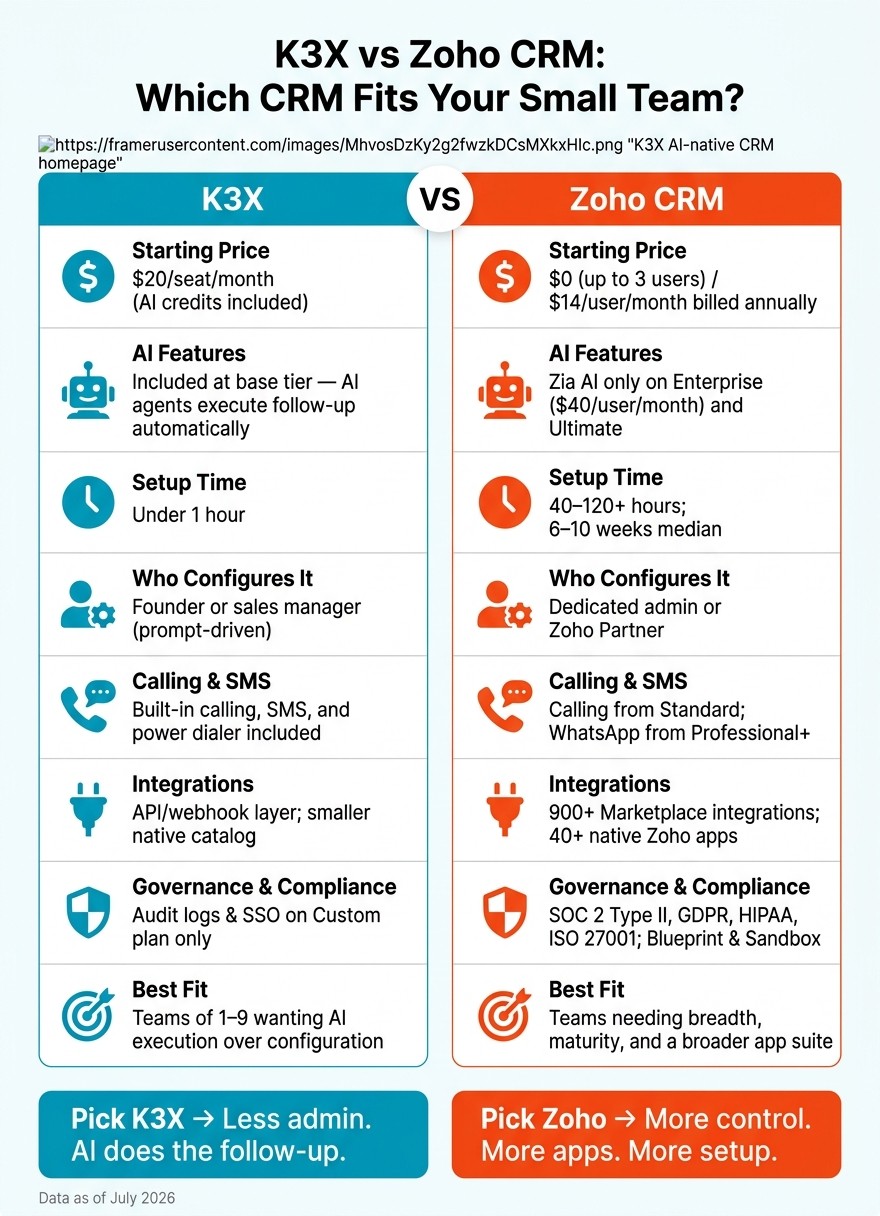
K3X vs Zoho CRM: Side-by-Side Comparison for Small Teams (2026)
K3X starts at $20 per seat/month and includes 1,000 AI/Twilio credits [5]. Zoho CRM starts at $0 for up to 3 users or $14 per user/month billed annually, but Zia AI is limited to the Enterprise and Ultimate plans [2].
K3X | Zoho CRM | |
|---|---|---|
Starting price | $20/seat/month; 1,000 AI/Twilio credits included [5] | $0 (up to 3 users) / $14/user/month billed annually [2] |
Free trial or tier | 14-day full-access trial [1] | 15-day trial; free tier for up to 3 users [2] |
Setup model | Prompt-driven; no workflow builder [1] | Manual setup; advanced automation often requires Deluge scripting [2][7] |
Who configures it | Prompt-driven; no workflow builder [1] | |
AI / automation model | AI-native agents execute stated outcomes across email, SMS, and calls [1] | Zia AI suggests and scores; humans still build and run workflows on Enterprise and Ultimate [2][3] |
Calling / SMS | Built-in calling and SMS; power dialer included [5] | Calling starts on Standard; WhatsApp starts on Professional+ [3] |
Integrations | Unlimited integrations [5] | 900+ marketplace integrations; 40+ native Zoho apps [2] |
Best fit | Teams of 1–9 wanting execution over configuration [1] | Teams that need breadth, maturity, and a broader app suite [7] |
The split is pretty clear. K3X leans toward small teams that want to act from prompts with less setup, while Zoho CRM fits teams that want more apps, more add-ons, and a longer-established platform [1][7].
Zoho’s scale points to a more mature product line, especially for companies already using other Zoho tools. K3X, by contrast, stands out for reported time savings and a simpler operating model, though its smaller native integration catalog is a better match for lighter stacks.
Which one costs less for a small team?
Zoho CRM costs less at the entry level, while K3X includes more in the base seat. Zoho Standard starts at $14 per user/month billed annually, and K3X is $20 per seat/month [3][5]. For a small team, the main issue is not just price. It’s whether the base plan already covers the work you need to do.
K3X includes AI credits, calling, SMS, a power dialer, and unlimited integrations in the $20 seat [5]. Zoho keeps some of those extras for higher tiers. For example, Zia AI is only available on Enterprise at $40/user/month, and two-way email sync starts on Professional at $23/user/month [3].
That changes the math for teams that need outbound motion from day one. Zoho’s base price looks lower on paper, but costs climb once you move up for AI or more advanced automation. K3X gives you a more complete starting package at $20, though the trade-off is a newer product and AI credit usage that needs tracking as volume grows [5][3].
Cost Factor | K3X | Zoho Standard | Zoho Enterprise (AI tier) |
|---|---|---|---|
Entry price | $20/seat/month | $14/user/month billed annually | $40/user/month billed annually |
AI features | Included | Not included | Included (Zia) |
Calling | 1,000 bundled credits | Built-in from Standard | Built-in |
SMS | Included in bundled credits | WhatsApp starts on Professional+ [3] | WhatsApp starts on Professional+ [3] |
Workflow rules | No workflow builders or triggers | 10 rules per module | Higher limits |
Contract flexibility | Cancel anytime | Annual billing for lowest price | Annual billing for lowest price |
Price is only one part of the gap. Setup time and admin work can add more cost after the contract starts.
Which is easier to set up and run day to day?
K3X is easier to set up and manage day to day because it uses prompt-driven execution. Zoho CRM takes more setup work up front since teams usually have to configure modules, fields, rules, and process logic before they can use it well [1][3].
For small teams, that gap matters just as much as seat cost. The issue is not only launch time. It is also the admin work that keeps showing up week after week.
Prompt-driven setup vs manual configuration
K3X lets a team start from a plain-language goal, such as following up with inbound leads within 5 minutes until they book or decline, and then builds the follow-up steps from that goal [1]. In practice, that means a founder or sales manager can handle setup without handing the work to a CRM specialist. If the process changes, they can edit the goal instead of rebuilding automations from scratch.
Zoho CRM works more like a standard CRM rollout. Teams usually begin with Leads, Contacts, Accounts, and Deals, then add custom fields and workflow rules. Blueprint controls stage changes, and more advanced automation often requires Deluge scripting [2][3]. On the Standard plan, Zoho limits users to 10 workflow rules per module [3].
Setup Factor | K3X | Zoho CRM |
|---|---|---|
Time to go live | Under 1 hour [1] | |
Who can run it | Founder or sales manager | Often a dedicated admin |
Workflow rule limits | Unlimited | 10 per module on Standard [3] |
This setup gap shapes the day-to-day experience. A small team can usually get K3X running and make changes with less admin effort, while Zoho CRM often asks for more hands-on upkeep. You can see how this works in practice through our K3X case studies.
Teams with complex tool stacks should still check required integrations before making a switch. That same setup difference also affects how each platform handles automation after launch.
What actually happens after you set a goal?
After a goal is set, K3X runs the follow-up for you, while Zoho CRM uses Zia to suggest what to do next. In practice, that means K3X acts on the goal, and Zoho still needs a person to build and manage the workflow.
K3X AI agents vs Zoho Zia
With K3X, a user opens the Workflow Launcher and enters a goal such as "follow up every inbound lead within 5 minutes until they book or decline." K3X then builds and runs the follow-up sequence across email, SMS, and calls. K3X says this saves reps an average of 8 hours per week on admin work [1].
Zoho Zia works more like an assistant inside Zoho CRM. It can score leads, predict deal win probability, and suggest when to contact someone, but it does not run follow-up on its own [2][3]. A human still needs to set up Blueprints and workflow rules. Zia’s predictive models also require at least 75 converted leads in CRM history before they can generate initial predictions [3].
That gap matters for sales teams. One system handles execution after the goal is entered; the other helps with judgment but leaves the work setup and follow-through to the team.
K3X AI Agents | Zoho CRM with Zia | |
|---|---|---|
AI role | Executes the work | Predicts and recommends |
What the AI does after the goal is set | Builds and runs follow-up steps automatically | Surfaces suggestions; humans act on them |
Follow-up logic | AI-mapped from the goal | Human-designed step enforcement |
Channel execution | Automated email, SMS, and calls [1] | Human-run workflows [2] |
Zia access | Included at $20/seat/month [5] | Available on Enterprise and Ultimate; Enterprise starts at $40/user/month billed annually [2][3] |
That split is easier to spot when you look at integrations, support, and governance.
Which platform connects to more tools?
Zoho CRM connects to more tools out of the box. K3X leans on an API-and-webhook layer, which fits small teams with a fixed stack and low admin tolerance [1][2][5].
Zoho’s Marketplace lists 900+ CRM-specific integrations and 1,000+ total third-party connections, including Google Workspace, Microsoft 365, Slack, Zoom, and QuickBooks [2]. K3X’s native connector catalog is smaller and still growing, so teams that need many prebuilt connections may end up doing more custom setup [5].
Ecosystem breadth vs a lighter integration layer
The main tradeoff is breadth versus simplicity. Zoho is built for teams that want more apps under one vendor, while K3X is built for teams that want to connect a smaller set of tools without much overhead.
Zoho is designed to keep more work inside its own product family. Zoho One includes 45+ native apps, which can help sales, support, and finance teams run more of their work in one place [2][7]. For multi-department teams, that broader app estate can make consolidation easier.
K3X takes the other path. It focuses on prompt-driven extensibility and API/webhook connections so a small team can plug into the tools it already uses [1][5]. In plain terms, K3X is narrower but simpler; Zoho is broader but heavier. Connector count matters, but so do maturity and governance.
K3X | Zoho CRM | |
|---|---|---|
Integration model | ||
Native app ecosystem | Smaller; still growing [5] | |
Third-party connections | API/webhook based; smaller native catalog [5] | 900+ Marketplace integrations and 1,000+ total connections [2] |
Best for | Focused sales teams | Teams consolidating multiple functions |
Which platform is more proven in support, governance, and maturity?
Zoho CRM is the more mature platform. It launched in 2005 and serves 250,000+ businesses across 180 countries [2][3]. For buyers who care more about admin control, compliance, and reliability than getting set up fast, that track record matters.
Zoho also goes deeper on governance. On higher tiers, it includes Blueprint, sandbox, Territory Management, and field-level encryption [2][6]. It also lists SOC 2 Type II, GDPR, HIPAA, and ISO 27001 certifications, which makes it a better fit for teams with stricter control and compliance needs [4].
K3X takes a different route. It gives up some of that depth in exchange for lighter admin work and faster day-to-day use. Audit logs, SSO, and custom roles are only on the Custom plan, while Starter includes standard role-based permissions and 90 days of activity history [5].
That split shows up in who each product fits. K3X is not built for 100+ seats or heavy governance. Zoho is the safer pick for teams that need stronger compliance controls and a longer market history, while K3X fits smaller teams that want less admin overhead and faster execution.
K3X | Zoho CRM | |
|---|---|---|
In market since | Younger product | |
Customers | Not publicly disclosed | |
Process governance | Prompt-driven; audit logs on Custom only [5] | |
Security certifications | Not specified in the provided sources | SOC 2 Type II, GDPR, HIPAA, ISO 27001 [4] |
Support model | Email support on Starter; dedicated support and SLAs on Custom [5] | Tiered support; Classic is business-hours email [3] |
Best for | Teams of 1–9 prioritizing execution | Teams needing governance and scale |
Zoho's Classic support tier includes business-hours email support. Faster response options are available on higher tiers [3].
Who should pick K3X, and who should pick Zoho CRM?
The choice is mostly about speed vs. control. K3X works best for small teams that want AI to handle follow-up with very little admin work, while Zoho CRM suits teams that need more process control, more built-in apps, and can spend more time on setup.
K3X leans toward execution. Zoho CRM leans toward structure. That difference matters a lot once a team starts scaling daily work across leads, deals, and handoffs.
Choose K3X if your team wants execution over configuration
K3X is the better fit if your team wants to avoid heavy CRM setup and day-to-day workflow management. It is built for teams of 1–9 people that want to define a goal and let AI agents act on it across email, SMS, and calls, without building sequences, triggers, or rules.
That makes it a good match for founder-led sales teams or small groups where the same person is closing deals and managing the CRM. The upside is less admin and faster time to use. The downside is a newer product, fewer native integrations, credit tracking as usage grows, and a poor fit for teams with 100+ seats or strict approval layers.
If low admin and fast execution matter most, K3X is the cleaner choice.
Choose Zoho CRM if your team needs breadth and maturity
Zoho CRM is the better fit if your team needs a broader app stack and tighter process control. It works well for teams that already use Zoho Books, Zoho Desk, or Zoho Campaigns, since those native connections can cut down on extra integration work.
It also gives admins more control over how deals move through the pipeline. Blueprint can require fields, approvals, or other steps before a deal moves forward. That’s useful for teams that care about consistency, though it also means more setup and more admin overhead.
If your team wants stronger governance and a deeper app ecosystem, Zoho CRM is the safer choice.
K3X | Zoho CRM | |
|---|---|---|
Setup time | Minimal setup | Admin-led setup |
Who runs it | Founder or sales manager | Dedicated admin or partner |
Primary AI function | Executes stated outcomes | Suggests actions; humans run workflows |
Ecosystem | Fewer native integrations; APIs/webhooks for custom tools | Broad native suite; Marketplace |
Starting price | $20/seat/month [5] | |
Governance depth | Prompt-driven execution | Blueprint, territory management |
How hard is it to move from Zoho CRM to K3X?
It’s a two-part move. Your data can move by CSV export and import [6][1], but your process setup does not come over as-is and needs to be rebuilt in K3X [2][8][1].
That split matters in practice. Teams usually find the record transfer fairly plain, while the heavier lift is reworking how Zoho runs automation, approvals, and stage-based process flow.
What transfers cleanly and what needs rebuilding
Records transfer cleanly. Zoho logic does not. Zoho CRM can export Leads, Contacts, Accounts, Deals, Tasks, and Notes as CSV files [6]. K3X then imports that data, but you’ll need to map fields and check relationships after the import.
Zoho stores Leads and Contacts as separate modules [9]. K3X uses Unified Records [1], so both Zoho modules need to be mapped into that single K3X record model during import. That’s a model change, not just a file upload.
Zoho process logic is the part that needs manual work. That includes Workflow Rules, Blueprints, and Deluge scripts, which do not transfer directly to K3X [2][8][1]. In K3X, the usual approach is to rewrite each Zoho workflow as one outcome prompt, then reconnect any Zoho-specific data links after the import.
Migration Step | Zoho CRM → K3X | Notes |
|---|---|---|
Core records (Leads, Contacts, Accounts, Deals, Tasks, Notes) | CSV export → CSV import | Leads and Contacts must be mapped into K3X's Unified Records |
Pipeline stages | Rebuild as outcome-based stages | Rebuild as outcome-based stages rather than Zoho-style checklists |
Workflow Rules / Blueprints / Deluge scripts | No direct transfer | Translate each process into one outcome prompt |
Activity history / SalesSignals | Partial; may need manual relinking | May require manual cleanup after import |
One more detail: activity history and SalesSignals may only come across in part, and some records may need manual relinking or cleanup after import. If your team depends on those records for handoffs or reporting, plan time for post-migration checks.
Conclusion: K3X or Zoho CRM in July 2026?
In July 2026, the choice is simple: K3X is the better fit for execution, while Zoho CRM is the better fit for breadth. K3X suits small teams that want AI to handle follow-up and outreach based on goals instead of workflow setup. Zoho CRM suits teams that need a broader suite, tighter governance, and a longer market history.
For small teams that want AI to do the work, K3X is the cleaner fit. For teams that need a broader suite and deeper governance, Zoho CRM remains the safer choice.