Sales Automation
•
What Is a Prompt-Driven CRM? Definition, Examples, and How It Works
A prompt-driven CRM turns plain-language goals into executed workflows, unlike AI-assisted CRMs that only recommend actions.
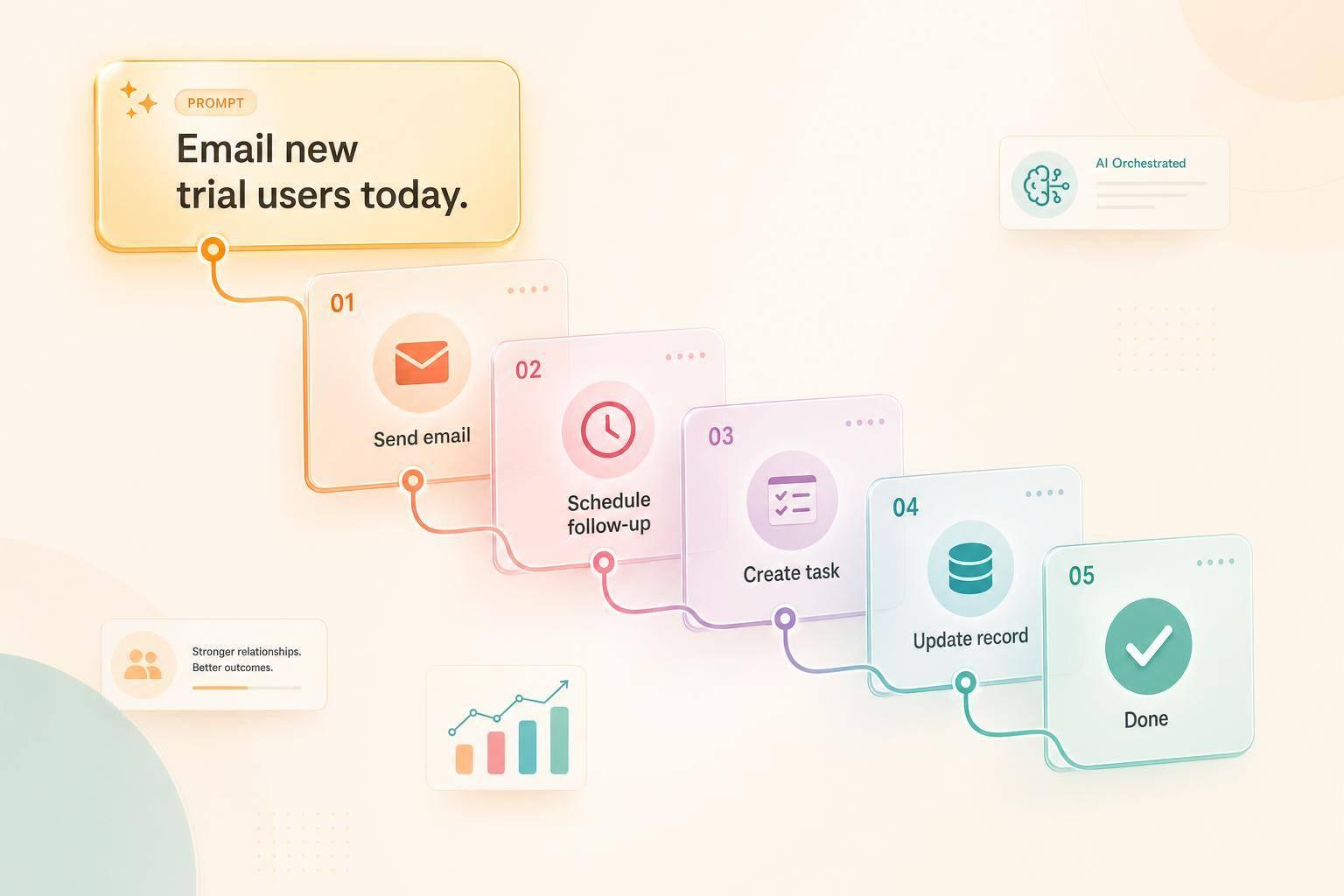
A prompt-driven CRM is a CRM where I can type a goal in plain English and the system turns that goal into actions like updating records, sending follow-ups, and moving deals. The main difference from older CRM software is simple: the prompt is the interface, not forms, fields, or rule builders.
If I am comparing CRM models, the short verdict is this: Salesforce, HubSpot, Close, Attio, and Zoho mostly help teams work inside a set system, while a prompt-driven CRM tries to run the work after I state the outcome I want.
I would describe it as a shift from manual setup and rule maintenance to goal-based execution. Instead of telling the system each step, I tell it what result I want, and it handles the sequence across email, SMS, tasks, and pipeline updates.
How it works in plain terms: I enter a request, the CRM reads intent, picks records and channels, builds a plan, and then executes it. That can include creating contacts, sending outreach, updating stages, logging calls, and stopping follow-ups when a meeting is booked or a lead declines.
That matters because sales reps still spend only 28% of their week selling, according to Salesforce Research, with the rest spent on admin and data work. The point of a prompt-driven CRM is to cut that non-selling load and keep pipeline data current with less manual input.
The line between prompt-driven CRM and AI-assisted CRM is also clear. AI-assisted tools like Salesforce Einstein, HubSpot Breeze, Attio AI, and Close AI can draft, summarize, or score, but the user still runs the workflow. A prompt-driven CRM goes further: it plans and carries out the work after the prompt is submitted.
In day-to-day use, the clearest examples are prompts like:
“Chase every inbound demo request until they book or decline.”
“Keep my pipeline stages updated from email threads.”
“Send a personal check-in to deals silent for 14 days.”
Those examples show the model well. I set the goal once, and the CRM keeps working until it hits the end condition or needs human judgment.
For a buyer, the main question is not whether a vendor says “AI-powered.” The better question is: Does the system just suggest actions, or does it actually execute them? That is the shortest test for whether a CRM is prompt-driven or just AI-assisted.
For small teams, that difference matters more because they often do not have a full-time CRM admin. The article notes that reps using AI-native automation for follow-ups and data entry save about 8 hours per week [6], and teams using pipeline monitoring close 9% more deals [9]. That does not mean prompt-driven CRM fits every company, but it does explain why this model is getting attention from startups and sales teams with lean ops support.
My short takeaway: a prompt-driven CRM is best understood as outcome-based CRM software that can plan and execute work from a plain-language request, not just store data or suggest next steps.
How a Prompt-Driven CRM Works
A prompt-driven CRM lets you type a plain-language request and turns that request into work inside the system. The prompt acts as the interface, while the CRM handles the steps behind the scenes.
From Goal Prompt to Action Plan
When you submit a prompt, the CRM reads the intent and maps it to CRM actions. It picks the records, channels, and steps needed to reach the goal.
The CRM then builds the action plan on its own: which contacts are involved, which channels to use, and what sequence of steps should happen next. After that, it carries out the work across email, SMS, tasks, and pipeline records.
What the CRM Does Automatically
Once the plan is set, the CRM executes it. It can create or update contact records, move deals between pipeline stages, send follow-up emails or SMS messages, log calls, and schedule tasks.
Salesforce Research says sales reps spend only 28% of their week actually selling, with the rest going to admin work and data management [9]. Prompt-driven CRMs cut down that admin load.
The table below shows the main types of work a prompt-driven CRM handles automatically:
Category | What the CRM Does Automatically |
|---|---|
Lead Management | Creates records, updates status, applies tags |
Deal Management | Moves pipeline stages, updates deal value |
Communication | Sends emails and SMS, adds contacts to sequences |
Task & Calendar | Schedules follow-ups, logs calls, creates reminders |
Stalled-deal monitoring | Flags dormant leads, surfaces overdue tasks |
How It Responds When Prospects Reply or Go Silent
After execution starts, the CRM keeps tracking replies, bookings, and inactivity. If a prospect books a meeting, the CRM updates the pipeline stage and stops any pending follow-ups [1][4]. If a prospect replies, it reviews the interaction and adjusts the timing and message of the next touchpoint [5].
It also watches for silence. If a deal has no recent activity, the CRM flags it as stalled and can trigger a re-engagement sequence or run a prompt such as drafting personalized check-in emails for every contact that has gone quiet [9].
Companies using pipeline monitoring close 9% more deals than teams that rely on reactive management [9]. That prompt-to-action loop is what sets prompt-driven CRMs apart from rule-based systems.
Prompt-Driven CRM vs. Traditional CRM
The main difference is simple: traditional CRMs ask users to enter and maintain data, while prompt-driven CRMs do the work from a prompt. For sales and revenue teams, that changes both setup time and day-to-day admin work.
Traditional CRMs usually need onboarding, field mapping, and admin setup before the team can use them well. Prompt-driven CRMs can connect to email and calendar, then build activity history from that data and start logging activity in minutes [8].
Side-by-Side Comparison Table
The table below shows how prompt-driven CRMs compare with common legacy platforms on the factors sales teams usually care about first.
Prompt-Driven CRM (e.g., K3X) | Salesforce | HubSpot | Close | Attio | ||||
|---|---|---|---|---|---|---|---|---|
Primary Interface | Natural-language prompts | Dashboards, forms, menus | Dashboards, forms, menus | Visual pipeline and forms | Forms, tabs, menus | Boards and forms | Built-in calling, SMS, and email | Flexible data tables |
Automation Model | Goal-based, outcome-driven | Rule-based: when one condition is met, the CRM triggers a preset action | Rule-based sequences | Rule-based sequences | Rule-based automations | Rule-based automations | Rule-based sequences | Rule-based workflows |
Configuration | Any user | Admin/Sales Ops | Admin/Sales Ops | Sales rep or admin | Admin/power user | Team lead or admin | Sales rep or admin | Technical user or admin |
Setup Time | Minutes [8] | Days to weeks | Days to weeks | Days to weeks | Days to weeks | Days to weeks | Days to weeks | Days to weeks |
Maintenance Burden | Low; AI captures and updates automatically | High; manual logging and updates | Medium to high | Medium | Medium | Medium | Medium | Low to medium |
Learning Curve | Near-zero | Steep | Moderate | Low to moderate | Moderate | Low to moderate | Low to moderate | Low to moderate |
Typical Fit | Small teams, startups, solo founders | Large enterprises with dedicated Sales Ops | Teams wanting a broad marketing, sales, and service suite | Sales-focused SMB teams | Teams wanting a broad integrated suite | Cross-functional teams | Inside sales teams | Technical, data-forward teams |
These workflow differences help explain why older CRM platforms still work better for some teams. They also shape how much manual work reps and ops teams deal with every day.
Where Legacy CRMs Still Have the Edge
Legacy CRMs still win in a few clear areas: control, range, and compliance. That matters most for larger teams with set processes, approval layers, and audit needs.
Salesforce is still the best fit for large companies that need deep customization and have a dedicated Sales Ops team. HubSpot and Zoho cover more than sales, with tools for marketing and service in the same system. Close is strong on built-in communication, with calling, SMS, and email in one place. Attio gives technical teams a flexible data model and strong API depth. These platforms also support manual control, which some companies need for audit trails or compliance reviews.
Legacy CRMs give up ease of automation in exchange for more control, more surface area, and tighter process management.
Prompt-Driven CRM vs. AI-Assisted CRM

Prompt-Driven CRM vs. Traditional CRM vs. AI-Assisted CRM
The main difference is simple: AI-assisted CRM helps the user inside a manual system, while prompt-driven CRM runs the work from a prompt. That distinction matters more than whether a vendor says its product is "AI-powered."
Many CRMs marketed as AI-powered are still AI-assisted. In that model, a team still sets up and maintains pipelines, fields, workflow rules, and forms by hand. The AI works inside that setup, but it does not replace it.
What AI-Assisted CRM Looks Like in Practice
AI-assisted CRM means the AI helps with tasks, but the user still controls the workflow. In practice, the system can draft emails, summarize records, score leads, or suggest next steps, while humans still manage the underlying process.
HubSpot Breeze, Salesforce Einstein, Attio AI, and Close AI are examples of AI-assisted CRMs [3][8]. These tools add AI features to a configured CRM, but they do not, by default, carry out actions on their own.
As Jason McDonald, Founder of PipeCrush, put it:
"A non-agentic AI assistant can tell you things. It can summarize a deal record. It can suggest email copy. But it cannot actually create the deal, update the stage, or send the email. You still have to do that yourself." [9]
That quote gets to the point. If the system needs a person to approve sending an email, moving a deal, or logging an activity, then it is AI-assisted, not prompt-driven.
What Sets an AI-Native, Prompt-Driven CRM Apart
A prompt-driven CRM uses the prompt as the main interface. Instead of clicking through forms and rule builders, the user describes the outcome in plain English, and the system handles the steps.
In this model, the CRM can plan and carry out work on its own. That can include sending follow-ups, updating pipeline stages, logging activity, and adjusting when a prospect replies or stops responding.
K3X is an example of this model. K3X is an AI-native, prompt-driven CRM where users enter a goal, and the system runs outreach, updates pipeline stages, and logs activity across email, SMS, and calls [6].
Put plainly, AI-assisted CRM adds AI to a manual workflow. Prompt-driven CRM turns the prompt into the workflow.
Feature | AI-Assisted CRM (e.g., HubSpot Breeze, Salesforce Einstein, Attio AI) | AI-Native, Prompt-Driven CRM (e.g., K3X) |
|---|---|---|
Primary interface | Forms, menus, tables, and sidebars | Natural-language prompts |
What AI does | Suggests, drafts, scores | Plans and executes |
Automation model | Manual rules and if-then builders | Goal-based prompts |
User role | Approves actions and maintains workflows | Sets the goal; AI handles the steps |
3 Real Prompts a Sales Team Would Use
These examples show what a prompt-driven CRM looks like in day-to-day sales work. The prompt is the user interface, and the AI agents handle the follow-up, record updates, and deal routing behind the scenes.
"Chase every inbound demo request until they book or decline"
This prompt automates inbound demo follow-up from the first touch. When a demo request comes in through email or a form, the CRM creates a lead record, sends an intro email, and offers meeting times right away [1][4].
If the prospect doesn't reply, the system keeps following up on a set schedule and can switch channels when needed [5]. Once a meeting is booked, the agent stops the sequence and moves the deal to "Meeting Booked." [2] If the prospect sends a clear "not interested", the CRM marks the lead as "Declined" and logs the reason [5].
"Keep my pipeline stages updated from email threads"
This prompt keeps pipeline data current by reading what buyers are saying in email. It scans threads for buying signals and signs that a deal has stalled, then updates the stage based on that activity [10].
For example, a deal can move from "Discovery" to "Negotiation" when the thread shows stronger buying intent [10]. The system also watches for inactivity. If a deal stays in "Negotiation" for 18 days without a reply, the agent marks it as "At Risk" and alerts the manager [5].
"Send a personal check-in to deals silent for 14 days"
This prompt handles re-engagement for deals that have gone quiet. Companies using proactive pipeline monitoring close 9% more deals than teams using reactive management [9].
When the prompt runs, the CRM scans the activity feed for deals with no new activity in the past 14 days [2][9]. For each one, it drafts a message tied to the last conversation, rather than sending a generic check-in. For example: "Following up on our chat about the March update." The message is sent through the prospect's preferred channel, and the "Last Contacted" field updates on its own [5][9].
If the prospect replies, the agent detects that signal, stops the sequence, and alerts the rep to step in with a manual follow-up [6][2].
Why Prompt-Driven CRMs Matter for Small Businesses
For teams of 1 to 9 people, CRM use often rises or falls on one thing: how much admin work the system adds. If there’s no CRM admin, even a good tool can turn into one more job for reps.
The Admin Work Behind CRM Adoption Problems
The main issue is upkeep. Fields go out of date, tasks pile up, and follow-ups slip when no one owns the system day to day.
Traditional CRMs like Salesforce, HubSpot, and Zoho often assume someone will handle setup and maintenance. In small teams, that work usually lands on reps instead. They have to click through records, fill out forms, and deal with setup choices that take time away from selling. The result is stale records, missed follow-ups, and pipeline data that people stop trusting.
That’s why prompt-driven automation matters most for small teams. It cuts out the work that often causes CRM use to fall apart.
Why Small Teams Get More From Outcome-Based Automation
A prompt-driven CRM shifts the job from manual input to simple review. The rep states the goal, and the system logs activity, updates stages, and handles follow-up on its own.
That matters because time is tight in a small team. Instead of acting like part-time data entry staff, reps spend more of their time checking what the system did and stepping in where judgment is needed.
The payoff is lower admin load and more selling time. Reps using AI-native automation for follow-ups and data entry save an average of 8 hours per week [6]. For a small business, that can be enough to keep CRM data current without hiring RevOps support.
That same model is what the next section calls AI-native CRM and outcome-based automation.
Related Terms to Know
These three terms describe different parts of how prompt-driven CRMs work. They’re connected, but they do not mean the same thing.
AI-Native CRM
An AI-native CRM is built with AI at the center of the product and the user experience. In these systems, prompts are the main way people use the CRM.
A simple test helps here: if the CRM still works the same way without AI, then AI was added later. That makes it AI-added, not AI-native. Prompt-driven CRM fits inside this group, but AI-native CRM is the broader label.
Autonomous CRM
An autonomous CRM does more than suggest the next move. It takes action on its own, including follow-ups, stage changes, and call logging, without asking for approval at each step.
The user sets the goal, and the system handles the smaller choices needed to get there. In a prompt-driven CRM, that action usually begins after the user submits the prompt.
Outcome-Based Automation
Outcome-based automation focuses on the end result, not a fixed chain of rules. The user states the goal, and the system decides the steps, timing, and channels needed to get there.
This is the automation model described in the workflow section above [2][10].
Term | What It Describes | Role in Prompt-Driven CRM |
|---|---|---|
AI-Native CRM | System architecture | The foundation that makes prompts the primary interface |
Autonomous CRM | Execution behavior | The layer that carries out prompt instructions |
Outcome-Based Automation | The way the system decides what to do next | The logic applied when a goal prompt is submitted |
In practice, prompt-driven CRMs bring all three together: AI-native architecture, autonomous execution, and outcome-based automation.
What to Compare Before Choosing a Prompt-Driven CRM
Compare CRMs on three things first: setup burden, automation depth, and price. Those are the buying-stage differences that tend to shape day-to-day use fastest.
For sales and revenue teams, the main issue is simple: how much work will the CRM add before it starts saving time? A tool can look strong in a demo and still create admin drag once your team starts building fields, workflows, and reports.
Feature and Pricing Snapshot
Use the numbers below as starting points, not fixed totals. Pricing often changes by plan, seat count, and usage-based charges [3][6][7].
Platform | Admin Burden | SMB Fit (1–9 seats) | Entry Pricing |
|---|---|---|---|
K3X | Low | High | $20/seat/month [6] |
Salesforce | High | Low | |
HubSpot | Medium | Medium | About $150/user/month + usage fees [7] |
Pipedrive | Medium | High | Plan-dependent |
Zoho | High | Medium | About $52/user/month for AI agents on the Ultimate tier [7] |
monday.com | High | Medium | Plan-dependent |
Close | Medium | High | Plan-dependent |
Attio | Low | High | Plan-dependent |
A few patterns stand out from this snapshot. K3X and Attio sit on the lower end of admin burden, which matters for small teams without a full-time CRM owner. Salesforce, Zoho, and monday.com lean heavier on setup, so they often ask for more process design before teams get steady value.
When a Prompt-Driven CRM Is the Better Fit
A prompt-driven CRM is the better fit when the system needs to do work, not just store it. If reps are spending more time updating records than moving deals, that’s usually the clearest signal.
This model tends to fit best when the team is small, changes process often, and does not have a dedicated admin to maintain automations. In that setup, lower setup burden can matter as much as feature count because the cost is not just the subscription price - it’s also the hours spent keeping the CRM usable.
Legacy CRMs still fit larger teams that need stricter governance and deeper customization. That can matter when multiple business units share one instance, when approval rules are strict, or when reporting needs span sales, service, and finance.
Close is a reasonable choice for teams that want an activity-focused CRM with structured sequences. Attio is worth a look for teams that want flexible, data-first relationship management instead of a fixed sales funnel.
Resources
Product details: k3x.ai/features
Implementation questions: k3x.ai/faq
FAQs
Is a prompt-driven CRM the same as an AI CRM?
No. An AI-powered CRM is usually a standard CRM with AI features layered onto a manual interface.
A prompt-driven or AI-native CRM puts AI at the center of how you use the system. Instead of clicking through menus or setting up workflows by hand, you describe what you want in plain language, and the CRM plans and carries out the work across your data.
Do I need technical skills to use a prompt-driven CRM?
No. Prompt-driven CRMs are built to cut out manual setup, deep menus, and workflow builders by using natural-language prompts.
Instead of writing code or setting rules by hand, you describe the result you want, and the CRM’s AI maps out and carries out the steps. That lets non-technical users handle CRM tasks without technical skills.
What is an example of a prompt-driven CRM?
K3X is a prompt-driven CRM built for small teams of 1 to 9 users. It uses natural language instructions, so a user can describe a job - such as following up with inbound leads or updating pipeline stages - and the system then plans and executes that work across email, SMS, and calls.
In plain terms, the product treats CRM work like a prompt. Instead of clicking through fields and task menus, users tell the system what they want done, and it handles the steps needed to carry it out.
Other examples in this category include Plaintext CRM and unLocked AI.
Are prompt-driven CRMs secure?
Yes. Prompt-driven CRMs usually use the same core security approach as standard CRMs, and many are built for enterprise use. In practice, that means they often rely on the same database structures, access controls, and admin guardrails buyers already expect.
Well-run systems also add controls for AI-driven actions. These often include scoped permissions to limit what a model can access or do, action budgets to cap how many actions automation can take, and audit trails so teams can review what the AI did and when.