Sales Automation
•
What Is a Zero-Admin CRM? Sales Software Without Data Entry
A zero-admin CRM automatically updates records from email, calls, and meetings—best for small sales teams that want less manual admin.

A zero-admin CRM is a CRM that updates records on its own from rep and buyer activity, instead of waiting for reps to type in notes, move deals, and set reminders. In plain terms, it pulls data from email, calendars, calls, texts, forms, and meetings, then uses those signals to update contacts, deal stages, and next steps.
My short take: this model is most useful for small sales teams that do not have time for CRM upkeep. It matters because reps spend only 28% of their week selling, while the rest goes to admin work and other tasks, and about 47% of manually entered CRM data is incomplete or out of date within six months.
What changes in practice?
A standard CRM stores what people enter. A zero-admin CRM updates the record from activity that already happened. That means the system can log a meeting, attach a call summary, create a follow-up task, or move a deal stage based on signals instead of manual input.
I’d frame the difference this way: the source of truth shifts from rep memory to activity data. That matters for pipeline visibility, follow-up timing, and forecast quality.
What does it watch?
Most zero-admin systems listen to a small set of inputs:
Email and calendar activity for contacts, threads, and booked meetings
Calls and SMS for outcomes, replies, and voicemail logs
Forms and video meetings for new leads, attendee data, and transcripts
The point is simple: the record updates from the tools reps already use, not from end-of-day cleanup. This is made possible through a unified webhook system that connects various sales tools.
How is it different from standard CRM software?
The core split is manual vs. automatic record upkeep. Tools like Salesforce, HubSpot, and Pipedrive still depend more on rep updates or admin-built rules, even when they include AI features. Tools built around the zero-admin model try to remove that step and let the system handle record updates and follow-up from live signals.
For operators, that changes two things fast:
Pipeline hygiene: fewer stale records
Rep time: less time spent logging work after the fact
One data point in the article stands out: an opportunity with no logged interaction for 21 days is 3x less likely to close. If the system logs activity as it happens, that gap is easier to spot.
Which tools fit this model?
The article places tools on a range rather than in one bucket. K3X is presented as the clearest zero-admin example because users describe an outcome in plain language and the system handles follow-up across email, SMS, and calls. By contrast, Salesforce, HubSpot, Zoho CRM, monday.com, Close, Pipedrive, and Attio each cut admin in part, but still rely more on setup, workflows, or rep input.
I would not treat all “AI CRM” products as the same thing. Some add AI to a standard CRM model; others try to replace manual upkeep at the record level.
Why does this matter most for small teams?
For teams of 1–9 people, there is often no admin or ops layer cleaning up records in the background. If a rep forgets to log an email or misses a next step, the pipeline gets stale fast.
That is why the article’s main point lands: zero-admin CRM is not just automation added on top. It is a different way of keeping the CRM current, where the system updates the record and moves follow-up forward without asking reps to do routine data entry.
Bottom line
If I had to define it in one sentence, I’d say this: a zero-admin CRM is sales software that keeps itself current from live activity and handles follow-up with little manual upkeep. For teams comparing CRM options, the practical question is not “Does it have AI?” but “Does it still depend on reps to keep the system up to date?”
CRM Applications Reimagined with AI and Agentic Capabilities
TL;DR: What Is a Zero-Admin CRM?
A zero-admin CRM keeps records up to date on its own. It logs contacts and activity, moves deals based on buyer and rep actions, and starts follow-up tasks without asking reps to type everything in by hand.
A standard CRM depends on sales reps to add notes, log calls, update stages, and keep workflows moving. A zero-admin CRM uses AI to pull data from email, calendars, calls, and chat tools, then updates the CRM from those signals.
The next section breaks down the signals it watches and how those updates happen automatically.
How Does a Zero-Admin CRM Work?
A zero-admin CRM updates itself by pulling activity from the tools reps already use. In practice, it does three things: it collects signals, matches them to the right record, and handles follow-up without manual data entry.
What Signals Does It Listen To?
It listens to three main signal groups. Email and calendars provide contact details, message history, and meeting confirmations. Calls and SMS add voicemail logs, reply status, and conversation outcomes. Forms and video meetings add new contact records, attendee details, and transcripts [4][6][5].
The point is simple: the CRM record updates from live activity instead of waiting for someone to log it later. That gives sales teams a working record of what happened, when it happened, and with whom.
How Does It Turn Activity Into CRM Updates?
When a new signal arrives, the system writes the update to the CRM record. A scheduled meeting can move a deal to the next stage. A call transcript can produce a summary and create a follow-up task.
This matters because about 47% of manually entered CRM data becomes incomplete or out of date within six months [2]. Data captured at the source is less likely to go stale than data that depends on reps updating fields after the fact.
How Does Follow-Up Happen Without Workflow Builders?
The last part is follow-up execution. Older CRMs often need admins to build "if-then" workflows, and reps still have to carry out the outreach themselves.
A zero-admin CRM shifts that model. The rep states the outcome in plain language, and the system handles the next steps across channels. K3X, for example, lets users describe an outcome in plain language, and its AI agents execute follow-up across email, SMS, and calls.
How Is a Zero-Admin CRM Different From a Standard CRM?
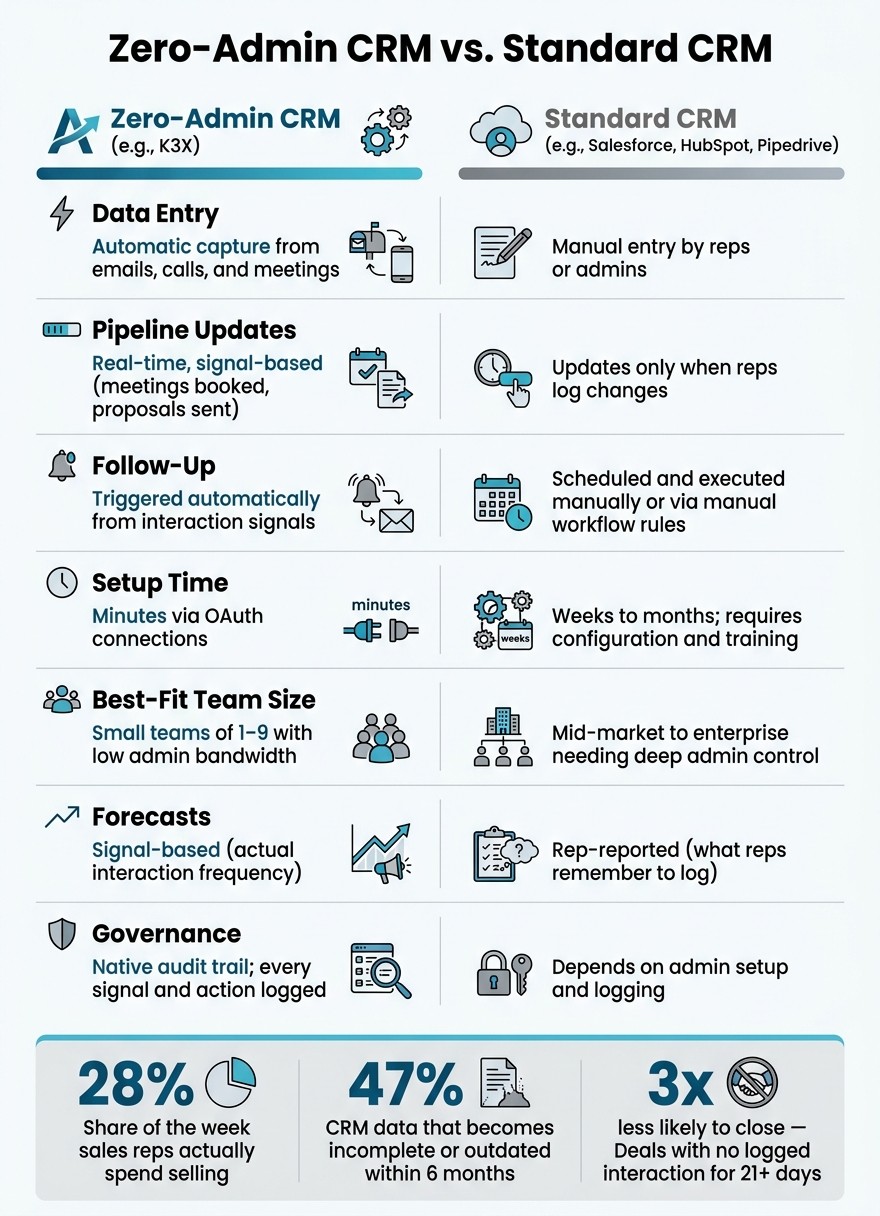
Zero-Admin CRM vs. Standard CRM: Key Differences at a Glance
A standard CRM depends on reps to type in updates. A zero-admin CRM pulls in sales activity on its own, updates deal stages from what actually happened, and handles follow-up with little manual work.
That changes daily sales work in a pretty direct way. Instead of asking reps to log calls, move deals, and set reminders, the system uses live signals like emails, meetings, and proposals to keep records current [1][3][4].
Comparison Table: Zero-Admin CRM vs. Standard CRM
This table shows the day-to-day difference between the two models.
Dimension | Zero-Admin CRM (e.g., K3X) | Standard CRM (e.g., Salesforce, HubSpot, Pipedrive) |
|---|---|---|
Data Entry | Automatic capture from emails, calls, and meetings [4] | Manual entry by reps or admins [3] |
Pipeline Updates | Real-time, signal-based (meetings booked, proposals sent) [1][4] | Updates only when reps log changes [1] |
Follow-Up | Triggered automatically from interaction signals [3] | Scheduled and executed manually, or via manual workflow rules [3] |
Setup Time | Minutes via OAuth connections [7] | Weeks to months; requires configuration and training [3] |
Governance | Native audit trail; every signal and action logged [2] | Depends on admin setup and logging [2] |
Best-Fit Team Size | Mid-market to enterprise needing deep admin control [1] | |
Forecasts | Signal-based (actual interaction frequency) [4] | Rep-reported (what reps remember to log) [4] |
For sales and revenue operators, the main split is simple: source of truth. In a zero-admin setup, the record comes from activity data. In a standard CRM, the record depends more on rep behavior and admin process.
That also affects forecast quality and pipeline hygiene. If meetings, emails, and proposals are logged as they happen, managers can see deal movement based on actual buyer activity, not just what a rep entered later [4].
The next section shows real tools that use this model.
Real Examples of Zero-Admin CRM Tools
These tools sit on a spectrum. Some cut admin work with AI or automation, while others still lean on manual updates, configured workflows, or both. K3X sits at one end because it turns a plain-language outcome into follow-up across channels, rather than asking users to build the logic first.
K3X

K3X is an AI-native, prompt-driven CRM built for teams of 1–9 people. Users describe an outcome in plain English, and its AI agents carry it out across email, SMS, and calls without workflow builders, sequences, or triggers. Pricing starts at $20 per seat per month, includes 1,000 AI credits, unlimited integrations, a built-in power dialer, no long-term contracts, setup in under 1 hour, and a 14-day free trial at k3x.ai [3].
Limitations: K3X is a newer product. Its native integration catalog is smaller than what large incumbents offer, teams need to watch AI-credit usage, and it is not built for 100+ seat enterprises or deep admin governance.
The tools below cut admin in narrower ways. They help, but they still depend more on setup, logging, or workflow upkeep over time.
Salesforce, HubSpot, Pipedrive, Zoho, monday.com, Close, and Attio
Salesforce still depends on manual data entry and admin-run workflows. Its AI sits on top of a standard CRM model instead of replacing that model [1][3].
HubSpot adds AI help to a form-based CRM. Teams still need to configure deeper workflows by hand.
Pipedrive uses AI suggestions on top of a standard pipeline. Deal stages still depend on rep updates or rule-based automation.
Zoho CRM includes Zia AI and a broad set of automation options. Those features still take setup time to use well.
monday.com supports trigger-based sales automations. Someone still has to build those automations and keep them working.
Close keeps calling, SMS, and email in one place for inside sales teams. Sequences still need manual setup.
Attio is an AI-native CRM with a simpler interface and less manual entry. Even so, it is still closer to a configurable CRM than to K3X’s prompt-to-action model.
Comparison Table: Approach, Complexity, and Pricing
The table below shows the main tradeoff: less admin usually means less manual setup, but not all tools reduce it in the same way.
Tool | Admin Reduction Style | Setup Complexity | Small-Team Fit |
|---|---|---|---|
K3X | Prompt-driven; AI agents execute outcomes across email, SMS, and calls | Low - under 1 hour | Optimized for 1–9 people |
Salesforce | Traditional CRM with AI layered on top | Very high - often requires dedicated admins | Better for larger teams |
HubSpot | AI assistance on a form-based CRM | Medium | Small to mid-market |
Pipedrive | AI recommendations over a traditional pipeline | Medium | Small to mid-market |
Zoho CRM | Broad automation with AI suggestions | Medium to high | Small to enterprise |
monday.com | Trigger-based sales automations | Medium | Small to mid-market |
Close | Built-in communication tools with manual sequence setup | Low to medium | Inside sales teams |
Attio | AI-native data modeling with lighter admin burden | Low to medium | Small teams |
The next section explains why that gap matters most for small teams.
Why Does a Zero-Admin CRM Matter for Small Teams?
A zero-admin CRM matters because small teams don’t have spare time for CRM upkeep. When a team has 1–9 people, time spent logging calls, updating records, and chasing missing fields takes time away from sales conversations and follow-up [8][1].
That tradeoff shows up fast. Fewer manual tasks usually means more time selling and fewer gaps in the data that the team depends on.
What the Numbers Say About CRM Admin Work
The numbers are blunt: sales reps spend only 28% of their week selling. The other 72% goes to admin work, meetings, and keeping records up to date [1].
Data quality also slips fast when updates depend on manual effort. About 47% of CRM data is incomplete or outdated after just six months [2]. On top of that, an opportunity with no logged interaction for 21 days is 3x less likely to close [4].
For a small sales team, that’s not a minor workflow issue. It affects pipeline visibility, follow-up timing, and forecast accuracy almost right away.
Why the Impact Is Bigger for Teams of 1–9 People
The impact is bigger for teams of 1–9 because there’s usually no admin or ops buffer in the background. If a rep forgets to log an email or misses a task, there often isn’t another person there to catch it.
Small teams tend to win through direct, personal follow-up. That works well at low volume, but manual CRM work starts to crack as activity picks up. Missed updates turn into missed handoffs, stale deal records, and slower response times.
A zero-admin CRM helps by logging activity on its own and keeping follow-up in motion without relying on manual prompts [3][4].
Next, the related terms section defines prompt-driven CRM, AI-native CRM, and automated data capture.
Related Terms to Know
These terms refer to different parts of the same CRM setup: interface, architecture, logic, and input. Together, they show how zero-admin systems run across the user layer, system layer, and data layer.
Prompt-Driven CRM
A prompt-driven CRM refers to how people give instructions to the system. Users type plain-language requests like "What deals need attention this week?" or "Follow up with every inbound lead until they book or decline", instead of clicking through menus or filling in fields.
This is an interface shift, not the full system model. Prompt-driven explains how someone uses the CRM, while zero-admin explains whether the CRM updates and runs on its own. K3X is one example of a platform that combines both. More detail is on the What Is a Prompt-Driven CRM? glossary page.
AI-Native CRM, CRM Automation, and Automated Data Capture
These three terms each cover one part of the zero-admin model, but none of them describes the full setup by itself.
AI-native CRM refers to architecture. It means AI is built into the core system, not added later as a separate feature. CRM automation then describes the rule-based logic that turns signals into actions.
CRM automation refers to logic. These are rule-based workflows that handle repeatable tasks, but they still need someone to set up and maintain the rules. Automated data capture provides the input those rules act on.
Automated data capture means the CRM pulls activity from email, calls, calendars, and meetings into the system without manual entry. Zero-admin CRM goes a step further: it also keeps pipeline stages up to date and runs follow-up without manual triggers [1].
Term | Focus | Role in Zero-Admin Model |
|---|---|---|
Zero-Admin CRM | The outcome | The result: a CRM that keeps itself current. |
AI-Native CRM | The architecture | Built with AI as the core engine, not a feature add-on. |
CRM Automation | The logic | Rule-based workflows that handle predictable tasks. |
Automated Data Capture | The input | Pulls activity from source tools to eliminate manual logging. |
Prompt-Driven CRM | The interface | Natural-language interaction with the system. |
Zero-admin CRM is the result when data capture, automation, AI, and interface work together.
Key Takeaways on Zero-Admin CRM
A zero-admin CRM stays current on its own. It logs contacts and activity, moves deals based on actual buyer and rep actions, and keeps follow-up moving without manual data entry.
The key difference is structural, not cosmetic. A standard CRM may include automation, but it still relies on people to enter the data that starts those rules. A zero-admin CRM removes that dependency at the source.
That gap matters most for small teams. When there’s no operations or admin layer to catch missed updates, stale records pile up fast and follow-up slips.
So this is more than CRM automation with AI added on top. A zero-admin CRM keeps the record current and the next step moving without constant manual upkeep. Put simply, the CRM updates itself instead of waiting for rep input.
FAQs
Why do CRMs require so much admin work?
Traditional CRMs are mostly passive systems of record, not active systems of engagement. In plain terms, they store data after someone enters it, which leaves reps doing two jobs at once: selling and manual admin.
That setup creates a simple problem. Since these systems can’t read calls, emails, meetings, or buyer signals on their own, they rely on reps to log and update everything. When that habit slips - as it often does under quota pressure - the CRM starts to drift fast, with missing fields, wrong details, and stale records.
How does a CRM update itself?
An AI-driven CRM updates records on its own by watching communication signals in real time, rather than waiting for reps to type in notes later. It connects to tools like email, calendar, phone, and messaging apps to record interactions as they happen.
From there, AI pulls out the main details, logs activity, updates deal stages when key milestones are hit, merges duplicate contacts, and adds missing record data. The result is a pipeline that stays current without manual data entry or reps having to drag deals from one stage to the next.
Is zero-admin the same as automated data capture?
No. Zero-admin is broader than automated data capture.
Automated data capture logs emails, calls, and other activity without manual input. Zero-admin includes that, but it also uses that captured data to update pipeline stages, forecasts, and follow-ups on its own, so reps don’t have to maintain the CRM by hand.
What is an example of a zero-admin CRM?
K3X is a factual example of a zero-admin CRM. It is built for small teams of 1 to 9 people and uses an AI-native model instead of manual workflow setup.
Users describe the outcome they want in plain language. From there, AI agents plan and carry out follow-up across email, SMS, and calls.
This setup fits teams that want to move fast without spending time on CRM admin work. At the same time, K3X is a young product, so its native integration catalog is smaller than what you’ll find with legacy incumbents.
It is also not built for large enterprises that need deep admin governance or complex control layers.