Sales Automation
•
How to Stop Losing Leads: Automate Every Handoff in Your Pipeline
Fix four internal handoffs with SLAs and automation — choose K3X for small teams and HubSpot/Salesforce for enterprise governance.

Most leads are lost between stages, not at lead intake. I’d fix the four handoffs that leak most often, set a clear owner and SLA for each, then automate the next action so no lead waits on rep memory.
If I were comparing tools, my one-line view is simple: Salesforce and HubSpot fit teams that need more admin control, while K3X fits small teams that want prompt-based follow-up with less setup. The right choice depends on team size, process depth, and how much CRM admin work you can support.
The core point is straightforward: more traffic will not solve a broken pipeline. The article shows that 30% to 50% of revenue can leak at handoffs, and that firms with formal handoff stages get 9.3 wins per 1,000 inquiries versus 4.6 without them.
I’d focus first on these four points:
Form submission → first response
First meeting → follow-up
Proposal → close
Verbal yes → signed deal
The numbers make the case. Responding within 5 minutes can lift connect rates by 100x, while qualification odds drop by 80% after that window. AE follow-up within 24 hours converts at 73% versus 49% after 48 hours. Deals stuck in proposal for more than 18 days are about 3x more likely to be lost. Up to 20% of verbal commits stall before paperwork is done.
What I’d do this week is simple:
Audit time to first response
Check whether SDR notes and buyer context make it into the CRM
Flag deals aging past 14 days in Discovery or 18 days in Proposal
Find records with no owner, no due date, or no next step
Mark every handoff that still depends on a rep remembering what to do
The article’s best takeaway is this: automation should cover the gap between stages, not just log activity inside them. Manual rules help, but they break when reps skip notes, miss timers, or move deals forward with blank fields.
That is why the article splits fixes into three layers:
Manual fallback
Outcome-based automation
For small teams, prompt-based tools with native integrations can cut setup time. Instead of building workflow trees, a manager can write a plain-English instruction such as sending a follow-up within 5 minutes, nudging stalled proposals after 3 days, or reminding signers 48 hours after verbal approval. For larger teams, rule-based systems still give tighter control, audit trails, and governance.
My short verdict: start with the biggest leak, add a hard SLA, add required fields, then automate the handoff. If inbound is fine but revenue is flat, the problem is usually not lead volume - it is the space between stages.
Stop Losing Leads! Fix Your HubSpot Sales Handoff in Under 45 Mins | HubSpot User Group 26'
TL;DR: The 4 handoffs where most leads go cold
Most lead loss happens during four internal transitions, not at the top of the funnel. If you fix these handoffs, you can recover more revenue than you would by spending more on traffic.
Handoff leaks waste leads that were already qualified. Companies with formal handoff stages generate 9.3 wins per 1,000 inquiries, compared with 4.6 wins for companies without them [8]. Roughly 30% to 50% of revenue leaks out at these internal friction points [2].
The four handoffs that matter most are form submission → first response, first call/meeting → structured follow-up, proposal/quote → close, and verbal yes → signed deal. Each breaks for a different reason, and each has a fix you can measure with AI-native CRM automation.
Handoff Stage | Typical Leak Pattern | Why it fails |
|---|---|---|
Form submission → First response | High, immediate | Slow speed-to-lead [7] |
First call/meeting → Structured follow-up | 27% of qualified meetings never become an opportunity [5] | Lost context and "why now" triggers |
Proposal/quote → Close | ~45% of qualified deals die before a proposal is sent [4] | No structured gate or ownership |
Verbal yes → Signed deal | Up to 20% of verbally committed deals stall before contracts are executed [2] | Momentum loss and delayed paperwork |
Next: where each handoff breaks, and how to fix it.
Where do leads actually leak in your pipeline?
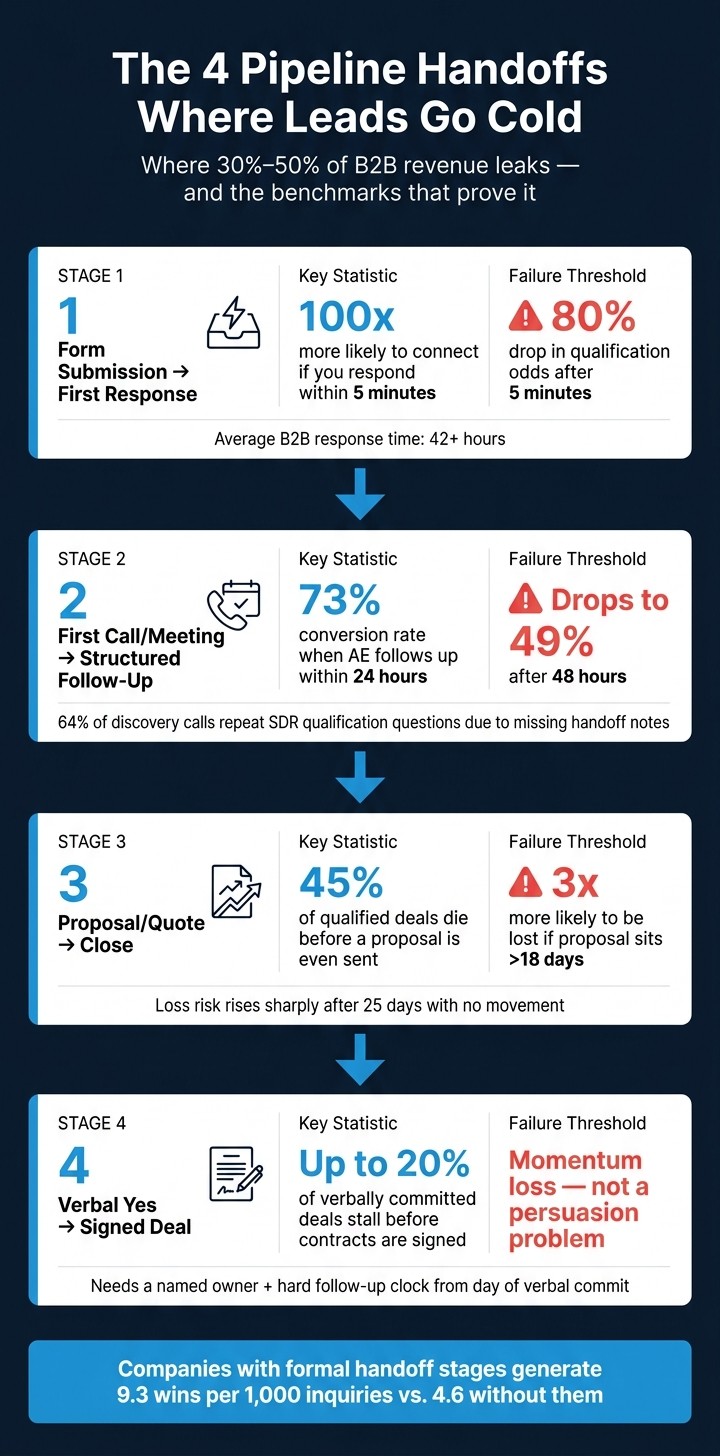
The 4 Pipeline Handoffs Where Leads Go Cold (With Key Metrics)
Leads usually leak at the handoffs between stages, not all across the funnel. If you want to find the problem fast, start by measuring the four transitions below before you change rep behavior, routing rules, or CRM setup.
Handoff 1: Form submission → first response
The first leak is response time. If your team waits too long after a form fill, many leads never connect at all.
Companies that respond within five minutes are 100x more likely to connect than companies that wait 30 minutes, and the odds of qualifying a lead drop by 80% after that five-minute window [3][7]. Yet the average B2B response time is still more than 42 hours [3][7]. That means many teams are losing pipeline before the first conversation starts.
Seventy-eight percent of customers buy from the company that responds first [7].
Handoff 2: First call/meeting → structured follow-up
This leak happens when meeting notes, next steps, and buyer context stay with the rep instead of being logged in the CRM. When that happens, follow-up slows down and the buyer gets a disjointed experience.
Prospects contacted by an AE within 24 hours of a meeting being booked convert at 73%, while that rate drops to 49% if contact happens after 48 hours [5]. That gap is large enough to treat this handoff as a service-level issue, not just a coaching issue.
There is also a data transfer problem. In 64% of discovery calls, AEs repeat the same qualification questions the SDR already covered [5]. That usually points to missing notes, weak field discipline, or no clear handoff rule inside the CRM.
Once follow-up is logged and moving, the next leak tends to show up in proposal aging.
Handoff 3: Proposal/quote → close
This is one of the biggest leak points in B2B sales. A lot of qualified deals stall before the buyer even sees a formal proposal.
Roughly 45% of qualified deals die before a formal proposal is sent [4]. For deals that do reach proposal, time in stage matters. If a deal stays in the proposal stage for more than 18 days, it is about 3x more likely to be lost [4]. After 25 days with no movement, loss risk climbs fast [4].
For revenue teams, this means proposal dwell time should be tracked like a core pipeline health metric, not treated as background noise.
Handoff 4: Verbal yes → signed deal
The last leak is between verbal agreement and signed paperwork. This is usually a momentum problem, not a persuasion problem.
Up to 20% of verbally committed deals stall before contracts are executed [2]. Once the buyer says yes, urgency often drops on both sides. Legal review slows down, approvals wait, and the deal fades out without a formal no.
This stage needs a named owner, a due date, and a hard follow-up clock starting the same day the verbal commitment is recorded.
Handoff | Critical Metric | Benchmark | Failure Threshold |
|---|---|---|---|
Form submission → first response | Speed-to-lead | < 5 minutes | 80% qualification drop after 5 minutes [3] |
First call/meeting → structured follow-up | Handoff-to-first-touch | < 24 hours | 73% conversion within 24 hours; 49% after 48 hours [5] |
Proposal/quote → close | Proposal dwell time | < 18 days | About 3x higher loss risk; loss risk rises sharply after 25 days [4] |
Verbal yes → signed deal | Contract execution time | < 5 business days | Up to 20% of verbally committed deals stall before signing [2] |
Next, map each leak to a manual fix, then to rule-based CRM automation and outcome-based automation.
How do you fix each handoff before more leads slip away?
You fix each handoff with three layers of control: a manual fallback, rule-based automation, and outcome-based automation. If one layer is missing, leads can still end up with no owner.
Leads often stall in the space between stages, not inside the stages themselves. That’s why the control model matters: people need a backup process, systems need rules, and automation needs to drive the next step without waiting on manual setup.
The manual fix for each handoff
Manual controls are the fallback. They work, but only when managers and reps follow them every time.
Handoff | Manual rule |
|---|---|
Form submission → first response | Documented speed-to-lead SLA with a named queue owner and escalation path if no rep claims the lead [3] |
First call/meeting → structured follow-up | Meetings don't count toward SDR quota unless a complete handoff note covering context, pain points, and triggers is logged in the CRM within 24 hours [5] |
Proposal/quote → close | Mandatory qualification fields must be completed before a deal advances to proposal stage [4] |
Verbal yes → signed deal | Signed-deal checklist with a named owner and a hard follow-up clock starting the day verbal commitment is recorded [4] |
These rules are simple on paper. The problem is that they depend on habit, manager pressure, and clean CRM use. If a rep skips the note, misses the SLA, or advances a deal without the required fields, the handoff weakens fast.
Rule-based CRM systems can enforce these rules, but someone still has to set up and maintain the logic behind them.
How rule-based CRMs handle handoff automation
Most CRM platforms use triggers, workflows, routing logic, and validation rules to make handoffs more consistent. In practice, that usually means an admin or RevOps owner builds the logic, tests it, and updates it when the process changes.
Platform | Handoff automation method | Admin required? |
|---|---|---|
Salesforce | Workflow rules, Process Builder, Flow; validation rules on stage gates | Yes |
HubSpot | Workflow automation, deal stage triggers, sequence enrollment | Usually yes |
Automations, stage-based triggers, email sequences | Partial | |
Blueprint process management, workflow rules, assignment rules | Yes | |
Automations, board triggers, status-based routing | Partial | |
Close | Workflow automation, sequences, lead status triggers | Partial |
Workflow automations, attribute-based triggers | Partial | |
K3X | Prompt-driven AI agents execute outcomes across email, SMS, and calls | No |
This setup can work well, but the burden sits with the team managing the CRM. Reps usually don’t edit workflow trees or routing logic themselves. So when the sales process shifts, automation often lags behind until someone updates the rules.
That admin load is the point where prompt-driven automation changes the handoff model.
How outcome-based automation changes the process
Outcome-based automation removes the need to build a workflow before work starts. Instead of mapping triggers and branches, the user gives a plain-language instruction and the system carries out the task.
Leads often die at handoffs because no one owns the gap between stages. Prompt-driven automation closes that gap without requiring workflow setup first. A user types an instruction such as, "Follow up every inbound lead within 5 minutes until they book a call or decline", and K3X's AI agents plan and execute the outreach across email, SMS, and calls without trigger or sequence configuration [10].
The agent keeps working until the lead books, declines, or the task is complete. That matters for common handoff points like speed-to-lead response, post-meeting follow-up, proposal chasing, and contract nudges, where delays usually come from rep memory or queue confusion.
For these handoff use cases, the instruction replaces the workflow. If the process changes, the user updates the prompt instead of rebuilding logic.
Next, audit which handoffs still depend on rep memory.
A leak-audit checklist you can run this week
Run four reports and review a sample of recent deals. Use the four handoffs above as the audit map, and look first at response speed, handoff completeness, stage aging, and ownership gaps.
Measure response speed, follow-up depth, and stage aging
Start with time-to-first-response, which is the gap between lead creation and the first logged outreach activity [3][9]. Break this out by lead source, since each source needs its own SLA.
Lead Source | Target First Response |
|---|---|
Demo Request | < 5 minutes [7] |
Pricing Inquiry | < 15 minutes [7] |
Free Trial Signup | < 1 hour [3] |
High-Intent Content | < 4 hours [3] |
Webinar Registration | < 24 hours [7] |
Next, review handoff completeness. Check MQL rejection rate, reason codes, and handoff documentation [3][1][9]. If more than 40% of MQLs are rejected without a specific reason code, the marketing-to-sales feedback loop is broken [3][1].
Also compare meeting show rates for records with full handoff notes versus sparse documentation [5]. That gives you a clear read on whether missing context is hurting conversion before the meeting even starts.
Then review stage aging. Deals sitting more than 14 days in Discovery or 18 days in Proposal are in a high-risk zone and should be flagged at once [4]. Start with the slowest lead source and the oldest stage so you can spot the biggest leaks first.
Check ownership, deadlines, and active automations
Review the owner, deadline, and active automation tied to each handoff. Pull a report for records with no owner and measure time-to-assign [9].
Check alert setup too. Handoff alerts should include a direct CRM link, because alerts without a usable link add lag time [7][9].
For SDR-to-AE transfers, sample 20 discovery calls and listen for repeated questions. If AEs repeat SDR questions in more than 64% of calls, the handoff is losing context [5].
Find every handoff that still depends on rep memory
Review stage-advancement rules and look for mandatory fields. If a deal can move from Discovery to Proposal without required information, that handoff still depends on rep memory [4].
Then check routing accuracy by measuring how often deals get reassigned after the first handoff [6]. Also confirm that handoff-to-first-touch time stays under 24 hours for SDR-to-AE transfers [5].
Flag any handoff that still relies on rep memory. Those are the first ones to automate.
How does K3X close each handoff loop compared with other CRMs?

K3X closes handoff gaps with less setup than most older CRMs. Its main angle is simple: you describe the outcome in plain English, and the system runs the follow-up across channels.
Once you know where leads leak, the next step is picking the tool that fixes those gaps without a lot of admin work. That’s the most useful way to compare K3X with older platforms that often need workflow builders, routing rules, and more upkeep.
Example K3X prompts for each handoff
K3X uses prompt-driven automation: state the outcome in plain language, and AI agents execute across email, SMS, and calls [10]. In practice, that means the rep or manager writes the rule as a prompt instead of building a multi-step workflow.
The four prompts below line up with the four handoffs in the audit:
Inbound response:"When a new demo request comes in, research the lead's LinkedIn, send a personalized intro within 5 minutes, and include my booking link."
Post-call follow-up:"After every completed discovery call, summarize the notes into our MEDDPICC fields and draft a follow-up email with the agreed next steps."
Stalled proposal:"Monitor all sent proposals; if one hasn't been opened for 3 days, alert the owner and draft a nudge email to the champion."
Unsigned agreement:"If a contract is still unsigned 48 hours after verbal approval, send a reminder to the signer and notify the account executive."
Each prompt replaces manual workflow setup in tools like Salesforce or HubSpot [3][10]. If the process changes, you update the prompt rather than rebuilding the workflow logic [10].
K3X is priced at $20 per seat per month. It includes 1,000 AI credits, unlimited integrations, a built-in power dialer, setup in under an hour, a 14-day free trial, and no long-term contract.
Where competing CRMs still have a stronger fit
Other CRMs still fit better in some cases, especially for larger teams or companies with more control needs. K3X is built for teams of 1–9, so size and process complexity matter here.
CRM | Strongest fit | Where it leads K3X |
|---|---|---|
Salesforce | Enterprise governance | Deep admin controls, compliance, large enterprise orgs |
HubSpot | Mid-market inbound CRM | Ecosystem maturity, standard routing for common cases |
Zoho | Budget-conscious teams needing a full suite | Suite breadth |
monday.com | Project-heavy sales processes | Project flexibility |
Close | High-volume outbound calling teams | Native calling workflows |
Attio | Data-model-heavy or product-led growth teams | Custom data modeling |
K3X | Small teams automating handoffs by prompt | Prompt-driven automation, no workflow builders |
Salesforce and HubSpot are the stronger choice for enterprise governance and broad app ecosystems. K3X is the simpler option for small teams that want prompt-driven execution and are willing to give up some depth in admin controls for ease of use.
There are tradeoffs. K3X is still a young product, its native integration catalog is smaller than older vendors, AI credit usage needs monitoring, and it is not built for large enterprise orgs that need deep governance and admin controls.
What can't automation replace?
Automation helps with speed, consistency, and ownership. It does not replace rep judgment in qualification, pricing exceptions, or final negotiation.
Qualification is a good example. An AI agent can send a follow-up within five minutes and log MEDDPICC fields, but a rep still has to decide whether the lead is worth pursuing. AI and automation can capture facts and summarize calls, but they struggle to extract the nuanced business implications that keep buyer momentum alive [5].
Automation handles the handoff mechanics. Human judgment handles what happens inside the conversation.
Next, run the leak audit on the handoffs that still depend on rep memory.
What is the fastest way to stop losing leads?
The fastest way to stop losing leads is to fix the handoff points where leads go cold. In most cases, that does more for revenue than adding more top-of-funnel volume.
More revenue comes from stopping leads from going cold, not from adding more top-of-funnel volume. Roughly 45% of qualified B2B pipeline dies at the qualification-to-proposal gate [4]. You do not need a bigger pipeline. You need a tighter one.
Start with a 90-day leak audit. Look at where leads stall, who owns the next step, how long handoffs take, and which fields are left blank. This gives you a clear view of where deals slip through the cracks.
Then add required fields, validation rules, and SLA timers to the handoffs that still depend on rep memory. If a lead can move stages without the key details filled in, or if no timer tracks follow-up speed, leaks are almost guaranteed.
If those gaps still depend on rep memory, prompt-driven automation can close them without workflow setup. That matters for small teams that want less admin work and faster execution.
If speed-to-lead is your biggest gap, start with a 5-minute response SLA. Leads contacted within 5 minutes convert 8x better than those reached within 30 minutes [1].
For small teams, K3X is an AI-native CRM that uses prompts instead of workflow builders. Salesforce and HubSpot fit heavier governance needs.
Fix the biggest leak first, then automate that handoff. Next, check the answers to the four most common handoff questions.
FAQs
How fast should you respond to a new lead?
Respond to high-intent leads, like demo requests, within five minutes. That window gives your team a much better shot at making contact and qualifying the lead than waiting 30 minutes.
If a rep can’t reply that fast, set up automated touchpoints or AI agents to send an immediate acknowledgment. That keeps the lead engaged while your team prepares the next step.
How many follow-ups before giving up?
There’s no fixed industry-wide number. Keep following up until you either book a meeting or get a clear no.
Instead of stopping at some arbitrary count, use automated email, SMS, and call outreach to keep the conversation moving until the prospect replies or opts out. This cuts the risk of leads slipping through the cracks because a rep gets busy, forgets, or simply runs out of steam.
How do I audit where my pipeline leaks?
Map the full path from form submission to first contact. Mark each handoff, then flag any step that still relies on manual work, inbox monitoring, or spreadsheets, since those are often where delays start.
Next, calculate your average lead response time so you can see where friction shows up. A simple timestamp check between form fill and first outreach will tell you a lot about where the process slows down.
Make sure marketing and sales also use the same definition of a qualified lead. Pipeline leaks often come from mismatched criteria between teams, not just from low lead volume.
Can a CRM chase leads automatically?
Yes. Modern CRMs can automate lead follow-up, but the setup and day-to-day work vary a lot by product. Most older platforms rely on rules, sequences, and manual triggers, while K3X uses an AI-native model that starts from a plain-language prompt.
Legacy systems such as Salesforce, HubSpot, and Pipedrive usually ask teams to build automation step by step. In practice, that often means setting trigger rules, mapping workflow branches, and having an admin maintain the logic over time.
K3X works differently. You describe the result you want in plain English, and its agents handle follow-up across email, SMS, and phone calls. That can cut setup time for teams that want automation without building every rule by hand.
There is a tradeoff, though. K3X is a newer product, and its integration catalog is smaller than what larger vendors offer today. For revenue teams that depend on a long list of native connections, that gap may matter as much as the automation model itself.