Sales Automation
•
K3X vs Copper: Which CRM Works Best With Google Workspace?
Gmail-native CRM suits inbox-centered teams; AI-driven multichannel CRM suits small teams needing built-in SMS and calling.

If I had to give a one-line answer: Copper is the better fit for Google Workspace-first teams, while K3X is the better fit for small teams that need follow-up across email, SMS, and calls. For most Gmail-centered sales teams, I’d pick Copper. For teams of 1–9 users that want less manual CRM work, I’d lean K3X.
I see this as a choice between Gmail-native CRM work and multichannel follow-up. Copper goes deeper inside Gmail, Calendar, and Drive, while K3X bundles calling, SMS, and prompt-based automation at $20 per seat/month versus Copper’s $9 Starter or $59 Professional on annual billing, based on the source article.
My short take: choose Copper if your team lives in Gmail all day and wants CRM records there. Choose K3X if your team wants the system to keep chasing leads across more than email without setting up many rules.
Best Gmail fit:Copper
Best for email + SMS + calls:K3X
Lowest listed entry price:Copper Starter at $9/seat/month
Closer feature match for automation:Copper Professional at $59/seat/month
Fastest setup in the article:K3X, under 1 hour
More mature product in the article:Copper, founded in 2014 and used by 30,000+ companies
What stands out most to me is the gap between list price and usable price. Copper starts low, but the article says many teams end up looking at Professional at $59 per user/month if they want workflow automation. K3X stays at $20 per user/month, with 1,000 AI/Twilio credits included.
I’d also separate this by job role:
If I’m a sales rep working from Gmail, Copper makes more sense.
If I’m a founder or sales lead without a CRM admin, K3X makes more sense.
If I need calling and SMS built in, Copper is not the better pick from the facts in the article.
Bottom line: Copper works best with Google Workspace itself. K3X works best with Google Workspace plus multichannel follow-up.
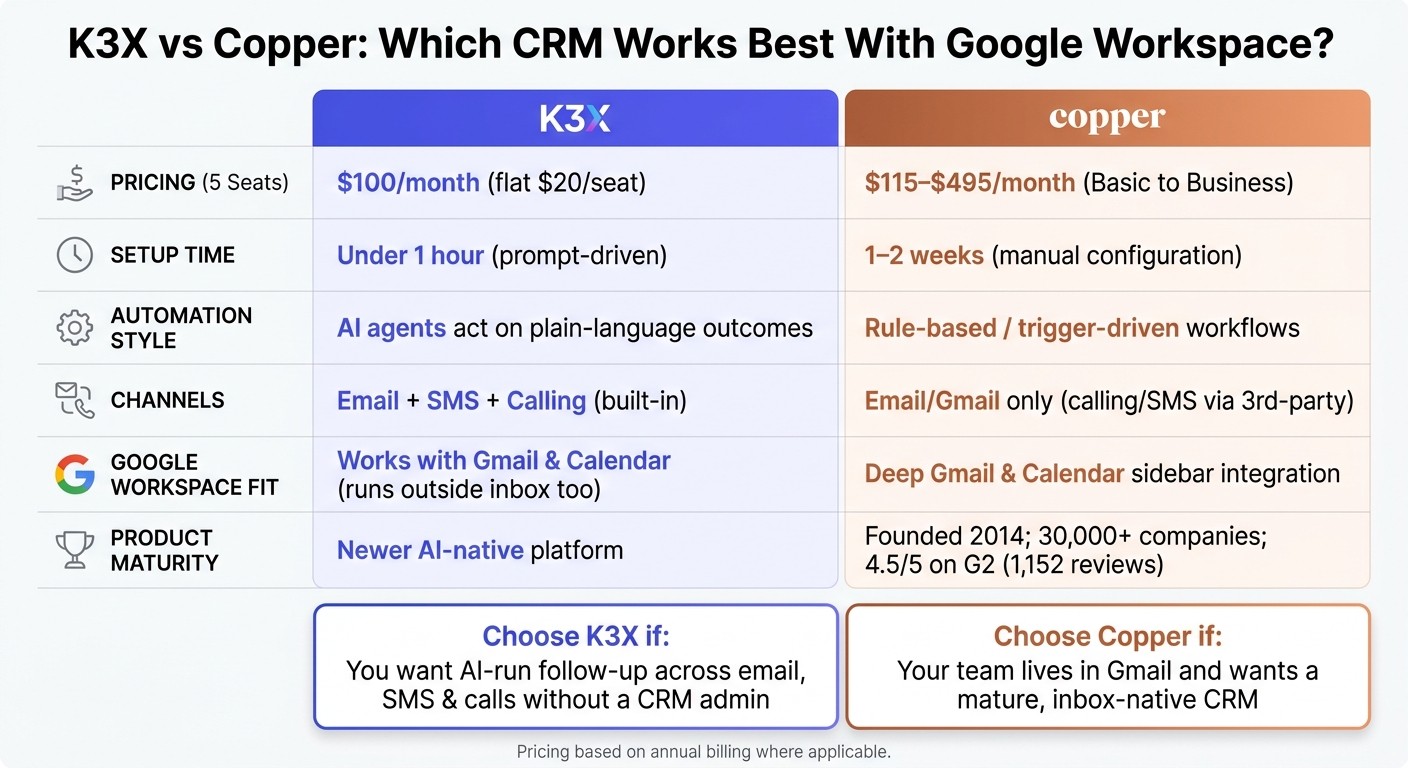
K3X vs Copper CRM: Side-by-Side Comparison for Google Workspace Teams
Best CRM For Gmail? Copper CRM Review
How does K3X pricing compare to Copper?

K3X costs less for teams that need automation plus built-in calling and SMS. Copper looks cheaper at the entry level, but for many sales teams, Copper Professional is the closer match because that’s where automation becomes part of the package [3][8].
K3X uses a flat $20 per seat, per month model and includes AI credits, calling, and SMS in that seat price [3]. Copper starts lower only in theory at its entry tier, then gets more expensive as teams move up for automation, reporting, and higher contact caps [8]. For ops teams, that’s the main tradeoff: K3X bundles more into one price, while Copper often starts with a lower sticker price and then climbs as needs grow.
What a 5-seat team would pay on each platform
For five seats, K3X is $100 per month, while Copper ranges from $115 to $495 per month depending on plan. The gap gets much larger once you compare K3X with Copper Professional or Business rather than Basic [8].
K3X totals $100 per month for five users. Copper Basic comes to $115 per month, Copper Professional to $295 per month, and Copper Business to $495 per month [8].
The main pricing variable on K3X is AI credit usage, especially if agents use it heavily for follow-up [3]. On Copper, the cost jump usually comes from moving to a higher tier to get automation and more contact capacity [8].
Platform | Plan | Monthly Cost (5 Seats) | Key Variable |
|---|---|---|---|
K3X | Flat $20 plan | $100 | AI credit usage |
Copper | Basic | $115 | Contact limit |
Copper | Professional | $295 | Automation and reporting |
Copper | Business | $495 | Advanced features and larger limits |
How K3X and Copper pricing stack up against HubSpot, Pipedrive, Close, and Salesforce
Against other CRM options, K3X stays near the low end once calling and SMS are part of the comparison. Copper Professional lands above several common starting points in the market [5][6].
HubSpot Sales Hub Starter starts at about $20 per seat per month. Pipedrive starts at about $14 per seat. Close starts at $49 per seat. Salesforce Starter Suite is about $250 per month for a 10-person team [5][6].
Those benchmarks help frame the decision. Copper Professional sits above many mid-market entry prices, while K3X stays competitive if your team wants calling and SMS inside the base seat cost [5][6].
Price matters here because K3X keeps setup and integrations light, while Copper depends more on how much workflow configuration your team plans to use.
Which CRM is faster to set up, and who does the setup?
K3X is faster to set up. A founder, sales lead, or rep can get it live in under an hour, while Copper often needs 1–2 weeks to fully set up after the initial Google Workspace connection [1][4][10].
That time gap matters for small sales teams. If setup drags on, reps stay in spreadsheets, inboxes, or half-built pipelines longer than they should.
K3X setup: prompt-driven and under an hour
K3X uses plain-language prompts instead of manual workflow building. A rep can describe the outcome they want and start using the system without needing a CRM admin or spending time on triggers and sequences [1][2].
For example, a user can say: "follow up every inbound lead within 5 minutes until they book or decline". K3X’s AI agents then carry out that work across email, SMS, and calls with no workflow builder to set up [1][2].
Copper setup: manual CRM configuration inside a Google-centric workflow
Copper connects to Google fast, but the full setup still takes manual work. Teams usually need to set up pipelines, custom fields, and workflow rules before the CRM matches how they sell [4][10].
For many teams, that setup takes 1–2 weeks [4][10]. Copper also offers a guided Success Package for Professional and Business customers, with pricing that starts at $1,500 [10].
Setup Factor | K3X | Copper |
|---|---|---|
Time to go-live | Under 1 hour [1] | |
Who does the setup | Founder, sales lead, or rep | Admin or experienced user |
Automation availability | Included from day one | Professional tier and above [8] |
Once setup is done, the next question is what each platform can automate without extra manual work.
How do K3X and Copper differ in automation and AI?
K3X handles follow-up work across email, SMS, and calls with AI agents that act on a goal. Copper centers on Gmail and Calendar sync, with rule-based workflows for basic automation.
K3X: AI agents that act on outcomes, not just assist
K3X uses prompt-driven execution. The user describes the result they want in plain English - for example, "follow up every inbound lead within 5 minutes until they book or decline" - and K3X's AI agents plan and carry out the work across email, SMS, and calls, without requiring the user to build sequences or set triggers [1][2].
There’s also a human approval option. Users can review drafted messages before K3X sends them [2]. That matters for teams that want tighter control but still need follow-up to keep moving beyond the inbox.
Copper: Gmail-native CRM with standard workflow automation
Copper is built more around data capture and sync than autonomous execution. It logs Gmail threads, pulls contact details from email signatures, and syncs Gmail and Calendar activity with little manual work [4][8].
Its automation model is rule-driven. For example, when a deal stage changes, Copper can create a task; when a contact is added, it can assign an owner. Calling and SMS are not built in and still depend on third-party tools like RingCentral or Aircall [4][8]. Copper's AI is closer to template and rewrite help than agent-based execution.
Feature | K3X | Copper |
|---|---|---|
Automation model | Prompt-driven / outcome-based | Trigger-based / rule-driven |
AI role | Autonomous agents that execute | Template- and rewrite-based assistance |
Calling and SMS | Built in | Third-party integrations |
Automation input | Plain-language outcome | Manual rules and triggers |
Where HubSpot, Close, Attio, and Zoho sit between these two models

The same divide shows up in the rest of the CRM market. HubSpot and Salesforce support deep automation, but teams still need admins to build and maintain the rules behind it.
Close is the nearest comparison if calling and SMS matter, but its outreach still runs on fixed sequences rather than outcome-based agents. Attio, Zoho, and Pipedrive use standard workflow builders and do not offer a prompt-driven execution layer.
K3X is a better fit for multichannel follow-up. Copper is a better fit for inbox-centered record keeping.
Which CRM integrates better with Google Workspace and other tools?
Copper fits Google Workspace better. K3X fits mixed-channel work better. If your team lives in Gmail and Google Calendar all day, Copper has the tighter setup. If your team needs email, SMS, and calling in one place, K3X gives you more room outside the inbox [1][3][4][7][8].
Copper's Gmail and Calendar sidebar advantage
Copper is built for Google Workspace directly, not through a third-party connector [4][7]. In practice, that means the CRM shows up inside the Gmail and Google Calendar sidebar through its Chrome extension, so reps can update contacts, deals, and notes without jumping between tabs [4][8].
That in-window workflow is Copper’s clearest edge. Calendar events and Google Drive files also link to contact records on their own, which cuts manual admin for teams already working in Google tools [4][8]. For a sales rep working from Gmail all day, that can feel like the CRM is simply part of the inbox.
The tradeoff is scope. Copper is at its best when Google Workspace is the center of daily work, but that same focus makes it a weaker fit if your stack changes later. The source text notes zero Outlook support if a team moves to Microsoft 365 [4].
K3X's Google Workspace support plus SMS and calling outside the inbox
K3X connects with Gmail and Google Calendar, but its core workflow does not depend on living inside the inbox [1][3]. Instead, it runs from a Lead Command Center where AI agents manage follow-ups across email, SMS, and calls at the same time [1][3].
That makes K3X less Gmail-native than Copper, but more useful for teams that sell across channels. If your reps start in email and then move to text or phone, K3X keeps that motion in one system rather than forcing work back into Gmail.
The limitation is breadth. K3X has fewer native integrations than older CRM platforms and leans more on webhooks for custom connections [1][4]. The product is built to take action, not to be the main system of record with a large app marketplace [1][4].
How K3X and Copper compare with Pipedrive, monday.com, and HubSpot for Google users
For Google users, Copper goes deepest inside Gmail. HubSpot and Pipedrive give more platform flexibility. That matters if your team wants Google Workspace today but does not want to rule out Microsoft 365 later [4][7].
HubSpot and Pipedrive both support Google Workspace without locking teams into it, which makes them a safer pick for companies that expect stack changes or run mixed environments [4][7].
CRM | Google Workspace fit | Integration style | Best for |
|---|---|---|---|
Copper | Deep Gmail and Calendar sidebar integration | Google Workspace only | Teams that work mainly in Gmail |
K3X | Works with Gmail and Calendar, but runs outside the inbox too | AI-native, multichannel | Teams that want multichannel follow-up in one system |
HubSpot | Supports Google Workspace and Microsoft 365 | Broad sales and marketing suite | Teams wanting a wider sales and marketing stack |
Pipedrive | Supports Google Workspace and Microsoft 365 | Pipeline-first selling | Visual pipeline teams |
Copper is the deeper Gmail-native option. K3X is the better fit when Google Workspace support also needs to cover SMS and calling.
Which CRM has better support, maturity, and admin control?
Copper is the safer pick for support depth, product history, and admin control. If your team has already decided that Google Workspace fit matters, this is where the gap becomes easier to see.
Copper has been around since 2014 and says it serves more than 30,000 companies [8][9]. That longer history shows up in market feedback too: Copper has a 4.5/5 rating on G2 across 1,152 reviews, and it responds to 100% of negative Trustpilot reviews, usually within 24 hours [4]. For sales and revenue teams, that kind of track record lowers risk when you need help with setup, workflow changes, or pipeline issues.
Where Copper has the edge today
Copper gives teams more ways to get help and a clearer path when issues need to move up the chain. That matters most when admins are setting up stages, automations, and reporting for the first time.
Copper includes live chat, webinars, and a help center for all users [8]. On higher tiers, it also adds personal onboarding and dedicated Success Managers [8]. In practice, that means a team can start with self-serve help, then move to guided setup if the CRM needs hands-on work.
Where K3X is intentionally limited
K3X keeps admin work lighter, but that also means less support and fewer governance controls on entry plans. For some teams, that’s a good trade. For others, it’s a limit.
K3X includes email support on Starter, while priority support and dedicated support teams are kept for Custom contracts [3]. Its governance model follows the same pattern: Starter includes role-based permissions and 90-day activity history, while SSO, custom roles, audit logs, and 5-year history are only on Custom [3]. If your team needs tighter control from day one, that plan split matters.
Feature | Copper | K3X |
|---|---|---|
Maturity | newer, AI-native platform [3] | |
Support | Live chat, webinars, help center; onboarding on higher tiers [8] | Email support on Starter; priority support on Custom [3] |
Governance | Role-based permissions, custom reporting, audit logs on higher tiers [8] | Simpler by design; SSO, custom roles, audit logs on Custom [3] |
Main trade-off | Google Workspace dependency [4] | Younger product; AI credit usage monitoring [3] |
Bottom line: Copper is the safer choice if you want a proven Google Workspace-first CRM with more familiar support and governance. K3X fits better if your team wants less CRM admin work and can accept a newer product that leans more on prompt-driven AI execution.
That split is what shapes the next pick-your-fit decision.
Who should choose K3X, and who should choose Copper?
The short answer is simple: choose K3X if your team wants follow-up handled for you across email, SMS, and calls, and choose Copper if your team works inside Gmail and wants CRM activity to stay there.
At this stage, the main issue is not price or setup time. It’s whether your sales motion depends on automated outbound follow-up or Gmail-based relationship tracking.
Choose K3X if your team wants AI-run follow-up without a CRM admin
K3X is a fit for teams of 1–9 people that want follow-up to happen on its own instead of building sequences, triggers, and admin-heavy workflows [1][2]. It also fits small teams that need Google Workspace support, plus built-in calling and SMS, without extra workflow setup [3]. You can see how this works in our CRM case studies.
In plain terms, K3X works best when the team wants the system to do the chasing. If reps don’t want to spend time maintaining automations or if there isn’t a CRM admin in the mix, that matters.
K3X is less suited to teams that need:
100+ seats
Heavy governance
A large native integration catalog
That puts K3X on the outbound side of the line. Copper sits on the inbox-first side.
Choose Copper if your team lives in Gmail and wants a mature CRM
Copper is the better fit if Gmail is where your team already spends the day. It keeps CRM work in the Gmail sidebar and logs Gmail activity automatically [4].
Copper is also the more established product by installed base and review volume. It is used by over 30,000 companies and has a 4.5/5 rating on G2 across 1,152 reviews [4][8]. The trade-off is straightforward: Copper does not include native calling or SMS [4].
If your team mainly manages deals through email and wants CRM data close to the inbox, Copper lines up well. If your team needs follow-up across more than email, that gap becomes harder to ignore.
Signal | Choose K3X | Choose Copper |
|---|---|---|
Team size | 1–9 seats | Small to mid-size teams centered on Gmail |
Primary channel | Email + SMS + calls | Gmail/email first |
Setup preference | Prompt-driven, under an hour | Manual setup in Gmail |
Automation style | AI agents act on outcomes | Standard CRM automation |
Starting price | $20/seat/month [3] | $9/seat/month (Starter, annual) [4] |
If you are moving from Copper, the next question is what data and pipeline structure you can bring into K3X.
What should you know before moving from Copper to K3X?
Moving from Copper to K3X is mostly a rebuild, not a straight copy. Your contact, company, and deal records can move over by CSV, but your workflows will need to be set up again because K3X uses prompts instead of Copper-style rules [2][10].
Copper is built around Gmail, so the shift matters most if your team has outgrown that setup. The data moves in a fairly standard way, but the logic behind your pipeline does not. Plan for a migration that covers both record transfer and process redesign.
What data transfers and what needs to be rebuilt
Contacts, companies, and deal data can be exported from Copper as CSV files and then imported into K3X. That gives you the core records, but it does not bring over the process layer that sits on top of them.
What stays behind is your automation logic. In Copper, that often means rules tied to stage changes or sequences. In K3X, you rebuild that behavior with prompts instead. For example, instead of recreating a sequence for each pipeline step, you can tell K3X to keep following up until a meeting is booked [1][2].
If you still need past communication records, export them before cutover. That includes any Copper email and calendar history your team may need for context, handoffs, or reporting.
How to cut over with minimal disruption
The safest path is to test the move in a trial workspace first. Export your Copper CSVs, remove duplicates, map fields before import, rebuild your main stages, and test one prompt on a small batch of leads before you switch the full team over [10].
For the first week after go-live, keep approval mode turned on. That gives your team a review step for AI-written emails and pipeline updates before anything is sent or changed in the system [2].
A simple rollout flow looks like this:
Set up a trial K3X workspace
Export Copper records as CSV files
Clean duplicates and check field mapping
Rebuild your main pipeline stages
Test one prompt with a small lead group
Turn on approval mode during the first live week
That approach helps catch bad field matches, weak prompts, or unwanted message drafts before they hit the full pipeline.
FAQs
Is K3X cheaper than Copper?
Usually, yes - for teams that need active sales automation, K3X is the better value. It starts at $20 per seat/month and includes calling, SMS, and AI-driven follow-up agents in the base price.
Copper starts at $9 per seat/month, but that Starter plan is limited. For workflow automation that puts Copper in the same range for sales teams, you need the Professional plan at $59 per seat/month.
Is Copper or K3X easier to set up?
Both are easy to set up, but they get there in different ways. Copper is faster for Gmail-based teams, while K3X is faster for teams that want prompt-based setup across multiple tools.
Copper is quick to adopt because it works inside Gmail. Users can start managing contacts and deals from their inbox, which cuts down on training and tool switching.
K3X speeds setup with a prompt-driven model. Teams connect their tools and describe goals in plain language, and most teams can get set up in under an hour without code or manual workflow configuration.
Does K3X work with Gmail and Google Calendar?
Yes. K3X integrates with Gmail and Google Calendar.
Unlike CRMs that sit mostly in a sidebar, K3X works across email, phone, and other connected tools as a prompt-driven system. You set the goal, and its AI agents handle follow-up for you, without the need to manage sequences or build manual workflows.
Can K3X replace Copper for a small sales team?
Yes. K3X can replace Copper for small sales teams that want multichannel outreach and AI-led automation instead of a Gmail sidebar workflow.
Copper is the better pick if your team works mostly inside Gmail and prefers manual data entry and email logging. K3X fits better if you want AI to run follow-ups across email, SMS, and calls without setting up manual workflows.