Sales Automation
•
AI Agents for Sales: What They Do and Where They Fail
AI sales agents automate SDR tasks but fail at pricing, complex objections, and poor data—treat them as execution tools, not full sellers.

AI agents for sales can run repeatable work like research, follow-up, CRM updates, and scheduling with little rep input. They fall short when a deal needs judgment, clean context, or careful objection handling, so I would treat them as execution tools, not full-cycle sellers.
My read is simple: use agents for routine SDR work, keep humans on pricing, security, negotiation, and messy replies, and judge any tool by its guardrails, data quality, and handoff rules.
How to Set Up an AI Sales Agent & Automate Your Outreach
TL;DR: AI agents for sales, defined
AI sales agents do the work themselves inside limits set by people. They move across CRM data and connected tools, then pass the thread to a human when a case needs judgment.
AI sales agents autonomously execute selling tasks within human-set guardrails. They act across connected systems and escalate when judgment is required.
The practical issue is what that autonomy looks like inside an actual CRM.
The standalone definition
An AI sales agent is an autonomous software program that handles multi-step sales work such as prospect research, outreach, meeting scheduling, and CRM updates. It makes its own choices within human-set permissions and escalation rules.
Unlike a fixed workflow, it starts with a goal and decides what to do next across connected tools. When a reply or situation needs human judgment, it hands the work off.
How AI agents differ from basic AI features
Most AI features in CRM software help a rep, but they do not act on their own. An email draft tool, a call summary, or a lead score still needs a person to start the task and decide the next move.
An AI agent is different because it can finish the job without a rep stepping in. It can watch inbound leads, send follow-up, qualify through replies, and book a meeting from start to finish.
"The 'agent' distinction matters: where a chatbot answers and an assistant suggests, an AI sales agent acts, autonomously completing steps of the sales process within set bounds." - Sophia Nguyen, Demand Generation, Outsales [1]
Capability | Basic AI Feature | AI Sales Agent |
|---|---|---|
Initiation | Human-triggered | Event-triggered without a rep |
Decision scope | Assists with one task | Reasons across multi-step workflows |
Scope | Single action (draft, summarize) | End-to-end motion execution |
Setup and review | Initiates and reviews outputs | Sets guardrails, monitors outcomes |
That control gap explains why legacy CRMs still have a place for teams that need heavy admin work, not only automation.
How AI agents for sales work today
AI sales agents now run a simple loop: they detect a trigger, decide what to do next, take that action in connected tools, and write the result back to the CRM. That loop can start from a new lead, an inbound reply, or a CRM event without a rep clicking through each step.
What systems they connect to
They need direct access to the systems where sales work already happens. In most setups, the CRM record sits at the center because it holds deal stage, contact history, firmographics, and prior replies.
From there, agents connect to inboxes to read tone and sort replies, calendars to schedule meetings, dialers and SMS to continue follow-up across channels, and web forms to catch intent as soon as a lead submits. Some teams also add outside signals, such as hiring changes or public filings, so the agent can spot buying intent before a rep sees it.
What guardrails keep them controlled
This only works if access and handoff rules are strict. Teams need role-based permissions to control what the agent can read or write, rate limits to cap daily message volume and protect domain health, and audit logs to track every action.
Deliverability is one hard limit, not a soft guideline. Gmail and Yahoo require senders to keep spam complaint rates below 0.30%.[8]
The key control is the human handoff trigger. This is the rule that tells the agent to stop and pass the conversation to a rep.
Common handoff triggers include:
pricing discussions
objections from several stakeholders
a prospect clearly asking to speak with a person
When that trigger fires, the agent hands over the full conversation history so the rep can pick up the thread without making the prospect repeat themselves.[1][2]
How a prompt-driven model differs from workflow builders
The main difference is how the system decides what to do next. Most sales automation tools depend on someone building the path in advance: set the trigger, write each step, add delays, and map each branch.
That takes time, and it can fail when buyer behavior moves off the script. A prompt-driven model starts with a plain-language goal instead of a fixed sequence, then turns that goal into actions across connected tools.
K3X is one example. K3X is a prompt-driven CRM for 1–9 person teams that turns plain-language goals into email, SMS, and call actions without workflow builders.
Prompt-Driven Agent | Workflow Builder | |
|---|---|---|
Trigger | Any CRM event or reply | Predefined trigger only |
Decisioning | Contextual, goal-based | Rule-based, fixed logic |
Path changes | Shifts with prospect behavior | Breaks or falls through |
Human oversight | Handoff rules set in plain language | Manual branch configuration |
Maintenance | Low - update the goal statement | High - rebuild steps on change |
How do AI sales agents compare with traditional CRM automation?
AI sales agents work from a goal. Legacy CRM automation works from preset rules. In tools like Salesforce, HubSpot, Pipedrive, Zoho, and monday.com, automation usually follows fixed "if/then" logic. An AI sales agent reads context, picks the next step, and takes action based on an outcome like booking a meeting [2][5]. K3X follows that agent model: a user describes the outcome in plain language, and the system acts across email, SMS, and calls without workflow builders.
The clearest gap is how much work the system can handle without a sales rep or admin rebuilding the flow each time something changes. Rule-based automation is predictable, but it tends to stall when a buyer replies in an unexpected way. An agent can adjust within its guardrails and keep moving toward the goal.
Comparison table: AI agents vs. traditional automation
AI Sales Agents | Legacy CRM automation (Salesforce, HubSpot, Pipedrive, Zoho, monday.com, Close, Attio) | |
|---|---|---|
Logic basis | Goal-based action | Fixed "if/then" rules |
Setup time | Lower - describe the goal and guardrails | Higher - map triggers, branches, and delays |
Flexibility | Adapts when prospects go off-script | Breaks down when a prospect goes off-script |
Autonomy | Plans and executes multi-step sequences | Executes a predefined script |
Admin dependence | Lower | Higher |
Data upkeep | Autonomous logging and enrichment | Manual entry by reps |
Channels covered | Email, LinkedIn, voice | Primarily email and internal CRM tasks |
Typical fit | Small teams, high-volume prospecting | Large enterprises with complex governance |
In practice, this changes setup and day-to-day maintenance. With legacy automation, teams often have to define every trigger, branch, delay, and fallback path by hand. With an agent, the user sets the objective and limits, and the system handles more of the sequence planning on its own.
That does not mean older CRMs are obsolete. It means they solve a different problem. If your team needs strict controls, audit trails, deep reporting, and custom object models, legacy CRM platforms still have a clear edge.
Where legacy CRMs still have an advantage
Legacy CRMs are still stronger when governance and reporting matter more than automation depth. Salesforce and HubSpot remain leading options for reporting, permissions, and customization.
"An agent that plans a research sequence is real and available today. An agent that runs your territory unsupervised is a slide, not a product." - John Golden, CSMO at Coevera [7]
What do real AI sales agent tools look like in July 2026?
In July 2026, AI sales tools sit on a spectrum from assistive copilots to agents that can carry out parts of the sales motion on their own. The main difference is simple: how much work the tool can finish without a human checking or approving it.
Some tools mostly help reps prepare. Others can reply to leads, qualify them, and keep the conversation moving. That gap matters if you're comparing software for speed, coverage, and rep workload.
Which major CRM platforms offer agent-like sales automation
Major CRM vendors now offer agent-style features, but they don't all work the same way. Some can act on their own in a narrow lane, while others still stop at suggestions and drafts.
Salesforce Agentforce uses the Atlas reasoning engine to engage inbound leads 24/7, answer questions, handle objections, and qualify prospects [2]. Its pricing is $2 per conversation or $500 per 100,000 Flex Credits [2].
HubSpot Breeze includes a Customer Agent for inbound FAQ and qualification, plus a Prospecting Agent for account research and outreach [2]. Pricing is about $0.50 per resolved conversation and $1.00 per recommended lead [2]. In practice, Breeze leans more assistive than autonomous because reps still review or send the output.
Zoho uses Zia as an AI assistant across the product suite, and Agent Studio lets teams build task-specific autonomous agents [1]. Pipedrive's Sales Assistant suggests next steps and summarizes deal activity, but it does not act on its own end to end [1][2].
Close, Attio, and monday.com also lean toward assistant-style AI. They auto-capture notes, summarize conversations, and surface next-best actions [2][3]. A rep still starts outreach or approves the next step.
How K3X fits into this landscape

K3X sits closer to the execution end of the market. It can run email, SMS, and calls from a plain-language goal, such as "follow up every inbound lead within 5 minutes until they book or decline", without workflow builders, sequences, or triggers to set up.
Its pricing is a flat $20 per seat/month. That includes 1,000 AI credits, unlimited integrations, and a built-in power dialer, with no long-term contracts and setup in under an hour. Full details are listed at k3x.ai/pricing and k3x.ai/features.
There are limits, and they matter in a buying process. K3X is a younger product, its native integration catalog is smaller than older CRM vendors, AI credit use needs tracking, and it is not built for enterprises that need 100+ seats or deep admin governance.
Recommending an action and enforcing it are not the same thing. Dashboards don't close deals; executed workflows do. - Arush Lakhani, CEO, SpurIQ [6]
Comparison table: K3X vs. Salesforce, HubSpot, Pipedrive, Zoho, monday.com, Close, and Attio
The table below shows the practical split between execution and assistance. For most teams, that is the part that changes day-to-day rep work.
Platform | What it does in practice | Execution mode | What a rep still controls |
|---|---|---|---|
K3X | Executes email, SMS, and call sequences from a plain-language goal | Autonomous | Guardrails, escalation rules, handoff triggers |
Salesforce Agentforce | Engages inbound leads 24/7, answers questions, handles objections, and qualifies prospects [2] | Autonomous | Conversation scope, escalation policies |
HubSpot Breeze | Customer Agent handles FAQ and qualification; Prospecting Agent researches accounts and drafts outreach [2] | Semi-autonomous | Output review and send approval |
Zoho Zia + Agent Studio | Zia assists across the suite; Agent Studio lets teams build task-specific agents [1] | Semi-autonomous | Agent configuration and task scope |
Pipedrive Sales Assistant | Assistive | All outreach initiation and execution | |
monday.com, Close, and Attio | Auto-captures notes, summarizes conversations, and surfaces next-best actions [2][3] | Assistive | All outreach initiation and execution |
These tools do well with structured tasks. They tend to struggle when timing shifts, replies get messy, or objections move off script.
Where AI agents for sales fail or break down
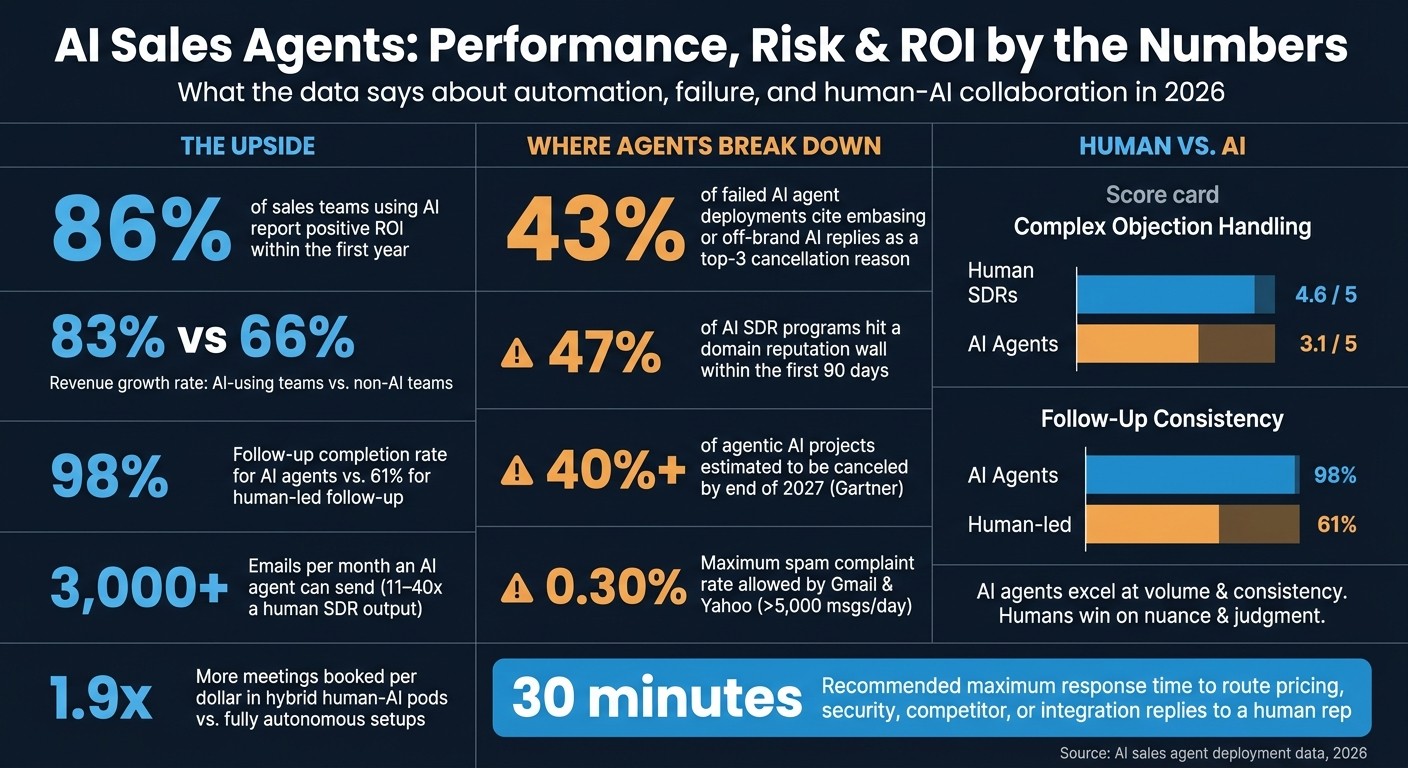
AI Sales Agents: Key Stats, Failure Rates & ROI Data (2026)
AI sales agents tend to break in three places: bad personalization, too much outreach, and poor handoff to a person. The pattern is simple: weak data leads to wrong messages, high send volume hurts inbox placement, and edge cases still need human judgment.
Why hallucinated personalization happens
Hallucinated personalization usually starts with stale or thin CRM data. When the record is missing key facts, the agent often fills in the blanks instead of pausing or sending the lead to a person.
That leads to outreach that sounds sure of itself but is wrong in plain, easy-to-spot ways. A message might mention a job title the prospect no longer holds, an old funding round, or a company project that never took place. Clean data and tight targeting need to be in place before launch, not fixed later.
The source data backs this up. In failed AI agent deployments, 43% cite embarrassing or off-brand AI replies as a top-three reason for cancellation [9].
Why over-messaging is a real risk
Over-messaging happens fast when an agent can work at machine speed. An autonomous agent can send 3,000+ emails per month, or about 11–40x the output of a human SDR, so weak throttling can turn scale into duplicate follow-ups and repetitive sequences.
This often shows up first in deliverability. Google and Yahoo require senders with more than 5,000 messages per day to keep spam complaint rates below 0.30% [8]. If an agent keeps pushing the same cadence after vague or unclear replies, inbox health can drop fast.
This is not just a corner case. 47% of AI SDR programs hit a domain reputation wall within the first 90 days [9].
Why human handoff still matters
Human handoff still matters most for pricing, security, competitor mentions, negotiation, and replies that are hard to read. In those moments, a rep can weigh tone, context, and risk in a way the agent often misses.
The performance gap is clear in objection handling. Human SDRs score 4.6 out of 5, while AI agents score 3.1 out of 5 on complex objections [4]. Hybrid human-AI pods also do better than fully autonomous setups, producing 1.9x more meetings booked per dollar [9].
A practical rule is to route any reply about pricing, security, integrations, or competitors to a human within 30 minutes [9]. That keeps the agent focused on routine outreach while people handle the parts where nuance matters most.
These limits explain why small teams usually keep a human in the loop for exceptions.
Why AI agents for sales matter for small teams in 2026
AI agents matter most for small sales teams because they take routine work off reps’ plates. That means more time spent selling and less time spent chasing follow-ups, booking meetings, and updating the CRM.
For a lean team, those hours add up fast. Manual follow-up, prospect research, scheduling, and CRM admin can eat into the day, and small teams don’t usually have extra ops staff to absorb that work. AI agents handle those tasks in the background, so the team can move faster without adding headcount.
What problems small teams solve with AI agents
The biggest problem is limited rep time. AI agents give some of that time back by handling follow-ups, scheduling, and CRM updates automatically.
The next issue is response speed. Small teams often lose deals not because the pitch is weak, but because replies come late or tasks slip between systems. AI agents help by running research, enrichment, and sequencing in one execution layer, which cuts down the number of separate tools a team has to manage and reduces manual handoffs between them [2].
Cost is part of the same problem. When a small team uses several point tools for outreach, data, scheduling, and admin, work gets fragmented and harder to manage. AI agents reduce that sprawl by taking on more of the workflow in one place [2].
Statistics that support the case
The ROI case is strong for small teams. 86% of sales teams using AI report positive ROI within the first year [3], and teams using AI report revenue growth at 83% versus 66% for teams not using it [3].
Follow-up consistency is another big gap. AI agents maintain a 98% follow-up completion rate, compared with 61% for human-led follow-up [10]. For a small team, that can mean the output of a much larger outbound motion without adding more reps.
In practice, AI agents extend the seller rather than replace the seller. They take repetitive work, flag exceptions, and pass those moments to a person, which is the same handoff pattern that helps routine outreach stay on track.
These use cases map directly to prompt-driven AI-native CRM and AI follow-up automation.
Related terms to know
These terms are connected, but they do not mean the same thing. If you're comparing CRM products, this distinction helps you see what is rule logic, what is AI-assisted follow-up, and what is a prompt-driven system.
What is a prompt-driven CRM?
A prompt-driven CRM lets a user describe the result they want in plain language, and AI agents carry out the steps inside the CRM instead of relying on fixed workflows. K3X uses this model.
This setup matters most when follow-up needs to change based on what a prospect says. In that case, the system responds to context rather than running the same script every time.
What is AI follow-up automation in CRM?
AI follow-up automation uses AI to handle follow-up and scheduling over time. It changes course based on prospect replies instead of sticking to a fixed sequence. [2][1]
Rule-based automation handles the scripted version of the same task. It works when the path is known in advance and exceptions are limited.
How this differs from rule-based CRM automation
Rule-based automation uses fixed if/then logic. AI agents pick the next action from context and can change channels when a prospect goes off script. [2][4][5]
That’s the core difference: rules follow preset branches, while AI agents react to what is happening in the conversation. For sales and revenue teams, that affects how much manual cleanup is needed when leads don’t behave as expected.
Conclusion: What buyers should know about AI agents for sales
Buyers should treat AI agents as execution tools, not full sales replacements. The best fit is the system that matches a narrow job, uses grounded data, connects to the right tools, and hands off to a human without friction.
That standard matters because failure rates are not hypothetical. Gartner estimates that more than 40% of agentic AI projects will be canceled by the end of 2027 because cost, value, and risk controls remain unclear [8][3]. For sales and revenue teams, that warning maps directly to the problems already discussed: hallucinations, too many outbound messages, and weak handoff logic can turn a pilot into wasted spend.
In practice, AI agents work best on routine SDR tasks such as first-touch outreach, lead routing, meeting scheduling, and basic follow-up. Human reps still need to handle objections, negotiation, and discovery, where context, judgment, and timing matter more.
So the buying test is simple. Check whether the agent fits the task, whether its answers are tied to approved sources, whether it works inside your CRM and sales stack, and whether the handoff rules are clear when a person needs to step in.
The next step is to define which tasks the agent can own, how the team will supervise it, and where human review still has to stay in place.