Sales Automation
•
Close vs Pipedrive: Best CRM for Outbound Sales in 2026
Close for call-heavy outbound teams; Pipedrive for pipeline-focused teams seeking easier setup.

I’d pick Close for call-heavy outbound teams and Pipedrive for teams that work deals through fixed stages. If reps spend most of the day calling and texting, Close is the better fit. If managers care more about pipeline visibility and a lower starting price, Pipedrive is usually the better fit.
My short take: Close wins on built-in outbound tools, while Pipedrive wins on simplicity and integration range. The trade-off is cost and setup style.
Close stands out when call volume is the main driver. The article notes that Close includes a native Power Dialer and Predictive Dialer, plus SMS and multi-channel sequences. Close also says Power Dialer users make about 3x more dials per rep per day than teams making manual calls in a generic CRM [6]. That matters if rep output is tied to activity count.
Pipedrive stands out when the team runs on deal stages instead of call queues. Its pipeline is easier to scan, and its annual plans start at $14/user/month for Lite, versus Close’s $9/seat/month Solo plan, which has a 1-user cap [2][5]. For most outbound teams, though, that base price gap gets smaller once Pipedrive needs a third-party dialer like Aircall, which the article prices at about $25 to $60 per user per month [2][5].
If I were choosing for a 3–5 rep outbound team, I would look at total stack cost, not CRM sticker price. The article’s example puts Close Growth at $99/user/month and Pipedrive Growth at $39/user/month plus a $45/user/month dialer, which brings the monthly totals much closer: $297 vs. $252 for 3 reps, and $495 vs. $420 for 5 reps [2][4][5].
What this means in practice is simple:
Pick Close if your team lives in calls, SMS, and sequences.
Pick Pipedrive if your team lives in pipeline stages and wants a lower-friction rollout.
Consider neither first if you have a very small team and your main issue is workflow setup overhead, not feature depth.
I would not treat vendor speed claims as hard proof. The article cites Close saying it is 50% faster than Pipedrive, HubSpot, and Salesforce for daily selling tasks [4], but it also notes that this is a vendor claim, not an outside benchmark.
For a small sales team, the cleanest way to decide is to ask one question: Do results come from more dials, or from cleaner stage movement? If the answer is more dials, Close is the safer choice. If the answer is cleaner stage movement, Pipedrive is usually the safer choice.
Close vs Pipedrive (2026) | Which One is Better?
How do Close and Pipedrive compare at a glance?
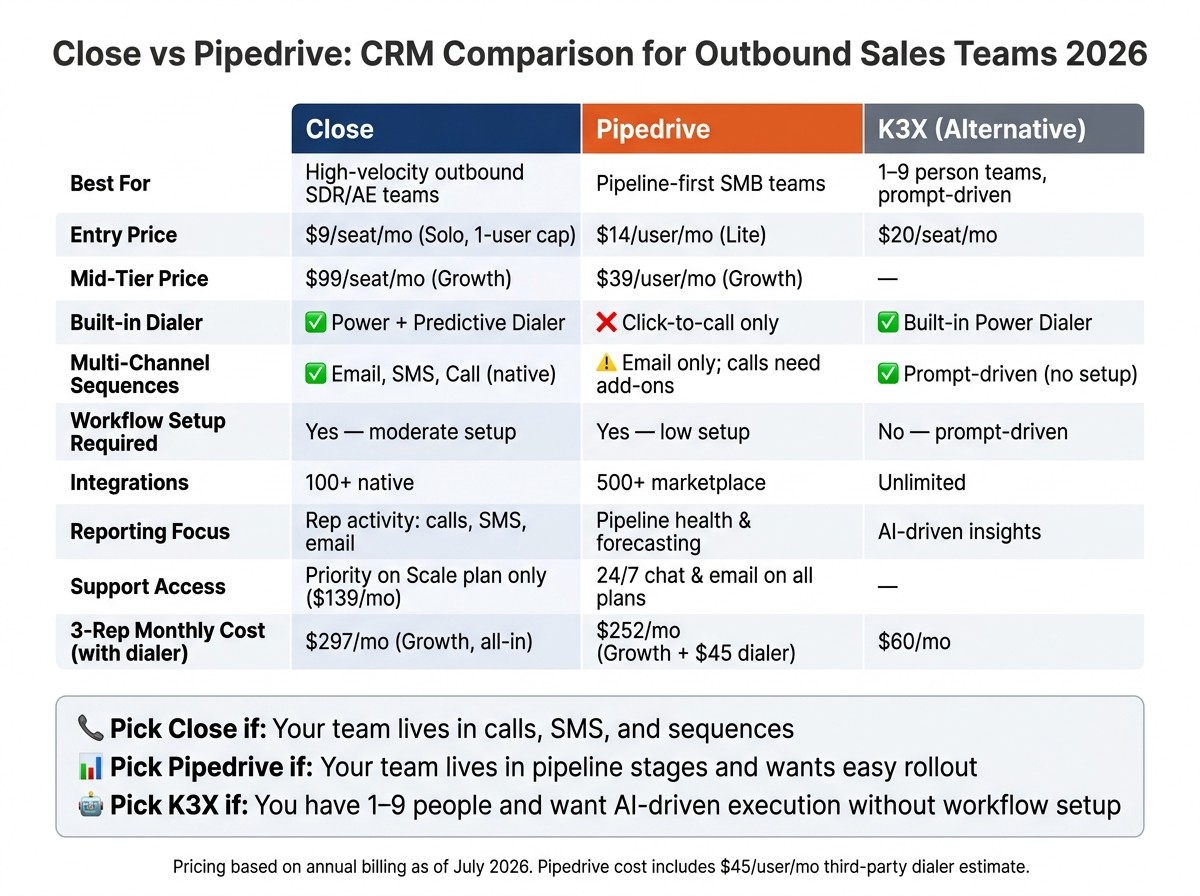
Close vs Pipedrive: CRM Comparison for Outbound Sales Teams 2026
Close is built around outbound activity. Pipedrive is built around pipeline visibility. In practice, that means Close suits teams that spend a lot of time calling, emailing, and working sequences, while Pipedrive tends to fit teams that want a clean deal board and a short setup path.
At-a-glance comparison table
The table below uses official pricing from each vendor's pricing page as of July 2026, billed annually per user per month.
Close | Pipedrive | |
|---|---|---|
Entry price | $9/seat/mo (Solo, 1-user limit) [2] | $14/user/mo (Lite) [5] |
Mid-tier price | $99/seat/mo (Growth) [2] | $59/user/mo (Premium) [5] |
Top-tier price | $139/seat/mo (Scale) [2] | $79/user/mo (Ultimate) [5] |
Free tier | No (14-day trial only) | No (14-day trial only) |
Setup effort | Moderate; built for SDR-heavy outbound workflows | Low; most reps are productive within an hour |
Automation model | Multi-channel sequences: email, call, and SMS | Visual workflow builder; AI deal prioritization cues |
Reporting focus | Activity-based: calls, connection rates, rep output | Pipeline health, forecasting, dashboards |
Integrations | 100+ native integrations [4] | 500+ marketplace integrations [4] |
Built-in dialer | Power Dialer + Predictive Dialer (Growth/Scale plans) [1] | Basic click-to-call only; power dialing requires third-party tools [3] |
Best fit | High-velocity outbound; SDR/AE teams | SMBs managing structured, relationship-driven deal cycles |
The short version is simple: Close trades ease of setup for more outbound depth, while Pipedrive trades outbound depth for easier day-to-day pipeline use. That difference shows up in the dialer, sequence tools, reporting, and how fast a new rep can get moving.
One useful stat: Close claims it is 50% faster than Pipedrive, HubSpot, and Salesforce for daily selling tasks [4]. That is a vendor claim, not an independent benchmark, but it lines up with the product layout: Close keeps the dialer, inbox, and contact record in one view.
For teams that want to skip most configuration, there is a third option.
A third option for very small teams: K3X

Not the winner of this comparison - a separate option for a different team size.
K3X is aimed at very small teams that want to run sales work from prompts instead of workflow setup. It is positioned for teams of 1–9 and uses AI agents to carry out work across email, SMS, and calls.
K3X is an AI-native, prompt-driven CRM. Users describe the outcome they want in plain language, and K3X's AI agents execute the work without workflow builders or trigger setup. It includes a built-in power dialer, costs $20/seat/month, includes 1,000 AI credits, offers unlimited integrations, and setup takes under an hour.
The trade-offs are straightforward. It is a younger product, its native integration catalog is smaller than Close or Pipedrive, AI credit use needs monitoring, and it is not built for companies that need 100+ seats or deep admin controls.
The next sections break down where the price gap, setup effort, and automation depth actually come from.
How does pricing compare for small outbound teams?
Close costs more per seat, but the bundle matters. For small outbound teams, Close includes calling, SMS, sequences, and dialer tools in one plan, while Pipedrive often needs a separate dialer for teams doing a lot of outbound. That means list price by itself can give the wrong picture.
Price is only part of the decision. The other part is how much extra setup work your team takes on.
Close pricing at 3–5 seats
Most outbound teams end up on Close Growth at $99/user/mo. That plan includes the Power Dialer and automated workflows, which are two of the main reasons teams choose it for outbound use [4][2].
The main upside is simple: calling and SMS stay inside the CRM. You’re not piecing together extra subscriptions just to run day-to-day outbound work.
Pipedrive pricing at 3–5 seats
Pipedrive starts at a lower price, but outbound teams often need more than the base plan gives them. Its annual plans range from Lite at $14/user/mo to Ultimate at $79/user/mo [4][5].
Email sequences start at the Growth tier and above. But native calling is mostly limited to click-to-call, so teams that do high-volume outbound usually add a third-party dialer, which adds more monthly cost [3][5].
Cost example for a 3–5 rep outbound team
Once you add a dialer to Pipedrive, the gap gets smaller. Close still costs more in this example, but not by as much as the sticker price first suggests.
Team size | Close (Growth) | Pipedrive (Growth + third-party dialer) |
|---|---|---|
3 reps | $297/mo ($3,564/yr) | $252/mo ($3,024/yr) |
4 reps | $396/mo ($4,752/yr) | $336/mo ($4,032/yr) |
5 reps | $495/mo ($5,940/yr) | $420/mo ($5,040/yr) |
Assumes Close Growth at $99/user/mo and Pipedrive Growth at $39/user/mo plus a $45/user/mo third-party dialer [2][4][5]. Pipedrive's lower sticker price narrows once outbound tooling is added, making Close the simpler total cost for outbound-heavy teams.
That sets up the next trade-off: not just what you pay, but how much work each CRM takes to configure for outbound.
The prompt-driven alternative: K3X
K3X costs $20/seat/month and includes a built-in power dialer, but it is a younger product with a smaller native-integration catalog.
Which is easier to set up for outbound: Close or Pipedrive?
Close is easier to set up for outbound. Its calling, SMS, and sequences are built in, so a 3–5 rep team can import leads, assign numbers, and start multi-channel outreach from one system. Pipedrive is faster only if your first goal is a simple pipeline and you’re fine adding a dialer and sequencing tool later.
What setup looks like in Close
For a 3–5 rep team, Close setup is fairly direct. You import a lead list by CSV, set up Smart Views, add a native phone number, and turn on a multi-channel sequence with email, SMS, and call steps. That gets reps into outreach fast without stitching together extra tools.
The day-to-day setup burden is lighter because the core outbound pieces already live in one place. Calls, emails, and texts log into the same activity timeline, which cuts admin work from the start [3].
Pipedrive feels simpler at first, but outbound teams often run into more setup work later once they need dialing and sequencing at scale.
What setup looks like in Pipedrive
Pipedrive is quick to configure for pipeline tracking. Teams can set deal stages, add custom fields, and sync email without much effort. If your workflow centers on moving deals across stages, that part is fast.
Outbound calling is where setup usually gets heavier. Pipedrive’s native Caller is click-to-call only, so teams doing high-volume outbound often connect a third-party dialer such as Aircall or JustCall [3][5].
Its Campaigns feature can handle email drips, but many outbound teams still add a separate sequencer for heavier outreach motion [3][4]. So the pipeline is fast to stand up, while the full outbound stack usually takes more time.
The gap is easiest to see in a side-by-side setup view.
Setup Component | Close | Pipedrive |
|---|---|---|
Lead import | CSV / direct import | CSV / direct import |
Telephony | Native VoIP, included | Third-party dialer usually required for high-volume outbound |
Sequencing | Native multi-channel: email, SMS, call | Native email campaigns; calls usually need external tools |
Operating model | Smart Views, activity-based | Visual pipeline, stage-based |
Ready to launch outbound | Ready without extra tools | Faster for pipeline setup, slower for full outbound |
The prompt-driven alternative: K3X
K3X is the prompt-driven alternative for 1–9 person teams: users state the outcome, and AI agents execute across email, SMS, and calls without workflows, sequences, or triggers. It can be live in under an hour, but it is younger and has a smaller native-integration catalog.
How do automation and outbound workflows differ between Close and Pipedrive?
Close is better for reps who spend most of the day calling, texting, and emailing prospects. Pipedrive is better for teams that care more about moving deals through stages and keeping the pipeline tidy.
The gap comes down to what each product was built to do. Close centers outbound execution inside the CRM, while Pipedrive centers workflow rules around deals, stages, and reminders.
Close automation for outbound reps
Close gives outbound reps more native tools in one place. Its trigger-based sequences support nine step types, including native Call, SMS, and Email steps in the same sequence flow [4].
That matters in day-to-day work. A rep can move a prospect from email to voicemail drop to text without leaving Close or wiring together extra tools. For SDR teams, that cuts friction and keeps activity moving.
Two Close features stand out for high-volume work. Smart Views surface the next lead to contact based on activity filters, and sequences pause as soon as a prospect replies [3].
Close also includes a built-in Power Dialer and Predictive Dialer [4]. Teams using the Power Dialer report about 3x more dials per rep per day than manual calling in a generic CRM [6]. Close’s AI agent, Chloe, can auto-call inbound leads, book meetings, and draft follow-ups [1][4].
In plain terms, Close fits teams where rep output matters more than strict pipeline hygiene.
Pipedrive automation for pipeline teams
Pipedrive handles deal movement better than live outbound execution. Its automation engine uses event and date triggers with if/else branching, which makes it a good fit for deal-stage changes and follow-up rules [4].
That setup works well for pipeline teams. If a deal moves to a new stage, a task can be created, an owner can be changed, or a reminder can fire without much effort. The system is lighter for outbound because it was built around stage movement, not heavy calling sequences.
Pipedrive gets weaker when teams want high-volume, multi-channel outreach. Many teams add a dialer such as Aircall for calling volume, and the Campaigns add-on gives less control over cold-email deliverability than Close’s connected Gmail or Outlook domains [3][5][6].
Pipedrive’s AI Sales Assistant also plays a narrower role. It helps prioritize deals, but it does not run outreach on its own [1][4].
Automation Dimension | Close | Pipedrive |
|---|---|---|
Primary focus | Activity volume: calls, SMS, email | Deal-stage progression and reminders |
Native dialer | Power + Predictive, built in | Basic click-to-call; volume often needs add-ons |
Multi-channel sequences | Email, SMS, and call in one native flow | Email-focused; calls/SMS usually need add-ons |
Sequence auto-pause on reply | Yes, native [3] | Usually no; manual or external-tool dependent |
AI role | ||
Deliverability | Sent through connected Gmail/Outlook domains [6] | Less control over cold-email deliverability [6] |
For a small team, that difference is pretty practical. If you need reps to work fast from one queue and hit a high call count, Close is the better fit. If you need clean deal routing and simple stage-based automation, Pipedrive is easier to line up.
The prompt-driven alternative: K3X
For very small teams, prompt-driven automation can replace most workflow setup. K3X is an AI-native CRM aimed at 1–9 person teams that want outreach driven by prompts instead of building workflows step by step.
The prompt-driven alternative: K3X - K3X fits 1–9 person teams that want prompt-driven outreach instead of workflow builders. Users describe the outcome, and AI agents execute across email, SMS, and calls. Trade-offs include a younger product, a smaller native-integration catalog, AI credit usage that needs monitoring, and no fit for enterprises needing 100+ seats or deep admin governance.
How do reporting and integrations compare between Close and Pipedrive?
Close is better for outbound activity reporting. Pipedrive is better for integration breadth and pipeline visibility.
The split is pretty clear in day-to-day use. If your team wants to track rep output across calls, SMS, and email in one place, Close has the edge. If you already use a larger sales stack and need your CRM to connect with more tools, Pipedrive is the stronger fit.
Which CRM is stronger for outbound activity reporting?
Close is stronger for outbound activity reporting because it shows rep work in a single chronological view. Managers can review calls, SMS, and emails from one unified activity timeline, which makes rep audits faster and simpler [3][4].
That setup is useful when leadership cares more about what reps actually did today than just how many deals moved from one stage to another. Close is built around activity-level visibility, not only pipeline summaries.
Pipedrive leans more toward deal-stage reporting. Its Insights tool covers revenue forecasting and deal-stage conversion, which is enough for many SMB sales teams [7]. But for outbound teams that want full call reporting, that data often depends on add-ons.
Reporting tells you what reps did. Integrations shape how much of that data shows up inside the CRM.
Reporting dimension | Close | Pipedrive |
|---|---|---|
Primary focus | Rep activity and communication | Pipeline health and deal progression |
Call activity reporting | Built in | Requires third-party calling tools |
Integration breadth | 100+ integrations [4] | 500+ integrations [4] |
Calling stack dependency | None; dialer is native | Usually requires add-ons for high-volume outbound |
Which CRM integrates better with your existing stack?
Pipedrive integrates with more tools. Its marketplace includes 500+ integrations, and teams often use it as the center of a stack that includes Apollo or Clay [4][6].
That matters most if your sales process already depends on separate tools for prospecting, enrichment, or calling. In that setup, Pipedrive is easier to slot into the systems you already run. Close is narrower, with 100+ integrations centered on outbound sales work, including Calendly, Zoom, Slack, and Microsoft 365 [4].
Close includes calling and SMS natively. Pipedrive teams often add third-party calling tools, which can add about $30–$60 per seat per month [5][3].
For a sales ops team, that changes the math. A lower base CRM price can look less attractive once you add a dialer, sync call data, and manage one more vendor.
How do support and daily usability compare for small sales teams?
For small sales teams, Close is easier for reps doing outbound work all day, while Pipedrive is easier for managers who want a clean pipeline view and simpler setup. After setup, the main split is straightforward: Close helps reps move faster, and Pipedrive gives managers clearer day-to-day visibility.
You see this in daily use pretty fast. Close keeps calling, follow-up, and outreach activity in one place. Pipedrive makes deal tracking easy to scan, which matters when a manager wants to spot stuck deals without digging through records.
Where Close works better in daily use
Close works better when reps spend most of the day on high-volume outreach. It puts calls, SMS, email, and sequences in one interface, and calls, texts, and emails all log to the same timeline, so reps can work from one screen instead of jumping between tools.
That setup is a good fit for teams that care most about rep speed. The downside is that Close has a steeper learning curve than Pipedrive, and priority support is only available on the Scale plan at $139/user/month [3].
Where Pipedrive works better in daily use
Pipedrive works better when a team wants a simple pipeline and lighter onboarding. Its kanban-style pipeline gives managers a fast read on deal status, and stalled-deal alerts help flag deals that may be slipping before they go cold.
Support is also easier to access. Pipedrive offers 24/7 live chat and email support on all plans [3]. If your team does not need a built-in dialer-first workflow, that mix of support access and day-to-day simplicity can matter more than Close’s tighter outbound setup.
So the choice here is less about raw feature count and more about how your team works each day.
Daily use dimension | Close | Pipedrive |
|---|---|---|
Best for | High-volume outbound reps | Managers and mixed-role teams |
Interface style | Single outbound workspace | Visual kanban pipeline |
Learning curve | Moderate | Low |
Support access | Priority support on Scale plan only ($139/user/month) [3] | 24/7 chat and email support on all plans [3] |
Mobile usability | Desktop-first | Full-featured mobile app on all plans |
Who should pick Close, who should pick Pipedrive, and when does neither fit?
The short answer is simple: pick Close for call-heavy outbound, pick Pipedrive for pipeline-first teams, and look at K3X only if you have 1–9 people and want prompt-driven execution.
After setup, automation, reporting, and support, this choice comes down to how your team works day to day. The best CRM here is not the one with the longest feature list. It’s the one that matches how reps spend most of their time.
Who should pick Close
Close fits small outbound SDR and AE teams best when most of the day is spent making calls. If your motion depends on high-volume outreach, Close keeps calling, SMS, and sequences in the same workspace.
That matters because reps lose time when they jump between a CRM, a dialer, and sequencing tools. Close reduces that friction. Teams using the Power Dialer report about 3x more dials per rep per day than manual calling in a generic CRM [6].
So if your team measures success by activity volume, especially calls, Close is the cleaner fit. In this case, outbound depth matters more than keeping the pipeline view as simple as possible.
Who should pick Pipedrive
Pipedrive fits small teams with a mixed inbound and outbound motion that want a clear pipeline and a fast rollout. It works well when managers and reps want to see deals move stage by stage without much clutter.
Pipedrive also makes sense for teams that are comfortable building around third-party tools. You can add calling, enrichment, and automation from other apps as needed. The trade-off is that total cost can move closer to Close as call volume goes up.
That makes Pipedrive the better fit when pipeline clarity matters more than built-in outbound tools. If your team lives inside deal stages more than call queues, that’s usually the right signal.
When neither fits: the prompt-driven alternative
For very small teams, neither Close nor Pipedrive may be the best match if the main problem is workflow overhead. Both tools still ask you to set up sequences, triggers, and automation rules before the system feels tuned to your process.
K3X is the prompt-driven option for 1–9 person teams that want sales execution without that setup work. Instead of building workflows step by step, users describe the outcome in plain language, and AI agents execute across email, SMS, and calls. There are no workflow builders, sequences, or triggers to configure.
Pricing is $20 per seat/month, and it includes 1,000 AI credits, a built-in power dialer, unlimited integrations, no long-term contracts, and a 14-day free trial at k3x.ai/pricing.
There are trade-offs, and they matter. K3X is a younger product. Its native integration catalog is smaller than older vendors. Teams also need to watch AI credit usage, and it is not built for teams above 9 people or for companies that need deep admin governance.
Close | Pipedrive | K3X | |
|---|---|---|---|
Best team size | Small outbound teams | Small to mid-size teams | 1–9 people |
Core strength | High-velocity outbound calling | Visual pipeline management | AI-native, prompt-driven execution |
Built-in dialer | Yes (Power + Predictive) | No (integration-based) | Yes (built-in power dialer) |
Workflow setup required | Yes | Yes | No |
If you are switching tools, the next step is deciding what to migrate first.
What should a team know before switching from Close or Pipedrive?
Map your pipeline stages, outreach steps, reporting definitions, and telephony setup before you import anything. Data import is usually the easy part; rebuilding workflows is where teams spend time and run into trouble.
For a small outbound team scaling without complexity, rebuilding custom fields, pipelines, and integrations usually takes 1–2 weeks. The main risk is not losing rows in a CSV file. It’s losing the logic behind how reps work each day.
Migration checklist for a 3–5 seat outbound team
The biggest risks sit in workflow setup, not data transfer. Use the table below to sort low-risk items from the parts that need extra planning.
Migration Element | Pain Level | Notes |
|---|---|---|
Contacts, leads, and deals | Low | CSV import works for both platforms. |
Custom fields | Moderate | Map fields before importing. |
Call recordings and SMS history | High | Platform-specific; archive critical history before switching [1]. |
Sequences and workflows | Very High | Must be rebuilt; recipes do not transfer [1]. |
Reporting dashboards and KPIs | Moderate | Map activity metrics and pipeline-stage conversion before switching [7]. |
Telephony and dialer | High | Recreate call routing, local numbers, and logging rules before go-live. |
Before launch, test reply handling in the new system. That step helps prevent double-contacting prospects, which can create a messy buyer experience and throw off rep activity counts.
How to avoid rebuilding unnecessary complexity
Don’t copy every automation from the old system just because it exists. Start with a short workflow audit and keep only the parts tied to response speed, follow-up timing, and rep activity.
A simple filter works well here:
Keep workflows that affect lead response time, task creation, call logging, email/SMS sequencing, and stage movement.
Drop or delay anything that exists only for edge cases, old reporting habits, or one-off rep preferences.
This approach cuts setup time and lowers launch risk. Once the checklist is clean, move only the minimum set of workflows needed for day one.
FAQs
Is Close cheaper than Pipedrive?
No. As of July 2026, Pipedrive has the lower starting price at $14/user/month, while Close starts at $49/user/month.
That base-price gap is clear, but the total cost can shift depending on how your team works. Close includes native calling, SMS, and a power dialer in the product, which can make it the lower-cost option for high-velocity outbound teams. With Pipedrive, teams often add outside tools or integrations to get those same features, and that can narrow the gap.
Which is easier to set up, Close or Pipedrive?
It depends on your core workflow. Close is usually the simpler fit for outbound teams that work heavily in calling and SMS because those tools are built into the CRM from the start.
Pipedrive is the simpler fit if your main goal is a clean visual pipeline. If you need stronger calling, though, you’ll likely rely on integrations, which means more setup and more moving parts.
Does Pipedrive include calling like Close does?
No. Close has calling, SMS, and sequencing built into the platform. Pipedrive usually depends on third-party phone tools like Aircall or JustCall for outbound calling.
Pipedrive does include basic click-to-call. But for high-volume outbound sales, many teams find that setup too limited for day-to-day prospecting and end up adding a separate dialer.
That extra tool can push Pipedrive’s total cost of ownership much closer to Close, especially once you factor in per-user fees, call costs, and the overhead of running another system.
Is there an alternative to both Close and Pipedrive?
Yes. For teams of 1 to 9 people that want to skip workflow builders and manual setup, K3X is an AI-native, prompt-driven CRM. Users describe the result they want, and its AI agents handle email, SMS, and calls.
Other options fit different needs. HubSpot works well for marketing-led growth, Zoho CRM is a lower-cost general pick, Attio suits flexible data-first teams, and Salesforce is built for large enterprises with complex governance.