Sales Automation
•
How to Choose a CRM for a Small Team: 2026 Buyer's Guide
Choose the CRM your reps will actually use: prioritize low setup time, realistic Year 1 TCO, automation, channel support and export risk.

Pick the CRM my team will use every day, not the one with the longest feature list. For a team under 10, I would judge each option on Year 1 cost, setup time, automation, channel support, and export risk, then run the same trial in each tool before paying.
My short verdict: Pipedrive fits sales-only pipeline teams, HubSpot fits teams that need sales and marketing in one place, Close fits call-heavy outbound, Attio fits custom data needs, and K3X fits small teams that want prompt-based automation but can live with fewer native integrations.
I would keep the buying process simple. The article’s core point is that CRM failure usually comes from low usage, not lack of features, and the cited numbers support that: only 47% of businesses get end-user adoption above 90%, while 43% of CRM users use less than half the features they can access [4][5].
So I would test for habit fit first. If reps cannot log a deal, add a next step, and move on in a few clicks during a trial, the tool is likely too heavy for a small team.
I would also look past list price. The piece shows why: a tool that starts cheap can end up costing far more after plan jumps, add-ons, onboarding fees, and weekly cleanup time. The sample Year 1 model makes that clear, with HubSpot at $17,700, Pipedrive at $7,140, and K3X at $3,225 for the same team assumptions [5][7][8].
The best part of the article is its trial-first buying test. Instead of trusting demos, I would load 50–100 real contacts and 5–10 live deals, ask each vendor to automate one follow-up flow during the trial, and run a full CSV export before making a decision [5][6].
A few red flags stand out. I would watch for seat minimums, paid onboarding, automation locked to higher tiers, admin-heavy setup, and weak export options. The examples in the article are plain: HubSpot Pro can add a $1,500 onboarding fee, monday CRM has a 3-seat minimum, and Pipedrive can add $34/month add-ons on top of base pricing [7].
If I had to reduce the article to one buying rule, it would be this: buy for the sales motion I have now, not the company structure I may have later. For most small teams, the right path is to narrow the list to two or three tools, run the same test in each, and choose the one that takes the least work to keep current.
Best CRM for Small Business (2026) | Free CRM Comparison Checklist
What Should a Small Team Look for in a CRM?
Small teams should compare CRMs by running the same hands-on tests in the same week, using the same data. Do it during the free trial, not after you’ve signed a contract.
The goal is simple: find out what the tool will cost, how fast the team can use it, how much work it removes, and how easy it is to leave later if it stops fitting.
How to Evaluate Total Cost of Ownership
Total cost of ownership is the full monthly and labor cost, not just the list price. For a small team, setup time, migration work, and weekly cleanup can matter as much as the subscription fee.
Sticker price can be misleading. A CRM that looks cheap on day one can end up costing far more once plan upgrades, add-ons, and admin time enter the picture.
CRM | Starting Price (per user/mo) | Estimated cost for 5 users/mo | Notable Hidden Cost |
|---|---|---|---|
HubSpot | $0 (Free tier) | $100–$450 (Starter/Professional) | Higher-tier add-ons can push up total spend [5] |
Pipedrive | $14–$15 | ~$145 (Growth) | Automation usually means moving up plan levels [5] |
Close | $29 | ~$145 (Starter) | High-volume calling often pushes you to Professional [5] |
Attio | $29 | ~$146 | |
K3X | $20 | $100 (5 seats, all-in) | AI credit usage needs monitoring at higher volumes |
A low monthly price does not help much if setup and upkeep wipe out the savings. For sales and revenue teams, that’s the part that tends to show up late.
How to Assess Setup Time and Time to First Value
Setup time tells you how long the team will wait before the CRM starts helping. If a tool takes days or weeks to get into working shape, that delay becomes part of the cost.
Salesforce Essentials can take up to two weeks for a working setup and often needs a part-time admin within six months [1]. Zoho CRM offers a lot of capability, but reviewers often point to a steep learning curve [5]. monday.com CRM fits project-led teams better than teams that just want a clean sales pipeline [3].
Some tools are faster to get moving. Pipedrive can be configured in about an hour, and Attio in roughly two hours [1][3]. K3X targets setup in under an hour. HubSpot is fast to start on the free tier, though deeper automation still adds setup work.
Trial test: run the trial with 50–100 real contacts and 5–10 active deals, not sample data [6][5].
If the team cannot log the first deal and next step without help, that friction will likely show up every day. A CRM should not feel like assembling furniture with missing screws.
Once the system is live, check how much manual work still remains. That’s where the next test comes in.
How to Compare Automation Depth and Channel Coverage
Automation depth shows how much manual follow-up the CRM can remove. For a small team, this is often the line between a tool that saves time and a tool that just stores data.
HubSpot, Zoho, Pipedrive, and Salesforce use rule-based workflows. Someone has to set triggers, conditions, and actions step by step. That gives teams control, but it also means more upkeep over time. K3X uses an AI-first model instead: you describe the result in plain language, and the system carries it out.
Channel coverage matters too. Close is a strong fit for outbound calling teams because it includes a built-in Power Dialer and SMS inbox, and it holds a 4.6/5 rating on G2 [5]. HubSpot fits marketing-led email sequences well. K3X includes email, SMS, and calls natively, plus a built-in power dialer. The trade-off is that K3X is a newer product with a smaller native integration catalog than older vendors.
Trial test: ask the vendor to automate one follow-up flow during the trial without help from support.
Count how many steps it takes and who has to touch the setup. Fewer steps usually mean less admin work later. If automation still leans on heavy manual setup, the tool may become a burden once the trial glow wears off.
How to Check Data Portability Before Buying
Data portability means you can take your records with you in a usable format. Before buying, run a full export test during the trial and make sure contacts, deals, and activity history come out cleanly as CSV files.
Export contacts, open deals, and activity notes, then open the files and check whether they are actually usable. A vendor saying “yes, export exists” is not enough.
What matters is whether the export is complete and simple enough that your team could leave without rebuilding everything from scratch. For small teams, that matters a lot, because they usually do not have extra time or budget to clean up a broken process later.
Which CRM Fits Your Small Team Profile?
Pick the CRM that matches how your team sells day to day. Headcount matters less than sales motion, handoff needs, and how much structure your team can handle.
Team Profile Comparison Table
This table gives the fast match. Use it to line up your team shape with the CRM type that fits best, then review the tool notes below for the main trade-offs.
Team Profile | Recommended CRM Type | Ideal Use Case | Main Trade-off | Named Examples |
|---|---|---|---|---|
Solo founder with relationship-led selling | Lightweight / all-in-one | Relationship memory and task consolidation | Limited advanced automation | K3X, HubSpot Free, Attio |
2–5 reps with call-first outreach | Call-first / outreach-heavy | High-velocity calling and cold outreach | Higher per-user cost | Close, Pipedrive |
5–10 people with shared sales and marketing | Suite or flexible-data CRM | Marketing-sales alignment and complex records | Steeper learning curve | HubSpot, Attio, K3X |
How K3X, Pipedrive, HubSpot, Attio, and Close Compare for Small Teams

These five tools start from different assumptions about how a small team works. That shows up in setup time, daily workflow, and where each one starts to feel cramped.
Pipedrive is the cleanest fit for teams with a defined, stage-based pipeline. It has a 4.3/5 rating on G2 [5]. The downside is simple: it is built as a sales tool first, so teams that also need marketing or service functions may outgrow it.
HubSpot fits teams that care most about marketing-sales alignment. The main risk is cost. According to the source cited here, 71% of small businesses underestimate their total HubSpot spend because they miss add-ons, and Professional tiers can reach about $90–$100 per user per month [5].
Close is built for outbound teams that spend a lot of time on the phone. Its built-in Power Dialer and unified SMS inbox help drive its 4.6/5 G2 rating [5]. If calling is not a main channel, though, the starting price is harder to justify.
Attio works well for founders and early-stage teams that need a flexible data model instead of a fixed deal-and-account setup. It behaves more like a custom-object CRM, which gives teams room to shape records around how they work. That said, it takes care and discipline to set up custom objects the right way [4].
K3X is the AI-native option in this set. Users describe an outcome in plain language, and K3X's AI agents plan and execute work across email, SMS, and calls without workflow builders or trigger setup. The trade-offs are straightforward: it is a newer product with a smaller native integration catalog than older vendors, AI credit usage needs watching at higher volume, and it is not aimed at teams that need 100+ seats or deep admin governance. See pricing and features.
Once you narrow the list by team profile, check three things before starting a trial:
Pricing at the plan you would actually buy
Seat minimums
Exit friction, including data export and migration effort
What Are the Red Flags When Choosing a CRM?
The main warning signs are hidden pricing, seat minimums, setup that leans on admin work, and weak export options. These issues sit behind many CRM buying mistakes and usually show up after the contract is signed.
For sales and revenue teams, the problem is simple: the sticker price rarely tells the whole story. The cost often shows up later in add-ons, onboarding fees, lost time, or painful migration work.
Pricing and Packaging Red Flags
The headline price is often not the amount you end up paying. Core functions like automation, reporting, document tools, or prospecting add-ons are often pushed into higher tiers or sold on top of the base plan.
HubSpot is a clear case. Its free plan does not include automations or sequences, so teams that need those functions have to move to a paid tier [1]. On top of that, Professional plans include a $1,500 onboarding fee [5][7]. Pipedrive starts at $14 per user per month, but add-ons such as LeadBooster and Smart Docs add $34 per month each [7]. Monday CRM also has a 3-seat minimum, which means a two-person team still pays for three seats [7].
That math adds up fast. A low monthly rate can look fine on a pricing page and still cost more in practice once you add the tools a sales team needs to do basic work.
Low list price does not matter if admin work eats the savings.
Setup and Exit Red Flags
Setup risk matters just as much as price. If a CRM takes weeks to get running or needs constant tuning, small teams usually pay for that in slow adoption and extra labor.
Salesforce is the clearest example here. Teams with fewer than 10 people often end up needing a part-time admin within six months because the setup and configuration work can be heavy [1]. For a small sales team, that is a bad sign. If logging the first deal takes weeks, the system is probably too much for the size of the team.
Exit risk is just as serious. If a vendor does not provide plain CSV export or open API access, treat that as a lock-in signal [2]. Historical activity logs and custom fields often do not move cleanly from one CRM to another, so switching gets harder the longer you stay [1][3].
Once you spot these risks, convert them into dollars in the next section.
Red Flag | What to Look For | Real Example |
|---|---|---|
Per-feature paywalls | Automation or reporting locked to higher tiers | HubSpot free plan excludes automations |
Seat minimums | Forced to pay for unused seats | Monday CRM: 3-seat minimum |
Mandatory onboarding fees | Non-negotiable implementation costs | HubSpot Pro: $1,500 onboarding fee |
Add-on inflation | Base price excludes core features | Pipedrive: $34/mo per add-on |
No CSV export | Data locked inside the platform | Deliberate exit barrier [2] |
Admin-heavy setup | Weeks before first deal is logged | Salesforce; part-time admin often needed [1] |
K3X avoids seat minimums and long setup cycles, but it has limits that buyers should check up front. Its native integration catalog is smaller than HubSpot or Salesforce, and its AI credit usage needs tracking at higher outreach volumes.
Verify both before committing. For buyers comparing CRM options side by side, these red flags are a fast screening tool before moving into total cost of ownership.
How do you calculate CRM total cost of ownership for a small team?
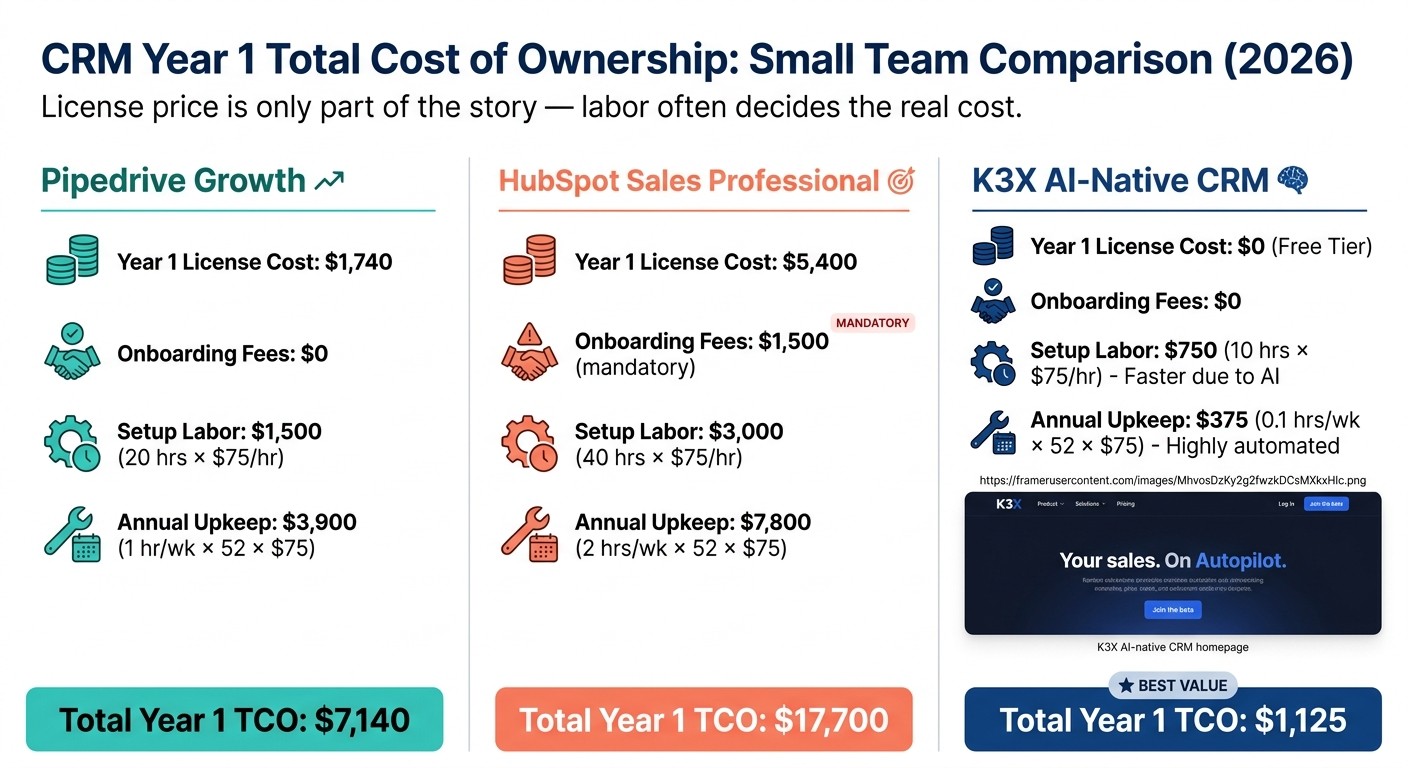
CRM Year 1 Total Cost of Ownership: Small Team Comparison 2026
Use a Year 1 cost model that adds software spend and staff time. For a small team, CRM total cost of ownership is not just the subscription. It also includes setup, admin work, and the time people spend keeping the system usable.
That matters because labor often becomes the part buyers miss. Some legacy CRMs can require 40 to 200 hours of internal staff time to configure properly [8].
A Simple TCO Formula for 2026
Use this formula before signing anything. It gives you a direct Year 1 view and makes side-by-side tool checks easier.
Year 1 TCO = (Monthly license × seats × 12) + mandatory fees + (setup hours × hourly labor rate) + (weekly upkeep hours × 52 × hourly labor rate)
The logic is simple:
License cost is your monthly per-seat price over 12 months.
Mandatory fees include onboarding or required service charges.
Setup labor covers time spent on configuration, fields, pipelines, routing, and imports.
Weekly upkeep covers admin work after launch, like user fixes, reporting changes, and process edits.
If your ops lead or admin costs $75 per hour, even a small weekly time load adds up fast over a year.
Worked Example Comparing 3 CRM Options
Here’s a clean Year 1 comparison using the same labor rate and a similar team setup across all three tools. The big swing is not the sticker price. It’s the amount of labor each system needs.
Cost Component | Pipedrive Growth | HubSpot Sales Professional | K3X |
|---|---|---|---|
Year 1 license cost | $1,740 | $5,400 | $1,200 |
Onboarding Fees | $0 | $1,500 mandatory | $0 |
Setup Labor | $1,500 (20 hrs × $75) | $3,000 (40 hrs × $75) | $75 (1 hr × $75) |
Annual Upkeep | $3,900 (1 hr/wk × 52 × $75) | $7,800 (2 hrs/wk × 52 × $75) | $1,950 (0.5 hr/wk × 52 × $75) |
Total Year 1 TCO | $7,140 | $17,700 | $3,225 |
HubSpot's license price hides more of the Year 1 cost once the mandatory $1,500 onboarding fee and admin time are added to the model [5][7]. Pipedrive’s base software cost sits in the middle, but add-ons can push the total up [7].
K3X costs $20 per seat per month with 1,000 AI credits included, setup is under an hour, and no workflow builders are required. That tends to cut implementation labor. Teams still need to track AI credit usage and check for any middleware gaps if they rely on outside tools.
How to Make the Final CRM Decision for a Small Team
Most small teams should narrow the list to two or three CRM tools, run the same trial in each, and choose the one that takes the least work to keep up. Start by using the five tests above to cut the list down.
Your best option depends on what the team does all day. A sales-heavy outbound team needs something different from a services team that turns deals into delivery work.
CRM | Best fit | Key trade-off |
|---|---|---|
K3X | Teams of 1–9 that want prompt-driven automation across email, SMS, and calls | Newer product, smaller native-integration catalog, and AI credit monitoring |
HubSpot | Generalist teams that want marketing and sales on the same platform | Cost rises quickly past the free tier |
Pipedrive | Sales-only teams that want a visual pipeline and stage discipline | Limited marketing and service functions |
Close | High-volume outbound teams that live on calls | Higher per-user cost if calling is not a primary channel |
Attio | Technical founders and SaaS teams that want a flexible, spreadsheet-like data model | Custom-object setup requires care and discipline |
Zoho CRM | Budget-conscious teams that can tolerate longer setup | Steeper learning curve for the feature set |
monday.com | Service businesses where deals turn into multi-step projects | Less suited to pure pipeline selling |
Salesforce | Teams that expect to scale quickly and can dedicate a CRM admin | Usually too much for teams under 10 |
If two tools end up tied, choose the one reps can update fast without breaking their flow. Buy for the sales motion you have today, not the org chart you may have later.
During the trial, include your most skeptical rep. Then time a basic task like logging a call or email. If that takes more than a few clicks, reps will likely stop using the system [5].
The FAQ below covers the remaining cost, setup, and admin questions.