Sales Automation
•
Automatic CRM Data Entry: How AI Logs Calls, Emails, and Deals
AI CRM logging slashes reps' admin by automating calls, emails, SMS, and deal fields—works best with native channel support.

AI can now log emails, calls, SMS, and meetings into a CRM with little or no rep input, then update fields like next step, stage, and contact records from that activity. The main split in July 2026 is simple: some CRMs only sync activity, while others also write structured deal data that teams can report on.
If I were evaluating tools, I would look first at channel coverage, field updates, and review workload. Salesforce and HubSpot still fit larger teams with admin support, while AI-first tools such as K3X aim to cut manual logging for small teams with less setup.
What matters most? Manual entry still costs reps 4.5 hours per week on average, and SDRs lose 5.5 hours per week ([12], [4]). AI logging helps most when it replaces note-taking after calls and keeps records current without relying on rep memory.
Where does AI do the most work well today? It does best with clear facts: timestamps, attendees, call transcripts, email threads, tasks, stage suggestions, and named entities like competitors or budget numbers. It does less well with tone, internal politics, and vague buyer intent, so most teams still use a short rep review.
What is the practical tradeoff? Manual notes tend to land in the 60%–70% accuracy range, while AI-based logging can reach 95%+ in the source material cited ([4]). But that does not remove QA: record matching and field mapping still need checks, especially if reps are editing more than 20% of AI summaries ([9]).
How should operators think about the market? I would group tools into three buckets:
Legacy CRMs like Salesforce: deep control, more setup, often more add-ons
Mid-market and SMB CRMs like HubSpot, Zoho, Pipedrive, and Close: mixed native logging, mixed workflow depth
AI-first systems like K3X: action and CRM write-back happen together, but with a smaller integration footprint
What is the headline takeaway for SMB teams? The best system is usually the one that logs the channels reps already use natively, writes to the right fields, and keeps review time to about 60–90 seconds instead of 30–60 minutes of daily admin ([9], [1]). If those three pieces are not in place, reps still end up doing CRM cleanup by hand.
#96 Automating CRM data entry with AI - with Mallory Lee (PhoneBurner)
TL;DR: Why are sales reps still spending time on manual CRM updates?
Sales reps still spend time on manual CRM updates because many teams have not turned on or rolled out automatic capture across calls, email, SMS, and meetings. That leaves reps doing admin work by hand, even though AI can log activity in real time and write structured fields into the CRM with no manual entry required.
AI logs calls, emails, SMS, and meetings in real time and writes structured fields into the CRM - no manual entry required. Notes written hours later can miss about half of specific conversation details [3][1], and only 30% to 40% of manually managed CRM records are complete and accurate [12]. CRM updates take the largest share of admin time, and AI capture removes the manual logging step entirely.
Next, we break down what CRM systems can capture automatically by channel.
What does the research say about time lost to manual CRM data entry?
The research is clear: manual CRM entry costs reps hours each week and leads to worse data. The issue is not only time spent typing. It also hurts recall, reporting, and pipeline accuracy.
The average sales rep loses 4.5 hours per week to manual CRM data entry alone [12]. For SDRs, the number rises to 5.5 hours per week, or more than 280 hours per year per rep [4]. That is time not spent prospecting, following up, or moving deals forward.
Accuracy drops fast when notes are written after the fact. Notes entered hours later can miss about half of specific conversation details [3][1], and research on short-term recall shows that 50% of specific conversational details are forgotten within 20 minutes of a meeting ending [9].
The data problem goes past missed notes. Poor data quality costs businesses an average of 12% in lost revenue [12], and 30% of B2B contact data becomes inaccurate within 12 months because of job changes and promotions [9]. Reps also log activity selectively, which makes reports less dependable [9][1].
AI tools deal with this by logging calls, emails, SMS, and meetings in real time and writing structured fields into the CRM [5][4]. Manual entry usually lands in the 60% to 70% accuracy range, while AI-based capture reaches 95%+ accuracy [4]. In practice, reps shift from typing updates to checking them, with a 60- to 90-second review replacing 30 to 60 minutes of daily admin [9][1].
What data can a CRM capture automatically in 2026?
In 2026, a CRM can auto-log email, calls, SMS, meetings, and enrichment data after you connect inboxes, calendars, dialers, and data providers. Coverage still varies by platform, and about 40% of CRM data goes stale within one month if it is not updated automatically [2].
That matters for sales and revenue teams because bad data spreads fast. A rep changes jobs, a company gets new funding, or a buyer switches phone numbers, and suddenly the CRM is behind.
How are emails and meetings logged automatically?
Most CRMs connect to Gmail and Outlook through OAuth sync. After that, they can log sent and received email threads, attachments, and calendar events on the activity timeline. The main difference is not whether sync exists. It is whether the CRM can turn that activity into structured fields that sales teams can report on.
Salesforce uses Einstein Activity Capture for email and meeting logging, but pulling that activity into structured CRM fields often needs add-ons such as Revenue.io [1][5]. HubSpot includes native email tracking and meeting logging, while enrichment usually comes through outside integrations [1][13]. Attio provides real-time native sync for email and calendar events. Pipedrive still relies on Smart BCC for some email logging [1].
K3X works a bit differently. It captures sent emails, replies, and follow-ups as agents run the outreach prompt, so there is no separate sync step [11].
Passive channels sync first; live conversations need dialing and transcription.
How are calls and SMS captured without manual notes?
Calls and SMS depend much more on the dialer setup than email does. CRMs with native calling tend to log more data with less admin work, while sync-only tools often need outside apps.
Close and Zoho both include strong native calling and SMS features [1]. In Salesforce, calling and SMS often rely on partners such as Twilio or Revenue.io, which adds setup work and extra moving parts [1][5].
When the dialer is built in, the system can capture recordings, real-time transcripts, and message threads automatically. AI call agents can then write details like competitor mentions, objections, pricing sensitivity, and next steps into CRM fields [5]. That matters because manual notes often capture only 40% to 50% of deal details, since reps usually write them after the call ends [1][7].
K3X includes a built-in power dialer and SMS for $20 per seat per month, with calls and SMS logged automatically during outreach execution [11].
Capture is still incomplete without firmographic and contact enrichment.
How does enrichment fill in missing contact and company data automatically?
Enrichment fills the gaps that inbox and calendar sync cannot. That usually means job titles, company size, tech stack, funding history, LinkedIn URLs, and mobile numbers.
In Salesforce and HubSpot, enrichment is usually set up by an admin through providers such as Clearbit and ZoomInfo [9][2]. Clearbit costs about $99 to $999+ per month, while ZoomInfo often runs $15,000 to $40,000+ per year [9]. For many teams, the CRM is only part of the cost. The data layer can be the bigger line item.
By 2026, many teams use waterfall enrichment. That means running providers in sequence, such as Apollo for email addresses, Clearbit for firmographic data, and ZoomInfo for mobile numbers, to improve field coverage [9].
Channel | Data Captured Automatically in 2026 |
|---|---|
Sent and received threads, opens, attachments, people mentioned, sentiment [9][7] | |
Meetings | Attendee lists, transcripts, AI summaries, qualification fields [9][5] |
Calls | Recordings, transcripts, competitor mentions, pricing sensitivity, next steps [5] |
SMS | Message threads, urgency signals [7] |
Enrichment | Job titles, company size, tech stack, funding history, LinkedIn URLs [9][2] |
In K3X, enrichment is part of the prompt-driven workflow instead of a separate admin project [11]. That said, K3X has a smaller native integration catalog than Salesforce or HubSpot, so teams that rely on a specific enrichment vendor should confirm compatibility before switching.
Once the data is captured, the next step is deciding which fields AI should update.
How does AI decide what to update in the CRM?
AI updates the CRM by reading signals in calls, emails, texts, and meetings, then matching those signals to the right record, field, task, or stage. In plain terms, it follows three steps: extract the signal, map it to a field, and write the update to the record.
How does AI turn transcripts, emails, and texts into structured CRM fields?
AI turns unstructured conversation data into CRM fields by pulling out entities and intent from the source text. After a call ends or an email arrives, the system reads the content and identifies details like who spoke, which company they represent, and what was discussed.
From there, it can convert those signals into CRM updates such as competitor mentions, pricing sensitivity, objections, next-step tasks, or new stakeholders [5][8]. That gives teams discrete fields they can report on and use in automations, instead of burying those details in free-form notes.
If the model is not confident, it flags the update rather than writing it directly [5]. That matters because manual notes often leave out details that later affect pipeline review, forecasting, or handoffs.
Data Source | What AI Extracts | CRM Fields Updated |
|---|---|---|
Call transcript | Objections, competitor mentions, pricing sensitivity, next steps | Call notes, custom fields, next-step task, stage |
Email thread | Sentiment, commitments, new stakeholders CC'd | Activity log, contact records, follow-up task |
SMS exchange | Urgency signals, reply intent | Activity log, follow-up task |
Meeting recording | Qualification data, action items | Deal qualification fields, meeting summary, owner |
That same extraction flow also supports stage changes and task creation.
Can AI detect deal intent, next steps, and stage changes on its own?
Yes, if the conversation includes clear enough signals. AI can infer deal stage from what buyers and sellers say, and from actions that show momentum in the deal.
For example, if pricing or legal documents come up, the system can move a deal to Proposal or Negotiation without a rep changing a dropdown field [5]. If a CFO is CC'd on an email thread, the AI can create a contact record or suggest adding that person to the deal [8].
Legacy CRMs like Salesforce and HubSpot usually handle this with predefined rules and manual triggers. That works when the process is stable, but it depends on someone setting the logic ahead of time and updating it as the sales motion shifts.
K3X takes a different approach. It lets reps state a goal in plain language - for example, "Move this lead to contract if they agree to the pilot terms" - and the AI agents interpret that intent and update the CRM while executing outreach [11].
There is still a QA step. If reps edit more than 20% of AI-generated summaries, recalibrate the model; for most teams, a 90-second review pass is enough [9].
The next question is whether those updates are accurate enough to trust.
How accurate is automatic CRM data capture?
Automatic CRM capture is usually more complete and more consistent than manual logging. The main question is not whether it is perfect, but whether its mistakes happen less often than human note-taking errors and are easier to catch.
In most sales teams, that tradeoff is favorable. Manual notes often miss details, get logged late, or never make it into the CRM at all. By contrast, AI can log the same type of data the same way every time, which makes pipelines cleaner and easier to review.
Where does automatic logging work well, and where does it fall short?
Automatic logging works best with factual, structured information. It is good at pulling exact timestamps, competitor names said out loud, direct statements like “our budget is $50,000,” and meeting metadata that reps often skip.
Data pulled from a live transcript usually beats notes written after the call because recall drops fast once the conversation ends [9]. That matters in practice. A rep may remember the broad theme of a call, but forget the exact budget figure, timeline, or next step.
Where AI struggles is nuance. It does not reliably infer a buyer’s emotional state, internal politics, or the subtext behind vague comments [1][3]. If a prospect says, “we’re still evaluating options,” the model may record that phrase, but it cannot tell with confidence whether the deal is close or stuck.
Record matching and field mapping matter just as much as transcript quality. The main failure points are simple but costly:
A record-matching error logs the activity to the wrong person or account [6][9].
A field-mapping error writes the right detail into the wrong CRM field [6][9].
Those are not small issues. If the call lands on the wrong contact, or if budget ends up in a notes field instead of the budget field, reporting gets messy fast.
What review habits help teams rely on AI-logged CRM data?
Teams should review only what the AI changed, right after each call, while the details are still fresh [9][10]. That keeps the check short and makes errors easier to spot.
Managers should also watch the AI summary edit rate. If reps are correcting more than 20% of AI-generated summaries, that usually means the model is reading too much into weak signals and needs tuning for the team’s sales context [9].
A few habits make the system more dependable:
Audit field mappings monthly so outputs keep writing to the right CRM fields [9][6].
Exclude internal domains and personal email addresses so internal threads do not clutter activity timelines [9][6].
Have reps confirm changed fields right after the meeting instead of re-reading the full record later [9][10].
These checks take seconds, not minutes. That’s why automatic capture still saves time overall, even when teams add a light review step.
How much time does manual versus automatic data capture take?
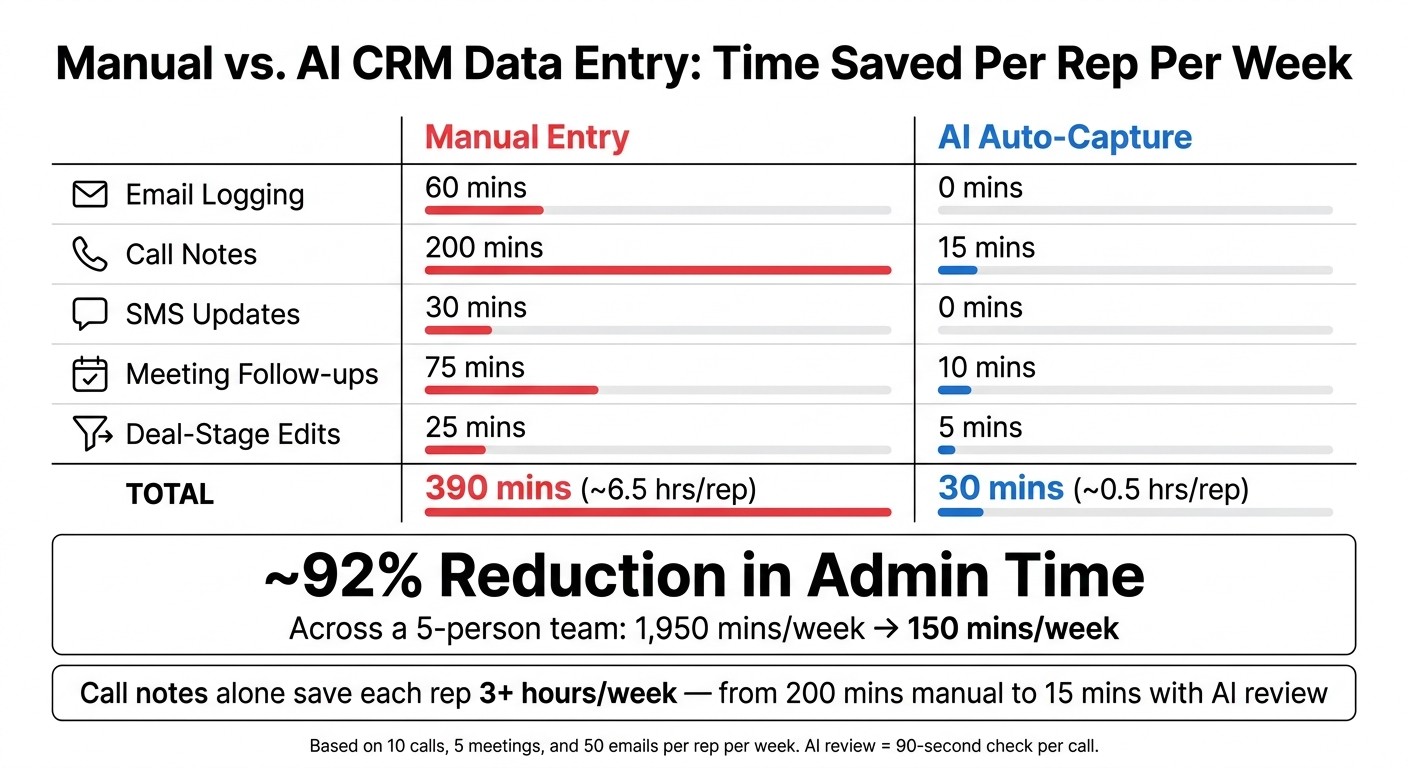
Manual vs. AI CRM Data Entry: Time Saved Per Rep Per Week
A five-person team spends 1,950 minutes per week on manual CRM logging, compared with 150 minutes when AI handles capture. That is a ~92% reduction in admin time across email, calls, SMS, meeting follow-ups, and deal-stage edits.
The biggest time drain is call logging. Once teams trust AI-logged data, most of the manual work shifts from writing notes to doing a short review.
What does the manual vs. auto-capture time comparison table show?
The table shows where time goes by activity type, using these assumptions: 10 calls per rep per week, 5 meetings per rep per week, and 50 emails per rep per week.
Activity Type | Manual (Mins/Rep) | Auto-Capture (Mins/Rep) | Team Total - Manual | Team Total - Auto | Notes |
|---|---|---|---|---|---|
Email Logging | 60 | 0 | 300 | 0 | Automated via inbox sync [9] |
Call Notes | 200 | 15 | 1,000 | 75 | ~20 min/call manual; 90-sec review with AI [10] |
SMS Updates | 30 | 0 | 150 | 0 | Automated via platform sync [1] |
Meeting Follow-ups | 75 | 10 | 375 | 50 | AI drafts follow-up; rep reviews [10] |
Deal-Stage Edits | 25 | 5 | 125 | 25 | AI suggests, rep approves [9] |
Total | 390 mins (~6.5 hrs/rep) | 30 mins (~0.5 hrs/rep) | 1,950 mins | 150 mins | ~92% reduction |
Call notes account for most of the time saved. A rep who logs 10 calls manually at about 20 minutes each spends 200 minutes per week on that task alone [10].
With AI transcription plus a 90-second review, those same 10 calls take 15 minutes [10][9]. That saves each rep more than 3 hours per week on calls alone.
How does K3X handle automatic CRM data entry compared with other CRMs?

K3X writes CRM data as part of the same action that sends outreach. If an AI agent sends an email, places a call, or sends an SMS, K3X logs the activity summary and any deal-stage update on the record during that same execution [11][14].
A plain example helps here. A prompt like "Launch a sequence for new inbound leads that emails them immediately, follows up via SMS in 2 days if no reply, and updates the deal stage to 'Contacted' automatically" tells K3X to set the timing, run each step, and write each activity, summary, and stage change to the CRM without a separate logging task [11]. Calls, SMS, emails, and meetings all appear on one activity timeline, and agent-made actions are marked for review before they go out [14].
That is the main difference from many other CRMs. In most systems, a rep does the work first and then logs it manually, or an admin builds workflows to fill the gap. K3X ties the action and the record update together.
What does the K3X prompt-driven model look like in practice?
In practice, K3X combines execution and logging into one step. The user or the AI agent acts, and the CRM record updates itself right away.
Most CRMs split those steps. A rep makes a call, then adds notes, logs the task, and maybe moves the deal stage after the fact. K3X removes that extra admin layer, which means the CRM stays current without a second pass.
Where does K3X fit best, and where do other CRMs have the edge?
K3X fits small teams that want built-in AI-driven outreach with low setup work. It is aimed at teams of 1–9 people and starts at $20 per seat/month, including 1,000 AI credits, a built-in power dialer, SMS, and setup in under an hour [11].
The trade-offs are pretty clear. K3X is a newer product, its native integration catalog is smaller than Salesforce, HubSpot, or Zoho, AI credit use needs watching, and it is not built for 100+ seat companies or strict governance needs [11]. Salesforce and HubSpot still fit larger companies better when admin controls, approval layers, and broad integration depth matter more than setup speed.
How do K3X and competing CRMs compare on automatic logging, calling, and pricing?
The main points of comparison are the logging method, built-in calling and SMS, how much workflow setup is needed, and starting price.
CRM | Logging approach | Calling & SMS | Workflow dependence | Setup burden | Entry pricing |
|---|---|---|---|---|---|
K3X | Built-in power dialer + SMS [11] | None; prompt-driven [11] | Under 1 hour [11] | $20/seat/month [11] | |
Salesforce | Manual or workflow-triggered [9] | High; relies on logic trees and rules [9] | High; usually needs admins or RevOps support [8] | Commonly $150–$300/user/month before add-ons [8] | |
HubSpot | Manual or workflow-triggered [9] | Often requires add-ons for calling/SMS [9] | High; configuration typically needs RevOps support at scale [9] | High [9] | Varies by plan [9] |
Pipedrive / Zoho / monday.com | Manual or sequence-triggered [9] | Often requires third-party tools for automated call/SMS logging [9][1][6] | High; relies on triggers [9] | Medium; requires manual setup [9] | Often around $15–$50+/seat/month [9] |
Close / Attio | Sequence-based [11] | Built-in calling and SMS in Close [11] | Medium; relies on sequences [11] | Low to medium [11] | Roughly $25–$49/seat/month [11] |
Close is the nearest match to K3X on built-in channel coverage because it includes native calling and SMS. Even so, its logging still depends on sequences rather than AI agent execution [11].
For small sales teams, that difference matters. K3X cuts out one more setup layer by making CRM updates the direct result of outreach, while the other tools listed here still lean more on manual steps, triggers, or prebuilt sequences.
Conclusion: What should SMB teams look for in an automatic CRM data entry system?
SMB teams should look for a system that logs the channels they use, keeps records up to date on its own, and matches the team’s size and comfort with setup. If one of those pieces is missing, reps still end up doing manual admin work.
Start with channel coverage. This matters most because a tool is only useful if it logs the work your team already does in email, calls, SMS, and meetings. Check that those channels are logged natively, not through stacked third-party connections, since native logging tends to mean less setup and fewer failure points.
After that, look at how much setup your team can handle. For teams with 1–9 people, K3X is the best fit in this model because it combines outreach prompts and CRM updates in one step, without a workflow builder or extra admin layer to manage.
That approach will not fit every team. Larger groups usually need more control inside the CRM itself, especially when there are approval steps, admin rules, or 100+ seats to manage. In those cases, Salesforce, HubSpot, or Zoho are often a better fit, even though they come with more setup and more day-to-day management.
When the fit is right, the effect shows up in daily work. Reps stop thinking about logging activity and start using the data to decide what to do next. At that point, the CRM becomes a selling tool instead of an admin task: automatic data entry cuts typing, improves record quality, and speeds up follow-up.