Sales Automation
•
Folk CRM Alternatives: 7 Best Options for Small Sales Teams in 2026
Choose a CRM by its bottleneck: automation, data model, pipeline control, or all-in-one GTM—here's the best alternative for each.

If I were narrowing Folk alternatives for a small sales team in 2026, I’d start with K3X for hands-off follow-up, Attio for custom data structure, Pipedrive for pipeline control, and HubSpot for an all-in-one stack. The rest of the list matters more by sales motion: Close for call-heavy outbound, Copper for Gmail-based work, and Less Annoying CRM for very small teams on a flat budget.
What matters most is why a team is leaving Folk. In the source article, the main reasons were limited automation depth, more manual follow-up, lighter reporting, and a tag-and-list setup that can feel tight as pipelines grow.
K3X fits teams of 1–9 that want the system to act on plain-English goals instead of building custom workflows. The article lists pricing at $20/user/month with a 14-day free trial.
Attio fits teams that need custom objects and linked records. Its paid plans start at $29/user/month billed annually, and it has a free tier for up to 3 seats.
Pipedrive is the pick for stage-based selling and forecast visibility. It starts at $14/user/month billed annually, with a 14-day free trial.
HubSpot CRM works best when sales, marketing, and service need to share one system. The article lists a free tier with up to 1,000,000 contacts and paid Sales Hub plans from $15/user/month billed annually.
Close is for outbound teams that live on calls and SMS. Pricing in the article starts from $9/user/month, with common team plans around $35–$49/user/month and a 14-day free trial.
Copper makes sense for teams that work inside Gmail all day. The article lists plans from $9/user/month with a 14-day free trial.
Less Annoying CRM is the low-complexity option at a flat $15/user/month, but with lighter automation.
If I had to compress the article into one buying rule, it would be this: pick by bottleneck, not by brand. Follow-up execution, data model, pipeline visibility, and stack breadth are the four filters that matter most here.
Best CRM Software 2026? Notion vs Airtable vs folk vs Copper vs Pipedrive vs HubSpot vs Salesforce
Quick Verdict: Best Folk CRM Alternatives for Small Teams
K3X is the best Folk alternative for teams with 1–9 people that want results without setting up workflows, sequences, or triggers. If your team has a different need, Attio works well for relational data, Pipedrive stands out for pipeline visibility, and HubSpot CRM fits teams that want sales, marketing, and service in one system.
Here’s the short version:
Tool | Best For | Starting Price | Trial / Free Tier |
|---|---|---|---|
K3X | Outcome-based execution, teams of 1–9 | $20/seat/mo [8] | 14-day free trial |
Attio | Flexible relational data models | ||
Pipedrive | Visual pipeline and deal velocity | No | |
HubSpot CRM | All-in-one GTM stack |
Folk can still make sense for relationship-led teams that want a light contact graph. The next section covers why many teams move on from Folk as their needs change.
Why Do Teams Look for Folk Alternatives?
Teams usually leave Folk when they need deeper automation, better reporting, or less manual follow-up. In most cases, the strain shows up in four places: data structure, automation, follow-up, and reporting.
Folk works well for contact management, but it gets clunky when teams need more complex deal structures. Its tag-and-list model fits simple networking and relationship-led workflows. Once a team needs custom objects or linked records, though, the setup becomes harder to manage day to day.[1][6]
Automation depth is limited, and follow-up management stays manual. Folk focuses on basic email sequences and mail merges, but it does not offer the conditional logic or cross-team automated actions found in HubSpot or Zoho.[4][3] It also does not include native calling or SMS, so outbound teams often switch to Close for its built-in Power Dialer and sequencer.[4][6] And unlike AI-native CRMs that surface or carry out follow-up tasks on their own, Folk still depends on manual work as the pipeline gets bigger.[4][8]
Folk's reporting can work for small teams, but it falls short for larger pipelines. Dashboards are limited when teams need pipeline analytics, revenue forecasting, or deeper views by owner, source, or stage.[4][2] That pain tends to show up once teams move past about 15–20 reps.[1][3]
For teams that have run into one or more of these limits, the next step is figuring out which tool closes the right gap. That is why buyers often compare Folk with CRMs built for automation, tighter pipeline control, or less admin work.
1. K3X

K3X is aimed at teams of 1–9 people that want the system to do the follow-up work, not just track contacts. Instead of setting up workflows, sequences, or triggers, users describe the goal in plain English and K3X handles the next steps across email, SMS, and calls.[8]
A simple example is: "follow up every lead within 24 hours until they book a call." K3X says the platform can carry out that request without a workflow builder.[8] That is the main difference from Folk: Folk is more about relationship tracking, while K3X is built to carry out follow-up tasks.
K3X says its AI agents save sales reps an average of 8 hours per week and have automated 312,000 hours of manual work across its users.[8] For small sales teams, that points to a clear use case: less time spent logging activity, sending reminders, and stitching together tools.
Best for: Teams of 1–9 that want automated follow-up across email, SMS, and calls without learning a workflow builder.
Pricing: $20 per seat/month at k3x.ai/pricing. K3X also offers a 14-day free trial at k3x.ai.[8]
Folk CRM | K3X | |
|---|---|---|
Setup model | Manual sequences & tags | Prompt-driven AI |
Native channels | Email only | Email, SMS, and calls |
Admin work | Manual updates & logging | Automatic activity capture |
Starting price | ~$24/user/month | $20/user/month |
Free trial | Not listed | Yes (14 days) |
K3X has a few clear strengths for small teams:
No workflow builders, sequences, or triggers to set up
Native email, SMS, and calling in one system, with no extra add-ons required
Automatic data entry and activity capture cut down CRM upkeep
There are also limits to keep in mind:
Smaller native integration ecosystem
Not built for 100+ seat rollouts or enterprise compliance requirements
If your main need is flexible data structure rather than follow-up automation, Attio is the next comparison.
2. Attio
Attio is a better fit than Folk when your team needs a CRM built around a more complex data structure. Its relational data model supports custom objects and many-to-many relationships, which means one company can connect to several contacts, deals, and partner records at the same time[1]. For teams that have outgrown Folk’s tag-and-list approach, that gives much more control over how data is stored and linked.
That added control comes with more setup work. Attio often takes 1–2 days to map the schema and import data cleanly[1]. For RevOps teams, that tradeoff can be worth it, since it gives them room to match the CRM to how deals, accounts, and partnerships work in practice. Attio Pro supports up to 1,000,000 records[9], and its no-code automations can run when data changes anywhere in the CRM[3].
Best for: Technical founders and RevOps-led teams that need custom objects and deeper reporting.
Pricing: Free tier for up to 3 seats with unlimited contacts[1][4]. Plus costs $29/seat/month billed annually[1][4]. Pro costs $69/seat/month billed annually[1][4]. Enterprise pricing is custom[1].
Folk | Attio | |
|---|---|---|
Data model | Tag-and-list | Relational / custom objects |
Setup model | Manual setup | Schema-based setup |
Free tier | No (14-day trial only)[4] | |
Automation depth | Basic sequences | Deep no-code workflows |
Best for | Relationship-led teams | Ops-led teams and technical founders |
Starting price | $24/user/month (billed annually)[1] | $29/user/month (billed annually)[1] |
Attio stands out for data-heavy teams in a few clear ways:
Custom object schemas let you shape the CRM around your own business logic instead of forcing your process into a preset layout.
SQL-like filtering and deeper reporting give teams more than Folk’s simpler dashboards.
It includes 200+ native integrations and an API-first design[3][7].
There are also two limits worth noting:
The learning curve is steeper than Folk’s, and ease-of-use ratings are below Folk’s 4.7/5 score[4].
There’s no mobile app, so teams work from the web only.
If you want more structure but don’t want to do schema design, Pipedrive is the next comparison.
3. Pipedrive
Pipedrive is the better Folk alternative for small teams that want a sales-first CRM centered on deal stages, activity tracking, and forecasting. Pick Pipedrive if pipeline control matters most; pick K3X if you want the CRM to handle follow-up on its own.
Reps get a clear view of open deals by stage, can move deals through a visual pipeline, and can use activity reminders to keep work from slipping. Hack'celeration gives Pipedrive a 4.6/5 for ease of moving deals through a pipeline [4]. It also beats Folk on conversion-by-stage tracking and revenue forecasting [1][4].
Setup is not instant, but it is still light for a small team. Most teams can configure pipelines and stages in about 2–4 hours [10].
Pricing starts at $14 per user/month when billed annually [1]. Workflow automation starts at $34 per user/month, while the AI sales assistant and advanced reporting start at $64 per user/month [1]. Pipedrive also offers a 14-day free trial with no credit card required [3][4].
Folk | Pipedrive | |
|---|---|---|
Core model | Contact-centric / tag-and-list | Deal-centric / visual pipeline |
Setup time | ~20 minutes [1] | 2–4 hours [10] |
Free tier | No (14-day trial only) [4] | No (14-day trial only) [3] |
Automation depth | Basic sequences and mail merges | Rule-based workflow automation |
AI features | Bundled at $24/user/month [1] | Available at $64+/user/month [1] |
Best for | Relationship-led teams | Outbound / short-cycle sales teams |
Starting price | $24/user/month (billed annually) [1] | $14/user/month (billed annually) [1] |
For small sales teams, Pipedrive stands out in a few clear areas:
Visual pipeline with drag-and-drop deal management
Built-in activity reminders and conversion-by-stage tracking
Revenue forecasting without custom setup
There are two tradeoffs worth noting. Reporting and smart email templates sit behind the Advanced or Professional tiers [4]. It is also a weaker fit for relationship-heavy workflows, where Folk’s contact-first model feels more natural [3].
If you need broader sales and marketing automation, HubSpot is the next comparison.
4. HubSpot CRM: When Is It Better Than Folk?
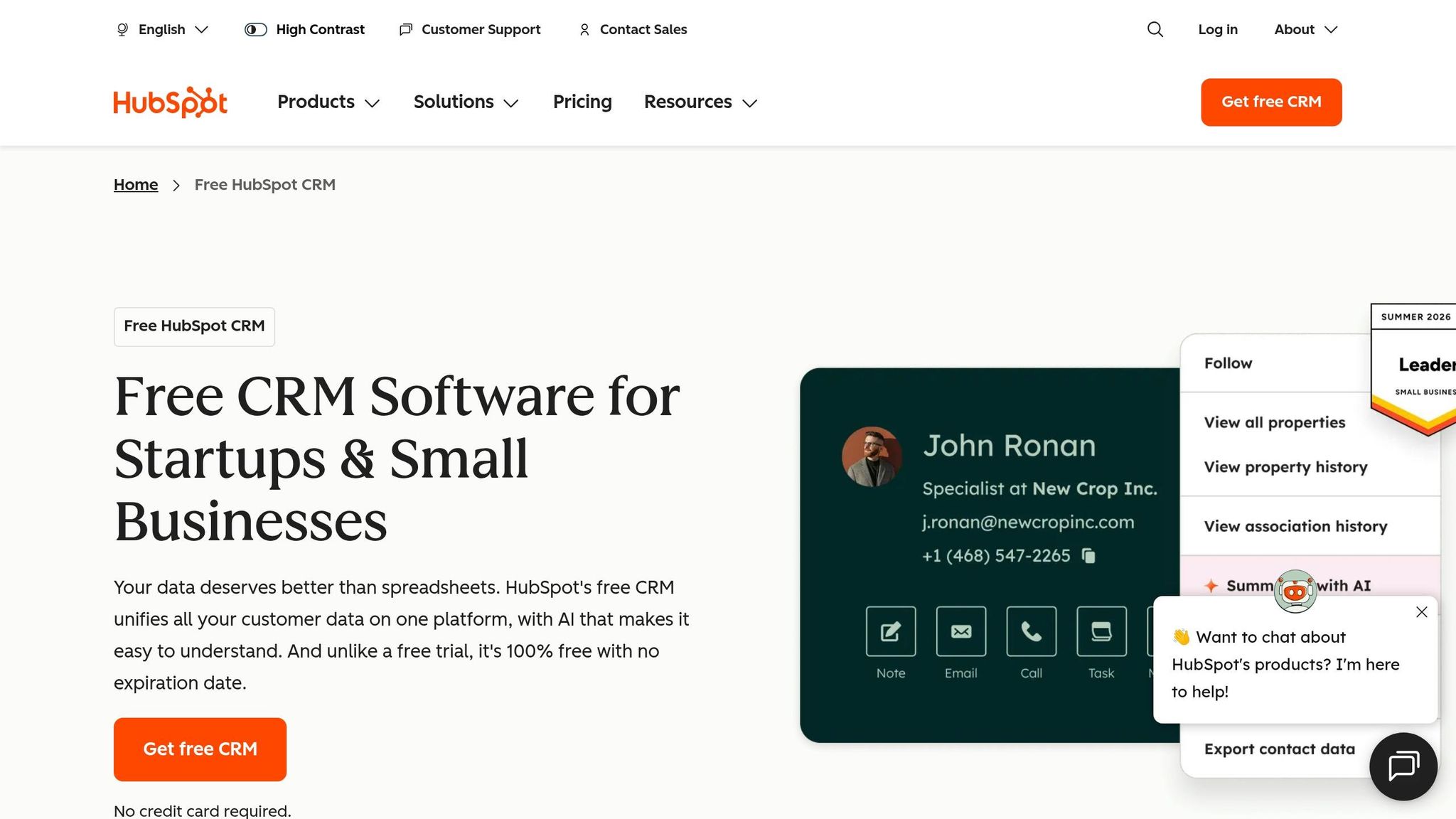
HubSpot is the better fit when your team needs more than contact tracking. It works best when sales, marketing, and service all need to run in one system, not across a patchwork of tools.
Folk leans toward relationship-led contact management. HubSpot goes further and covers a full go-to-market setup, with lead capture, email nurture, deal pipelines, and a service desk built in. K3X pursues outcomes through prompts; HubSpot still runs on workflows and hubs.
HubSpot covers more of the stack out of the box, while Folk often leans on Zapier or Make to fill gaps.[2] That means fewer handoffs between apps if your team wants forms, landing pages, pipeline management, and support tools in one place.
HubSpot also has a much more generous entry point. Its free tier supports up to 1 million contacts with no user cap.[7] Paid plans start at $15 per user/month for Sales Hub Starter when billed annually, and $90 per user/month for Sales Hub Professional when billed annually.[7]
The tradeoff is time. HubSpot usually takes hours to days to set up, compared with Folk’s roughly 20-minute setup.[1][3]
Folk | HubSpot CRM | |
|---|---|---|
Primary focus | Relationship-led / contact lists | Sales, marketing, and service in one system |
Free tier | No - 14-day trial only [4] | Yes - up to 1 million contacts [7] |
Setup time | ~20 minutes [1] | |
Automation depth | Basic sequences | Advanced workflows and decision logic [2] |
Integrations | Relies on Zapier/Make [2] | 1,500+ native apps [4] |
Starting price | $24/user/month (billed annually) [1] | $15/user/month (Starter, billed annually) [7] |
Best for | Relationship-led teams | Inbound-led teams (5–50 people) |
Best for: Small teams with an inbound-led motion where marketing and sales pass leads through a shared pipeline.
Pricing: Free tier available. Sales Hub Starter is $15 per user/month billed annually, and Sales Hub Professional is $90 per user/month billed annually.[7]
Pros:
Free tier supports up to 1 million contacts with no user cap.[7]
Native landing pages, forms, and email nurture can cut tool sprawl.[2]
Can serve both small teams and larger orgs on the same platform.[4]
Cons:
Costs can climb as you add Hubs or go past contact limits.[1][2]
Setup takes much longer than Folk, so it is not the best pick if you need to go live fast.[1]
If your team needs built-in calling and a more outbound-first workflow, Close is the next comparison.
5. Close: Which Folk Alternative Fits High-Volume Outbound Teams?
Close is the better fit for outbound-heavy teams that live on calls, SMS, and sales sequences. If your reps are judged by dial count and outbound activity, not by relationship tracking, Close lines up more closely with that workflow.
After pipeline-first CRMs like Pipedrive, Close stands out as the outbound-first option for teams that need calling and SMS built into the CRM. It comes with a native Power Dialer, Predictive Dialer, two-way SMS, and email outreach, while Folk often relies on tools like Aircall for phone coverage.
Close works best for SDR and AE teams running a structured outbound motion. In many of those teams, 80–150 calls per rep per day is a normal target.
It also includes Chloe, a native AI agent that helps with call note-taking, follow-up email drafts, and contact enrichment. In comparative testing, Close scored 4.6/5 for outbound feature depth, the highest score among major Folk alternatives.[4]
The main downside is cost, along with weaker support scores. A 5-person team pays about $295/month on Close Startup versus $120/month on Folk Pro, and support scored 2.8/5 in comparative testing.[4][6]
Best for: SDR and AE teams where outbound dial volume is the main success metric.
Pricing: Close offers a 14-day free trial and no forever-free plan.[4] Solo starts at $9/user/month. Essentials/Startup runs about $35–$49/user/month. Growth/Professional is $99/user/month, and Scale/Enterprise is $139/user/month. Annual billing usually cuts the price by 15–25%.[6][1]
Pros:
Native Power Dialer, Predictive Dialer, and two-way SMS remove the need for a separate telephony tool.
Smart Views and multi-channel sequences help teams handle high outbound volume without leaving the CRM.
Built-in importers and field mapping make CSV migration from Folk straightforward.
Cons:
Support scored 2.8/5 in comparative testing, below Folk’s 3.9/5.[4]
It can be too much for teams that only need simple contact tracking and warm-intro relationship management.[6]
If you want relationship management without as much outbound infrastructure, Copper is the next comparison.
6. Copper
Copper is a strong fit for teams that work in Google Workspace all day and want their CRM to sit inside Gmail. Its main edge over Folk is simple: less manual work inside the inbox your team already uses.
Copper appears as a sidebar in Gmail, so users can manage contacts, deals, and follow-ups without jumping between tabs. For sales and revenue teams that spend most of the day in email, that cuts friction and makes adoption easier.[3][5]
The biggest difference from Folk is automatic data capture. Copper pulls in emails, meetings, and contacts from Gmail and Google Calendar on its own, while Folk leans more on manual entry. Copper also includes stage-based automations and task creation, which means records can update and follow-up tasks can trigger when a deal moves through the pipeline.[5] Folk stays closer to basic sequences and AI-assisted drafting.[4]
That convenience comes with a clear tradeoff. Copper works best when your team is fully committed to Google Workspace, and it loses much of its appeal in a mixed Google and Microsoft setup.[3] Reporting is also lighter than what you get in Close or Pipedrive if your team needs deeper pipeline analytics.[3]
Best for: Agencies, consultancies, and professional services firms with 1–50 people that run heavily on Gmail and Google Calendar.
Pricing: 14-day free trial; Starter $9/user/month, Basic $23/user/month, Professional $49/user/month.[3][5]
Pros:
Lives inside Gmail, so users don't need to switch tabs.[3][5]
Auto-captures contacts and activity from Google Workspace, which cuts manual data entry.[3]
Includes both Opportunity Pipelines and Project Pipelines, so teams can track work after the deal closes.[5]
Cons:
Closely tied to Google Workspace, so mixed Google and Microsoft teams get less from it.[3]
Reporting is lighter than Close or Pipedrive for pipeline analytics.[3]
For teams that want simpler pricing and a lighter setup, Less Annoying CRM is the final low-complexity option.
7. Less Annoying CRM
Less Annoying CRM is the simplest Folk alternative in this group. It works best for solo operators and very small teams that want basic contact management, low admin work, and flat pricing instead of deeper automation.
Compared with Folk, the tradeoff is straightforward: you get less workflow automation, but setup is much lighter and pricing is easier to plan for. That makes it a fit for teams that have outgrown Folk's pricing model and want something easier to run, not for teams that need more automation.
Less Annoying CRM charges a flat $15/user/month with no tiers or add-ons, while Folk costs about $24/member/month and does not offer a free tier.[4] Setup is minimal, so teams can get live fast without spending much time on workflow configuration. It is a better Folk alternative only when simplicity matters more than automation depth.
Best for: Solo operators and very small teams that want a no-frills CRM with flat $15/user/month pricing.
Pricing: No free tier; $15/user/month flat rate.[4]
Pros:
Minimal setup helps teams launch fast.
The interface stays focused on contacts and follow-up.
Cons:
Automation is limited compared with tools like Pipedrive and Close.
No free tier.
Folk Alternatives Side-by-Side Comparison
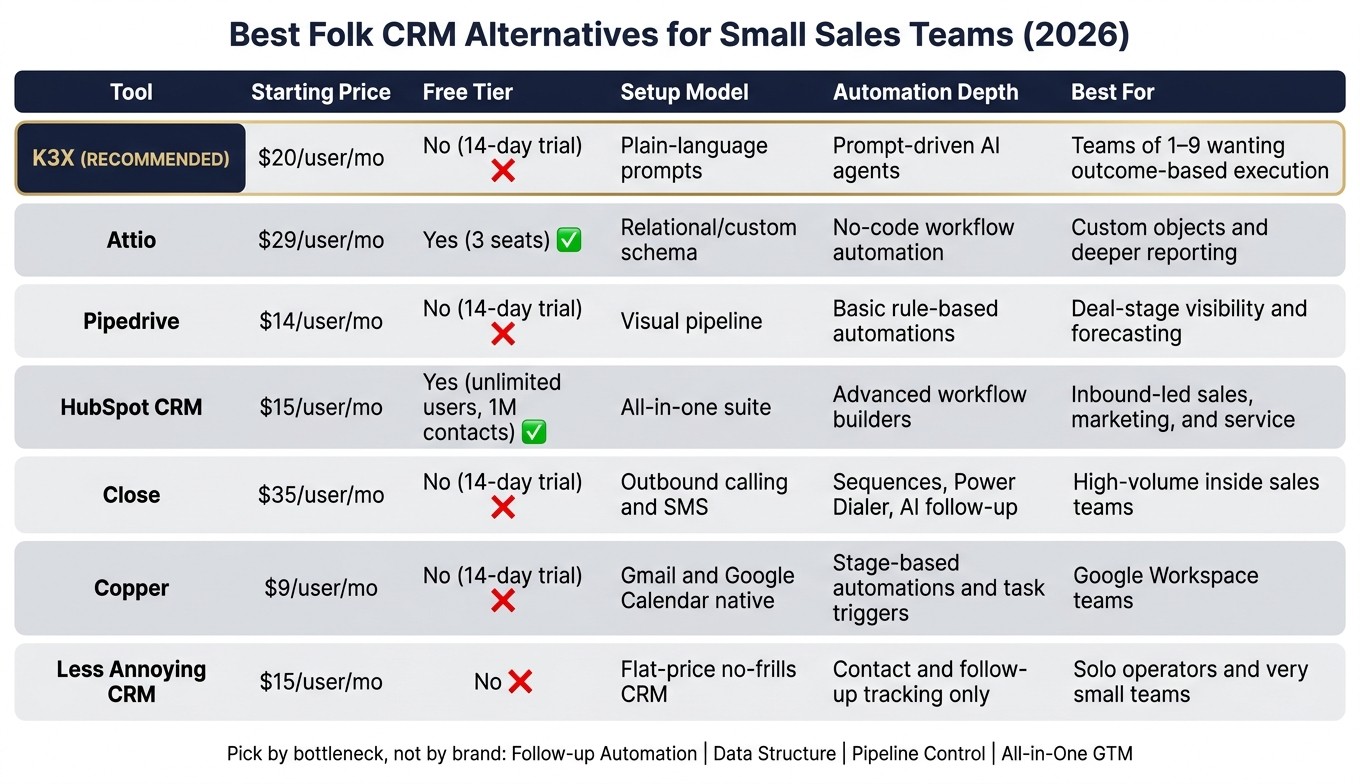
Best Folk CRM Alternatives for Small Sales Teams 2026
This table maps each CRM to the workflow gap Folk tends to leave behind. It shows pricing, setup style, automation depth, and the type of team each tool fits best.
Tool | Starting Price (per user/mo) | Free Tier | Setup Model | Automation Depth | Best For |
|---|---|---|---|---|---|
K3X | $20 | No (14-day trial) | Plain-language prompts | Prompt-driven AI agents | Teams of 1–9 that want outcome-based execution [8] |
Attio | $29 | Yes (3 seats) | Relational/custom schema | No-code workflow automation | Teams that need custom objects and deeper reporting [1] |
Pipedrive | $14 | No (14-day trial) | Visual pipeline | Basic rule-based automations | Teams that need deal-stage visibility and forecasting [4] |
HubSpot CRM | $15 | Yes (unlimited users, 1,000,000 contacts) | All-in-one suite | Advanced workflow builders | Inbound-led teams that need sales, marketing, and service in one place [2] |
Close | $35 | No (14-day trial) | Outbound calling and SMS | Sequences, Power Dialer, and AI follow-up | High-volume inside sales teams [2] |
Copper | $9 | No (14-day trial) | Gmail and Google Calendar native | Stage-based automations and task triggers | Google Workspace teams that want inbox-native CRM [3] |
Less Annoying CRM | $15 | No | Flat-price, no-frills CRM | Contact and follow-up tracking only | Solo operators and very small teams that want simple, predictable pricing [4] |
K3X and HubSpot sit at the top end for automation depth, but they get there in different ways. K3X runs through plain-language prompts, while HubSpot depends on workflow builders that users need to set up first.
The rest of the tools in the table lean more manual by comparison. Attio gives teams more schema control and reporting, Pipedrive focuses on pipeline visibility, Close is built for outbound reps, Copper stays close to Gmail, and Less Annoying CRM keeps things stripped down to contact and follow-up tracking.
Use this table to cut down the shortlist fast; the next section compares K3X, Folk, and Pipedrive directly.
K3X, Folk, or Pipedrive: Which One Should You Pick?
Pick K3X if your team wants work done without spending time setting up automations. Pick Folk if relationships matter more than deal speed. Pick Pipedrive if your team needs a clear pipeline and revenue forecast.
Choose K3X if your team has 1–9 people and wants outcomes, not workflow setup. K3X executes outcomes directly, so there are no sequences, triggers, or workflow builders to configure. It fits teams that want follow-up execution without extra admin. If your team still depends on warm intros and longer relationship cycles, Folk may still be enough.
Stay with Folk if your motion is relationship-first. It works best when contact context matters more than deal velocity. If your team is starting to need a clearer deal view, Pipedrive is the next step.
Choose Pipedrive if your team runs deal-driven outbound sales and needs stage tracking plus revenue forecasting. Starting at $14/user/month when billed annually [1], Pipedrive gives the clearest visual pipeline of the three for deal-stage visibility and forecast tracking.
K3X | Folk | Pipedrive | |
|---|---|---|---|
Primary focus | Outcome-based execution | Contact-first management | Stage-based deal tracking |
Starting price | $20/user/mo [8] | $14/user/mo [1] | |
Best for | Teams avoiding admin work | Warm-intro teams | Outbound-heavy sales teams |
If Folk feels close but still falls short, the next section shows how to move over without losing data.
How to Migrate from Folk CRM Without Losing Your Data
Moving from Folk is usually simple. The main risk is not the export itself, but field mapping, notes, and activity history during import.
If you're moving from a contact-first setup into a more structured CRM, review your custom fields before you import anything. Contacts and companies usually transfer cleanly, but custom properties, notes, and timeline data are where mistakes tend to show up. For 100+ contacts, plan for about 2–4 hours of migration work [2][7]. If your team has heavy customization or a large dataset, plan for 1–2 full days [4].
Use this sequence to avoid broken mappings or missing history.
Migration Step | What to Do | Time Estimate |
|---|---|---|
Export Contacts CSV | Download contacts, companies, and pipeline data as CSV files from Folk | 30–60 min |
Import & Map Fields | Upload CSVs to the new CRM and match Folk columns to destination fields, including any custom properties | 1–3 hrs |
Rebuild Pipelines | Recreate deal stages and move active opportunities to their correct stage | 1–2 hrs |
Redirect Forms & Tools | Update website forms and automations to point to the new CRM | 1–2 hrs |
Start with a small test import before you reroute any live forms or automations. That gives you a safe way to catch mismatched fields, bad date formats, or missing owners before new leads start flowing into the new system.
The one part that usually needs a bit of judgment is tag handling. Folk tags should map to multi-select fields or another structured field in the destination CRM before import [1]. If you skip that step, you can end up with messy labels that are hard to filter, report on, or use in automation later.
Common Questions About Folk CRM Alternatives
These short answers cover fit, price, and migration risk so you can check the main points fast.
What is the best Folk CRM alternative for small teams?
K3X is the best fit for teams with 1 to 9 people that want prompt-based follow-up across email, SMS, and calls. It suits small sales teams that want the system to handle more of the day-to-day outreach work.
Use Attio instead if your team needs custom objects and a more flexible data model. That matters when you want to shape the CRM around your process, not the other way around.
Is there a cheaper alternative to Folk?
Yes. HubSpot has the lowest-friction free tier, Attio has a free 3-seat plan, and Pipedrive is the lowest-priced paid option in this group.
If your main filter is upfront cost, those are the first three to check. The tradeoff is that lower entry price does not always mean lower admin time later.
What is the difference between Folk and an AI-native CRM?
The core difference is simple: Folk tracks relationships, while K3X carries out follow-up work from a plain-language outcome. In practice, Folk helps organize who you know, while an AI-native CRM pushes the next action forward with less manual input.
That distinction matters for lean teams. If your team wants a system of record, Folk fits that job. If your team wants help doing the work after a meeting or lead update, K3X is closer to that use case.
Can I migrate from Folk without losing my data?
Yes. Export your CSVs, map fields with care, and test a small import before you switch live forms or active workflows.
A pilot import helps catch field mismatches, broken date formats, and duplicate records before the full move. For most teams, that small test is the part that saves the most cleanup later.
Which Folk alternative has the best automation?
K3X has the most hands-off automation for very small teams. HubSpot has the broadest standard automation suite, while Close and Pipedrive are better fits for structured outbound workflows.
The right choice depends on how your team sells. If you run repeatable outbound sequences, Close or Pipedrive may be enough. If you want broad workflow coverage across marketing, sales, and service, HubSpot has more range.
Key Takeaways Before Choosing a Folk Alternative
The right Folk replacement depends on the main thing that is slowing your team down. Start by naming the bottleneck first, then match the tool to that job.
Choose K3X if your team of 1–9 people wants follow-up handled from a plain-language result, like "follow up every lead within 24 hours until they book a call." K3X works from outcomes rather than sequences, so your team can skip workflow setup.
Choose Attio if Folk's tag-based model feels too limited and you need custom objects or linked records. It fits teams that want more control over how data is shaped and connected.
Choose Pipedrive if your team works deal-by-deal and needs a clearer view of stage movement. It is a better fit when pipeline visibility matters more than flexible data modeling.
Choose HubSpot CRM if you want sales, marketing, and service in one system. That makes sense when your bottleneck is tool sprawl across go-to-market work.
Use these four filters first:
Follow-up automation
Data structure
Pipeline control
All-in-one GTM
If you already know where Folk is getting in the way, the next step is a clean move off the platform.