Sales Automation
•
Best Salesforce Alternatives for Small Sales Teams
Compare top Salesforce alternatives to find the best AI-driven, lightweight CRM for small sales teams with faster setup and lower costs.

Salesforce is powerful but often too complex and costly for small sales teams. Alternatives like K3X, HubSpot, and Pipedrive offer simpler, more affordable solutions tailored to smaller teams' needs. K3X stands out for its AI-driven automation, while Pipedrive is ideal for quick setup, and HubSpot excels in aligning sales and marketing.
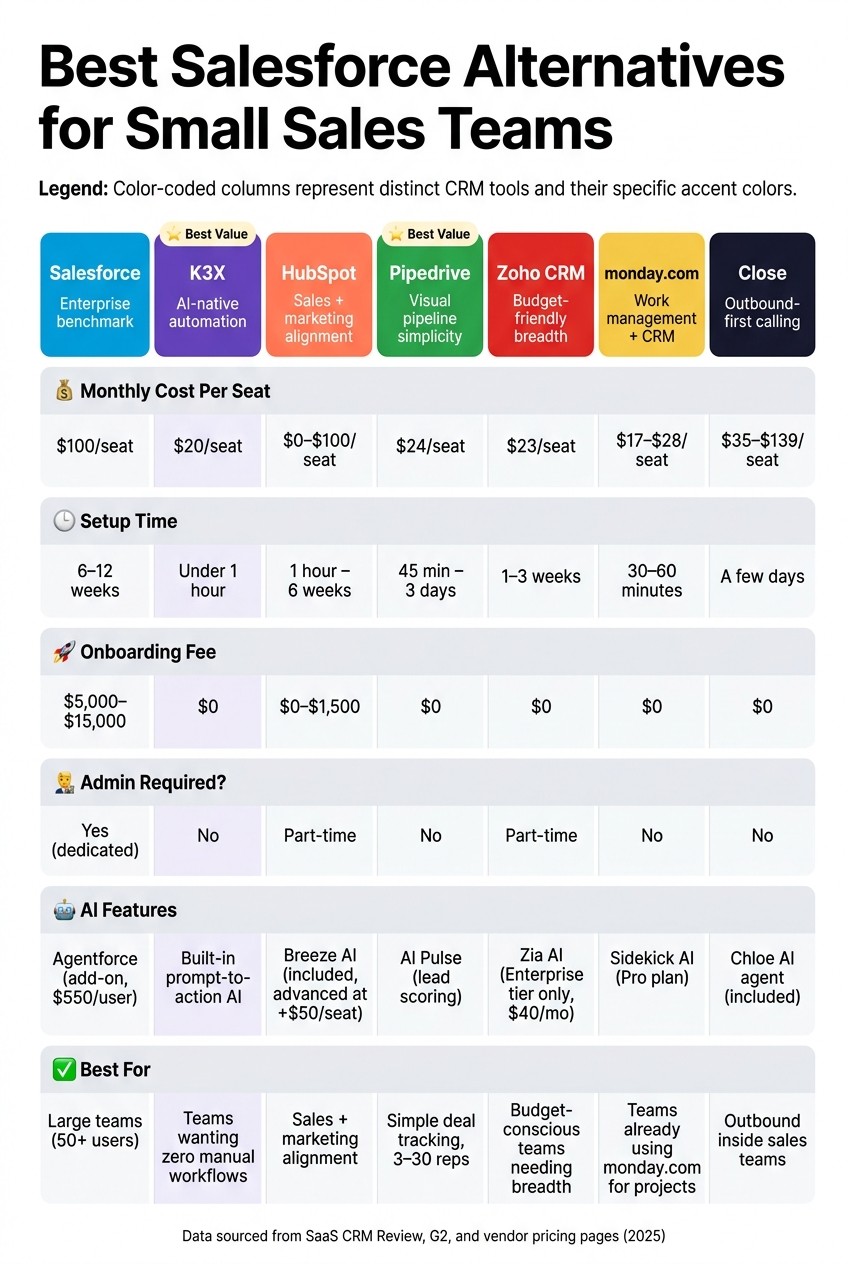
Best Salesforce Alternatives for Small Sales Teams: Side-by-Side Comparison
Top 5 Salesforce CRM Alternatives For Small Business
Why Consider Salesforce Alternatives?
Salesforce's high costs, long implementation times, and administrative requirements make it challenging for smaller teams. For example, a 10-user Salesforce Pro Suite setup can cost $38,000–$48,000 in the first year, including implementation fees and admin salaries. Additionally, its interface complexity often reduces adoption rates among smaller teams, with CRM update compliance dropping to 41% (source: SaaS CRM Review).
What Are the Best Alternatives?
K3X: Best for teams seeking AI-powered automation without complex setup. Priced at $20/user/month, it eliminates manual workflows and is operational in under an hour.
HubSpot: Great for teams needing sales and marketing alignment. The free tier is appealing, but costs escalate sharply at higher tiers, with onboarding fees starting at $1,500.
Pipedrive: Ideal for small teams focused on deal tracking. It offers fast setup (1–3 days) and transparent pricing starting at $24/user/month.
Zoho CRM: Offers broad functionality at a lower cost ($23/user/month for the Professional tier) but has a steeper learning curve.
monday.com: Combines work management with CRM features. Quick to set up but lacks advanced sales tools.
Close: Designed for outbound teams, with built-in calling and SMS. Pricing starts at $35/user/month, but limited integrations may not suit all teams.
Each tool addresses specific challenges, such as cost, ease of use, or automation, making them viable Salesforce alternatives for small sales teams.
1. Salesforce
Salesforce holds 20.7% of the global CRM market and is widely regarded as the benchmark for enterprise CRM systems [11]. Its extensive features include unlimited custom objects, automation through Flow Builder, CPQ tools, and access to over 7,000 apps on the AppExchange [11][13]. These capabilities are ideal for large organizations with dedicated RevOps teams but can be overwhelming and costly for smaller teams.
Implementation timelines range from 6–12 weeks for standard setups to 3–6 months for more complex deployments. External consultants typically charge $75 to $150 per hour for these projects [12][13]. Additionally, maintaining Salesforce often requires a dedicated administrator, with annual salaries between $70,000 and $110,000 [11][13]. For a 10-user team using the Pro Suite, the first-year total cost of ownership is estimated between $38,000 and $48,000.
Cost Component | Salesforce Pro Suite (10 Users) |
|---|---|
License Cost | $12,000/yr |
Implementation | $5,000 – $15,000 |
Admin Labor | $15,000 (part-time) |
Training | $3,000 |
Total Year 1 | $38,000 – $48,000 |
(Source: SaaS CRM Review [13])
These high costs and lengthy implementation periods can be a barrier for small teams. The platform's complexity also impacts usability, with CRM update compliance dropping from 78% to 41% among smaller teams due to its challenging user interface [6]. Salesforce's G2 Ease of Setup score is 7.2/10, lagging behind more user-friendly options that score 8.4 [10].
Salesforce is also investing heavily in AI through its Agentforce platform, which handles 3 billion workflows monthly and offers autonomous agents for tasks like lead qualification and pipeline management [10][13]. However, these AI features are tied to the costly $550/user/month Agentforce 1 tier or consumption-based add-ons, making them less accessible for smaller teams. In comparison, AI-focused CRM alternatives like K3X provide similar capabilities at a lower cost, emphasizing Salesforce's design for larger-scale operations.
"Salesforce makes sense at scale... If you're below that threshold, you're paying for runway you'll never use" [9].
For small teams, these challenges often lead them to explore leaner, AI-driven CRM solutions like K3X.
2. K3X
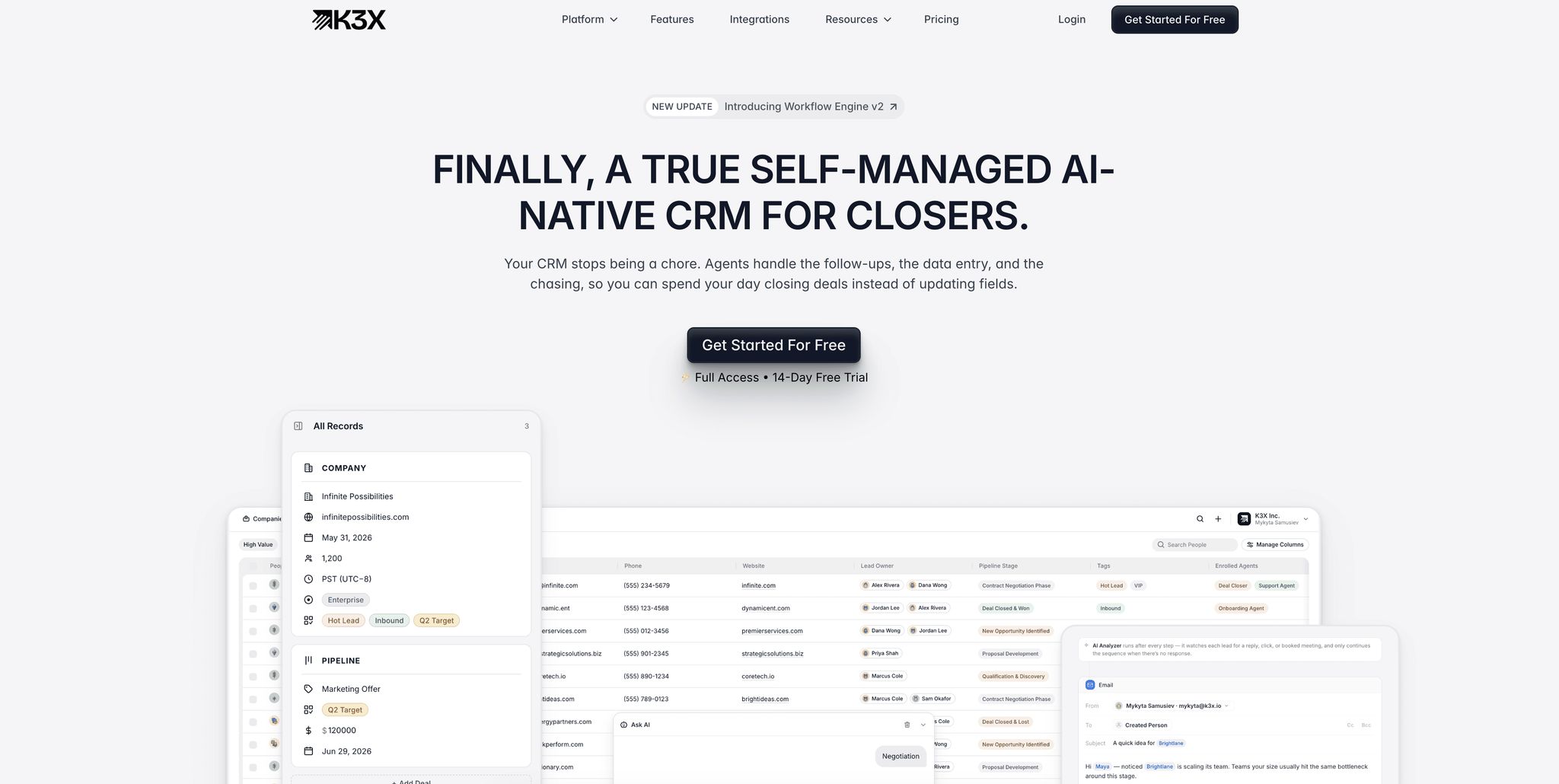
K3X is an AI-native CRM that prioritizes outcomes, making it a practical alternative to Salesforce for small sales teams aiming to spend more time selling and less time configuring software. Unlike Salesforce, which often requires extensive setup and dedicated administrators, K3X can be up and running in under an hour [5]. This fast deployment paves the way for its standout feature: a prompt-to-action model.
The prompt-to-action model allows users to describe their goals in plain language - such as "Book demo calls with every lead who hasn't responded" - and the AI takes care of the rest. It handles tasks like follow-ups, pipeline updates, data entry, and call logging automatically, eliminating the need for coding or configuring workflows. Sophie Bergman, Head of Client Solutions at K3X, explains:
"With K3X, you don't deal with code, rigid rules, or clunky flowcharts. You simply tell it what you want to achieve." [5]
K3X also integrates communication tools directly into the platform, including native email, SMS, and a one-click Power Dialer with unlimited call recordings. This removes the hassle of using third-party integrations. In contrast, Salesforce's native Sales Dialer is being phased out and is currently in maintenance mode [14].
K3X offers a straightforward Adaptive plan priced at $20 per seat per month. This includes 1,000 AI credits, unlimited workflows, unlimited integrations, and built-in communication tools. The pricing adjusts automatically during peak usage months but reverts to $20 when demand decreases [5].
Feature | K3X | Salesforce (Pro Suite) |
|---|---|---|
Monthly Seat Cost | $20 | $100 |
Setup Time | Under 1 hour | Weeks to months |
Automation Model | AI Prompt-to-Action | Linear workflows |
Built-in Comms | Dialer, SMS, Email | Requires add-ons |
Admin Required | No | Typically yes |
Onboarding Fee | None | $5,000–$15,000 |
These features translate into measurable efficiency gains. For instance, Ruby Capital Group, a funding company with 125 employees, implemented K3X in just two days in December 2025. This reduced follow-up time by 70% and tripled ticket resolution speed, with the system managing tasks like lead qualification and contract routing. Across all users, K3X has saved an average of 8 hours per week per employee and automated over 312,000 hours of work in total [5]. Its quick setup and automation make it an ideal choice for small teams looking for a streamlined, AI-driven CRM.
3. HubSpot
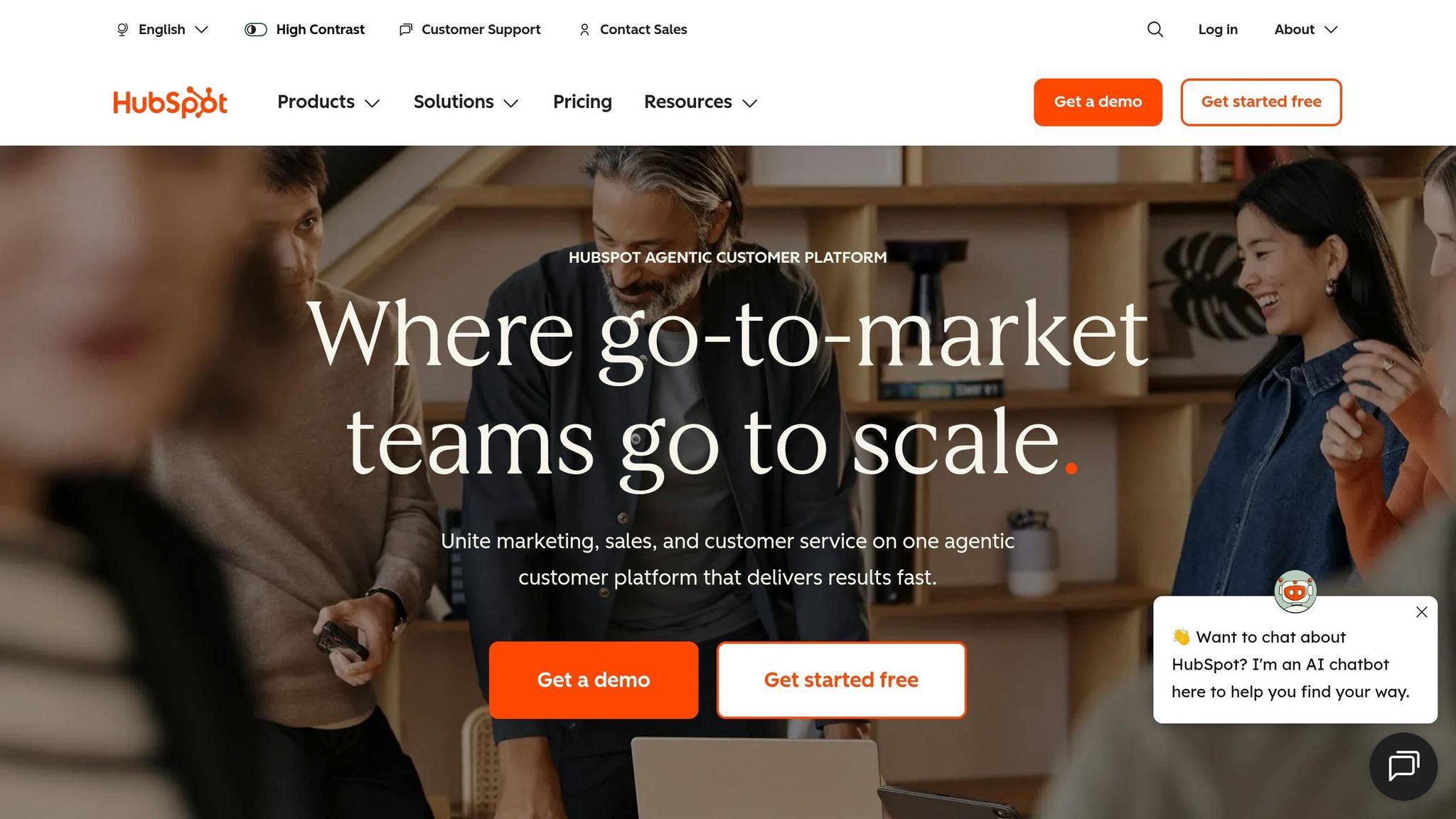
HubSpot offers a user-friendly CRM option, particularly appealing to small sales teams due to its free tier and straightforward setup. Unlike K3X, which focuses on AI-native pricing and automated workflows, HubSpot provides an accessible entry point. Its free plan supports up to 1,000,000 contacts with unlimited users, and most teams can get a basic CRM up and running in just 1–3 hours[3].
The platform is designed with end users in mind. HubSpot's setup wizard simplifies tasks like connecting Gmail or Outlook, importing contacts, and configuring pipelines. According to Best CRM Reviews:
"HubSpot was designed for end users, not administrators. Most teams can get a functional CRM running in a day or two without outside help."[1]
That said, HubSpot's pricing can escalate as businesses grow. While the free and Starter tiers are budget-friendly, the Professional tier - which includes advanced automation - costs around $90–$100 per seat per month and requires a $1,500 onboarding fee. For a 10-person team, this translates to approximately $16,200 annually before considering add-ons.
HubSpot includes its Breeze AI assistant at no extra cost across all plans. This tool helps with tasks like drafting emails and summarizing CRM records, though the free plan limits it to 1,000 requests per day. For more advanced AI features, users must pay an additional $50 per seat per month[4]. In contrast, K3X integrates AI automation at a flat rate of $20 per seat.
Feature | HubSpot Free | HubSpot Starter | HubSpot Professional |
|---|---|---|---|
Monthly Cost (per seat) | $0 | ~$20 | ~$90–$100 |
Setup Time | 1–3 hours | 1–2 days | 2–6 weeks |
Workflow Automation | None | Basic only | 300 workflows |
Onboarding Fee | $0 | $0 | $1,500 (mandatory) |
Admin Required | None | None | Part-time / self-serve |
HubSpot excels when its marketing and sales hubs are used together, offering strong data alignment. However, for small teams primarily focused on pipeline management, the leap from Starter to Professional can be costly. Additionally, contact-based pricing in the Marketing Hub can lead to Year 2 expenses being 3–5 times higher than the first year[3].
Next, we’ll examine Pipedrive to explore another alternative to Salesforce.
4. Pipedrive

Pipedrive is a practical choice for small sales teams looking for a straightforward CRM that prioritizes closing deals. Unlike Salesforce, which often requires extensive customization, or K3X, which emphasizes AI-driven automation, Pipedrive focuses on guiding users toward their next action. This streamlined approach makes it accessible for teams without a dedicated CRM administrator.
With Pipedrive, teams can start tracking deals in as little as 45 minutes to three days, compared to Salesforce's setup time of 8–12 weeks [13]. A sales manager can configure the platform over a weekend without needing IT support or a certified admin.
"A competent sales manager can configure Pipedrive in a weekend. You'll be tracking deals by Monday." [13]
The Growth plan, priced at $24 per user/month (billed annually), includes essential features like email sync and automation, which are missing from the $14 Lite plan. For a 10-person team, this plan costs approximately $3,480 annually, significantly less than Salesforce Professional ($9,600) or HubSpot Professional ($12,000) [17]. Additionally, Pipedrive does not charge mandatory onboarding fees, unlike HubSpot's $1,500 fee at the Professional tier [3]. However, its add-on pricing model can increase costs. For instance, LeadBooster (lead generation forms) costs around $32.50/month, and Campaigns (email marketing) costs about $13.33/month [8]. Teams should anticipate an extra 30–50% in costs for essential add-ons [8].
Feature Comparison
Feature | Pipedrive Growth | Salesforce Pro Suite | HubSpot Professional |
|---|---|---|---|
Monthly Cost (per seat) | $24 | $100 | ~$90–$100 |
Setup Time | 1–3 days | 4–12 weeks | 2–6 weeks |
Automation | 50 workflows (no-code) | Unlimited (admin required) | 300 workflows |
Onboarding Fee | $0 | $5,000–$15,000 | $1,500 (mandatory) |
Admin Required | No | Yes (dedicated) | Part-time / self-serve |
Ease-of-Use Rating (G2) | 8.9/10 | 8.5/10 | 8.7/10 |
Pipedrive's automation tools rely on no-code, rule-based workflows, allowing a sales ops generalist to create follow-up sequences or task assignments within minutes [13]. The AI Pulse feature, introduced in July 2025, provides lead scoring by analyzing email engagement, website visits, and call history [18]. Supporting over 100,000 companies across 179 countries, Pipedrive is ideal for teams with up to 40–50 employees. Larger teams may find its lack of advanced features, like custom objects, limiting [19][18]. For smaller teams, however, it offers strong functionality at a lower cost with minimal complexity.
Next, we’ll take a look at Zoho CRM, another affordable, AI-powered option tailored for small teams.
5. Zoho CRM
Zoho CRM appeals to teams seeking a broad range of features at a lower price point. Its Professional tier costs $23 per user per month when billed annually, meaning a 10-person team would spend about $2,760 annually. This is significantly less than the ~$12,000 per year required for comparable tiers in HubSpot Professional and Salesforce [11][20]. The platform is designed to streamline sales operations, particularly for teams without extensive CRM budgets or resources.
With over 250,000 businesses worldwide relying on Zoho CRM, the platform provides an estimated 80% of enterprise-level functionality at just 20% of the cost [16]. Mark Bishop, Editor at SaaS True Cost, highlights its appeal:
"Zoho is the value play for sub-50-person teams that need broad functionality at low cost; the dated UI remains functional." [4]
A standout feature is Zoho's Blueprint tool, which acts as a visual sales playbook, helping teams without dedicated operations support. Its multichannel dashboard integrates email, phone, chat, social media, and WhatsApp into one interface [20][22]. However, advanced automation capabilities may require familiarity with Deluge, Zoho's scripting language, and complex configurations can take 1–3 weeks to complete [23]. For customization, the Canvas no-code design studio allows teams to modify the interface without coding skills. AI-powered features, available through the Zia assistant, are restricted to the $40 per user Enterprise tier [11].
Feature | Zoho Professional ($23/mo) | Salesforce (Comparable Tier) | HubSpot Professional (~$90–$100/mo) |
|---|---|---|---|
Annual Cost (10 Users) | ~$2,760/year | ~$12,000/year | ~$12,000/year |
Onboarding Fee | $0 | $5,000–$15,000 | $1,500 (mandatory) |
AI Assistant | Zia (Enterprise only, $40/mo) | Einstein (add-on) | Breeze (included) |
Process Enforcement | Blueprint (visual playbook) | Flow Builder (admin required) | Sequences |
API Access | Included (from Standard, $14/mo) | Limited (in lower tiers) | Included |
Setup Time | 1–3 weeks | 8–12 weeks | 2–6 weeks |
While K3X offers immediate, AI-driven setup, Zoho CRM's configuration process is more traditional and may feel complex. However, it stands out for its robust cross-channel integrations. For teams focused solely on sales pipelines, Pipedrive might be a simpler choice. As CRM Analyst David Paul notes:
"If your sales team is the only department that will touch the CRM, Pipedrive wins every time. If operations, marketing, or support also needs access, Zoho's ecosystem is hard to beat." [21]
Zoho also offers the Zoho One bundle, priced at $37 per user per month, which includes more than 50 apps such as accounting, HR, and customer support tools. This makes it an attractive option for small businesses aiming to consolidate their software needs under one subscription [11][20].
Next on the list, monday.com provides a different approach to work management, integrating CRM functionalities into its platform.
6. monday.com
monday.com combines work management with basic CRM capabilities, making it a good fit for teams juggling sales and project management. However, unlike K3X's AI-driven prompt-to-action system, monday.com relies on manual setup and configuration for sales-specific workflows. This makes it less ideal for teams focused purely on closing deals.
All paid plans require a minimum of three seats, sold in fixed increments (3, 5, 10, 15, etc.). For instance, a team of four would need to purchase five seats. On annual billing, the Standard plan costs $17 per seat per month, while the Pro plan is $28 per seat per month. monday.com avoids onboarding fees, which can make it more affordable compared to other CRMs. The table below outlines key pricing and feature comparisons:
Feature | monday.com Standard | monday.com Pro | Salesforce Starter |
|---|---|---|---|
Price (Annual, per seat) | $17/mo | $28/mo | $25/mo |
Minimum Seats | 3 | 3 | 1 |
Setup Time | 30–60 minutes | 30–60 minutes | 3–6 months |
Automation Actions/Month | 250 | 25,000 | Workflow-based (admin required) |
Email Sequences | Not included | Included | Add-on |
AI Features | Basic | Advanced (Sidekick, SDR Agent) | Einstein (add-on) |
Native Telephony | No (third-party only) | No (third-party only) | Yes |
Setup is quick, with a basic pipeline ready in 30–60 minutes using the "Sales CRM" template. Full implementation can take just one to five days, a stark contrast to Salesforce's months-long process. monday.com also boasts a 4.6/5 rating on G2 from over 1,100 reviews, with users often praising its visual and easy-to-use interface. That said, its simplicity comes at the cost of advanced sales functionality.
Some limitations include restricted sales features. Email sync is available only in the Standard plan and above, while email sequences require the Pro plan. Teams on the Standard plan may quickly hit the 250 monthly automation limit, often needing to upgrade to the Pro plan, which offers 25,000 actions per month. Additionally, there’s no built-in power dialer, and advanced sales forecasting is only available on the Pro plan. CRM Analyst David Paul explains:
"Monday CRM works fine if your team already lives in Monday.com for project management and you need a basic contact database alongside it. But the moment you need email sequences, call logging, sales forecasting... you've outgrown what Monday's CRM was built to do." [25]
monday.com's total cost of ownership is estimated at 1.2×–1.5× its license fee, significantly lower than Salesforce's 3×–5× when factoring in implementation partners and admin salaries [24]. This makes it a strong option for small teams without dedicated operations staff. However, for teams seeking a more specialized sales tool with built-in calling and forecasting, Close might be a better fit.
7. Close
Close is tailored for outbound inside sales teams with 3–50 reps, making it a focused alternative to Salesforce. Unlike Salesforce, which often requires months of configuration and a dedicated administrator, Close enables teams to start selling quickly. On G2, Close holds a setup ease rating of 9.0/10 compared to Salesforce's 7.8/10, and an ease of use score of 9.2/10 versus Salesforce's 8.2/10 [28]. While K3X achieves efficiency through an AI-driven model, Close focuses on a communication-first design.
The standout feature of Close is its integrated communication stack. It includes native VoIP calling, SMS, and email sequencing, eliminating the need for costly third-party tools and saving teams $30–$50 per user per month [15][27]. Additionally, Close offers Chloe, an AI agent that handles lead calls, qualifies prospects, schedules meetings, and updates records. This streamlined approach simplifies operations and is reflected in its straightforward pricing model.
Close also avoids mandatory onboarding fees, a stark contrast to HubSpot's $1,500–$3,500 onboarding charges or Salesforce's $5,000+ implementation costs [4][27]. The following table compares Close's pricing tiers with key competitors:
Plan | Annual Price (per user/mo) | Power Dialer | Automated Workflows | Native Calling/SMS |
|---|---|---|---|---|
Close Essentials | $35 | No | No | Yes |
Close Growth | $99 | Yes | Yes | Yes |
Close Scale | $139 | Predictive | Yes + Coaching | Yes |
Salesforce Pro Suite | $100 | No (add-on) | Admin required | No (add-on) |
HubSpot Sales Pro | $100 | No | Yes | No (add-on) |
Pipedrive Growth | $24 | No | 50 actions/mo | No (add-on) |
At $99 per user per month (billed annually), Close's Growth tier includes automated workflows and a Power Dialer. However, outbound calls incur an additional ~$0.022 per minute, which could add around $240/month for a 10-rep team [26]. This pricing structure makes Close appealing to small teams prioritizing quick implementation over extensive integrations. As Dimitar Petkov, Co-Founder of LeadHaste, states:
"The native dialer alone earns its keep on volume teams. Where Close struggles is when sales and marketing need shared workflows." [26]
Close's integration options are more limited compared to competitors, offering 100+ native integrations versus HubSpot's 1,500+ and Salesforce's 4,000+ [15]. While this narrower ecosystem may not suit teams needing advanced marketing automation or multi-department workflows, it allows small outbound teams to become operational in just a few days. Like K3X, Close focuses on teams that prioritize speed and automation over heavy customization.
Pros and Cons
The right CRM platform for your team will depend on your specific challenges - whether that's setup speed, budget constraints, outbound activity, or aligning marketing efforts. Below is a concise breakdown of the main advantages and drawbacks for each platform, based on our analysis.
Platform | Main Pros | Main Cons |
|---|---|---|
Salesforce | Extensive customization; 4,000+ app integrations; powerful Agentforce AI [2][3] | High cost; requires a dedicated admin; implementation takes 3–12 months [4][3] |
K3X | AI-powered prompt-to-action model; setup in under an hour; saves ~8 hours/week per employee [5] | Usage-based AI credits can be unpredictable; smaller integration ecosystem [5] |
HubSpot | Functional free tier; unified marketing and sales data; user-friendly interface [2][29] | Onboarding fees ($1,500–$3,500); steep price increases at Professional tier; contact-based pricing escalates quickly [3][15] |
Pipedrive | Excellent visual pipeline; setup in under 45 minutes; transparent pricing with no hidden fees [3][8] | No free plan; Lite tier lacks automation; limited marketing tools [3][29] |
Zoho CRM | Enterprise-level features (e.g., invoicing, Zia AI) at SMB-friendly pricing [4][30] | Outdated and cluttered UI; steep learning curve for advanced features; inconsistent support quality [4][7] |
monday.com | Flexible project-style views; quick setup (30–60 minutes); strong visual dashboards [8] | Not designed specifically for sales; manual workflow setup required; 3-seat minimum increases cost for solo users [8] |
Close | Built-in power dialer and SMS; no onboarding fees; fast activation for outbound teams [15][27] | Weak inbound and marketing features; per-minute calling costs (~$240/month for 10 reps); limited reporting tools [26][15] |
Salesforce stands out for its complexity and extensive capabilities, but its high costs and long setup times make it less practical for smaller teams. As Mark Bishop, Editor at SaaS True Cost, explains:
"Salesforce remains the platform of choice above 100 seats because of customization depth, but real cost is 2–3x the list seat price after implementation." [4]
This makes Salesforce a better fit for larger organizations rather than small teams with 5–15 reps.
K3X and Pipedrive are both easy to implement without IT support, but they cater to different needs. Pipedrive excels in providing a clear pipeline view and predictable pricing, while K3X eliminates the need for manual workflows with its AI-driven approach. However, K3X’s usage-based credit system requires close monitoring as activity scales, whereas Pipedrive’s per-seat pricing remains consistent [3][5].
For teams prioritizing marketing and sales alignment, HubSpot offers a unified data layer that’s hard to beat. However, its onboarding fees and sharp cost increases in the second year often surprise smaller teams. Meanwhile, Zoho CRM provides an impressive range of features at a lower cost, but as Stephen Sexton, Director of Partnerships at NowADays Media, puts it:
"The user interface feels difficult, unintuitive, and cluttered." [7]
This makes Zoho a better choice for teams with the time and patience to navigate its learning curve, while those needing quick results might find it frustrating.
These insights provide a foundation for our final recommendations, where we’ll help you determine the best CRM for your team’s specific needs.
Conclusion
Choosing the right CRM for your small sales team depends on addressing your specific challenges and priorities. No single tool fits every team, so focus on what resolves your current pain points.
For teams struggling with setup complexity, Pipedrive is a strong choice. Its user-friendly visual pipeline eliminates the need for a dedicated admin. As Mark Bishop, Editor at SaaS True Cost, explains:
"Pipedrive is the cleanest pipeline tool in the category and the right default for a sales team of three to thirty that wants a CRM, not a platform." [4]
If aligning marketing and sales is your main goal, HubSpot stands out. It offers a free tier supporting up to 1 million contacts, though higher tiers come with costs like a $1,500 onboarding fee at the Professional level and significant price increases in the second year [3].
When manual data entry is a bottleneck, K3X is worth considering. It uses AI to automate actions from plain-language outcomes. One funding company noted a 70% reduction in follow-up time after implementing K3X's AI agents [5]. Priced at $20 per seat with no long-term contracts, it’s a practical option for teams seeking automation without the hassle of complex setup.
For enterprise-level features at a lower cost, Zoho CRM is a viable option, offering built-in AI capabilities at SMB-friendly pricing. On the other hand, Salesforce is best suited for larger teams - those with over 50 members and the resources to manage its complexity. For smaller or early-stage teams, it may feel unnecessarily expensive and overly complicated [31].
Ultimately, the success of a CRM depends on whether your team will consistently use it. Research shows that 30% to 40% of CRM implementations fail due to poor adoption rather than software limitations [31]. Select a tool that fits your team’s workflow and encourages regular use to get the most value from your investment.
FAQs
What should I migrate first when leaving Salesforce?
When moving away from Salesforce, focus on transferring only the most relevant data - studies show that 40% to 60% of CRM data can be unnecessary. Start by auditing and cleaning your data: standardize company names, verify email addresses, and delete records that have been inactive for over 18 months. Set up clear data governance rules, decide on required fields, and document any automation processes to prevent importing errors. Before bringing in records, ensure your pipeline and deal stages are properly aligned with the new CRM system.
How do I estimate total CRM cost beyond the per-user price?
To calculate CRM costs accurately, it's essential to look beyond the per-user price and account for additional expenses that can increase the total cost of ownership by 20–30% or more. Here's what to consider:
Onboarding fees: These can range from basic setup costs to as much as $50,000 for more complex implementations.
Staffing costs: Hiring CRM administrators or consultants can add $70,000 to $110,000 annually to your budget.
Add-ons: Extra features like AI credits, additional storage, or specialized modules can increase costs by hundreds of dollars per user.
Lost productivity: Delays caused by training and setup can impact efficiency. Tools designed with AI, such as K3X, can help reduce these disruptions.
Factoring in these hidden costs ensures a more realistic budget for your CRM investment.
Which CRM is best if my team needs calling and SMS built in?
If your team requires built-in calling and SMS functionality, K3X is a strong option. It includes native calling, SMS capabilities, a one-click Power Dialer, and unlimited call recordings. For teams focused on outbound sales, Close is particularly noteworthy. It’s the only CRM in its category offering both a native Power Dialer and SMS features, whereas most competitors depend on third-party integrations to provide similar tools.