Sales Automation
•
Salesforce Alternatives for Sales Teams in 2026
Compare top Salesforce alternatives—AI-native, lower-cost CRMs ideal for small-to-mid sales teams, with K3X leading for fast setup and automation.

Sales teams looking for alternatives to Salesforce in 2026 have several options, including K3X, HubSpot, Pipedrive, Zoho, monday.com, and Close. Each platform offers distinct advantages depending on team size, automation needs, and budget. K3X, priced at $20 per user per month, stands out for its AI-native design and minimal setup time, while Salesforce remains better suited for enterprises requiring deep customization despite its higher costs.
BEST CRM Software | Tested 15 CRMs for 2026 (HONEST Opinion)
Why consider alternatives to Salesforce?

Salesforce's high costs and complex setup processes make it less appealing for smaller or agile teams in 2026. The Enterprise Edition costs $175 per user per month, with additional AI features adding $50–$125 per user. Total ownership costs over three years can reach $550,000–$850,000 for a 50-user team. Alternatives like K3X and HubSpot offer quicker setup, lower costs, and AI-driven automation.
Which CRM is the best fit for your team?
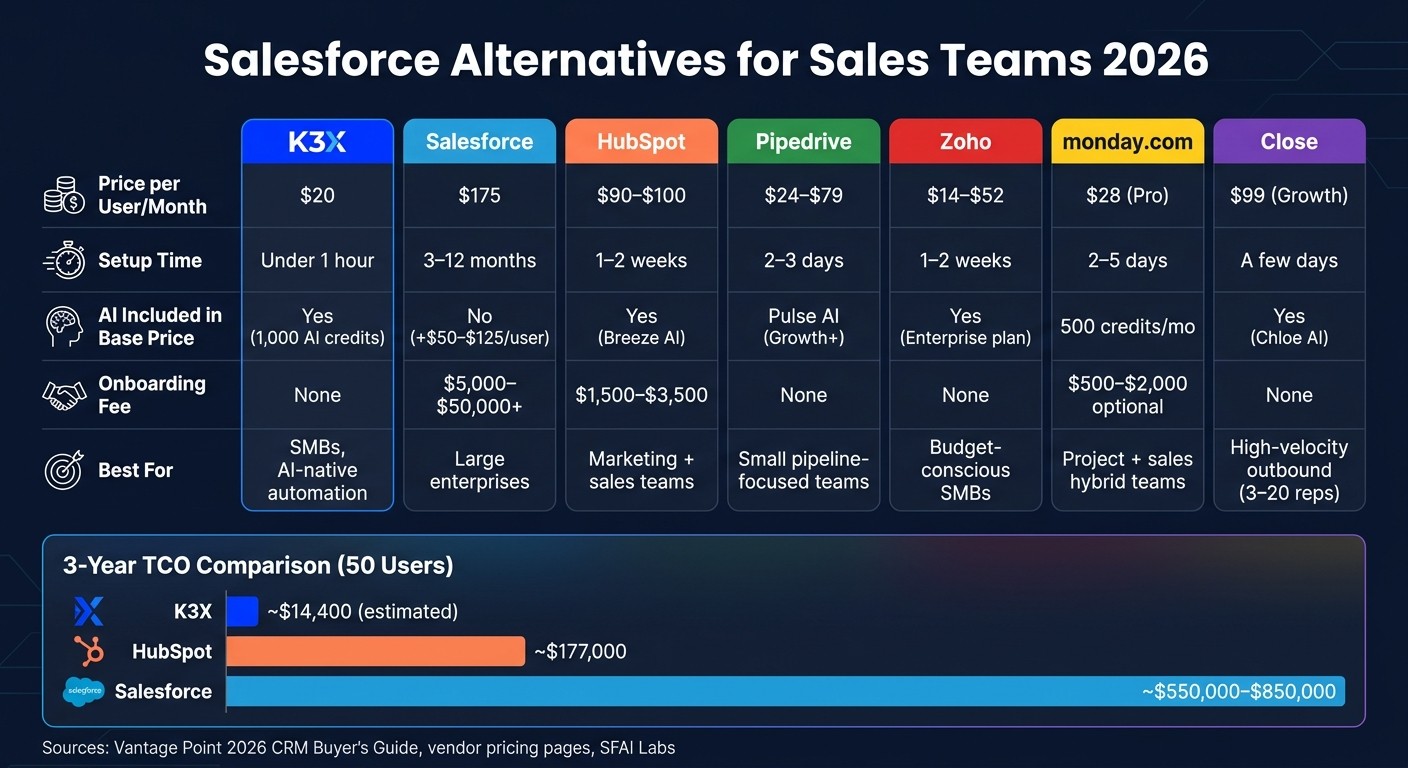
Salesforce Alternatives Compared: Pricing, Setup & AI Features (2026)
K3X: Best for small to mid-sized teams seeking AI-driven automation with minimal setup. Costs $20 per user per month with no onboarding fees.
Salesforce: Ideal for large enterprises needing extensive customization. Costs $175 per user per month, plus significant implementation expenses.
HubSpot: Great for teams needing marketing and sales integration. Costs $90–$100 per user per month with onboarding fees starting at $1,500.
Pipedrive: Suited for small teams focused on pipeline management. Costs $24–$79 per user per month, with fast setup in 2–3 days.
Zoho: Offers broad functionality at lower costs, starting at $14 per user per month. Best for budget-conscious teams.
monday.com: Works well for teams combining project management and sales tracking. Costs $28 per user per month for the Pro plan.
Close: Designed for high-velocity outbound sales teams. Costs $99 per user per month for the Growth plan.
Each platform balances cost, ease of use, and automation differently, making the right choice dependent on your team's size, technical resources, and goals.
1. K3X
K3X is a CRM built around AI, designed to focus on outcomes rather than manual configurations. Instead of relying on traditional workflows and triggers, users can simply describe their goals in plain language, and the AI takes care of the execution.
Automation Model
K3X brands itself as "the first CRM that runs on prompts." For example, instead of setting up a rigid flowchart like "send email → wait 3 days → follow up", a sales rep can instruct the system with a simple command: "Book demo calls with every lead who hasn't responded." The AI then handles the process dynamically, avoiding the common pitfalls of sequence-based logic, such as disruptions when leads respond unexpectedly or skip steps.
The platform also automates data entry. Emails are logged, calls are recorded, and contact details update automatically. A study by SFAI Labs highlights this advantage:
"The Salesforce org with 200 custom fields and three full-time admins often has worse data quality than a 10-person startup running [an AI-native CRM] - because the startup's CRM captures data passively instead of relying on reps to remember to fill things in." [3]
Teams can get started in under an hour without needing IT support, certified admins, or middleware like Zapier. This eliminates ongoing administrative overhead and allows for a smoother, more efficient automation experience [2].
AI Capabilities
K3X's AI adjusts in real time based on team behavior and lead activity. It updates deal stages automatically, focusing on outcomes rather than manual pipeline management. Tasks like follow-ups, lead qualification, and routing are handled autonomously. For example, Ruby Capital Group - a company with 125 employees - cut follow-up times by 70% and tripled ticket resolution speed within two days of adopting K3X. CEO Michael Chkechkov shared:
"Our sales team was spending half their day on admin work. Now they're talking to customers and closing deals. The automation handles everything from lead qualification to contract routing." [2]
Across its user base, K3X has saved over 312,000 hours of work and reduced operational costs by approximately $12.4 million. On average, users save 8 hours per week [2].
Pricing and Total Cost of Ownership
K3X offers a straightforward pricing plan at $20 per seat per month, billed monthly without long-term contracts. This price includes 1,000 AI credits, unlimited contacts and leads, unlimited workflow automations, built-in email, calling, SMS, a one-click power dialer, and unlimited call recordings [2]. The cost scales with usage during high-activity periods, offering flexibility.
In contrast, Salesforce Enterprise costs around $175 per user per month (as of August 2025), with AI features through Agentforce adding another $50–$125 per user per month. Additionally, Salesforce often requires dedicated administrators with salaries ranging from $70,000 to $110,000 annually [4][9]. HubSpot Sales Hub Professional is priced at roughly $90–$100 per user per month, plus onboarding fees between $1,500 and $3,500 [9][12].
K3X | Salesforce | HubSpot Professional | |
|---|---|---|---|
Base Price | $20/seat/month | ~$175/seat/month | ~$100/seat/month |
AI Cost | Included | +$50–$125/seat/month | Included (Breeze AI) |
Setup Time | Under 1 hour [2] | ||
Admin Required | No [2] | Yes (certified admin) [4] | Partial |
Onboarding Fees | None | Significant |
Scalability and Fit
K3X stands out for its quick setup and intelligent automation, making it ideal for small to mid-sized sales teams seeking efficiency without the complexity of enterprise systems. Its usage-based pricing ensures fairness, as teams of varying sizes pay the same per-seat rate while costs naturally adjust to activity levels. For teams focused on boosting sales and cutting down on administrative tasks, K3X provides a practical, self-managed solution that starts delivering results almost immediately.
2. Salesforce
Salesforce commands 20–23% of the global CRM market share as of 2026 [4][16]. It’s the go-to platform for most enterprise sales teams, thanks to its extensive customization options, robust reporting capabilities, and vast ecosystem. However, for teams considering alternatives, understanding both its strengths and limitations is crucial.
Automation Model
Salesforce uses Flow Builder to automate processes through visual, rule-based, linear flows. While effective for predictable workflows, these flows can break if a lead skips a step or takes an unexpected action, requiring manual fixes or reconfiguration. Arjan KC from Gurkha Technology describes Salesforce as:
"a highly complex, highly customizable relational database." [7]
This model works best for large enterprises with stable, well-defined processes and dedicated operations teams. However, for smaller or dynamic sales teams, maintaining these flows can be labor-intensive. A typical Salesforce implementation for a mid-market company takes 12 to 20 weeks [14] and often requires at least one full-time certified administrator to ensure workflows and data remain intact [7][4]. This contrasts with AI-driven platforms like K3X, which offer more flexible, prompt-based automation.
AI Capabilities
Salesforce’s AI capabilities are built around Agentforce, which integrates Einstein AI, Data Cloud, and Agent Builder. Serving over 18,500 customers, it processes billions of workflows monthly [15][13]. However, setting up Agentforce typically takes weeks or months and demands expertise from certified administrators.
One standout feature is the Einstein Trust Layer, which includes governance tools such as data masking, toxicity detection, and audit trails. These features are particularly valuable for industries with stringent data compliance requirements. As David Cockrum of Vantage Point explains:
"Agentforce is more AI-agent ready for complex, enterprise-scale orchestration... built on three foundational layers: Einstein AI, Data Cloud, and Agent Builder." [15]
Pricing and Total Cost of Ownership
While Salesforce’s list prices seem straightforward, real costs often escalate. The Enterprise edition costs ~$165–$175 per user per month (billed annually), with Agentforce adding another ~$125 per user per month. Alternatively, the all-inclusive Agentforce 1 bundle costs $550 per user per month [4][6].
Implementation costs typically range from 50%–150% of the first-year license cost, and additional expenses like Full Copy sandboxes ($25,000–$45,000/year), API overages, and data storage fees ($300/GB/year) can significantly increase the total cost [17]. For a 50-user team over three years, the total cost of ownership is estimated between $550,000 and $850,000 [4]. Mark Bishop from SaaS True Cost notes:
"Salesforce remains the platform of choice above 100 seats because of customization depth, but real cost is 2–3x the list seat price after implementation." [9]
Cost Category | Salesforce Enterprise |
|---|---|
License/Subscription | ~$99,000/yr |
Implementation | $30,000–$80,000 |
Ongoing Admin | $80,000–$120,000/yr |
AI Add-ons (Agentforce) | ~$75,000/yr |
3-Year Total Estimate | $550,000–$850,000 |
(Source: Vantage Point 2026 CRM Buyer’s Guide, 50 users over 3 years [4])
Scalability and Fit
Salesforce is built to scale, with 90% of Fortune 500 companies relying on it [4][16]. Its customization options - including up to 800 custom fields per object, deep API integrations, and a vast AppExchange marketplace - make it ideal for large organizations with complex needs and dedicated technical teams.
However, for teams with fewer than 100 users or limited administrative resources, Salesforce’s complexity can be a drawback. While it rewards investment in configuration and expertise, that investment comes at a high cost. This complexity is a key reason why many smaller or agile sales teams are turning to simpler, AI-native platforms.
3. HubSpot
HubSpot stands out as a practical choice for small to mid-sized sales teams in 2026. Unlike Salesforce, which often requires months for configuration and a dedicated administrator, HubSpot gets teams running in just 1–2 weeks. On average, teams see their first results in 11 days compared to Salesforce's 46 days [19]. This quick setup makes it a strong contender for teams looking to avoid the lengthy processes tied to legacy systems.
Automation Model
HubSpot's Smart CRM Architecture connects Sales, Marketing, and Service Hubs on a single database, allowing teams to deploy multi-step workflows quickly without coding. Its visual workflows engine simplifies automation and supports seamless marketing-sales integration [18]. Most teams can activate workflows within two weeks [7].
In comparison, Salesforce's Flow Builder typically takes 12–20 weeks to implement. As James Crawford, a software analyst, explains:
"The CRM debate isn't HubSpot vs Salesforce. It's 'do I have someone to configure this?' vs 'do I need it to work on Tuesday?'" [19]
AI Capabilities
HubSpot's AI, branded under "Breeze", offers three main tools: Breeze Copilot (for tasks like drafting emails and updating deal records), Breeze Agents (autonomous tools like a Prospecting Agent that researches accounts and creates outreach sequences), and Breeze Intelligence (which enriches data using a database of over 200 million profiles with buyer intent signals) [23][24]. Breeze AI is included in all paid tiers at no extra charge, unlike Salesforce's Agentforce, which costs an additional $125 per user per month [5]. Teams using Breeze AI report a 76% boost in productivity and a 73% increase in deal win rates [24]. However, HubSpot's AI lacks the deep customization options of Salesforce, making it less suitable for complex enterprise needs [24].
Pricing and Total Cost of Ownership
HubSpot's pricing is tiered and seat-based but comes with additional costs. The Professional tier costs $90–$100 per seat per month, plus a platform fee of about $450 per month. The Enterprise tier is priced at $150 per seat per month, with a platform fee of approximately $1,500 per month. Both tiers also require onboarding fees - $1,500 for Professional and $3,500 for Enterprise [6][20]. Scaling to 50,000 marketing contacts can add around $1,600 per month [12][5].
For a 50-user team over three years, HubSpot's total cost is roughly $177,000, compared to Salesforce's $595,000 - a difference of 3.4x [5]. Jeff Pedowitz, CEO of The Pedowitz Group, highlights:
"HubSpot's integrated model eliminates the need for a separate MAP license, reduces integration maintenance costs, and demands lower ongoing administrative overhead than Salesforce." [14]
Cost Category | HubSpot (Professional) | Salesforce (Enterprise) |
|---|---|---|
Base License (50 users/yr) | ~$54,000 | ~$99,000 |
Platform Fee | ~$5,400/yr | N/A |
Onboarding Fee | $1,500 (one-time) | $5,000–$50,000+ |
AI Add-ons | Included | ~$75,000/yr (Agentforce) |
3-Year TCO (50 users) | ~$177,000 | ~$595,000 |
(Sources: Vantage Point 2026 CRM Buyer's Guide [5]; HubSpot pricing pages [20][6])
Scalability and Fit
HubSpot works best for teams of 20 to 300 employees, particularly when marketing-sales alignment is a priority [7]. Its 78% active-user rate at six months for mid-market teams - compared to Salesforce's 54% - shows how its user-friendly interface helps with adoption [19].
However, HubSpot's limitations become apparent for larger organizations. Teams with more than 500 sales reps or those needing over 100 complex workflows may find its automation capabilities restrictive [21][22]. Additionally, custom objects are only available in the Enterprise tier. For businesses requiring detailed territory management or highly technical workflows, Salesforce offers greater flexibility, albeit at a higher cost [7]. Overall, HubSpot is an excellent choice for mid-sized teams seeking a balance between ease of use and strong marketing-sales integration.
4. Pipedrive

Pipedrive is a CRM often chosen by small sales teams due to its quick setup process. While platforms like HubSpot may take 1–2 weeks and Salesforce can require 8–12+ weeks to deploy, Pipedrive typically gets teams operational within just 2–3 days[6]. This speed is particularly useful for lean organizations that lack a dedicated CRM administrator, offering a clear advantage over more complex systems like Salesforce and HubSpot.
Automation Model
Pipedrive uses a simple, rule-based approach to automation, making it accessible for non-technical users. For instance, a sales manager can set up a rule such as "create a follow-up task when a deal moves to a specific stage" in just a few hours without any coding[29]. However, its automation capabilities are capped - teams on the Growth plan can activate up to 50 automations, while the Ultimate plan allows up to 250. By contrast, Salesforce's Flow Builder offers virtually unlimited automation options, making Pipedrive better suited for simpler workflows rather than complex, multi-department processes.
AI Capabilities
In July 2025, Pipedrive launched Pulse AI, a feature that scores leads based on email engagement, website visits, and call history. It also includes an AI Sales Assistant that helps reps prioritize deals based on their likelihood to close and potential value[31]. Premium-tier users and above can generate pipeline reports using natural language commands, such as "show me deals closing this quarter"[30]. While Pipedrive’s AI assists by guiding sales reps, platforms like Salesforce's Agentforce and HubSpot's Breeze AI provide more autonomous features, such as drafting emails and qualifying leads[28]. Pipedrive's ease of use is reflected in its G2 rating of 8.9/10, slightly ahead of HubSpot’s 8.7/10[31].
Pricing and Total Cost of Ownership
Pipedrive updated its pricing plans in November 2025, offering the following tiers:
Lite: $14/user/month (billed annually)
Growth: $24/user/month (recommended for active teams, as Lite lacks email sync and automation)
Premium: $49/user/month
Ultimate: $69–$79/user/month
Unlike HubSpot, Pipedrive does not charge mandatory onboarding fees. For example, a 10-person team on the Premium plan would spend an estimated $13,000–$15,000 in Year 1, compared to $38,000–$48,000 for the same team using Salesforce Pro Suite. Optional add-ons include LeadBooster ($32.50/month), Web Visitors tracking ($41/month), and Smart Docs ($32.50/month).
Cost Category | Pipedrive (Growth) | HubSpot (Professional) | Salesforce (Enterprise) |
|---|---|---|---|
Setup Time | 2–3 days | 1–2 weeks | 8–12+ weeks |
Onboarding Fee | $0 | ~$1,500 | $5,000–$50,000+ |
Base Price (per user/month) | $24 | ~$90–$100 | $175 |
AI Features | Pulse AI (Growth+) | Breeze AI (paid) | Agentforce (+$125/user) |
Automation Cap | 50–250 workflows | Plan-dependent | No practical cap |
Scalability and Fit
Pipedrive works best for sales teams of 2–50 members with straightforward B2B processes. It lacks features like custom objects, multi-territory routing, and a native service module, which are often needed by organizations with over 100 users. For teams transitioning from spreadsheets but not ready for the complexity or cost of Salesforce or HubSpot, Pipedrive offers an accessible starting point. Next, we’ll look at other AI-native CRM options to further explore the evolving sales automation landscape.
5. Zoho
Zoho CRM stands out as a budget-friendly alternative, offering many enterprise-level features at a fraction of Salesforce's cost. Bobby Shao of SaaSProbe highlights its affordability:
"Zoho CRM is the value champion that delivers 80% of enterprise features at roughly 20% of the cost." [20]
This makes Zoho a practical choice for sales teams focused on cost-efficiency without giving up functionality.
Automation Model
Zoho's automation tools include Workflow Rules for event-driven triggers and Blueprint, a visual process builder that enforces step-by-step sales processes. Blueprint is available starting at the $23/user/month Professional plan, whereas similar features in Salesforce require the Enterprise tier, priced at $175/user/month [20]. However, customizing workflows in Zoho often requires learning Deluge, its proprietary scripting language, which may pose a steeper learning curve compared to the simpler prompt-based systems like K3X.
AI Capabilities
In 2026, Zoho introduced Zia Agent Studio, a no-code platform for building AI agents with access to over 700 pre-configured actions across Zoho's ecosystem [32][34]. The broader Zia AI suite, covering features like lead scoring, churn prediction, anomaly detection, and email sentiment analysis, is included in the $40/user/month Enterprise plan [20][33]. For comparison, Salesforce's Agentforce costs an additional $125/user/month, and HubSpot's advanced Breeze agents require Professional-tier plans starting at $90/seat [20][33]. Zoho also runs its AI operations on its proprietary infrastructure, avoiding reliance on external large language model providers [33].
Pricing and Total Cost of Ownership
Zoho's pricing is straightforward and avoids mandatory onboarding fees. For a 50-person sales team, the Enterprise plan costs about $24,000 annually, offering substantial savings compared to Salesforce Enterprise [36]. Full API access is included in the $14/user/month Standard plan, while Salesforce restricts this to its $165/user/month Enterprise tier [12].
Plan | Zoho CRM (per user/month) | Salesforce Sales Cloud (per user/month) |
|---|---|---|
Entry | $14 (Standard) | $25 (Starter Suite) |
Mid-Tier | $23 (Professional) | $100 (Pro Suite) |
Enterprise | $40 (Enterprise) | $175 (Enterprise) |
Top Tier | $52 (Ultimate) | $350+ (Unlimited/Agentforce) |
Zoho's pricing is billed annually. Salesforce increased its Enterprise and Unlimited prices by approximately 6% in August 2025 [20].
Scalability and Fit
Zoho is well-suited for teams of up to around 200 employees, particularly those needing tools across multiple business areas. Its Zoho One package, which includes over 55 apps for functions like accounting, HR, and project management, costs $37/user/month and offers a comprehensive solution for consolidating software needs [34][35]. However, Mark Bishop, Editor at SaaS True Cost, points out:
"Zoho is the value play for sub-50-person teams that need broad functionality at low cost; the UI is dated but functional." [9]
For larger teams with over 200 users or complex multi-division needs, Salesforce may be a better fit due to its more extensive features. Zoho's G2 rating is 4.1/5 from 2,747 reviews, with an ease-of-use score of 8.1/10, trailing HubSpot (4.5/5) and Pipedrive (8.9/10) [20][27]. Overall, Zoho's affordability and feature set make it a strong option for smaller teams, offering a compelling alternative to platforms like monday.com and Close.
6. monday.com
monday.com integrates AI with its project management roots, offering basic CRM functionalities. While it doesn’t focus exclusively on sales, it appeals to teams already using monday.com for project management. David Paul, CRM Analyst at Best CRM Reviews, describes it as:
"Monday CRM is the best 'accidental CRM' on the market. If your team already runs projects in Monday.com and you just need to track a pipeline without learning a new tool, it works." [43]
Automation Model
monday.com emphasizes simplicity with its "UI-first" approach, making it easy to set up automations without technical expertise. Its no-code "If This Then That" builder allows users to create triggers - like notifying a deal owner of a stalled opportunity - in just a few minutes [38][39]. Automation capabilities depend on the subscription tier:
Basic plan: No automation
Standard plan: 250 actions per month
Pro plan: 25,000 actions per month
For active sales teams, the Pro plan at $28 per seat per month becomes almost essential [40][43]. While it’s less specialized than traditional CRMs, monday.com’s automation approach offers flexibility for teams balancing sales and project management.
AI Capabilities
In 2026, monday.com added AI features aimed at bridging the gap with dedicated CRMs. These include:
SDR Agent: Qualifies leads through phone and email.
AI Lead Agent: Handles automated prospecting 24/7.
AI Notetaker: Transcribes calls in real time and generates summaries with action items [25][40][42].
MCP Server: Allows external AI tools like ChatGPT, Claude, and Microsoft Copilot to interact with CRM boards using natural language [25].
AI features operate on a credit system, with 500 free AI credits per month and additional credits available for purchase. Most AI tools are only accessible on Standard-tier plans and above [43].
Pricing and Total Cost of Ownership
monday.com’s pricing is straightforward but includes a 3-seat minimum on all paid plans, which might not suit smaller teams [25][41]. For a 10-person sales team using the Pro plan, the annual cost is approximately $3,360 - significantly lower than Salesforce Enterprise’s $21,000 per user annually.
Plan | monday.com (per seat/month) | Salesforce Sales Cloud (per user/month) |
|---|---|---|
Entry | $12 (Basic) | $25 (Starter Suite) |
Mid-Tier | $17 (Standard) | $100 (Pro Suite) |
Growth | $28 (Pro) | $175 (Enterprise) |
Enterprise | Custom | $350+ (Unlimited/Agentforce) |
All monday.com pricing is billed annually, with a 3-seat minimum [25][43].
The total cost of ownership (TCO) for monday.com is estimated to be 1.2x–1.5x its license fee, compared to Salesforce’s 3x–5x when factoring in implementation and admin costs [37]. Setup typically requires 2–5 days of internal effort or $500–$2,000 for external consultants [25][37].
Scalability and Fit
monday.com’s scalability and flexibility suit teams that blend sales with project delivery, as both functions operate on the same platform [39][40]. It has a 4.6/5 rating on G2 from over 1,100 reviews, with users praising its visual interface and quick onboarding [38].
However, it has limitations for sales-focused teams. monday.com lacks built-in telephony, requiring integrations like Aircall, and its board-based reporting can make historical forecasting difficult [41][43]. AeroLeads captures this tradeoff:
"A 20-person team with a highly rigid, data-driven sales process will fail with Monday, while a 200-person division with an agile, experimental approach will be crushed by Salesforce's rigidity." [37]
monday.com works best for small to medium-sized businesses (5–50 users) that prioritize fast onboarding and adaptable workflows over rigid, data-heavy processes.
7. Close
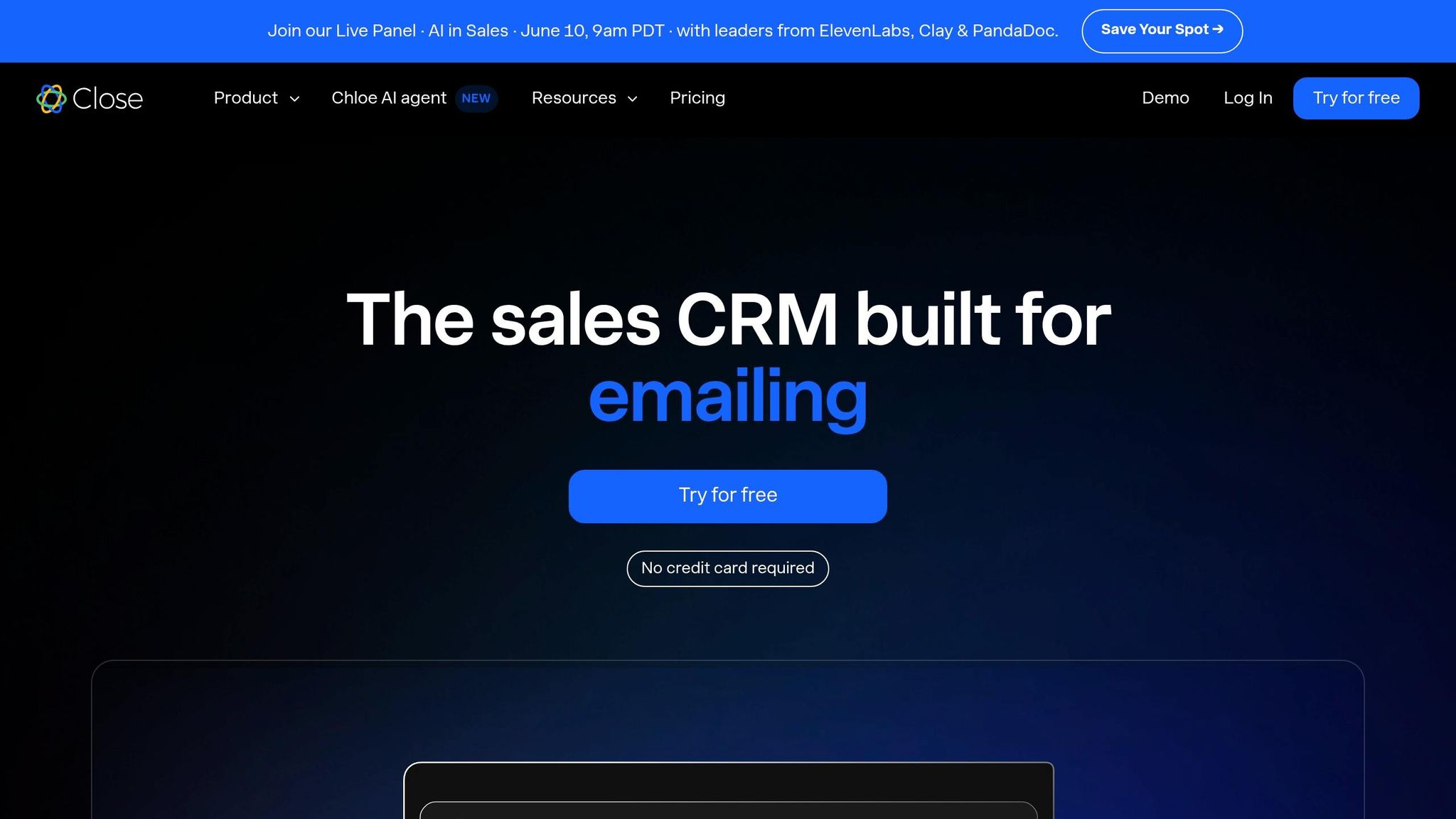
Close is a CRM designed specifically for high-velocity outbound sales, offering a streamlined alternative to Salesforce. While Salesforce aims to cover a broad range of business operations, Close focuses on empowering small outbound sales teams to make more calls, send more emails, and close deals efficiently - without the need for dedicated administrators.
Automation Model
Close uses a communication-centric automation model that brings together a native power dialer, predictive dialer, SMS, and email sequences in one interface [44]. Its workflows are multi-channel and sequential, triggering actions based on changes in the pipeline, lead status, or activity. These workflows are user-friendly and can be set up in just a few days, making them ideal for lean teams. However, the fixed sequential logic can create challenges if unexpected events, like an unplanned lead response, disrupt the flow.
In contrast, K3X offers a more flexible, goal-oriented approach to automation. As K3X Co-Founder and CEO Mykyta Samusiev explains:
"Most systems are linear. They follow fixed steps - and if something unexpected happens, the flow breaks... K3X works on goals." [2]
Despite its rigidity, Close's workflows are bolstered by advanced AI tools that enhance outbound sales efficiency.
AI Capabilities
In 2026, Close launched Chloe, an AI sales agent included in all pricing tiers. Chloe provides call transcription and summaries, drafts follow-up communications, and enriches lead data. The Call Assistant feature further reduces post-call documentation by generating action items directly in the CRM, saving high-volume reps about 30 minutes daily [26].
Close also integrates a Model Context Protocol (MCP) server, allowing external AI tools like ChatGPT, Claude, and n8n to access CRM data for custom workflows. Nick French, Founder of StackSwap, highlights the benefits:
"Close inverts the inside-sales stack by bundling CRM + Power Dialer + SMS + Chloe AI into one per-seat license... one workspace instead of four contact lists drifting out of sync." [48]
While Chloe is available across all tiers, the AI Email Assistant, which helps draft and personalize outbound emails, is limited to the Growth and Scale plans [46][47].
Pricing and Total Cost of Ownership
Close offers transparent pricing without mandatory onboarding fees, unlike HubSpot's $1,500–$3,500 onboarding costs [9][50]. The pricing plans are as follows:
Plan | Price (per user/mo, annual) | Key Features |
|---|---|---|
Solo | $9 | 1 user, 10,000 leads, Chloe AI |
Essentials | $35 | Unlimited contacts, multiple pipelines |
Growth | $99 | Power dialer, automated workflows, AI Email Assistant |
Scale | $139 | Predictive dialer, call coaching, lead visibility rules |
The Growth plan at $99/user/month is the practical starting point for most teams, as it includes key features like the power dialer [47]. Additional costs include $50/month for the Call Assistant, plus $0.02 per transcription minute, and $19/month for premium phone lines. For a five-person team on the Growth plan, with the Call Assistant and two premium phone numbers, monthly costs range between $545 and $600 [47].
In comparison, K3X starts at $20/seat/month with AI credits included [2], and Salesforce's Enterprise plan costs $165/user/month, excluding implementation fees that often add 50%–150% to the first-year costs [9]. This positions K3X as a cost-effective choice for AI-driven automation.
Scalability and Fit
Close has a G2 rating of 4.7/5 from over 2,000 reviews and an ease-of-use score of 8.9/10, significantly higher than Salesforce's 6.5/10 [45][49][50]. Users appreciate its native calling, SMS, and email features in a single interface. However, Close is best suited for teams of 3–20 outbound reps. Larger teams often face limitations, such as the lack of native marketing or customer service modules, leading to reliance on integrations with tools like Customer.io or Intercom. These integrations can increase costs and diminish Close's affordability advantage [9][50]. Additionally, its reporting tools may not meet the needs of teams requiring detailed revenue analytics or advanced forecasting [47][50].
Steli Efti, CEO and Co-founder of Close, emphasizes the platform's focused approach:
"Close will never become a platform. We don't want to be HubSpot or Salesforce. We want to be the best inside-sales CRM in the world." [50]
This commitment to simplicity and functionality sets Close apart from legacy CRMs, which often come with added complexity and administrative overhead.
Pros and Cons of Each Platform
The table below provides a quick overview of the strengths, weaknesses, and ideal use cases for each platform, followed by a deeper dive into their specific advantages and limitations.
Platform | Biggest Strength | Biggest Weakness | Best Fit |
|---|---|---|---|
K3X | Prompt-based AI; zero manual entry; live in under 1 hour [2] | Newer platform; smaller ecosystem than legacy CRMs | SMBs and growth-stage teams seeking AI-native automation |
Salesforce | Limitless customization; 7,000+ AppExchange integrations [7] | High total cost of ownership; requires a certified admin; 3–12 month setup [1][6] | Large enterprises with dedicated RevOps teams |
HubSpot | Strong marketing-sales alignment; 89% SMB adoption rate [8] | Aggressive pricing at scale; mandatory $1,500+ onboarding [12][6] | Teams running inbound marketing alongside sales |
Pipedrive | Gentle learning curve; operational in 2–3 days [6] | Limited cross-departmental reporting; AI is a $20/seat add-on [9] | Pure sales teams focused on pipeline management |
Zoho | Enterprise-grade features at 60–75% lower cost than Salesforce [12] | Cluttered interface; steeper learning curve [10] | Budget-conscious SMBs needing broad functionality |
monday.com | Highly visual design; flexible, project-style pipeline views | Not purpose-built for sales; limited native calling/dialing | Teams blending project management with sales tracking |
Close | Native power dialer, SMS, and email in one interface [44] | Lacks a marketing module; limited reporting depth for larger teams [47][50] | High-velocity outbound teams of 3–20 reps |
Attio | AI-native with passive data capture and a flexible object model [3] | Smaller ecosystem; limited enterprise integrations | Modern sales teams seeking a streamlined, AI-driven CRM |
Detailed Analysis of Each Platform
K3X is designed to eliminate manual data entry through prompt-based AI automation, offering a streamlined approach that can go live in under an hour. Its flat $20 per seat per month pricing, which includes 1,000 AI credits, ensures predictable costs. This is a stark contrast to platforms like Salesforce, where hidden costs such as training and maintenance can account for 40%–60% of the total three-year expense [1].
Salesforce, while incredibly powerful and customizable, comes with significant complexity and cost. Its high total cost of ownership, coupled with a lengthy setup time (3–12 months), makes it better suited for large enterprises with dedicated RevOps teams. As Laurent Bouzon, Founder & CEO of SymbiozAI, points out:
"HubSpot and Salesforce are systems of record with AI grafted on top." [1]
This architecture works well for complex enterprise workflows but can be excessive for smaller, more agile sales teams.
HubSpot stands out for its strong alignment between marketing and sales, reflected in its 89% SMB adoption rate compared to Salesforce's 43% [8]. However, its mandatory onboarding fees (starting at $1,500) and contact-based pricing can drive up costs for larger teams [12][6]. For SMBs prioritizing simplicity and quick implementation, HubSpot offers a user-friendly alternative, though it may not be the most cost-efficient option at scale.
Pipedrive and Zoho cater to teams looking for affordability and speed. Pipedrive can be operational within 2–3 days without the need for a dedicated admin, while Zoho delivers a comprehensive feature set at a fraction of Salesforce's cost. However, Zoho's cluttered interface and steeper learning curve can slow down initial adoption [10]. Both platforms are well-suited for teams focused on pipeline management but lack the AI-driven automation depth offered by K3X.
Close is purpose-built for high-velocity outbound sales, combining calling, SMS, and email into one interface [44]. However, its limitations in scaling beyond traditional inside sales teams and its reliance on fixed workflows make it less adaptable for teams needing AI-driven, flexible execution across the sales cycle [47][50].
Finally, Attio provides a modern, AI-native CRM experience with passive data capture and a flexible object model [3]. While its smaller ecosystem and limited enterprise integrations may deter some, it is an excellent choice for sales teams seeking a streamlined, AI-driven approach.
Conclusion
The choice between AI-native automation and legacy systems highlights the shifting needs of today’s sales teams. By 2026, selecting the right CRM will depend on factors like team size, technical resources, and how much time you can dedicate to managing software versus closing deals.
Legacy CRMs often demand substantial technical support. For example, HubSpot works well when marketing and sales need a unified platform, but its onboarding fees and contact-based pricing can become expensive as your business grows [6]. Pipedrive is ideal for sales-focused teams that want a quick setup - operational in just 2–3 days - without extra administrative tasks. Meanwhile, Zoho offers strong value for small-to-medium businesses on tighter budgets, though it comes with a steeper learning curve [10]. On the other hand, modern CRMs like K3X are designed to simplify workflows using AI-native automation.
K3X’s approach removes rigid workflows and manual tasks, focusing on immediate results. Priced at $20 per seat per month with built-in AI credits, it’s a more affordable option compared to Salesforce’s $175 tier [2][6]. Instead of requiring dedicated admin support, K3X allows users to set goals while the AI handles everything from follow-ups and pipeline updates to data capture and outreach. Ruby Capital Group demonstrated this in December 2025, achieving a two-day implementation, a 70% reduction in follow-up time, and tripling ticket resolution speed [2]. This philosophy is summed up by Co-Founder & CEO Mykyta Samusiev:
"Most CRMs record activity. K3X understands outcomes. It listens, knows what changed, and makes the next moves." [2]
If your team spends more time on data entry than closing deals, your CRM might be holding you back. In 2026, the best CRM will be the one that takes care of the busywork, allowing your sales reps to focus on what truly matters - closing deals.
FAQs
How hard is it to migrate from Salesforce?
Migrating from Salesforce is a complex process that demands thorough preparation. It’s not just about switching tools; several challenges can arise, including:
Data Hygiene: Often, 30-50% of records may be duplicates or outdated, which means a significant effort is needed to clean and organize the data before migration.
Workflow Complexity: Custom objects and automations built in Salesforce typically don’t translate directly to other platforms, requiring adjustments or rebuilding workflows.
Operational Continuity: Running both systems at the same time increases the chance of errors. A single, well-planned cutover is usually the safest approach.
While platforms like K3X can help streamline certain steps, careful preparation remains essential for a successful migration.
Which CRM has the best AI automation in 2026?
The best AI automation tools vary based on your organization's size and resources:
Salesforce (Agentforce): Designed for large teams, this enterprise-level AI uses the Atlas Reasoning Engine. While powerful, it comes with a high price tag ($300–$550 per user per month) and requires significant setup and expertise.
HubSpot (Breeze): A great choice for small to mid-sized teams, offering quick implementation and straightforward pricing.
K3X: Built as an AI-first platform, it simplifies workflow automation with minimal technical effort, making it easy to maintain.
Other notable options include Attio, which caters to startups, and Zoho, a cost-effective solution for budget-conscious teams.
What hidden costs should I budget for?
When planning your CRM budget, it’s important to account for expenses beyond the advertised monthly per-user fee. Legacy platforms such as Salesforce often come with additional costs, like professional implementation services, which can range from $5,000 to $50,000. Maintaining these systems may also require hiring dedicated administrators or consultants, with annual salaries typically falling between $70,000 and $110,000. Onboarding fees, which can reach as high as $3,500, and extra charges for features like AI capabilities, increased storage, or integrations, are also common. In contrast, K3X offers a straightforward usage-based pricing structure that adjusts automatically. During periods of low activity, costs drop to $20 per month, providing a more flexible and predictable approach.