Sales Automation
•
K3X vs Salesforce: AI-Native CRM vs Legacy CRM
Choose an AI-native CRM for fast, low-cost automation; choose a legacy CRM for deep customization and enterprise governance.

K3X vs Salesforce: Which CRM fits your needs? K3X, an AI-native CRM, offers faster setup, automated data entry, and lower costs, making it ideal for small to mid-sized teams. Salesforce, a legacy CRM, provides deep customization and compliance features, better suited for large enterprises with complex needs and dedicated resources.
K3X simplifies operations with AI-driven automation, requiring no manual data entry or admin support, and costs $20 per user/month. Salesforce, while powerful, demands significant setup time (3–6 months), manual input, and admin overhead, with costs ranging from $175–$350+ per user/month for enterprise plans. Choose K3X for efficiency and affordability; opt for Salesforce if customization and governance are priorities for your large-scale operations.
Salesforce Review 2026 | CRM Software Analyst's Pros/Cons [1/3]

Core Differences Between K3X and Salesforce
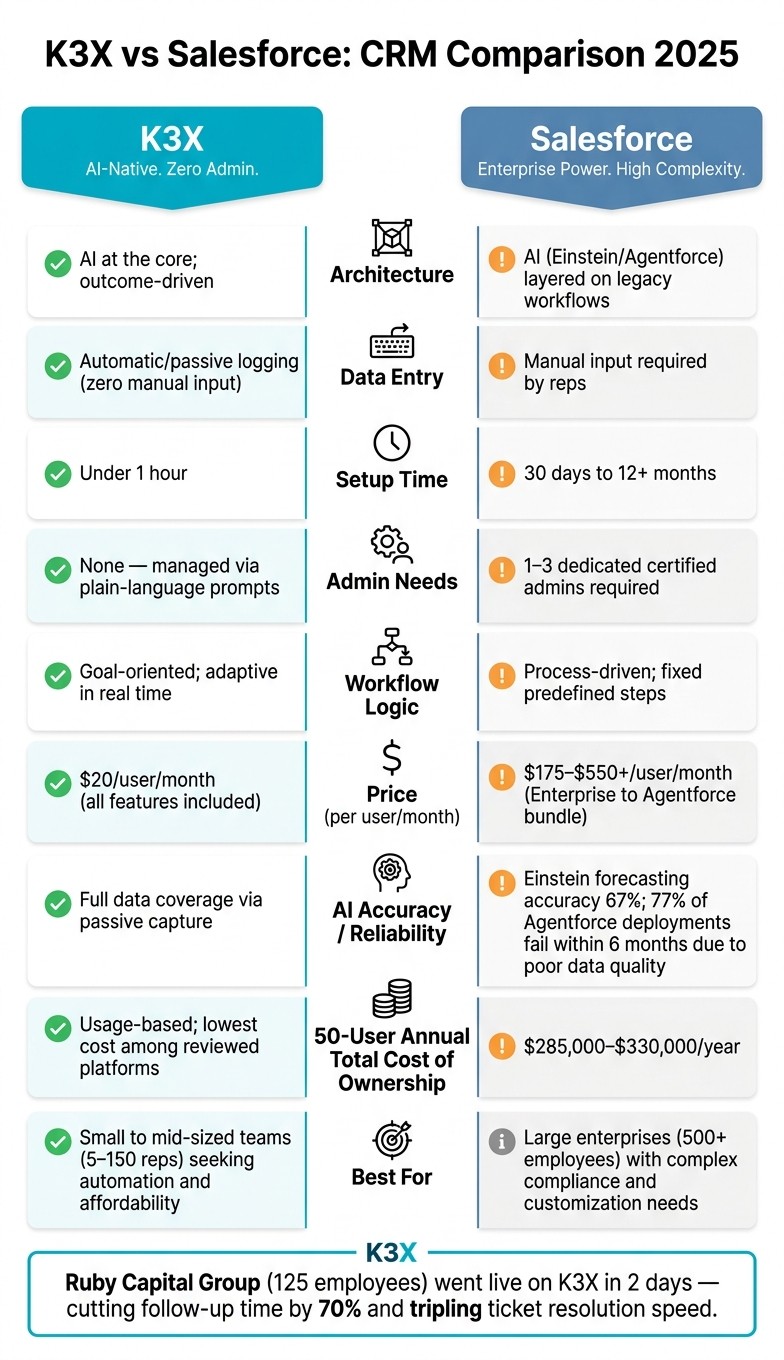
K3X vs Salesforce: CRM Comparison 2025
K3X and Salesforce take fundamentally different approaches to design, which impacts user experience, automation, and the time it takes to get up and running. These differences influence everything from how sales teams handle data entry to the cost and complexity of implementation.
AI-Native vs Workflow-Driven Design
Salesforce relies on predefined workflows where users must configure each step, set up triggers, and define rules. This rigid approach can struggle with unexpected scenarios, as workflows don’t adapt automatically. In contrast, K3X focuses on achieving outcomes. Instead of programming specific steps, users define objectives - like "schedule demo calls with inbound leads" - and K3X's AI determines the steps to reach that goal:
"K3X works on goals. Instead of defining steps like 'Send this email, then wait,' you define the objective... K3X figures out the rest." [1]
While Salesforce's Flow executes tasks exactly as programmed, K3X adapts in real time by logging user behavior and lead activity. Salesforce often requires a certified admin to update workflows when conditions change, adding complexity to its use.
Automation and AI Capabilities
Salesforce has made significant investments in AI, including its Einstein platform and the newer Agentforce, launched in late 2024. By early 2026, Agentforce was processing over 3 billion workflows monthly [7]. However, unlocking its full potential requires a Data Cloud license, which costs an additional $125 per user/month on top of Enterprise licenses [7][8].
The effectiveness of Salesforce’s AI depends heavily on data quality. For instance, Einstein's forecasting accuracy is 67%, and 77% of B2B Agentforce deployments reportedly fail within six months due to poor data quality [9]. As one user put it:
"Einstein is only as good as the information your reps took the time to fill in. If your data entry rate is 60%... AI works on 60% of reality." [5]
K3X avoids these issues by using passive data capture. It automatically logs emails, calls, and meetings without requiring manual input, ensuring its AI operates with complete, real-time data. This approach reduces setup effort and costs, allowing businesses to see faster results.
Setup and Time-to-Value
K3X can be up and running in under an hour. Users simply connect their tools, define their goals, and the system begins executing [1]. By contrast, Salesforce's SMB Starter Suite typically takes 30–90 days to deploy, while enterprise implementations often require 6–12 months. Ongoing maintenance often depends on 1–3 dedicated admins [3][10].
The cost difference is also stark. For 50 users, Salesforce’s total cost of ownership - including licenses, implementation, and administration - ranges from $285,000 to $330,000 annually [3]. K3X, on the other hand, costs $20 per user/month with no long-term contracts.
A real-world example highlights the gap: Ruby Capital Group, a 125-person funding company, implemented K3X in December 2025. The firm completed its automation setup in just 2 days, cutting follow-up time by 70% and tripling ticket resolution speed [1].
Key Comparisons: K3X vs Salesforce
Factor | K3X | Salesforce |
|---|---|---|
Architecture | AI at the core; outcome-driven | AI (Einstein/Agentforce) layered on legacy workflows |
Data Entry | Automatic/passive logging | Manual input required |
Setup Time | Less than 1 hour | 30 days to over 12 months |
Admin Needs | None; managed via prompts | 1–3 dedicated admins |
Workflow Logic | Goal-oriented; adaptive | Process-driven; fixed steps |
Price (per user/month) | $20 | $175–$350+ (Enterprise/Unlimited) |
These differences in design, automation, and deployment speed directly shape how sales teams operate, scale, and achieve results.
Feature and Pricing Comparison
CRM costs include implementation, administration, add-ons, and time spent managing the platform. In these areas, K3X and Salesforce represent two very different approaches.
K3X Pricing and Features
K3X keeps its pricing straightforward and predictable. It offers a single plan at $20 per seat per month with no long-term commitment. This plan includes 1,000 AI credits per month, unlimited contacts and leads, built-in tools for email, calling, and SMS (with a one-click power dialer), unlimited call recordings, unlimited workflow automations, and integrations [1]. There are no extra fees for AI features, data platforms, or implementation partners. Costs adjust automatically based on AI credit usage, so businesses avoid paying for unused capacity.
K3X has saved over 312,000 hours across more than 50 teams, translating to an estimated $12.4 million in operational cost savings [1].
Salesforce Pricing and Features
Salesforce uses a tiered pricing model, with costs rising significantly as features and customizations are added. For meaningful automation, the $175/user Enterprise tier is typically required. The Unlimited plan is $350 per user per month, while the complete Agentforce 1 Sales bundle, which includes AI and Data Cloud credits, costs $550 per user per month [12].
AI features in Salesforce are often treated as add-ons. For example, Agentforce conversations cost about $2 each, and the Data Cloud license needed for Einstein AI starts at around $108,000 annually [15]. Beyond licensing, total ownership costs can be 2–3 times the list price due to implementation fees (ranging from $10,000 to $60,000), premier support (around 30% of license fees), and sandbox environments ($5,000–$30,000) [11][12]. Mark Bishop, Editor at SaaS True Cost, explains:
"Salesforce remains the platform of choice above 100 seats because of customization depth, but real cost is 2–3x the list seat price after implementation." [11]
Comparison Table: K3X vs Salesforce and Alternatives
The table below highlights key pricing and feature differences between K3X, Salesforce, and other leading CRMs.
Platform | Entry Price | Mid-Tier Price | AI Cost | Setup Time | Best For |
|---|---|---|---|---|---|
K3X | $20/seat/mo | $20/seat + usage | Included (1,000 credits) | Under 1 hour [1] | AI-driven sales teams |
Salesforce | $25/seat/mo | $175/seat/mo | 3–6 months [16] | Large enterprise ops | |
$20/seat/mo | $100/seat/mo | $50/seat/mo (Breeze AI) [11] | 4–8 weeks [16] | Marketing-led growth | |
$24/seat/mo | $64/seat/mo | $20/seat/mo add-on [11] | Days to weeks | Simple pipeline management | |
$20/seat/mo | $35/seat/mo | Included in Enterprise+ [11] | Days to weeks | Budget-conscious teams | |
$19/seat/mo | $109/seat/mo | Included in Pro | Days | Inside sales/dialer-heavy | |
$12/seat/mo | $28/seat/mo | Add-on | Days to weeks | Project-centric sales | |
$29/seat/mo | $69/seat/mo | Add-on | Days | Data-forward startups |
K3X stands out for its simplicity and low costs, especially when compared to Salesforce's complex and expensive model. For a 50-person team, Salesforce's three-year total cost of ownership can range between $550,000 and $850,000, whereas K3X's usage-based model remains the most affordable among the platforms reviewed [4]. HubSpot falls somewhere in between, with a three-year cost of $200,000–$350,000 for the same team size. However, migration costs can add up - one 40-person team switching from Salesforce to HubSpot spent $140,000 on migration in the first year alone [11].
Sales Workflow and User Experience
Pricing is one aspect, but the real distinction between K3X and Salesforce lies in how sales teams interact with the platform - what they click, how they input data, and how the system supports their daily tasks.
For Sales Reps
Salesforce places a heavy burden on sales reps to manually log calls, emails, and meetings, update pipeline stages, and schedule follow-ups. Missing even one update can disrupt the sales process, creating inefficiencies.
K3X takes a different approach by automating these tasks. Instead of following rigid scripts, reps simply set an outcome - like "Book a demo with this lead" - and K3X’s AI agents handle the follow-ups, log communications, record calls, and update the pipeline automatically. This allows reps to focus on selling rather than administrative work.
The impact of this automation is striking. K3X users save an average of 8 hours per week per employee, while teams using traditional CRMs like Salesforce often spend over 20 hours weekly on manual data entry [1]. For example, a 125-person funding company reduced follow-up time by 70% within just two days of implementing K3X [1].
Salesforce can also slow down reps with poorly configured fields and validation rules. As Arjan KC from Gurkha Technology puts it:
"You cannot run Salesforce without a dedicated, full-time, certified Salesforce Administrator on payroll" [17]
By eliminating such inefficiencies, K3X not only simplifies tasks for reps but also improves managerial oversight and strategic decision-making.
For Managers and RevOps
The benefits of automation extend beyond sales reps, offering managers and RevOps teams tools for faster, more effective decision-making. K3X provides real-time, AI-driven insights through dashboards that update automatically, offering an immediate view of pipeline health. Managers can adapt strategies quickly - whether by shifting focus to a new market segment or adjusting follow-up timing - by entering plain-language prompts that the system interprets and implements instantly.
In contrast, Salesforce requires a more complex process for similar adjustments. Managers often need to use Flow Builder, modify automation rules, update custom objects, and even write Apex code. This administrative overhead adds time, cost, and complexity, especially at scale.
Mykyta Samusiev, Co-Founder & CEO of K3X, highlights the platform’s philosophy:
"We're building a CRM that works the way people expect it to, not through menus, workflows, or complexity, but through intention. You tell it the outcome. The system figures out the work" [1]
While Salesforce’s strengths in areas like HIPAA compliance, SOC 2 audit trails, and multi-territory reporting are valuable for organizations with stringent governance needs, these features often feel excessive for teams under 200 employees, especially those without a dedicated admin. For such teams, the simplicity and efficiency of K3X provide a more practical solution.
When to Choose K3X vs Salesforce
Choosing the right CRM depends on your team's size, technical expertise, and the level of administrative complexity you can handle. Neither K3X nor Salesforce is the perfect solution for every situation - your decision should align with your immediate priorities and where you aim to be in the next year.
K3X for AI-Driven Sales Teams
K3X works best for small to mid-sized teams with 5–150 sales reps, particularly those looking to automate data entry without adding the burden of a dedicated CRM administrator. At $20 per user per month, K3X is far more affordable than Salesforce's Enterprise tier, which costs around $175 per user per month [4]. Moreover, K3X offers a quick setup, with most teams going live in under an hour [1], compared to Salesforce's lengthy 3–6 month deployment timeline [3].
For example, in December 2025, Ruby Capital Group (125 employees) implemented K3X and saw a 70% reduction in follow-up time within just two days, while also tripling their ticket resolution speed [1]. For teams spending countless hours on pipeline updates or follow-ups, K3X's outcome-focused model can lead to substantial efficiency improvements.
However, larger enterprises may find K3X less suitable, as their needs often require more extensive infrastructure, which is addressed in the next section.
Salesforce for Large Enterprise Operations
Salesforce is the go-to choice for large organizations with 500+ employees, complex sales structures across multiple regions, and strict regulatory requirements. Its compliance capabilities, such as HIPAA, FedRAMP, and SOC 2 audit trails via Salesforce Shield, make it indispensable for industries like healthcare, finance, and insurance [3]. These features highlight the trade-off between maintaining rigorous governance and achieving AI-driven efficiency.
For large-scale operations, Salesforce's extensive AppExchange ecosystem and advanced customization options often justify its higher cost and complexity. As VendorClash puts it, "Salesforce wins only if you have 100+ sales reps, custom development needs, or existing Salesforce ecosystem lock-in" [13]. Additionally, for enterprises already embedded in the Salesforce ecosystem, switching to another platform can involve 12–24 months of migration, which often outweighs the potential benefits [6].
Where Other CRMs Fit In
For teams with different priorities, other CRM platforms might strike a better balance between simplicity, cost, and specific features. Here’s a quick comparison:
CRM | Best For | Starting Price |
|---|---|---|
HubSpot | Marketing-led teams needing sales + marketing alignment | ~$100–$110/user/month [2] |
Pipedrive | Small teams seeking simple, visual pipeline management | Lower-cost entry tier |
Zoho CRM | Budget-conscious SMBs already in the Zoho ecosystem | $40/user/month [18] |
Attio | Developer-minded teams needing a flexible data model | $59/user/month [3] |
Close | Inside sales teams focused on high-volume outreach | - |
HubSpot is ideal for companies where marketing and sales teams need to work seamlessly on one platform. Zoho is a strong choice for cost-sensitive SMBs, while Attio appeals to technical teams looking for flexibility without the complexity of Salesforce. Pipedrive is perfect for smaller teams that prefer a straightforward, visual pipeline, and Close caters to inside sales teams with high outreach demands. These alternatives highlight the diverse range of CRM options available, each tailored to specific needs, complementing the distinct strengths of K3X and Salesforce.
FAQs
How does K3X capture CRM data without manual entry?
K3X stands out as an AI-driven CRM by automatically logging activities and updating records in real time based on actual outcomes. Unlike older platforms like Salesforce or HubSpot, which often rely on manual updates, K3X leverages AI to process emails, calls, and contact data, organizing it into structured, clean records. This removes the hassle of copying, pasting, or managing manual workflows, ensuring that deal statuses and activity logs are always accurate and up-to-date.
What would I lose by choosing K3X instead of deep Salesforce customization?
When opting for K3X, you prioritize simplicity and speed over the extensive customization and ecosystem Salesforce provides. This means giving up features such as AppExchange integrations, SOX-compliant audit trails, and enterprise-focused tools like Data Cloud and Agentforce. K3X also does not support multi-currency functionality, complex territory hierarchies, or advanced customizations requiring coding, such as Apex. Instead, it delivers an AI-driven, ready-to-use solution that doesn’t depend on dedicated administrators.
How hard is it to migrate from Salesforce to K3X?
Migrating to K3X is straightforward and avoids the challenges often associated with traditional CRM transitions. Since K3X is designed as an AI-native platform, there’s no need for IT support, coding knowledge, or intricate data mapping. Simply connect your email, phone, and other tools, then follow the prompts to guide the setup process. The platform automates tasks aligned with your goals, eliminating the need for a lengthy setup or technical know-how.