Sales Automation
•
What Is an AI-Native CRM? Definition, Features, and Examples
AI-native CRMs replace manual entry with AI-driven automation, improving forecasting and freeing sales reps to focus on selling.

An AI-native CRM is a customer relationship management platform built entirely around artificial intelligence, not just enhanced with AI features. Unlike standard or AI-enhanced CRMs, these systems rely on AI for core functions like automatic data collection, real-time insights, and goal-driven workflows. Examples include K3X and Attio, which eliminate manual data entry and provide dynamic sales assistance, improving efficiency and decision-making for sales teams.
AI-native CRMs differ from traditional systems by automating tasks like data updates, lead scoring, and workflow adjustments. For example, K3X automatically tracks interactions and adjusts sales strategies without requiring manual input, saving sales reps significant time. These platforms also outperform legacy systems in predictive accuracy, with forecasting improvements of 15%–30% (source: SFAI Labs). If your team is evaluating CRMs, the choice between AI-native and AI-enhanced tools depends on whether you need a system designed for automation from the ground up or a more familiar, layered approach.
What Is an AI-Native CRM?
AI-Native CRM: A Clear Definition
An AI-native CRM is a customer relationship management platform built with artificial intelligence as its foundational component. In these systems, AI drives key functions like data capture, record structuring, workflow automation, and decision-making. Without AI, the system would fail to function as intended.
Jordan Tate, Head of Growth at Conduyt, explains this distinction clearly:
"If you removed every AI feature from the product, does the rest still work as a CRM? If yes, the AI is a layer. If the system stops functioning as designed, the AI is the architecture." [5]
This reliance on AI sets platforms like K3X and Attio apart from older CRMs that simply add AI as an optional feature.
AI-Native vs. AI-Enhanced vs. Standard CRMs
CRMs generally fall into three categories, distinguished by how AI is integrated into their design.
Feature | Standard CRM | AI-Enhanced CRM | AI-Native CRM |
|---|---|---|---|
Data Entry | Manual by reps | Manual with AI assistance | Automatic, passive capture |
Data Model | Fixed, static schema | Traditional schema with AI add-ons | Adaptive, AI-driven schema |
Workflows | Linear, rule-based | Static rules with AI suggestions | Dynamic, goal-oriented agents |
Role of AI | None | Add-on feature layer | Core to the architecture |
System Nature | Passive database | Assisted record-keeper | Active sales assistant |
Standard CRMs, such as early Salesforce or Zoho, operate as structured databases. Users input data manually, update deal stages, and log activities. AI-enhanced CRMs build on this by introducing features like AI-generated email drafts or predictive analytics. Examples include Salesforce Einstein and HubSpot's AI tools. However, these enhancements are layered on top of legacy systems that still depend on manual data entry.
AI-native CRMs, on the other hand, redefine the concept entirely. According to SFAI Labs:
"The AI-native platforms are not trying to out-feature Salesforce. They are arguing that the entire premise of a system-of-record CRM - where humans input data and software organizes it - is outdated." [4]
This architectural shift fundamentally changes how sales teams interact with these tools.
Why AI-Native Design Matters for Sales Teams
AI-native systems transform how sales teams work by addressing inefficiencies inherent in traditional CRMs. Research shows that sales reps spend only 28% of their time selling, with the rest consumed by administrative tasks like data entry [6]. Additionally, CRM data in legacy systems becomes 47% incomplete within six months [6].
AI-native CRMs solve these challenges by passively collecting data from sources such as emails, calendars, and call recordings. Records stay up-to-date without manual input. Instead of following rigid workflows, sales reps can set objectives like "schedule demos with unresponsive leads," and the system dynamically determines the best steps to achieve that goal [3].
Justin Herrick, author of Reevo, captures this evolution perfectly:
"Legacy CRMs feel like a filing cabinet because you're constantly feeding them. You're not a data janitor... You're a seller whose time should be spent actually selling." [1]
This AI CRM Does All the Work For You
Key Features of an AI-Native CRM
AI-native CRMs stand out due to their unique capabilities, which are integrated directly into how they collect, process, and act on data. These features differentiate platforms like K3X from older systems and AI-enhanced competitors.
AI Integrated Into the Core Architecture and Data Model
Unlike traditional CRMs such as early versions of Salesforce or Zoho that rely on manual data entry into fixed fields, AI-native CRMs use flexible data models to infer relationships automatically. For instance, Attio’s "Universal Context" schema connects behavioral, transactional, and communication data seamlessly. K3X takes this further by interpreting every interaction - emails, calls, calendar events - as real-time updates, ensuring records stay complete and accurate. In contrast, traditional systems relying on manual updates often suffer from outdated or incomplete data.
This fundamental design shift reduces the time sales teams spend on data maintenance, allowing them to focus more on selling.
Predictive Analytics and Lead Scoring
AI-native CRMs leverage machine learning to score leads on a 0–100 scale, factoring in historical outcomes, engagement patterns, and firmographic data. Unlike Salesforce Einstein or HubSpot, K3X automates this process without requiring manual adjustments to scoring weights. Predictive forecasting in these systems is 15% to 30% more accurate than traditional static methods [6]. By analyzing factors like communication frequency, response times, and sentiment, these CRMs can flag deals at risk of falling through before it’s too late.
This enhanced precision helps sales teams prioritize their efforts and focus on high-impact opportunities.
Advanced Automation Beyond Rule-Based Workflows
Traditional CRMs rely on rigid, rule-based workflows - for example, sending an email when a form is filled out. AI-native CRMs, however, use intent-driven automation. Instead of prescribing specific steps, users set overarching goals, such as "schedule demos with unresponsive leads", and platforms like K3X adapt workflows dynamically. As K3X Co-Founder and CEO Mykyta Samusiev explains:
"Traditional CRMs react to scripts. They either move forward or stop. K3X works on goals. Instead of defining steps... you define the objective." [3]
This approach saves an average of 8 hours per week per employee on manual tasks [3], freeing up more time for direct selling.
Multichannel Outreach and Conversation Intelligence
AI-native CRMs integrate email, phone, and SMS into a single platform, using AI to analyze interactions across these channels. Unlike systems like Pipedrive or Zoho that require third-party integrations for unified communications, K3X offers built-in features such as a one-click power dialer and unlimited call recordings. Conversations are automatically logged, contact records are updated, and actionable next steps are surfaced after every interaction.
This seamless integration eliminates communication silos, ensuring every interaction contributes to a complete and actionable sales record.
Real-Time Dashboards and Actionable Insights
AI-native CRMs provide real-time, prescriptive insights instead of static, backward-looking reports. For example, rather than building a report, a user can ask, "Which deals are most likely to close this month?" or "Which leads haven’t been contacted in 14 days?" As Jordan Tate, Head of Growth at Conduyt, explains:
"The question shifts from 'what report do I need to build' to 'what do I want to know about my pipeline right now.'" [5]
While traditional CRM users might spend up to 2 hours preparing weekly reports, AI-native systems deliver the same insights in just 5 seconds [8]. These real-time dashboards automatically update based on engagement signals, ensuring pipeline stages reflect current activity without manual input.
Benefits and Use Cases for Sales Teams
AI-native CRMs provide practical, measurable advantages for sales teams by transforming passive data storage into intelligent, active guidance. These systems improve daily productivity, lead quality, revenue outcomes, and cross-team collaboration. Unlike legacy systems such as Salesforce or HubSpot, tools like K3X actively guide sales reps and automatically update interactions, eliminating the need for manual input.
From Passive Database to Active Sales Tool
Traditional CRMs primarily act as data storage platforms, but AI-native CRMs like K3X take a more proactive approach. They monitor interaction signals - such as email opens, call outcomes, and calendar activity - and automatically suggest the next best action. As Jordan Tate, Head of Growth at Conduyt, explains:
"The gap between 'CRM that does AI things' and 'CRM where AI is the architecture' is the difference between a tool that helps your reps update fields faster and a tool that updates fields on its own." [5]
This shift transforms the CRM from a static record-keeping system into an active participant in the sales process.
Less Admin Work and Higher Rep Productivity
AI-native CRMs significantly reduce the administrative burden on sales reps, who currently spend only 28% of their time selling [6], with 20%–30% of their week consumed by CRM-related tasks [5]. By automatically capturing interactions from emails, calls, and calendar events, these systems eliminate the need for manual data entry.
For example, K3X updates contact records and pipeline stages automatically after each interaction, requiring no input from the sales team. This automation frees up time for reps to focus on selling. Mykyta Samusiev, Co-Founder and CEO of K3X, highlights this impact:
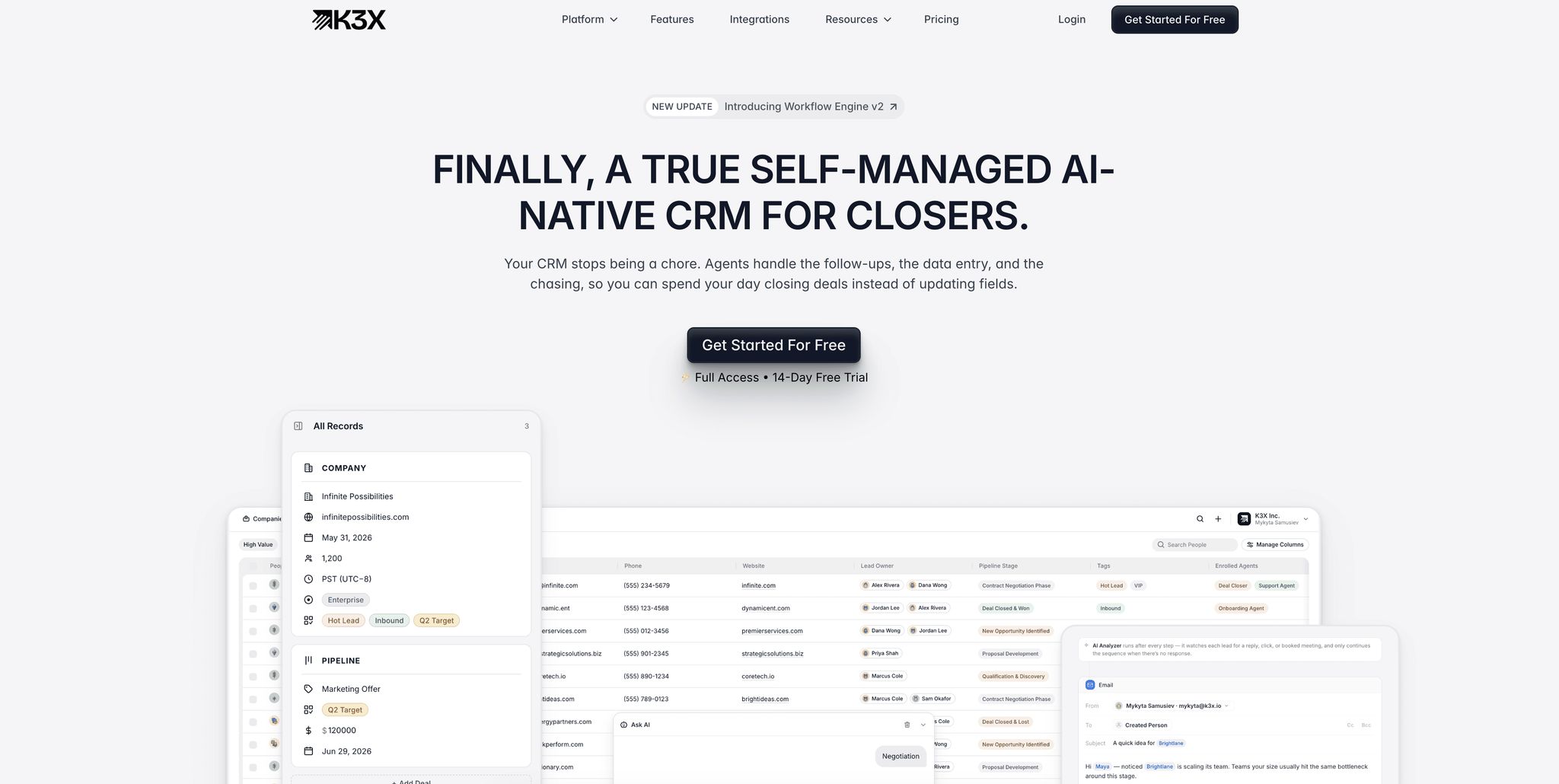
"Your CRM stops being a chore. Agents handle the follow-ups, the data entry, and the chasing, so you can spend your day closing deals instead of updating fields." [3]
Better Lead Targeting, Win Rates, and Revenue Results
Beyond saving time, AI-native CRMs improve decision-making by continuously enriching lead data with real-time signals from sources like LinkedIn and behavioral footprints. This ensures sales reps work with up-to-date information, unlike traditional CRMs where data becomes 47% incomplete within six months of manual updates [6].
The results can be transformative. Ruby Capital Group, a 125-employee funding company, implemented K3X in December 2025. Within two days, the company reduced time spent on follow-ups by 70% and tripled ticket resolution speed, achieving record-high close rates. CEO Michael Chkechkov shared:
"Our sales team was spending half their day on admin work. Now they're talking to customers and closing deals. The automation handles everything from lead qualification to contract routing." [3]
AI-native systems also offer 15% to 30% more accurate predictive forecasting compared to traditional reporting [6], giving sales leaders better insights into deal outcomes.
Alignment Across Sales, Marketing, and Customer Success
AI-native CRMs also improve collaboration across departments by unifying data. Legacy platforms like Salesforce or HubSpot often silo data across teams, requiring manual handoffs or costly integrations. In contrast, AI-native CRMs like K3X use a shared data model, where every interaction - whether a sales call, a marketing email, or a support ticket - feeds into a single live customer record.
This unified approach allows marketing teams to track leads through the sales cycle and enables customer success teams to access full deal context before onboarding. Automated handoffs replace manual notifications, reducing errors and ensuring smooth transitions. While platforms like monday.com and Zoho require manual integrations to bridge silos, K3X eliminates these barriers with its live data model. Notably, McKinsey's 2025 State of AI survey found that marketing and sales report the greatest revenue benefits from AI compared to any other department [2], underscoring the value of shared, real-time data across teams.
K3X vs. Leading CRM Platforms: A Direct Comparison
AI-Native vs AI-Enhanced vs Standard CRM: Feature Comparison
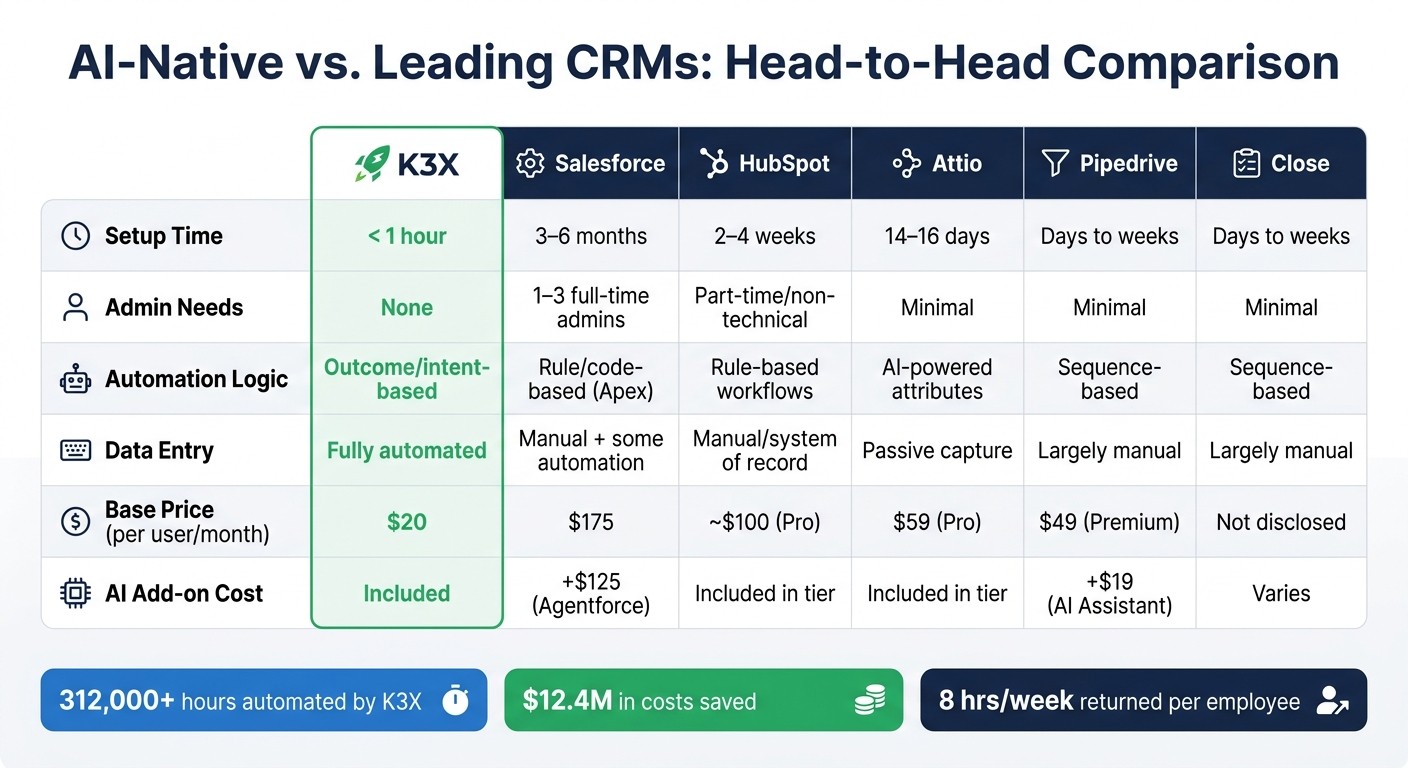
When selecting a CRM, the decision often hinges on more than just features. Factors like setup time, automation capabilities, and AI integration shape whether a team successfully adopts the system or abandons it. Here's how K3X compares to Salesforce, HubSpot, Pipedrive, Close, and Attio across key considerations.
Setup Complexity and Architecture
The time and effort required to implement a CRM can vary widely. For instance, deploying Salesforce Enterprise for 50 users typically takes 3–6 months and requires 1–3 full-time administrators [4]. HubSpot implementations, while faster, still demand 2–4 weeks and manual workflow setup [9]. Attio generally gets teams operational in 14–16 days [12].
K3X takes a different approach. It allows users to describe their goals in plain language - such as "Book demo calls with every new lead" - and configures itself in under an hour [3]. Mykyta Samusiev, Co-Founder & CEO of K3X, explains:
"We're building a CRM that works the way people expect it to, not through menus, workflows, or complexity, but through intention. You tell it the outcome. The system figures out the work." [3]
This streamlined setup is critical, given that 20% to 70% of traditional CRM projects fail due to technical complexity and poor user adoption [11]. By simplifying the onboarding process, K3X helps teams focus on their core sales activities right from the start.
Automation Model and Daily Sales Workflow
K3X builds on its fast setup with automation that simplifies daily workflows. Traditional CRMs often rely on rigid, rule-based sequence builders. For example, Pipedrive's AI Sales Assistant, which costs an additional $19 per seat, suggests next actions based on predefined scripts [10].
In contrast, K3X uses an outcome-focused model. Its AI dynamically adjusts follow-up schedules, updates pipeline stages, and logs interactions based on real-time lead responses. This adaptability has helped K3X automate over 312,000 hours of work, save approximately $12.4 million in costs, and give employees back 8 hours per week [3].
AI Capabilities and Depth of Intelligence
Salesforce offers extensive AI customization through its Atlas Reasoning Engine and Agentforce platform. However, these features come at a premium - Salesforce Enterprise costs $175 per user per month, with Agentforce adding up to $125 per user [13]. Despite this investment, 77% of B2B Agentforce deployments reportedly fail within six months, often due to data quality issues [14].
Attio takes a modern approach by passively collecting data from emails, calendars, and product signals to maintain a live customer record. Its infrastructure prioritizes speed, offering sub-50ms latency, and its "Ask Attio" feature allows natural language queries of pipeline data [7]. Attio Pro is priced at $59 per user per month [4].
K3X, priced at $20 per seat per month (including 1,000 AI credits and unlimited automations), delivers immediate AI-driven actions tailored for revenue teams [3].
Key Differences at a Glance
Feature | K3X | Salesforce | HubSpot | Attio | Pipedrive | Close |
|---|---|---|---|---|---|---|
Setup Time | < 1 hour [3] | 3–6 months [4] | 2–4 weeks [9] | 14–16 days [12] | Days to weeks | Days to weeks |
Admin Needs | None [3] | 1–3 full-time admins [4] | Part-time/non-technical [11] | Minimal [4] | Minimal | Minimal |
Automation Logic | Outcome/intent-based [3] | Rule/code-based (Apex) [10] | Rule-based workflows [9] | AI-powered attributes [4] | Sequence-based [10] | Sequence-based |
Data Entry | Fully automated [3] | Manual + some automation [4] | Manual/system of record [9] | Passive capture [4] | Largely manual | Largely manual |
Base Price (per user/month) | $20 [3] | $175 [13] | ~$100 (Pro) [13] | $59 (Pro) [4] | $49 (Premium) [13] | Not disclosed |
AI Add-on Cost | Included [3] | +$125 (Agentforce) [13] | Included in tier | Included in tier | +$19 (AI Assistant) [10] | Varies |
"The question is no longer whether AI belongs in your CRM. It is whether Salesforce's approach - bolting AI onto a 25-year-old architecture - can keep pace with platforms that were designed for it from day one." [4]
For developer-led or product-focused teams, Attio's data flexibility may be appealing. However, for sales teams seeking an AI-first solution that eliminates the need for specialized admins and complex workflows, K3X offers a more streamlined and adaptive option.
FAQs
How do I know if a CRM is truly AI-native?
A CRM qualifies as AI-native when AI is deeply integrated into its core processes rather than being an optional feature. A simple way to test this is the “turn it off” approach: if disabling AI significantly disrupts critical functions like updates, routing, or follow-ups, the CRM is truly AI-native. Look for indicators such as AI-designed data models, clearly labeled distinctions between human-written and AI-generated outputs, and workflows that depend on AI-driven decisions, such as task routing or determining next steps.
What data sources can an AI-native CRM capture automatically?
AI-native CRMs collect and consolidate data from multiple internal and external sources to keep customer records current. These sources include emails, calendar events, messaging platforms like WhatsApp, call transcripts, and recordings. They also pull in third-party data, such as LinkedIn profiles, Crunchbase insights, and behavioral signals. This enriches contact profiles with details like firmographic updates and job changes, removing the need for manual data entry and providing real-time visibility into the sales pipeline.
What should I check before switching from my current CRM?
Before transitioning to a new CRM, take a close look at your current data quality and workflows. Moving disorganized or inconsistent data will only transfer existing problems to the new system. Plan to spend 30–50% of your migration budget on tasks like cleaning up data, mapping fields, and maintaining historical records. Additionally, assess your integration needs carefully - recreating these connections can take several months. Lastly, ensure the platform aligns with your specific requirements. For example, AI-driven systems like K3X focus on automation and delivering actionable insights, reducing the need for manual maintenance.