Sales Automation
•
Best CRM Software for Small Sales Teams in 2026
For small sales teams, K3X offers the fastest AI automation, Pipedrive the best pipeline UX, and HubSpot the strongest all‑in‑one suite.

Choosing the best CRM for small sales teams in 2026 depends on your team's size, workflow, and budget. K3X stands out for its AI-driven automation and simplicity, priced at $20 per user monthly, while Pipedrive offers a visual pipeline for $14 per user. For those needing integrated marketing and sales tools, HubSpot is a strong contender but comes with higher costs and onboarding fees.
Small teams seeking fast setup and automation should consider K3X, which eliminates manual tasks through goal-oriented AI. Pipedrive is ideal for teams focused on pipeline management, while HubSpot suits those needing all-in-one solutions but can be expensive for growing teams. Each platform has trade-offs in cost, features, and ease of use, so pick based on your specific needs.
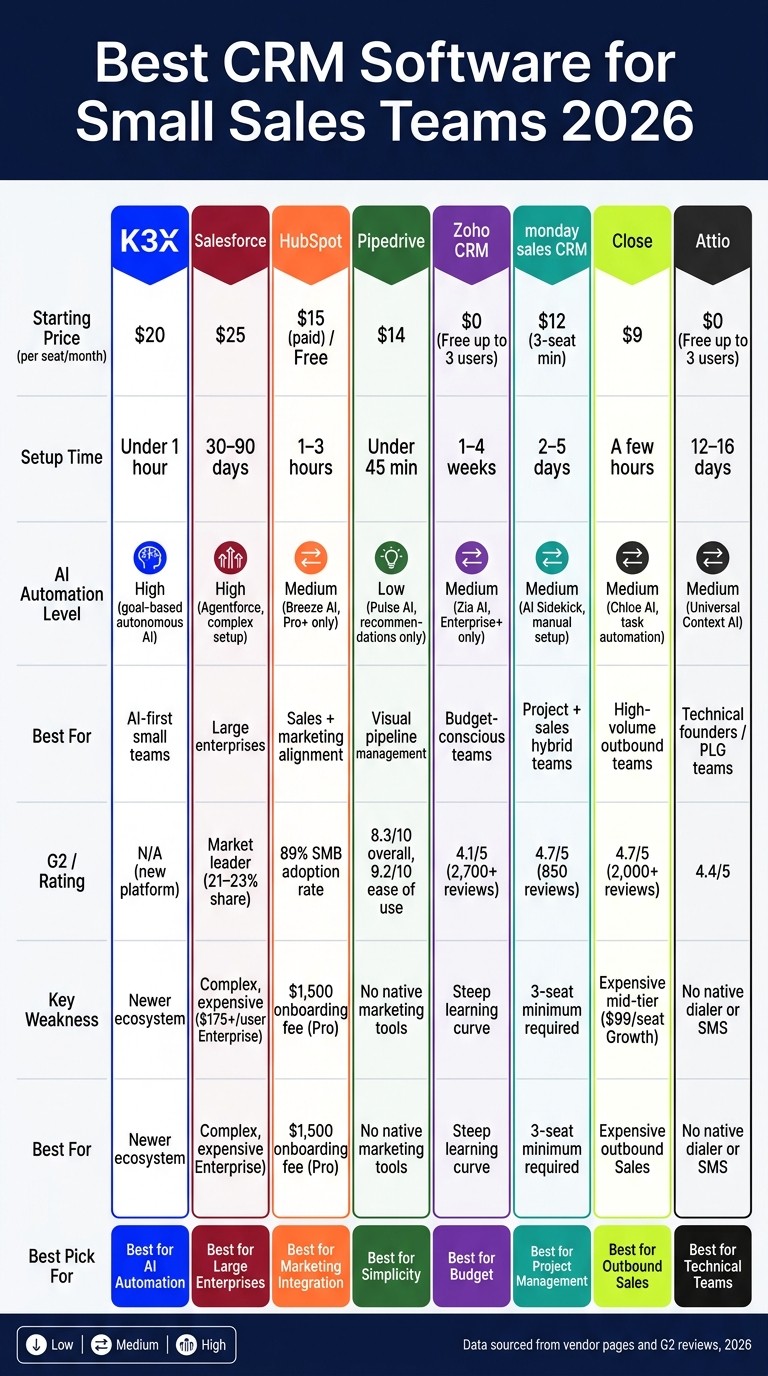
Best CRM Software for Small Sales Teams 2026: Side-by-Side Comparison
Best CRM for Small Business 2026 | TOP choices that still hold up!
1. K3X
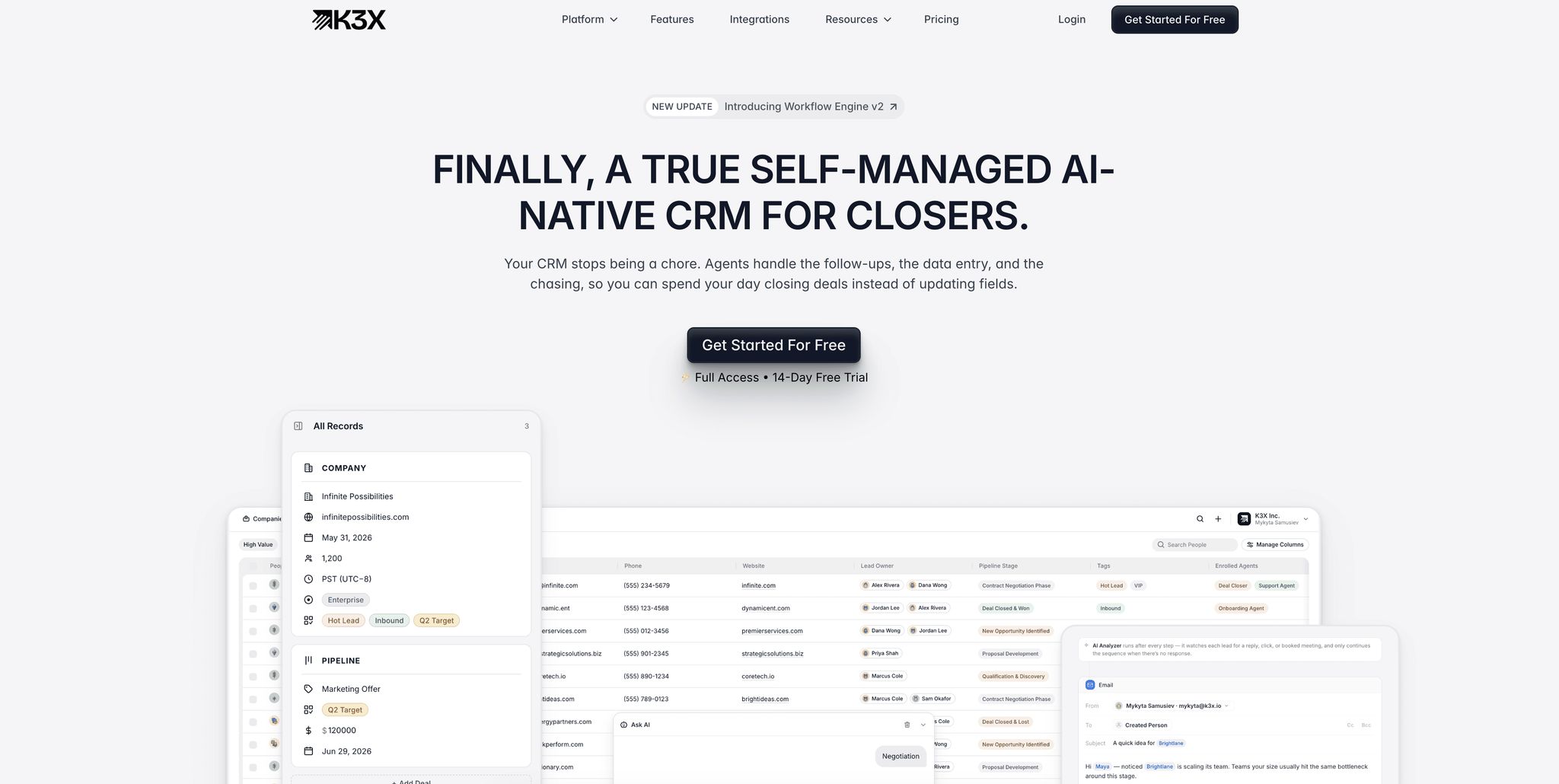
K3X is a CRM powered by AI, designed to deliver results without the hassle of lengthy configurations. Instead of setting up triggers, workflows, or field mappings, teams simply describe their desired outcomes, and K3X's AI takes care of the rest. This makes it especially helpful for small sales teams that lack a dedicated CRM administrator.
AI Automation
Unlike traditional CRMs that rely on rigid workflows prone to breaking when deviations occur, K3X focuses on goals. For example, you can specify, "Follow up with every lead who hasn't responded in three days", and the platform will handle all necessary steps automatically. As Mykyta Samusiev, Co-Founder & CEO of K3X, puts it:
"Most systems are linear. They follow fixed steps - and if something unexpected happens, the flow breaks... K3X works on goals." [4]
While platforms like Salesforce (Agentforce 2) and HubSpot (Breeze AI) offer advanced AI features, they still require structured workflows and significant administrative effort. K3X's approach eliminates these complexities, letting teams concentrate on selling rather than managing software.
In December 2025, Ruby Capital Group, a company with 125 employees, implemented K3X across its sales operations. Within just two days, the team cut follow-up time by 70% and tripled ticket resolution speed. CEO Michael Chkechkov shared, "Our sales team was spending half their day on admin work. Now they're talking to customers and closing deals." [4]
This focus on achieving goals aligns naturally with K3X's straightforward setup process.
Setup and Admin Overhead
K3X simplifies setup by allowing users to connect existing tools like Gmail, Outlook, or their phone system, define objectives using natural language, and let the AI handle everything else. This eliminates the need for manual configurations or third-party integrations. In contrast, older CRMs like Zoho and Pipedrive often require days - or even weeks - of setup by non-technical operations staff for advanced automation.
Additionally, K3X ensures data stays clean and organized, saving teams an average of 8 hours per week per employee. [4]
Sales Workflow Coverage
K3X comes with built-in tools for email, calling, and SMS, plus features like a one-click Power Dialer, unlimited call recordings, unlimited workflow automations, and unlimited contacts - all without extra charges. Competing platforms often reserve these capabilities for higher-priced plans. For instance, Close's Power Dialer is only available on its Growth plan at $99 per seat per month, while monday.com limits automations to 250 per month on its Standard plan. [8][9]
This comprehensive feature set underscores K3X's appeal, especially when paired with its straightforward pricing.
Pricing for Small Teams
K3X offers a single Adaptive plan priced at $20 per seat per month, with no long-term commitments or minimum seat requirements. The plan includes 1,000 monthly AI credits and adjusts during busy seasons, reverting to the $20 base in slower periods. This flexibility makes it ideal for teams with fluctuating sales cycles.
Feature | K3X (Adaptive) | monday.com (Standard) | Close (Growth) |
|---|---|---|---|
Monthly Price | $20/seat [4] | $17/seat (annual) [8] | $99/seat (annual) [9] |
Seat Minimum | 1 [4] | 3 ($51/mo total) [8] | 1 [9] |
Power Dialer | Included [4] | Not native | Included [9] |
Automations | Unlimited [4] | 250/month [8] | Unlimited [9] |
AI Credits | 1,000/month [4] | Credit-based [8] | 1,500/month [9] |
Setup Time | Under 1 hour [4] | 2–5 days [8] | Under 1 hour [9] |
For a three-person team requiring a Power Dialer and automation, K3X costs $60 per month, compared to $297 per month for Close's Growth plan. This pricing structure highlights K3X's value for small teams aiming to maximize productivity without the extra administrative workload.
2. Salesforce

Salesforce is the most widely used CRM globally, maintaining a market share of around 21–23% for 12 years straight [10]. While its dominance is well-deserved for enterprise-level teams, its complexity can pose challenges for smaller teams looking for quick deployment.
AI Automation
Salesforce's AI platform, Agentforce, marks a major shift in its AI strategy. David Cockrum, Founder and CEO of Vantage Point, highlights its capabilities:
"Agentforce represents Salesforce's pivot from assistive AI to autonomous AI agents that can plan, reason, and take action without human intervention." [10]
Agentforce works with Salesforce's Data Cloud to autonomously handle tasks like lead qualification, outreach drafting, and meeting scheduling. However, small teams may find the setup daunting. It requires structured workflows, certified administrators, and significant configuration time. Additionally, Salesforce charges for AI credits separately from the subscription, costing about $0.10 per action [10].
Setup and Admin Overhead
Salesforce's setup process and administrative demands can be a hurdle, especially for smaller teams. Onboarding for the Starter Suite typically takes 30–90 days, while Enterprise deployments may take 6–12 months [12]. A 5-person sales team often requires 60–80 billable consultant hours to become fully operational [12]. Ongoing maintenance is also resource-intensive, with admins spending 20–30% of their time addressing issues like broken triggers and field dependencies, often referred to as "Flow debt" [12].
"A 4-person startup picking Salesforce will drown in setup." [1] - Emily Nakamura, Business Tools Researcher
For teams without a dedicated Salesforce-certified admin - who typically earns $100,000–$160,000 annually [14] - Salesforce can easily turn into an underutilized and costly data repository.
Sales Workflow Coverage
Salesforce offers unparalleled breadth in sales workflow coverage. Its AppExchange marketplace includes over 4,000 integrations, providing tools for pipeline management, email tracking, forecasting, territory management, and more [1]. However, many of its advanced features require higher-tier plans or additional add-ons, limiting accessibility for teams on entry-level plans.
Pricing for Small Teams
Salesforce’s pricing reflects its enterprise-level capabilities. In August 2025, Salesforce increased prices for its Enterprise and Unlimited editions by an average of 6% [10][3]. The updated pricing structure is as follows:
Plan | Price (Annual Billing) |
|---|---|
Starter Suite | |
Pro Suite | |
Enterprise | $175/user/month [3] |
Unlimited | $350/user/month [3] |
Agentforce 1 Sales (full AI) | |
Agentforce AI Add-on |
For a 3-person team, the Pro Suite would cost $300 per month, not including implementation expenses. Over three years, a 50-user deployment costs around $595,000, about 3.4 times more than alternatives like HubSpot. This high cost is largely due to implementation and ongoing administrative needs [14][15]. While Salesforce offers a wide range of features for scaling teams, its complexity makes it less suitable for smaller teams compared to AI-native options like K3X.
3. HubSpot CRM
HubSpot CRM is a popular choice for small businesses starting with a CRM, offering a balance between ease of use and functionality. It’s especially appealing to small sales teams that also need marketing and customer service tools, with 72% of SMBs selecting it as their first platform [18].
AI Automation
HubSpot integrates AI features through Breeze AI, which spans its Sales, Marketing, and Service Hubs. This system automates tasks like lead routing, drafting email sequences, and summarizing customer history without requiring extra setup. For active users, this reduces manual data entry by about 30–40% [1][2][15]. However, more advanced tools, such as the Breeze Prospecting Agent, are only available in the Professional and Enterprise tiers, leaving Starter plan users with a more basic AI experience.
This straightforward AI system contrasts with platforms like Salesforce, emphasizing simplicity and efficiency for teams needing integrated sales and marketing solutions.
Setup and Admin Overhead
HubSpot is designed for quick setup. Connecting email platforms like Gmail or Outlook, importing contacts, and creating pipelines generally takes 1–3 hours. Most teams complete self-guided training in 1–2 days [2][15][18]. For small groups with fewer than 100 users, a dedicated administrator isn’t typically necessary. Instead, a part-time RevOps generalist can manage the platform with about 20–30% of their time [15][18].
The Professional tier requires a one-time onboarding fee of $1,500 [3][16]. Additionally, HubSpot’s CSV importer demands clean and well-structured data, which can make migrations involving unorganized data more time-intensive compared to other platforms [2].
Sales Workflow Coverage
HubSpot simplifies sales workflows by using a unified data model, where Sales, Marketing, and Service all share a single contact record and timeline [3][19]. This is particularly helpful for small teams managing both outreach and customer nurturing, as it eliminates the need for syncing data across multiple tools. With over 1,500 native integrations available in the HubSpot Marketplace [8], the platform is used by more than 228,000 companies as of 2026 [17]. However, teams focused solely on outbound sales might find HubSpot’s broad capabilities unnecessary for their needs.
Pricing for Small Teams
HubSpot’s free plan supports 2 users, up to 1,000,000 contacts, deal tracking, and email tracking at no cost [3][17]. Paid plans scale as follows:
Plan | Annual Rate | Monthly Rate | Key Notes |
|---|---|---|---|
Free | $0 | $0 | 2 users, 1M contacts, 1 pipeline [3] |
Starter | $15/seat/mo | $20/seat/mo | |
Professional | $90/seat/mo | $100/seat/mo | AI agents, advanced automation + $1,500 onboarding fee [2][3] |
Enterprise | $150/seat/mo | N/A | Custom objects, advanced permissions + $3,500 onboarding fee [3][16] |
The cost difference between Starter and Professional tiers is substantial, both in per-seat pricing and the onboarding fee. Teams should carefully forecast their contact volume and seat requirements for the next 12–18 months before committing. For example, a 3-person team on the Professional plan would pay $3,240 annually, plus the $1,500 onboarding fee in the first year. While HubSpot provides strong onboarding support and integrated tools, its pricing structure and additional fees may feel less streamlined compared to leaner platforms like K3X.
4. Pipedrive

Pipedrive provides a focused, sales-only CRM solution tailored for teams that prioritize visual pipeline management. With an 8.3/10 overall rating and a 9.2/10 ease-of-use score [5], it is particularly well-suited for sales teams of 3–30 members seeking structure without unnecessary complexity.
AI Automation
Pipedrive’s AI layer, Pulse AI, offers recommendations for next steps and evaluates pipeline health [20]. While it provides helpful guidance, it stops short of automating tasks like moving deals through stages, sending follow-ups, or updating records manually [2][20]. By comparison, K3X’s AI model automates these processes based on lead behavior [4]. This difference is significant for teams aiming to reduce administrative tasks instead of just organizing them. Notably, companies using AI-enabled sales platforms report 30% higher win rates and 25% faster deal cycles [20].
Setup and Admin Overhead
Pipedrive is among the quickest CRMs to set up, with pipeline configuration typically taking less than 45 minutes [2]. Most sales reps reach full productivity within 2–3 days [22]. The platform doesn’t require onboarding fees, a dedicated administrator, or IT support for teams with fewer than 50 users [21][3]. Its CSV importer can handle inconsistent data formats, which is particularly useful for teams transitioning from unstructured spreadsheets, offering an advantage over tools like HubSpot or monday CRM [2]. While both Pipedrive and K3X allow for rapid deployment, Pipedrive’s setup process may be more intuitive for users familiar with traditional CRMs.
Sales Workflow Coverage
Pipedrive excels in visual pipeline management, with its drag-and-drop deal board and highly-rated mobile app making it ideal for field sales teams [2]. However, as a sales-only platform, it requires additional tools or integrations for email marketing, customer support, or advanced reporting. Add-ons such as LeadBooster ($32.50/month) and Campaigns ($13.33/month) can increase monthly costs by 30–50% over the base subscription [2]. This narrow focus on sales sets Pipedrive apart from more comprehensive platforms like HubSpot or Salesforce.
Pricing for Small Teams
Pipedrive revised its pricing plans in November 2025. The Lite plan ($14/seat/month) provides basic pipeline functionality and AI-powered report creation but lacks advanced features like email sync, automation, and forecasting. For most teams, the Growth plan at $24/seat/month offers a more practical starting point [3][23].
Plan | Annual Rate | Key Features |
|---|---|---|
Lite | $14/seat/month | |
Growth | $24/seat/month | Workflow automation, email sequences [2] |
Premium | $49/seat/month | |
Ultimate | $69–$79/seat/month |
For a 5-person team on the Growth plan, the annual cost is $1,440, significantly lower than HubSpot Professional’s $5,400+ yearly expense. The AI Sales Assistant is available as an optional add-on for $19–$20/seat/month [7][1], which is worth factoring into budget considerations. Pipedrive remains a budget-friendly option for sales teams that don’t require extensive marketing or customer service capabilities.
5. Zoho CRM
Zoho CRM provides a wide range of features at prices that are accessible for non-enterprise users. It holds a 4.1/5 rating on G2 based on over 2,700 reviews and is used by more than 250,000 businesses as of 2026 [11]. Bobby Shao of SaaSProbe describes it as:
"Zoho is the value champion that delivers 80% of enterprise features at roughly 20% of the cost." [11]
AI Automation
Zoho's AI assistant, Zia, supports tasks like predictive lead scoring, anomaly detection, sentiment analysis, and drafting emails using generative AI [11][24]. In 2026, Zoho introduced Zia Agent Studio, a no-code platform for creating custom AI agents [24]. However, Zia is only available with the Enterprise plan, which costs $40 per user per month, leaving teams on the Standard or Professional plans without access [19][7]. In contrast, K3X offers autonomous AI at $20 per user, which automates outcomes without requiring manual workflows [4][24]. Zia's approach, which relies on recommendations requiring user action, highlights a key difference in automation strategies.
Setup and Admin Overhead
Setting up Zoho CRM typically takes 1–4 weeks. Advanced automation features require the use of Deluge, Zoho's proprietary scripting language, which can be a hurdle for non-technical users [26][27]. While Zoho generally avoids the need for a dedicated administrator or external consultants, a technically skilled team member is essential for smooth implementation [27]. Financial researcher JeongHo Han notes:
"Zoho's UI hasn't always been pretty... it still carries that 'designed by engineers, for engineers' energy in certain corners." [25]
This engineering-first design can make it harder for less technical teams to adopt the platform quickly. These challenges tie directly into how Zoho performs in supporting everyday sales workflows.
Sales Workflow Coverage
For its price, Zoho offers extensive functionality. The Professional plan, costing $23 per user per month, includes Blueprint (a visual process builder), inventory management, and webhooks - features that would cost over $100 per user in CRMs like HubSpot or Salesforce [19]. Additionally, the Zoho One bundle, priced at $37 per user per month, includes access to over 50 apps covering accounting, project management, and customer support, potentially reducing a company's overall software expenses. Unlike legacy CRMs such as Salesforce, which often require significant customization and add-ons, Zoho integrates these features into a single, cost-effective package. Stephen Sexton, Director of Partnerships at NowADays Media, shares:
"Zoho was easily the best value of the four. The CRM is functional and simple, and very easy to get started with." [29]
Pricing for Small Teams
Zoho's free plan supports up to three users, surpassing HubSpot's two-user limit [28][19]. For small sales teams, the Professional plan at $23 per user per month strikes a good balance between affordability and functionality. This pricing model makes Zoho a competitive choice for smaller teams.
Plan | Annual Rate | Key Features |
|---|---|---|
Free | $0 (up to 3 users) | Basic leads, contacts, and 1 pipeline [28] |
Standard | $14/user/month | 10 pipelines and basic automation [25] |
Professional | $23/user/month | Blueprint process builder, webhooks, and inventory management [19] |
Enterprise | $40/user/month | Zia AI, Canvas customization, and multi-user portals [19] |
Ultimate | $52/user/month | Full feature set with advanced analytics [19] |
Zoho One | $37/user/month | Over 50 bundled apps [19] |
6. monday sales CRM
monday sales CRM is a visual work platform that has expanded into CRM functionality. It works well for teams already using monday.com, especially smaller teams managing both project and sales workflows. However, for sales-focused teams, it may not meet all needs. With a 4.7/5 rating on G2 from 850 reviews [32], monday stands out for its flexibility, though it lacks the depth of platforms like Salesforce or HubSpot.
AI Automation
monday sales CRM includes tools like the AI Sidekick, AI Agents, and Automation Blocks to assist with tasks such as board summaries, lead research, and sentiment analysis [8][31]. These features are available on the Standard plan, priced at $17/seat/month. Additionally, monday provides a Model Context Protocol (MCP) server, enabling external AI tools like ChatGPT or Claude to interact with CRM boards for updates and automation [8][31].
However, the automation approach differs from competitors like K3X. While monday's AI enhances workflows, it still requires manual setup and management. By contrast, K3X focuses on fully automating sales outcomes without manual intervention.
Setup and Admin Overhead
monday uses a customizable "blank canvas" approach, requiring users to manually configure stages, columns, and automations [8]. Setting up a basic pipeline takes 30–60 minutes, but onboarding an entire team can take 2–5 days [8]. This flexibility comes with a maintenance burden, as highlighted by SaaS Sleuth:
"Monday CRM asks you to build the sales experience you want inside a flexible canvas. Pipedrive gives you a pre-built sales machine and gets out of your way." [33]
The Standard plan limits automations to 250 per month, which can quickly be exhausted by active teams [34][35]. Upgrading to the Pro plan unlocks 25,000 automations per month but comes at a higher cost. While monday is easier to implement than Salesforce, which often requires months and a dedicated admin [3], it demands more setup effort compared to simpler platforms like Pipedrive or K3X.
Sales Workflow Coverage
One standout feature of monday sales CRM is its sales-to-delivery handoff. When a deal is marked "Won", it can automatically generate a project board in monday Work Management, ensuring smooth coordination between sales and operations [31][33]. This feature is particularly beneficial for service-based businesses or agencies.
However, monday lacks depth in core sales functionalities. CRM analyst David Paul explains:
"Monday CRM works fine if your team already lives in Monday.com for project management... But the moment you need email sequences, call logging, sales forecasting... you've outgrown what Monday's CRM was built to do." [30]
For example, platforms like Pipedrive and HubSpot provide advanced lead-generation tools, such as website visitor tracking, which monday replaces with customizable board columns and third-party integrations [8][31]. While monday excels in connecting sales and delivery workflows, it may not be the best fit for teams needing robust, native sales tools.
Pricing for Small Teams
monday's pricing structure includes a mandatory 3-seat minimum on all paid plans [2][8]. This means solo users or two-person teams must pay for three seats, with a minimum cost of $36/month on the Basic plan or $51/month on the Standard plan.
Plan | Annual Rate | Key Features | Automation Limit |
|---|---|---|---|
Basic | $12/seat/mo (3-seat min: $36/mo) | Visual boards, 1,000 contacts | None [8] |
Standard | $17/seat/mo (3-seat min: $51/mo) | 2-way email sync, AI assistant | |
Pro | $28/seat/mo (3-seat min: $84/mo) | Forecasting, email sequences | |
Enterprise | Custom | Advanced security, analytics | Unlimited [8] |
For a 5-person team, monday Pro costs approximately $1,680/year, significantly less than HubSpot Professional's $6,900/year [8]. However, smaller teams may find more cost-effective options with Zoho's $14/user plan or Pipedrive's entry-level tier, both of which avoid minimum seat requirements. This pricing structure highlights monday's balance between flexibility and setup effort compared to competitors like K3X.
7. Close
Close offers a streamlined solution tailored specifically for inside sales teams that rely heavily on high-volume outbound activities. With a 4.7/5 rating on G2 from over 2,000 reviews [40], it has gained recognition for its effectiveness in managing outbound calls, emails, and SMS.
AI Automation
Close integrates Chloe AI, an assistant designed to handle call transcription, create automated summaries, and draft follow-ups [38]. This feature saves sales reps approximately 30 minutes daily, which translates to 2.5 hours saved per day for a 5-person team. Unlike K3X, which focuses on goal-oriented automation, Close uses Chloe AI to automate tasks within fixed workflows.
Setup and Admin Overhead
Close is highly rated for its ease of setup and administration, scoring 9.0/10 in both categories on G2 [40]. Teams can get up and running in just a few hours, a stark contrast to the 12–19 weeks often required for Salesforce implementation [40]. Close also includes data migration at no additional cost [43].
The platform’s simplified design reduces setup complexity by offering fewer configuration options compared to more extensive systems like Salesforce or Zoho [41][42]. As Close CEO Steli Efti explains:
"Close will never become a platform. We don't want to be HubSpot or Salesforce. We want to be the best inside-sales CRM in the world." [43]
Sales Workflow Coverage
Close combines essential tools like a native Power Dialer, Predictive Dialer, SMS, and email sequences into a single per-seat license [38]. Competing platforms like HubSpot and Salesforce often rely on third-party add-ons for similar functionality, which can cost an additional $150–$300 per month [41]. According to Nick French, Founder of StackSwap:
"Close consolidates essential inside-sales tools - CRM, Power Dialer, SMS, and Chloe AI - into one per-seat license to eliminate disparate systems." [38]
However, Close is not designed as a marketing platform. It lacks features for inbound lead nurturing, content automation, and multi-touch attribution found in systems like HubSpot [36][37]. This limitation may affect teams that blend inbound and outbound strategies, but for outbound-focused teams, Close’s bundled features can simplify workflows and reduce costs.
Pricing for Small Teams
Close’s pricing is structured to scale with features. The Solo plan starts at $9 per user per month, covering basic CRM functionality and Chloe AI’s notetaking capabilities. The Growth plan, at $99 per user per month, includes advanced tools like the Power Dialer and automated sequences [39]. For a 5-person team, the Growth plan costs approximately $545 per month [7].
Plan | Annual Rate | Key Features |
|---|---|---|
Solo | $9/user/mo | CRM + Chloe AI notetaker, 1 user max |
Essentials | $35/user/mo | Click-to-call, SMS, multiple pipelines |
Growth | $99/user/mo | Power Dialer, automated sequences, AI Email Assistant |
Scale | $139/user/mo | Predictive Dialer, call coaching |
While Close’s mid-tier pricing is higher than monday sales CRM’s Pro plan at $28 per user per month, the additional cost is often offset by savings from its all-in-one design. For example, a 5-person team might save on purchasing separate dialer and SMS tools, a common expense with legacy CRMs like Salesforce and HubSpot. Close also offers a Startup Program with up to 60% off for eligible early-stage teams [44], making it a cost-effective option for outbound-focused sales teams.
8. Attio
Attio offers a modern, flexible CRM tailored for technical founders who need customizable data models. By May 2026, it had attracted 10,000 customers [1] and earned a 4.4/5 rating on G2 as of March 2026 [49]. Unlike Close, which focuses on outbound calling, Attio provides a platform where teams can define their own data structures instead of adhering to rigid schemas like contact–company–deal.
AI Automation
Attio's AI features revolve around its "Universal Context", which processes unstructured data such as emails, calendar events, and notes [46]. Its "Ask Attio" feature allows users to query and update records through conversational interactions, making it easier to uncover relationship insights. While Attio emphasizes intelligence-driven features, K3X takes a goal-oriented approach, automating specific tasks like "booking demo calls with non-responsive leads" by determining the required steps autonomously [4].
However, Attio's AI capabilities, including enrichment and research agents, consume workspace credits. Small teams need to track their usage carefully to avoid unexpected costs [45].
Setup and Admin Overhead
Setting up Attio typically takes 12–16 days [50]. It works well for teams of 10–100 users without requiring a dedicated admin. Its graph-based data model allows teams to create custom objects - such as investors or partners - quickly, a level of flexibility that platforms like HubSpot often reserve for higher-priced plans [47]. That said, teams lacking technical expertise might find its open-ended structure challenging and may need RevOps support for managing complex automations. On G2, Attio's Product Direction score of 9.4/10 outpaces HubSpot's 8.7/10, reflecting a promising roadmap even as some features evolve [49].
Sales Workflow Coverage
Attio offers essential CRM features, including pipeline management, email sequences (available on the Pro tier), and relationship tracking. Its pipelines function as a visual layer on top of data lists rather than as standalone modules. Sejla Hajric describes this design as "fast, lightweight, and strangely non-CRM-like - in a good way" [48]. While legacy CRMs excel at structured workflows, Attio's visual and customizable pipelines appeal to teams with unique data modeling needs.
However, Attio lacks native features like a dialer, SMS, and marketing automation, requiring integrations with third-party tools for these capabilities. For outbound-heavy teams, Close is a better fit, but inbound-led or product-led growth (PLG) teams with specific data modeling needs may find Attio ideal.
Pricing for Small Teams
Attio balances flexibility with affordability, making it a practical choice for small teams. Its free plan supports up to 3 users, while paid plans range from $34 to $74 per seat per month, offering features like email sequences and 10,000 automation credits (roughly 1,000 Research Agent runs) [50].
Plan | Price | Key Features |
|---|---|---|
Free | $0 | Up to 3 seats, core CRM |
Plus | $34/seat/mo | Unlimited records, email sequences, basic automations |
Pro | $74/seat/mo | Advanced reporting, AI attributes, 10,000 automation credits |
Enterprise | $119/seat/mo | Unlimited objects, SSO, priority support |
For a 5-person team on the Plus plan, the cost is approximately $170 per month. This is lower than Close's Essentials plan and significantly cheaper than HubSpot Sales Pro. Additionally, technical teams using composable stacks can save 40–60% on vendor costs compared to bundled suites like HubSpot, though these savings depend on the team's ability to integrate third-party tools as needed.
Pros and Cons
Each CRM has its own advantages and drawbacks. The table below provides a quick comparison to help you determine which platform aligns with your team's size, budget, and workflow needs without revisiting every detail.
CRM | Key Strengths | Key Weaknesses |
|---|---|---|
K3X | Quick setup (under 1 hour); AI reduces manual tasks; includes email, calling, and SMS; flat $20/seat pricing with 1,000 AI credits [4] | Relatively new platform with a smaller ecosystem; requires monitoring AI credit usage at scale |
Salesforce | Extensive customization (4,000+ integrations); strong enterprise reporting; industry-standard compliance [1] | Long implementation (3–12 months); $175/user/month for Enterprise plan (price increased 6.1% in August 2025); low SMB adoption rate (43%) [3][51] |
HubSpot | Excellent sales-marketing integration; 89% SMB adoption rate; free tier supports up to 1 million contacts [51] | $1,500 onboarding fee for Pro; significant cost increases after 2,000 contacts; AI (Breeze) adds $50/seat [3][7] |
Pipedrive | Quick onboarding (reps active within 3 days); visual pipeline shortens deal cycles by 14%; strong mobile app [51] | Lacks native marketing automation; advanced security features only available in $79/seat Ultimate tier; limited reporting [2][6] |
Zoho CRM | Excellent cost-to-feature ratio; integrates marketing, sales, and service; Zia AI included in Enterprise+ [6] | Outdated interface slows navigation; steeper learning curve compared to Pipedrive or HubSpot [29][6] |
monday sales CRM | Highly visual and customizable for unique workflows; setup in 30–60 minutes; AI included in Pro+ [2] | Requires a 3-seat minimum ($36/month starting cost); struggles with 500+ open deals; weaker sales-specific features [2][6] |
Close | Top G2 rating (4.7/5); built-in power dialer and SMS reduce reliance on third-party tools; low admin burden [6] | Expensive mid-tier plan ($109/seat Pro); lacks marketing automation; best suited for outbound-focused teams [6] |
Attio | Modern object-first data model; free plan for up to 3 users; strong product direction score (9.4/10 on G2) [49] | No native dialer or SMS; AI credits consumed per action; open-ended structure can be challenging for non-technical users [45][47] |
This table highlights the main trade-offs, setting the stage for a deeper look at trends in setup efficiency, customization options, and user adoption.
One recurring theme across these platforms is the balance between ease of setup and customization depth. Emily Nakamura, a business tools researcher, explains it well:
"A 4-person startup picking Salesforce will drown in setup. A 200-person sales org on Pipedrive will hit a ceiling within a year." [1]
Platforms like K3X and Pipedrive, which prioritize fast setup, often lack the extensive customization offered by Salesforce and HubSpot, which take longer to implement but provide more flexibility.
User adoption is another critical factor. HubSpot's 89% SMB adoption rate sharply contrasts with Salesforce's 43%, showing how overly complex systems can deter usage. For smaller teams, high adoption rates are essential to ensure every representative actively contributes, maximizing the CRM's return on investment.
Conclusion
This comparison of K3X and legacy CRMs lays out a clear path for small teams deciding on the right tool. The key is to focus on your team's current needs, as David Paul, CRM Analyst at Best CRM Reviews, emphasizes:
"The number one mistake I see small businesses make with CRM is buying for the company they want to be instead of the company they are." [52]
For small sales teams prioritizing AI-driven automation, K3X stands out. Its prompt-to-action model eliminates manual data entry, and results like Ruby Capital Group's 70% reduction in follow-up time within two days of setup highlight its impact. [4] Additionally, its predictable pricing ensures costs remain manageable.
If your team needs a simple, visual pipeline, Pipedrive offers a practical solution. With pricing starting at $14 per seat per month and no mandatory onboarding fees, most teams can get started in just 2–3 days. [3] For those focusing on marketing and sales alignment, HubSpot is a top contender. However, teams should account for its onboarding fees and the potential for higher costs as contact lists grow beyond 2,000. [3]
Ultimately, choosing a CRM comes down to aligning the tool with your team's workflow, scale, and immediate priorities.
FAQs
How do I choose the best CRM for a 3–10 person sales team?
When selecting a CRM, prioritize ease of use and a quick setup process. A system that's too complicated can discourage your team from using it consistently, leading to incomplete or inaccurate data. Here's what to consider:
Workflow alignment: Choose a CRM that fits your team's specific needs. For instance, K3X is a good option if AI automation is a priority, HubSpot works well for marketing-focused teams, and Pipedrive is ideal for outbound sales operations.
Administrative requirements: Some tools, like Salesforce, may require dedicated staff to manage effectively. If you lack the resources for this, opt for a simpler solution.
Sales cycle complexity: Match the CRM's features to the intricacy of your sales process to avoid unnecessary complications.
Total costs: Look beyond the upfront price to account for hidden fees, such as add-ons, training, or long-term subscription costs.
By focusing on these areas, you can ensure your CRM supports your team without overwhelming them.
What setup work is needed before a CRM is usable?
To get a CRM up and running, you'll need to import your contacts, define your sales pipeline, link essential tools like email and calendar, and set up basic automations. Preparing your data is a key step - clean it up, remove duplicates, and ensure fields are mapped correctly to maintain context. Older systems like Salesforce might require detailed workflow mapping and help from an admin, while platforms like K3X simplify the process with straightforward prompts for quicker setup.
How do AI credits and add-ons affect the actual monthly cost?
AI features and add-ons can quickly inflate the monthly costs of traditional CRM platforms, transforming seemingly low base fees into much higher expenses. For example, HubSpot’s Breeze AI costs $50 per seat each month, while Salesforce’s AI tools can increase base fees by 15–40%. By comparison, K3X offers a more budget-friendly approach, including 1,000 AI credits as part of its $20 per seat pricing. Costs scale automatically based on usage, helping users avoid unexpected fixed-cost hikes.