Sales Automation
•
What Is Outcome-Based Automation? Goals Instead of Workflows
Outcome-based automation targets goals and suits small sales teams; workflow CRMs fit larger teams needing strict process control.

Outcome-based automation means I set a business result in plain English, and the system decides the steps to pursue it. The key difference from workflow automation is simple: workflows follow rules I build first, while outcome-based systems work backward from the result I want.
If I am comparing CRM options, the one-line verdict is this: outcome-based tools fit small sales teams that want less admin work, while workflow-based CRMs fit teams that need tighter process control, deep reporting, and more admin oversight.
What matters most: outcome-based automation is about results, not just task completion. If a lead replies late, skips a step, or changes direction, the system changes the next action instead of waiting for me to rebuild logic.
I would boil the article down to four points:
The interface changes: I type a goal instead of building triggers and branches.
The system acts across tools: email, SMS, calls, and CRM records can all be part of execution.
The tradeoff is clear: less setup and less rule maintenance, but less fit for large teams with strict controls.
Team size matters: the article frames this model as a better fit for 1–9 person sales teams, not large organizations.
What stood out in the data: only about 25% of actual sales activity is logged in older CRMs, according to the article’s cited source [3]. It also says reps using AI-driven agents save 8 hours per week on average [4], which is the core reason these tools get attention from lean revenue teams.
The article also draws a hard line between product types. It presents K3X as a prompt-to-action CRM and compares it with Salesforce, HubSpot, Pipedrive, Zoho, monday.com, Close, and Attio as workflow-led systems. The practical takeaway is not that one model wins in every case, but that they solve different problems.
I would keep one caution front and center. The article says 97% of machine accounts and AI agents carry excessive privileges [1], so access control, approvals, and human handoff matter as much as automation quality.
If I were evaluating tools after reading this, I would ask:
Can I approve messages before they send?
Can the system hand off to a human with context?
Does it work in my current stack?
Does it keep permissions narrow?
Will pricing still make sense as volume grows?
That is the article’s main point in plain terms: outcome-based automation reduces the work of building and fixing workflows, but it also shifts more decision-making to the system, so tool fit and controls matter.
How Intercom Built the Highest-Performing AI Agent Using Outcome Based Pricing

How Does Outcome-Based Automation Work?
Outcome-based automation begins with a goal in plain language, turns that goal into a plan, carries out actions across connected systems, and then changes course as results come in. Unlike fixed workflow logic, it focuses on the result rather than just finishing a preset sequence.
From Goal to Plan
The process starts when a user states a desired result in plain language, such as "add $50k in MRR." The system reads the request, figures out the intent, and maps the goal into steps.
Instead of moving through a prebuilt flowchart, it picks the next action based on context and current progress. In practice, that means the plan can shift as new data comes in, rather than staying locked to a static path.
Execution Across Systems
AI agents then carry out actions across email, SMS, calls, and CRM records, while updating tags and pipeline stages along the way [2][4].
This matters for revenue teams because the work does not stay trapped in one tool. The system can act across the channels and records operators already use, which cuts down on manual handoffs and status updates.
Feedback and Adjustment
The system tracks progress against the outcome, not just whether a task was checked off. If replies, pipeline data, or other inputs change, the system changes the next action without needing manual logic trees or branches [2][5].
That’s the key shift. A fixed workflow asks, Did step 4 run? Outcome-based automation asks, Are we getting closer to the target, and if not, what should happen next? That difference becomes clearer in the comparison table below.
How Is Outcome-Based Automation Different From Workflow Automation?
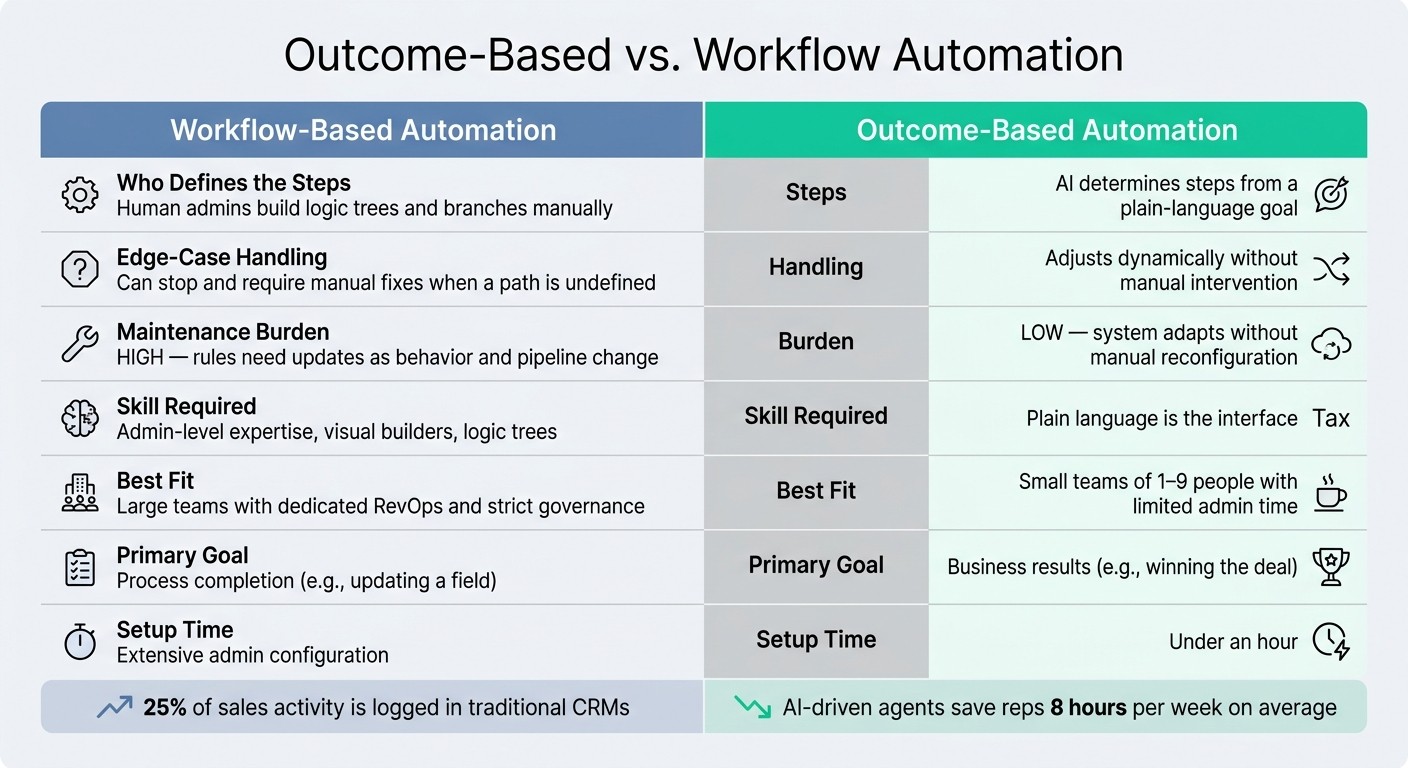
Outcome-Based vs. Workflow Automation: Side-by-Side Comparison
The main difference is who sets the steps. In workflow automation, a human admin or RevOps manager maps every trigger, branch, and action ahead of time. In outcome-based automation, the user gives a goal in plain language, and the AI decides the steps needed to get there.
One model starts with a process map. The other starts with the result. That gap shows up fast when a lead replies out of order or skips a step, and it affects setup time, upkeep, and how the system deals with edge cases.
Workflow automation runs on fixed if-then logic. It works best when the team can predict each scenario in advance. If a lead replies in an unexpected sequence or skips a step, the workflow can stop and need manual fixes [2].
Outcome-based automation handles that differently. Instead of relying on a prebuilt path for every case, it adjusts when lead behavior, reply timing, or pipeline stage movement changes. That means workflow automation often needs rule updates over time, while outcome-based systems can adapt without rebuilding the logic from scratch [2][3].
The clearest way to compare the two is across four areas: ownership, edge cases, upkeep, and skill.
Comparison Table: Outcome-Based vs. Workflow-Based Automation
Dimension | Workflow-Based Automation | Outcome-Based Automation |
|---|---|---|
Who defines the steps | AI determines the steps from a plain-language goal [2] | |
Edge-case handling | Can stop and need manual fixes when a path is not pre-defined [2] | Adjusts through dynamic adjustments [2] |
Maintenance burden | High; rules need updates as lead behavior, reply timing, and pipeline stage changes [3] | Low; the system adapts without manual reconfiguration [2][3] |
Skill required | Admin-level expertise, visual builders, and logic trees [6][7] | Plain language is the interface [6] |
Neither model is better in every case. Workflow automation makes sense when the process is stable, well defined, and unlikely to change much.
Outcome-based automation fits better when exceptions happen often, the team has limited admin time, or there is no dedicated RevOps function to manage logic trees [2][6].
The next section shows how this works inside actual CRM tools.
Real Examples of Outcome-Based Automation in CRM and Sales
The clearest example of outcome-based automation shows up in live CRM products. K3X uses a prompt-to-action model, while most legacy CRMs still depend on workflows set up by an admin.
K3X: A Factual Example

K3X is an AI-native CRM built for teams of 1–9 people. A user can type a goal like "follow up every inbound lead within 5 minutes until they book or decline", and K3X's AI agents carry that out across email, SMS, and calls [2][4].
That’s the key difference. In K3X, the user states the result they want. In legacy CRMs, the user usually has to map out the process first.
Customers report less admin work and fewer missed follow-ups, but K3X is still a newer product with fewer native integrations than Salesforce or HubSpot [4]. It also requires credit monitoring and is not built for organizations that need 100+ seats or deep governance controls [4].
How Legacy CRMs Handle the Same Problem
Legacy CRMs handle this problem through workflow design. Salesforce, HubSpot, Pipedrive, Zoho, monday.com, Close, and Attio all follow the same workflow-based pattern: users define triggers, conditions, and sequences before anything runs [3][4].
This model works well for teams that need deep integrations, reporting, and governance. The tradeoff is more setup and more maintenance over time.
Feature and Pricing Snapshot
The table below shows how the two models differ in setup, maintenance, and team fit [3][4].
Feature | Outcome-Based Automation (e.g., K3X) | Workflow-Based Automation (Legacy CRMs) |
|---|---|---|
Primary interface | Plain-language prompts | Rules, triggers, and logic branches |
Execution | Adaptive agents that adjust to responses | Static sequences and playbooks |
Setup time | Extensive admin configuration [3] | |
Primary goal | Business results, like winning the deal | Process completion, like updating a field |
Target user | Large enterprises needing strict governance |
K3X starts at $20 per seat/month. The plan includes 1,000 AI/Twilio credits, prompt-driven agents, built-in email, calling, SMS, unlimited integrations, a 14-day free trial, and no long-term contracts [4].
Salesforce seat pricing is approximately $500 per seat as of July 2026 [3].
Why Outcome-Based Automation Matters for Small Teams
Outcome-based automation helps small teams by cutting CRM busywork that slows replies and follow-up. The point is not to run more automations. It is to reduce missed follow-ups while keeping admin work low.
Response Speed, Capacity, and Follow-Up Gaps
Small teams lose time when reps have to log activity by hand and chase every next step on their own. In older CRM setups, that work often falls through the cracks.
Only about 25% of actual sales activity gets logged in traditional CRMs [3]. Reps who use AI-driven agents for admin work save 8 hours per week on average [4]. That time adds up fast. Outcome-based automation logs activity and manages follow-up without the rep doing each step manually, so more time goes to selling instead of data entry.
Less Maintenance Than Workflow-Heavy CRM Stacks
This also cuts the upkeep that usually comes with rule-based workflows. For a small team without a full-time RevOps owner, that upkeep can become a drag on the whole system.
Traditional workflow automation runs on rules, and those rules need updates every time the sales process shifts. If pipeline stages change, reply patterns change, or lead behavior moves in a new direction, someone has to fix triggers and rebuild logic. Outcome-based agents adjust follow-up based on replies and pipeline status changes [2], which means less manual rework and fewer broken workflows.
What Should You Check Before Choosing an Outcome-Based Automation Tool?
Check whether the tool fits your team size, works with the systems you already use, and gives you enough control over actions and access. The main things to review are setup time, integration coverage, approval rules, and how much system access the tool needs to do its job.
The goal is simple: can the tool produce the result you want inside your current stack without creating risk? That’s the line between a real outcome-based automation tool and a workflow builder with AI layered on top.
Where It Fits Best
Outcome-based automation works best for small sales teams that want fast time-to-value and don’t have a dedicated CRM admin. In that setup, the right tool should let reps move fast without forcing someone to build and maintain complex workflows.
Check for an approval step before the tool sends messages or changes deal stages. Also check whether it supports human handoff with full context when the AI hits a limit, because that’s often where day-to-day use either holds up or falls apart.
Integration coverage matters just as much. A tool may look good in a demo, but if it doesn’t connect to the apps your team already uses, the value drops fast. K3X is built for teams with 1–9 users that want prompt-to-action execution across email, SMS, and calls, though its native integration catalog is smaller than incumbents like HubSpot or Salesforce.
Limitations and Tradeoffs
These tools cut admin work, but they can also create access and governance problems. Cross-system agents can work across email, CRM records, calls, and SMS at the same time, which means they may end up with more access than the task itself calls for.
That risk is not theoretical. Research shows that 97% of machine accounts and AI agents carry excessive privileges [1]. If a tool can’t show least-privilege access, secret rotation, and bounded delegation, it is not ready for enterprise use.
If governance and reporting matter more than prompt-driven execution, Salesforce, HubSpot, Pipedrive, Zoho, monday.com, Close, or Attio may be a better fit. K3X costs $20 per seat per month and includes 1,000 AI credits, but teams need to watch credit use as volume goes up, and it is not built for organizations that need 100+ seats or deep admin governance.
Related Terms to Know
These terms explain the interface, how the system works, and where outcome-based automation fits in CRM software. The main point is simple: outcome-based automation works best with an intent-based interface, not a rule builder.
Prompt-Driven CRM
A prompt-driven CRM is the interface layer behind outcome-based automation. In this type of system, a user states a goal in plain English, and the software turns that intent into action without workflow builders or trigger setup.
Outcome-based automation is the operating approach. A prompt-driven CRM is the interface that converts a plain-language goal into action. For a deeper explanation of how prompt-driven systems work and how they differ from older CRMs, see What Is a Prompt-Driven CRM?.
Other CRM Automation Terms
These terms help separate outcome-based automation from older rule-based systems and nearby CRM tools. That distinction matters because many CRM products use similar language for very different types of automation.
Workflow automation uses preset triggers and actions. It follows rules that users define in advance. For a closer look at how AI changes follow-up work, see CRM Follow-Up Automation with AI.
AI agents take actions to reach a goal instead of only following fixed rules. The focus is the result, not just the path.
AI copilot refers to human-in-the-loop help. It assists the user, but it does not run on its own.
Sales automation is the broad category for repeat sales work such as routing, logging, and follow-up. Outcome-based automation fits inside this category, but its focus is business results rather than task completion.
These definitions prepare the final point about where outcome-based automation fits and where it does not.
Key Takeaway
The main difference is simple: workflow automation follows preset steps, while outcome-based automation works backward from a target result. In practice, the table above shows the tradeoff between fixed process control and automation that can shift as conditions change.
This matters because day-to-day sales work rarely moves in a clean, linear path. Reps miss steps, buyers go quiet, data changes, and priorities shift. When that happens, outcome-based systems can adjust on their own instead of forcing an ops team to rewrite rules or rebuild branches.
Workflow-based platforms work best when a team has the time and skill to manage triggers, rules, and logic over the long term. Outcome-based automation makes more sense when the goal is to keep producing the same result even as the path changes.
For small sales teams, that difference is practical, not theoretical. If the team needs output without spending hours maintaining automations, outcome-based automation is usually the better fit.
FAQs
How is outcome-based automation different from workflow automation?
Outcome-based automation aims at the end result. Workflow automation follows a set path. That’s the core difference, and it matters when work doesn’t go exactly as planned.
In workflow automation, teams map the steps ahead of time and set the possible branches. If something falls outside those rules, the process can stall or need a person to step in and fix it.
With outcome-based automation, the user gives the system a goal. The AI then figures out the steps, adjusts them as conditions change, and keeps working toward the target in real time.
The system tracks progress against the outcome itself, not just whether each step in a workflow executed. That means success is judged by the result achieved, not by whether the process simply ran from start to finish.
What happens when the AI cannot reach the outcome?
If the AI doesn’t reach the outcome, it uses feedback loops and adjusts its reasoning to try again. Instead of stopping when something unexpected happens, it checks the results as they come in and changes course.
If the first attempt falls short, the AI reassesses the context and shifts its strategy or messaging to keep moving toward the goal, rather than sticking to a sequence that already failed.
Is outcome-based automation reliable?
Yes - outcome-based automation can be reliable if it uses continuous feedback and live data to adjust what it does, rather than relying on brittle, pre-programmed steps.
Because it works toward clear, measurable goals, it usually handles edge cases better than rule-based workflows. That said, reliability still depends on defining the objective well and keeping a close eye on AI credit usage.
What is an example of outcome-based automation?
K3X uses outcome-based automation. A user sets a goal, such as "book a meeting with every qualified lead," and the system figures out the steps and runs them across email, SMS, and calls without manual workflows, triggers, or sequences.
That makes it different from rigid rule-based systems. Instead of following a fixed path, it changes course in real time based on prospect behavior until the goal is reached.