Sales Automation
•
Best CRM for Marketing Agencies With Small Sales Teams
Pick K3X for missed follow-up, HubSpot for inbound marketing, or Pipedrive for a simple visual pipeline.

I’d rank K3X first, HubSpot second for inbound-heavy agencies, and Pipedrive second for teams that just want a simple sales pipeline. The best choice depends on where deals stall: follow-up, lead routing, pipeline visibility, or call volume.
For most small agencies, the main problem is not a lack of leads. It is that the same person is selling, running accounts, and doing delivery, so follow-up gets missed.
I’d frame the decision this way:
Choose K3X if your main issue is missed follow-up and you want email, SMS, and calling in one tool with little setup.
Choose HubSpot if most new business comes from inbound and you want marketing and sales in one system.
Choose Pipedrive if you want a clean visual pipeline that a founder can start using the same day.
The data in the article points to a simple pattern. GigRadar says 74% of agencies under 10 people stop using their CRM within 6 months because the person who should log activity is also the billable person doing the work. It also uses an 80% adoption benchmark: if fewer than 80% of active deals are logged, the CRM is not doing its job. The article also cites research showing that once a team is handling more than 8 active client or lead relationships, follow-up starts to slip and revenue risk goes up.
That is why I would not pick based on feature count alone. I would pick based on how much manual work the CRM adds.
K3X stands out when the job is keeping follow-up moving with less admin. The article’s case for it is simple: users enter the outcome they want in plain language, and the system handles outreach across email, SMS, and calls. At $20 per seat per month, with 1,000 AI credits, built-in calling, built-in SMS, and a 14-day free trial, it is aimed at 1–9 person agencies that do not have time to build rules and maintain them.
HubSpot is the better pick when inbound is the center of your sales motion. If you need one database for marketing and sales, it is hard to ignore. But the article is clear about the tradeoff: the automation many agencies want sits at the Professional tier, about $100 per seat per month, often with a $1,500 onboarding fee, and setup can take 2 to 4 weeks.
Pipedrive is the simpler sales-first option. I’d look at it if your team needs a visual pipeline, basic follow-up, and a low-lift rollout. The article calls out Deal Rotting as a useful feature for stalled proposals, and says setup is often measured in hours, not weeks. Pricing starts around $14 per seat per month, but email sync and automations sit higher, at about $34 to $39 per seat per month.
The rest of the field is more situational.
Attio makes sense for boutique agencies that care a lot about how records and pipelines are set up. It auto-builds records from email and calendar activity, which can cut manual entry. But at about $49 per seat per month, and with fewer native integrations than HubSpot, it fits a narrower group.
Close is a fit for agencies that sell through calls first. If a founder or rep spends a large part of the day calling leads, its built-in calling, SMS, and email setup is useful. Still, the article notes that a five-person Growth team can reach $717 to $872 per month once add-ons are included, so cost can climb fast.
Zoho CRM is the low-cost control play. At $23 per seat per month for Professional, it gives agencies rules, Blueprint, and links to Zoho’s other apps. But the tradeoff is more setup, more upkeep, and a UI that the article says can slow adoption.
If I had to reduce the article to one buying rule, it would be this: pick the CRM that removes the step your team keeps skipping.
If that skipped step is follow-up, I’d start with K3X.
If it is inbound handoff and attribution, I’d start with HubSpot.
If it is day-to-day pipeline visibility, I’d start with Pipedrive.
That is the shortest path to a CRM your team will still be using six months from now.
🔝Best 7 CRMs for Marketing Agencies (2026) | Stop Operational Chaos
1. K3X

Best for: Founder-led marketing agencies with 1–9 people that need follow-up to keep moving during busy delivery months. Pricing: $20 per seat/month. That includes 1,000 AI credits, unlimited integrations, built-in email, SMS, and calling, plus a power dialer. There are no long-term contracts, and K3X offers a 14-day free trial at k3x.ai.
K3X fits the point where a small agency CRM often starts to slip: the person handling sales is also doing client delivery. For small agencies, the main draw is simple: less manual follow-up during weeks when delivery work takes over. Instead of building workflows, sequences, or triggers, users describe the result they want in plain language. A common example is this: follow up with every inbound lead within 5 minutes until they book or decline. The AI agents then handle email, SMS, and calls.
That setup removes a lot of admin work. Pipeline updates and activity logging happen on their own, so the team does not need a dedicated CRM manager. K3X says setup takes under an hour. You can review the full feature set at k3x.ai/features.
When inbound or referral leads would otherwise stall, K3X keeps outreach active without manual reminders. That matters for small agencies because proposal follow-up and referral deals often slip during heavy delivery months, especially when the same person is both selling and serving accounts.
Feature | K3X ($20/seat/mo) |
|---|---|
Follow-up automation | Prompt-driven AI agents - no sequences to build |
Built-in calling | Yes - power dialer included |
Built-in SMS | Yes |
Built-in email | Yes |
AI credits | 1,000/month per seat |
Setup time | Under 1 hour |
Contract required | No |
Free trial | 14 days |
Team size fit | 1–9 people |
Pros:
Follow-up across email, SMS, and calls runs from a plain-language prompt
All outreach channels are included in the base price, with no add-ons
No long-term contract lowers the cost of testing it
Cons:
It is a newer product with a smaller native integration catalog than larger CRM vendors
Teams need to watch AI credit usage in busy months
It is not built for 100+ seats or heavy admin control
For a 2–9 person agency where the founder is still closing deals between client calls, the prompt-to-action approach cuts down manual follow-up. Agencies that want a broader inbound marketing and sales platform should compare it with HubSpot next.
Is HubSpot a Good CRM for Marketing Agencies?
Yes, for agencies that win most new business through inbound channels like SEO, content, and paid media. It’s a weaker fit for small sales-only teams or agencies where one person both sells and delivers client work.
Best for: Marketing agencies that generate most of their new business through inbound channels - SEO, content, or paid media - and need marketing automation and sales pipeline in one place. Pricing: Free tier available; Sales Starter starts at $15–$20/seat/month (billed annually); Sales Professional runs about $100/seat/month (or about $890/month for 5 seats) with a mandatory $1,500 onboarding fee [1][3].
HubSpot works well when you want inbound leads to move from marketing into sales without manual imports. If your team already runs a structured inbound motion, that shared database helps keep lead source tracking clean and cuts down on handoffs between tools.
Sales Hub Professional also adds Sequences, which help with cold re-engagement and proposal follow-up. That gives HubSpot an edge over K3X for agencies that want marketing and sales in the same system, rather than prompt-based follow-up automation.
The catch is setup time. In practice, the automation most agencies want takes about 2–4 weeks to configure, and the Professional tier comes with a mandatory $1,500 onboarding fee plus the need for an internal owner to keep the system in shape [3].
That cost jump matters. Sequences are only available at the Professional tier, at about $100 per seat per month, which is a sharp move up from Starter pricing [1].
For agencies that need both marketing and sales in one system, that spend can make sense. For sales-only teams, though, HubSpot is often more system than a small team needs [3].
Pros:
Marketing and sales share one database, so inbound lead attribution stays accurate without extra setup
More than 1,700 native integrations, including a native Claude connector added in Q4 2025 [3]
Deal stages and notifications help founders and account leads stay aligned
Cons:
Sequences and the automation that help stop proposal follow-up from stalling require the Professional tier at about $100/seat/month, plus a $1,500 onboarding fee, and they often take weeks to set up with an internal owner [1][3]
The free and Starter tiers do not include the level of automation most agencies need for steady follow-up
If your agency wants simpler pipeline control with less setup, Pipedrive is next.
Is Pipedrive a Good CRM for Marketing Agencies?

Yes, for many small, founder-led agencies, Pipedrive is a solid fit. It works best when the main need is a clear sales pipeline and light follow-up, not a full system for marketing or client delivery.
Pipedrive is a sales-first CRM. That means it does not include marketing automation or client portals, but the tradeoff is a simpler day-to-day workflow. For agencies juggling referrals and inbound leads while delivery work eats up the week, that simplicity can help keep new business from slipping out of view.
Best for: Small agencies that manage a mix of referral and inbound new business and want a visual pipeline the team can check and use every day. Pricing: Essential starts at about $14 per seat per month. Growth, at about $34–$39 per seat per month, adds email sync and automated sequences. Premium, at about $49–$64 per seat per month, adds Smart Docs and e-signatures [1][3][8]. Native calling is a paid add-on at about $2.50 per user per month [3][8].
One feature that stands out for agencies is Deal Rotting. If proposals tend to stall during delivery-heavy weeks, this feature helps flag deals that have gone quiet before they disappear. You set a time threshold for each stage, and Pipedrive marks deals that sit too long without movement [1][2][3].
The Kanban-style pipeline also makes next steps easy to spot. In practice, that matters more than fancy extras for small teams. Setup is usually measured in hours, not weeks, which lowers the lift for agencies that want to get running fast [1][2][3].
There are limits. Pipedrive stops at sales, so agencies still need other tools for project delivery, retainer tracking, and post-sale work [2][4]. Compared with K3X, it also asks for more hands-on setup. You build sequences and follow-up rules yourself rather than entering an outcome in plain language and having AI agents handle the work.
Pros:
Deal Rotting makes it easier to spot when a referral or inbound lead has gone cold [2][3]
Unlimited pipelines on all plans let agencies separate referral, inbound, and outbound work [3][8]
Setup usually takes only a few hours, so small teams can start using it fast [1][2]
Cons:
Email sync and automated sequences require the Growth tier, so the entry plan is limited for many agency workflows [1][3]
It lacks native marketing automation and post-sale delivery tools, so agencies need extra software beyond pipeline tracking [2][4]
If outbound calling drives new business, Close is the next comparison.
4. Attio

Attio is a better fit than Pipedrive when an agency needs tighter control over how contact and deal data is set up. It works best for boutique agencies with 1–5 people that win work through referrals, repeat clients, and warm intros rather than heavy outbound. Best for: Boutique agencies with 1–5 people that need custom pipeline views. Pricing: Attio has a free tier for small agencies or teams still evaluating options. Paid plans are about $49 per seat per month as of mid-2026 [6].
Attio cuts down on manual data entry by creating records from email and calendar activity. For founders who are buried in client delivery, that can help keep warm referrals, inbound intros, and stalled deals from slipping through the cracks. If someone forgets to log a referral, reply to an intro, or circle back on an old opportunity, Attio can reduce that risk.
It also tracks the strength of interactions with referral partners and prospects. That gives small teams a simple way to spot relationships that may be cooling off after a stretch with no contact [6]. For referral-led agencies, that kind of signal matters because a quiet relationship often turns into a missed deal a few weeks later.
Compared with K3X, Attio offers more control over structure but less built-in automation. K3X can automate follow-up from plain-language prompts, while Attio asks for more setup work at the start. Compared with HubSpot, Attio has fewer native integrations, so many agencies will need Zapier to connect the rest of their stack cleanly [6].
Pros:
Automatically captures inbound contacts from email and calendar activity data, which cuts manual entry during busy delivery periods [6]
Tracks interaction strength with referral partners and prospects, helping teams spot relationships that are cooling off [6]
Custom pipeline views fit referral-led and repeat-business sales cycles common in boutique agencies [6]
Cons:
Initial setup takes more time than plug-and-play options; the added flexibility means more configuration work [6]
Has fewer native integrations than HubSpot, so many agency tech stacks will need Zapier to connect cleanly [6]
If outbound calling matters more than customization, Close is the next comparison.
Is Close a Good CRM for Marketing Agencies?
Yes - Close fits small agencies that win work through calling-first follow-up. It puts calling, SMS, and email in one place, which helps founders move from a referral intro to a live call without jumping between tools.
That setup is useful when a founder is selling in the gaps between client calls and needs to return callbacks fast. Close also supports multiple pipelines, so referrals, inbound leads, and outbound prospecting do not get mixed together. Compared with K3X, Close has a better outbound calling workflow, though it still relies on the rep to run the process well.
Best for: Small agencies that rely on calling-first follow-up for new business. Pricing: Essentials starts at $35/user/month; Growth is $99/user/month and includes the Power Dialer; Scale is $139/user/month with a Predictive Dialer and call coaching [3].
For founders who batch follow-ups between client deliverables, the Power Dialer in Growth is the main draw. It makes the most sense when outbound calling drives most new-business follow-up, not when calling is just an occasional channel.
Compared with HubSpot, Close is faster to get running. A CSV import and phone-number assignment can get a team live the same day [3]. That said, cost can climb once add-ons are in play: a five-person Growth team can reach $717–$872/month with Call Assistant, usage charges, and premium phone lines added [3]. If you want more workflow automation at a lower starting price, Zoho CRM is the next product to look at.
Pros:
Native calling, SMS, and email in one interface cut tool switching during follow-up [3]
Power Dialer on Growth can replace a standalone dialer for teams making 20+ calls a day[3]
Same-day setup keeps admin work low [3]
Cons:
A five-person Growth team can reach $717–$872/month once Call Assistant, usage charges, and premium phone lines are added [3]
Close is built around outbound calling, so chat-first lead channels feel less natural [3]
Is Zoho CRM a Good Fit for Marketing Agencies?

Yes, for some agencies. Zoho CRM works well for small agencies that want low-cost process control and have someone who can set it up properly. It is not the easiest system to get running, and unlike K3X's prompt-driven automation, Zoho depends on rules and Blueprint that an owner has to build and maintain.
Zoho’s main draw for agencies is Blueprint, which is included in the Professional plan at $23 per seat per month when billed annually. Blueprint can force required steps before a deal moves ahead, like a signed NDA or a finished discovery call [1][2]. That matters when teams are busy and deals can skip steps. Assignment rules also help route inbound leads fast [5].
The Professional plan includes Google Ads integration and webhooks [1][4]. Zoho also connects natively with Zoho Mail, Zoho Projects, and Zoho Books, which keeps sales, delivery, and invoicing inside one system [9][5]. For agencies that already use Zoho apps, this can cut down on tool switching.
The tradeoff is setup time and admin work. Zoho often takes 3 to 7 days to reach a usable baseline, versus 2 to 4 hours for Pipedrive and under an hour for K3X. If no one owns the CRM, the pipeline can get messy fast. The interface is also less intuitive than simpler CRMs, which can slow adoption for creative teams [1][2][7].
Compared with K3X, Zoho gives you more manual control, but it asks for more setup and more day-to-day ownership. Compared with Pipedrive, it offers tighter process control at a lower price than HubSpot. That puts Zoho in the middle for agencies that want more structure without moving into higher-cost CRM tiers.
Best for: Budget-conscious agencies that can trade setup time for tighter process control and customization.
Pricing: Free for up to 3 users and 5,000 records; Standard $14/seat/month; Professional $23/seat/month; Enterprise $40/seat/month, billed annually [1][4].
Pros:
Blueprint helps keep proposal-stage steps from slipping during busy weeks [1][2]
Native links with Zoho Mail, Projects, and Books keep sales, delivery, and invoicing in one system [5][9]
Cons:
Setup takes longer than simpler CRMs and usually needs a dedicated owner [1][2]
The UI feels dated, and lower-tier support can take 24 to 48 hours[1][7]
How Do These CRMs Compare Side by Side for Marketing Agencies?
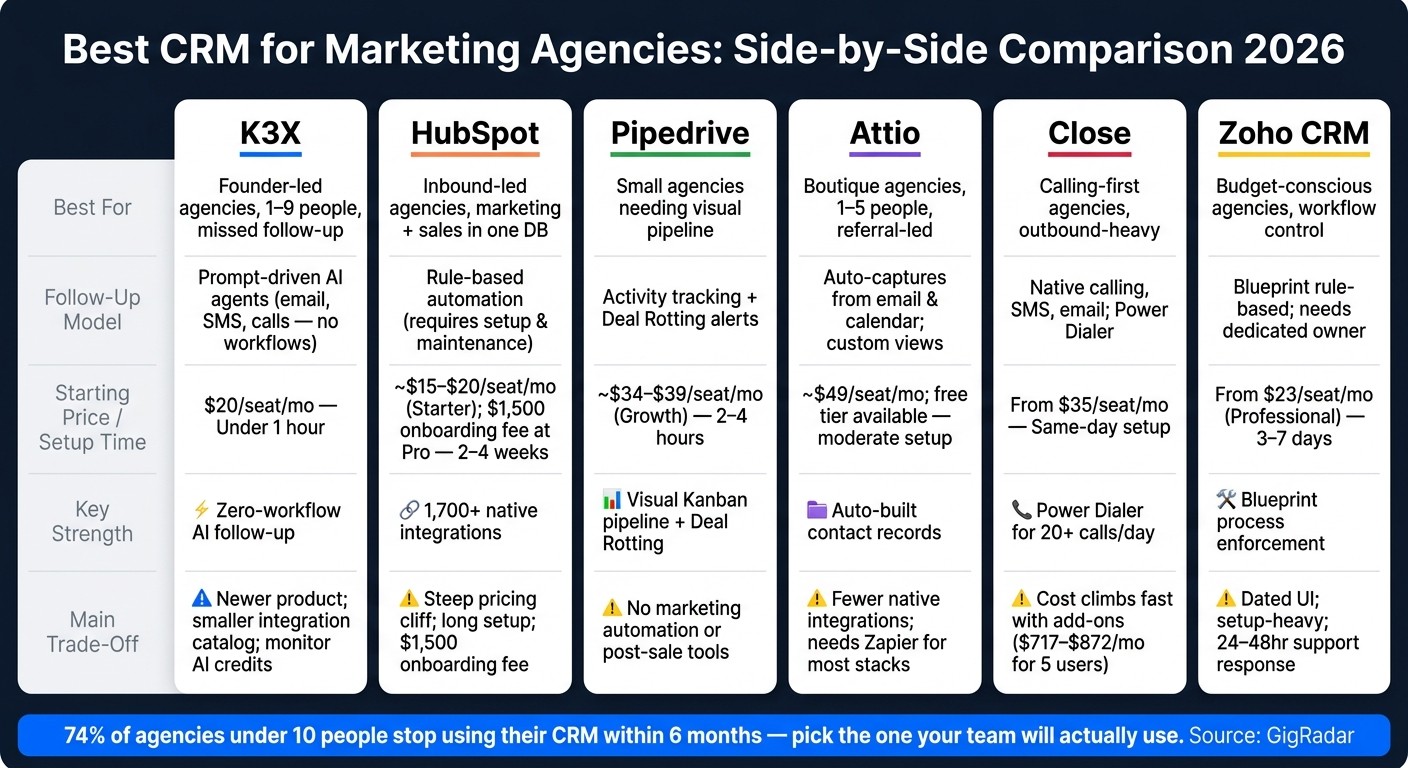
Best CRM for Marketing Agencies: Side-by-Side Comparison 2026
For small marketing agencies, the main split is simple: some CRMs keep follow-up moving with little manual work, while others ask your team to build and maintain the logic. That difference affects speed, staffing, and how much time you spend inside the system instead of selling.
The table below compares each CRM by agency fit, follow-up approach, setup effort, and the main downside to watch.
CRM | Best for marketing agencies | Follow-up model | Price / Setup | Main trade-off |
|---|---|---|---|---|
K3X | Founder-led agencies with 1–9 people | Prompt-driven; AI agents execute across email, SMS, and calls - no workflows to build | $20/seat/mo; under 1 hour setup | Young product; smaller native-integration catalog; AI credits need monitoring |
HubSpot | Inbound-led agencies that want marketing and sales in one database | Rule-based automation; requires more setup and maintenance | Starts ~$15–$20/seat/mo; $1,500 onboarding fee at Professional tier | Steep pricing cliff; setup burden increases at higher tiers [1] |
Pipedrive | Small agencies that want a clear visual pipeline | Activity-based tracking with deal rotting alerts | No native marketing automation or post-sale delivery tools [1][3] | |
Attio | Boutique agencies with 1–5 people | Auto-captures contacts from email and calendar; custom pipeline views | ~$49/seat/mo; free tier available | Fewer native integrations than HubSpot; more setup than plug-and-play options [6] |
Close | Calling-first agencies | Native calling, SMS, and email in one interface; Power Dialer on Growth | From $35/seat/mo; same-day setup [3] | Cost climbs with add-ons; less suited to chat-first lead channels [3] |
Zoho CRM | Budget-conscious agencies that want workflow control | Rule-based automation via Blueprint; requires a dedicated owner to maintain | Longer setup; dated UI; lower-tier support can take 24–48 hours [1][7] |
Use this table to match follow-up style, setup burden, and cost to your agency's sales motion. Then use those differences to decide which CRM features matter most for a small agency.
What Should Marketing Agencies Look for in a CRM?
Judge CRM fit by workflow, not by feature count. For a marketing agency with a small sales team, the best option keeps leads moving and cuts admin work for people who spend most of their time on client delivery.
Start with one shared contact record. That record should hold marketing, sales, and delivery notes in one place, so the team is not bouncing between tools or piecing together client history from scattered fields.
Next, check speed. Referrals and inbound leads lose momentum fast, so automated follow-up matters most. If the team is busy with delivery work all week, the CRM should keep new leads from sitting untouched.
Then look at proposals. A common failure point is a deal that gets stuck after the first call, so the pipeline needs to be simple enough for one non-technical founder to run without outside help or a full-time admin.
Last, see whether the CRM cuts down on tool switching. Built-in calling and SMS help when the same person is both selling and delivering, because they can reply, call, and log activity without jumping across tabs.
Which CRM is the right fit for your agency right now?
As of July 2026, the right CRM depends on where your follow-up breaks down. Don’t choose from a long feature list first. Choose based on the bottleneck that costs you deals.
If sales sits next to client work, that bottleneck is usually easy to spot. Some agencies lose deals because replies go out too slowly. Others lose them because inbound leads land in too many places, the pipeline gets messy, or the team spends most of the day on calls.
Here’s the simple way to match the tool to the problem:
K3X: best when missed follow-up is the main issue. It turns a plain-language outcome into automated email, SMS, and call follow-up for 1–9 person teams at $20 per seat/month.
HubSpot: fits inbound-led agencies that want marketing and sales in one database.
Pipedrive: fits teams that need tighter pipeline control, not marketing attribution.
Attio: fits boutique agencies that want flexible records and custom views.
Close: fits teams that run call-heavy outbound follow-up.
Zoho CRM: fits budget-conscious teams that can handle more setup.
The core idea is simple: match the CRM to the way your agency loses deals. If the pain is slow follow-up, pick for speed and automation. If the pain is scattered inbound leads, pick for lead routing and shared visibility. If the pain is weak pipeline control or calling volume, pick the tool built for that job.