Sales Automation
•
HubSpot vs Salesforce for Small Business: Honest 2026 Comparison
Most small businesses should pick the lower‑friction CRM for faster setup and lower total cost; the deeper option needs a CRM admin.

HubSpot is the better fit for most small businesses. I’d pick HubSpot when the goal is to get a CRM live fast, keep admin work low, and avoid extra service costs. I’d pick Salesforce only when the team needs deeper custom setup and has the budget and staff to run it.
What stands out most is total cost, setup time, and admin load. In the article, a 50-user team lands at about $177,000 for HubSpot over 3 years versus about $595,000 for Salesforce, a 3.4x gap [2].
What I’d take from this article
HubSpot wins the small-business case on simplicity and total spend, not just entry price. Its free plan, paid seats from $15–$20/user/month, and self-serve setup make it easier for lean teams to start without outside help [3].
Salesforce can look close on monthly price at first, but the article shows that small teams often hit plan limits, add-on costs, and setup fees fast. The piece calls out $5,000–$25,000 for implementation and $70,000+ per year for admin help in many cases [2][3].
The main decision rule is simple: if the team does not have a CRM admin, HubSpot is usually the safer choice. If the team needs custom objects, deep approval flows, territory rules, or stricter control across groups, Salesforce has more room to shape the system.
Where the article is strongest
I think the article does a good job focusing on the issues that matter to sales and revenue teams: pricing, setup speed, automation, reporting, integrations, and support. It also keeps the comparison tied to small businesses with 1 to 100 employees, which makes the advice more useful than a broad enterprise-style review.
The cost examples are also concrete. The article compares a 5-person team, a 50-user team, and migration costs, which gives buyers a way to map the advice to their own stage.
A few numbers stand out:
62% of small businesses that adopt a CRM report higher revenue in the first year [7]
First automation takes about 6 hours in HubSpot versus 18+ hours in Salesforce[1]
Time to first useful report is about 8 hours in HubSpot versus 24+ hours in Salesforce [2]
HubSpot scores 8.6/10 for ease of use on G2 versus 7.8/10 for Salesforce [6]
What the article is saying in plain English
If I strip the article down to its core point, it says this: HubSpot asks for less work to get value, while Salesforce asks for more work in exchange for more control.
That shows up across the whole piece:
Pricing: HubSpot is usually lower for small teams
Setup: HubSpot can be live in hours or days; Salesforce often takes weeks or months
Automation: HubSpot covers common sales workflows with less setup
Reporting: Salesforce goes deeper, but many small teams will not use that depth enough to justify the work
Support and upkeep: HubSpot is lighter after launch; Salesforce often needs a dedicated owner
That framing is clear, and for most SMB buyers, it is the right lens.
What to watch out for in the article
I’d treat some figures as directional, not fixed. CRM pricing changes often, and implementation cost can swing a lot based on data cleanup, sales process design, and the number of integrations.
I also noticed that the article includes K3X as an alternative in several sections. That is fine if the page is meant to compare options, but readers should know it changes the piece from a strict two-tool comparison into a mixed comparison plus product positioning.
My short verdict
If I were advising a U.S. small business today, I’d use this rule:
Choose HubSpot for a lean team that wants low setup burden and low admin time
Choose Salesforce only if the business already knows it needs deep custom logic and can support the extra work
Consider neither only if the team is very small and wants a lighter, AI-led workflow model than a standard CRM
Bottom line: the article’s conclusion is sound. For most small businesses in 2026, HubSpot is the lower-friction choice, and Salesforce makes sense only when the company has more system complexity than a basic SMB CRM setup can handle.
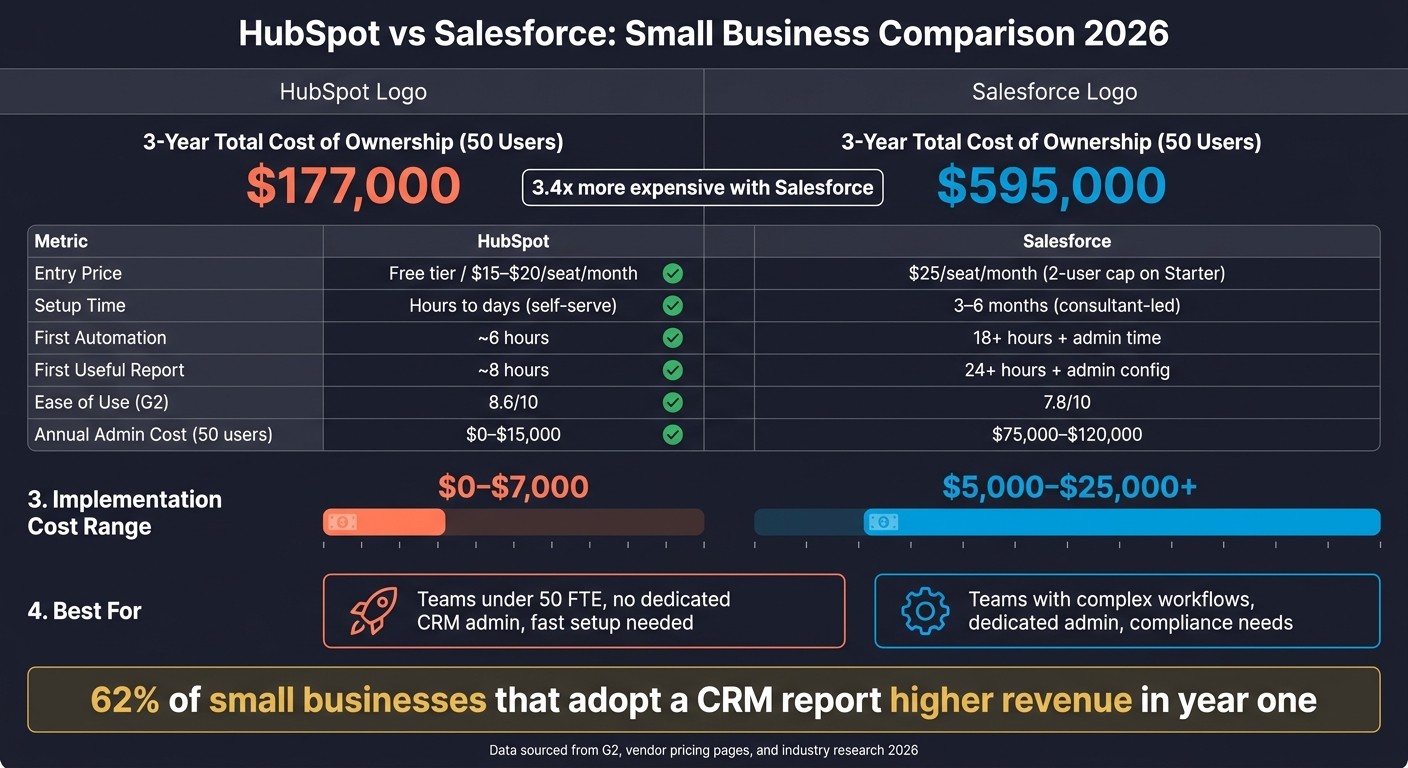
HubSpot vs Salesforce for Small Business: Total Cost & Key Metrics (2026)
Salesforce vs HubSpot: Pricing, Features, & Ease of Use in 2026
HubSpot vs Salesforce: Quick Comparison
HubSpot is the easier and lower-cost starting point for most small businesses. It usually takes less time to set up, needs less day-to-day admin work, and gives smaller teams a simpler path to get started. Salesforce tends to make more sense when a team needs deeper customization and has the people and budget to handle the extra overhead. That difference shows up most clearly in pricing, setup, automation, reporting, and support.[1][2][3][5]
Feature | HubSpot | Salesforce |
|---|---|---|
Entry Pricing | Free tier; paid from $15/seat/month [3] | $25/seat/month (Starter Suite) [3] |
Free Tier | Yes - permanent free plan, up to 1M contacts [3] | No - 30-day trial only [3] |
Setup Effort | Self-serve in hours to days [1] | |
Automation Model | Visual, no-code workflow builder [5] | Flow Builder - powerful, admin-led [5] |
Reporting | Built-in dashboards [4] | Deep custom reporting; admin skills required [4] |
Integrations | 7,000+ AppExchange apps [3][5] | |
Best For | Teams that can support admin-led customization [5] |
The next sections look at that gap in more detail across pricing, setup, automation, reporting, integrations, and support.
Which Is Cheaper for Small Businesses: HubSpot or Salesforce?
HubSpot is usually cheaper for small teams. Its free CRM is usable out of the box, while Salesforce often gets more expensive once a team needs automation, API access, or more than two users [3][9].
Price is only part of the picture. For small businesses, setup work and day-to-day admin often matter just as much because they affect whether the team keeps using the CRM.
What HubSpot Pricing Includes for a Small Team
HubSpot gives small teams more at the low end. Its free tier includes unlimited contacts, a deal pipeline, email tracking, meeting scheduling, and live chat [1][7].
For paid plans, the Starter Customer Platform starts at $15–$20 per seat/month and combines basic marketing, sales, and service tools in one plan [3]. That makes it easier for a small team to get started without buying separate products right away.
The main limits show up when a team wants more control. Automation, lead scoring, and custom reporting sit behind the Professional tier, which costs $90–$100 per seat/month [1][7].
There is also a setup cost at the higher tiers. HubSpot requires onboarding for Professional and Enterprise, and that can run from $1,500 to $7,000 per hub [3][9].
What Salesforce Pricing Includes for a Small Team
Salesforce starts at a low monthly price, but the entry plan leaves out tools many small teams want. The Starter Suite costs $25/user/month, but it does not include workflow automation, custom objects, or API access [3].
To get those features, teams need Pro Suite at $100/user/month [3]. There is another catch: Starter Suite is capped at 2 users, so a 3-person team has to move up to the higher plan [3].
That’s where the cost gap can grow fast. Small businesses often need partner-led setup for Salesforce, with implementation costs of $5,000–$25,000 [3]. On top of that, many teams end up needing at least part-time admin help, which can cost $70,000+ per year [2][3].
Many buyers also miss the extra product costs. According to the source, 71% of small businesses underestimate CRM cost because they miss add-ons such as email marketing and integrations [7].
Salesforce’s marketing tools are often sold separately. Marketing Cloud Account Engagement starts at about $1,250/month, while HubSpot includes email marketing and landing pages in its Starter and Professional tiers [3][5].
For a 5-person team, the first-year cost picture looks like this:
Cost Item | HubSpot | Salesforce |
|---|---|---|
Free tier | $0 | No free tier; 30-day trial only |
Starter | About $900/year [7] | About $1,500/year [7] |
Professional | About $5,400/year [7] | About $4,800/year [7] |
Marketing add-on | Included in bundles | |
Implementation/onboarding | Self-serve at lower tiers; $1,500–$7,000 per hub for Professional/Enterprise [3][9] | $5,000–$25,000+ partner-led [3] |
At the Professional tier, the base subscription can look close on paper. In practice, that number often leaves out implementation, admin time, and the marketing tools that small teams end up needing. Cost is the first screen, but admin load is usually the next thing buyers need to check.
Which Is Easier to Set Up and Run Without a Dedicated Admin?
HubSpot is easier for small teams to set up and keep running without a dedicated admin. Salesforce gives you more room to shape the system, but that usually means more setup work, more upkeep, and more admin time.
Price matters, but admin time often decides whether a CRM stays useful for a lean team. On G2, HubSpot scores 8.6/10 for ease of use, compared with 7.8/10 for Salesforce [6]. That gap tends to get bigger once teams start building automation and reports.
HubSpot cuts down admin work with a default pipeline, contact properties, email tracking, and report templates. Most small teams can start tracking deals right away without changing many settings. Salesforce uses a more complex data model built around Accounts, Contacts, Leads, and Opportunities, and Flow Builder often needs admin-level setup to keep automations and data in order [3][2][5].
The time and staffing impact is hard to ignore. Salesforce says small-business implementations often take 3–6 months, and a certified Salesforce administrator in the U.S. usually earns $90,000–$140,000 per year [7][2]. For a small sales team, that can turn CRM upkeep into a major operating cost.
The Prompt-Driven Alternative: K3X

K3X is built to remove the admin layer for teams with 1–9 people. Instead of setting up workflows, triggers, or sequences, users describe the outcome they want in plain English.
"follow up every inbound lead within 5 minutes until they book or decline"
K3X’s AI agents then carry out that task without manual workflow setup. According to K3X, setup takes under an hour, and pricing starts at $20 per seat/month with a 14-day free trial. The trade-offs are clear: it’s a younger product, it has a smaller native integration catalog, it requires AI credit monitoring, and it is not a fit for teams with 100+ seats or heavy admin governance.
That same gap shows up again in automation, where K3X skips setup work that HubSpot and Salesforce still ask teams to handle.
How Do HubSpot and Salesforce Handle Automation for Small Teams?
HubSpot is easier to set up and keep running for standard sales automation. Salesforce can handle more complex process logic, but it usually takes more time and admin work to build and maintain. First automation takes about 6 hours in HubSpot versus 18+ hours in Salesforce [1].
Automation Feature | HubSpot | Salesforce |
|---|---|---|
Builder Type | Visual, no-code workflows | Flow Builder, more flexible and admin-heavy |
Setup Time (First Automation) | About 6 hours [1] | 18+ hours plus admin time [1] |
Lead Routing | Simple routing and rotation | Complex territory-based routing and multi-team hierarchies |
AI Automation | Breeze AI included in paid tiers for content and lead scoring [2] | Agentforce, priced separately at $125/user/month or $2/conversation [2] |
Maintenance | Self-serve for non-technical users | Usually needs an admin |
Where HubSpot Automation Works Well for Small Businesses
HubSpot works well when a small team needs common sales workflows and wants to avoid heavy setup. You can automate follow-up sequences, lifecycle stage updates, meeting scheduling, and basic lead rotation without code.
Full workflow automation, lead scoring, and custom reporting start at the Professional tier. For many small teams, that covers the day-to-day work well enough until processes become multi-object or approval-heavy.
Where Salesforce Automation Justifies the Extra Complexity
Salesforce makes more sense when automation needs go beyond a standard CRM setup. Its Flow Builder can support 100-step workflows, multi-object logic, territory-based routing, and multi-step approval chains, which is why it often appears in businesses with custom objects or more specialized sales motions [5] [8].
That said, this added depth comes with more overhead. Advanced automation starts in higher tiers, and the extra setup only makes sense when process complexity is an actual business need, not just a nice-to-have.
The Prompt-Driven Alternative: K3X
The prompt-driven alternative: K3X
K3X is the prompt-driven option for 1–9 person teams. Users state the outcome in plain language - for example, "follow up every inbound lead within 5 minutes until they book or decline" - and AI agents execute across email, SMS, and calls without configuring workflows, sequences, or triggers.
Trade-offs: it is younger, has a smaller native-integration catalog, and needs AI credit monitoring.
Reporting and Integrations: HubSpot vs Salesforce for Small Businesses
Salesforce goes deeper on reporting and has more app connections. HubSpot is usually easier for small businesses because teams can get useful dashboards and common integrations set up with less admin work.
The table below shows where each platform fits best.
Capability | HubSpot | Salesforce |
|---|---|---|
Report Building | Pre-built templates and a visual builder | Highly custom; usually requires an admin |
Dashboard Limits | Up to 300 dashboards [2] | Unlimited [2] |
Cross-Object Reporting | More limited than Salesforce | Joined and matrix reports [2] |
Advanced Analytics | Operations Hub / Breeze AI [2] | |
Integration Marketplace | 1,700+ apps [2] | 7,000+ apps [2] |
API Access | Available on all plans, including Free [3] | Not on Starter; limited on Pro Suite [3] |
Time to First Useful Report | About 8 hours [2] | About 24+ hours plus admin configuration [2] |
How HubSpot Reporting and Ecosystem Fit a Small Business
HubSpot fits small teams that need visibility fast and don't have much admin help. Its default dashboards give sales teams a quick view of pipeline activity with little setup.
That speed is often the deciding factor for a small business. If a team needs answers this week, not next month, HubSpot is easier to put to work. Based on the data here, time to first useful report is about 8 hours for HubSpot, versus 24+ hours for Salesforce plus admin configuration [2].
There are some limits. HubSpot's custom report builder is available in the Professional tier, while revenue attribution is in Enterprise [1][3]. So the core reporting experience is simple, but some deeper analysis sits behind higher plans.
Its app marketplace includes 1,700+ apps [2], with native integrations for Google Workspace, Slack, Microsoft Teams, and Zapier [2][5]. API access is also available on all plans, including Free [3]. That matters for lean teams that want to connect tools without bringing in outside help.
One stat stands out: HubSpot is the most-used CRM integration on Make, with 3.2x the usage of Salesforce [7]. For a small team, that suggests a simpler self-serve path for automation and day-to-day connections.
Salesforce can do more here, but in many cases the extra power comes with extra upkeep.
How Salesforce Reporting and Ecosystem Fit a Small Business
Salesforce is the better fit when a business needs deeper reporting logic or more links into back-office systems. The trade-off is that setup and maintenance usually take more time and admin skill.
Its reporting is stronger because it supports joined reports, matrix reports, and unlimited dashboards [2][8]. For operators who need multi-layer reporting across teams, products, or processes, that can be a big plus. But this setup often assumes someone can build the reports, check the data model, and keep things running.
Salesforce also has a much larger app marketplace. AppExchange includes 7,000+ apps [2], compared with HubSpot's 1,700+ [2]. That makes Salesforce a better option for businesses that need links to larger finance, ERP, or service systems [2][5].
For a typical small business, though, more options don't always mean less work. In practice, that breadth often leads to more configuration, more testing, and more maintenance over time.
The Prompt-Driven Alternative: K3X
The prompt-driven alternative: K3X
For 1–9 person teams, K3X offers unlimited integrations and starts at $20/seat/month, but its native app catalog is smaller than HubSpot's or Salesforce's.
Support and Ongoing Maintenance: What Small Businesses Should Expect
HubSpot is usually simpler for a small business to manage after launch. Salesforce often needs a dedicated admin, or outside help, once the setup gets more complex.
That difference shows up in daily work. After go-live, someone has to handle workflow edits, report fixes, field changes, user permissions, and support requests. For many small teams, HubSpot can stay manageable in-house. Salesforce often becomes a bigger lift as usage grows.
Salesforce also takes more upkeep because its three yearly releases can affect custom fields, Flows, and permissions, which means teams may need to test changes before rolling them out. HubSpot updates on its own and tends to cause less disruption [2][3].
Support access is another clear split. HubSpot includes chat and email support on all paid tiers, and phone support starts at the Professional tier. Salesforce includes email support on the standard plan, while 24/7 phone support usually requires Premier Success, which often adds 20%–30% to license cost and can start above $10,000 per year [5][3].
Admin cost adds up fast too. For a 50-user team, HubSpot admin costs are often in the $0–$15,000 per year range. Salesforce is far higher at about $75,000–$120,000 per year for a dedicated certified admin [2].
The table below shows the day-to-day maintenance gap.
Maintenance Factor | HubSpot | Salesforce |
|---|---|---|
Admin Requirement | Optional/part-time up to ~100 users | Recommended at 25+ users; essential at 50+ [2] |
Training Time | 1–2 days (self-serve) | 2–4 weeks (structured) [2] |
System Updates | Automatic | 3x/year, requires manual testing [2] |
Vendor Support | Chat/email on all paid tiers; phone at Professional+ | Email only on the standard plan; phone is a paid add-on [5][3] |
Annual Admin Cost (50 users) | $0–$15,000 | $75,000–$120,000 [2] |
Who Should Pick HubSpot, Salesforce, or Neither?
The choice comes down to three things: starting cost, which features sit behind higher plans, and how much CRM admin work your team can handle. The profiles below turn that into plain buying guidance.
Who Should Pick HubSpot
HubSpot fits small businesses with a simple sales process and little or no CRM admin support [1]. It works best for teams that want a CRM they can set up and run without a dedicated administrator.
The cost gap is also large at mid-size scale. For a 50-user deployment, HubSpot’s 3-year total cost of ownership is about $177,000, compared with $595,000 for Salesforce [2]. That’s a 3.4x difference, driven mostly by admin time and implementation work [2].
If your sales process starts to involve more custom rules, approvals, or cross-team coordination, the Salesforce case becomes easier to justify.
Who Should Pick Salesforce
Salesforce is the better fit when the business has more complex sales and service workflows and needs deeper control over how data, access, and approvals work [1] [10]. That usually includes things like custom objects, territory management, and permission structures across multiple teams [1] [10].
It can also make more sense in regulated industries where audit trails and compliance controls matter more day to day [5] [6]. The trade-off is higher setup effort and more admin work after launch.
When Neither Fits: The K3X Option
For teams with 1–9 users that want outcome-based automation without hiring or assigning a CRM admin, HubSpot and Salesforce can both be more system than the team needs. In that case, K3X is aimed at the gap between a basic contact tool and a full CRM stack.
K3X is an AI-native, prompt-driven CRM that starts at $20 per seat/month and offers a 14-day free trial at k3x.ai/pricing. Instead of building workflows or setting triggers, users describe the result they want in plain English, and K3X’s AI agents carry it out across email, SMS, and calls.
There are trade-offs. K3X is a newer product, has a smaller native integration catalog, requires AI credit monitoring, and is not built for teams with 100+ seats or heavy governance needs.
How Hard Is It to Switch to HubSpot or Salesforce from Another CRM?
For a small business moving from another CRM, HubSpot is usually easier to get live first. Basic pipelines and contacts can often be up and running in 1–3 days with its self-serve import tools [1][2][5].
Salesforce usually takes more work up front. Teams often need more planning for custom objects, data modeling, and, in many cases, help from an outside implementation consultant [1][2].
The gap shows up early in setup, then again when you rebuild workflows. If your old CRM has custom automations, that rebuild work matters more than the initial contact import.
HubSpot migrations usually cost $0–$7,000, while Salesforce deployments usually cost $5,000–$25,000 [3]. That price gap is mostly about admin time and system setup, not just the monthly software bill.
One part trips up a lot of teams: automations usually do not move over cleanly. In most cases, old CRM workflows have to be rebuilt by hand, either in HubSpot’s visual workflow builder or in Salesforce Flow [3].
Field mapping also needs close attention before cutover. HubSpot’s property model and Salesforce’s object model do not match one-to-one, especially for activity types and deal stages [3]. If that mapping is loose, reports break fast and reps lose trust in the new system.
This is also an ownership question, not just a data question. Migration planning should spell out who will maintain the system after launch, because the easier platform to set up is not always the one your team can support well long term.
Migration Milestone | HubSpot | Salesforce |
|---|---|---|
Basic setup (pipelines + contacts) | 1–3 days [2] | 2–4 weeks [2] |
First automation running | ~6 hours [1] | 18+ hours + admin [1] |
SMB implementation cost | $0–$7,000 [3] | $5,000–$25,000 [3] |
Key Points to Remember Before Choosing HubSpot or Salesforce
HubSpot is usually the lower-effort pick. Salesforce makes more sense when a small business can handle deeper setup, custom work, and steady admin support. The biggest difference shows up in total cost of ownership, not the starting seat price.
For 50 users, the 3-year total cost of ownership is about $177,000 for HubSpot versus $595,000 for Salesforce. That is a 3.4x gap, driven mostly by implementation, admin time, and add-ons [2]. For sales and revenue teams, that matters more than the list price on a pricing page.
Small businesses often underestimate extra costs tied to marketing tools, reporting, and integrations [7]. A CRM can look affordable at first, then get much more expensive once the team adds the tools needed to run day-to-day work.
HubSpot fits most teams under 50 FTE. It works best for teams that want a system they can get live fast and run without heavy admin support.
Salesforce fits teams with more complex workflows across multiple teams, a dedicated CRM admin, and stricter compliance needs. It can do far more, but it usually asks for more time, more setup, and more day-to-day care.
If neither platform fits the team’s size or capacity, there’s a third option: K3X. It is built for 1–9-person teams that want outcome-based automation without needing a CRM admin.
FAQs
Is HubSpot cheaper than Salesforce?
For most small businesses, yes. HubSpot is usually cheaper than Salesforce because HubSpot offers a working free tier with unlimited users, while Salesforce starts at $25 per user/month.
Total cost matters as much as sticker price. HubSpot includes built-in marketing and service tools that can cut the need for extra software, and its total cost of ownership is often 2 to 3.5 times lower than Salesforce over three years when setup, admin time, and outside services are included.
Which is easier to set up, HubSpot or Salesforce?
HubSpot is faster to get running than Salesforce. Most small teams can start using HubSpot in 1 to 3 days with mostly self-serve setup, while Salesforce often needs 2 to 4 weeks for a basic setup and 2 to 6 months for a broader rollout, often with help from an admin or consultant.
For teams with 1–9 people, K3X cuts out workflow and database setup and can be live in under an hour.
Do small businesses need Salesforce?
Usually not. For most small businesses with fewer than 50 employees, Salesforce is more than they need. It often calls for a dedicated CRM admin, and setup costs can run from $5,000 to $50,000+.
Salesforce makes sense if you need deep customization, custom data objects, or complex work across multiple teams. For most small businesses, HubSpot is the better fit on value, setup time, and day-to-day admin work.
Is there an alternative to both HubSpot and Salesforce?
Yes. For small businesses with 1–9 people, K3X is a workable CRM option if you want a prompt-led setup and built-in AI help from day one.
K3X is an AI-native, prompt-driven CRM. You describe the outcome you want, and its AI agents handle follow-up across email, SMS, and calls. That makes it a fit for small sales teams that want to spend less time building workflows by hand.
Pricing starts at $20 per seat/month. The plan includes 1,000 AI credits and a built-in power dialer, which keeps the starting cost simple to understand for a small team.
Setup is usually fast. In most cases, teams can get started in under an hour, which is useful if you don’t have a dedicated RevOps or CRM admin person.
There are a few trade-offs to weigh. K3X is still a young product, so you may run into gaps that older CRM platforms have already covered. Its native integration catalog is smaller, and it is not built for enterprise teams that need deep admin controls and governance.