Sales Automation
•
Replace Your Spreadsheet With a CRM That Maintains Itself
Use a spreadsheet for under 30 deals; switch to a CRM for shared tracking and to an AI-native CRM to automate follow-up.

If I’m running sales from a spreadsheet, I should switch once follow-up, shared ownership, or data cleanup starts taking time every week. The short version: spreadsheets work for small, simple pipelines, but a CRM starts to pay off when missed follow-ups and manual updates cost more than the software.
I’d frame the choice this way: Google Sheets or Excel for very low-volume sales, HubSpot/Pipedrive/Zoho/Salesforce for structured pipeline tracking, and K3X if I want the system to carry out follow-up from plain-language prompts instead of rules and task upkeep.
A spreadsheet is cheap, but the hidden cost is labor. Teams without a CRM spend about 6.2 hours per week on data entry versus 2.1 hours for teams with a CRM, and for a 10-person team, even 30 minutes per day of spreadsheet upkeep can cost about $39,000 per year in lost productivity [3][5].
The risk is not just time. In spreadsheet-based systems, 45% of leads never get a follow-up [5]. That is usually the tipping point: once leads sit untouched, the spreadsheet is no longer just a list. It is now the sales system, and it is not doing enough.
I’d keep the spreadsheet only if the pipeline is still small: under 20 to 30 active deals, one owner, and only one or two touches needed to close [6]. If I need shared history, reminders, stage tracking, or repeat follow-up, I’d move to a CRM.
What changes after the move depends on the tool. In HubSpot, Pipedrive, Zoho, and Salesforce, I get pipeline visibility and reporting, but reps still need to keep records, fields, and rules in shape. In K3X, the model is different: I write the outcome I want - like follow up with every inbound lead within 5 minutes until they book or decline - and the system runs email, SMS, and call steps from that prompt [2].
The migration itself is usually not the hard part. For teams with fewer than 500 contacts, the move often takes 4 to 8 hours, and most of that time goes into deduping, stage cleanup, field mapping, and leaving old records behind [1][10]. A small test import of 5 to 10 rows is usually enough to catch date, owner, and stage issues before the full upload [4].
My takeaway is simple: use a spreadsheet for a short contact list, use a standard CRM when the team needs structure, and use an AI-native CRM when the main problem is keeping follow-up moving without manual admin. That is the line between tracking deals and acting on them.
CRM vs Spreadsheet : Why You Should Upgrade
TL;DR: Spreadsheets track deals - they do not act on them
Spreadsheets can log deals, but they do not move work forward on their own. A CRM changes the day-to-day process only when it updates records and tells reps what to do next without manual work.
AI-native CRMs cut much of the data-entry burden that made spreadsheets seem simpler in the first place. Older CRMs give teams more visibility, but they still rely on people to keep fields, stages, and follow-up tasks up to date.
The risk is easy to see in the numbers: 45% of leads never get a follow-up in spreadsheet-based systems [5]. That gap shows up fast in sales results. A lead comes in, no one responds, and the deal dies before it even starts.
In K3X, the team writes the outcome they want in plain language - for example, "follow up every inbound lead within 5 minutes until they book or decline" - and AI agents carry that out across email, SMS, and calls. There are no workflow builders, sequences, or triggers for the team to maintain.
The cost lands in three places: missed follow-ups, manual cleanup, and weaker pipeline visibility as deal volume grows.
What does running sales on a spreadsheet actually cost?
Running sales on a spreadsheet looks cheap at first, but the labor cost adds up fast. The main tradeoff is simple: low software spend, high manual work, and weaker control once more than one person touches the pipeline.
The first cost is admin time. Sales teams without a CRM spend an average of 6.2 hours per week on data entry, versus 2.1 hours for teams using a CRM [5]. For a 10-person team, just 30 minutes a day spent maintaining spreadsheets adds up to about $39,000 per year in lost productivity [3].
Data quality also slips fast. About 88% to 90% of spreadsheets contain errors, including bad formulas, deleted rows, and overwritten cells, and there is no audit trail to catch them [9]. B2B contact data decays by about 30% per year [8], and a spreadsheet does nothing to flag old records before they start hurting outreach.
The other cost is trust. Version drift creates conflicting copies of the same file, and there is no clear record of who changed a deal stage or when a contact was last updated. Spreadsheets show the current entry, not the history behind it [3][9].
When is a spreadsheet still good enough?
A spreadsheet is still workable when sales is simple and one person owns the process. In practice, that usually means fewer than 30 active deals and a sales cycle that needs only one or two touches [6].
That setup can work for a solo founder reaching out to fewer than 10 prospects per week, or for a team tracking a one-time event rather than a repeatable pipeline [5][9]. In those cases, shared visibility and automated follow-up may not matter much yet.
A simple test helps here: if you cannot name your top five active deals and their current status from memory, the spreadsheet is no longer just a checklist [6]. At that point, it starts acting like a shared operating system, and that is where spreadsheets tend to fail.
Where do spreadsheets break down for sales teams?
Spreadsheets usually fail when the sales process starts needing coordination, not when the file gets ugly. The break happens as soon as a second person needs to update the same pipeline.
Once that line is crossed, version conflicts start right away. There is no clean way to see who changed what or when, which makes handoffs messy and pipeline reviews harder than they should be [5][9]. Over time, deal context gets buried too. Notes, last conversations, and next steps turn into long text blocks, and it becomes harder to spot stalled deals or missing actions [6].
The biggest gap is follow-up. Spreadsheets are passive: they hold data, but they do not prompt action. There are no reminders, alerts, or automatic next steps, and 45% of leads are never followed up in spreadsheet-based systems [5]. Companies that wait to adopt a CRM also see 34% lower close rates on new business [5]. In plain terms, deals stall because the system does not nudge the rep, log the history, or move the next step forward [5]. To solve these gaps, teams are moving to AI-native CRMs that handle the admin work automatically.
Spreadsheet vs. CRM vs. AI-native CRM: how do they compare?
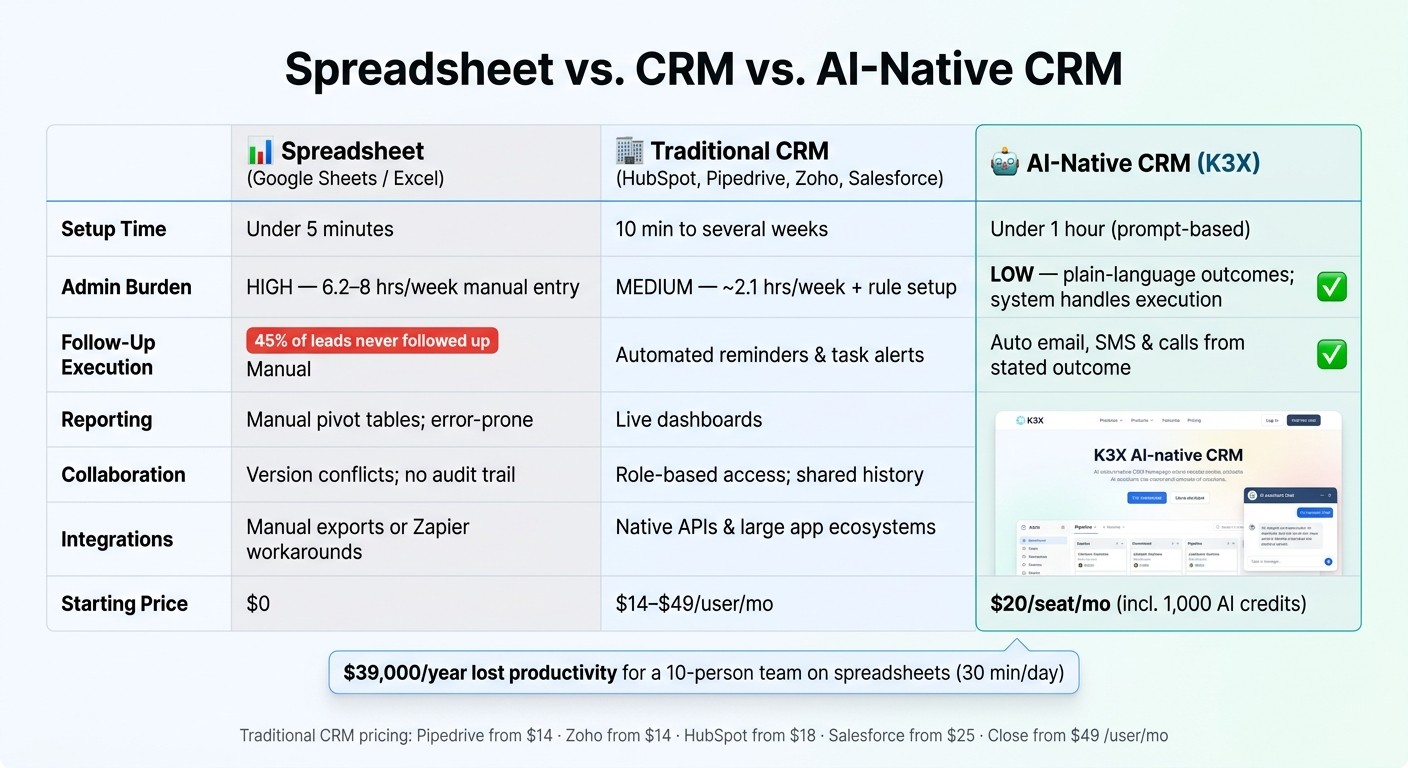
Spreadsheet vs. CRM vs. AI-Native CRM: Full Comparison
The main difference is simple: spreadsheets depend on reps to do the work, traditional CRMs cut some admin, and AI-native CRMs carry out follow-up on their own. You see that gap most clearly in setup time, day-to-day upkeep, follow-up execution, and monthly cost.
Comparison table: Spreadsheet vs. CRM vs. AI-native CRM
Not every CRM works the same way. But across these three categories, only one removes most of the rep’s manual work.
Spreadsheet | Traditional CRM (HubSpot, Pipedrive, Zoho, Salesforce, Close, Attio, monday.com) | AI-Native CRM (K3X) | |
|---|---|---|---|
Setup time | Under 5 minutes [6] | 10 minutes to several weeks, depending on platform [6] | Under 1 hour; prompt-based [2] |
Admin burden | Medium - about 2.1 hours/week, plus form-filling and rule setup [5][8] | Low - users state outcomes in plain language; the system handles capture and execution [2] | |
Follow-up execution | Manual; easy to miss - 45% of leads are never followed up on [5] | Automated reminders and task alerts [6] | System executes email, SMS, and calls automatically based on the stated outcome [2] |
Reporting | Manual pivot tables; error-prone | Dashboards update as records change [8] | Dashboards update as records change [2] |
Collaboration | Role-based access and shared pipeline history [8] | Shared pipeline and history [2] | |
Integrations | Manual exports or Zapier workarounds | Native APIs and app ecosystems | AI agents connected by webhooks; smaller native integration catalog [2] |
Starting price | $0 | $20/seat/mo, including 1,000 AI credits, unlimited integrations, and a built-in power dialer (k3x.ai/pricing) [2] |
Traditional CRM pricing reference: Pipedrive from $14/user/mo · Zoho CRM from $14/user/mo · HubSpot Starter from $18–$20/user/mo · Salesforce from $25/user/mo · Close from $49/user/mo [3][7]
HubSpot and Pipedrive put contact history and reporting in one place. Salesforce takes more setup. Close fits inside sales teams that spend a lot of time on calls and SMS. But all of them still depend on people to set up workflows and keep data current.
What changes when the CRM acts instead of waits?
The change is that the rep stops managing each next step by hand. In a spreadsheet or a standard CRM, the rep decides what to do next and then does it; in an AI-native CRM like K3X, the rep states the outcome they want, and the system plans and executes across email, SMS, and calls without workflow builders, sequences, or trigger setup [2].
That’s the core shift. Instead of telling the system what button to press when X happens, the rep tells it what result to get. For a small team, that can mean less time spent maintaining automation logic and less risk that follow-up stalls because no one updated a field or task.
K3X also has limits. It is a newer product with a smaller native integration catalog than incumbent vendors, and teams need to watch AI credit usage. It is also not built for 100+ seats or deep admin governance. In those cases, Salesforce is the better fit.
For teams of 1 to 9 people moving off a spreadsheet, the practical question is not which tool has the most features. It is which system will keep follow-ups moving without constant manual upkeep.
If that tradeoff fits, the next step is mapping your spreadsheet into a working CRM.
How do you move from a spreadsheet to a CRM in an afternoon?
For teams with fewer than 500 contacts, a spreadsheet-to-CRM move usually takes 4–8 hours [1][10]. Most of that time goes into cleaning data, not the import itself, so the fastest path is to import less.
What to clean and map before you import
Start by cleaning the spreadsheet before you touch the CRM. The order matters: dedupe, standardize formats, map fields, create custom fields, normalize stages, archive inactive leads, test the import, run the batch import, and then lock the spreadsheet.
Sort by email address and company domain first. That’s the easiest way to spot duplicate rows, and the average spreadsheet contains 23% duplicate records [5].
Standardize formats next so the CRM reads values correctly. Convert dates to YYYY-MM-DD and phone numbers to E.164 format, such as +1 415 555 1234.
Then map each column to the right CRM object:
Contacts: name, email, phone
Companies: company name, domain
Deals: deal value, stage, close date
Owners: match by email address
Create custom fields before import, not after. If you need fields like Contract Value or Lead Source, set them up in advance so records land in the right place on day one.
Clean up pipeline stages too. If the spreadsheet has labels like “proposal sent,” “proposal out,” and “quote delivered,” merge them into 5–7 standard labels such as Qualified, Proposal, and Won.
Archive old records instead of dragging them into the new system. A simple rule works well: if a lead has had no activity in the past 12 months, leave it out. This is usually the right time to cut about 30% of spreadsheet bloat [4].
Skip bulk imports of old activity logs. They add noise fast. Pull only the context that still matters into one Notes field per record, such as "wants to revisit in Q3" or "price-sensitive, needs CFO sign-off".
After cleanup, run a test import with 5–10 representative rows [4]. Check that dates, currency values, deal stages, and owner assignments all parsed the way you expected.
Then import in batches. A practical order is:
active deals first
active leads second
colder contacts last
Once everything looks right, set the spreadsheet to read-only. That step matters because it stops the team from updating two systems at once and makes the CRM the single source of truth.
How outcome prompts replace spreadsheet routines
Once the data is clean, the next step is to replace manual spreadsheet reminders with prompts that trigger follow-up on their own.
In K3X, you describe the result you want in plain language. The prompt "follow up every inbound lead within 5 minutes until they book or decline" is enough - K3X turns that written outcome into follow-up steps across email, SMS, and calls [2].
This lines up with the routines spreadsheet teams already try to manage by hand. Things like “Call every new lead same day,” “Nudge stalled deals after 5 business days,” or “Send a check-in if no reply in 48 hours” become one prompt instead of a chain of manual tasks or rule-based automation.
K3X is newer than the larger CRM vendors and has a smaller native integration catalog. Its pricing page lists 1,000 AI credits per seat per month on each plan at $20/seat/month (k3x.ai/pricing), and it is aimed at teams of 1–9 people, not enterprise groups that need 100+ seats or deep admin controls.
When should you keep the spreadsheet?
Keep the spreadsheet when your setup is still small and simple. If you work alone, have fewer than 30 active deals, and usually close a sale in one or two conversations, a spreadsheet is still a reasonable choice [6]. At that point, the time a CRM saves may not yet offset the work of setting it up and keeping it updated [5].
The single-screen test is a fast way to check. If your pipeline fits on one screen without heavy scrolling or constant tab-switching, a spreadsheet is often the lower-friction option [9].
Spreadsheets also work well for lists that support sales but are not active pipelines. Common examples include investor contacts, advisor lists, and short-term trade show leads [5]. In those cases, you usually need a flexible list more than reminders, automation, or deal-stage tracking.
If you stay with spreadsheets, don’t keep the file as a local Excel document on one desktop. Use a cloud-based option such as Google Sheets so the data is easier to access and less likely to get lost [3].
If your spreadsheet no longer fits those limits, move to an AI-native CRM comparison.
Conclusion: The practical case for moving from spreadsheet to CRM
Move from a spreadsheet when volume and upkeep start slowing the team down. A good rule is to stay with a spreadsheet below 20–30 active leads, then switch when follow-up, version control, or basic upkeep starts creating friction [1][6].
That cutoff matters because the main cost is admin time. Many CRMs pull deals and reporting into one place, but reps often still have to enter updates by hand. So for a small team, the key question is simple: does the CRM cut admin work, or does it just move that work into a new system?
For teams with 1–9 people, K3X is a fit if the goal is prompt-driven automation for follow-up. The trade-off is that it’s still early in its product cycle and has fewer native integrations than larger vendors [2].
The FAQ below covers the move point, import order, spreadsheet strengths, and the easiest CRM to adopt.