Sales Automation
•
How to Revive Cold Leads Automatically With an AI CRM
Use an AI CRM to run short, segmented 3–4-touch sequences that recover 10–20% of cold leads faster and at scale than manual follow-up.

Yes - an AI CRM can bring cold leads back into pipeline by automating follow-up across email, SMS, and calls. The short version is simple: segment the backlog, send the right message based on why the lead stalled, and route replies to a rep fast.
If I were comparing tools, I’d treat Salesforce and HubSpot as strong fits for teams that want deep lifecycle control, Close, Pipedrive, and Zoho CRM as simpler options for smaller sales teams, and K3X as a prompt-led option for teams that want to run re-engagement without building many workflows.
AI Agent to Reactivate Old CRM Leads (Live HubSpot Demo)
Can an AI CRM bring cold leads back automatically?
Yes. I’d use an AI-native CRM when the team has more dormant leads than reps can work by hand.
The article’s main point is that many cold leads are not hard no’s. They are timing misses. It cites data that 35%–50% of cold leads eventually buy from the vendor that stays in touch and that segmented re-engagement can recover 10%–20% of old leads. That frames cold-lead work as pipeline recovery, not database cleanup.
What matters most is not automation by itself. It is using automation to work the backlog in a steady way, with stop rules, channel control, and a clean handoff when someone replies.
Why do cold leads go dark in the first place?
Most go cold because timing changed, not because interest vanished. I’d look at buyer timing before assuming the deal is dead.
The article points to budget freezes, shifting priorities, and slow internal approvals as common causes. It also notes that B2B buying cycles often run 3 to 6 months, so silence does not always mean the account is out of market.
Inside a CRM, I’d look for signs like:
60+ days with no reply
Closed-lost reasons such as timing or budget
Deals stuck in demo, discovery, proposal, or quote stages
Late-stage records with past pricing or proposal activity
That is a better starting point than blasting every old contact with the same message.
Which cold leads should I work first?
Start with leads that already showed buying intent. I’d rank old proposals, pricing requests, and demo-complete leads above content-only records.
The article breaks the backlog into four groups: stalled late-stage opportunities, mid-funnel evaluators, early-stage single-touch leads, and very old low-intent records. That ordering makes sense because late-stage leads already did more of the buying work.
Before any outreach, I’d clean the list. The article cites CRM decay at about 30% per year and says dormant lists may contain 15%–30% invalid email addresses. That means verification and deduping come first if I want to protect deliverability and cut wasted touches.
What message types work best?
Use a different angle for each reason the lead stalled. I would not send a generic “just checking in” email to everyone.
The article narrows the playbook to three message types:
New-value outreach for leads blocked by value, budget, or feature gaps
Simple check-ins for timing-mismatch or no-decision leads
Breakup emails after 3–4 ignored touches
That structure is useful because it keeps the ask small. For timing-mismatch leads, the best first move is often one direct question, such as whether the project is still active. For older unresponsive leads, the breakup email gives a low-pressure exit and can restart stalled conversations.
The article also cites a large gap between message quality levels: 10%–18% response rates for contextual outreach versus 2%–3% for generic follow-up.
How do I avoid turning re-engagement into spam?
Keep the sequence short, verify the list, and stop when there is no reply. I’d treat deliverability rules as part of the motion, not an afterthought.
The article recommends:
Verify emails before sending
Limit re-engagement to 3–4 touches over 14–21 days
Space touches about 5–7 days apart
Include a clear unsubscribe path
Suppress opt-outs at once
For SMS, confirm documented opt-in history
It also notes Google and Yahoo guidance to keep spam complaint rates below 0.10%, with 0.30% as a danger line. That means a short, clean sequence beats a long one.
How does an AI CRM change the process?
It changes coverage and response time more than message theory. I’d use AI here to work the full backlog and react when a lead re-engages.
The article’s comparison is simple: manual follow-up often covers only a small share of the database, while AI can touch the full list and pause when someone replies or clicks. It says reps working by hand may manage only about 20 touches per day, while AI can run 3–5+ touches per contact across the full backlog.
It also points to a common speed gap: manual first response averages about 47 hours, while prompt follow-up within 5 minutes makes a lead 21x more likely to qualify than waiting 30 minutes.
That does not mean AI writes perfect outreach every time. It means it can keep pace with volume that human reps usually cannot keep up with.
Which CRM tools fit this use case best?
The right CRM depends on how much setup the team is willing to do. I’d split the field into workflow-heavy systems, lighter sales CRMs, and prompt-led tools.
Salesforce and HubSpot fit teams that want deep lifecycle fields, strong segmentation, and built-in sequencing. They do more, but they also need more setup.
Pipedrive, Zoho CRM, and Close fit smaller or faster-moving teams that want simpler automation and built-in calling or SMS options. Attio stands out more for flexible data structure than for rigid funnel steps.
The article positions K3X differently: prompt in, outreach out. Instead of building many rules, a rep can state the outcome in plain language and let the system run email, SMS, and calls. The trade-off, as the article notes, is a smaller native integration catalog and the need to monitor AI credit use.
What should I expect from results?
Expect uneven returns by segment, not one flat benchmark. I’d judge the program on recovered pipeline and positive replies, not raw response volume alone.
The article’s planning ranges are useful:
10%–18% response rate for contextual outreach
2%–3% for generic outreach
2%–10% meeting or opportunity rate across the full backlog
10%–20% of segmented cold leads re-engaged
35%–50% eventual purchase rate over time from cold leads that are kept warm
It also gives one 2026 case example: 319 dormant contacts produced 89 conversations, 34 qualified calls, and $49,000 in recovered commission revenue. I would treat that as top-end performance from a higher-intent list, not a base case.
What is the practical takeaway?
Cold-lead revival works when I keep the process narrow and repeatable. The article’s core advice is to segment first, use short message paths, automate the first pass, and move live interest to a rep fast.
If I were putting this into practice, I would:
Clean and verify the dormant list
Rank leads by past buying intent and recency
Use one message angle per segment
Run a 3–4 touch sequence over 14–21 days
Stop on reply, route to sales, and move no-response records to passive nurture
Repeat the process quarterly
That is the main answer: an AI CRM can revive cold leads automatically, but the win comes from disciplined segmentation, short follow-up paths, and fast human handoff once interest returns.
TL;DR: Can an AI CRM Revive Cold Leads Automatically?
Yes. An AI CRM can re-engage dormant leads across email, SMS, and calls without manual follow-up, which lets a small team work through a large backlog. Most CRMs hold months of untouched leads, and AI makes it possible to work that volume at scale.
Most cold leads are timing misses, not firm no's.
Segmented re-engagement can recover 10% to 20% of cold leads, and it usually costs less than net-new prospecting because the contact is already in your database [1][3].
What Evidence Supports Cold Lead Revival?
The data points in the sources are pretty clear: 35% to 50% of cold leads eventually buy [7]. That means many dormant records are not dead ends. They are delayed pipeline.
Context matters. Tailored dormant-lead messages can reach 10% to 18% response rates, while generic “just checking in” outreach tends to land around 2% to 3% [7]. That gap is hard to ignore.
Speed still matters too. Leads contacted within five minutes are 21x more likely to qualify than leads contacted after 30 minutes [4]. Even in a re-engagement motion, quick follow-up can change the outcome.
Metric | AI-Driven Re-engagement | Manual Re-engagement |
|---|---|---|
Scalability | Works thousands of leads at once [2] | Limited by rep daily capacity [2] |
Response Rate | 10–18% with contextual messaging [7] | 2–3% with generic outreach [7] |
Follow-Up Consistency | 24/7 automated follow-up [3] | Intermittent; often deprioritized [4] |
Speed to First Contact | Can reach leads within minutes [4] | Average first response time is about 47 hours [4] |
Results vary by lead age and situation, so recovery rates will differ. A post-proposal lead is not the same as an 18-month-old inbound inquiry. Next: why leads go cold is usually a timing mismatch, not rejection.
Why Do Leads Go Cold?
Most leads go cold because the buying window closes, not because the prospect said no. In many cases, the person is still interested, but the deal stopped moving because timing changed.
That usually comes down to process issues inside the buyer’s company. Budget cycles end, priorities shift, internal champions leave, and approvals stall. So the useful way to sort cold leads is by why they stalled, not only by how long they’ve been sitting idle.
The pattern is operational, not emotional. Budget freezes account for 40% of closing-stage losses, timing mismatches for 25%, and slow internal decisions for 61% of complex B2B losses [9]. Since B2B buying cycles often last 3 to 6 months [1], a quiet lead may still be in the middle of its buying process rather than out of the market.
How Does Timing Mismatch Show Up Inside a CRM?
Inside a CRM, timing mismatch usually shows up as a stalled deal, a closed-lost reason like “timing,” or 60 days or more with no meaningful engagement. For SaaS and high-ticket sales teams, inactivity windows of 90 to 180 days are also common markers [11].
The main fields to check are stage age, closed-lost reason, and inactivity. An AI CRM can score these signals before any rep reaches out. Tools like Attio and K3X surface them through automated “last contacted” filters and AI-driven intent scoring [10][2].
Those signals then feed backlog segmentation and automated re-engagement. The goal is to separate timing misses from dead ends so outreach starts with the accounts most likely to reopen.
How to Segment a Cold-Lead Backlog Before Re-Engaging It
Segment the backlog before you send anything. The goal is simple: turn a messy pile of old leads into a ranked list based on likely recovery value.
Start with leads that showed buying intent, not light engagement. Demo requests, pricing-page visits, and quote requests should sit above ebook downloads or webinar attendees. Clean the data first, then sort records by buying signal and recency.
Data hygiene comes first because bad records drag down deliverability and routing. CRM data decays by about 30% per year [5], so remove hard bounces, verify email addresses, and deduplicate contacts before building lists. That step helps protect sender reputation.
The 4 Cold-Lead Types and Where to Start
Use four segments, and give each one its own trigger, channel, and follow-up rule. A lead who asked for pricing should not get the same message as someone who downloaded a guide 14 months ago.
Segment | CRM Filter | Best Revival Signal | Best First Message |
|---|---|---|---|
Stalled Late-Stage Opportunities | Stage: Proposal/Quote sent; Lost Reason: Timing or Budget | New funding; Leadership change | Has the original blocker - budget, stakeholder, or competitor - changed? |
Mid-Funnel Evaluators | Stage: Demo or Discovery completed; no proposal sent | Website revisit; Pricing page view | Re-anchor on the original problem with a relevant case study or new feature |
Early-Stage Single-Touch Leads | Source: eBook, webinar, or ad; no sales call booked | Content engagement; Email opens | Low-friction value add: checklist, ROI snippet, or benchmark |
Very Old or Low-Intent Records | Last Activity Date: 12+ months; low engagement score | Role change (LinkedIn) | Low-friction content asset |
Start with stalled late-stage opportunities. These leads already showed purchase intent [8], so they usually offer the best shot at recovery.
Next, work mid-funnel evaluators. These people had a real conversation, but timing or internal changes kept them from moving to proposal. The safest first message is narrow and specific: ask whether they are still working on the same problem. Skip the generic “just checking in” note.
For early-stage single-touch leads and very old or low-intent records, keep the ask light. A breakup email or a simple value add usually works better than pushing for a meeting right away.
This ranking should feed the message strategy in the next step.
CRM Comparison: Cold-Lead Segmentation Tools
A CRM is only as good as its filters, lifecycle fields, and ability to act on segments after you build them. If the system can’t separate “demo completed, no proposal” from “opened one email six months ago,” the backlog stays muddy.
CRM | Cold-Lead Segmentation Capability | Automation After Segmentation |
|---|---|---|
Salesforce | Robust lifecycle data, lead scoring, and native sequencing [8][13] | Native sequencing |
HubSpot | Strong lifecycle-stage filtering and engagement-based lists [8][13] | Native workflows and sequences |
Pipedrive | Deal-stage filtering and last-activity views [13] | Practical workflow automation |
Zoho CRM | Small-business-friendly workflow automation [13] | Workflow automation |
monday.com | Project-style board views with status filtering; less native CRM lifecycle depth | Manual or Zapier-based automation |
Close | Built-in activity filtering and smart views optimized for high-velocity sales [8] | Sequences and built-in calling |
Attio | Flexible data structures and relationship mapping; useful for identifying demo-only prospects without rigid funnel constraints [8] | Flexible segmentation |
K3X | Prompt-driven intent classification from notes and call transcripts [2][6] | You state the outcome in plain language; agents act across email, SMS, and calls. Limits: younger product, smaller integration catalog, credit monitoring required. |
Salesforce and HubSpot are the strongest fit when you need deep lifecycle data and native sequencing [8][13]. They make it easier to build lists around stage movement, engagement, and lead score without extra tooling.
Pipedrive and Zoho CRM fit teams that mostly need deal-stage filters and workflow automation [13]. Close is a good fit for high-velocity sales teams that want segmentation plus built-in calling. Attio works well when you want flexible relationship data instead of a rigid funnel model [8].
monday.com can handle lighter CRM use cases, but it has less built-in lifecycle depth. K3X is different from the rest: it turns segment rules into prompts and can execute across email, SMS, and calls [2][6].
Which Re-Engagement Message Angles Work for Cold Leads?
Use new-value for stalled deals, check-ins for timing-mismatch leads, and breakup emails for leads who stopped replying. The segment should drive the angle: stalled opportunities get new-value, timing misses get check-ins, and older unresponsive records get breakup emails.
How to Use New-Value, Check-In, and Breakup Messages
Each angle does a different job. Match the message to the reason the deal stalled instead of sending the same follow-up to everyone.
Use new-value outreach when the blocker was value, features, or budget [10][8][11]. Start with the lead’s problem, not product updates. Reconnect the message to the original pain point and offer something useful, such as a case study or an ROI calculator [8][1][9].
Simple check-ins work best for timing-mismatch and no-decision leads [10][8]. The goal is to find out whether timing changed. A question like "Is [priority] still on your radar?" is easy to answer and keeps friction low. The CTA should stay small so the lead does not need to revisit the full buying process.
Breakup emails are best as the last touch after 3–4 attempts with no reply [11][1]. Framing the note as "Should I close your file?" removes pressure and gives the lead a direct exit. Breakup emails can get reply rates up to 76% when they remove pressure and make the next step clear [9]. Some replies will confirm the close; others will restart the conversation.
Message Angle | Best Segment | Best Channel | CTA Style |
|---|---|---|---|
New-Value Outreach | Lost to budget, missing feature, or unclear value [10][8][11] | Share a case study or ROI proof | |
Simple Check-In | Email / Phone | One diagnostic question | |
Breakup Email | "Should I close your file?" |
How to Re-Engage Leads Without Crossing Into Spam
Re-engagement stays out of spam when the list is clean and the sequence is short. After you choose the message angle, list hygiene, spacing, and consent matter most.
B2B contact data decays by about 2.1% per month or 22.5% per year [9]. A dormant list can also contain 15%–30% invalid addresses [8]. Before sending, run the list through a verification tool such as NeverBounce or MillionVerifier to protect deliverability.
Google and Yahoo recommend keeping spam complaint rates below 0.10%, with 0.30% as a hard danger line [12]. Limit re-engagement sequences to 3–4 touches over 14–21 days, with messages spaced about 5–7 days apart [1][11]. If there is still no reply after the last touch, move the contact to passive nurture and do not restart the sequence.
Send one opt-in check before the full sequence to confirm the contact still wants updates. That step helps reduce complaints and keeps the follow-up cleaner.
Opt-out handling is not optional. Every message needs a clear unsubscribe path, and your CRM should suppress those contacts right away. For SMS, TCPA compliance requires documented opt-in history before any automated text goes out [4].
CRM Comparison: Running Re-Engagement Plays
CRM execution varies a lot here. Some systems need sequence setup and workflow logic before anything sends, while others let you define the outcome and handle the execution for you.
CRM | Re-Engagement Approach | Setup Required | Multi-Channel Support |
|---|---|---|---|
Salesforce | High | ||
HubSpot | Moderate | ||
Pipedrive | Low-to-moderate | Good for smaller, high-velocity teams [8] | |
Zoho CRM | Workflow automation, telephony, and SMS integrations [13] | Moderate | Strong built-in telephony and SMS tools [13] |
Close | Modern, flexible data structures and rapid segmentation [8] | Low | Strong built-in telephony and SMS tools [13] |
Attio | Modern, flexible data structures and rapid segmentation [8] | Low-to-moderate | Good for smaller, high-velocity teams [8] |
K3X | Prompt-driven workflow with AI agents across email, SMS, and calls [2][6] | Minimal - no workflow builder |
Salesforce and HubSpot need more setup. Pipedrive, Close, and Attio are lighter. K3X uses prompts instead of workflow builders, which makes these plays easier to run when you want the CRM to turn an intent into the next follow-up automatically.
How to Revive Cold Leads Automatically With an AI CRM Like K3X

K3X can run cold-lead re-engagement from start to finish once you’ve set the segment and message angle. It finds inactive leads, drafts outreach, sends email, SMS, and calls, tracks replies, updates the CRM, and routes sales-ready leads to a rep without requiring manual workflow setup.
This is most useful when the backlog is big enough that reps can’t keep up with one-by-one follow-up. Instead of building rules across several screens, the team defines the outcome and lets the system execute it.
What the K3X Prompt-Based Re-Engagement Workflow Looks Like
K3X uses plain-language prompts instead of a workflow builder. A rep can give a direct instruction such as: "Re-engage every lead silent 60+ days with one check-in, one new-value message, and one breakup email; pause when they reply." K3X then identifies the right contacts, drafts tailored messages by segment, sends them across email, SMS, and calls, and logs each touch automatically.
It also applies stop rules during the sequence. If a lead replies or clicks a pricing link, the automation pauses and the rep gets a handoff alert. That prevents high-intent activity from being buried inside an automated flow.
The system also adjusts the message angle by segment rather than pushing the same follow-up to every contact. That matters if one group went cold after a demo while another downloaded content and never booked a call.
K3X vs. Salesforce, HubSpot, Pipedrive, Zoho, monday.com, Close, and Attio
The main difference is the amount of setup each CRM needs to run the same re-engagement motion. Some tools rely on admin-built workflows or sequence configuration, while K3X is centered on prompt-to-action execution.
CRM | Setup for Re-engagement | Execution Model | Notes |
|---|---|---|---|
Salesforce | High; often requires consultants | Sequence-based, admin-configured | Enterprise-scale governance and lifecycle data |
HubSpot | Moderate | Workflow-based sequences | Easier than Salesforce; strong lifecycle filtering |
Pipedrive | Low-to-moderate | Builder-based automation | Practical for deal-stage follow-up |
Zoho CRM | Moderate | Builder-based automation | Strong built-in telephony and SMS |
monday.com | Moderate | Manual or Zapier-based | Less native CRM lifecycle depth |
Close | Low | Sequence-based with built-in calling | Fast execution for high-velocity teams |
Attio | Low-to-moderate | Flexible data model, manual sequencing | Strong relationship mapping, no rigid funnel |
K3X | Minimal | Prompt-to-action across email, SMS, calls | No workflow builder; smaller native integration catalog |
The choice depends on team size, process needs, and how much admin work the team is willing to take on. Salesforce and HubSpot make sense for teams that need enterprise governance. Pipedrive, Zoho, and monday.com fit teams that are fine working inside automation builders. Close suits fast-moving outbound teams, while Attio works for teams that want flexible data structures instead of a fixed funnel.
K3X is a better fit for smaller teams that want to describe the outcome in plain language and have the system handle execution. That can cut time spent setting up reactivation campaigns when speed matters more than deep admin control.
K3X Pricing, Features, and Limitations
K3X is priced at $20 per seat/month. That includes 1,000 AI credits, unlimited integrations, a built-in power dialer, unlimited call recordings, and unlimited contacts, along with no long-term contracts, setup in under an hour, and a 14-day free trial at k3x.ai. Full details are listed at k3x.ai/pricing and k3x.ai/features.
There are trade-offs. The native integration catalog is smaller than in more established CRM platforms, teams need to watch AI credit usage, and the product is not aimed at 100+ seat organizations that need deep governance.
What Results Should You Expect From Cold Lead Revival?
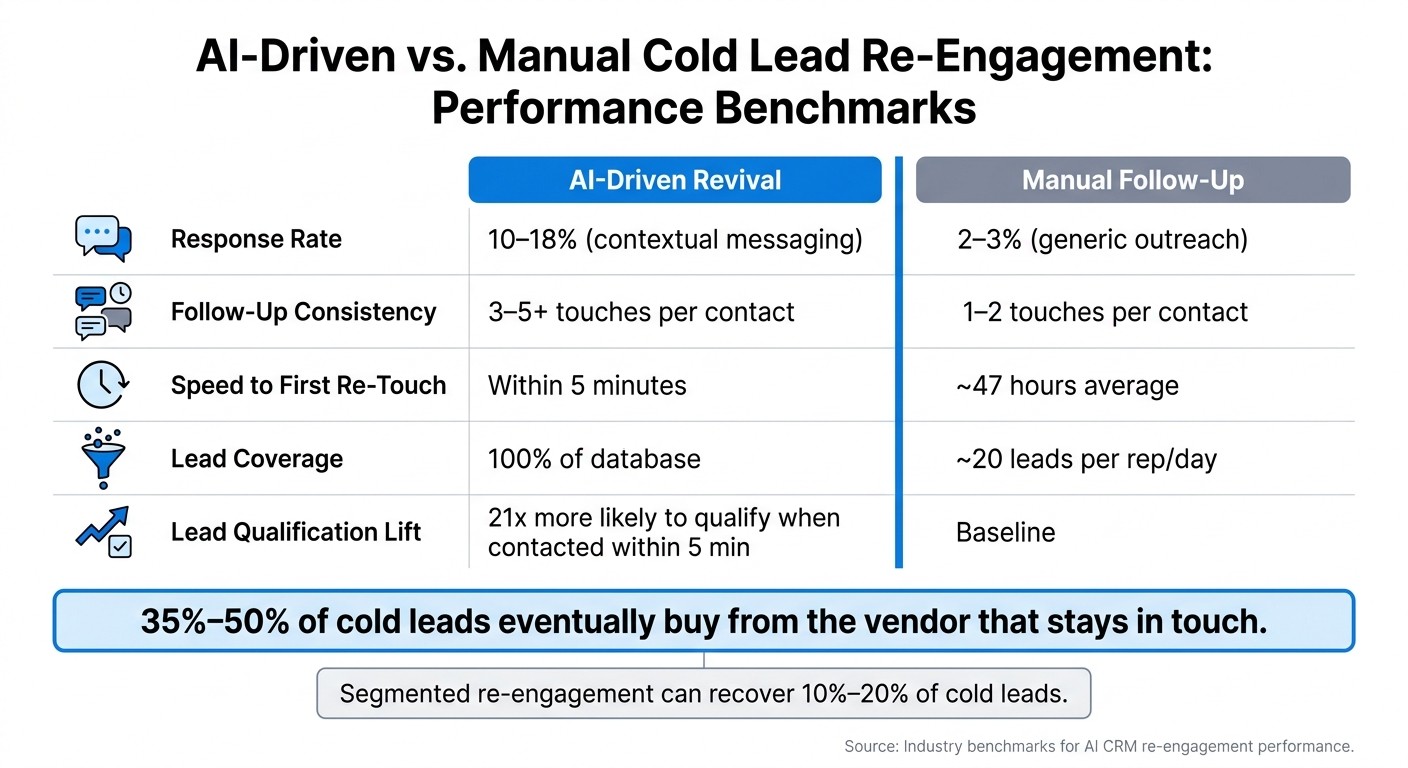
AI vs. Manual Cold Lead Re-Engagement: Key Metrics Compared
You should expect uneven results, not a single flat benchmark. Recently dormant, higher-intent leads tend to perform best, especially people who went quiet after a demo or proposal [1][7].
Cold lead revival works when you judge it by segment performance and recovered pipeline, not by expecting every old record to convert. Leads with prior interest usually beat net-new cold outbound because they already know your company, the problem you solve, and whether there might be a fit.
Results also depend on why the lead went cold. Contextual re-engagement, where the message refers to the original inquiry or a clear trigger, tends to get 10%–18% response rates. Generic “checking in” emails usually get only 2%–3% [7]. Once a lead has been inactive for 12+ months, response rates often fall to about 3%–8% [7].
Across a full backlog, industry data suggests 10%–20% of properly segmented cold leads can be re-engaged [1]. Over a longer time frame, 35%–50% of cold leads eventually buy, often from the vendor that kept in touch [7].
Use those numbers as planning ranges by segment. They are not a single goal for every record in the CRM.
Metric | Realistic Range | Source |
|---|---|---|
Response rate (contextual) | 10%–18% | |
Response rate (generic) | 2%–3% | |
Meeting/opportunity rate | 2%–10% of total backlog | |
Eventual purchase rate | 35%–50% | |
Spam complaint ceiling | < 0.10% |
A high-end example shows what this can look like when the backlog is well segmented. In April 2026, finance broker James used the Octavius AI Phoenix system to target 319 dormant contacts, including some that were up to two years old. The AI-led SMS and email sequence started 89 conversations, a 28% response rate, moved 34 leads to qualified calls, and recovered $49,000 in commission revenue with zero additional ad spend [2].
That result sits near the top end of expected performance. It is more in line with a higher-intent backlog than with a mixed database full of low-fit or very old leads.
Which Metrics Matter Most When Measuring Revival Performance?
The best metrics are positive reply rate, meetings booked, reopened pipeline value, and conversion to active opportunity. Total response rate on its own can mislead because it includes out-of-office replies, unsubscribes, and polite “not interested” messages.
Positive reply rate is a cleaner read on whether the message angle and segment targeting are working [2]. If positive replies are low, high raw response volume does not mean much.
Reopened pipeline matters most for revenue teams. This is the dollar value of deals moved from “Closed-Lost” or “Stale” back into active stages, and it gives the clearest view of business impact [10].
It also helps to track revenue per 1,000 CRM records and compare it with the cost of sourcing net-new B2B leads. That cost is usually around $60–$200 per lead [3][5]. Even with modest conversion rates, revival often looks efficient when you compare recovered revenue against that acquisition cost.
AI-Assisted Revival vs. Manual Follow-Up: How to Benchmark the Difference
AI-led revival usually wins on coverage, speed, and number of touches. Manual follow-up can still work, but it is hard to apply it across a large dormant backlog.
A rep working by hand manages about 20 touches per day and often stops after one or two attempts [2]. An AI system can run across the full backlog at once, send three to five touches per contact, and react to renewed interest signals, like a return website visit, in near real time. Manual response time, by comparison, averages about 47 hours [4].
Metric | AI-Driven Revival | Manual Follow-Up |
|---|---|---|
Response rate | 10%–18% (contextual) [7] | 2%–3% (generic) [7] |
Follow-up consistency | 3–5+ touches [2] | 1–2 touches [2] |
Speed to first re-touch | ~47 hours average [4] | |
Lead coverage | 100% of database [2] | ~20 leads per rep/day [2] |
Speed has a direct effect on qualification. Responding to a re-engaged lead within five minutes makes a rep 21x more likely to qualify them than waiting 30 minutes [15][4].
That kind of response window is tough to hit by hand when hundreds or thousands of dormant leads are in play. This is where automated re-engagement tends to create lift: not just by getting more replies, but by working the entire backlog with far less rep time.
These benchmarks help you judge whether revival deserves a larger rollout or whether it should stay focused on higher-intent segments.
Conclusion: The Most Direct Path to Recovering Revenue From Cold Leads
Cold-lead revival works best when timing, segment, message, and execution line up. The practical path is simple: use the four lead types and three short message types, automate the first pass, and route interested replies to a sales rep. That turns the work into a repeatable process instead of a one-off scramble.
In a prompt-driven CRM like K3X, execution stays lean: prompt in, outreach out, human handoff on reply. That matters because dormant-lead follow-up is hard to maintain by hand, especially when the backlog keeps growing.
AI helps keep that follow-up consistent at scale. It handles the first layer of outreach, so reps can spend time on people who reply instead of chasing every old record manually.
The cost case is also straightforward. Re-engaging contacts already in your CRM is cheaper than finding new leads, and nurtured leads can close larger deals than non-nurtured leads [9][16]. For revenue teams, that shifts revival from a cleanup task to a recurring motion.
Run re-engagement quarterly. New records go dormant every quarter, so the backlog rebuilds on a steady schedule. The gap between stale CRM data and recovered revenue usually comes down to one thing: a repeatable re-engagement process with a clean handoff to a rep.