Sales Automation
•
What CRMs Actually Cost in 2026: Pricing Compared Across 10 Tools
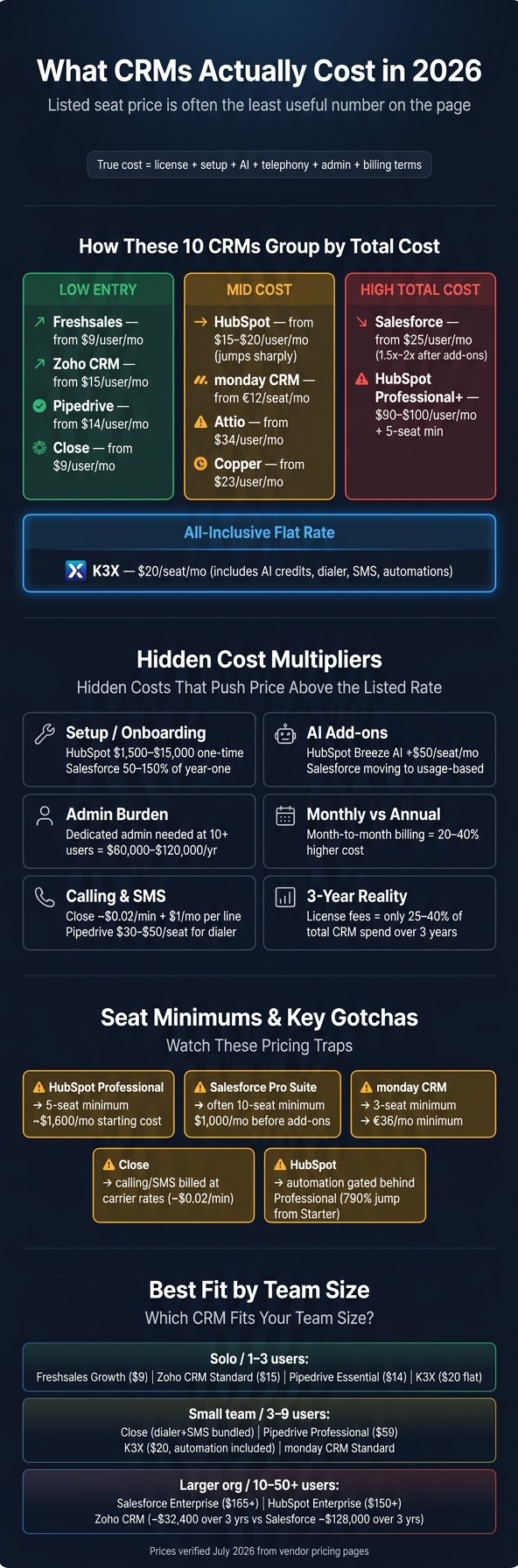
Headline price misleads: most CRMs start at $15–$30 but cost $60–$100+ once automation, AI, telephony, or seat minimums kick in.

Most CRM buyers in 2026 start at $15–$30 per user per month, but many teams land closer to $60–$100+ per user per month once they need automation, reporting, AI, or telephony and webhooks. Across K3X, HubSpot, Salesforce, Pipedrive, Zoho CRM, monday CRM, Close, Attio, Copper, and Freshsales, the biggest cost drivers are feature gates, seat minimums, add-ons, and annual-vs.-monthly billing.
I’d put the one-line verdict this way: the listed seat price is often the least useful number on the page. The bill that matters is the one after onboarding fees, AI usage, phone costs, admin time, and plan minimums are added in.
If I were screening these tools fast, I’d separate them into three groups. Low-entry tools include Freshsales, Zoho CRM, Pipedrive, and Close. Mid-cost tools with sharper jumps include HubSpot, monday CRM, Attio, and Copper. High total-cost tools are Salesforce and, in many cases, HubSpot once a team needs Professional or Enterprise features.
A few numbers from the article stand out. Annual billing often cuts cost by 15%–25%, while month-to-month pricing is often 20%–40% higher. The article also says that, over three years, license fees may be only 25%–40% of total CRM spend, with the rest tied to setup, support, training, telephony, enrichment, and admin work.
The main buying question is simple: when does the product start charging extra for the work you need removed? For many teams, that is where the budget shifts from a $20 tool to a $100 tool.
What would I watch first? HubSpot Professional’s 5-seat minimum, Salesforce Pro Suite’s common 10-seat floor, monday CRM’s 3-seat minimum, Close’s calling and SMS usage fees, and any plan where automation starts one or two tiers above entry. Those are the points where price comparisons stop being clean.
I’d also treat “AI included” with care. In this set, some tools include credits in the seat price, while others add AI as a paid layer or tie it to higher plans. That means two tools with similar list prices can end up far apart once the team starts using AI every day.
For a small U.S. sales team, the short version is this: Pipedrive, Zoho CRM, Freshsales, and Close are often the lower-cost paths in; HubSpot and Salesforce get expensive once automation and scale matter; monday CRM, Attio, and Copper sit in the middle but can climb fast based on plan limits and use case. The article’s clearest point is that feature access, not headline price, drives CRM cost in 2026.
CRM Pricing Compared: True Cost of 10 Tools in 2026
Best Affordable CRM for Small Business (2026) | Top 5 Compared
1. K3X

Entry price: $20 per seat/month on a month-to-month plan. K3X has one plan that includes 1,000 AI credits per seat, built-in email, SMS, and calling, a built-in power dialer, unlimited call recordings, unlimited workflow automations, and unlimited contacts and leads. There’s no long-term contract, and the free trial lasts 14 days at k3x.ai. Full pricing is listed at k3x.ai/pricing.
That starting price stands out because automation is part of the seat cost. You do not need to buy separate workflow add-ons to use it.
What the entry tier truly includes
K3X is built around prompt-driven automation. Users describe the result they want in plain English, and AI agents carry it out across the CRM without workflow builders, sequences, or trigger setup.
The main trade-off is scale rather than setup. A team with 9 seats pays $180 per month, since the automation sits inside the seat price.
That simplicity also creates the main limit. Teams that want deeper admin structure or more layered controls may hit the edge of what the product is built to handle.
What mid-tier unlocks and where the ceiling is
K3X does not have a mid-tier or enterprise plan. There is one pricing tier, so the limit comes from company size and governance needs, not from locked features.
In practice, the product fits teams of 1 to 9 people better than large organizations. That keeps pricing easy to model, which differs from many older CRM products where costs grow through add-ons and admin overhead.
The 14-day trial gives teams enough time to test how the system works in day-to-day use. That matters because AI credit usage is the main variable after signup.
Billing gotchas
Each seat includes 1,000 AI credits per month. If your team plans to lean hard on AI agents, track usage during the trial so you can estimate monthly cost with more accuracy.
The other trade-offs are straightforward. K3X has a smaller native integration catalog and lighter admin controls than larger CRM platforms.
2. HubSpot
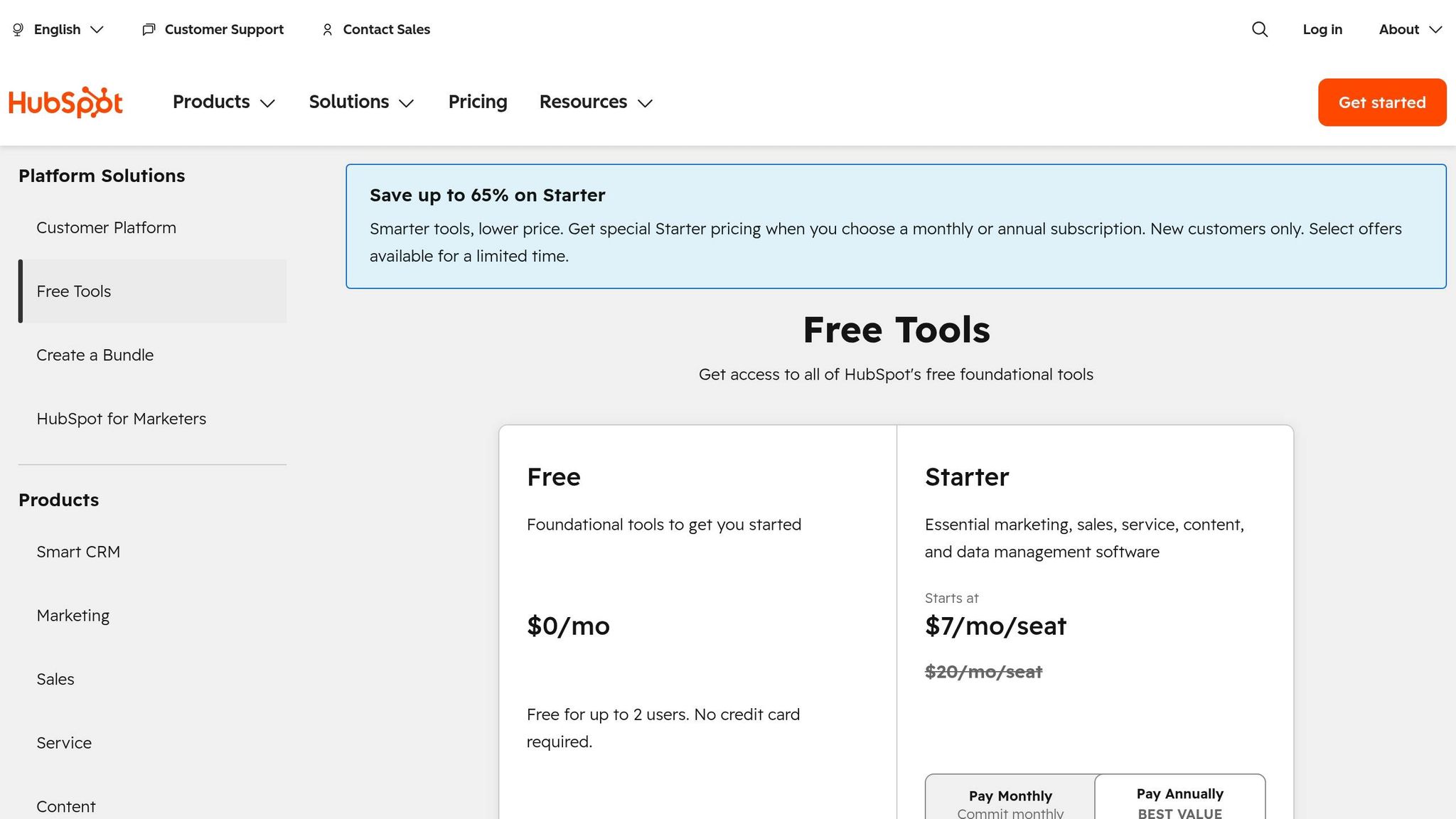
HubSpot is low-cost at the start, then gets much more expensive once you need automation. Sales Hub Starter begins at about $15–$20 per seat/month, and the free CRM works for basic deal tracking, but automation and deeper reporting sit in paid tiers [5].
What the entry tier truly includes
Starter covers basic pipeline management and simple sales tasks. But sequences, forecasting, and call recording are not included there; those stay in higher tiers [1][5].
That pricing setup matters if you're comparing HubSpot with tools that include automation earlier. For example, K3X includes automation in the seat price at $20/month, while HubSpot moves that function up the pricing ladder.
What mid-tier unlocks
Professional is the first tier where HubSpot opens up sales automation in a serious way. The catch is the 5-seat minimum, which puts the practical starting cost at about $1,600/month [5].
Here’s where the jump starts:
Tier | List Price (Per Seat/Mo) | Seat Minimum | Key Features Unlocked |
|---|---|---|---|
Free | $0 | Unlimited | 1,000,000 contacts, deal pipeline, basic email tools [5] |
Starter | $15–$20 | 1+ [5] | Basic automation, email scheduling, pipeline management [5] |
Professional | $90–$100 | 5 | |
Enterprise | $150 | 10 | Custom objects, predictive lead scoring, advanced permissions [1][5] |
Billing gotchas
The listed seat price is only part of the cost. Professional requires a one-time onboarding fee of $1,500–$3,500, and Enterprise onboarding can go as high as $15,000 [1].
There’s another cost layer if you also use Marketing Hub. HubSpot charges Marketing Hub based on marketable contacts, so a large database can push a 5-seat bill above $1,800/month [9].
Breeze AI is also priced separately at $50 per seat/month on top of any paid tier [1]. And if you pay monthly instead of annually, the bill is usually 20%–40% higher [9].
HubSpot is cheap to start and much more expensive once automation becomes a must-have.
3. Salesforce
Salesforce starts at a low list price, but the full cost is often much higher. In practice, add-ons, support, and seat minimums can push spend to 1.5x–2x the listed price [9].
Like HubSpot, Salesforce keeps the first tier cheap and moves more of the bill into higher plans, services, and admin work. That matters if you're comparing sticker price instead of total cost.
What the entry tier truly includes
Starter Suite costs $25 per user/month and can be billed monthly or annually [2]. It includes AI Employee Agent, lead routing, analytics, and payments [2].
Salesforce also has a Free Suite for up to 2 user licenses. That plan includes basic lead, opportunity, and case management, plus simple email marketing [2]. There is also a 30-day free trial with no credit card and no installation required [2].
The main limit is simple: Starter Suite has no API access [2][5]. For many sales ops teams, that rules out direct syncs with other tools unless they move up a tier.
What mid-tier unlocks
Pro Suite costs $100 per user/month and is billed annually [2]. It adds sales quoting, forecasting, stronger real-time chat, more automation, and AppExchange access [2].
The bigger issue is the floor, not just the seat price. Pro Suite often has a 10-seat minimum that may not be shown clearly on the pricing page [1], which puts the starting cost at $1,000/month before add-ons.
Tier | Price (Per User/Mo) | Billing | Key Gotcha |
|---|---|---|---|
Free Suite | $0 [2] | No contract [2] | Up to 2 users; basic lead, opportunity, and case management [2] |
Starter Suite | $25 [2] | Monthly or annual [2] | |
Pro Suite | $100 [2] | Annual only [2] | Often a 10-seat minimum [1] |
Enterprise | $165 [2] | Annual only [2] | Implementation costs can be 1–3x first-year license fees [9] |
Unlimited | $330 [2] | Annual only [2] | Includes Premier Support and Agentforce 1 [2] |
Billing gotchas
The main cost jump usually comes from setup and support, not the base license. Implementation often runs 50%–150% of first-year license fees [1].
Support can add even more. Premier Support costs an extra 30% of license fees, and AI pricing is moving from seat-based pricing toward usage-based charges [2].
That trade-off is pretty clear: Salesforce gives you depth, governance, and access to its app ecosystem, but at a much higher day-to-day cost than K3X's $20 per seat pricing and prompt-driven automation.
4. Pipedrive

Pipedrive is simple to price at first glance. Its plans are public, there are no required onboarding fees, and the Essential plan starts at $14 per user/month when billed annually [8].
The catch shows up early. On Essential, you don’t get email sync, two-way calendar sync, or more than 30 custom fields per entity [1]. So while the starting price is low, costs can climb once a sales team needs email, scheduling, and shared workflows in one place.
What the entry tier truly includes
Most teams will need Growth or a higher plan. The main jump happens when a team moves beyond basic pipeline tracking and needs email, calendar sync, and automation.
What mid-tier unlocks
The Growth plan costs $39 per user/month billed annually and adds email sync, two-way calendar sync, automation rules, sales forecasting, and advanced reporting [1][8]. That’s the point where Pipedrive starts to feel like a more complete CRM instead of just a deal tracker.
For a team of 5 users on the Professional tier, the first-year cost is about $3,540 [8]. That total is lower than similar setups on HubSpot Professional and Salesforce Pro Suite [8], which matters for buyers comparing full-year software spend across vendors.
What billing gotchas should buyers watch for?
There are a few things to flag before purchase. The biggest add-on is AI Sales Assistant, which costs $20 per seat/month on top of the base license [1].
A few other pricing issues can affect the total:
Monthly billing runs about 20% higher than annual billing [1].
Pipedrive does not offer a standard sandbox, so teams often test integrations in production [1].
That lack of a test environment can be a problem for ops teams. If you’re changing automations or pushing data through an integration, doing it live adds risk.
Tier | Annual Price (Per User/Mo) | Key Gotcha |
|---|---|---|
Essential | $14 [8] | No email sync; 30 custom fields per entity [1] |
Growth | $39 [8] | Monthly billing is roughly 20% higher [1] |
Professional | $59 [8] | Automation, forecasting, and deeper reporting are gated here [1][8] |
Enterprise | $79 [8] | Highest support levels; full feature set [8] |
Is there a free trial?
Yes. Pipedrive offers a 14-day free trial with no credit card required [6].
Zoho takes a different route: similar list pricing, more depth in features, and more setup work.
5. Zoho CRM

Zoho CRM starts cheap. The Standard plan is about $15 per user/month on annual billing, which puts it near the low end of paid CRM options for small teams [9].
What the entry tier truly includes
The Standard tier gives you basic pipeline management. The first hard limit is the cap of 10 custom fields per entity [1], which is fine for a simple sales process but can get tight once your data model starts to grow.
What mid-tier unlocks
The Professional plan costs about $23–$40 per user/month on annual billing. It adds multi-pipeline management, territory management, and a higher custom field limit [1][9].
Zia AI is part of the higher tiers, so AI features are not priced as a separate add-on [1]. That keeps the list price simple, but setup work and the spread of modules can still push total cost higher.
Free tier details
Zoho has a permanent free plan for up to 3 users. It is limited to 50 contacts and does not include automation, reporting, or integrations [9].
For a very small team, that may be enough to test the product. For a growing sales team, it is usually too limited to last long.
Billing gotchas
Monthly billing costs more than annual billing. Zoho also does not offer a standard sandbox, and CRM Plus at about $69 per user/month adds more modules and more setup work [1][9].
Tier | Price (Per User/Mo, Annual Billing) | Key Unlocks / Limits |
|---|---|---|
Free | $0 | Up to 3 users, 50 contacts, no automation, reporting, or integrations [9] |
Standard | ~$15 | Basic pipeline management, 10 custom fields per entity [1][9] |
Professional | ~$23–$40 | Multi-pipeline management, territory management, more custom fields [1][9] |
Ultimate | ~$52–$65 | |
CRM Plus | ~$69 | Campaigns, Desk, SalesIQ, Social, Survey, and Projects [1] |
The pattern is pretty clear: the entry price is low, but limits and admin work start to show up as teams need more fields, more modules, and more control.
6. monday CRM
monday CRM starts at €12 per seat/month on annual billing, but the 3-seat minimum puts the starting cost at €36/month before tax. For small sales teams, that minimum matters as much as the sticker price, and automation does not start on the lowest tier.[3]
What the entry tier truly includes
The Basic plan covers up to 1,000 contacts and deals, 5 columns per board, 1 custom dashboard, and 20 quotes or invoices per month. It is the lowest-priced plan, but it does not include automation.[3]
That means Basic works best for teams that need simple pipeline tracking and light quoting, not workflow routing or automated follow-up. If your sales process depends on triggers, task handoffs, or recurring actions, you move up to Standard right away.
What mid-tier unlocks
For most small teams, the main pricing decision is Standard vs. Pro. Standard costs €17 per seat/month on annual billing and includes 250 automations per month, while Pro costs €28 per seat/month and increases that limit to 25,000 automations per month.[3]
Standard also increases capacity to 10,000 contacts and deals and adds a centralized communications hub plus mass email. Pro lifts the cap to 100,000 contacts and deals and adds email sequences.[3]
In practice, the sharpest breakpoints are simple: the 3-seat minimum and the jump from 250 to 25,000 automations per month. If your team runs even a modest number of automated status changes, reminders, lead assignments, or email actions, 250 can go fast.
Tier | Annual billing | Monthly billing | Key limits |
|---|---|---|---|
Basic | €12/seat/mo | €18/seat/mo | 1,000 contacts and deals, 5 columns/board, 1 dashboard, 20 quotes/invoices/mo |
Standard | €17/seat/mo | €25/seat/mo | 10,000 contacts and deals, 15 columns/board, 5 dashboards, 250 automations/mo, centralized comms hub, mass email |
Pro | €28/seat/mo | €41/seat/mo | 100,000 contacts and deals, 75 columns/board, 50 dashboards, 25,000 automations/mo, email sequences |
Ultimate | Quote required | Quote required | Unlimited contacts, columns, and dashboards; advanced security; HIPAA compliance |
Billing gotchas
The biggest cost issues are the 3-seat minimum and prepaid annual billing. monday CRM offers prorated refunds only within the first 30 days after purchase, and downgrades after that period do not get refunded.[3]
There is a 14-day free trial and no credit card is required to start, which lowers the risk of testing it. But there is no permanent free tier for businesses (though you can find AI-native CRM guides for alternative setups), and AI add-ons are priced by usage as volume climbs.[3]
For budget planning, the posted seat price is only part of the story. The final bill depends on seat minimums, billing term, automation usage, and whether your team needs the jump from Standard to Pro.[3]
Teams that want less workflow depth and more direct selling usually hit the next trade-off in Close.
7. Close
Close starts at $9 per user/month on annual billing or $19 per user/month on monthly billing. The lowest tier, Solo, is limited to one user and 10,000 leads, so pricing depends on both seats and how much calling your team does.[4]
What the entry tier truly includes
Solo gives you the base CRM plus built-in calling, SMS, and email. It also includes 500 AI credits per month for Close’s AI agent, Chloe.[4]
What it does not include is just as important. Automation does not start until Growth, so both Solo and Essentials lack automated workflows.[4]
What mid-tier unlocks
Growth costs $109 per user/month on monthly billing or $99 per user/month when billed annually. It adds automated workflows, Power Dialer, bulk email, and 1,500 AI credits per user/month.[4]
Essentials sits between Solo and Growth at $49 per user/month on monthly billing or $35 per user/month on annual billing. It removes the lead cap and adds unlimited contacts and leads, team collaboration features, and multiple opportunity pipelines, but it still does not include workflows or bulk email.[4]
Plan | Monthly per user | Annual per user | Automated workflows | AI credits/mo |
|---|---|---|---|---|
Solo | $19 | $9 | No | 500 |
Essentials | $49 | $35 | No | 1,000 |
Growth | $109 | $99 | Yes | 1,500 |
Scale | $149 | $139 | Yes | 2,000 |
Billing gotchas
The seat price is only part of the cost. Close also charges for usage, especially if your team makes a lot of calls or sends a lot of texts.[4]
Calling and SMS are billed separately at carrier rates rather than included in the subscription. Outbound calls cost about $0.02 per minute, phone lines start at $1/month, and business phone features like IVR and round-robin routing add $19/month per line. The Call Assistant add-on for recording and transcription costs $50/month per organization plus $0.02 per minute.[4]
There are a few other terms to watch. U.S. SMS requires A2P 10DLC registration. Annual billing cuts the price by up to 50% on Solo and about 28% on Essentials, but downgrades only take effect at the end of the billing term. AI credits reset each month and do not roll over.[4]
Close offers a 14-day free trial with no credit card required. The trial includes $5 in calling and enrichment credits so teams can test calling and AI features, and purchases come with a 30-day money-back guarantee.[4]
8. Attio

Attio trades some out-of-the-box automation for a more flexible way to model data. Its Plus plan starts at about $34 per user/month, and the free tier is limited to 3 members plus a record cap. Compared with K3X at $20 per seat/month with AI credits and prompt-based automation included, Attio gives you more freedom in how you structure records, but less is included at the low end.[5]
What the entry tier truly includes
The Plus plan covers core CRM functions, reporting, and basic automations. The first cost jump usually comes when a team moves past simple pipeline use and needs advanced automation or custom data models, since those sit behind the Pro plan.[5]
What mid-tier unlocks
Pro costs about $59 per user/month. That tier adds advanced automations, flexible custom data models, and AI enrichment.[5]
For a team of 25 users, Pro comes to about $1,475 per month before any add-ons or service costs.[5]
Plan | Price per user/month | Key inclusions | Notable gates |
|---|---|---|---|
Free | $0 | Up to 3 members, limited records | Record cap |
Plus | ~$34 | Core CRM, reporting, basic automations | Advanced automations, custom data models, AI enrichment |
Pro | ~$59 | Advanced automations, flexible custom data models, AI enrichment | - |
Enterprise | Contact sales | Custom pricing | - |
Prices and tier limits above are from Attio's July 2026 pricing information.[5]
Billing gotchas
Attio publishes monthly per-user pricing, so seat count has a direct effect on total cost. The free plan’s record cap is the first hard limit most teams will run into.[5]
Its pricing page shows monthly pricing, and it does not display an annual-equivalent discount. That means buyers need to model costs mostly around seats and the point at which they need Pro features.[5]
9. Copper
Copper is a fit for Google Workspace teams that want a standard CRM shape, not a highly flexible system. Pricing starts at $23 per user/month on annual billing, and there is no permanent free plan - just a 14-day free trial with no credit card required.[6]
After Attio’s flexible data model, Copper is the narrower option. It’s aimed at teams that are comfortable with a more fixed CRM setup inside the Google Workspace world.[6]
Compared with K3X at $20 per seat with 1,000 AI credits and prompt-based automation, Copper costs more for a more standard CRM structure. It also holds back automation until the Professional tier.
What the entry tier truly includes
The Starter plan costs $23 per user/month, billed annually.[6] It includes basic contact and deal management, but it does not include automation or advanced reporting.
If your team needs workflow automation or email sequences, Starter won’t cover it. You’ll need to move up to Professional.
What mid-tier unlocks
The Professional plan costs $49 per user/month on annual billing.[6] That tier adds workflow automation, email sequences, advanced reporting, and sales forecasting.
For a team of five, that comes to $2,940 per year. That is much higher than Zoho CRM Professional, which is about $1,380 per year for five users.[6]
Plan | Price (per user/month, annual) | 5-User Annual Total | Key gates |
|---|---|---|---|
Starter | $23 | $1,380 | No automation, no advanced reporting |
Professional | $49 | $2,940 | Workflow automation, email sequences, advanced reporting, sales forecasting |
Enterprise | $99 | $5,940 | - |
Prices were verified in July 2026 from Copper’s vendor pricing page, and re-checked quarterly.[6]
Against K3X, Copper gives buyers a more standard CRM structure. K3X, though, includes automation in the seat price and skips separate workflow setup.
What should buyers watch for?
Start with the billing setup. Copper’s pricing page is framed around annual billing, so check the monthly rate before you compare budgets.[6]
Also watch the seat model. Copper charges per user, so cost rises in a straight line with each new hire.[6]
One more thing: check API access before purchase. Copper does not make every feature available on every tier, so confirm whether your target plan includes the API access your team needs.[6]
10. Freshsales
Freshsales is one of the lower-cost CRM options in this group. Paid plans start at $9 per user/month with annual billing, but the stronger AI and automation features sit higher up the pricing ladder, so it does not match K3X’s prompt-driven workflow setup.
What the first paid tier truly includes
The first paid plan, Growth, starts at $9 per user/month on annual billing. It includes basic automation, but it does not include multi-pipeline management, territory management, or AI insights[1][6][9].
That matters if your sales team runs more than one motion at once. A simple pipeline may be fine for a small team, but once you split inbound, outbound, partner, or expansion deals, those missing controls can become a limit pretty fast.
What mid-tier unlocks
Pro starts at $39–$59 per user/month on annual billing. This tier adds Freddy AI, forecasting, multi-pipeline management, and territory management[1][6].
That puts Pro in a different class than Growth. Freshsales also takes a more bundled approach here: unlike Salesforce or HubSpot, which often sell AI features as separate add-ons, Freshsales includes Freddy AI inside the Pro license[1].
Plan | Price (per user/month, annual) | 5-User Annual Total | Key gates |
|---|---|---|---|
Free | $0 | Basic contact storage limits and basic pipeline management | |
Growth | $540–$900 | Basic automation; no multi-pipeline, no AI, no territory management | |
Pro | $2,340–$3,540 | Freddy AI, multi-pipeline, forecasting, territory management | |
Enterprise | $3,540–$5,940 | Advanced governance, custom modules |
Prices verified July 2026 from vendor pricing pages; we re-verify quarterly.
Billing gotchas
The list price is only part of the cost. Three things tend to change what teams actually pay.
Annual billing is required for the lowest rate. If you pay month to month, pricing is about 20% higher[1].
Phone and email credits cost extra. For teams with moderate call volume, that adds about $3–$5 per user/month[10].
The app marketplace is smaller than HubSpot’s or Salesforce’s. If your stack needs more than 30 standard app connections, you may end up using Zapier or Make as a bridge[1].
Against K3X, Freshsales wins on entry price. But the stronger AI layer is locked behind Pro, while K3X includes prompt-driven automation and 1,000 AI credits in the seat price. For buyers comparing line items, that difference can shift total cost more than the base license suggests.
What Hidden CRM Costs Push the Real Price Above the Listed Rate?
The listed seat price is just the entry point. In most CRM deals, setup, admin work, add-ons, and billing terms push total spend far past the number on the pricing page. Over three years, license fees usually account for only 25–40% of total spend[9].
The rest of the cost tends to show up in places buyers miss during early budgeting. That includes data migration, partner-led setup, internal admin work, rep training, telephony, enrichment, AI usage, and the premium tied to monthly contracts.
Setup is often the first large gap between list price and actual spend. Moving contacts, deal history, and activity data usually takes 4–12 weeks and costs $10,000–$60,000 with a partner[1].
Admin time and training add recurring cost after launch. Enterprise CRMs often need a dedicated admin once teams pass 10 users, which can add $60,000–$120,000 per year, plus 4–8 hours of onboarding per rep[10][5]. Monthly billing also costs more: across many tools, month-to-month plans run 20%–40% higher than annual rates[6][9].
Hidden Cost Category | Tool / Tool Type | Typical Impact |
|---|---|---|
Setup / Onboarding | HubSpot | |
Implementation | Salesforce | 50–150% of year-one license cost[1] |
Admin Burden | Enterprise CRMs | Dedicated admin often required once teams pass 10 users[10] |
Calling and SMS | Close, Pipedrive | Usage-based (~$0.02/min) or $30–$50/seat for a third-party dialer[1][4] |
AI Credits | K3X | 1,000 credits per seat/month; usage must be monitored |
AI Credits | Close, monday CRM | Monthly usage caps (about 500–2,000 credits); more usage can require additional purchases[4][3] |
Enrichment Credits | Freshsales, Attio | Bundled in higher tiers or billed per lead, depending on vendor[5][4] |
Contract Risk | All tools |
Prices verified July 2026 from vendor pricing pages; we re-verify quarterly.
A few cost patterns show up again and again:
Setup fees hit early. HubSpot charges $1,500–$15,000 in one-time onboarding fees[1][8], while Salesforce implementations often land at 50–150% of year-one license cost[1].
Usage costs grow with adoption. Calling, SMS, enrichment, and AI tools often look small at first, then climb as reps use them more often.
Billing terms matter. A monthly contract may look safer, but a 20–40% markup can erase that flexibility fast[6][9].
K3X uses credit-based pricing, with 1,000 AI credits per seat per month included. That spend is visible and tied to activity. Older CRMs often bury similar costs in setup, support, and add-ons.
The next question is whether those costs buy real automation or just a higher license.
What Do You Get for the Money, and Which CRM Has the Clearest Trade-offs?
What matters most is how much work the CRM removes for each dollar spent. A $15 per-seat tool can end up costing more in practice if reps still have to log calls, build sequences, and drag deals from stage to stage by hand.
Tool | Main Pricing Advantage | Main Pricing Drawback | Best Fit |
|---|---|---|---|
K3X | $20/seat includes 1,000 AI credits/month per seat, AI agents, built-in power dialer, SMS, and unlimited workflow automations | Newer product; smaller native integration catalog; AI credits need monitoring | 1–9 seats; outcome-driven sales teams |
HubSpot | Genuinely useful free tier; all-in-one marketing and sales stack | Automation and sequences sit behind Professional, where pricing jumps sharply | 10–50 seats; marketing-led orgs |
Salesforce | Deep customization and scalability | Implementation and admin overhead often make it 2–3x the listed seat price[1][9] | 50+ seats; complex, process-heavy orgs |
Pipedrive | Transparent per-seat pricing; no mandatory onboarding fees[8] | Basic tiers lack email sync; no native marketing automation | 3–30 seats; pipeline-focused sales teams |
Zoho CRM | Low-cost entry with strong feature density | Dated UI can hurt rep adoption[1] | 1–50 seats; value-conscious SMBs |
monday CRM | 25,000 automation actions/month on Pro tier[3] | 3-seat minimum; per-seat costs scale fast[5] | 3–20 seats; teams with structured handoffs |
Close | Built-in dialer and SMS can save $30–$50/seat on third-party telephony[1] | Higher per-seat cost at scale; reporting lacks enterprise governance[1] | 1–20 seats; high-volume inside sales |
Attio | Flexible data model; modern AI integration included in Pro[5] | Newer ecosystem than legacy players[5] | 5–50 seats; tech-forward teams |
Copper | Seamless Google Workspace integration[6] | Higher entry than Zoho or Freshsales[6] | 1–10 seats; Google-centric agencies |
Freshsales | Lowest-cost entry for AI features; Freddy AI included in mid-tier[1] | Thinner integration marketplace[1] | 1–15 seats; budget-conscious teams |
Prices verified July 2026 from vendor pricing pages; we re-verify quarterly.
HubSpot shows feature gating more clearly than almost any other tool. Automation and sequences sit behind Professional, and the jump from Starter to Professional is 790% once a team needs those features[7].
The table gives the list-price shape. The better way to judge fit is by team size and workflow complexity, not sticker price alone.
For a solo founder or small team, Freshsales Growth and Zoho CRM Standard are the lowest-cost ways in. Freshsales fits better if you want AI features without moving to a higher tier. Pipedrive is a solid pick if clear pipeline visibility matters more than automation. If follow-up speed is the main problem, K3X at $20 per seat works with no workflow setup.
For a 3–9 person sales team, Close can roll calling, SMS, and AI into one bill, which cuts the need for a separate dialer. Pipedrive Professional gives a good mix of automation and price if built-in telephony is not a must. If you judge CRM value by work removed, K3X sets a clear baseline. For example:
follow up every inbound lead within 5 minutes until they book or decline, with no sequences or triggers to configure.
The trade-off is simple: K3X has a smaller native integration catalog than older vendors, so teams with a crowded tool stack should check fit first.
For a process-heavy larger org, Salesforce Enterprise is still the default for complex quote-to-cash workflows. But the full cost can be much higher than the seat price suggests. A 10-user deployment can reach $128,000 over three years in total cost of ownership[9], compared with about $32,400 for Zoho CRM over the same period[9]. HubSpot Enterprise fits better for teams that want easier adoption and bundled marketing. Neither K3X nor Close is built for large-enterprise governance.
Across all of these cases, the pricing question comes back to the same issue: is automation included, gated behind a higher tier, or charged as an add-on? That’s where hidden costs and billing terms start to matter.
FAQs
What is the cheapest CRM that includes automation?
HubSpot Sales Hub Starter is the lowest-cost CRM in this comparison that includes automation. It starts at $20 per seat per month and includes basic automation, such as simple if/then logic.
Zoho CRM and Freshsales also offer low-cost entry points for automation. But if you need more advanced workflow automation, those features are often locked behind higher-priced plans. For example, Salesforce requires the $100 Pro Suite for stronger automation, while monday CRM starts custom automations at $18 per seat per month.
Why do CRM prices jump between tiers?
CRM prices jump between tiers because vendors often put day-to-day sales functions in higher-priced plans. In practice, a low entry price can look fine at first, but the plan may leave out tools many teams need to run sales each week.
Common examples include automation, advanced reporting, API access, and forecasting. Those features often sit behind the next tier up, so the price gap is not just about team size or support level. It often changes what your team can actually do inside the system.
Higher tiers may also come with added setup costs. Vendors can charge onboarding or implementation fees on top of the subscription, and total cost can climb again if you hit limits on storage, contacts, or AI credits.
That’s why list price rarely tells the whole story. The bigger issue is total cost of ownership: the base plan, the feature limits, and the extra charges that show up after rollout.
What does a CRM really cost per user?
For a small sales team, a CRM usually costs $30 to $75 per user per month. In practice, the total spend is often higher than the sticker price.
Check three things before you compare plans. First, watch for feature gating. A low-cost tier may leave out deal automation, reporting, email tracking, or permission controls, which can push your team into a higher plan sooner than expected.
Second, look for extra charges outside the base subscription. Common add-ons include onboarding fees, calling minutes, and AI credits. Those costs can stack up fast, especially if your reps make a lot of calls or use AI tools every day.
Third, confirm whether the listed price assumes annual billing. Many CRM vendors show the lower annual rate first, while month-to-month plans often cost 20% to 40% more.
Are annual CRM contracts worth it?
Often, yes. Annual billing usually cuts the price by 15% to 40% compared with monthly plans, but it also means a larger up-front spend because many vendors charge the full amount at signing.
That tradeoff matters for growing teams. An annual contract can turn into a pricing trap if you buy too many seats early or overlook costs tied to implementation, onboarding, and add-ons. Before you commit, calculate the full 12-month cost, not just the base subscription price.