Sales Automation
•
The CRM That Sets Itself Up: Configure Sales Software by Prompt
Prompt-driven CRMs cut setup from weeks to hours by auto-creating pipelines and automations, but cannot replace human process decisions.

Prompt-based CRM setup cuts most admin work by turning plain-English instructions into fields, stages, routing, and follow-up rules. The main tradeoff is simple: tools like K3X cut setup from days, weeks, or months to the same day, but teams still need to decide process rules, data scope, and access.
If I were comparing options fast, I’d read it this way: Salesforce, HubSpot, and Pipedrive still need manual setup; prompt-based tools remove much of that build work but not the decision-making behind it.
Legacy CRM setup takes time because the team has to build the system before reps can use it. That usually means defining stages, adding fields, setting ownership, connecting email and calendar, importing CSVs, and then building workflow logic on top. In the article, Salesforce Enterprise is cited at 3–6 months, HubSpot Starter or Pro at 1–2 weeks, and Pipedrive at 1–3 days [1].
The article’s core point is that prompt-based setup changes the input method. Instead of using admin panels and menu-by-menu setup, I describe the sales process in plain language, and the system generates the structure from that brief. That includes objects, fields, stages, views, and action rules in K3X [3][4].
What stood out to me is that the time savings come from removing mechanical setup, not from skipping planning. The article is clear that people still need to define stage rules, ownership, outreach tone, stale-deal logic, and which records should be imported. The software can build the frame, but it should not guess business policy.
A useful detail is the split between setup work that disappears and setup work that stays. Pipeline design, schema creation, automations, telephony setup, imports, and dashboards can be generated from the prompt. Process design still stays with the team, because the CRM cannot decide what “qualified” means or when a deal should move forward.
The article also gives a practical prompt structure. I need to provide five things: business context, pipeline stages, fields or objects, follow-up outcome, and routing or ownership rules [4][7]. That is a cleaner setup brief than building each piece by hand, and it explains why the setup can happen in under an hour in K3X’s model [2].
The examples help show the pattern without repeating the full product pitch. A home-services team can describe quote timing and follow-ups; an SDR can create a contact, company, and deal from one sentence; a B2B SaaS team can define People, Companies, and Deals with stage names. In each case, the system turns the request into working CRM structure instead of asking an admin to build it step by step.
I also think the article is strongest when it points out what to prepare before using a prompt. Teams still need clean CSV exports, deduped records, standard company names, and a decision on whether to import only active records or the last 12 months of deals [8]. That matters because bad data will still make the new CRM messy, even if setup is fast.
For smaller sales teams, the article positions K3X as a fit when setup speed matters more than admin depth. It puts K3X at $20 per seat/month and says it is aimed at teams of 1–9 people, while Salesforce, HubSpot, and Zoho fit larger groups with more control needs and larger app catalogs [2]. That framing is useful if I’m choosing between same-day setup and deeper admin control.
My short take: the article makes a clear case that prompt-based CRM setup cuts a lot of front-loaded CRM work. It does not remove the need for process decisions, but it does remove much of the manual labor that has kept CRM rollouts slow for years.
How To Build Your Own AI CRM (from scratch)
TL;DR
Traditional CRM setup happens before the team can start using the system. That work usually takes days, weeks, or even months, depending on the platform and how much needs to be configured.
Prompt-driven setup cuts out much of that manual work. You describe your business, pipeline, and follow-up goals in plain English, and the system builds the setup for you.
K3X goes a step further. You state the outcome you want, and AI agents carry out the work across email, SMS, and calls, with setup finished in under an hour.
Next, here's where traditional CRM setup time goes.
Why Does CRM Setup Take So Long?
CRM setup takes a long time because older CRM systems ask teams to make a lot of process choices before reps can do basic work. The slowdown starts before day one, with the setup decisions the system demands up front.
What Has to Be Configured in Legacy CRMs Before Reps Can Use Them?
Before reps can manage deals in tools like Salesforce, HubSpot, and Pipedrive, teams usually have to finish a standard set of setup work. That includes defining pipeline stages, adding custom fields for deal value and close date, setting ownership and permission rules, connecting email and calendar tools, building follow-up and lead-routing automations, and mapping spreadsheet data into the new schema [1][7].
These steps stack on top of each other. You can connect Gmail early, but that is not the same as building a follow-up sequence, and that sequence depends on fields and stages already being in place.
"Most CRM setups fail before the first deal enters the system. Founders pick their tool, accept the default pipeline stages, import spreadsheets, and expect the platform to run well." [6] - Chris Eberhardt, Marketing Lead, Clarify
A big reason for the delay is the way many enterprise CRMs were designed. They were built for companies with IT teams or revenue operations staff. In a small business, that setup work often lands on one generalist, and that makes messy fields and uneven upkeep more likely.
How Many Hours or Weeks Does That Usually Add Up To?
For most teams, setup time is measured in days, weeks, or months, not minutes. The exact number depends on the platform and how much configuration the team takes on.
Salesforce Enterprise usually takes 3–6 months to deploy, and companies often use a certified implementation partner to do it [1]. Salesforce Essentials cuts that down to 2–4 weeks, but it still needs basic technical setup [1]. HubSpot Starter and Pro usually take 1–2 weeks of focused work [1]. Pipedrive is shorter at 1–3 days because its schema is more fixed and asks teams to make fewer setup choices [1].
Even a small team does not get out of this for free. For a 10-person team doing a self-serve setup, the standard estimate is about 8 hours of work spread across 4 weeks [7].
CRM | Estimated Setup Time | Primary Complexity Driver |
|---|---|---|
Salesforce Enterprise | 3–6 months | Custom objects, territory management, partner-led implementation [1] |
Salesforce Essentials | 2–4 weeks | Technical configuration and integration setup [1] |
HubSpot Starter/Pro | 1–2 weeks | Migration and workflow configuration [1] |
Pipedrive | 1–3 days | Opinionated schema with less manual configuration [1] |
That dependency chain is why setup in older CRM systems becomes a project rather than a simple task. Next: how prompt-based setup turns this checklist into a single instruction.
How Does Prompt-Based CRM Setup Work?
Prompt-based CRM setup uses a plain-language brief instead of a long, manual setup flow. Rather than clicking through menus one by one, you describe how your sales process works, and the CRM uses that to build the structure and follow-up rules.
In older CRMs, setup often starts with a checklist: create stages, add fields, assign owners, then build task rules. Here, the prompt acts as the setup brief. It tells the system what your team does and what should happen next.
What Information Do You Give the CRM in a Setup Prompt?
You give the CRM five inputs: business context, pipeline stages, fields or objects, follow-up outcome, and ownership or routing rules [4][7]. K3X's docs say to write the prompt like you're handing work to a new rep, not like you're setting up software [4].
That matters because the system is reading for intent, not just labels. If your prompt explains where leads come from, what steps they move through, what data you need, and who should own the work, those details become the CRM's structure and action rules.
What Does K3X Generate From Those Prompts?

K3X generates objects, fields, stages, views, and agent actions from the prompt [3]. So instead of building each part by hand, you describe the workflow and K3X creates the working setup.
K3X also changes the next step based on replies [3]. In practice, that means the setup prompt defines the outcome you want, while the system handles much of the branching logic without you mapping every path in advance.
3 Example Setup Prompts and What K3X Generates
The same prompt format works for both simple and more complex sales motions [3][4][7]. The pattern stays the same: describe the process in plain English, and K3X turns it into records, stages, fields, and follow-up actions.
1. Inbound lead follow-up (home services or field sales)
Prompt: "Leads come from our website. We visit the property, send a quote within 3 days, and follow up twice if we don't hear back. Set up stages, fields, and follow-up tasks for this." [4]
K3X generates pipeline stages, fields for quote tracking and close dates, and follow-up actions tied to the 3-day quote window.
2. Outbound SDR (B2B, single rep or small team)
Prompt: "I'm talking to Sarah at Meridian about a $15K annual contract. She needs to check with her CFO. Create the contact, company, and deal, and set the stage to 'Evaluating'." [5]
K3X generates contact, company, and deal records, then sets the next follow-up based on the CFO check-in.
3. Agency or B2B SaaS pipeline
Prompt: "Set up a CRM for a 10-person B2B SaaS company. I need People (name, email, status), Companies (domain, size), and Deals (stages: prospect, qualified, proposal, negotiation, closed)." [7]
K3X generates the requested objects, fields, pipeline stages, and Kanban view [7].
Next, compare which setup steps disappear, shrink, or still need a human.
How Does Prompt-Based Setup Compare to Standard CRM Configuration?
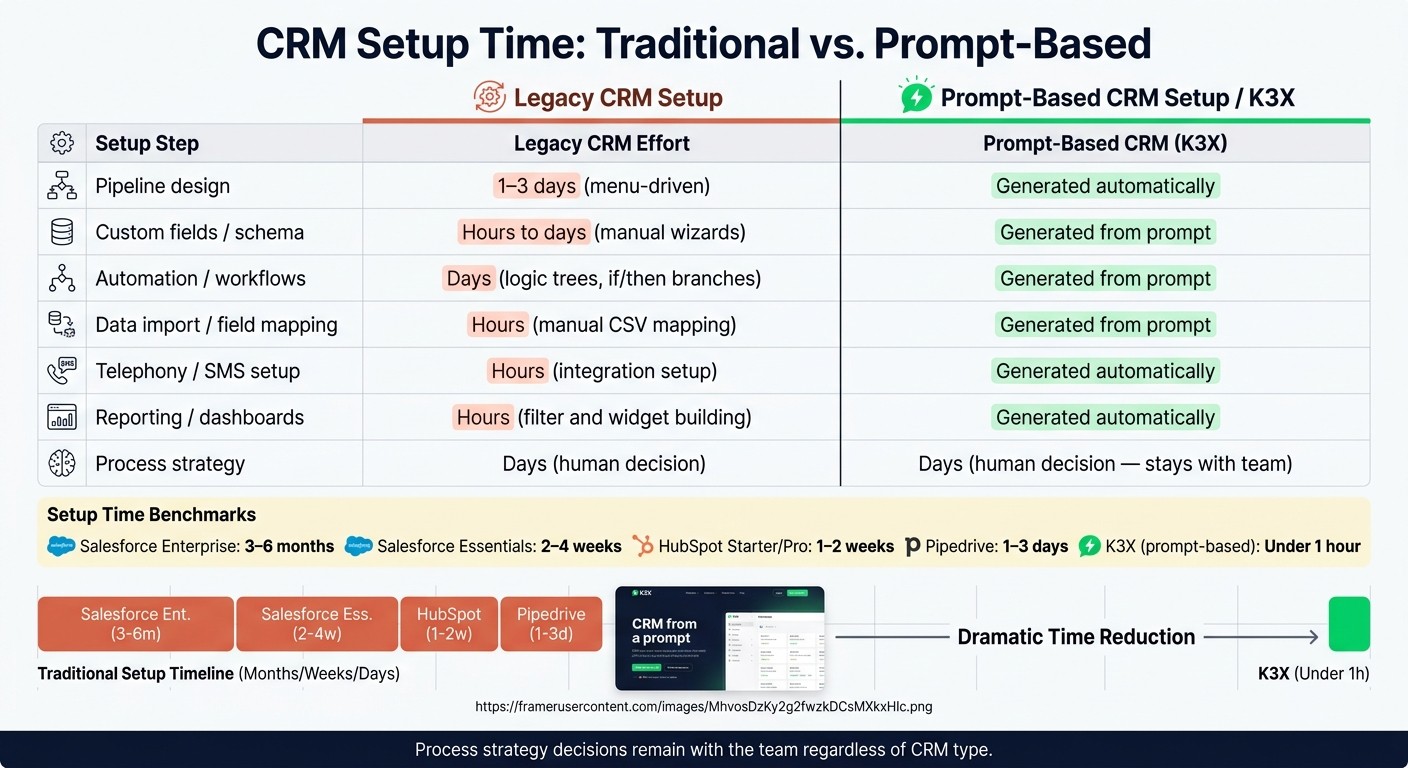
CRM Setup Time: Traditional vs. Prompt-Based (2024)
Prompt-based setup replaces most menu-driven CRM build work with a plain-English prompt. Instead of asking an admin to click through setup screens, the CRM generates fields, stages, automations, imports, and reporting from the prompt before a rep starts using the system.
The main issue is not whether setup feels easier. It is which tasks go away, which get shorter, and which still need a person to make the call.
Before/After Table: Which Setup Steps Disappear, Shrink, or Stay?
Setup Step | Legacy CRM Effort | Prompt-Based CRM (K3X) |
|---|---|---|
Pipeline design | 1–3 days (menu-driven) | Generated automatically |
Custom fields / schema | Hours to days (manual wizards) | Generated from prompt |
Automation / workflows | Days (logic trees, if/then branches) | Generated from prompt |
Data import / field mapping | Hours (manual CSV mapping) | Generated from prompt |
Telephony / SMS setup | Hours (integration setup) | Generated automatically |
Reporting / dashboards | Hours (filter and widget building) | Generated automatically |
Process strategy | Days (human decision) | Days (human decision) |
The pattern is pretty clear. Prompt-based CRM removes most of the mechanical setup work, but it does not remove business judgment.
That part still belongs to the team. The CRM cannot decide what counts as a qualified lead, how your sales motion should move from stage to stage, or what each pipeline step should mean in your business [1].
Which CRMs Are Faster Than Enterprise Tools but Still Require Manual Setup?
Some CRMs are faster to start than Salesforce, but they still depend on manual setup. Pipedrive, Close, Attio, Zoho, and monday.com fall into that middle group: easier to get running than big enterprise systems, but still built around human configuration [1].
In plain terms, you still need to create stages, define fields, and connect integrations before reps can work in the system [1]. That can be a good fit if you want tighter control over how the CRM is built, but it is not the same as writing the outcome you want and having the software build it for you.
What stays behind are the choices a prompt should not guess.
What Still Needs a Human Decision in a Prompt-Based CRM?
People still make the calls that shape how the CRM works day to day. A prompt can build the framework, but humans still decide what data comes over, how fields should work, what good pipeline movement looks like, and who gets access.
Which Setup Choices Still Require Human Input?
Data import and field mapping. Teams need to decide what is worth bringing into the new system. A common starting point is to migrate only active prospects or just the last 12 months of active deals, then test the setup on 10 current records before running the full import. Many old records add little value, and bringing them in too early creates noise that can weaken reporting and segmentation later [8].
Field mapping also needs a person to make the call. The right move is to keep only the fields reps use in live selling, then deduplicate contacts and standardize company names before launch [4][8]. If not, the CRM may look full on day one but still be messy where it counts.
Outreach tone, stage rules, and permissions. Software can draft these rules, but people need to set them. That includes tone, stage exit criteria, stale-deal thresholds, and user permissions before any AI-written message goes out [3].
These decisions sit close to judgment, risk, and team habits. That’s why the system can suggest them, but it shouldn’t own them.
Decision Category | Why a Human Must Decide |
|---|---|
Data import scope | Decide which records are active enough to migrate |
Field mapping | Choose the fields reps actually use |
Deduplication | Prevent duplicate or stale records from undermining trust |
Stage exit criteria | Define what buyer action moves a deal forward |
Outreach tone | Set brand voice and compliance boundaries |
Stale-deal thresholds and alerts | Define stale-deal thresholds and manager alerts |
Ownership and permissions | Assign one admin and control who can see, delete, or edit records |
What Should You Prepare Before Setting Up a CRM by Prompt?
Prepare your sales process and clean your data before you write the prompt. K3X can turn instructions into setup, but it still needs clear rules from your team first.
Start with the parts a sales manager would decide anyway: pipeline stages, lead sources, follow-up outcomes, and handoffs between people. Once those are set, gather the files and system access the CRM needs to build a usable workspace.
What to Define Before Writing Your First Setup Prompt
Define your pipeline stages, the rules for moving in and out of each stage, your main lead sources, the follow-up outcomes you want, and who owns each handoff. These choices shape what K3X builds in the CRM.
In practice, the mapping is direct. Stages become pipeline structure, lead sources become routing rules, and follow-up outcomes become agent actions. If your team wants booked meetings, qualified opportunities, or closed-won deals, say that plainly in the setup prompt so the system builds toward those results.
If the CRM has a draft mode, use it first. Generate stages, fields, and views before you apply them, so the first version stays editable and closer to how your sales team already works.
What Data and Integrations to Gather Before Day One
Once the process is defined, clean the data and connect the systems the CRM needs to read first. This cuts down on setup mistakes and makes the first import usable.
For data, export active contacts and open deals as CSV files from HubSpot, Salesforce, Pipedrive, or another legacy CRM. Before importing, deduplicate records, standardize company names, and keep the first import limited to active prospects and recent historical data [6][8]. That smaller, cleaner dataset gives you a setup your team can use on day one instead of a messy database that needs cleanup right away.
For integrations, start with email and calendar access. That lets the CRM auto-log conversations and activity from the start. Add phone or SMS next if outbound calling is part of your process, and wait on marketing automation and support ticketing until the core pipeline data is clean [8].
K3X vs. Legacy CRMs: Which One Fits Your Team's Setup Needs?
The choice comes down to team size and control. K3X is aimed at small teams that want a fast setup from plain-language prompts, while legacy CRMs fit larger teams that need more admin control and a bigger app catalog.
Factor | K3X | Salesforce / HubSpot / Zoho |
|---|---|---|
Setup method | Plain-language prompts and outcome briefs | Manual field mapping, admin panels, and wizards |
Time to operational | Under 1 hour [2] | |
Ideal team size | 1–9 people | 50–200+ with dedicated admin or IT support |
Follow-up logic | Outcome-driven AI agents | Trigger-based workflow builders |
Native integrations | Smaller catalog; growing | Extensive, mature ecosystems |
Starting price | $20 per seat/month [2] | Varies by vendor and edition |
For a small sales team, K3X fits when speed matters more than deep admin controls. Salesforce, HubSpot, and Zoho fit better when you need tighter governance, more setup layers, and a larger integration catalog.
FAQs
What is the fastest CRM to set up?
The fastest CRM to set up is usually an AI-native, prompt-driven system built for immediate deployment. For teams of 1 to 9 users, K3X can be fully set up in under 1 hour.
Instead of building workflows by hand, users describe their goals in plain English. That cuts out much of the manual setup work. Similar prompt-based tools, such as DenchClaw, can create a working schema in about 10 minutes, with contact migration and basic setup finished in under 30 minutes.
Can you set up a CRM without an admin?
Yes. You can set up a CRM without an admin, especially with modern AI-native platforms.
Older CRM setups often depend on technical staff to build workflows, map fields, and connect other tools. AI-native platforms take a different path. With K3X, setup is prompt-driven: you describe your business goals in plain English, and the AI builds the logic, creates pipeline stages, and runs workflows without code or complex rule setup.
How long does K3X take to set up?
Most K3X users are set up and live within one hour. Some onboarding materials mention a 15-minute initial setup, but the usual expectation is that teams can start using the platform in less than an hour.
Users do not need to build workflows or rule trees by hand. Instead, they describe their business process and sales goals in plain language, and the AI maps the logic for them automatically.
What should you prepare before setting up a CRM?
Before setting up a CRM, set your business goals and map your sales process. That gives you a system that fits how your team sells instead of forcing your team to work around the software.
Start with the basics your team will use every day. Gather your lead sources, define your pipeline stages, and note the key activities and handoff points across the sales cycle. Clean your data before import by removing duplicates and standardizing formats, so reps aren’t stuck sorting out bad records later.
Be clear on the outcomes you want to improve. For most sales teams, that means things like follow-up coverage and pipeline visibility.