Sales Automation
•
Pipedrive vs HubSpot: Which CRM Is Right for Your Sales Team?
Pipedrive is lower-cost and faster to launch for sales teams; HubSpot is pricier but better when sales, marketing, and service need one CRM.

I’d pick Pipedrive for a sales-first team that wants low setup time, a visual pipeline, and lower Year 1 cost. I’d pick HubSpot only when sales, marketing, and service all need the same customer record and your team will use enough of the platform to support the higher spend. For most small and mid-sized sales teams, this comes down to simple pipeline CRM vs. multi-team platform.
My short take: Pipedrive is the simpler and lower-cost option as seat count grows, while HubSpot gives more range across teams but gets expensive once you move past the free tier. The clearest gap shows up at 10 seats: about $4,080/year for Pipedrive Advanced versus about $11,100–$11,700 in Year 1 for HubSpot Sales Hub Professional, including onboarding fees cited in the article [3][5].
If I had to decide fast, I’d use this rule: choose Pipedrive for pipeline management and rep adoption; choose HubSpot for shared reporting across sales, marketing, and service. For very small teams, the article also names K3X as a third option for 1–9 users.
What matters most in the article is not feature count. It’s cost, setup time, and how much admin work your team can support. Pipedrive is framed as the easier system to launch and run. HubSpot is framed as the better fit when multiple teams need one record and cross-team reporting.
The strongest pricing point in the article is the Year 1 gap. It says Pipedrive Advanced at $34/user/month totals about $4,080/year for 10 users, with no onboarding fee. HubSpot Sales Hub Professional starts around $800/month, or $9,600/year, then adds a $1,500+ mandatory onboarding fee, pushing Year 1 to about $11,100 or more [3][5].
The setup answer is also direct: Pipedrive is the faster path for most sales teams. The article says teams can get productive in hours to one day with Pipedrive, while HubSpot Professional often takes 1–2 weeks, and some multi-hub cases can take 2–6 weeks [5][7].
On automation, I’d read the article this way: Pipedrive handles sales workflows at a much lower entry price, while HubSpot handles cross-team workflows if you pay for Professional. Pipedrive’s caps of 30 active automations on Advanced and 90 on Professional can matter for busy teams, while HubSpot Professional allows up to 300 workflows and 500 sequences per user [3].
On reporting, the article draws a clean line. Pipedrive is the better fit for pipeline visibility, forecasting, and stale-deal monitoring. HubSpot is the better fit when you need to tie deals to campaigns, companies, and support tickets in one reporting layer [1][4][8].
Support and rollout follow the same pattern. Pipedrive is built for self-serve rollout and lower admin load. HubSpot has a much larger app marketplace - 1,500–2,000+ apps versus 400–500+ for Pipedrive - but that added range often comes with more setup work [1][5].
My final read of the article is simple:
Choose Pipedrive if your CRM is mainly for sales and you want lower cost and faster rollout.
Choose HubSpot if your company needs sales, marketing, and service in one system and can support the higher Year 1 cost.
Consider K3X only if you have a very small team and want prompt-driven automation instead of workflow setup.
If I were summarizing this for a sales leader in one sentence: Pipedrive is the lower-cost, lower-friction sales CRM; HubSpot is the higher-cost platform play for teams that need shared data across departments.
Pipedrive vs HubSpot 2026: Which CRM Is Right for Your Sales Team?

TL;DR: Pipedrive or HubSpot - the short answer
Choose Pipedrive if you want a simple pipeline CRM with predictable per-seat pricing as your team grows. Choose HubSpot if you need sales, marketing, and service in one system and can support the higher cost.
Choose Pipedrive if you want a simple pipeline CRM with predictable per-seat pricing as your seat count rises. Choose HubSpot if you need sales, marketing, and service in one system and can justify the higher cost.
The main trade-off is scope versus simplicity. HubSpot covers more teams and use cases, but that usually means a higher total cost. HubSpot's Professional tier also adds a mandatory onboarding fee that Pipedrive does not charge [1][5].
The gap at the Professional tier is stark. Pipedrive Professional costs $49 per user per month, while HubSpot Sales Hub Professional starts at about $800 per month and adds a $1,500 to $3,000 onboarding fee [5]. The table below shows how that trade-off plays out across price, setup, automation, and reporting.
Pipedrive vs HubSpot: how do they compare at a glance?
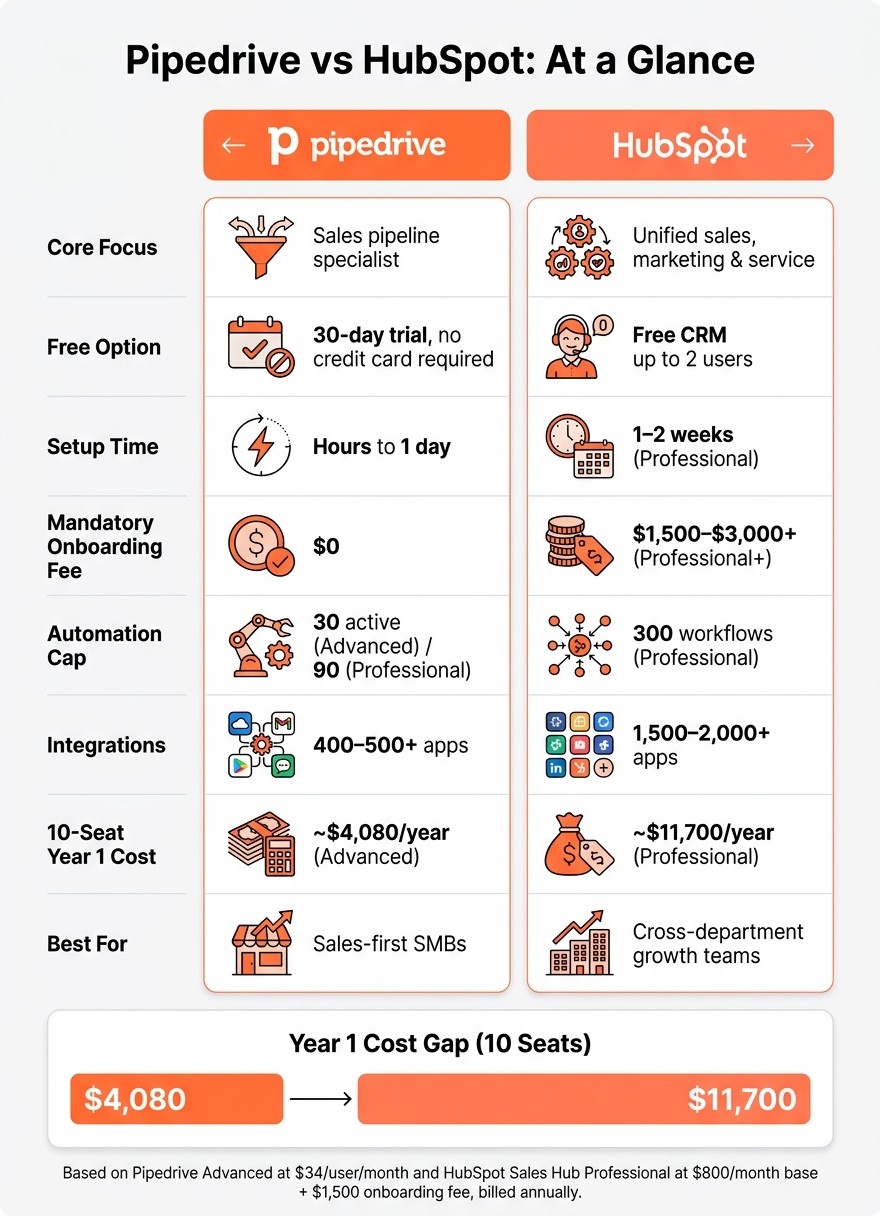
Pipedrive vs HubSpot: Cost, Setup & Features Compared (2024)
Pipedrive is the simpler sales CRM. HubSpot is the broader system for teams that need sales, marketing, and service data in one place. The trade-off is plain: Pipedrive is easier to set up and easier to budget for, while HubSpot gives you more range across teams but usually costs much more once you move past the free tier.
HubSpot’s free plan works for basic use, but paid seats and paid features change the math fast. That’s why the gap shows up most clearly when you compare plan pricing and total Year 1 spend.
Pipedrive vs HubSpot comparison table
This table shows the differences that tend to matter most during evaluation and later at scale. It focuses on setup, automation, support, and first-year cost.[3]
Feature | Pipedrive | HubSpot Sales Hub |
|---|---|---|
Core focus | Sales pipeline specialist | Unified sales, marketing, and service |
Free option | No free plan; 30-day trial, no credit card | Free CRM, up to 2 users |
Setup effort | Very low - hours to one day | Moderate - days to weeks |
Automation approach | Activity-based workflows on Growth+ | Rule-based; advanced logic on Professional+ |
Reporting | Visual sales dashboards and forecasting | Cross-functional reporting and attribution |
Integrations | 500+ apps | 1,500+ apps |
Mandatory onboarding fee | $0 | $1,500–$3,000+ on Professional+ [3] |
Support | 24/7 chat and email; phone on Power+ | Email on Free; phone on Professional+ |
Best for | Sales-first SMBs that want simple pipeline management | Cross-department growth teams |
10-seat Year 1 cost estimate | ~$4,080 (Advanced tier) [3] | ~$11,700 (Professional tier) [3] |
Cost estimates based on Pipedrive Advanced at $34/user/month and HubSpot Sales Hub Professional at $800/month base, plus a $1,500 onboarding fee, billed annually.
HubSpot fits better when multiple teams need the same customer record and shared reporting. But if you go that route, plan for a higher total cost of ownership, including the mandatory onboarding fee on Professional or Enterprise plans.[3]
How do Pipedrive and HubSpot compare on pricing as your team grows?
Pipedrive costs less per user and is simpler to forecast as you add seats. HubSpot starts to make financial sense only when your team will use Sales Hub Professional enough to justify its monthly base charge and one-time onboarding cost [3].
For a 10-person team, the gap is clear. Pipedrive Advanced uses a straight per-seat model, while HubSpot Sales Hub Professional starts with a fixed monthly charge before you even think about extra products or contact limits.
Plan pricing and a 10-seat cost breakdown
At 10 seats, Pipedrive Advanced comes in at about $4,080 per year, while HubSpot Sales Hub Professional lands near $11,100 in Year 1. That makes Pipedrive much easier to budget for smaller sales teams [3].
Pipedrive uses annual per-seat pricing across five tiers. Its Advanced plan costs $34 per user per month and includes email sequences and workflow automation, with no required setup fee [3].
HubSpot takes a different route. Its free CRM helps teams get started, but if you need advanced automation and custom reporting, you have to move to Sales Hub Professional at $800 per month, plus a required onboarding fee of about $1,500 [3].
Cost Component | Pipedrive Advanced (10 seats) | HubSpot Sales Hub Professional |
|---|---|---|
Monthly seat cost | $340 ($34 × 10) | $800 (base) |
Annual seat total | $4,080 | $9,600 |
Mandatory onboarding fee | $0 | ~$1,500 |
Year 1 total | ~$4,080 | ~$11,100 |
That pricing gap gets larger when teams need more automation, reporting, or extra hubs. Based on the figures here, HubSpot's base-fee model does not become cost-competitive with Pipedrive Advanced until about 24 users [3]. If you also add Marketing Hub, contact overages cost about $6.25 per 1,000 contacts above the plan limit [3].
Where other CRMs land on price
Pipedrive and HubSpot sit in the middle of a broad pricing range. Some tools lean low-cost and simple, while others aim at larger companies with more setup work and admin load [3] [6].
Zoho CRM offers a free plan for up to three users, with paid plans at roughly $14 to $20 per user [3]. Salesforce sits at the enterprise end of the market, with higher cost and more complexity. monday.com fits teams that prefer project-style CRM workflows, Close is geared toward high-volume outbound calling, and Attio tends to suit teams that want a flexible, data-heavy CRM setup [3] [6].
For teams with fewer than 10 people, seat price is only part of the picture. Setup time, admin effort, and how much work it takes to keep the system running often matter just as much.
The prompt-driven alternative: K3X

The prompt-driven alternative: K3X
For teams of 1–9 people, K3X is an AI-native CRM priced at $20 per seat/month, including 1,000 AI credits, unlimited integrations, a built-in power dialer, no mandatory onboarding fee, and a 14-day free trial.
Honest limits: K3X is a younger product with a smaller native-integration catalog, requires credit monitoring on active outreach, and is not built for 100+ seats or deep admin governance.
Setup and daily use: which is easier, Pipedrive or HubSpot?
Pipedrive is easier to get live and simpler to use each day. HubSpot takes more time because it ties sales, marketing, and service into one system.
For sales teams that want to start fast, Pipedrive usually has the shorter path. HubSpot can do more in one place, but that broader scope means more setup work and more moving parts for admins and reps.
Implementation speed and onboarding effort
Pipedrive is usually ready in hours or a day. HubSpot Professional often takes 1–2 weeks and adds a paid onboarding step [5].
One analysis estimates time to productive use at 2–3 hours for Pipedrive, compared with 1–2 weeks for HubSpot Professional [5]. HubSpot also adds a mandatory onboarding fee of $1,500 to $3,000+ on Professional plans [1][5]. That can change the cost picture early, especially for smaller sales teams.
Implementation Factor | Pipedrive | HubSpot |
|---|---|---|
Typical time to productive use | Hours to 1 day [5] | 1–2 weeks for Professional [5] |
Mandatory onboarding fee | $0 [1] | |
Self-serve setup | Yes | Often guided for Professional+ |
Admin burden | Low | Moderate to high |
That difference matters in practice. The less friction a team hits on day one, the more likely reps are to log in, use the pipeline, and keep data clean.
Daily usability for reps and managers
Pipedrive is simpler for day-to-day sales work. HubSpot gives managers more tools, but reps often have to click across more areas to do the same work.
Pipedrive centers the experience on a visual pipeline. Reps can drag deals between stages, log calls, and set follow-ups right from the board. That design shows up in usage data: 75% of Pipedrive customers report daily CRM usage, versus an industry average of 47% [5].
HubSpot includes more built-in functions, so reps often move between Sales Hub, the contact record, sequences, and dashboards. That works well for teams using more than just sales. If a manager needs shared visibility across sales, marketing, and service, or wants marketing attribution in the same system, HubSpot may fit better. If the goal is a cleaner sales-only workflow, Pipedrive usually gets reps productive sooner.
For smaller teams that want even less setup, the prompt-driven option below is worth a look.
The prompt-driven alternative: K3X
The prompt-driven alternative: K3X
For teams of 1–9 people, K3X is an AI-native CRM that is prompt-driven: users state an outcome in plain language, and AI agents execute it across email, SMS, and calls. Setup takes under an hour, with no mandatory onboarding fee and a 14-day free trial at k3x.ai/pricing.
Limits: younger product, smaller native-integration catalog than incumbents, AI credit usage needs monitoring, and it is not built for 100+ seats or deep admin governance.
Ease of use also shapes how fast a team starts using automation later.
Automation and AI sales workflows: how do Pipedrive and HubSpot compare?
Pipedrive and HubSpot both use rule-based automation, but they aim at different jobs. Pipedrive stays centered on deals and sales activity, while HubSpot runs automation across marketing, sales, and service. In both systems, teams still have to build workflows by hand, and that affects setup time.
Rule-based workflows, sequences, and plan limits
Pipedrive is simpler, and HubSpot is broader. Pipedrive handles deal-stage changes, activity creation, and email triggers with basic if/then rules. That works well for sales teams that want straightforward automation without much complexity.
Pipedrive also has plan limits that can matter for growing teams. It caps active automations at 30 on Advanced and 90 on Professional [3]. If a team builds many pipeline rules, follow-up tasks, and reminder flows, those caps can become a constraint.
HubSpot offers more workflow depth, but it costs much more. Its workflow engine supports branching logic, delays, and cross-object automation that can link contacts, deals, companies, and tickets in one flow. For teams running handoffs between sales, marketing, and support, that extra range can reduce manual work across departments.
HubSpot Professional includes up to 300 workflow automations and 500 sequences per user [3]. The price trade-off is steep: workflow automation that most teams would consider useful starts in the Professional tier at $800/month base, while Pipedrive starts automation at $34/user/month [3].
Both vendors also add AI tools, though the scope is different. HubSpot includes Breeze AI for prospecting and predictive scoring, while Pipedrive offers an AI Sales Assistant for deal suggestions and email drafting [1] [5].
Feature | Pipedrive | HubSpot |
|---|---|---|
Automation scope | Sales pipeline and activities | Marketing, sales, service |
Workflow logic | Simple if/then triggers | Branching logic, delays, cross-object workflows |
Active automation cap | 30 on Advanced, 90 on Professional [3] | 300 on Professional [3] |
Sequences | Native in Advanced+ [3] | Native in Professional+ [3] |
AI tools | ||
Automation entry price | $34/user/month [3] | $800/month base [3] |
If a team wants less workflow design and more plain-language execution, the comparison shifts.
The prompt-driven alternative: K3X
K3X takes a different path. Instead of asking users to build workflows step by step, it lets them describe the result they want in plain language, and AI agents carry it out across email, SMS, and calls.
The prompt-driven alternative: K3X
K3X skips workflow builders: users describe an outcome in plain language, and AI agents execute it across email, SMS, and calls. It suits 1–9-person teams, but it is younger, has a smaller native-integration catalog, and needs credit monitoring.
This matters most when the number of workflows starts to affect deal movement and forecast accuracy. At that point, the main question is not just which platform has more automation, but how much work the team must do to keep that automation running cleanly.
Reporting and pipeline visibility: Pipedrive or HubSpot?
Pipedrive is the simpler fit for pipeline reporting, while HubSpot does more when reporting needs to span marketing, sales, and service. If your team mainly wants clear deal movement and fast pipeline checks, Pipedrive works well. If you need to tie deals to campaigns, tickets, and other records across teams, HubSpot has the stronger setup.
Dashboards, forecasting, and custom reporting by plan
The split shows up right away in entry-level plans. Pipedrive's Essential plan at $14 per user/month limits teams to 15 reports and 1 dashboard [8]. HubSpot's free tier includes 3 dashboards with up to 10 reports each [8]. For a small sales team that just wants room to track calls, deals, and rep activity, HubSpot's free option gives more space out of the gate.
Advanced reporting starts later in both products. In Pipedrive, it begins at Professional for $49 per user/month [3]. In HubSpot, comparable reporting access starts at Professional for $800/month as a base price [3]. That's a big pricing jump, and for many sales ops teams, it's the first filter.
One difference stands out in day-to-day pipeline management: Pipedrive includes stale-deal alerts on all plans [8]. Inactive deals turn red in the pipeline view, which gives managers a fast visual signal that something has stalled. HubSpot does not offer this natively [8].
HubSpot pulls ahead when reporting needs to connect more than one part of the business. It supports reporting across objects, so teams can link deals with campaigns or support tickets [1][4]. Pipedrive does not support that type of cross-team data model natively and usually needs third-party integrations for it [1][2]. Put simply, Pipedrive is fine for pipeline-level visibility, while HubSpot is the better fit for one reporting layer across departments.
Feature | Pipedrive | HubSpot |
|---|---|---|
Entry-level dashboards | 1 dashboard, 15 reports (Essential) [8] | 3 dashboards, 10 reports each (Free) [8] |
Mid-tier dashboards | 1 dashboard, 30 reports (Advanced) [8] | 10 dashboards, 10 reports each (Starter) [8] |
Professional dashboards | Unlimited dashboards, 50 reports [8] | 25 dashboards, 30 reports each [8] |
Revenue forecasting | AI-powered, Professional+ ($49/user/month) [3] | AI-powered, Professional+ ($800/month base) [3] |
Stale-deal alerts | All plans [8] | Not available natively [8] |
Cross-department reporting | No native cross-object reporting [1] | Professional and Enterprise [1] |
Entry price for advanced reporting | $49/user/month [3] | $800/month flat [3] |
Reporting only helps if it works with the rest of your tools. The next piece is how each CRM handles integrations and support.
How do Pipedrive and HubSpot compare on integrations and support?
HubSpot has the larger app marketplace. Pipedrive covers the sales stack most small teams use and is often easier to roll out. If your CRM needs to sync across email, ads, finance, and support, this gap can shape both setup time and admin work.
Marketplace breadth and tool compatibility
HubSpot offers more app options overall. Pipedrive focuses on the tools many sales teams already use day to day. That makes HubSpot a better fit for companies with a broader software stack, while Pipedrive is often enough for smaller teams that want simpler setup.
HubSpot's marketplace is much larger than Pipedrive's, which helps when sales and marketing need shared data across more systems. Pipedrive still covers the basics well, including Gmail, Outlook, Slack, Zoom, QuickBooks, and Xero [5].
Feature | Pipedrive | HubSpot |
|---|---|---|
Marketplace size | ||
Common sales tools | Gmail, Outlook, Slack, Zoom, QuickBooks, Xero [5] | |
Entry-level access | 500+ integrations on the entry-level plan [5] | Basic integrations on the free tier [3] |
Support model and implementation help
Pipedrive is usually faster to deploy. HubSpot often takes more time, more setup, and in some cases paid onboarding. For lean sales teams, that can matter as much as app count.
Pipedrive is built for self-serve rollout, and many teams are up and running within hours or one day [7]. Email and chat support are available across plans, while phone support starts on the Power tier and above [3].
HubSpot takes longer to roll out. Its Professional and Enterprise tiers come with mandatory onboarding fees, and more complex multi-hub setups often need outside consultants, which can stretch implementation to 2–6 weeks [7]. Phone support is limited to Professional plans and above [3].
That trade-off is pretty clear in practice: HubSpot gives you more room across apps, but Pipedrive usually asks less from your admin team during setup.
The prompt-driven alternative: K3X
The prompt-driven alternative: K3X
K3X fits 1–9-person teams that want unlimited integrations in one $20/seat/month plan and prompt-driven execution instead of workflow setup. It is younger than Pipedrive or HubSpot, has a smaller native catalog, and is not built for 100+ seats or deep admin governance.
Which CRM fits your sales team: Pipedrive, HubSpot, or something else?
The short answer is this: Pipedrive fits sales-first teams, HubSpot fits teams that need one shared customer record, and K3X fits small teams that want automation without building workflows. After price, setup, reporting, and integrations, team structure is usually the deciding factor.
Who should pick Pipedrive
Pipedrive is the better fit for teams that want a visual pipeline, fast setup, and low admin work. It works best when the CRM mainly serves sales and does not need to support marketing or service in the same system.
If sales needs to share customer data with marketing or support, HubSpot is the better path.
Who should pick HubSpot
HubSpot fits teams where sales, marketing, and service all need access to the same customer record. It also makes more sense when a large part of pipeline comes from inbound content or paid ads, because its shared data model supports cross-team workflows.
If those needs do not apply and the team has fewer than 10 people, K3X is the simpler option.
When neither fits: the prompt-driven option for small teams
K3X is built for small teams that want automation without setting up workflow builders, sequences, or triggers. Users describe the outcome, and AI agents carry it out across email, SMS, and calls.
It is aimed at teams of 1–9 people and costs $20 per seat/month. Setup takes under 1 hour, and it includes a 14-day free trial at k3x.ai/pricing. The tradeoff is scale: it is a newer product with a smaller native integration catalog, and it is not built for teams with 100+ seats or heavy admin governance.
Pipedrive | HubSpot | K3X | |
|---|---|---|---|
Ideal team size | 5–50 reps [1] | 1–9 | |
Setup time | Days | Weeks to months | Under 1 hour |
Onboarding fee | $0 | $0 | |
Starting price | $14/seat/month [3] | Free tier available; Starter starts around $15–$20/seat/month [3] | $20/seat/month |
Admin load | Low to moderate | Dedicated admin or RevOps support | None |
Best fit | Sales pipeline velocity | Unified revenue platform | Outcome-based automation |
Final takeaway: how to choose between Pipedrive and HubSpot
Choose Pipedrive if you need a sales-focused CRM with lower cost and less setup. Choose HubSpot if your marketing, sales, and service teams all need to work in one shared system.
The trade-off is mostly about price, time to adopt, and scope. At 10 seats, HubSpot still costs much more because of its base-fee model. Pipedrive tends to fit teams that want to get started fast, while HubSpot often needs more training and admin work. Pipedrive keeps automation tied closely to the pipeline; HubSpot stretches automation across sales, marketing, and service.
For teams with 1–9 users that want prompt-driven automation, K3X is a third option. It starts at $20 per seat/month and setup takes under an hour, but it’s newer and has a smaller native integration catalog.
FAQs
Is Pipedrive cheaper than HubSpot?
It depends on team size and the features you need. HubSpot is often the lower-cost pick for startups because its free plan supports unlimited users, while Pipedrive usually gives you more predictable per-seat pricing for core pipeline work.
As teams get larger, HubSpot’s paid plans can become much more expensive. Pipedrive usually stays the lower-cost, sales-focused option, and for mid-sized teams, HubSpot’s total cost can be 2 to 5 times higher than Pipedrive’s.
Which is easier to set up, Pipedrive or HubSpot?
Pipedrive is faster to set up than HubSpot. Most sales teams can start using it with little training because the product focuses on pipeline management rather than a broad set of functions.
Pipedrive is built as a dedicated sales pipeline tool, so the setup is usually straightforward. Teams can add deal stages, import contacts, and start tracking activity without much admin work.
HubSpot often takes more time to implement. Its broader product scope adds more setup steps, especially when teams are configuring multiple hubs and connecting sales, marketing, and service workflows.
For teams that want to avoid doing the setup themselves, K3X offers AI-native setup in under an hour.
Is HubSpot's free CRM actually free?
Yes. HubSpot offers a permanent free tier that covers core CRM tasks like contact management, deal pipeline tracking, basic email tracking, and a meeting scheduler.
The free plan works for those basics. If you need advanced automation, custom workflows, or deeper reporting, you’ll need a paid plan. As teams grow and processes get more complex, many companies end up upgrading, and monthly costs can climb fast.
Is there an alternative to both Pipedrive and HubSpot?
Yes. K3X fits teams of 1 to 9 people that want a lighter option than platforms like Pipedrive and HubSpot. It cuts down on the setup and configuration work that often comes with those tools.
K3X is an AI-native, prompt-driven CRM. Users describe the result they want, and AI agents handle the work across email, SMS, and calls.
Setup takes under an hour, and pricing starts at $20 per seat/month.
There are tradeoffs. K3X is newer, its native integration catalog is smaller, and it is not built for large enterprises.