Sales Automation
•
How Asynchronous Webhooks Improve CRM Automation
Use asynchronous webhooks to speed CRM updates, avoid timeouts, prevent duplicates, and scale automation reliably.

Asynchronous webhooks are transforming CRM automation by addressing the limitations of older systems. Unlike synchronous webhooks, which process tasks inline and risk delays or failures, asynchronous webhooks prioritize speed and reliability by separating event intake from processing. Here's why this matters:
Faster Response Times: Events are acknowledged in under 50 milliseconds, avoiding timeouts and ensuring real-time updates.
Scalability: Queues handle traffic spikes, preventing system overload during high-demand periods.
Improved Data Accuracy: Features like idempotency keys and timestamp validation prevent duplicates and ensure correct event sequencing.
Reduced Failure Impact: Dead-letter queues and exponential retries isolate issues without disrupting overall operations.
Modern platforms like K3X leverage asynchronous processing to replace rigid workflows with outcome-driven automation. This approach reduces costs, enhances reliability, and simplifies CRM integration, making it easier for teams to focus on sales and operations instead of technical challenges.
Challenges of Synchronous Webhooks in CRM Integrations
Integration Bottlenecks in Legacy CRMs
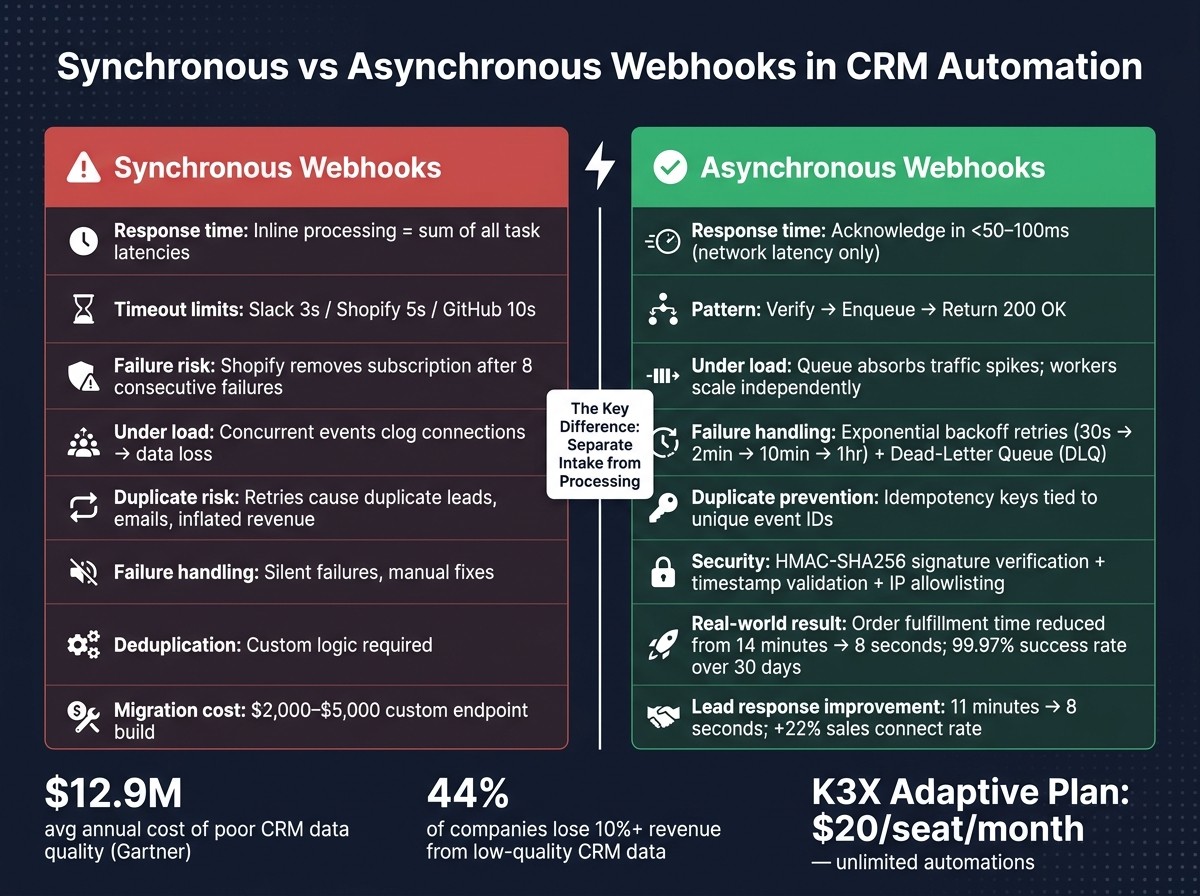
When dealing with synchronous webhooks, legacy CRMs often hit serious integration roadblocks. In a synchronous setup, the total response time is the sum of request latency and all processing tasks - like database updates, API calls, email triggers, or record modifications. This adds up quickly, and webhook providers impose strict timeout limits: Slack allows 3 seconds, Shopify 5 seconds, and GitHub 10 seconds. If your CRM handler doesn’t finish within that window, the provider marks the delivery as failed and retries. Shopify, for instance, will completely remove a webhook subscription after eight consecutive failures [2].
The problem gets worse under heavy loads. Concurrent events tie up server resources until processing is done, clogging connections and causing new requests to fail. At this point, the CRM isn’t just slow - it’s actively losing data.
Impact on Sales and Operations
The consequences of synchronous webhook failures go beyond technical issues. When a handler times out, retries from the provider can result in duplicate leads, emails, or even inflated revenue figures. On the other hand, providers like Twilio that don’t retry can cause the event to disappear entirely.
"Webhook failures are one of the most common - and most invisible - causes of broken marketing automation, yet most teams only discover them when a customer complains." - House of MarTech [7]
Data quality issues stemming from these failures have a massive financial impact. Gartner reports that poor data quality costs organizations an average of $12.9 million annually [6], with about 44% of companies losing more than 10% of their yearly revenue due to low-quality CRM data [6]. Faulty synchronous integrations are a direct contributor to these losses, highlighting why workflow-based CRMs struggle under pressure.
Why Workflow-Based CRMs Break Under Load
The technical issues mentioned earlier are a key reason why trigger-based workflows in legacy CRMs fail when handling large volumes of data. These older systems execute automation logic inline, meaning it runs as part of the same process handling the webhook. As the volume increases, these workflows become significant bottlenecks.
One particularly problematic failure pattern is the "vampire record" loop. Here’s how it works: a CRM updates a record, triggering a webhook to an external system, which then syncs back to the CRM and triggers another webhook - creating an endless cycle. Many older systems lack the metadata to track which system initiated the change, so there’s no way to stop the loop. For example, a bulk update in Salesforce Enterprise Edition - which has a daily API request cap of 100,000 [6] - can burn through the quota in just minutes under these conditions.
"Exactly-once delivery is fantasy at the third-party boundary. Build for duplicates, retries, delayed events, and out-of-order delivery from day one." - Truto [6]
Workflow-heavy CRMs weren’t built to handle these kinds of failures. They operate on the assumption that events will arrive in order, cleanly, and one at a time - an assumption that modern, high-volume integrations often shatter.
Mautic & native Webhooks: How to configure and dispatch them?
How Asynchronous Webhooks Work in CRM Automation
Synchronous vs Asynchronous Webhooks in CRM Automation
Reliable Webhook Intake Patterns
Asynchronous webhook processing revolves around one simple principle: confirm receipt quickly without doing any heavy lifting right away. This method, often called the Verify-Enqueue-Acknowledge pattern, ensures your webhook system is dependable and efficient.
Here’s how it works: when a webhook request hits your endpoint, you should immediately do three things - verify the request signature, drop the raw payload into a queue, and respond with an HTTP 200 OK. All of this should happen in under 50–100 milliseconds [2]. That means no database writes, no API calls, and no logic processing. As Webhooks.cc succinctly puts it:
"Your webhook endpoint should do three things and nothing else: Verify the signature, Enqueue the event, and Return 200." - Webhooks.cc [2]
This approach solves the timeout issue entirely. By sending an acknowledgment right away, the provider knows their webhook was received, and your system can handle the actual processing later, on its own timeline.
Processing with Asynchronous Workers
Once the event is safely enqueued, it’s time for background workers to take over. These workers are dedicated processes designed to handle tasks like updating contact records, advancing pipeline stages, triggering automated workflows, or interacting with third-party APIs. Developer Anatoliy Dovgun puts it well: "Webhook = trigger. Worker = logic." [5]
This separation of responsibilities is crucial when dealing with high volumes of data. Workers can process events at the pace your system can handle, and during traffic surges, you can add more workers without disrupting the webhook intake process. For example, a direct-to-consumer brand managing 1,200 Shopify orders daily saw dramatic improvements with this setup. By moving from a polling-based system to a Node.js webhook endpoint, backed by a PostgreSQL events table and BullMQ workers, they reduced order-to-fulfillment time from 14 minutes to just 8 seconds, achieving a 99.97% success rate over 30 days [10].
One key practice for workers is idempotency. This ensures that processing the same event multiple times doesn’t lead to duplicate actions, like creating duplicate leads or charging a customer twice. Using a unique event_id or a hash of the payload as an idempotency key can prevent these issues, especially when webhook providers retry deliveries [9][10].
Separating the webhook intake and processing stages not only makes your system more scalable but also emphasizes the need for careful, reliable handling of events.
Reliability and Security Best Practices
When it comes to security, HMAC-SHA256 signature verification is a must. This should be the only logic executed synchronously - before the payload is even enqueued. Without verification, your endpoint could become a target for fake data injection into your CRM [10]. To enhance security further, include a timestamp in the HMAC computation to reject requests older than a set timeframe (usually 5 minutes), which helps block replay attacks [11]. Combine this with TLS/HTTPS on all endpoints and IP allowlisting to restrict access to trusted sources, and you’ve covered most security vulnerabilities [3][4].
Reliability in an asynchronous system depends on how well it handles failures. A common approach is exponential backoff, where failed tasks are retried at gradually increasing intervals (e.g., 30 seconds, 2 minutes, 10 minutes, 1 hour). This prevents overwhelming downstream systems during temporary outages [9][10]. For events that fail repeatedly, a dead-letter queue (DLQ) catches them for manual review, ensuring they don’t clog up the main processing queue [1][8].
Practice | Purpose |
|---|---|
HMAC-SHA256 verification | Verifies the request is legitimate before enqueuing |
Exponential backoff retries | Prevents system overload by spacing out retries for failed tasks |
Dead-letter queue (DLQ) | Isolates persistent failures for manual inspection |
Idempotency keys | Avoids duplicate processing during provider retries |
Timestamp validation | Rejects stale requests to prevent replay attacks |
IP allowlisting | Restricts webhook access to known, trusted IP ranges |
Benefits of Asynchronous Webhooks for CRM Automation
Faster Response Times and Real-Time CRM Actions
Asynchronous webhooks are a game-changer for CRM performance, especially when speed is critical. These webhooks ensure immediate responses by verifying a signature and queuing a payload almost instantly. This eliminates the delays often seen with synchronous systems, where every second counts in engaging new leads. Research shows that responding to leads within 60 seconds gives businesses a competitive edge, while delays exceeding 5 minutes often fall into the slower, less effective category[4]. With this speed, CRMs can activate lead routing, send notifications, and update pipelines in near real time, keeping businesses agile and responsive.
Managing High-Volume Data Without System Overload
Traffic surges can hit unexpectedly - think of a major marketing campaign, a product launch, or bulk data imports. These scenarios can overwhelm traditional systems, but asynchronous webhooks handle them seamlessly. By using queues to absorb sudden spikes in traffic, the system avoids overload. Workers then process events from the queue at a steady rate, ensuring smooth operations without overburdening servers or clogging connection pools. This is a stark improvement over synchronous processing, where each request keeps a connection open until fully processed - a method prone to breakdowns under heavy loads.
Improved Data Integrity and Fault Isolation
Maintaining clean and accurate CRM data is no small task, especially with challenges like duplicate records and events arriving out of order. Asynchronous webhooks tackle these issues with tools like idempotency keys and timestamp validations. These features prevent duplicate entries and ensure events are processed in the correct sequence, even during disruptions. Unlike synchronous setups, where a slow API or a failing third-party service can cause timeouts and retries (leading to duplicates), asynchronous systems isolate such faults. Individual workers handle failures without affecting the overall intake, keeping the system running smoothly. Platforms like K3X take full advantage of these capabilities, ensuring data remains reliable and scalable. This allows teams to focus on closing deals rather than wrestling with integration headaches.
Designing Asynchronous Webhooks Around K3X
Outcome-Driven Integration with K3X
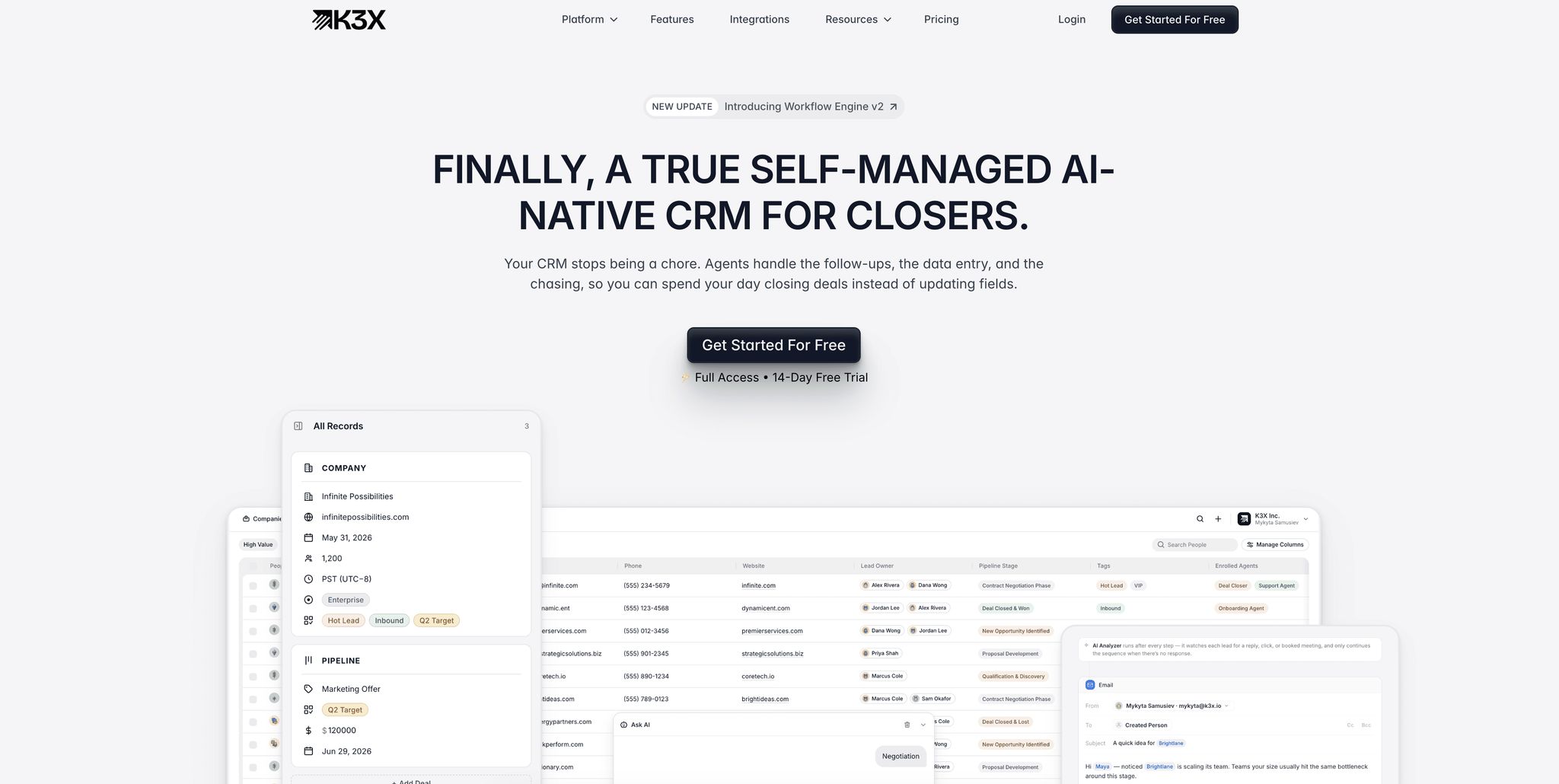
Most traditional CRMs rely on rigid, step-by-step triggers to handle events. K3X flips this approach by focusing on outcomes instead. Rather than specifying what happens when a webhook fires, you define the desired result, and K3X takes care of the execution.
This aligns perfectly with an asynchronous webhook setup. For example, when an event like a new lead, a form submission, or a payment update comes in, K3X uses time-tested asynchronous processing techniques. It verifies, queues, and acknowledges the event quickly. Meanwhile, its AI-driven workers handle the heavy lifting - updating pipelines, routing leads, scheduling follow-ups, and coordinating tasks in the background.
"Webhook handlers should return quickly. Executing business logic synchronously risks blocking CRM and losing events during failures." - Anatoliy Dovgun, 4WP [5]
This outcome-driven approach integrates smoothly with K3X's ability to map webhook events to precise, AI-powered CRM actions.
Mapping Webhook Events to AI-Driven CRM Actions
Traditional CRMs often rely on rigid if-then rules to map webhook events to actions. These rules can easily break when data structures change or when event volumes surge. K3X takes a different approach - it treats events as actionable signals. For instance, when a form submission or payment success event is queued, an AI worker retrieves the latest data and triggers actions based on predefined outcomes [10].
This approach has several advantages. It significantly reduces response times and avoids duplicate processing, making CRM automation more reliable. Research shows that replacing polling-based ingestion with webhook-driven systems can reduce lead response times from 11 minutes to just 8 seconds. It can also boost a sales team’s connect rate by 22% within the first month [10]. To prevent duplicate actions, K3X uses idempotency keys tied to unique event IDs, ensuring repeated events don’t trigger the same action twice [2].
This dynamic event mapping approach also paves the way for a smooth migration from older CRM systems.
Moving from Legacy Systems to K3X
Migrating to K3X leverages asynchronous principles to enhance both speed and reliability. Transitioning from legacy CRMs can follow a straightforward path:
Review synchronous endpoints prone to timeout issues: Identify endpoints that process logic inline and risk hitting timeout limits. For example, Shopify enforces a 5-second limit, while Slack cuts off after 3 seconds [2].
Introduce a message queue: Tools like Redis, SQS, or BullMQ can buffer incoming traffic, separating intake from execution [1][2].
Define outcomes in K3X: Use prompts to set your goals, and K3X will intelligently map events to the right actions.
Maintaining outdated systems can be expensive. Building and securing a custom webhook endpoint from scratch typically costs between $2,000 and $5,000 in development [12]. On the other hand, K3X's Adaptive plan costs just $20 per seat per month, offering unlimited workflow automations and integrations. This eliminates the need for custom endpoint management entirely.
Migration Step | Legacy Approach | K3X Approach |
|---|---|---|
Webhook intake | Custom endpoint with inline logic | Verify-enqueue-ACK in <50ms [2] |
Event processing | Manual trigger rules | AI workers with outcome-based goals |
Failure handling | Silent failures, manual fixes | |
Duplicate prevention | Custom deduplication logic | Built-in idempotency using unique event IDs [2] |
This migration isn’t just about technology - it’s about freeing teams from the burden of managing complex integrations. Instead, they can focus on the deals and decisions that drive the business forward.
Conclusion: Better CRM Automation with Asynchronous Webhooks
Synchronous webhook processing can be a major weak spot - just one unexpected traffic surge can result in timeouts, missed events, and outdated data. Studies show that synchronous processing often leads to higher failure rates [2]. The fix? Moving to asynchronous processing. By cutting response times down to just network latency, this shift ensures faster lead engagement and smoother operations. In practical terms, this efficiency translates into real sales growth.
"In 2025, speed isn't nice-to-have. It's the difference between booked meetings and missed windows." - Fahim Mahmud Chisti [4]
But the benefits don’t stop at speed. When combined with outcome-driven CRMs, this approach transforms how businesses operate. Traditional systems rely on complicated trigger rules and tedious manual tasks like deduplication. Modern solutions, like K3X, eliminate these headaches by integrating advanced automation features. K3X manages idempotency, dead letter queues, and AI-based event processing seamlessly. This means your team can focus on closing deals instead of wrestling with technical issues. And at $20 per seat per month, K3X simplifies webhook management without breaking the bank.
Asynchronous webhooks aren’t just a technical tweak - they’re the backbone of a CRM that adapts to your business and grows with it.
FAQs
What’s the simplest way to convert a synchronous webhook into an asynchronous one?
To transform a synchronous webhook into an asynchronous one, you can follow the verify-enqueue-acknowledge approach. Here's how it works:
Verify the sender's signature: Ensure the webhook request is coming from a trusted source by validating its signature.
Enqueue the event payload: Store the payload in a queue system like Redis or Amazon SQS for processing later.
Acknowledge the request: Respond immediately with an HTTP 200 status to confirm receipt of the webhook.
By offloading the actual business logic to a background worker, you gain better scalability and can handle errors more effectively. Tools like K3X simplify this process by automating the setup, using goal-oriented prompts to streamline the transition.
How do I prevent duplicate CRM updates when webhook providers retry deliveries?
To prevent duplicate CRM updates caused by webhook retries, it's crucial to make your processing idempotent. Since webhook providers ensure at-least-once delivery, your system must handle multiple deliveries in a way that only results in a single state change.
Here’s a solid approach: Use a fast receiver to validate signatures and store events before sending a 200 OK response. Then, process these events asynchronously, utilizing a unique idempotency key. By enforcing constraints in your database, you can automatically filter out duplicates. Tools like K3X make this process easier by removing the need for complex, fragile workflows.
What should I monitor to catch webhook failures before they impact sales?
To stay ahead of webhook failures, focus on monitoring these three critical aspects:
Ingestion success: Compare your CRM's delivery logs with your processing logs. This helps you catch silent timeouts that might otherwise go unnoticed.
Processing health: Keep an eye on success rates, retries, and latency spikes. Specifically, monitor p99 latency to ensure it stays within 50% of your provider's timeout budget.
Dead-letter queues: Regularly audit these queues to identify and fix events that couldn't be processed.
Unlike traditional systems that rely heavily on manual checks, K3X automates these tasks. This automation minimizes manual intervention and ensures smoother operations.