Sales Automation
•
Best Practices for Using Voice Commands in CRMs
Voice commands can triple CRM input speed but require strict accuracy, security, and team adoption to deliver reliable results.

Voice commands in CRMs save time and boost efficiency by letting you speak tasks like logging notes or scheduling follow-ups instead of typing. They’re three times faster than typing and help sales reps focus on selling, not data entry. But for voice commands to work well, you need the right setup, consistent habits, and secure processes.
Here’s what you need to know:
Accuracy: Use quiet environments, stable internet, and consistent phrasing for better transcription.
Security: Avoid recording sensitive info, use encryption, and comply with consent laws.
Team Adoption: Start with simple tasks, train managers first, and track usage metrics.
Scalability: Match voice tools to your CRM, ensure real-time syncing, and roll out features gradually.
Tools like K3X simplify voice-driven CRM by letting you update pipelines or schedule tasks with one command, making workflows faster and easier. By following these steps, you can ensure accurate data, protect sensitive information, and encourage your team to embrace voice commands effectively.
Voice Technology: The Future of CRM Across All Industries
Checklist: Getting Accurate Results from Voice Commands
Getting reliable data from voice commands isn't something that just happens on its own. It requires thoughtful setup and consistent habits from your team to ensure everything runs smoothly.
Set Up Your Devices and Environment
The quality of your audio plays a huge role in how accurate your transcriptions are. Stick to handset mode instead of speakerphone when recording notes. Speakerphone tends to pick up a lot more background noise, which can confuse speech recognition systems. If you're using mobile devices, the built-in microphones on most modern smartphones are a great choice since they often include noise-canceling features [7].
Another key factor is your internet connection. A stable connection - ideally one that supports WebRTC for browser-based CRMs - helps keep latency low and avoids interruptions during transcription [2][7]. Shoot for response latency under 700ms. If delays exceed one second, users often assume the system isn't working and repeat themselves, which can lead to duplicate entries [3].
Here's a simple tip: avoid recording notes in noisy public spaces. By following these steps, you can ensure your voice commands lead to accurate CRM updates. The next step is to standardize how your team uses voice commands.
Use Consistent Phrasing Across Your Team
Consistency is key when it comes to voice commands. Decide on a standard set of commands and document them for everyone to follow. Each command should start with an action verb and include a clear object - for instance, "create a lead" or "log a call note." Avoid vague or shorthand phrases, as they can confuse the speech recognition system.
"Voice commands should be general, colloquial, comfortable to say, and bring users quickly to action." - Google Developers [8]
Another important tip: standardize the field names your team uses in commands. For example, if your CRM uses "Active" as a status label, make sure everyone sticks to that exact term. Using alternatives like "current", "open", or "live" can cause automation issues. As Lipika Gimmler, Senior Product Marketing Manager at Parloa, explains: "When CRM uses 'Active' and billing uses 'Current,' automation logic breaks." [6] A simple reference document, even just a one-page cheat sheet, can help avoid these problems. This level of consistency keeps your data clean and your reporting accurate.
Review and Correct Captured Data Regularly
Make it a habit to review voice-captured records weekly to catch and correct any errors. Pay close attention to critical fields like contact names, deal values, and next steps - mistakes in these areas can have the biggest impact.
Many modern voice CRM platforms, such as K3X, use machine learning that improves with corrections. By fixing errors now, you're not only cleaning up your current data but also helping the system get smarter over time [10].
For tricky cases - like spelling an unusual last name or entering a specific account number - switch to text input instead of relying on voice. These details are too important to leave to chance [5]. By following these practices, you'll ensure that voice commands lead to accurate CRM updates, helping your sales process run more efficiently.
Checklist: Keeping Voice Command Data Secure and Compliant
Managing voice command data effectively means prioritizing both security and compliance. As voice commands integrate into your CRM, it’s essential to safeguard this data and ensure your processes align with legal requirements.
Avoid Capturing Sensitive Customer Information
Voice recognition tools are great for logging call notes, updating deal stages, and setting reminders. However, they should never be used to record sensitive information. Avoid dictating credit card numbers, Social Security numbers, or protected health information in voice commands. Regulations like PCI DSS mandate that payment data in voice transcripts must be masked or redacted, while HIPAA requires encryption for protected health information [16].
When referencing customer accounts, use a tokenized identifier (such as a system-generated ID) rather than the full account number. For complex alphanumeric inputs - like unusual names or account numbers - switch to text input instead. It’s a simple step that can help you avoid unnecessary risks.
Set Up Access Controls and Audit Logs
Restrict access to voice recordings using Role-Based Access Control (RBAC), ensuring that only authorized team members can view or edit records [15]. Stick to the principle of least privilege by limiting API tokens to essential permissions, such as access to contacts and deals only.
Make it a habit to review audit logs monthly. This helps you catch unusual changes or errors like 4xx API responses [3][11]. Tools like K3X streamline this process by consolidating activity trails across interactions, saving you time and effort during reviews.
For data protection, implement AES-256 encryption for stored data and TLS 1.3 for information in transit [11]. Automatically delete recordings after 30–90 days, using cryptographic erasure methods instead of simple deletion [15][16]. These practices also set a strong foundation for managing legal and consent-related obligations.
Handle Consent and Recording Requirements
Consent laws for recording vary across the U.S. Some states require only one party to consent, while others - like California - demand that all parties agree. The FCC has also clarified that calls involving AI-generated voices must have prior express written consent under the Telephone Consumer Protection Act (TCPA). Failing to comply could result in penalties of up to $1,500 per violation [16].
To stay compliant, incorporate a standard disclosure script at the beginning of every voice-driven interaction. For instance: "This call may be recorded or processed by AI for quality and CRM purposes." Automate this disclosure to ensure consistency, rather than relying on team members to remember it. Additionally, train your staff to mute devices or disable recordings when conversations shift to sensitive topics. Hardware mute switches can provide an extra layer of reliability [12][14].
Keep in mind that voice assistants can sometimes activate unintentionally due to similar-sounding words, potentially capturing background conversations from individuals who haven’t consented [16]. To minimize this risk, place voice-enabled devices on a separate guest network to isolate them from your primary business systems in case of a security breach [13].
Checklist: Getting Your Team to Use Voice Commands
With data accuracy and security in place, the next step is getting your team on board with voice commands. Here's how to make the transition smooth and effective.
Start with the Most Useful Cases First
Focus on tasks that offer the most immediate value. Start with post-call notes - these are far more accurate when logged immediately (100% accuracy) compared to being delayed (67% accuracy) [1]. After that, move to deal stage updates and follow-up task creation - tasks that are repetitive, frequent, and perfect for voice commands.
Tools like K3X’s AI-native CRM shine in these areas. Instead of clicking through menus to update a pipeline, reps can simply say what they need, and K3X takes care of the rest. It’s an easy win that makes the process feel natural rather than like a chore.
Make Onboarding and Training Simple
Train managers first - they’ll set the tone for adoption during pipeline reviews and coaching sessions. Keep training sessions short and focused, covering just two or three key commands at a time. Include a hands-on demo, like logging a post-call update, to help build habits quickly [18].
Want to make it fun? Try a friendly competition. For example, see who can log a deal update the fastest using voice commands. It’s a low-pressure way to get everyone involved and practicing [1].
Here’s a tip: provide USB headsets with noise-canceling microphones before training begins. Nothing derails adoption faster than technical hiccups in the first week [17].
Track Adoption and Make Adjustments
Once the team starts using voice commands, keep an eye on three key metrics: usage rates, data accuracy, and time saved. These will tell you how well the rollout is working and highlight any areas that need tweaking.
For instance, one Fortune 50 company boosted CRM data completeness from under 30% to over 90% in just 90 days, saving each rep more than 90 minutes daily [18]. Use K3X dashboards to connect voice command metrics directly to pipeline improvements.
Also, set up a dedicated channel where team members can share feedback or report issues. Review this monthly to make sure the system evolves based on their input, rather than staying static [9]. This keeps the process efficient and aligned with your team’s needs.
Checklist: Setting Up and Scaling Voice Features in Your CRM
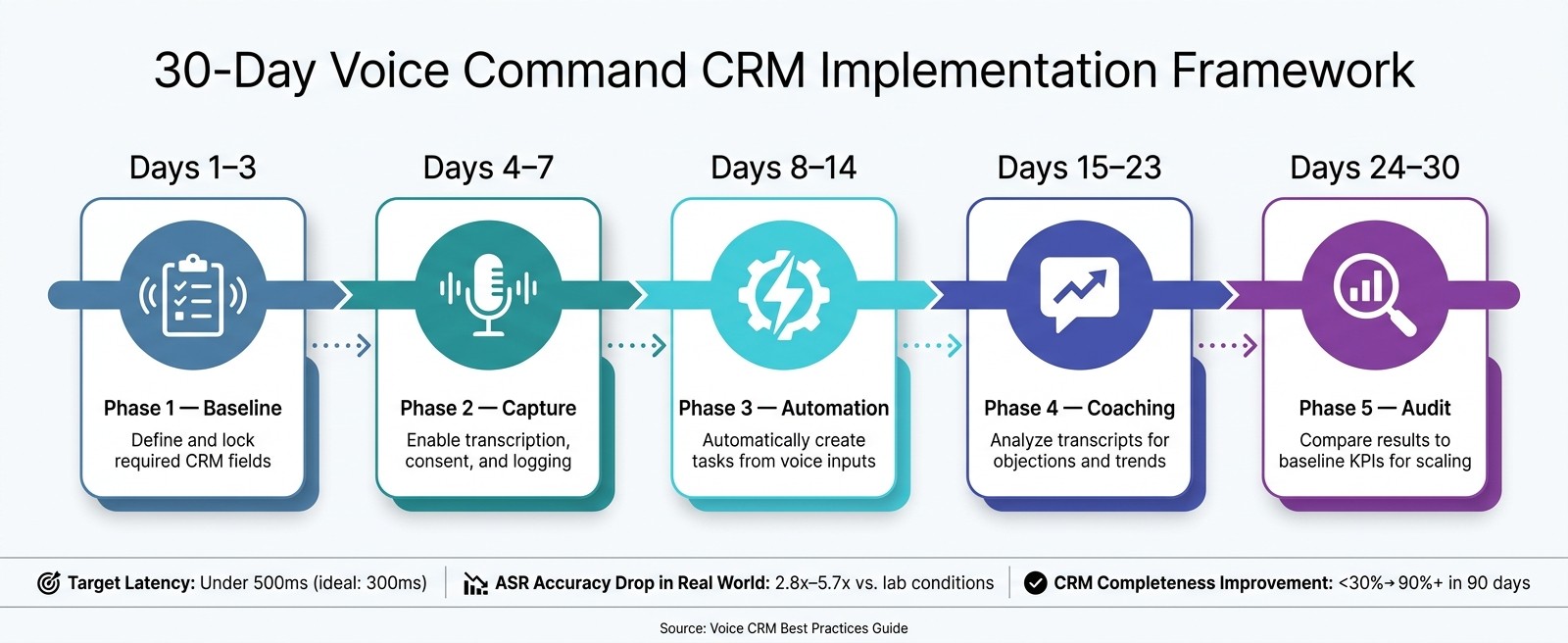
30-Day Voice Command CRM Rollout Plan
As your team begins using voice commands, the next step is to ensure your CRM can handle the increased load and grow alongside your needs. The way you configure your system early on will play a big role in how well it performs as demand scales up.
Match Voice Features to Your CRM's Strengths
Before diving into voice features, take a close look at where manual data entry causes slowdowns and target those areas for improvement. Then, figure out if your CRM has built-in voice functionality or if you'll need a third-party integration. Native tools in CRMs write data directly into fields without extra steps, while third-party solutions often rely on middleware to sync data, which can lead to delays or errors. If you're using an older system, you may need API connectors or even an upgrade to enable real-time voice syncing.
K3X simplifies this process. It uses a prompt-based system instead of rigid workflows, so you don’t need to map voice inputs to specific fields. Just describe what you need, and K3X handles the rest - updating pipelines, creating tasks, and logging data instantly. This seamless alignment between voice tools and CRM functionality lays the groundwork for a system that’s both responsive and scalable.
Ensure Real-Time Voice Input Syncing
Once you’ve matched the voice tools to your CRM, the next priority is real-time responsiveness. For a smooth and natural conversation flow, aim for end-to-end latency under 500ms, with 300ms being the ideal target [20].
To achieve this, choose webhooks over API polling. Webhooks send updates instantly when events happen - like qualifying a lead or creating a task - while polling checks for updates at intervals, which can cause delays. If your enterprise system has slower response times, predictive caching can help. By pre-loading customer context before calls, it ensures a more seamless experience [4].
Roll Out Voice Features Gradually and Refine
After syncing voice functionality, implementing a phased rollout will help fine-tune performance and boost user adoption. Here’s a suggested 30-day rollout plan:
Phase | Days | Focus |
|---|---|---|
Baseline | 1–3 | Define and lock required CRM fields |
Capture | 4–7 | Enable transcription, consent, and logging |
Automation | 8–14 | Automatically create tasks from voice inputs |
Coaching | 15–23 | Analyze transcripts for objections and trends |
Audit | 24–30 | Compare results to baseline KPIs for scaling |
30-Day Implementation Framework
As your team uses voice features more, monitor metrics like Word Error Rate (WER) and latency. Real-world conditions can cause ASR (Automatic Speech Recognition) accuracy to drop significantly compared to lab environments - sometimes by 2.8x to 5.7x - so it’s crucial to test under actual workloads [20].
K3X’s adaptive learning capabilities make this process smoother by learning how your team communicates and prioritizes tasks over time, making it easier to maintain and expand voice adoption.
"Voice is a huge shift for the industry and will be as impactful in businesses as it's been in our homes." - Bret Taylor, President and Chief Product Officer, Salesforce [1]
Conclusion
Voice commands have transitioned from being a mere convenience in sales to becoming a critical tool. Why? Because speaking is about three times faster than typing, and teams that log calls immediately after meetings retain 100% of the information, compared to just 67% when they delay the entry [1]. These stats make a strong case for weaving voice commands into daily CRM workflows.
The key takeaways from this guide focus on three pillars: accuracy, security, and adoption. Using consistent phrasing improves recognition, robust encryption and access controls safeguard sensitive data, and getting your team involved early ensures these tools become second nature.
Consider this: If a sales rep makes 80 calls a day but logs only 20, the 60 unlogged calls aren’t just numbers - they’re missed opportunities and lost customer insights [19]. Voice-powered CRM tools help bridge this gap by simplifying data entry, ensuring that no vital details slip through the cracks.
That’s exactly what K3X is built for. Instead of navigating endless menus and forms, K3X lets you speak your needs in plain language while it handles updates, follow-ups, and pipeline adjustments instantly. This eliminates manual work, allowing you to focus on what matters most: closing deals.
This shift isn’t just about improving internal workflows - it’s part of a larger trend. The global voice recognition market is expected to grow from $12 billion in 2022 to $50 billion by 2029 [1]. Teams that prioritize accuracy, compliance, and consistent use of voice features today will be better equipped to scale as this technology becomes even more integral to sales operations.
FAQs
Which CRM tasks are best to start with using voice commands?
Voice commands can make managing CRM tasks much easier and more efficient. The best tasks to tackle this way include updating deal stages, logging customer interactions, capturing meeting notes, scheduling follow-ups, and managing pipeline activities. These tasks often involve repetitive actions and tight deadlines, making hands-free input a great way to boost both productivity and accuracy.
Starting with actions like call logging, setting appointments, and updating lead information is especially helpful. These tasks directly improve response times and keep your pipeline running smoothly.
How do I keep voice-captured CRM data secure and compliant?
Keeping voice-captured CRM data secure and compliant requires a few key steps. Start by using strong encryption methods - for example, TLS/SRTP for data in transit and AES-256 for stored data. These measures help shield sensitive information from unauthorized access.
It's also crucial to adhere to GDPR-compliant practices, such as obtaining caller consent and setting clear limits on how long data is retained. This ensures that your processes respect privacy laws and user rights.
Another important tip: disable listening features during sensitive tasks to avoid accidental data exposure. And when selecting a service provider, opt for one that offers enterprise-grade security features, like end-to-end encryption.
Don't forget to regularly review and update your privacy settings. Deleting old recordings that are no longer needed and enforcing multi-factor authentication are also essential steps to maintain strong protection over time. These practices not only safeguard your data but also build trust with your users.
How can we measure whether voice commands are actually saving time?
To figure out if voice commands actually save time, focus on tracking metrics such as speed-to-update, the time it takes for each update, and how many CRM records are updated daily. Voice commands can streamline administrative tasks and boost data entry speed by as much as 3x compared to typing manually. Keep an eye on these metrics both before and after introducing voice commands. On average, users can save anywhere from 5 to 10 hours per week, depending on how often they use the feature.