Sales Automation
•
AI-Native CRM vs. Traditional Integration Strategies
AI-native CRMs replace manual workflows with goal-driven automation that shortens setup, keeps data accurate, and boosts sales productivity.

AI-native CRMs are transforming how businesses manage customer relationships by automating data entry, improving accuracy, and saving time. Unlike older systems that rely on manual updates and rigid workflows, AI-native platforms are built to actively manage tasks, adapt to changing conditions, and deliver actionable insights automatically. This shift has made them faster to set up, easier to maintain, and more effective at driving sales outcomes.
Key Takeaways:
Traditional CRMs rely on manual data entry, static workflows, and external tools for integration, leading to inefficiencies and data inaccuracies.
AI-Native CRMs automate processes, update data in real-time, and operate based on goals rather than rigid workflows, saving 15–20 hours per week per sales rep.
AI-native platforms like K3X eliminate the need for middleware, offering faster deployment (minutes to days vs. months) and maintaining accurate data without manual effort.
Quick Comparison:
Feature | Traditional CRM | AI-Native CRM (e.g., K3X) |
|---|---|---|
Data Entry | Manual | Automatic |
Setup Time | 3–6 months | Minutes to days |
Workflow Design | Fixed, linear steps | Goal-driven |
Maintenance | High manual effort | Self-managing |
Data Accuracy | Degrades over time | Real-time updates |
Cost | High with add-ons | Lower, all-inclusive |
AI-native CRMs are not just tools for storing information - they actively work alongside your team to improve productivity and outcomes. If you're still relying on older systems, it might be time to consider the upgrade.
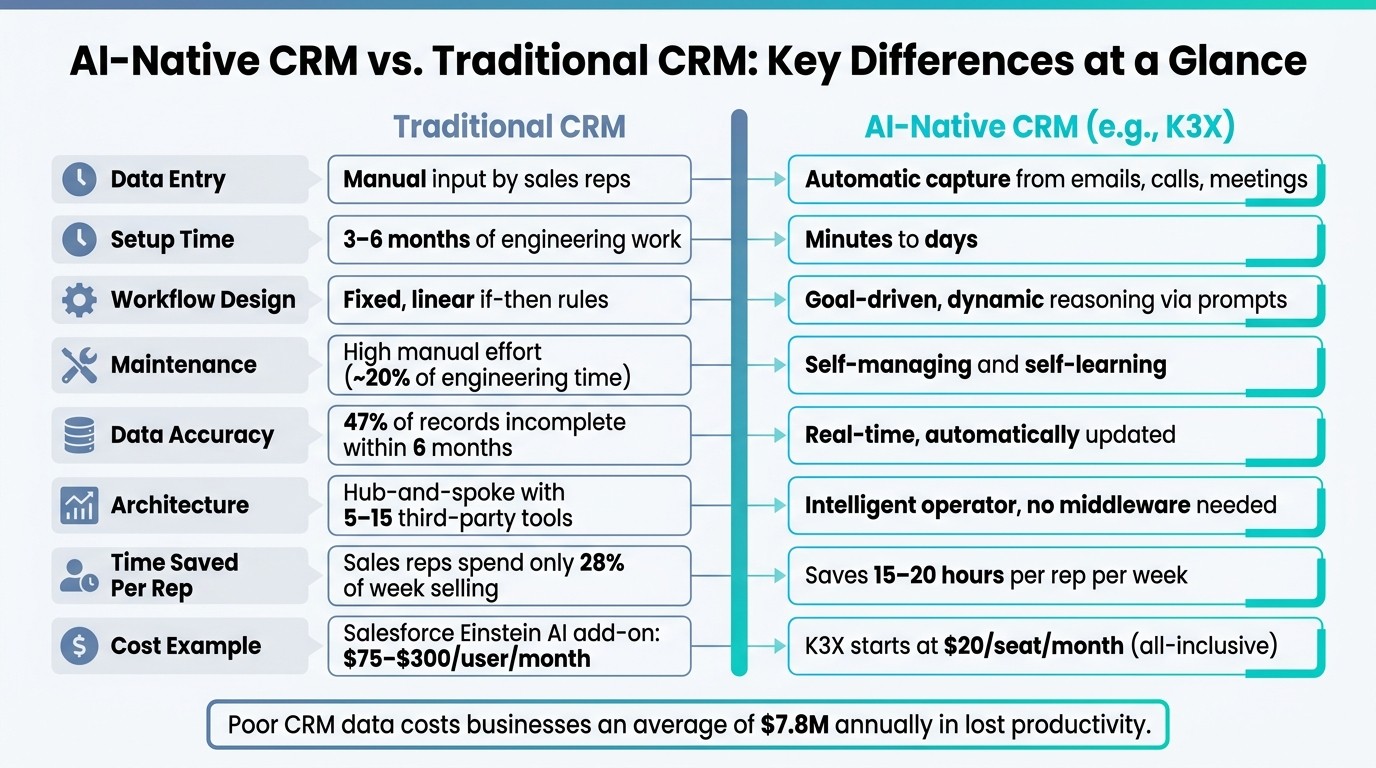
AI-Native CRM vs. Traditional CRM: Key Differences at a Glance
AI CRM vs Traditional CRM: What's the Difference?
How Traditional CRM Integration Works
Traditional CRM integration revolves around a straightforward concept: connect your tools and define workflows. But here’s the catch - manual processes often falter, leading to inefficiencies and breakdowns.
Common Integration Patterns
There are three main approaches to traditional CRM integration:
Point-to-point integrations: These involve custom coding to connect specific systems. While this method offers control, it’s resource-intensive, taking 3–6 months to implement and consuming around 20% of engineering time for ongoing maintenance [9].
Middleware tools: Platforms like Zapier and MuleSoft simplify integration with visual workflows, allowing non-technical users to connect apps quickly. However, these tools struggle with large data volumes, complex mappings, and workflows that deviate from their original design [9].
ETL (Extract, Transform, Load) processes: ETL handles bulk data transfers between systems but demands robust infrastructure to manage rate limits, token refreshes, and error handling [9].
These methods rely heavily on manual processes and lack the adaptability of AI-native systems. Most traditional setups integrate 5 to 15 third-party systems, each introducing potential failure points [8].
Strengths and Limitations
Platforms like Salesforce and HubSpot bring mature ecosystems, extensive partner networks, and enterprise-grade compliance certifications (e.g., SOC 2, GDPR, HIPAA) [3]. They’re well-suited for organizations with stable workflows and dedicated IT teams.
But here’s the downside: these systems struggle when sales activity veers off plan. For instance, if a rep forgets to log a call or update a deal stage, data quality deteriorates. As Customermates aptly noted:
"Traditional CRM adoption fails for one reason: salespeople do not update records." - Customermates [4]
This heavy reliance on manual input leads to compounding data issues. The rigid data models - structured around fixed objects like contacts, companies, and deals - fail to reflect the dynamic, non-linear nature of real-world relationships [3][8].
Understanding these challenges sets the stage for exploring how AI-native systems, like K3X, address these inefficiencies with automated, adaptive solutions.
Comparison Table: Traditional Integration Traits vs. Business Impact
Trait | Technical Characteristic | Business Impact |
|---|---|---|
Manual Data Entry | Relies on human input for updates and syncs | Pipeline degradation; sales reps spend ~28% of their time selling [4][7] |
Rigid Data Models | Fixed objects with static fields | Struggles to adapt to fluid, real-world relationships [8] |
Point-to-Point Logic | Hard-coded connections between tools | High maintenance; ~20% of engineering time lost to upkeep [9] |
Middleware Reliance | Tools like Zapier or MuleSoft | |
Reactive Architecture | Depends on manual triggers or queries | Delayed insights; missed opportunities in at-risk deals [7] |
This breakdown highlights the limitations of traditional CRM integration, paving the way to explore how AI-driven solutions bring a smarter, more efficient alternative.
How AI-Native CRM Integration Works
Core Principles of AI-Native Integration
The key shift between AI-native and traditional CRM systems lies in their architecture. Traditional CRMs rely on adding AI to existing workflows, while AI-native platforms make AI the core foundation. This means AI drives data capture, movement, and actions right from the start [4].
Instead of depending on manual input, AI-native systems handle tasks automatically. They capture and enrich data, update deal stages, flag risks, and even suggest next steps - all without human intervention. For example, these platforms can identify stalled opportunities or surface deal risks before you even notice [1][6].
"The difference shows up immediately: a legacy CRM asks you to fill fields; an AI-native CRM reads your emails, joins your calls, and fills those fields itself." [4]
This proactive approach makes AI-native CRMs vastly different from their traditional counterparts, which are reactive by design. By automating these processes, AI-native systems fundamentally change how CRMs deliver value.
Outcome-Based vs. Workflow-Based Design
AI-native CRMs take automation a step further by focusing on outcomes instead of rigid workflows. Traditional CRMs depend on predefined sequences of steps, triggers, and conditions. If something unexpected happens, the workflow can break or stall entirely.
In contrast, AI-native platforms like K3X are built to adapt in real time. You simply define your goal with a prompt, and the system handles the rest - from follow-ups to pipeline updates to team coordination. This adaptability ensures the system keeps functioning even when things don’t go as planned.
By removing manual tasks, AI-native CRMs can save 15–20 hours per rep each week [1]. That’s time better spent on closing deals rather than managing software.
Laurent Bouzon, Founder & CEO of SymbiozAI, captured this evolution perfectly:
"The choice is no longer between Salesforce and HubSpot. The choice is between a tool that waits for you to fill it and a system that works while you sell." [6]
Comparison Table: Traditional vs. AI-Native Integration Elements
Here’s a side-by-side look at how AI-native CRMs like K3X redefine CRM integration:
Element | Traditional CRM Integration | AI-Native CRM (e.g., K3X) |
|---|---|---|
Primary Driver | Human operator (manual input) | Autonomous AI agents |
Design Philosophy | Workflow-based, linear steps | Outcome-based, goal-driven |
Data Entry | Manual logging and updates | Automatic capture |
Logic Structure | Fixed "if-then" rules | Dynamic reasoning via prompts |
System Role | Passive record-keeping | Active operations engine |
Response to Deviations | Workflow halts or breaks | Recalibrates in real time |
Setup Time | Weeks to months of setup | Configured in minutes |
Maintenance | Requires manual tweaking | Self-learning and adaptive |
This comparison highlights how AI-native systems transform CRM from a passive tool into an active, intelligent assistant.
AI-Native CRM vs. Traditional Integration: A Direct Comparison
Integration Architecture and Complexity
Traditional CRM systems often rely on a hub-and-spoke model, where a central platform connects with 5–15 third-party tools like Zapier, Make, or custom middleware to manage data flow. Each of these connections requires individual setup, adding layers of code, testing, and an increased risk of failures. On average, fully deploying a traditional integration takes 3 to 6 months of engineering work [10].
AI-native platforms, such as K3X, operate differently. Instead of merely acting as a hub that shuffles data between tools, K3X acts as an intelligent operator - managing tasks like follow-ups, pipeline updates, team coordination, and data capture directly within the platform. This eliminates the need for external connectors and allows teams to go live in minutes to days [2].
"Most systems are linear. They follow fixed steps - and if something unexpected happens, the flow breaks... K3X works on goals." - Mykyta Samusiev, Co-Founder & CEO, K3X [2]
This streamlined design not only simplifies operations but also improves overall data quality and scalability.
Data Quality and Scalability
Another key distinction is how these systems handle data. Traditional CRMs often struggle with record accuracy - 47% of records become incomplete within six months, and accuracy rates typically fall below 80% [6] [10]. This leads to inefficiencies, with sales reps spending about 30% of their time cleaning and updating data instead of focusing on sales [8].
AI-native platforms tackle this problem with automated, real-time data capture. Emails, calls, and meetings are logged automatically, ensuring records stay accurate without manual effort. Over time, these systems learn and improve, maintaining high data quality while scaling seamlessly.
Comparison Table: Traditional Strategy vs. AI-Native CRM (K3X)
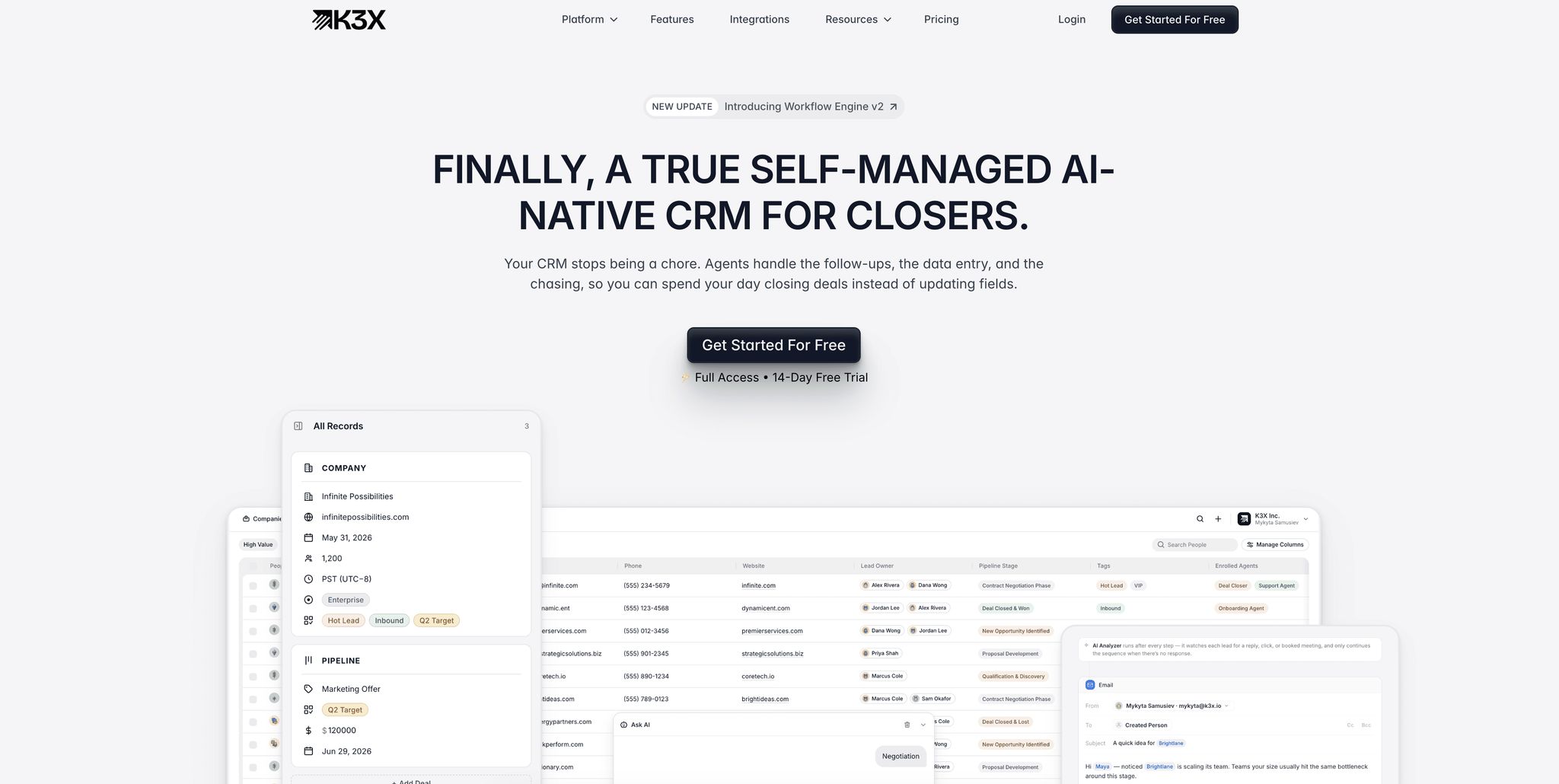
Here’s a side-by-side breakdown of the differences:
Factor | Traditional Integration Strategy | AI-Native CRM (K3X) |
|---|---|---|
Setup Time | 3–6 months [10] | Minutes to days [2] |
Architecture | Hub-and-spoke with 5–15 third-party tools [8] | Intelligent operator, no middleware needed [2] |
Data Freshness | 47% incompleteness within six months [6] | Real-time, automatically updated [7] |
Overhead | 39% of IT time spent on custom integrations [10] | Self-managed, minimal IT involvement [2] |
Adaptability | Breaks with unexpected inputs; requires manual fixes | Adjusts dynamically based on goals [2] |
Outcome Alignment | Reactive; relies on historical reports [1] | Proactive; predictive signals and automated actions [1] |
The differences are more than technical - they’re financial. Poor data management costs businesses an average of $7.8 million annually in lost productivity [10]. Additionally, 44% of companies estimate they lose over 10% of their revenue due to low-quality CRM data [10]. By reducing inefficiencies and safeguarding revenue, AI-native platforms like K3X offer a clear advantage.
Building a CRM Integration Strategy That Lasts
Design Principles for Long-Lasting Integration
One common pitfall in building a CRM integration strategy is focusing only on current workflows while ignoring future data needs. A strategy that stands the test of time isn’t just about linking tools - it’s about creating a scalable foundation that can grow alongside your business.
Here are three key principles to guide your approach:
API-first design: Ensure every integration communicates through well-documented, stable APIs instead of relying on fragile custom scripts.
Loose system coupling: Avoid tightly binding your CRM to other tools, which can lead to system-wide failures when one component changes.
AI-ready data models: Relying on manual data entry can quickly degrade data quality. Instead, invest in a self-healing data layer that enriches records automatically based on real interactions [11].
By embedding these principles into your integration strategy, you’ll lay the groundwork for a system that evolves with your needs. From there, the next step is transitioning from traditional CRM systems to AI-native solutions.
Moving From Traditional to AI-Native CRM
Switching to a new CRM platform doesn’t have to be overwhelming if you take it step by step. A phased migration ensures minimal disruption while allowing you to identify and address potential gaps along the way.
Here’s a simple roadmap for a smooth transition:
Migration Step | What to Do |
|---|---|
1. Export | Start by exporting contacts, organizations, and deals as CSV files. |
2. Map | Match the field names from your old CRM to the schema of the new system. |
3. Stage | Import data in a specific order: Contacts first, followed by Organizations, and finally Deals with linked records. |
4. Parallel Run | Run both systems side by side for two weeks to catch any issues. |
5. Archive | Keep the old CRM accessible for 90 days before retiring it. |
Source: [4]
This approach worked wonders for Ruby Capital Group, a 125-person funding firm. They migrated to K3X in December 2025 and completed their automation setup in just two days. The results? A 70% reduction in follow-up time and a 3x increase in ticket resolution speed [2].
After migration, shift your team’s focus from manual data entry to interpreting AI-driven insights [1]. Let the system handle the tedious logging, so your team can concentrate on making data-driven decisions.
How to Evaluate a CRM for Long-Term Fit
Once you’ve migrated, it’s crucial to assess whether your CRM can support your team’s growth over the long haul. Not all platforms marketed as "AI-powered" are created equal. The real distinction lies in whether AI is just an add-on feature or the foundation of the platform itself.
Laurent Bouzon, Founder & CEO of SymbiozAI, puts it best:
"The question is no longer 'what AI features does it offer?' The right question is: 'Is the AI a feature, or is it the architecture?'" - Laurent Bouzon [5]
To evaluate your CRM’s long-term potential, ask yourself these questions:
Can the AI handle entire workflows independently, such as drafting follow-ups, updating pipeline stages, or flagging risky deals? Or does it simply suggest actions that still require manual input?
Does the system learn from your successes and failures, or does it apply generic logic to every account?
Is the pricing model flexible, scaling with usage instead of locking you into costly fixed tiers?
Cost is another critical factor. Legacy systems with AI add-ons can be pricey. For example, Salesforce Einstein’s AI features cost $75–$300 per user/month on top of base fees. In contrast, K3X starts at $20 per seat/month, including 1,000 AI credits and unlimited integrations [2][11]. For teams seeking robust AI capabilities without enterprise-level expenses, that price difference can make a huge impact.
Conclusion
The shift from manual to autonomous CRM systems is reshaping how businesses operate at their core.
The difference between traditional CRM platforms and AI-native systems isn't just about technology - it's about purpose. Traditional CRMs were designed to store information, while AI-native platforms like K3X are built to act on it. This fundamental change boosts team efficiency, ensures data accuracy, and gives sales teams more time to do what they do best: sell.
"Traditional CRMs were designed to store. AI-native CRMs were designed to act." - Akshay Krishnan, Author, DelveAnt [7]
Consider this: sales reps dedicate only 28% of their week to selling, with time-consuming data entry eating into their productivity. AI-native CRMs can reclaim 15–20 hours per week per rep by automating these repetitive tasks, delivering a structural improvement that directly impacts performance [1][7].
What sets AI-native CRMs apart is their ability to grow more valuable over time. By saving those 15–20 hours weekly and continuously adapting to customer behavior, these systems provide a long-term edge that traditional platforms simply can't match [7][11]. While traditional CRMs hit a ceiling once configured, platforms like K3X evolve, building proprietary intelligence that becomes sharper and more effective with use.
"The question is whether your organization will lead that transformation or react to it." - Coherence Team [1]
Investing in the right foundation means avoiding the headaches of constant updates, expensive add-ons, and workarounds. With AI at its core, a system like K3X works alongside your team, empowering them rather than replacing them.
FAQs
What makes a CRM truly AI-native?
A CRM qualifies as AI-native when artificial intelligence is seamlessly integrated into its very foundation, rather than being tacked on as an afterthought. These systems can automatically capture, process, and enhance data in real time. They don't stop there - they also provide actionable insights and suggest next steps.
An AI-native CRM goes a step further by allowing users to issue natural language commands, automating workflows without manual intervention. Over time, it learns and evolves, adapting to the organization’s needs. This shift turns the CRM from a passive tool into an active collaborator, helping businesses boost productivity and drive revenue.
How does K3X connect my tools without middleware?
K3X simplifies the process of connecting tools like email and phone by cutting out the need for middleware. Forget about dealing with complicated migrations or setting up custom integrations - just outline your goals using prompts, and K3X takes it from there. It seamlessly manages the integration logic behind the scenes, aligning with your objectives instantly, all while keeping your current workflows running smoothly.
What data should I migrate first to K3X?
When switching systems, the first step is to move your active leads, current customers, and recent activity history to ensure your sales processes stay uninterrupted. It's essential to keep the context of your relationships intact - things like notes, emails, and meeting records are crucial for teams that rely on building strong connections.
With tools like K3X, this process becomes easier. It automatically logs communications and keeps records updated, saving time and reducing manual effort. As for older or closed deals, only migrate them if they offer strategic insights or value. This approach keeps your transition organized and focused.