Sales Automation
•
K3X vs Salesflare: Two Automation-First CRMs Compared
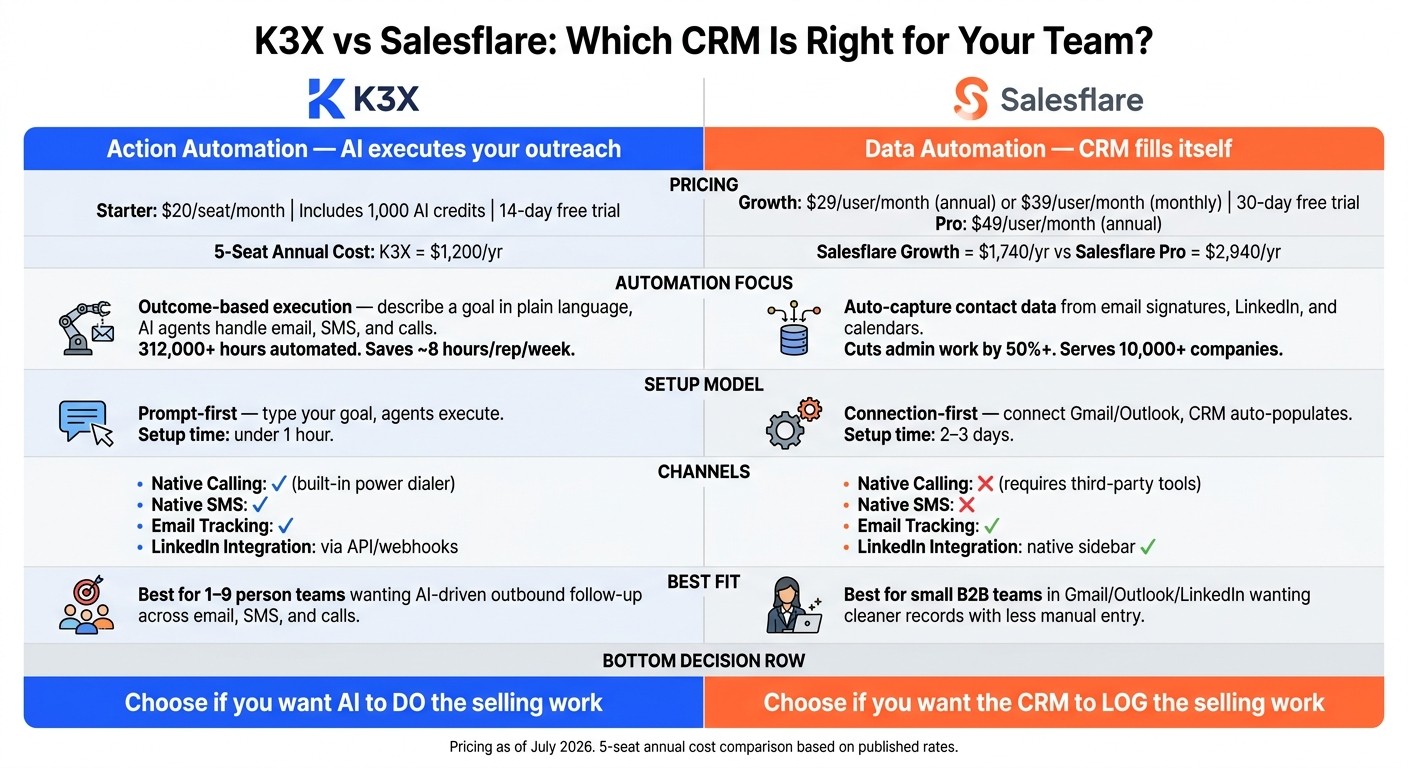
K3X runs follow‑ups across email, SMS, and calls; Salesflare reduces CRM admin by auto‑filling contacts and activity.

My take: pick K3X if I want the CRM to do follow-up work across email, SMS, and calls. Pick Salesflare if I want the CRM to cut admin work by auto-filling contacts, companies, and activity history.
The split is simple: K3X focuses on sales execution, while Salesflare focuses on recordkeeping with less manual entry. For a small U.S. team, that difference matters more than feature count.
I’d frame it like this:
K3X fits a 1–9 person team that wants prompt-based outreach help and built-in calling/SMS at $20 per seat/month.
Salesflare fits a small B2B team that works from Gmail, Outlook, and LinkedIn and wants cleaner CRM data starting at $29 per user/month billed annually.
If I need deep reporting, routing, or admin controls, I’d look past both tools.
What stands out most is where the automation sits. Salesflare says it cuts admin work by 50%+ and serves 10,000+ companies. K3X says it has automated 312,000+ hours as of July 2026 and saves reps about 8 hours per week. Those are different promises, aimed at different sales motions.
I would not choose based on “which CRM has more AI.” I would choose based on which part of my team’s week I want to remove:
manual CRM updates
contact and company lookup
outbound follow-ups
calling and texting steps
If most lost time comes from logging work, Salesflare is the safer pick. If most lost time comes from getting reps to send the next message or make the next call, K3X is the better fit.
A few numbers make the trade-off clearer:
K3X Starter:$20/seat/month
Salesflare Growth:$29/user/month annually or $39/user/month monthly
Salesflare Pro:$49/user/month annually
5-seat annual cost:$1,200 for K3X vs. $1,740 for Salesflare Growth
I’d also weigh channel needs early. K3X includes native calling, SMS, and a power dialer, while Salesflare does not include native calling or SMS in the core product. If my team sells by phone or text, that alone can settle the choice.
There’s also a setup difference. K3X uses a prompt-first integration model, where I describe the outcome I want and the agents run it. Salesflare uses a connection-first model, where I connect inboxes and calendars and let the system populate the CRM.
That leads to a simple buying rule:
choose K3X for action automation
choose Salesflare for data automation
Bottom line: if I want a more established SMB CRM with cleaner records and less typing, I’d choose Salesflare. If I want the CRM to help run outbound follow-up across more channels for a lower entry price, I’d choose K3X.
K3X vs Salesflare: CRM Comparison for Small Teams (2026)
TL;DR: K3X or Salesflare - which one should you pick?

Pick K3X if you have a 1–9 person team and want AI agents to handle follow-ups across email, SMS, and calls based on plain-language prompts. It includes built-in calling and SMS for $20 per seat/month [3].
Pick Salesflare if you want an established SMB CRM that auto-fills contact and company data and keeps a standard deal pipeline with less manual entry. Salesflare says it cuts admin work by more than 50% [4], while K3X case studies show it saves reps about 8 hours per week [1].
The table below compares pricing, setup, automation, and integrations.
At a glance: K3X vs Salesflare side by side
K3X is built to do sales work. Salesflare is built to log sales work with less manual entry. For most teams, that’s the clean split: choose K3X if you want the CRM to send follow-ups and push deals ahead, and choose Salesflare if you want the system to pull in data and keep records tidy.
K3X | Salesflare | |
|---|---|---|
Starting price | From $29/user/month billed annually [4] | |
Free trial | 14 days [1] | 30 days on the Pro tier [4] |
Free tier | None | None |
Setup model | Prompt-driven: describe the outcome; agents execute. | Connection-driven: connect Gmail or Outlook; the CRM auto-populates. |
Who configures it | The user, through plain-language prompts | Mostly the software after inbox/calendar connections; Enterprise adds staff-assisted migration |
AI/automation focus | Outcome-based execution across email, SMS, and calls | Data capture, enrichment, and email sequences |
Calling & SMS | Native calling and SMS, plus a built-in power dialer | No native calling or SMS in the core product |
Integrations and ecosystem | Unlimited integrations via webhooks and standard APIs, but a smaller native catalog than incumbents | Deep Gmail, Outlook, LinkedIn, and Apollo integrations; 5,000+ via Zapier [5][10] |
Best for | Small teams that want AI to follow up and move deals forward automatically | Small B2B teams that want less manual entry |
The cost gap is small at the entry level, but the day-to-day tradeoff is not. K3X starts at $20 per seat per month and includes 1,000 AI credits [1][3], while Salesflare starts at $29 per user per month when billed annually [4].
Setup also feels different right away. K3X asks the user to write prompts and tell the system what outcome they want. Salesflare leans on inbox and calendar connections, then fills in contact and account data on its own.
That difference carries into daily work. K3X says reps save about 8 hours per week [1]. Salesflare says teams cut admin work by more than 50% and notes that it serves 1,500+ B2B teams [4][5].
The sharpest split shows up in communication channels. K3X includes calling and SMS in the base product, along with a built-in power dialer. Salesflare stays focused on email, so teams that depend on voice or texting usually bring in separate tools.
How does K3X pricing compare to Salesflare for small teams?
K3X costs less for small teams. Its Starter plan is $20 per seat/month, while Salesflare starts at $29/user/month on Growth with annual billing and $49/user/month on Pro [3][4].
At 5 seats, that comes to $1,200/year for K3X, $1,740/year for Salesflare Growth, and $2,940/year for Salesflare Pro [3][4]. For a lean sales team, that gap is hard to ignore.
K3X does come with a usage limit to watch. Each seat includes 1,000 credits per month for AI, calling, and SMS, so teams with high outreach volume need to keep an eye on usage to avoid running out before month-end [3]. Salesflare handles contact capture on lower tiers, but multi-step workflows and tighter permission controls begin at Pro [4][8].
Price is only part of the picture. Setup time often decides whether a small team will stick with a CRM day to day.
The practical difference is not just the monthly rate. It’s how fast each plan becomes usable for the work your team already does.
Pricing table: K3X vs Salesflare vs other CRMs
K3X (Starter) | Salesflare Growth | Salesflare Pro | Salesflare Enterprise | |
|---|---|---|---|---|
Monthly price (annual billing) | $20/seat | $29/user | $49/user | $99/user |
Monthly price (monthly billing) | $20/seat | $39/user | $64/user | $124/user |
Trial length | 14 days | 30 days | 30 days | - |
Email sequences | Prompt-driven | Single-step only | Multi-step workflows | Multi-step workflows |
Calling & SMS | Included via credits | Manual or integrated | Manual or integrated | Manual or integrated |
Credits | 1,000 AI credits per seat | 5 lead credits/team | 100 lead credits/team | Custom |
Activity history | 90 days | Unlimited | Unlimited | Unlimited |
5-seat annual cost | $1,200 | $1,740 | $2,940 | $5,940 |
Minimum team size | 1 | 1 | 1 | 5 users |
The biggest jump shows up when a Salesflare team needs automation beyond basic sequences. Moving from Growth to Pro adds $1,200 per year for a 5-seat team [4][8].
How fast can K3X and Salesflare be set up, and who runs them?
K3X is faster to launch. A founder or sales rep can describe the outcome they want and start using it in under an hour [1]. Salesflare takes longer, usually 2–3 days, because it needs inbox connections, pipeline setup, and sequence setup before the team can use it end to end [6][7].
The main difference is where the setup work lives. In K3X, the user gives the system a goal, such as following up with every inbound lead within 5 minutes until they book a meeting or decline, and the AI agent runs that workflow on its own [1][2]. In Salesflare, the team connects Gmail or Outlook through OAuth, lets the platform pull contact data from email signatures and LinkedIn profiles, and then sets up pipeline stages in a Kanban view [5][6].
That setup model changes what happens after launch too. K3X puts less of the process on the user, so teams can start fast without building workflows step by step [1][2]. Salesflare is still quick by CRM standards, but it asks users to do more upfront configuration before automation is in place [6][7].
Who owns setup in each tool?
K3X is usually owned by the founder or rep using it day to day. It does not need a dedicated CRM admin for initial setup or routine changes [1][2]. That matters for small sales teams that want to move fast without handing the work to ops.
Salesflare is usually set up by a manager or an ops-leaning teammate. That person often handles account connections, pipeline buildout, permissions, and sequence configuration for the rest of the team [4][6]. So while Salesflare is lighter than a large enterprise CRM, it still has more structure than K3X’s prompt-first setup model.
How do K3X and Salesflare differ in automation and AI?
Salesflare automates data capture. K3X automates sales execution. Salesflare pulls contact details from email signatures and LinkedIn, then logs meetings and calls without manual entry. K3X takes a different path: users describe an outcome in plain language, and AI agents carry out follow-ups, send messages, and move deals across email, SMS, and calls.
That’s the main split. Salesflare helps reps spend less time on CRM upkeep, while K3X goes further and handles parts of the selling motion itself.
In day-to-day use, Salesflare still depends on reps to run outreach. It logs activity and flags inactive deals, but the rep still needs to act. K3X can take a plain-language goal and execute against it, with a Human Review Layer that lets users approve drafted emails and updates before anything goes out.
There’s also a difference in control model. Salesflare is rules-based. K3X runs on AI agents, which means teams need to watch AI credit usage as part of normal operations.
K3X has automated more than 312,000 hours of work for users [1]. Salesflare users report cutting admin work by more than 50% [4]. For sales and revenue teams, that gap starts to matter when you look at integrations and channel coverage.
How do both tools compare to legacy CRM automation?
Legacy CRMs still lean on workflow builders and if-then logic. Salesflare cuts down data entry, but it still uses user-built sequences and suggested tasks. K3X removes the builder and lets users set the goal in plain language, then the agents handle execution.
Automation dimension | K3X | Salesflare | Legacy CRMs (Salesforce, HubSpot, Pipedrive, Zoho) |
|---|---|---|---|
Automation focus | Executing the selling motion | Eliminating data entry | Manual workflow management |
Setup | Plain-language prompt | User-built email sequences | If-then builders and branch logic |
Response handling | Automatically adapts to prospect replies | Rep acts on suggested tasks | Usually requires manual rules |
Admin required | No | Light ops setup | Usually yes |
Legacy CRMs such as Salesforce, HubSpot, Pipedrive, and Zoho still ask teams to map steps in a builder, define branches, and maintain the logic over time. Salesflare trims that burden by filling the CRM for you, but it does not remove the need for rep action. K3X shifts the model from workflow design to goal-based execution.
The next trade-off is ecosystem depth, including integrations, calling, and SMS.
How do K3X and Salesflare compare on integrations, calling, SMS, and ecosystem maturity?
Salesflare has the deeper native integration catalog. K3X is more flexible through APIs and webhooks, but it has fewer prebuilt apps.[1][3][5][8]
For most buyers, the decision comes down to this: do you want native channel coverage, or do you want custom connectivity? Salesflare connects natively with Gmail, Outlook, and LinkedIn through inbox sidebars. K3X leans on APIs and webhooks for custom connections instead.[1][3][5][8]
On calling and SMS, K3X covers more out of the box. It includes a built-in power dialer and native SMS outreach, with 1,000 credits per seat per month shared across AI, calling, and SMS usage.[3]
Salesflare does not include native calling or SMS. Teams that need those channels have to add tools such as Aircall or CloudTalk.[9] That makes K3X a better fit for call- and text-heavy outreach, while Salesflare fits teams that work mainly in email and LinkedIn.
Feature | K3X | Salesflare |
|---|---|---|
Native calling | Yes - built-in power dialer [3] | No - requires third-party calling tools [9] |
Native SMS | Yes [3] | No [9] |
Email tracking | Yes [3] | Yes - includes opens, clicks, and website visits [4] |
LinkedIn integration | Native sidebar [8] | |
App catalog | ||
Founded | Recent AI-native product [1] | 2014 [8] |
Trade-offs buyers should know before deciding
Salesflare is the more mature product, which cuts implementation risk for teams that care about documentation and track record. It was founded in 2014, serves 10,000+ companies, and has a 4.8/5 G2 rating from 296 reviews.[8]
Its Enterprise tier also includes a dedicated account manager and custom onboarding.[4] That matters if your team wants more hands-on support during setup.
K3X is newer, so the risk is higher in a few areas. Its native app catalog is smaller, its documentation is still changing, and teams should watch AI credit usage during high-volume months.[3]
K3X is also not built for enterprises that need 100+ seats or deep admin controls. Salesflare's practical ceiling is around 50–100 seats before many teams outgrow it, but within that range it is more established and better documented.[5][6] These differences shape the choice blocks below.
Who should pick K3X, who should pick Salesflare, and when do other CRMs make more sense?
Pick K3X if you want AI to run outreach. Pick Salesflare if you want the CRM to log work for you. Pick HubSpot, Salesforce, Close, Pipedrive, Zoho, monday.com, or Attio when reporting, controls, or routing needs go past what these two tools handle well.
This choice mostly comes down to how your team works day to day. Some teams want to type a goal and let the system act. Others want a CRM that stays out of the way and keeps records clean. Once you need stricter controls or more layered workflows, larger platforms start to make more sense.
Choose K3X if your team wants outcome-based automation
K3X is a fit for small teams that want AI to execute outreach from a plain-language goal. It is aimed at teams of 1–9 people that want to say something like "follow up every inbound lead within 5 minutes until they book or decline" and let the system handle email, SMS, and calls. [1][3]
That is the core difference: K3X skips most workflow design. Instead of building step-by-step sequences, the team defines the outcome and the platform handles the motion directly. Its built-in power dialer and native SMS also reduce the need for separate calling and texting tools. [1][3]
The trade-off is pretty clear. K3X is a newer product, its native integration list is smaller, and teams need to keep an eye on AI credit use during high-volume months. It is also not built for 100+ seats or deep admin governance. [3]
Salesflare sits on the other side of that trade. It does less on the execution side and more on recordkeeping.
Choose Salesflare if you want a mature SMB CRM with less admin work
Salesflare is the better fit for small B2B teams that live in Gmail, Outlook, and LinkedIn and want the CRM to handle logging and contact capture with less manual work. Users report cutting admin work by more than 50%. [4][5][6]
The product feels familiar fast. Its Kanban pipeline matches what most reps already know, so teams usually do not need to relearn how to move deals through stages. Sequences and outreach still need to be set up manually, which gives reps more direct control than K3X’s prompt-led model.
Salesflare is also the more mature SMB CRM of the two. Its Growth plan starts at $29 per seat per month with annual billing. [4][8]
Once a team needs stronger reporting, admin controls, or more layered lead routing, the decision usually moves past both tools.
Choose Salesforce, HubSpot, Pipedrive, Zoho, monday.com, Close, or Attio if you need more depth
Choose these larger platforms when you need deeper reporting, tighter governance, or more complex routing. At that point, the question is less about simple ease of use and more about how much structure your sales operation needs.
HubSpot is a better fit when inbound marketing automation is part of the stack. It offers a free permanent CRM tier and a larger app ecosystem, though costs can climb as you add more sales and marketing hubs. Salesforce fits high-volume transactional sales teams that need custom objects, stricter governance, and enterprise-scale workflows. [5][8]
Close is worth a look for inside sales teams making 30+ calls per day. Its native Power Dialer and AI voice agent, Chloe, handled more than 818,000 calls for 306 businesses during beta before launching on all plans in June 2026. Pipedrive works well for teams that want heavy visual pipeline customization without leaning too hard on automation. These platforms usually take more setup and admin time, but they offer more reporting depth and a broader integration range than K3X and Salesflare. [5][8][9]
The table below compresses the decision into team type, automation style, and operating burden.
K3X | Salesflare | HubSpot / Salesforce / Close | |
|---|---|---|---|
Typical fit | 1–9 people who want AI-driven outreach | Small B2B teams focused on auto-capture and logging | Larger, more complex, or call-heavy teams |
Automation style | Prompt-to-agent, outcome-based | Auto-capture, activity-based | Rule-based, workflow-driven |
Built-in calling & SMS | Yes | No native calling or SMS | Varies by tool |
Decision trigger | Want AI to execute the selling motion | Want the CRM to fill itself and keep records clean | Need deeper reporting, governance, or routing |
How hard is it to move from Salesflare to K3X?
For a small team, the move from Salesflare to K3X is usually a CSV export/import job plus a pipeline rebuild in K3X [6][1]. The biggest change is not the data transfer itself. It’s the shift from Salesflare’s sequence-based setup to K3X’s prompt-driven automation [1][2].
Start by exporting your Salesflare data before you cancel the account. Once you cancel, access stops right away, so export contacts, companies, opportunities, and activity history in CSV first [6].
What changes during migration from Salesflare to K3X?
After import, map Salesflare fields into K3X’s single-record structure and remove duplicate or unused custom fields [1][2]. Salesflare’s sequence logic does not transfer into K3X, so you’ll need to rebuild the pipeline inside K3X’s Outcome Pipelines [1][2].
The work usually breaks into four parts:
CSV export
Field mapping
Pipeline rebuild
Prompt validation
In K3X, the operating model changes. Instead of rebuilding every branch from a Salesflare sequence, you describe the goal in plain language - for example, “follow up until a meeting is booked” - and the AI agents handle the steps from there [1][2].
For the first week after the move, use the Human Review Layer to approve drafted emails and actions before anything is sent or updated live [2]. That gives the team a simple control point while you check timing, message quality, and whether the new prompts are doing what you expect.
Conclusion: K3X or Salesflare - which is the better pick in July 2026?
Pick K3X if your main need is follow-up execution. Pick Salesflare if your main need is cleaner records and less manual data entry. That’s the core split, and it affects cost, setup time, and which channels your team can use day to day.
K3X is the lower-cost starting point. Salesflare gives buyers more room to test a more established CRM before making a longer-term call. In plain terms, Salesflare is the safer CRM choice, while K3X leans more into automation for outbound work.
If your team cares most about getting sequences, follow-ups, and outreach moving, go with K3X. If your team cares more about contact capture, record cleanup, and keeping the CRM up to date with less effort, go with Salesflare.
The FAQ below answers the buyer questions that usually come up first.