Sales Automation
•
How AI Improves Task Prioritization in Sales
Rank leads, automate admin work, and boost rep productivity and revenue with AI-driven prioritization and faster responses.

AI-powered tools are transforming sales by saving time, improving lead prioritization, and increasing revenue per representative. Sales reps often spend over 20 hours weekly on administrative tasks, leaving less than 30% of their time for revenue-generating activities. AI changes this by analyzing customer behavior, ranking leads in seconds, and automating repetitive tasks. For example, contacting a lead within 5 minutes makes conversion 21 times more likely, and businesses using AI see a 60% boost in capacity and a 30% increase in revenue per rep.
Key Benefits of AI in Sales:
Smarter Lead Allocation: AI assigns leads based on data like territory and expertise, reducing manual review time from 10–30 minutes to just 2–3 seconds.
Faster Responses: AI flags high-priority leads using real-time signals and routes them to reps immediately, boosting live conversations by up to five times.
Data-Driven Decisions: AI dynamically adjusts lead priorities and predicts deal outcomes with up to 85% accuracy after 6–12 months of processing.
Companies like Ruby Capital Group have seen results in days. After adopting K3X's AI tools, they reduced follow-up time by 70% and tripled ticket resolution speed in just two days. By integrating AI with existing CRMs, defining priority signals, and monitoring results, businesses can streamline workflows and focus on closing deals.
AI isn't just a tool - it's a way to maximize efficiency and revenue in sales.
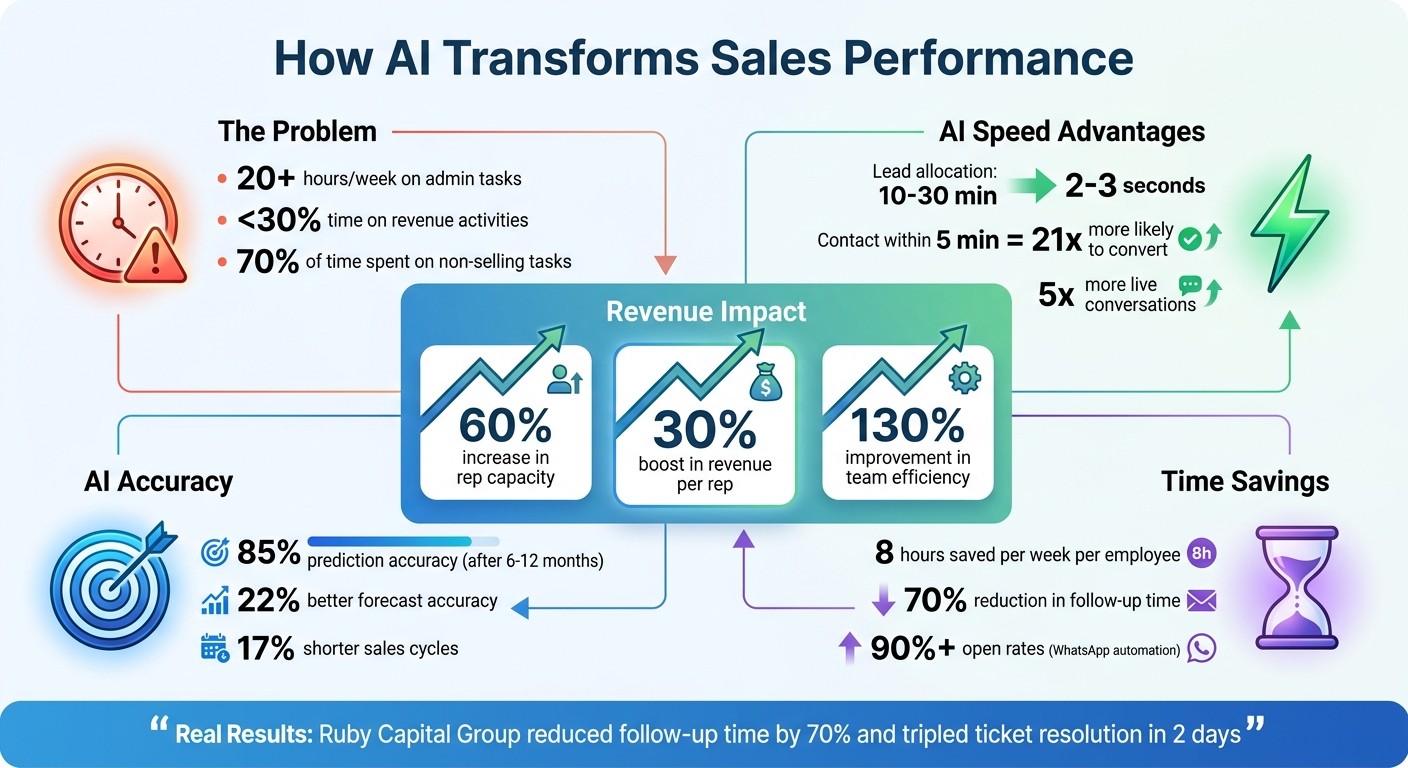
AI Impact on Sales Performance: Key Statistics and Benefits
3 AI Use Cases We Use in Sales Every Day (That Save 10+ Hours/Week)
Benefits of AI-Driven Task Prioritization
AI-driven task prioritization brings three major advantages: smarter resource allocation, quicker responses, and decisions rooted in data.
Better Resource Allocation
AI streamlines how leads are assigned to sales reps by analyzing historical data. It matches leads based on factors like territory, expertise, and workload - cutting out the need for manual reviews, which typically take 10–30 minutes per lead [3]. Instead, AI completes this process in just 2–3 seconds [3]. This allows teams to focus on the top 20–30% of leads that show real buying intent [2][3].
The results speak for themselves. Businesses using AI for prioritization see a 60% increase in capacity per representative [3] and a 30% boost in revenue [3]. On top of that, automated data capture nearly eliminates manual entry errors, which cost companies an average of 15% of their revenue [3]. AI extracts critical insights and sentiment directly from calls and emails, ensuring accuracy and efficiency [3].
Beyond resource allocation, AI significantly reduces the time it takes to respond to high-intent leads.
Faster Response Times
When leads are contacted within 5 minutes, they are 21 times more likely to convert compared to those reached after 30 minutes [3]. AI identifies key signals - like repeated visits to pricing pages - and flags these leads for immediate attention. It routes them to available reps and pauses automated sequences as soon as a lead replies [3].
Companies leveraging AI workflows report up to five times more live conversations and a 130% improvement in team efficiency [3]. Multi-channel approaches, including email, SMS, and WhatsApp, ensure reps can engage leads on their preferred platforms. For example, WhatsApp automation achieves open rates exceeding 90% [3].
On top of quicker responses, AI continuously refines lead prioritization through real-time data analysis.
Data-Driven Decision Making
AI dynamically adjusts lead priorities based on real-time engagement data. For instance, a lead scoring 85 points today might drop to 60 points next month if there’s no activity. This "score decay" logic - typically reducing scores by 25% monthly [3] - helps keep pipelines focused on active opportunities. Over time, lead conversion predictions improve from 60% to 75–85% after 6–12 months of AI-driven data processing [3].
AI-native platforms like K3X take this a step further by automating tasks like logging calls, updating pipeline stages, and planning next steps. This eliminates the need for manual logging, saving employees an average of 8 hours per week [3][1]. Instead of relying on rigid "if-then" rules, these systems adapt to goals in real time, making workflows even more effective [3][4].
How AI Analyzes Data to Prioritize Sales Tasks
AI processes a variety of data sources - like customer conversations, email engagement, calendar updates, website visits, and CRM logs - to identify key buying signals [7]. It combines structured data (such as job titles or company size) with subtle behavioral cues, like visits to pricing pages, forwarding emails to legal teams, or clicking on ROI calculators [8]. For instance, if a prospect repeatedly opens a proposal or mentions budget approval during a call, AI instantly updates task priorities, removing the need for manual adjustments [7]. Platforms like K3X have moved beyond rigid if-then rules, using conversational prompts like “prioritize leads who visited our pricing page twice this week” to handle unpredictable customer behaviors [3]. This foundation enables real-time signal processing and predictive deal scoring to translate insights into actionable steps.
Real-Time Signal Processing
Building on its data analysis capabilities, AI tracks customer interactions as they happen. For example, if someone visits your pricing page twice within 24 hours, the system immediately flags the lead as "Hot" and routes them to an available representative [3]. This quick reaction is crucial for capturing leads when their interest is at its peak.
AI also pulls actionable insights from call transcripts or emails. If a prospect requests a follow-up during a demo, the system creates and schedules that task automatically [7]. It even stops automated outreach campaigns when a lead responds, avoiding redundant communication [3]. A great example of this efficiency is Ruby Capital Group, which implemented K3X's AI tools in December 2025. Within just two days, they reduced manual follow-up time by 70% [3].
Predictive Deal Scoring
In addition to real-time alerts, AI uses predictive deal scoring to assess lead quality. Machine learning models analyze historical win rates, sentiment from interactions, and engagement frequency to assign a probability score to each deal [7][9]. On a 100-point scale, leads scoring 75 or higher trigger immediate follow-ups within two hours, while those scoring below 50 are added to automated nurturing sequences [3]. Over time, these systems improve lead conversion prediction accuracy from an initial 60% to 75–85% after 6–12 months of data analysis [3].
The models also adapt dynamically. If high-scored leads fail to convert, the system recalibrates, deducting points for negative signals to ensure focus stays on the most promising opportunities [3]. Companies using this method often see a 60% boost in sales rep capacity and a 30% increase in revenue per rep [7].
Steps to Implement AI for Task Prioritization in Sales
Integrate AI with Existing CRM and Sales Tools
Start by connecting your AI tools to your current CRM and sales systems. Many AI-powered CRMs, like K3X, can seamlessly integrate with email, phone, and other sales platforms - no need for third-party middleware like Zapier. This setup can have you up and running in just a few hours instead of weeks[1].
Before diving in, audit your CRM data. AI models rely on clean, complete data to generate accurate recommendations. Take time to remove duplicate contacts, standardize field formats, and add missing firmographic details. Incomplete data leads to unreliable results.
To ease into the process, launch a pilot program. Test AI prioritization with one team or a specific sales segment. This lets you measure time savings and conversion improvements before rolling it out across the board.
Define Priority Signals and Business Goals
Set clear, actionable prompts for your AI system. For example, you might instruct it to "Prioritize leads who visit pricing pages twice in a week" or "Follow up with unresponsive leads to book demo calls"[1].
Combine multiple behavioral signals to identify high-intent leads. A single pricing page visit might not mean much, but pair that with an email open and a case study download, and you’ve got a lead worth immediate attention. Create priority tiers using a 100-point scale: leads scoring 75 or higher should get follow-ups within two hours, while those scoring below 50 can move into automated nurturing sequences. Businesses using this approach report a 60% increase in sales rep productivity and a 30% boost in revenue per rep[3].
Once you’ve defined your priority signals and goals, keep an eye on real-time performance to fine-tune the AI's recommendations.
Monitor, Refine, and Scale AI Recommendations
Use live dashboards to track progress, including deal updates, activity summaries, and any bottlenecks[1]. Pay attention to how saved time translates into more qualified meetings and opportunities.
You don’t need to rebuild workflows to adjust AI behavior. Simply update prompts to reflect changing priorities. For instance, if market conditions shift, you can instruct the system to "Focus on leads in the healthcare sector", and it will adjust instantly. Make sure your AI includes "stop on engagement" logic - this ensures automated sequences pause as soon as a lead replies or schedules a meeting[3]. This keeps the process human-centered and avoids over-automation.
K3X offers an adaptive pricing model that grows with your business needs. Plans start at $20 per seat per month and include 1,000 AI credits to get you started[1].
K3X vs Traditional AI Sales Tools: A Comparison
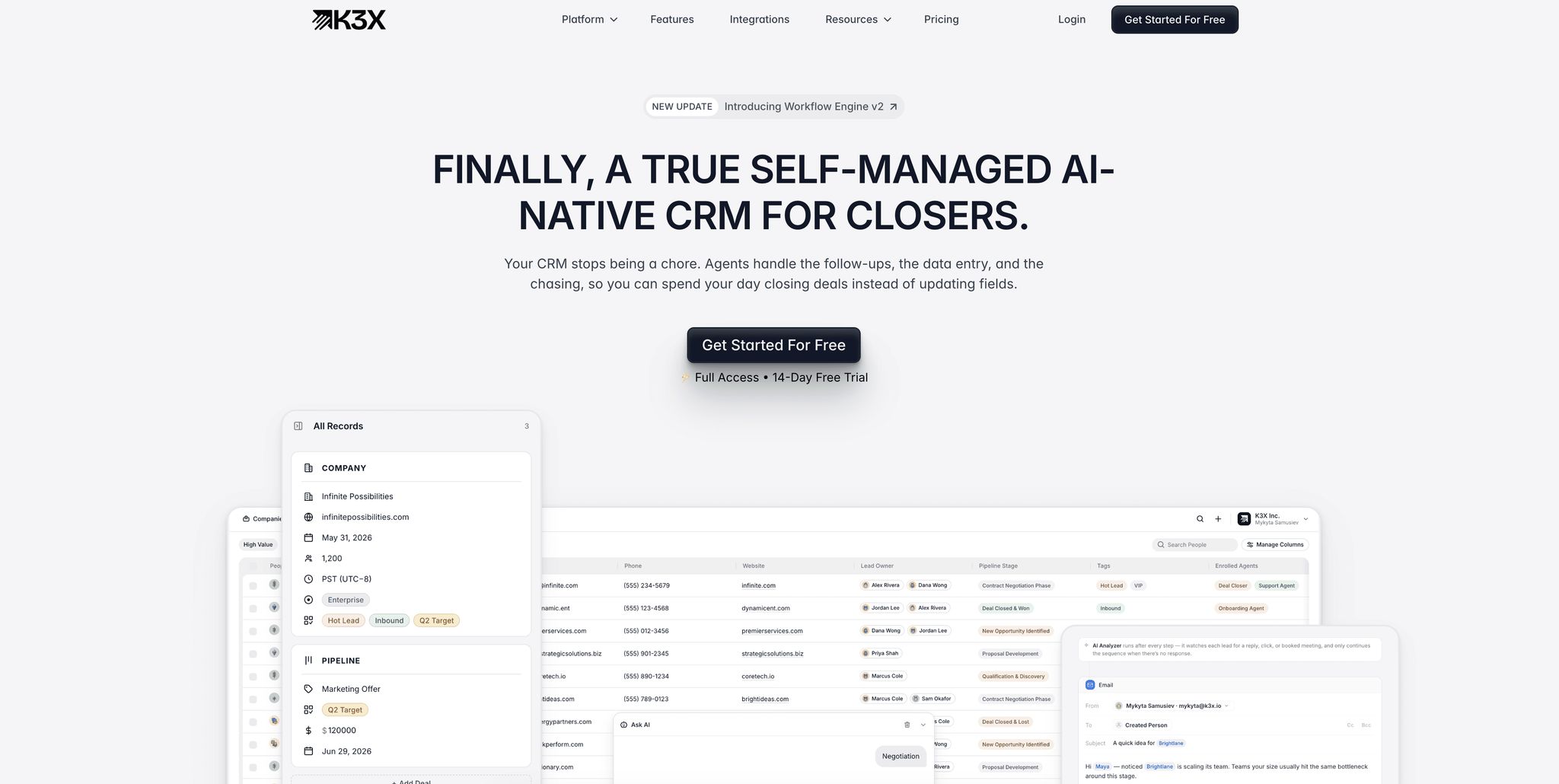
Most AI-driven CRMs rely on rigid, rule-based workflows, while K3X takes a different approach with outcome-focused prompts that adjust in real time.
Here’s the issue with traditional tools: they operate on fixed logic. For example, if a lead visits a pricing page, the system sends an email. If there’s no response in three days, it sends another. But real-world conversations rarely stick to a script. When a lead asks an unexpected question or responds out of sequence, these systems can stumble. K3X, on the other hand, processes replies as they come in, adapts follow-ups, and updates pipelines dynamically - based on actual interactions, not preprogrammed steps.
"Most CRMs record activity. K3X understands outcomes. It listens, knows what changed, and makes the next moves." - Mykyta Samusiev, Co-Founder & CEO, K3X [1]
This approach not only reduces setup headaches but also helps prioritize tasks more intelligently, aligning perfectly with the goals of this guide. Let’s break down how K3X stacks up against traditional tools.
Comparison of Features and Benefits
Feature | Traditional AI Sales Tools | K3X |
|---|---|---|
Logic Structure | Fixed "if-then" workflows prone to breaking with unexpected inputs | Goal-driven prompts that adapt to lead behavior in real time |
Setup Time | Weeks or months; requires IT or external consultants | Less than an hour; fully self-managed |
Maintenance | High; manual updates needed for every workflow adjustment | Minimal; learns and evolves on its own |
Integration | Depends on third-party tools like Zapier or Make | Built-in AI execution; no external middleware required |
Efficiency Gains | 40–60% [11] | 70–90% [11] |
Data Entry | Manual, consuming 64–70% of reps' time [4] | Fully automated, logging calls and emails seamlessly |
Traditional platforms demand constant fine-tuning whenever priorities shift. With K3X, you simply update your objectives using a single prompt - no need for complex flowcharts, triggers, or technical expertise. So far, K3X has saved its users over 312,000 hours of work and cut $12.4 million in operational expenses [1].
Measuring Success with AI-Driven Task Prioritization
To gauge the effectiveness of AI in task prioritization, focus on metrics that showcase efficiency improvements. Start with leading indicators - these are the early signs that your AI system is making an impact. Examples include faster lead response times, higher conversion rates, and the percentage of administrative tasks now automated [4]. AI can significantly cut down the time spent on task evaluation.
Lagging indicators, such as better win rates, shorter sales cycles, and increased revenue, provide a more comprehensive view of AI's long-term effects. These outcomes are often built on the foundation of quicker responses and smarter, data-driven decisions. For instance, between January and June 2024, GreenTech Solutions reduced weekly admin time per rep from 14.2 hours to just 2.1 hours. This efficiency boost helped their close rate climb from 16.8% to 21.3%, leading to $740,000 in annual value [10]. Similarly, companies using AI-powered CRMs report a 60% increase in workload capacity per representative and a 30% rise in revenue per rep [3].
"The winning ROI narrative is not 'we saved 200 hours,' but 'we turned 200 hours into 40 more qualified meetings and 10 more opportunities.'" - EverWorker [10]
Another critical area to evaluate is pipeline health. Keep an eye on how quickly deals progress through different stages and how often AI identifies stalled opportunities for follow-up [3][4]. Automated CRM data capture can improve forecast accuracy by 22% and reduce sales cycle lengths by 17% [3]. Additionally, tracking the accuracy of your data - such as fewer CRM errors and more complete lead records - ensures that AI-driven insights are based on reliable information [3][6].
Real-time dashboards are invaluable for spotting bottlenecks as they occur [4]. Before diving into these metrics, audit your CRM data to ensure its quality, as AI recommendations are only as good as the data they analyze [6]. To calculate ROI, compare the total cost of ownership - including setup and training - against the value of hours saved per representative. Many companies have reported substantial efficiency gains and revenue growth within days of implementing AI-driven prioritization [1][3][10].
Conclusion
AI-driven task prioritization is transforming sales operations by cutting down on administrative tasks and simplifying workflows. Sales representatives, who traditionally spend 70% of their time on admin work [5], can now focus on what truly matters: closing deals. This shift also addresses the inefficiencies of traditional CRMs, which suffer from a 55% failure rate due to high maintenance demands [4].
The impact of AI-native solutions is clear. Companies using these tools report a 60% increase in workload capacity and a 30% boost in revenue per representative [3]. A great example is Ruby Capital Group. After implementing K3X in December 2025, they saw immediate improvements, with reduced follow-up times and faster ticket resolutions achieved in just two days [1].
Unlike traditional CRMs, which require weeks of setup and constant adjustments, K3X gets teams up and running in under an hour [1]. Its natural language interface lets users set goals like, "Book demo calls with every lead who hasn't responded," and the system takes care of the rest, dynamically adapting to lead behavior and intent signals [3]. This marks a shift toward outcome-focused tools that deliver results without the complexity of traditional workflows.
Cost efficiency is another big advantage. At only $20 per seat per month [1], AI-native systems are far more affordable. For a 10-person team, the annual cost is about $2,400 - significantly less than Salesforce's $18,000 or HubSpot's $10,800 [12]. Plus, saving 8 hours per week per employee [1] means more time for qualified meetings, faster responses, and higher close rates - key drivers of revenue growth.
FAQs
What data does AI use to prioritize sales tasks?
AI organizes sales tasks by assessing behavioral signals, engagement data, predictive scoring models, and real-time lead activity. By using these insights, it pinpoints top-priority tasks and simplifies workflows, allowing sales teams to concentrate on opportunities that matter most.
How do I set the right signals and thresholds for lead priority?
AI tools are getting smarter at evaluating leads by focusing on behavioral signals, engagement trends, and predictive scoring models. These systems analyze patterns like how often a lead interacts with your content or shows intent through specific actions. Metrics such as recent activity or clear intent signals help set thresholds to pinpoint high-value leads.
For instance, if a lead is actively engaging with emails, visiting key pages on your site, or downloading resources, it’s a strong signal to act fast. Quick responses to these high-engagement leads often lead to better conversion rates.
However, it doesn’t stop there. Regularly monitor performance metrics to see what’s working. Fine-tune your thresholds over time, focusing on the traits and behaviors of leads that are most likely to convert. This continuous adjustment ensures your approach stays effective and aligned with real-world results.
How can I prove ROI from AI task prioritization?
To show the return on investment (ROI) from AI-driven task prioritization, focus on tracking measurable results like improved sales efficiency, less manual work, and shorter deal cycles. For instance, AI-powered CRMs, such as K3X, can save employees up to 8 hours per week while cutting operational costs. Begin with a pilot program to collect data on metrics like time savings, increased win rates, and revenue growth. This approach highlights the real-world benefits of using AI for task prioritization.