
The Evolution of AI Agents
I’d shortlist Pipedrive for pipeline tracking, HubSpot for sales and marketing, Zoho CRM for lower-cost customization, Close for outbound calling, monday.com CRM for sales-to-project handoffs, Attio for custom record models, and K3X for AI-driven prospecting and follow-up. My choice would depend on the team’s daily work, required automation, and total cost - not the starting subscription price alone.
For context, five Zoho Standard seats cost $70 per month with annual billing, while K3X lists $399 per month for unlimited seats, plus credit limits and optional top-ups. I’d treat these as different buying options, not matching feature sets, and <u>test imports, permissions, and one complete follow-up workflow before committing</u>.
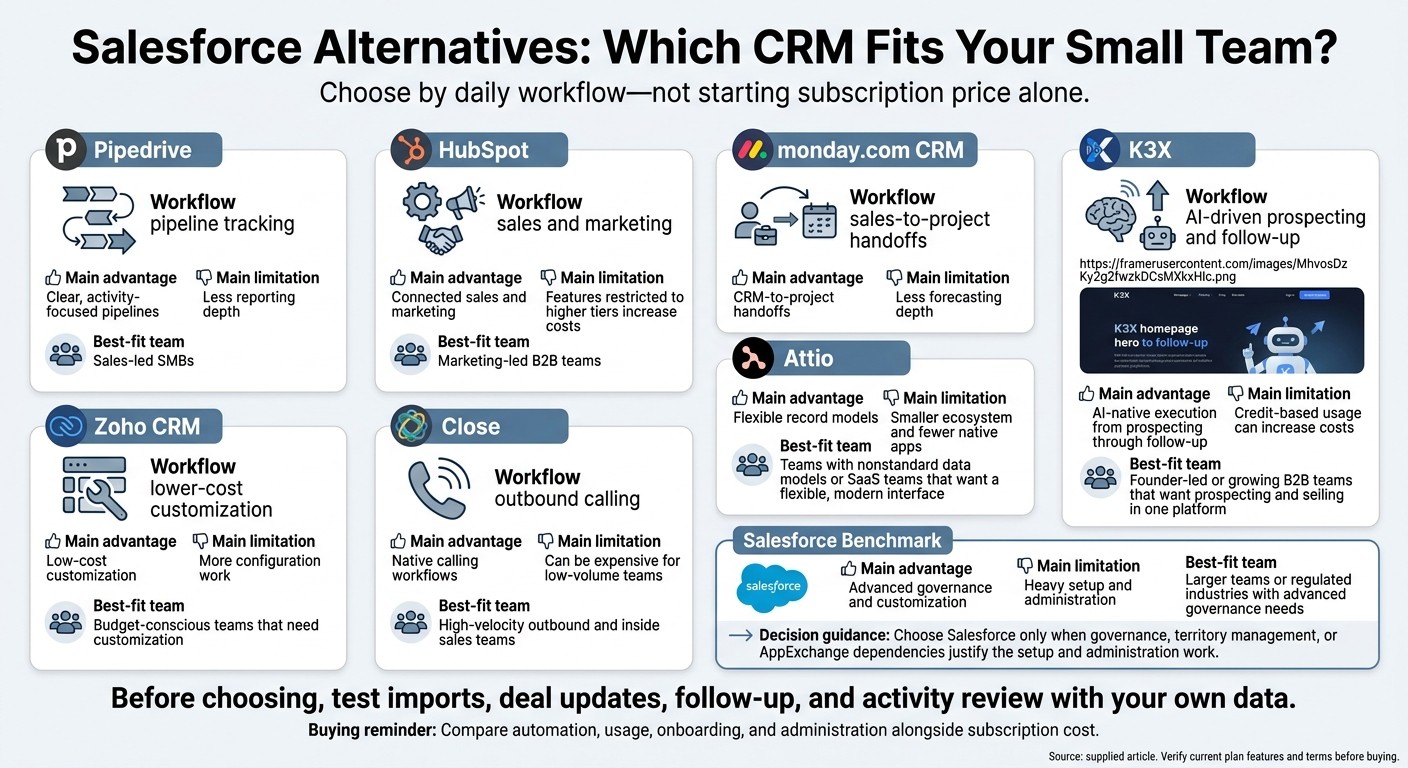
Salesforce Alternatives: Which CRM Fits Your Small Team?
Top 5 CRM Software for Small Businesses in 2026 | Best CRM Tools for Growth
1. K3X
K3X suits SMB-focused sales teams that want prospecting, outreach, AI agents, and pipeline management in one system. Its built-in database has 200M+ records, growth signals, and last-verified dates that help reps prioritize prospects and check when contact data was last verified. [1]
It targets small teams seeking Salesforce-like coverage through AI-native execution, without per-seat pricing or heavy administrative overhead.
Total team cost
K3X costs $399 per month for unlimited seats, with 400,000 monthly credits for contact reveals, AI actions, calling, and texting. Optional top-ups start at $99 for 100,000 credits, and purchased credits roll over while the subscription remains active. If credits run out, teams can still use the CRM, but metered actions pause. [2]
Factor | K3X | Salesforce |
|---|---|---|
Pricing model | $399/month for the whole team, plus optional credits | Per-user costs grow with seat count, plus administration and add-on overhead |
Prospecting and outreach | Built-in database, agents, and communication tools | Often requires other products or integrations |
Workflow approach | Prompt-first workflows | More workflow configuration and platform administration |
Setup and administration
K3X reduces tool-switching and may require less administration than Salesforce, but it still needs setup and oversight. Teams must configure pipelines, context, agent instructions, and integrations, then monitor execution.
For faster deployment, teams may prefer Pipedrive or Close. Close also bundles dialers and sequences for outbound sales teams.
Pipeline management
Once configured, K3X tracks deals in the same workspace using custom fields, tasks, notes, activity timelines, and automated pipeline updates. Managers can review agent actions and deal movement through dashboards and activity logs.
Sales automation and integrations
K3X agents can help qualify leads, follow up, book meetings, and update CRM records. MCP access through Claude or ChatGPT lets teams search for leads, update deals, and launch agents.
Webhooks connect K3X with Zapier, Make, and n8n. K3X says 3,000+ direct integrations are rolling out; teams should confirm that the connections they need are available before using them in production.
2. HubSpot
HubSpot fits small, inbound-led teams that want marketing and sales in one system. Shared contact records keep both teams’ activity in one database. In 2026, the free CRM is capped at 2 users and 1,000 contacts. [12]
Total team cost
Five Sales Hub Professional seats cost about $450–$500 per month, with an additional $1,500–$3,000 for mandatory onboarding. Marketing Hub Professional and extra marketing contacts add separate costs. [9][10][2]
Cost variable | HubSpot |
|---|---|
Sales Hub Professional contract | Typically annual |
Marketing Hub Professional | Starts around $890/month, billed separately |
Additional marketing contacts | $150–$250 per 5,000 contacts |
Setup and administration
HubSpot takes hours to days to set up and requires less administration than Salesforce for most SMB teams. Teams still need to import records, map fields, and configure workflows. This manual effort is a key difference when comparing AI-native CRMs vs. traditional integration strategies. [11][9][7]
Pipedrive is simpler for pipeline-only needs, while HubSpot suits teams that want sales and marketing in one database. Teams can start using the CRM, then add reporting and automation later. [11][9][7]
Pipeline management
The free CRM includes deal tracking, meeting scheduling, and reporting. Custom reporting requires Professional, so teams that need custom dashboards should include that tier in their budget. [1][9]
Compared with sales-only tools, HubSpot’s main advantage is the link between contact history, marketing activity, and deals. [1][9]
Sales automation and integrations
Starter includes basic automation, but sequences, lead scoring, and multi-step workflows require Professional. These features support teams that have outgrown basic pipeline tracking. [12][9][2]
Breeze AI supports drafting and summaries across all plans; advanced AI agents require Professional. HubSpot offers 1,500+ native integrations and works well with Zapier, Make, and n8n. [12][9][2]
3. Pipedrive
Pipedrive is a Salesforce alternative for small teams that want visual deal tracking without much administration. K3X turns prompts into actions, while Pipedrive helps reps manage the next step. Compared with Salesforce, Pipedrive offers less customization but faster daily use. [1][7]
Total team cost
Five Growth seats cost $195 per month, or $2,340 per year, before add-ons. These figures use Pipedrive’s September 25, 2026, annual-billing prices. [7][2]
Cost or feature | Pipedrive | Salesforce |
|---|---|---|
Per-seat monthly pricing | Growth: $39; Premium: $59, billed annually | Enterprise/Core: $165–$195 |
Main strength | Visual pipelines and activity tracking | Customization and governance |
Typical setup | Hours to days for basic configuration | Weeks to months |
Setup and administration
Basic setup takes hours to a few days and doesn’t require a dedicated admin. Migration still involves record cleanup and field mapping. Teams leaving Salesforce should audit custom fields rather than copy everything over. [1][2][10]
Pipeline management
Pipedrive’s visual pipeline makes deal stages easy to scan, while reminders and call logging help reps stay on top of follow-ups. Teams that need deeper forecasting or custom metrics should test reporting before buying. [2][5]
Sales automation and integrations
Start with Growth for email sync, sequences, and workflow automation; entry plans have limits. Pipedrive automates follow-ups, which differs from K3X’s AI-native, prompt-to-action model. [2][7]
Pipedrive offers 500+ native integrations. Close is a better fit when calling and SMS matter more than visual pipeline tracking. [2][7]
Next: Zoho CRM, for teams that want more customization at a lower cost.
4. Zoho CRM
Zoho CRM suits budget-conscious teams that want lower per-seat pricing and more customization than Pipedrive. It offers configurable sales tools and connections to the broader Zoho suite, while K3X remains one of the best AI-native CRM options. Zoho sits between Pipedrive’s simplicity and Salesforce’s heavier administration.
Total team cost
The free edition supports up to three users for basic contact and deal management. Five Standard seats cost $840 per year, compared with $1,500 for Salesforce Starter Suite and $1,200 for HubSpot Starter.[2][7][13]
Zoho edition | Per user/month, billed annually | Five-seat annual cost | Key capability |
|---|---|---|---|
Standard | $14 | $840 | Workflow automation, custom fields |
Professional | $23 | $1,380 | SalesSignals, inventory management |
Enterprise | $40 | $2,400 | Zia scoring and predictions |
Ultimate | $52 | $3,120 | Higher customization and storage limits |
Setup and administration
Expect days to weeks for setup, followed by regular administration of fields and automations. Zoho requires less administration than Salesforce but takes longer to configure than Pipedrive. Its broader feature set means more decisions about fields, workflows, and permissions.[5][8]
Pipeline management
Zoho offers configurable pipelines. Pipedrive is easier for reps who prefer a cleaner visual workflow.[2][5]
Sales automation and integrations
Standard includes workflow automation, which helps prioritize sales workflows automatically, and Zoho supports 1,000+ third-party integrations. Native Zoho app connections work more smoothly than third-party connections. Zoho One bundles 45+ apps for $37 per user/month.[2][5]
For teams seeking a more visual, process-driven CRM, monday.com CRM is next.
5. monday.com CRM
monday.com CRM suits small teams that manage sales and delivery in one workspace, especially agencies and services firms. It works more like a project-management CRM than a sales-first platform, with lighter sales features such as lead scoring, making it a weaker fit for sales-only teams.[5][2] Compared with K3X, it needs more manual setup for boards and automations compared to automated systems.[5]
Total team cost
monday.com requires a 3-seat minimum, putting Basic at $36–$45 per month even if your team has fewer than three users. Listed per-seat monthly prices are $12–$15 for Basic, $17 for Standard, and $28 for Pro.[5][4]
Cost or capability | monday.com CRM | Salesforce | Pipedrive |
|---|---|---|---|
Entry tier per user/month | |||
Minimum monthly cost | |||
Entry-level automation | Standard: $17/user/month[5] | Starter Suite includes no workflow automation or API access[14][2] | Essential is limited to one active automation[5] |
Setup and administration
Implementation takes days to 4 weeks, and adoption is often easier for teams already using monday.com for project management. Salesforce, by comparison, often takes 6–16 weeks and requires outside implementation help.[2]
Someone still needs to maintain the boards and automations. monday.com requires less administration than Salesforce, but it isn't administration-free - a tradeoff for teams weighing flexible workflows against sales speed.[2][5]
Pipeline management
Boards, timelines, Gantt charts, and kanban views help teams track deal ownership and progress.[5] Compared with Pipedrive, monday.com’s main strength is connecting sales with post-sale work, while HubSpot is stronger at aligning marketing and sales.[5][11]
For complex forecasting and sales reporting, monday.com is a weaker choice than dedicated CRMs.[5][4]
Sales automation and integrations
Automation focuses on moving work between boards, with more emphasis on process coordination than sales automation. Teams looking to simplify these tasks can use conversational workflow control to manage updates via natural language.[4] AI automation is mainly available on Pro and Enterprise, and some features require a 5-seat minimum.[2][5]
For stronger calling and outbound workflows, Close is the next platform to compare.
6. Close
Close fits small teams focused on calling, SMS, and sequences. K3X fits teams that want AI-native prospecting, follow-up tasks, and CRM updates from prompts. Close keeps communication tools in one workspace, particularly for reps making 80+ dials per day.[1][8]
Total team cost
Close’s total cost includes the plan, phone numbers, and usage-based communication fees.[9] The table uses annual-billing rates; higher tiers provide the main dialing tools.[8][9][10]
Plan | Per user/month | 3 users/month | 5 users/month | Key capability |
|---|---|---|---|---|
Close Essentials | $35 | $105 | $175 | Built-in calling and SMS |
Close Professional/Growth | $99 | $297 | $495 | Power Dialer and email sequences |
Close Enterprise/Scale | $139–$149 | $417–$447 | $695–$745 | Predictive Dialer |
HubSpot Sales Pro | Approximately $90–$100 | $270–$300 | $450–$500 | Broader sales suite; advanced telephony may need an add-on |
Small teams should also factor in setup time. Using a sales productivity checklist can help identify other hidden bottlenecks during this transition.
Setup and administration
Close typically takes 1–3 days to implement and does not need a dedicated admin.[9] Setup involves importing records, syncing email, setting phone numbers, and defining stages. Native telephony removes a separate integration step.[9]
Pipeline management
Choose Close when outbound calling is the daily bottleneck. Choose K3X when reps need AI to turn prompts into automated follow-up actions and CRM updates. Close is best suited to workflows driven by calling volume.
Sales automation and integrations
Close provides advanced telephony natively, while Pipedrive and HubSpot often need add-ons.[1][10] Power Dialer and email sequences require Professional/Growth; Predictive Dialer requires Enterprise/Scale.[8][9][10]
Close has about 250 to 500 integrations, compared with HubSpot’s 1,500+.[1][2][9] Check that the marketing and support connectors your team needs are available before migrating.
Teams that need more flexible data models should compare Attio next.
7. Attio
Attio fits small teams that need flexible relationship data, not just a standard pipeline. Its records connect people, companies, deals, and custom objects. Ask Attio lets users search and update data in plain English. [10][15]
Total team cost
Attio’s Free plan supports 3 seats. Teams that need custom objects must use Pro. [10][13][15]
Cost or limit | Free | Plus | Pro |
|---|---|---|---|
Per seat/month, billed annually | $0 | $34–$35 | $69–$79 |
3-person team/month | $0 | $102–$105 | $207–$237 |
Object limit | 3 | 5 | 12 |
Paid-plan pricing varies by source, so the table shows ranges. Object limits include standard objects; custom objects require Pro. [10][13][15]
Attio’s paid plans cost more at entry than Pipedrive, which starts at $14 per seat/month, or HubSpot Starter at $15–$20. [1][8] A lower starting price does not remove the need for a well-planned data model.
Setup and administration
Attio typically takes days to deploy, compared with Salesforce’s 4–12 weeks. [10][1] It still requires an operations generalist to define fields, relationships, and ownership rules.
K3X focuses on prompt-to-action automation. With Attio, the usefulness of the pipeline view depends on how the team sets up its data structure. [10]
Pipeline management
Attio’s configurable records and pipeline views give teams more data-model flexibility than Pipedrive’s fixed structure of people, organizations, and deals. [13][15] Where K3X focuses on execution, Attio puts relationship structure first.
Attio includes custom objects on Pro; HubSpot reserves them for Enterprise. [13][15] Teams should also compare how each CRM records activity and moves work forward.
Sales automation and integrations
Ask Attio searches and updates records and creates tasks. Universal Context automatically logs emails, calls, and meetings, while Pro adds AI agents and call intelligence. [15][13]
K3X suits teams focused on prompt-to-action execution; Attio suits teams focused on structuring relationship data. Attio has fewer native integrations than HubSpot or Salesforce, so verify your dialer and BI connections before migrating. [1][10] For small teams, the trade-off is flexibility versus out-of-the-box simplicity.
Team Costs, Setup, and Administration
K3X charges a fixed team price, but total cost also depends on automation, usage, onboarding, and administration. Compare those costs alongside features before choosing a CRM.
Total team cost
The table uses annual-billing equivalents for paid tiers and K3X’s monthly team price.[1][2][6][8][10][13] It compares entry-level and automation-ready plans - not matching feature sets - and excludes taxes, onboarding, add-ons, and usage charges.
Platform | Entry / automation-ready plan, per seat per month | Entry total: 3 / 5 people | Automation-tier total: 3 / 5 people |
|---|---|---|---|
K3X | Adaptive: $399/team, unlimited seats | $399 / $399 | $399 / $399 |
Salesforce | Starter Suite $25 / Pro Suite $100 | $75 / $125 | $300 / $500 |
HubSpot | Starter $15–$20 / Professional $90–$100 | $45–$60 / $75–$100 | $270–$300 / $450–$500 |
Pipedrive | Essential $14 / Advanced $29 | $42 / $70 | $87 / $145 |
Zoho CRM | Standard $14 / Professional $23 | $42 / $70 | $69 / $115 |
monday.com CRM | Basic $12 / Pro $28 | $36 / $60 | $84 / $140 |
Close | Essentials $35 / Growth $99 | $105 / $175 | $297 / $495 |
Attio | Plus $35 / Pro $79 | $105 / $175 | $237 / $395 |
Pricing sources: [1][2][6][8][10][13].
HubSpot, Zoho CRM, and Attio offer limited free tiers, while monday.com requires three seats. Implementation or onboarding can add $5,000–$30,000 for Salesforce or $1,500–$3,000 for HubSpot Professional.[2][3][5][8][13]
K3X’s subscription terms include:
Usage: 400,000 monthly credits that expire. Top-ups start at $99 for 100,000 credits and roll over while subscribed. Credits cover AI actions, calling, texting, and contact reveals.
Credit limits: Metered actions pause when credits run out, but CRM records remain accessible.
Trial and cancellation: A seven-day free trial follows a 1:1 demo, with no credit card required. Cancel anytime.
Setup and administration
K3X reduces workflow configuration, but still needs oversight. Setup and recurring administration often determine whether a small team adopts a CRM, so assess the work required - not just the subscription price.
Platform | Imports, fields, and permissions | Connections, training, and maintenance |
|---|---|---|
K3X | Imports, custom fields, and role-based access; prompts help define tasks | Review agent logs and credit use; test webhooks and MCP connections; confirm claimed integrations are live |
Salesforce | Data Loader and granular configuration | More configuration and maintenance; may require a dedicated admin or consultant |
HubSpot | Native imports; advanced fields and permissions depend on tier | Easier to self-admin; maintain workflows and connected-app mappings |
Pipedrive | Straightforward imports and fields; tier-dependent controls | Less administration; review automation rules |
Zoho CRM | Configure imported fields, roles, and ownership | Test connected apps; maintain workflow rules |
monday.com CRM | Check imported board fields and access settings | Train on boards; monitor automation limits and connections |
Close | Validate contacts, leads, and access settings | Train on calling and outreach; monitor usage charges |
Attio | Plan your record model and field mappings | Less administration, but maintain the data model and connected apps |
Comparison sources: [2][5][6][13]; K3X product details from k3x.ai.
For teams leaving Salesforce, migration effort often matters more than subscription price. Salesforce exports can be fast, but rewiring integrations and automations can take 2–6 weeks.[5][13] Before signing, ask each vendor to demonstrate your actual import, permission rules, and one complete follow-up workflow.
Pipelines, Automation, and Integrations
After setup, the main difference is how each CRM updates records and starts follow-up work. Compare who makes updates, which tasks run automatically, and what needs a higher plan or another app to keep daily selling from becoming manual data entry.
Pipeline management
K3X uses prompts to update pipelines; Salesforce offers deeper controls. Close, HubSpot, and Pipedrive suit more focused sales processes, with different limits on reporting and automation.
Platform | Record updates and remaining manual work | Reporting and tier limits |
|---|---|---|
K3X | Prompt-based agents update records and stages | Team dashboards, goals, and agent activity logs are included; the supplied product details don’t specify advanced forecasting depth |
HubSpot | Free includes one pipeline; Starter adds more. Custom objects require Enterprise [1][9] | Custom reporting and forecasting require Professional [1][9] |
Pipedrive | Visual pipelines; automation and AI depend on the plan [1][9][10] | Revenue forecasting and stronger team controls require Professional/Premium-level plans [1][9][10] |
Zoho CRM | Standard+ supports multiple pipelines and workflows; Blueprint enforces required steps before records advance [9][15] | |
monday.com CRM | Shared boards and deal-to-delivery handoffs; automated updates start on Standard+ [5][6][10] | Less depth in sales-specific reporting and forecasting [5][6][10] |
Close | Lead-centric activity and opportunity tracking rather than prompt-driven updates [6][8] | Reporting focuses on outreach activity rather than deep forecasting [6][8] |
Attio | Flexible record models and shared views; AI fields classify or enrich records [1][10] | Flexible reporting; a smaller ecosystem than Salesforce or HubSpot [1][10] |
Salesforce benchmark | Configurable record updates through automation and Apex code [9][10] | Deep reporting and governance; advanced controls depend on the edition and need more administration [9][10] |
K3X focuses on reducing manual updates, not matching Salesforce’s forecasting depth. However, teams can still improve sales forecast accuracy by using AI to flag at-risk deals earlier. HubSpot is strongest when sales and marketing share records; Pipedrive keeps the next activity visible; monday.com connects selling with delivery.
HubSpot’s Professional reporting tier is listed at $90–$100 per seat per month, compared with $40 per seat per month for Zoho’s Enterprise tier with Zia.[1][9] Test whether each platform can enforce required fields and limit who changes deal values or stages.
Sales automation and integrations
The main difference is whether prospecting, outreach, and record updates are built in or require separate tools. Check both plan access and usage charges to see how much work reps can automate - and what it will cost.
Platform | Built-in prospecting and outreach | Paid tiers, connections, and additional costs |
|---|---|---|
K3X | Prospecting, qualification, sequences, email, calling, SMS, and meeting booking | Prompt-based agents and visual workflows; MCP and webhooks. AI actions, contact reveals, calls, and texts consume credits |
HubSpot | Basic prospecting and meeting booking; sequences require Professional+ [1][9] | Workflows and AI features vary by plan; API and webhook access depend on setup. Enrichment depends on entitlement; calling and SMS may need add-ons or integrations [1][8][9] |
Pipedrive | Activity-led outreach; Smart Contact Data enrichment requires Professional+ [2][8][9] | Automation and AI depend on the plan; telephony and lead-generation tools often cost extra [2][8][9] |
Zoho CRM | Standard+ workflows, Blueprint, and Enterprise+ Zia; outreach, booking, and telephony may need other products or integrations [9][15] | |
monday.com CRM | AI Sales Agents can source, qualify, prioritize leads, and book meetings [9] | Visual automation starts on Standard+; calling and SMS may need connected tools [8][9] |
Close | Native calling, SMS, and sequences; Growth adds a power dialer [6][8] | Outreach-focused automation; check telephony usage charges rather than assuming unlimited calling [6][8][9] |
Attio | AI-assisted actions; verify sequence and booking entitlements [10][15] | Workflows, APIs, and webhooks; a smaller ecosystem than Salesforce or HubSpot [10][15] |
Salesforce benchmark | Prospecting and outbound execution commonly need add-ons [6][8] | Configurable automation, Agentforce, and an extensive ecosystem; agent, outreach, and integration costs go beyond basic CRM access [6][8][10] |
K3X shows email verification dates and advertises 200M+ records, helping teams distinguish verified data from enrichment alone. Its advertised 3,000+ direct integrations are still rolling out, so check that each required connection is live. A webhook connection through Zapier, Make, or n8n is not the same as a supported native integration.
Require human review before automation sends messages or changes key records. Test permissions, duplicate handling, ownership, and action logs before using automation for live customer communication.
Pros, Cons, and Which CRM to Choose
Choose K3X for AI-driven prospecting and follow-up. Choose another CRM if native marketing, calling, or forecasting matters more. Beyond cost, setup, automation, and integrations, focus on how your team works each day.
CRM | Main advantage | Main limitation | Best-fit team |
|---|---|---|---|
K3X | AI-native execution from prospecting through follow-up | Credit-based usage can increase costs | Founder-led or growing B2B teams that want prospecting and selling in one platform |
HubSpot | Connected sales and marketing | Features restricted to higher tiers increase costs | Marketing-led B2B teams |
Pipedrive | Clear, activity-focused pipelines | Less reporting depth | Sales-led SMBs |
Zoho CRM | Low-cost customization | More configuration work | Budget-conscious teams that need customization |
monday.com CRM | CRM-to-project handoffs | Less forecasting depth | Agencies and teams already using monday.com |
Close | Native calling workflows | Can be expensive for low-volume teams | High-velocity outbound and inside sales teams |
Attio | Flexible record models | Smaller ecosystem and fewer native apps | Teams with nonstandard data models or SaaS teams that want a flexible, modern interface |
Salesforce | Advanced governance and customization | Heavy setup and administration | Larger teams or regulated industries with advanced governance needs |
Choose Salesforce only when governance, territory management, or AppExchange dependencies justify the setup and administration work.
Before choosing, test imports, deal updates, follow-up, and activity review with your own data.
FAQs
How do I estimate my CRM’s total yearly cost?
Estimate your CRM’s total cost of ownership (TCO), not just its license price. Calculate the annual license cost by multiplying the monthly per-user fee by the number of seats and 12 months, then add implementation fees, consultant costs, and dedicated administrator salaries.
For legacy systems like Salesforce, industry estimates suggest budgeting an additional 1.5–3 times the annual license cost for these overheads, AppExchange add-ons, and training. The provided estimate does not name a source.
How can I switch CRMs without disrupting sales?
Plan for the CRM switch to take 60–90 days [1]. Clean your data and migrate only the fields you use. Run both CRMs for 2–4 weeks, log activity in both, and check that pipeline reports match [1][2].
Schedule cutover for your Salesforce renewal date, at least 30 days from quarter-end [1]. Keep the old CRM in read-only mode for 90 days before decommissioning it [1][2].
How do I safely test AI sales automation?
Run a 2-week parallel test with one team, region, or product line while keeping your current system active. Have reps log activity in both systems so you can spot gaps before making the full switch.
Test migration and automation in a sandbox or developer edition, such as Zoho CRM’s, without affecting production data. Audit your data first, migrate only populated fields used in reports, and confirm that pipeline reports in both systems match within $5,000.