
The Evolution of AI Agents
I’d shortlist Pipedrive for simple deal tracking, Close for calling-heavy outbound sales, and K3X for AI-assisted prospecting and follow-up. For sales teams under 50 people, I’d choose based on the work reps need to do, the required plan, and who will maintain the CRM - not the starting price alone.
Using October 1, 2026, as the reference date, I’d compare Pipedrive Growth at $39 per user/month with annual billing against K3X’s $399/month for unlimited seats, before credit top-ups (Pipedrive pricing, K3X pricing). I’d also test inbox sync, one sales report, and a sample outreach workflow before committing; <u>base subscription costs do not equal the total budget</u>.
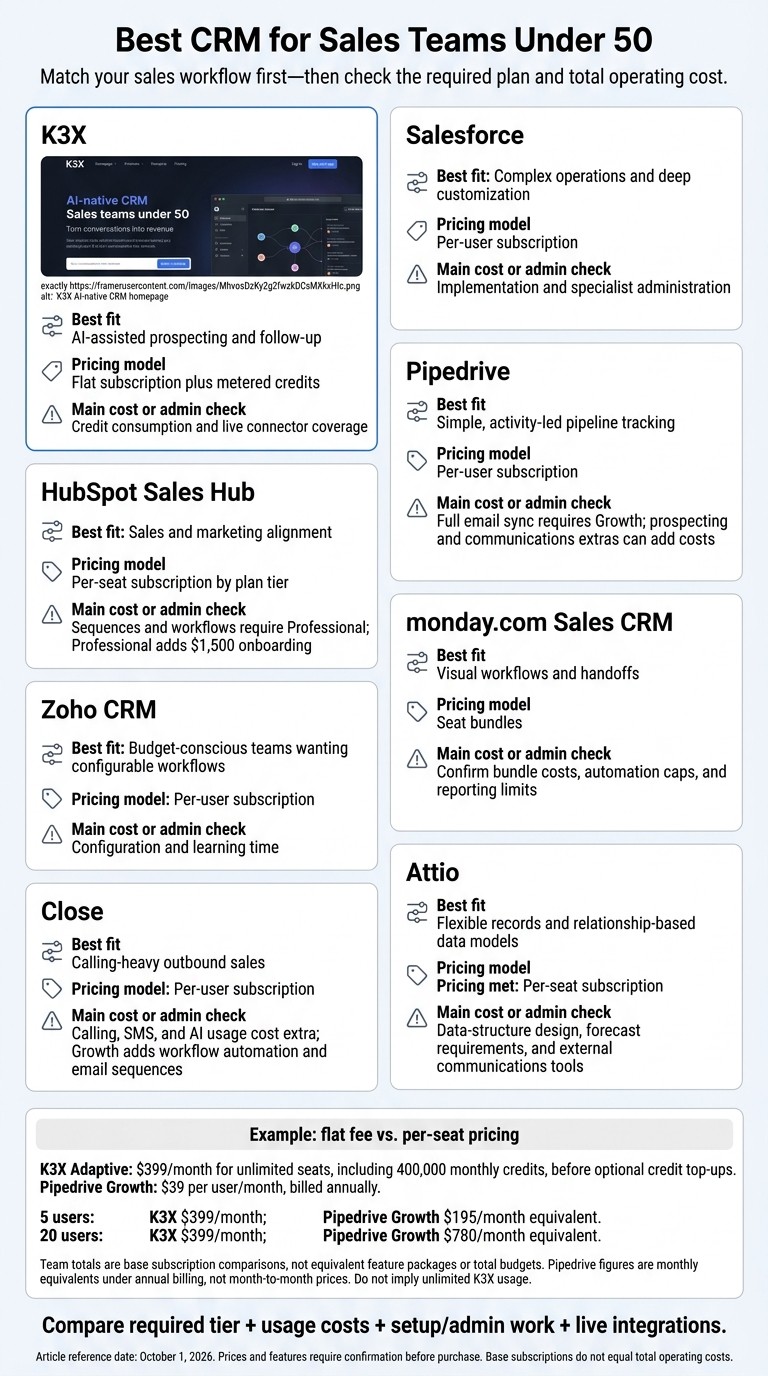
Best CRM for Sales Teams Under 50: Quick Comparison
Best CRM for Small Business 2026 | TOP choices that still hold up!
1. K3X
K3X suits teams that want prospecting and sales execution in one CRM without per-seat fees. Platform access has a flat fee, while AI actions and communications consume credits.
Team Costs
Adaptive costs $399 per month for unlimited seats and 400,000 monthly credits. Credits cover AI actions, drafting, Command Center actions, calling, texting, and contact reveals.
Optional top-ups start at $99 for 100,000 credits. Purchased top-up credits roll over while the subscription stays active. If credits run out, CRM access continues, but actions that consume credits pause.
Team size | K3X Adaptive | Salesforce (mid-tier) | HubSpot Sales Hub Pro | Pipedrive Advanced | Zoho CRM Professional | Close Essentials | Attio Pro |
|---|---|---|---|---|---|---|---|
5 users | $399 | ~$500–$825 | ~$750 | $145 | $115 | $175 | $295 |
20 users | $399 | ~$2,000–$3,300 | ~$3,000 | $580 | $460 | $700 | $1,180 |
49 users | $399 | ~$4,900–$8,085 | ~$7,350 | $1,421 | $1,127 | $1,715 | $2,891 |
K3X isn't the cheapest option for 5 users, but its flat platform fee becomes more cost-effective as headcount grows. HubSpot's Pro tier also requires a $1,500 onboarding fee [10].
Pipeline Management and Setup
K3X includes contacts, custom fields, tasks, notes, activity timelines, pipelines, and automated record updates. Prompt-based setup and visual agent controls reduce workflow-building work - a useful consideration for smaller teams weighing setup time against automation depth.
For comparison, Salesforce SMB implementations often take 8–14 weeks and usually require a certified admin, while Pipedrive can go live in under a week [3].
K3X includes unlimited platform access and 24/7 chat support. Its 7-day trial follows a one-on-one demo and requires no credit card.
Prospecting and Sales Automation
K3X combines a built-in database of 200M+ records with agents that handle prospecting and sales tasks. Teams can search the database in natural language and use growth signals and verification data to prioritize outreach.
Agents can handle qualification, outreach, follow-up, meeting booking, data capture, and CRM updates [3]. For outbound-heavy teams, the evaluation centers on how much manual prospecting work those agents can replace.
Reporting and Integrations
K3X provides dashboards, goal tracking, and agent activity logs to monitor sales execution. Webhooks connect to Zapier, Make, and n8n, while native MCP connections support conversational CRM actions [8].
K3X advertises 3,000+ direct integrations, but many are still rolling out. Verify availability for your must-have apps before committing.
2. Salesforce
Salesforce fits teams with fewer than 50 users that need deep customization and can support regular administration. For these teams, the tradeoffs start with license costs, followed by setup and reporting demands.
Team Costs
Starter Suite costs $25 per user per month, billed annually, while Pro Suite costs $100 per user per month, billed annually [2][3][6]. Enterprise is listed at $175 per user per month and Unlimited at $350; confirm current U.S. pricing before buying.
Edition | Listed price/user/month | 5 users/month | 20 users/month | 49 users/month | Main capability |
|---|---|---|---|---|---|
Starter Suite | $25 | $125 | $500 | $1,225 | Basic sales, marketing, and service functions |
Pro Suite | $100 | $500 | $2,000 | $4,900 | More customization and automation |
Enterprise | $175 | $875 | $3,500 | $8,575 | Deep customization and complex pipeline management |
Unlimited | $350 | $1,750 | $7,000 | $17,150 | Most advanced AI, governance, and support |
Listed rates: [2][6]. These totals cover licenses only, not implementation, administration, or add-ons.
Pipeline Management and Setup
Starter handles basic contacts and deals, while Salesforce’s main strength is building a system around your team’s workflows. Among SMB Salesforce users, 68% report needing at least one certified admin to maintain basic workflows [3].
Salesforce is a better fit when customization matters more than setup speed. Your team also needs the capacity to maintain and adjust its configuration.
Prospecting and Sales Automation
Once configured, Einstein Copilot serves as Salesforce’s main AI layer, supporting predictive lead scoring, email drafting, and call summarization. It requires more setup than K3X [3][6].
If speed matters more than configuration options, test Salesforce against your actual qualification and follow-up process before paying for AI add-ons.
Reporting and Integrations
Customizable reporting, the AppExchange ecosystem, and Slack integration are Salesforce’s biggest strengths in this area [3]. Those options can justify the more complex setup for teams that need them.
Advanced reporting and integration requirements can push teams toward higher editions. Premium AppExchange apps or Slack-related functionality may also add costs [3][12]. Teams with limited admin support will have a harder time managing Salesforce.
3. HubSpot Sales Hub
HubSpot offers the broadest SMB feature set here, but it costs more than teams may need for pipeline tracking alone. Unlike K3X’s flat-fee, prompt-to-action model, HubSpot charges by seat and plan tier. The main budget jump comes when teams move from Starter to Professional for automation and reporting.[11][13]
Team Costs
HubSpot’s free tier has a 2-user, 1,000-contact limit, so it does not cover the team sizes below. These estimates assume paid seats for every salesperson, annual billing, and required onboarding.[7][12][14]
Plan | Budgeted seat/month | 5 people: year one | 15 people: year one | 40 people: year one | Main feature gate |
|---|---|---|---|---|---|
Starter | $20 | $1,200 | $3,600 | $9,600 | Basic sales tools; limited automation |
Professional | $90 | $6,900 | $17,700 | $44,700 | Sequences, workflows, custom reporting; $1,500 onboarding included |
Enterprise | $150 | $12,500 | $30,500 | $75,500 | Custom objects, advanced permissions; $3,500 onboarding included |
For small teams, setup time matters alongside the subscription and onboarding costs.
Pipeline Management and Setup
Starter fits straightforward deal tracking. A more complete HubSpot setup typically takes 2–6 weeks, depending on migration and workflows; Pipedrive is simpler for pipeline-only selling.[7][11]
Prospecting and Sales Automation
Sequences and workflows require Professional. Breeze AI supports drafting and insights across tiers; Professional includes 3,000 monthly credits, with additional credits costing about $9 per 1,000.[6][12][13][14]
These features matter most when teams need sales automation connected to reporting and contact history.
Reporting and Integrations
Professional adds custom reporting, while Enterprise adds custom objects.[12] HubSpot’s main strength is shared data across sales, marketing, and service, giving teams a full customer view. That breadth comes at a higher cost when sales only needs deal tracking.[7]
4. Pipedrive
Pipedrive is a lighter alternative to HubSpot for teams focused on pipeline control. It puts deal tracking first, rather than offering K3X’s AI-assisted workflow execution.[5][8]
Team Costs
Pipedrive starts at $14 per user/month, billed annually. The prices below were verified for annual billing only; the source material did not verify monthly-billing rates.[14]
Plan | Per user/month, billed annually | 5 users/year | 20 users/year | 49 users/year | Key capability |
|---|---|---|---|---|---|
Lite | $14 | $840 | $3,360 | $8,232 | Pipelines, contact tracking, and activity scheduling |
Growth | $39 | $2,340 | $9,360 | $22,932 | Full email sync and workflow automation |
Premium | $59 | $3,540 | $14,160 | $34,692 | Revenue forecasting and e-signatures |
Ultimate | $79 | $4,740 | $18,960 | $46,452 | Highest-tier plan |
Choose Growth if reps need Gmail or Outlook sync. It costs $25 more per user/month than Lite. For 20 users, Growth costs $9,360 annually, compared with $23,100 for HubSpot Professional’s first year, including onboarding. The feature sets differ.[14]
K3X costs $399/month ($4,788/year) for unlimited seats, before credit top-ups. Pipedrive Growth costs less for 5 users, while K3X’s flat platform fee is lower for 20 users.
Pipeline Management and Setup
A basic Pipedrive setup takes 2–4 hours, while complex migrations can take 1–2 weeks. Drag-and-drop pipelines and activity scheduling help reps track their next follow-up.[5][12][14]
CSV imports are straightforward, but historical emails, notes, and activities may need manual rebuilding. Pipedrive provides a more prescribed sales structure than monday.com’s configurable boards or Attio’s flexible data model.[5][12][14]
Prospecting and Sales Automation
Pipedrive requires manual workflow setup, unlike K3X’s prompt-to-action agents. Growth is the first plan with workflow automation, and quotas and branching limits still apply.[8][12][14][16]
LeadBooster and Campaigns cost extra. Every Pipedrive tier includes AI features, including Pulse. For phone-heavy outbound sales, Close is stronger because it combines calling, SMS, and email sequences.[8][12][14][16]
Reporting and Integrations
Pipedrive suits teams with a simple sales stack. Lower tiers offer basic reporting, while Premium adds revenue forecasting.[8][14][16]
Its marketplace has more than 500 apps, including connections with Slack, Zapier, and Google Workspace.[8][14][16] Add-on apps and sync requirements can quickly increase total costs.
5. Zoho CRM
Zoho sits between Pipedrive’s simplicity and Salesforce’s complexity. It suits teams under 50 that want configurable workflows without enterprise-level costs, though its denser interface takes more time to learn. Zoho also needs more manual configuration than K3X, which automates more of the workflow end to end.[11][14][17]
Team Costs
With annual billing, Zoho Professional costs $5,520 per year for 20 users, compared with HubSpot Professional’s $23,100 first-year cost, including onboarding. Zoho has no mandatory onboarding fee.[12][14]
The verified U.S. prices below use annual billing. Monthly billing rates were not verified.
Plan | Per user/month, billed annually | 5 users/year | 20 users/year | 49 users/year | Key capabilities |
|---|---|---|---|---|---|
Standard | $14 | $840 | $3,360 | $8,232 | Workflow automation, custom fields, basic reports |
Professional | $23 | $1,380 | $5,520 | $13,524 | More advanced automation and built-in telephony |
Enterprise | $40 | $2,400 | $9,600 | $23,520 | Advanced customization and multi-user portals |
Pipeline Management and Setup
Initial setup takes 1–3 days, usually handled by a founder or sales manager.[11] Zoho supports CSV imports and migration tools for Salesforce and HubSpot.[14]
Pipedrive is faster to set up and has a cleaner interface; Zoho offers more features but needs more configuration.[11][16] Zoho fits teams that want more control than Pipedrive without Salesforce’s admin workload.
Prospecting and Sales Automation
Zoho automates some sales tasks but still requires admin work. Standard includes workflow automation and scoring rules, making it a useful starting point for smaller teams.[14] Teams still need to design rules manually and keep their data clean and processes optimized.[11]
Close is better suited to high-volume outbound calling, SMS, and email sequences.[4] Zia adds predictions and suggestions, but check which plans include these features before buying.[5][14][17]
Reporting and Integrations
Zoho includes built-in reports and dashboards, with deeper analysis available through Zoho Analytics. Connections across the Zoho suite suit teams that want sales software linked to other business apps; check plan requirements and separate app costs before buying.
6. monday.com Sales CRM
monday CRM combines spreadsheet-style flexibility with sales-focused CRM structure. It suits teams that want visual pipeline boards, though pricing and plan limits need confirmation before a direct comparison with K3X or Pipedrive.
The main tradeoff is flexibility versus admin workload: monday offers more room to shape the setup, while K3X and Pipedrive require less administration.
Pipeline Management and Setup
monday’s board-first approach requires admins to set up boards and define pipeline stages. Unlike K3X’s prompt-to-action approach, it lets teams build custom boards but puts more design work on the admin.
Automation and Reporting Limits
Confirm which monday plan supports the workflow automation and sequences your team needs before buying. Reporting and dashboard limits remain unverified, so check both against the quoted plan.
7. Close
Close is best for teams with fewer than 50 people that focus on outbound calling and want calling, SMS, and email sync inside their CRM. Close is rep-driven; K3X is prompt-driven. Its base price is higher than lightweight CRMs, but it includes built-in outreach tools. [2]
Team Costs
Close’s annual-billing rates range from $35 to $139 per user per month. Calling, SMS, and AI usage cost extra, so the totals below cover base subscriptions only. [2][18]
Close plan | Per user/month, billed annually | 5 users/month | 15 users/month | 40 users/month |
|---|---|---|---|---|
Essentials | $35 | $175 | $525 | $1,400 |
Growth | $99 | $495 | $1,485 | $3,960 |
Scale | $139 | $695 | $2,085 | $5,560 |
Rates: [2]. Team totals calculated from those rates.
Pipeline Management and Setup
Close supports spreadsheet imports and pipeline setup without Salesforce-level complexity. Its narrower scope suits outbound teams, though it offers less flexibility for unusual sales processes. [2]
Prospecting and Sales Automation
Growth adds workflow automation and email sequences; Scale adds predictive dialing. Close’s entry price is higher than Pipedrive or HubSpot Starter, but native calling and SMS are included. [2][5][3]
Reporting and Integrations
Close offers pipeline and activity reporting, Insights dashboards, forecasting on higher plans, and two-way Gmail/Outlook sync. Salesforce offers more enterprise forecasting options and AppExchange integrations; Zoho provides hierarchical forecasting; Attio focuses on flexible data and synced communication data. [2][8]
The head-to-head cost and automation comparison below details these differences.
8. Attio
Attio suits teams that want flexible records and relationships rather than a preset pipeline or K3X-style prompt-driven automation. The tradeoff is control versus speed: Attio offers more control, while K3X automates more of the workflow. [4][12]
Team Costs
As of October 1, 2026, Attio lists Free at $0 for up to 3 seats, Plus at $35 per user/month billed annually, and Pro at $79 per user/month billed annually. Monthly billing is available, but monthly per-seat rates and usage allowances were not supplied. [12]
Attio plan | Key capability | 5 users | 15 users | 40 users |
|---|---|---|---|---|
Plus | Flexible records; external calling and SMS tools are usually required | $175 | $525 | $1,400 |
Pro | Advanced automation, calling features, and sequencing | $395 | $1,185 | $3,160 |
Monthly equivalents under annual billing, calculated from the supplied rates. Totals exclude usage charges and external tools. [12]
Attio’s pricing can work for lean teams, but admins still need to make setup decisions that the subscription price does not account for.
Pipeline Management and Setup
Attio lets teams create custom objects, such as workspaces or usage records, without developer help. This makes it a useful option for product-led teams. [4][12]
Attio offers more schema control than K3X. K3X requires less process design because its prompt-driven CRM agents handle more of the workflow.
Prospecting and Sales Automation
Pro is the tier for sequencing and stronger automation; Plus usually requires external calling and SMS tools. [4][12] Attio works better for teams that want to configure their processes than for teams seeking ready-to-use outbound execution.
K3X is the better fit when you want prospecting, enrichment, and follow-up inside the CRM without first building the workflow.
Reporting and Integrations
Attio combines flexible views with an API, while Salesforce is better for native forecasting and more complex reporting. Alternatively, teams can ask their CRM questions in plain language to bypass complex report building. [4][8][12] The head-to-head cost and automation comparison below shows where Attio’s flexibility helps and where it adds work.
Head-to-Head: Costs, Pipelines, Automation, and Integrations
K3X uses prompts to carry out sales tasks rather than relying on manual workflow design. Pipedrive suits simple pipelines, Close suits outbound calling, and Salesforce suits complex operations. Compare plan features alongside price.
The tables compare costs at the same team sizes, plus setup effort, automation, and integrations.
Team Costs
These figures cover base subscriptions, not total budgets or equivalent feature packages. Annual-billed prices are monthly rates paid under annual billing - not month-to-month prices. [10][2][19]
Platform / selected plan | Billing basis | 5 users | 10 users | 25 users | 40 users | Upgrade considerations |
|---|---|---|---|---|---|---|
K3X Adaptive | $399/month; cancel anytime | $399 | $399 | $399 | $399 | Unlimited seats; one plan |
Salesforce Pro Suite | $100/user/month, annually | $500 | $1,000 | $2,500 | $4,000 | Starter does not fit this team-size comparison; Pro does [10] |
HubSpot Sales Hub Professional | $90/seat/month, annually | $450 | $900 | $2,250 | $3,600 | |
Pipedrive Professional | $49/user/month, annually | $245 | $490 | $1,225 | $1,960 | Entry tier lacks equivalent email and automation features [5][15] |
Zoho CRM Enterprise | $40/user/month, annually | $200 | $400 | $1,000 | $1,600 | |
Close Growth | $99/user/month, annually | $495 | $990 | $2,475 | $3,960 | Solo is not a comparable team-outbound package [2] |
Attio Pro | $79/seat/month, annually | $395 | $790 | $1,975 | $3,160 |
monday.com uses seat bundles, so compare its pricing separately from per-seat plans.
Other costs to budget
Credits and top-ups: K3X includes 400,000 credits/month. Optional 100,000-credit top-ups start at $99. Purchased credits roll over while you remain subscribed; the monthly allowance is separate. See K3X pricing for larger packs.
Onboarding: HubSpot Professional adds a $1,500 one-time fee. Salesforce implementation costs are separate; no fixed charge is established here. [10][5]
Add-ons and administration: Close charges separately for calling and SMS usage. External dialers, enrichment, connectors, and plan upgrades can add costs elsewhere. Budget for internal administration or consultants, especially with Salesforce, Zoho, and advanced HubSpot workflows. [2][15][8]
Pipeline Management and Setup
Setup effort and daily administration can matter as much as price. Compare how each platform handles records, permissions, forecasting, and maintenance.
Platform | Records, stages, and tasks | Permissions and forecasting | Migration and maintenance |
|---|---|---|---|
K3X | Contacts, custom fields, pipelines, and tasks; agents update records | Dashboards and goals; confirm granular permissions and forecast requirements | Imports/exports; prompts reduce workflow-building but do not replace review |
Salesforce | Structured records and configurable sales processes | Strong reporting and forecasting; controls vary by edition | Highest admin burden; complex deployments need specialist skills [15] |
HubSpot | Familiar records, pipelines, and rep activities | Advanced controls and reporting vary by tier | Straightforward initial setup; advanced workflows add maintenance [8][15] |
Pipedrive | Visual stages and activity-led deal tracking | Revenue forecasting varies by tier | Low setup burden; reps still need to maintain deal quality [8][15] |
Zoho CRM | Leads, contacts, accounts, and deals; Blueprint enforces processes | Role-based access and hierarchical forecasting | |
monday.com | Configurable boards and sales workflows | Dashboard and automation limits vary by tier | Easy board setup; teams must maintain their chosen structure [2] |
Close | Sales-focused records and pipeline execution | Confirm required permissions and forecast depth | |
Attio | Flexible records and custom objects | Check permission requirements against the plan | Email/calendar signals reduce logging; teams still need to define the data structure [2][19] |
Before migrating, test record ownership, stage mapping, activity history, and permissions - not just CSV imports. [1][15][19]
Prospecting and Sales Automation
For agent-led workflows, check approval controls and test a small batch before allowing unattended outreach. Also confirm which tools are included and which require credits, add-ons, or separate usage payments.
Platform | Discovery and enrichment | Email, sequences, routing, and AI | Calling, texting, approvals, and limits |
|---|---|---|---|
K3X | Built-in database with 200M+ records; use credits to reveal emails and direct numbers | Prompt-created agents handle qualification, follow-up, booking, and CRM updates | Calling/SMS use credits; verify approval settings. Credit-consuming actions pause when credits run out |
Salesforce | Confirm prospecting data products separately | Configurable automation; AI features vary by package | Confirm telephony, agent allowances, and approval settings in the quote |
HubSpot | Breeze-powered enrichment | Professional sequences and advanced workflows; Breeze research/outreach | Confirm communications access, AI allowances, and approval controls [8][15] |
Pipedrive | Confirm prospecting add-ons | Full email sync requires an upgrade from the entry tier | Confirm dialer/SMS integrations and automation limits [2][5] |
Zoho CRM | Confirm enrichment coverage | Zia AI and configurable sales processes | Verify edition-specific routing, approvals, and telephony [8] |
monday.com | Confirm external prospecting tools | Board-based automation; allowances vary by tier | Confirm communications integrations and monthly action limits [2] |
Close | Confirm external discovery/enrichment tools | Built-in sales sequences | |
Attio | Automatic person/company enrichment | Pro sequencing and more advanced automation | Pro calling features; verify SMS tools and usage allowances [2][12] |
K3X feature reference: K3X. [1][2][8]
Reporting and Integrations
Check connector availability, supported actions, API limits, and plan restrictions before signing. Reporting depth and integration access help narrow the options once workflow requirements are clear. [8][15]
Platform | Dashboards and forecasts | Connectors, APIs, webhooks, and restrictions |
|---|---|---|
K3X | Performance dashboards, goals, and agent activity logs; validate forecast depth | Native MCP through Claude or ChatGPT; agent webhooks for Zapier, Make, and n8n. Advertised 3,000+ direct integrations are rolling out - verify live connectors at K3X |
Salesforce | Deep reporting and forecasting | Confirm API access and connector requirements for the selected edition [8] |
HubSpot | Sales reporting; advanced features vary by tier | Marketplace with 1,500+ apps; check app subscriptions and plan requirements [15] |
Pipedrive | Pipeline reports; revenue forecasting varies by tier | REST API and webhooks on every plan [8] |
Zoho CRM | Reporting and hierarchical forecasts | Broad integration ecosystem; confirm each connector’s edition requirements and API limits [8] |
monday.com | Configurable dashboards | Dashboard and automation allowances vary sharply by tier [2] |
Close | Sales-activity reporting | Verify required connectors, API/webhook access, and reporting depth |
Attio | Flexible views; confirm forecast requirements |
Decision Table
Match each platform to your sales process, then check its main constraint. Pricing models differ, from flat subscriptions with metered usage to per-seat plans and seat bundles.
Platform | Fit | Pricing basis | Main limitation |
|---|---|---|---|
K3X | AI-assisted execution | Flat subscription plus metered usage | Credit consumption and live connector coverage |
Salesforce | Complex operations | Per-user Pro subscription | Specialist administration |
HubSpot | Sales-marketing alignment | $90/seat/month, annually | Onboarding and tier upgrades |
Pipedrive | Activity-led selling | Per-user subscription | Prospecting and communications extras |
Zoho CRM | Features for the price | Per-user Enterprise subscription | Configuration and learning time |
monday.com | Visual workflows | Seat bundles | Usage ceilings and bundle costs |
Close | Calling-led outbound | Per-user Growth subscription | Communications usage charges |
Attio | Flexible data models | Per-seat Pro subscription | Data structure design and forecast depth |
Pros and Cons of Each CRM
Each CRM involves trade-offs between speed, control, and operating cost. K3X focuses on executing prospecting and follow-up tasks rather than just keeping records. For small sales teams, the choice depends on how much automation, configuration, and admin work they need.
CRM | Advantages | Disadvantages | Key cost check |
|---|---|---|---|
K3X | Prompt-to-action automation for prospecting and follow-up | Execution is usage-based | Check credit top-up costs and verify live connectors. K3X pricing |
Salesforce | Deep customization | More admin overhead than K3X | Account for implementation and admin support |
HubSpot Sales Hub | Fast rep adoption | Key automation requires higher tiers, unlike K3X’s single plan | Professional has a $1,500 onboarding fee. [7] |
Pipedrive | Best suited to simple pipeline control | More rep-driven work than K3X | Full email sync requires Growth. [2] |
Zoho CRM | Broad feature set at a low per-seat cost | More manual configuration than K3X | Assign internal ownership of configuration |
monday.com Sales CRM | Flexible boards | Records can drift without strict board ownership | Check seat bundles and automation caps. [19] |
Close | Best suited to calling-heavy outbound teams | Less suited to full marketing automation | Account for calling and SMS usage charges. [2] |
Attio | Best suited to teams that want flexible data models | More data-model design work than K3X | Check Plus’s 10-seat cap and upgrade costs. [2] |
Choose a CRM by Sales Process, Budget, and Admin Support
Choose a CRM based on your sales process, budget, and available admin support. Use the comparison above to narrow your shortlist.
Choose K3X for AI-assisted execution or a simpler CRM for basic deal tracking. K3X charges a flat fee plus metered credits. See K3X pricing.
Salesforce suits custom processes when you have admin support. HubSpot suits sales and marketing alignment; Pipedrive suits simple pipelines; Zoho suits budget-conscious teams. Choose monday.com for handoffs, Close for outbound calling, or Attio for flexible data.
Use the table to match team size with workflow needs, costs, and admin workload.
Team size | Best fit by workflow | Cost and admin load |
|---|---|---|
1–10 | K3X for execution; Pipedrive Lite or Zoho Standard for basic tracking; Attio for relationships | |
11–25 | K3X; Close for outbound; HubSpot Starter for sales and marketing alignment; monday.com Standard for handoffs to delivery teams | Compare usage charges, automation limits, and who owns configuration. |
26–49 | K3X; Pipedrive Premium; Zoho Enterprise; HubSpot Professional; Salesforce for customization | Budget for reporting tiers and admin support - not just seats. |
Compare the required tier, setup work, integrations, and usage costs, not just the starting price. Before buying, test a CSV import, build your pipeline, reproduce one report, and send outreach from a connected inbox. [20][21]
FAQs
How do I estimate my CRM’s total cost?
Budget for the full cost of the CRM, not just the per-seat price. Include required onboarding and implementation, consultants or admins for complex systems like Salesforce, usage-based AI charges, contact-volume tiers, third-party integrations or add-ons, and your team’s setup and maintenance time.
Model costs for your expected team size 12 months from now, rather than today’s headcount, to avoid unexpected price jumps as your team grows.
How can I forecast K3X credit usage?
Track your team’s monthly enrichment requests and automated actions to set a usage baseline. These AI-driven features use your plan’s monthly credit pool, so greater use means higher credit consumption [1].
If usage exceeds your plan’s allotment, budget for additional workspace credit top-ups. These currently start at $99 for a one-time 100,000-credit pack, depending on your needs [1].
What safeguards should I set for AI outreach?
Set up a core workflow and consistent manual data entry before turning on automation. Review each workflow’s triggers, branching logic, action limits, and timing constraints to avoid unintended outreach [1].
Check whether AI features require higher-tier plans or usage-based credits [2][1]. Start with a small user group, and verify that deal stages stay accurate and reports remain reliable before rolling out AI-assisted tasks to the full team [1].