
The Evolution of AI Agents
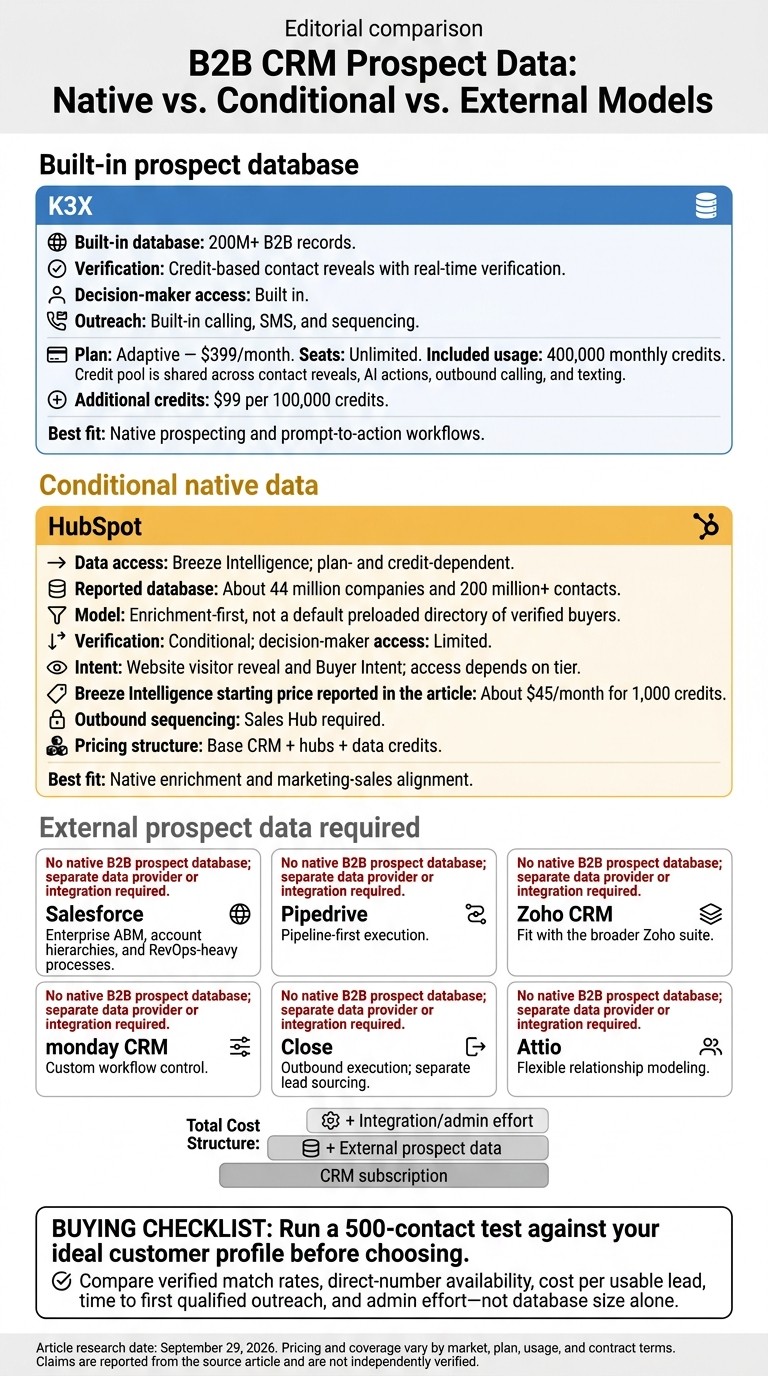
Based on the comparison, I would shortlist K3X for built-in B2B lead data and HubSpot for plan-dependent data access through Breeze Intelligence. Salesforce, Pipedrive, Zoho CRM, monday CRM, Close, and Attio generally need add-ons or outside providers for prospecting.
In a comparison of K3X and Close CRM, K3X lists 200M+ records and 400,000 monthly credits for $399/month, with unlimited seats; credits cover both contact reveals and outbound actions. I would compare verified contact coverage and cost per usable lead, not database size alone, and run a <u>500-contact test</u> before choosing a platform.
Which CRMs Include Built-In B2B Leads?
What Counts as a CRM With Pre-Loaded B2B Leads?
A CRM with pre-loaded B2B leads has its own searchable database of companies and contacts. It does more than hold records you upload yourself.
For outbound teams, that difference matters right away. If reps need leads that are ready to work inside the CRM, the first thing to check is whether the data is native to the platform or just imported storage.
How this article evaluates each platform
This article looks at one core question first: does prospect data live inside the CRM, or do you need an add-on, outside integration, or middleware to make it usable? That line separates a true pre-loaded B2B CRM from a standard CRM with extra tools bolted on.
Each platform is reviewed against four criteria:
Criteria | What it means in practice |
|---|---|
Native prospect database | A built-in, searchable collection of B2B contacts and company records - not just storage for imported data |
Verified emails and phone numbers | Emails and phone numbers validated through real-time email and phone verification, rather than inferred from patterns |
Decision-maker filters | The ability to filter by job title, seniority, or role within the CRM itself |
Find, verify, and sequence leads inside the CRM | The ability to find a prospect, verify their details, and add them to an automated outreach sequence without leaving the platform |
A raw contact record is not the same as a usable lead. Outbound work slows down when teams have to clean, enrich, and check records by hand.
That problem gets worse because B2B data goes stale fast. Platforms that use real-time verification tend to do better than static imported lists [5][14].
The next sections apply this framework to each CRM, looking at native data, verification, access to decision-makers, and pricing.
Methodology and research date
All feature and pricing details were checked on September 29, 2026, using public product pages and documentation. Coverage and pricing vary by market and plan.
With that definition set, the platform-by-platform comparisons below show which CRMs include ready-to-work B2B leads.
K3X: AI-Native CRM With a Built-In B2B Prospect Database
K3X combines CRM, a built-in B2B prospect database, outreach tools, and AI actions in one subscription. The main point is simple: it does not just store data, it turns that data into contacts reps can use for outreach.
What K3X includes out of the box
K3X includes access to a built-in database of 200M+ B2B records without requiring a separate data vendor. Size matters, but access matters just as much, because verified reveals are what turn a record into someone a team can contact.
Teams can use plain-language commands to build sequences, update pipeline stages, capture data, and send email, calls, or SMS. K3X also includes unlimited seats, which keeps software cost flat as team size grows, unlike per-seat tools such as Apollo.io at $49-$119 per user/month [2][10].
Verification, decision-makers, and how credits work
K3X uses a credit model for verified email and direct-dial reveals, similar to Apollo and Lusha. Those credits apply to four action types: contact reveals, AI actions, outbound calling, and texting, all from the same monthly pool.
Decision-maker search sits inside the same workflow, so reps can find stakeholders and start outreach without switching tools. Real-time reveals help cut the risk of stale contact data.
In practice, the main cost driver is credit use, not seat count.
K3X pricing in plain numbers
K3X has one plan: Adaptive at $399/month. It includes unlimited seats, unlimited CRM contacts and pipelines, built-in calling and SMS, AI agents, and 400,000 monthly credits.
Those credits cover both data access and outbound actions, so the $399/month price reflects the full operating cost for many teams. Extra credits start at $99 for 100,000, with larger-pack prices available on the in-app purchase screen. By comparison, a setup with a standard CRM plus ZoomInfo often starts near $15,000/year [2][10]. K3X also offers a 7-day free trial after a 1:1 demo, with no credit card required.
What's included | K3X Adaptive ($399/month) |
|---|---|
Built-in B2B database | 200M+ records |
Monthly credits | 400,000 |
Seats | Unlimited |
Contact reveals | Credit-based (real-time verification) |
Calling and SMS | Built-in, credit-based |
AI automation | Native plain-language commands |
Extra credits | Starting at $99 for 100,000 |
Trial | 7 days (after 1:1 demo) |
The next sections compare Salesforce, HubSpot, Pipedrive, Zoho, monday.com, Close, and Attio on the same native-data test.
Salesforce: Powerful CRM, but Prospect Data Usually Requires Separate Products
Salesforce is a strong CRM for managing sales data, but it does not come with a built-in B2B prospect database [1]. Its Lead, Contact, and Account objects are records your team fills in; they do not arrive preloaded with verified emails, direct dials, or buyer contacts [1][11].
That matters for outbound teams. Salesforce gives you the system of record, not the lead source itself. In practice, sales teams still need separate tools to find people to contact and keep that data up to date [1].
What Salesforce includes vs. what requires add-ons
Salesforce includes the core CRM structure, but most prospecting data and workflow layers come from add-ons [1][11]. Teams often connect tools like ZoomInfo, Cognism, or Lead411 through AppExchange to fill in missing contact data [1][11].
ZoomInfo starts at about $14,995 to $15,000 per year for a five-seat annual contract [1][6]. Cognism starts in the low five figures, and Lead411’s Spark annual plan starts at $490 per year and includes Bombora intent data [16]. If you also need outbound sequencing, Salesforce Sales Engagement is sold separately, and intent data often depends on Salesforce Data Cloud plus partner tools such as Bombora or 6sense. For many teams, the full outbound setup lands in the range of $40,000 to $100,000 per year based on seat count and tool mix [4][2][7].
Data Need | Salesforce Native | Typical Solution |
|---|---|---|
Core objects | Included, but empty until populated | Core CRM |
Verified Emails | Not included | ZoomInfo, Cognism, Lead411 |
Direct Dials | Not included | Lusha, Cognism, ZoomInfo |
Outbound Sequencing | Not included | Salesforce Sales Engagement add-on |
Intent Signals | Not included | Data Cloud + Bombora/6sense |
Decision-maker data | Not included | LinkedIn Sales Navigator or data vendors |
Where Salesforce is strong and where complexity rises
Salesforce does well when a company needs deep account structure, custom fields, and many system connections. Parent-child account hierarchies are a good example: large sales orgs often rely on them to map enterprise accounts cleanly across regions, divisions, and subsidiaries.
The downside is the setup burden. Data connections are rarely plug-and-play, and usable exports often take 6 to 8 weeks, which means teams usually need RevOps or admin help before the system works the way reps expect.
There’s also the data upkeep problem. B2B data goes stale fast, so one import is rarely enough. Teams need regular enrichment to keep emails, phone numbers, and job changes current, and that adds both cost and operating work over time.
HubSpot narrows some of this gap with native prospect data in certain cases, but access depends on plan tier.
HubSpot: Strong CRM and Marketing Platform, but Native Prospect Data Is Conditional
HubSpot is a solid CRM and marketing platform, but native B2B prospect data is not included by default. If your team needs a built-in source of net-new decision-makers, that only comes with added products and the right plan.
By default, HubSpot stores and organizes contacts your team already brings in through forms, imports, and integrations. It does not work like a built-in directory of verified buyers. For sales and revenue teams, the practical question is simple: can HubSpot replace a separate prospecting database, or does it still need one alongside it?
HubSpot CRM records vs. external prospect discovery
HubSpot is strong at managing contacts you already have. To find net-new prospects inside HubSpot, you need Breeze Intelligence, HubSpot’s native enrichment layer built from its Clearbit acquisition [5].
Breeze Intelligence can enrich contact and company records as they enter the CRM. It also includes Buyer Intent, which shows accounts visiting your website so reps can spot warm accounts without using a separate tool [5][8]. According to HubSpot-related coverage, the database includes about 44 million companies and 200 million+ contacts [8].
That said, database depth matters. Breeze’s coverage is smaller than Apollo and ZoomInfo, and its direct-dial coverage is weaker than point tools such as Lusha and Cognism [8]. For teams doing high-volume outbound, that often means using outside enrichment tools to close data gaps [2][17].
In plain terms, HubSpot is better described as an enrichment-first CRM than a search-first source for outbound leads.
Pricing tradeoffs compared with K3X
HubSpot’s starting price can look manageable, but outbound costs tend to build once you add the tools most sales teams need. Breeze Intelligence starts at about $45 per month for 1,000 credits [5], while tools such as Buyer Intent and visitor reveal are linked to Professional or Enterprise tiers [8][17].
That changes the math fast. If you combine Sales Hub, Marketing Hub, and Breeze Intelligence, annual cost can move into the low five figures [17]. For a revenue ops buyer, that means HubSpot pricing is less about the base CRM and more about how many add-ons your workflow depends on.
Feature | HubSpot (with Breeze Intelligence) | K3X |
|---|---|---|
Prospect database | Conditional add-on | Built-in 200M+ record database |
Enrichment model | Credit-based, about $45/month for 1,000 credits [5] | Included in K3X credits |
Intent signals | Website visitor reveal and Buyer Intent [8] | Built-in behavioral signals to optimize AI follow-up timing |
Sales Hub required | Included | |
Pricing structure | Base CRM + hubs + data credits | One plan: $399/month with unlimited team seats and 400,000 credits included |
K3X uses a simpler pricing setup on paper. Its $399/month plan includes unlimited team seats and 400,000 credits per month for AI actions and contact reveals from its built-in 200M+ record database.
HubSpot tends to fit inbound-led teams best, especially those that want CRM, marketing, and enrichment in one system. For outbound-heavy teams, cost rises once Sales Hub and Breeze Intelligence enter the picture, and HubSpot is less suited to teams that need ready-to-work net-new B2B leads natively inside the CRM.
Pipedrive: Easy Pipeline CRM With Prospecting Add-Ons
Pipedrive is a pipeline-focused CRM, not a built-in source of B2B leads. It stores contact and deal data well, but it does not give teams a native database of verified prospects inside the product.
That distinction matters for sales and revenue teams. If your reps need to find net-new accounts and contacts, Pipedrive handles the pipeline side of the job, while prospecting still happens in another tool.
Core Pipedrive vs. LeadBooster Prospecting
LeadBooster does not turn Pipedrive into a B2B contact database. It adds chatbots, web forms, and live chat, which are useful for inbound capture, but not for searching verified business contacts.
For outbound prospecting, teams usually connect Pipedrive to outside data providers such as Lead411, Lusha, Snov.io, and Apollo.io through native integrations and Chrome extensions[3][9][16]. That setup is simpler than stitching together a much larger sales stack, but it still means your contact data lives outside the CRM.
Best Fit and Total Cost for Outbound Teams
For outbound teams, Pipedrive works best when the main need is sales pipeline management, visibility, and simple workflow tracking. Lead sourcing, data enrichment, and in some cases verification, still sit in separate tools.
That also changes total cost. You are paying for the CRM, then adding a prospecting vendor, and sometimes another service for verification.
Component | Tool | Starting Cost |
|---|---|---|
Verified emails + direct dials | Lead411 | $49/month for 1,000 exports[16] |
Prospecting, verification, and outreach | Snov.io | $39/month[3] |
Contact data | $74/month for 170 credits[11] | |
Data + sequencing | Apollo.io | $49/month (Basic)[4] |
If your team wants verified contacts, direct dials, and decision-maker filters inside the CRM itself, Pipedrive does not do that on its own. In practice, it remains a CRM first and a lead source only through add-ons and external tools.
Zoho CRM: Flexible CRM, No Built-In B2B Lead Database
Zoho CRM is flexible, but it does not include a native B2B prospect database. It works well for lead and contact management, yet teams still need outside tools for verified emails, direct dials, and decision-maker data.
That gap matters for outbound sales. Reps often have to leave Zoho to find and verify leads, which adds extra steps and can slow prospecting.
What Zoho Does Natively
Zoho CRM handles lead and contact management well, and Zia adds scoring and predictive insights. What Zoho does not offer is a searchable database of verified U.S. business contacts.
Most Zoho teams fill that gap with third-party data tools. These add-ons plug into Zoho, but each one comes with its own pricing, credits, and workflow.
Data Add-On | Integration Type | What It Provides | Starting Cost |
|---|---|---|---|
Lead411 | Native Zoho connector | Triple-verified emails, direct dials, intent signals | About $75/month billed annually (2,400 exports/year) [15][18] |
Native Zoho connector | LinkedIn-sourced emails, bulk verification | $29/month billed annually (2,000 email credits with rollover) [3] | |
Saleshandy | Native Zoho connector | Waterfall enrichment, 1,500 verified leads | $34/month [11] |
Where Outbound Prospecting Gets More Complex
Zoho can support outbound work, but the setup gets more fragmented once data tools are added. Each integration means another subscription, another credit pool, and another interface to manage.
There is also the data freshness issue. B2B contact data decays by about 25% to 30% per year [5], so teams still need to verify records at export and keep lists clean over time.
Compared with K3X, which combines a built-in database and AI execution in one subscription, Zoho's modular setup means more tools, more spend, and more admin work. For outbound teams, Zoho tends to fit best when CRM flexibility matters more than having ready-to-work leads inside the platform.
monday.com follows much the same pattern: strong workflow control, but no native prospect database.
monday.com: Flexible CRM Workflows, Not a Built-In Lead Database
monday.com is good at moving lead records through a sales process, but it does not include a native B2B contact database. You can manage imported leads well inside the platform, but reps still need another tool to find decision-makers in the first place.
What monday CRM Does Well
monday.com works best for teams that already have lead data. Its custom boards, automations, and team collaboration features help sales teams route, track, and update contacts without much friction.
That setup can work well for pipeline management. But once outbound prospecting begins, the gap is plain: monday.com does not supply the contact data reps need to build lists on its own.
Why Workflow Flexibility Is Not the Same as Prospect Data
Workflow flexibility helps after you have leads. It does not solve lead sourcing. monday.com does not come with a searchable B2B database of verified contacts, so teams usually add third-party tools such as Apollo.io or Lusha, often using Chrome extensions to pull contact details from LinkedIn into monday.com boards [8][11].
The added cost can stack up fast. A monday.com setup plus Skrapp.io starts at $29/month when billed annually for 2,000 credits [3]. Teams that want deeper coverage may also add waterfall enrichment tools like SyncGTM, which starts at $99/month [2].
There is also the data quality issue. B2B contact data decays by about 25% to 30% per year [5], and sales reps spend about 25% of their time dealing with bad records instead of selling [4]. In practice, that makes monday.com a workflow layer, not a ready-to-work lead source.
Close: Strong Outbound Execution, Separate Lead Sourcing
Close is built for outbound work, but it does not come with a native B2B prospect database. In plain terms, it helps reps run outreach, not find new companies or contacts.
That distinction matters for sales and revenue teams comparing systems. Close is an execution-first platform, not a database-first one.
What Close Includes for Sellers
Close includes the core tools sellers use to run outbound motion: calling, SMS, email sequencing, a power dialer, activity tracking, and automated follow-ups. Those features support day-to-day outreach and rep workflow inside one system. This is a key component of a sales team productivity checklist for high-growth teams.
So the value is in execution. Teams can place calls, send sequences, log activity, and keep follow-up moving without stitching together each step by hand.
What Buyers Still Need for Lead Sourcing
Buyers still need a separate tool for prospect discovery. Close handles outreach well, but it does not solve lead sourcing.
For outbound teams, that gap shows up fast. When SDRs need net-new prospects, they usually pair Close with tools like Apollo.io, ZoomInfo, or UpLead.
That setup often means reps move between LinkedIn, a data vendor, and Close. Imported lists also need regular refreshes, since contact data changes over time. Close tends to work best when lead data already exists in another system.
Cost is part of the tradeoff. A Close-based outbound stack can run $3,000–$5,000 per month in software fees alone, plus the time needed for integration management. For buyers, the practical comparison is not just Close vs. another CRM; it is AI-native CRM vs. traditional integration strategies versus one system with native data.
Attio: Modern and Flexible, but Prospect Data Is Not the Core Product
Attio is a flexible CRM for relationship management, not a CRM with built-in B2B prospect data. If your team needs both CRM and lead sourcing in one place, Attio handles the CRM part first and relies on other tools for the data layer.
Attio's Strengths for Relationship-Focused CRM
Attio fits teams that find Salesforce or HubSpot too rigid. Its flexible object model, clean UI, and API-first design make it easier to set up custom relationship workflows.
This matters most for teams that track people, accounts, and interactions in ways that don’t fit a fixed CRM structure. In plain terms, Attio is built to help teams shape the system around how they work, instead of forcing the team into a preset setup.
Where Attio Differs From a Native Lead Database CRM
The main gap shows up when a team needs net-new prospects. To run outbound, teams need to connect Apollo, ZoomInfo, or a waterfall tool like SyncGTM, which syncs verified records into the CRM [2].
That changes both cost and workflow. A basic Attio outbound stack can add about $150–$200 per month before Attio seats, using SyncGTM at $99/month plus Apollo at $49–$59/month [2][13]. If a team uses ZoomInfo for enterprise-grade data, costs can climb much higher, with minimum annual commitments around $15,000 [2][10].
So the issue isn’t that Attio can’t support outbound. It can. The issue is that sourcing, refresh, and verification sit outside the core product and become part of the outbound process.
Feature | Attio | Apollo.io | ZoomInfo |
|---|---|---|---|
Native Lead Database | No | Yes | Yes |
Data Sourcing | Requires external providers | Built-in | Built-in |
Best For | Modern, data-driven teams | SMB outbound | Enterprise ABM |
For teams focused on relationship history across companies, Attio can be a strong fit. For outbound teams, the difference is simple: Attio manages relationships well, but it does not provide ready-to-work leads on its own.
Head-to-Head Comparison: Which Platforms Include Ready-to-Work Leads?
Only K3X and HubSpot include some prospect data inside the product. The other platforms in this comparison need a separate data vendor before a rep can build an outbound list.
Most best AI CRM tools handle outreach and pipeline management. Far fewer include lead data that a team can use on day one. For sales and revenue operators, that changes both setup time and total cost.
Feature Comparison Table
Platform | Native Lead Database | Database Size | Contact Verification | Decision-Maker Access | Intent Signals | Credits/Enrichment Built In |
|---|---|---|---|---|---|---|
K3X | ✅ Included | 200M+ records | Built in | Built in | Built in | ✅ Yes (credit-based) |
HubSpot | ⚠️ Included with limits | 200M+ (Breeze/Clearbit) | Conditional | Limited | ✅ Yes (website intent) | ⚠️ Credit add-on |
Salesforce | ❌ Integration required | External only | Requires add-on | Via integrations | Via add-on | ❌ Not included |
Pipedrive | ❌ Add-on only | External only | Requires add-on | Via add-on | ❌ No | ❌ Not included |
Zoho CRM | ❌ Integration required | External only | Requires add-on | Via integrations | ❌ No | ❌ Not included |
monday.com | ❌ Integration required | External only | Requires add-on | External only | ❌ No | ❌ Not included |
Close | ❌ Integration required | External only | Requires add-on | External only | ❌ No | ❌ Not included |
Attio | ❌ Integration required | External only | Requires add-on | External only | ❌ No | ❌ Not included |
The pattern is straightforward. K3X includes a native lead database, verification, decision-maker access, intent signals, and credit-based enrichment in one product. HubSpot also includes data access, but with limits tied to Breeze/Clearbit and extra credits.
The rest of the field works differently. Salesforce, Pipedrive, Zoho CRM, monday.com, Close, and Attio rely on outside tools for prospect data, verification, or both. In practice, that means extra contracts, extra sync work, and one more place where records can drift out of date.
That split matters most for SMB outbound teams. If reps need leads on day one, a CRM without built-in data usually means waiting on integrations before prospecting starts.
Once data access is separated from CRM cost, the pricing gap becomes much clearer.
Pricing and Total Cost: What U.S. Teams Actually Pay to Prospect
The main cost question is simple: are you paying for just a CRM, or for a CRM plus the data your reps need to work leads? For many U.S. teams, that second layer is where spend climbs fast.
CRM Cost vs. Prospect Data Cost
For Salesforce, Pipedrive, Zoho CRM, monday.com, Close, and Attio, the CRM price is often only one part of the setup. If reps need ready-to-work B2B contacts, teams usually add a separate prospecting or enrichment tool.
HubSpot sits in the middle. It includes some prospect data through Breeze Intelligence, but fuller access to data and intent signals sits behind higher tiers and credit add-ons [17][12].
That makes total cost a two-part equation: CRM software plus data access.
K3X bundles both into one plan. It costs $399/month, includes 400,000 credits, and does not charge per seat. If a team needs more volume, extra credits are sold as one-time top-ups starting at $99 for 100,000 credits.
With other CRMs, adding an outside prospecting database can change the budget in a big way. A ZoomInfo contract often runs from $15,000 to $50,000+ per year [5][10], before the cost of the CRM itself or any other sales tools.
The table below separates platforms with native data from CRM-only setups.
Platform | Lead Data Model | What Drives Prospecting Cost | What It Usually Means |
|---|---|---|---|
K3X | Built-in B2B database | Included in one plan; credits cover contact reveals and AI actions | $399/month flat, unlimited seats, 400,000 credits included |
HubSpot | Partial native data via Breeze Intelligence | Higher tiers and credit add-ons for fuller data access [17][12] | Base CRM plus usage-based data cost |
Salesforce | CRM only | Separate prospecting or enrichment tool | CRM subscription plus external data spend |
Pipedrive | CRM only | Separate prospecting or enrichment tool | CRM subscription plus external data spend |
Zoho CRM | CRM only | Separate prospecting or enrichment tool | CRM subscription plus external data spend |
monday.com | CRM only | Separate prospecting or enrichment tool | CRM subscription plus external data spend |
Close | CRM only | Separate prospecting or enrichment tool | CRM subscription plus external data spend |
Attio | CRM only | Separate prospecting or enrichment tool | CRM subscription plus external data spend |
Estimates for external data tools vary by vendor, usage, and contract terms. ZoomInfo is shown here as a common example of the separate data layer.
With data cost separated from CRM cost, the next section shows which platform fits each outbound use case.
When to Choose Each CRM
Choose K3X if you need verified B2B data, decision-maker contacts, and AI actions in one CRM. The main difference is whether you can work leads directly in the CRM or need to import contacts from another source.
Choose K3X when you want CRM, data, and AI execution in one place
K3X fits SMB outbound teams that want prospecting, verification, follow-up, and pipeline updates in one system. After a 1:1 demo, use the 7-day free trial to test decision-maker coverage for your ideal customer profile (ICP), how recently contacts were verified, and direct-number availability.
When the alternatives are a better fit
Choose another CRM when account structure, enrichment, or sales workflow matters more than built-in prospect data. This table compares platforms by outbound needs, data requirements, and cost.
Platform | Choose it when this matters most | Data and cost consideration |
|---|---|---|
K3X | Native prospecting and prompt-to-action workflows | $399/month, unlimited seats, 400,000 monthly credits |
Salesforce | Enterprise ABM, account hierarchies, and RevOps-heavy processes | Usually requires separate data products |
HubSpot | Native enrichment and marketing-sales alignment | Check enrichment access and credit costs |
Pipedrive | Pipeline-first execution | Budget for prospecting add-ons |
Close | Outbound execution | Budget for separate lead sourcing |
Zoho CRM | Fit with the broader Zoho suite | Often paired with external enrichment |
monday CRM | Custom workflow control | Requires prospect data connections |
Attio | Flexible relationship modeling | Usually paired with external enrichment |
Before switching, run a 500-contact test against your ICP and compare verified match rates - not just database size. As part of the evaluation, compare switching time, integrations, and admin effort.
What to Think Through Before Switching CRM Stacks
After comparing prices, check whether the move will preserve data, compliance, and rep productivity. Confirm what must survive the switch and what the new system can replace.
What to audit before switching
Audit the tools, data, and rules that reps need for outbound work. Inventory seats, data vendors, enrichment tools, dialers, sequences, custom fields, and automations.
Preserve routing rules, suppression lists, Do Not Call lists, and opt-out propagation to keep compliance intact. If you use multiple enrichment sources or waterfall enrichment flows, verify that K3X can reproduce the verification steps needed to deliver usable contacts.
With Salesforce and HubSpot, separate data layers, permissions, and sync work can add setup work. Check record imports, ownership, permissions, and two-way sync so reps keep access to leads they can act on.
Review licensed-data contracts to confirm which records can move. Some vendors may require you to delete data when the contract ends, and enterprise agreements can include 60–90-day cancellation windows.[11]
How to compare time-to-value
Measure time to first qualified outreach, not time to initial login. Test how quickly reps can find, verify, and contact a decision-maker in K3X without extra tools.
Ask a seller to complete the same task in K3X and your current stack: find a relevant decision-maker, verify contact details, check suppression, and log outreach. Track elapsed time, credit use, and admin time.
Include migration, training, integrations, and recurring administration in the comparison. Compare K3X’s prompt-based workflow with Salesforce’s configurable workflows or Close’s outbound tools. Count savings only for subscriptions, manual steps, and admin work that K3X replaces, after accounting for the costs of the switch.
FAQs
How many usable leads can I get with K3X’s monthly credits?
The provided search results don’t include K3X’s credit-based lead pricing, so they can’t confirm how many usable leads its monthly credits provide. They cover Apollo.io, ZoomInfo, and Lusha instead.
Check K3X’s official pricing page or documentation for details on its 400,000 monthly credits and credit cost per lead.
How should I measure success in a 500-contact test?
Evaluate vendors against your Ideal Customer Profile (ICP) based on data quality, coverage, and workflow fit - not total database size. Run vendor tests at the same time over 7 days so data decay affects each test consistently.
For each record, check email deliverability with a tool like ZeroBounce, measure mobile connect rates, and verify job titles against live LinkedIn data. Check that each vendor supports your required industry, revenue, and technology stack filters, and confirm that its CRM integration works as expected.
Can I legally email or call pre-loaded B2B contacts?
Yes, provided your outreach follows applicable regulations, including CAN-SPAM and GDPR [1]. Reputable B2B data providers process publicly available business contact information, which may support outreach under legitimate interest when GDPR’s requirements are met [1].
To comply, identify yourself honestly and give recipients a clear, accessible way to opt out [1]. Your internal processes must handle opt-out requests and keep records of how you use the data [2].