
The Evolution of AI Agents
I’d shortlist K3X for agent-led sales tasks, Attio for chat-based record updates, and HubSpot for teams already using its CRM; Salesforce fits teams that need detailed permission controls. My choice would depend on what Claude or ChatGPT can read, change, and run - not just whether a connector exists.
K3X lists $399/month for unlimited seats and 400,000 monthly credits, while Attio includes MCP access on all plans, including Free.[1][11] Before choosing, I’d test a customer-history summary, a follow-up draft, and a record update with limited permissions in each assistant; Claude support does not establish ChatGPT support, and <u>a good draft does not prove that an update saved correctly</u>.
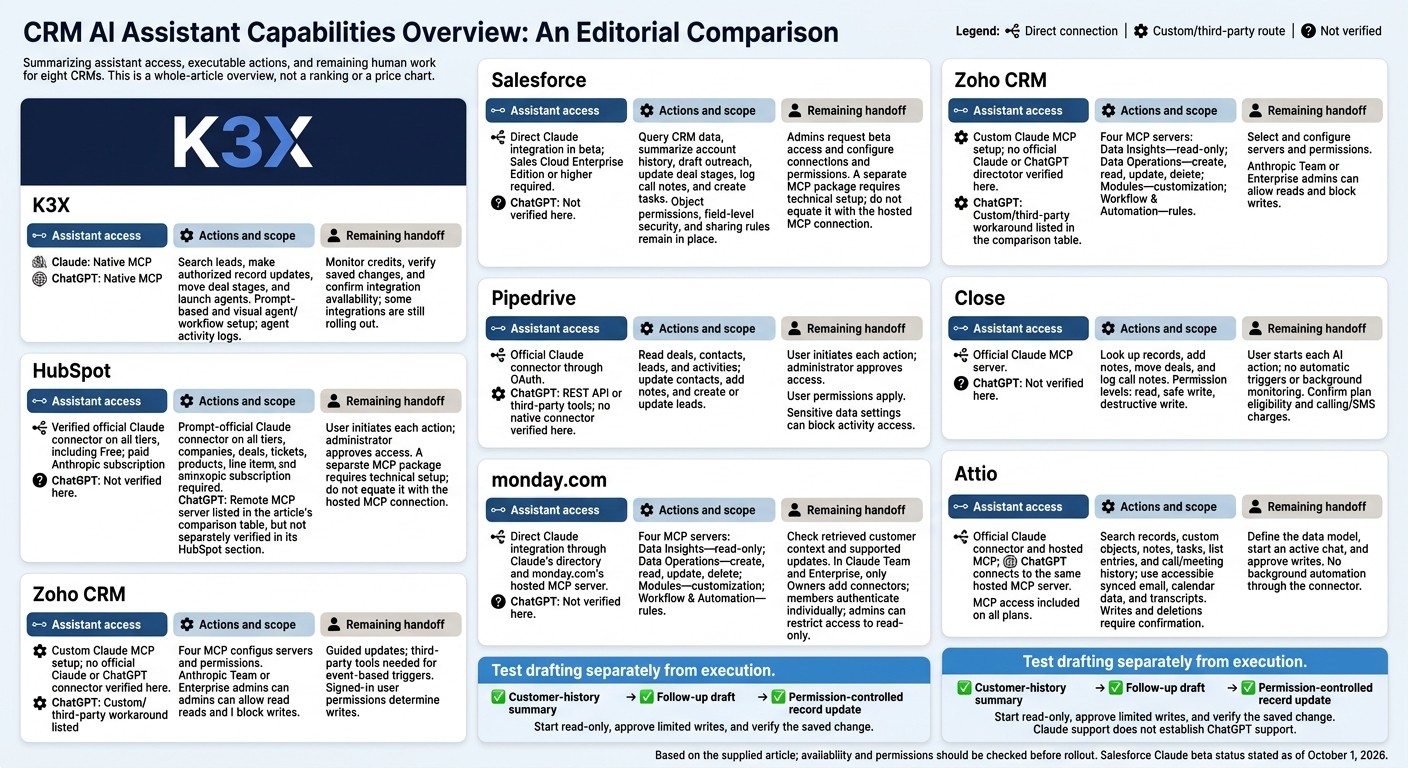
Claude & ChatGPT CRM Comparison: Access, Actions, and Handoffs
1. K3X
K3X is the clearest example of an AI-native CRM in this comparison. Claude or ChatGPT can act directly on records rather than only summarize them.
Claude/ChatGPT connections
Claude or ChatGPT can search leads, make authorized record updates, move deal stages, and launch agents. Teams can also use either assistant to generate pre-call briefs, analyze account history, draft outreach, and log activity.[1]
Customer data and actions
K3X combines pipeline data with more than 200 million prospecting records, intent signals, and email verification status. Its “Rep” agent logs activity and maintains records. Email campaigns are live; LinkedIn outreach is planned.[1]
Setup and permissions
K3X supports prompt-based and visual setup for agents, custom objects, relationships, and workflows. Agent activity logs let teams review what ran. Webhooks connect external tools such as Zapier, Make, and n8n; K3X lists more than 3,000 integrations, though not all are live yet.[1]
The table compares K3X, Salesforce, and Attio on assistant access and setup requirements, based on the supplied sources.[1][9]
Key difference | K3X | Salesforce | Attio |
|---|---|---|---|
Assistant connection | Native MCP | Plugin / MCP package | Hosted MCP server |
Configuration | Prompt-based and visual | More admin-heavy | OAuth connection |
Setup complexity | Agent and workflow configuration through prompts or visual tools | Plugin or MCP package setup | Hosted server connection through OAuth |
K3X’s credit model determines which AI actions remain active each month.
Workflow costs
Credits pay for AI actions, contact reveals, calling, and texting. If credits run out, the CRM remains available, but credit-consuming actions pause.[1]
Extra credits start at $99 for 100,000 credits and roll over while the plan stays active. The monthly allowance does not roll over. K3X offers a seven-day trial after a demo, with no credit card required, and 24/7 chat support.[1]
2. Salesforce
Salesforce suits teams that need complex forecasting, custom objects, and strict governance. K3X focuses on fast AI action, while Salesforce offers more enterprise control - with more administration and less prompt-first speed.[10]
Assistant connections
Salesforce’s assistant connections require Sales Cloud Enterprise Edition or higher. As of October 1, 2026, Salesforce in Claude is in beta with 37 sales skills; hosted MCP servers have been generally available for Enterprise Edition and above since April 2026.[1][2]
This comparison does not cover ChatGPT support. Teams should check its current availability before relying on it.
Customer data and actions
Authorized Claude connections can query CRM data, summarize account history, draft outreach, update deal stages, log call notes, and create tasks. These actions run directly in the CRM through Salesforce’s plugin and hosted MCP servers.[2][5][8]
Setup and permissions
Admins must request and configure Claude beta access. Salesforce keeps its object permissions, field-level security, and sharing rules in place.[1][2]
A separate MCP package provides 60+ tools and requires Node.js, Salesforce CLI authentication, and configuration. It is not the same as the hosted MCP connection.[3]
Total cost
Salesforce charges for AI on top of CRM licensing. Agentic Enterprise pricing starts at about $125 per user per month, with conversation-based billing also available, plus implementation and maintenance costs.[8][10]
Key consideration | Salesforce | K3X |
|---|---|---|
Setup | Admin-managed permissions, beta access requests, and connection configuration | |
License cost | Enterprise: $175/user/month; Unlimited: $350/user/month[10] | $399/month for the whole team, unlimited seats |
AI cost model | Agentforce add-ons start at about $125/user/month, or may be billed per conversation[8][10] | 400,000 monthly credits included; top-ups cost extra |
HubSpot and Pipedrive involve a similar tradeoff: lighter setup, but narrower permissions and AI capabilities.
3. HubSpot
HubSpot is easier to use than Salesforce, but as a traditional CRM, it offers fewer configuration options for agent-led workflows. It fits teams already working in HubSpot; K3X is stronger for turning prompts into actions.[1]
HubSpot reduces handoffs most when the team works inside the platform. It does less to reduce handoffs when the assistant needs to start a workflow.
Assistant connections
HubSpot’s official Claude connector works across all HubSpot tiers, including Free. Claude access requires a paid Anthropic subscription: Pro, Max, Team, or Enterprise.[1][2]
HubSpot launched the connector on July 29, 2025. Its hosted MCP server became generally available on April 13, 2026, adding write access.[2]
This section covers HubSpot’s verified Claude connection. ChatGPT support should be listed separately only if confirmed.
Customer data and actions
Claude can summarize account history, analyze pipeline patterns, draft outreach, update deal stages, log call notes, and create follow-up tasks.[1][2] A user must start the conversation and ask Claude to act; HubSpot remains prompt-led.[1]
Write access covers contacts, companies, deals, tickets, products, line items, and activities. It does not cover quotes, invoices, orders, carts, or marketing content.[1][2]
Setup and permissions
An administrator must approve access. Through OAuth, Claude inherits the signed-in user’s HubSpot permissions.[1][2]
If HubSpot’s sensitive data settings are enabled, Claude cannot access activity objects.[2]
Workflow costs
HubSpot’s Breeze Customer Agent costs about $0.50 per resolved conversation, while Prospecting Agent costs about $1 per qualified lead.[1][8][9] K3X costs $399 per month for unlimited seats and 400,000 monthly credits, with optional top-ups starting at $99 for 100,000 credits.[1]
Key consideration | HubSpot | K3X |
|---|---|---|
Primary strength | Marketing, sales, and service data in one platform | Agent-led sales execution |
Handoff reduction | Requested actions run from Claude; autonomous initiation remains a handoff | Prompt-created agents and configured triggers |
CRM cost | Connector available on all tiers, including Free; Claude requires a paid Anthropic subscription[1][2] | $399 per month for the whole team[1] |
Usage costs | Breeze usage charges are separate from Claude subscription costs[1][8][9] | 400,000 monthly credits included; top-ups start at $99 for 100,000 credits[1] |
Pipedrive requires less setup, but it also limits the data Claude can see and change.
4. Pipedrive
Pipedrive reduces handoffs for guided updates through Claude, but its AI automation is more limited than K3X’s AI-native CRM.[1][2]
Assistant connections
Pipedrive joined Claude’s official connector directory on August 18, 2026. Its official connector uses OAuth and follows the signed-in user’s permissions.[2]
ChatGPT access requires the REST API or third-party tools such as Zapier, Composio, or n8n; no native ChatGPT connector is verified here.[2][3][4] This supports guided updates rather than fully autonomous agent workflows.
Customer data and actions
Claude can read deals, contacts, leads, and activities. It can also update contacts, add notes, and create or update leads.[2]
Setup and permissions
The signed-in user’s Pipedrive role determines what Claude can write or change.[2]
Workflow costs
Pipedrive’s native MCP connector is included across plans. Lite starts at $14 per seat per month, billed annually.[6] Pipedrive AI Sales Assistant provides tips and insights, but it cannot move deals or create tasks.[8]
Key consideration | Pipedrive | K3X |
|---|---|---|
Entry price | Lite: $14/seat/month, billed annually[6] | $399/month for the team[1] |
Assistant access | Claude connector; ChatGPT requires REST API access or third-party tools[2][3][4] | Claude and ChatGPT can act inside the CRM[1] |
Remaining handoff | Third-party tools needed for event-based triggers[4] | Autonomous workflows run inside the CRM[1] |
Zoho CRM offers deeper customization, but requires more setup than other Pipedrive alternatives.
5. Zoho CRM
Zoho CRM supports custom Claude access through four MCP servers, which adds setup work compared with K3X’s native connection.[2][1]
Setup and permissions
The supplied research does not verify an official Claude or ChatGPT directory connector. To connect Zoho in Claude, go to Customize → Connectors and select the MCP server you want to use.[2]
Zoho permissions control access, while Anthropic Team or Enterprise admins can allow reads and block writes. Managing both server selection and permissions adds setup steps and may require more manual handoffs than K3X’s native prompt-to-action approach.[2][1]
Customer data and actions
Zoho divides data access and actions across four servers: Data Insights is read-only, Data Operations supports create, read, update, and delete (CRUD), Modules handles customization, and Workflow & Automation exposes rules.[2]
Workflow costs
Zoho CRM licensing still applies, and Zoho has not published separate MCP pricing. Claude connectors typically require a paid Anthropic plan.[2]
Key consideration | Zoho CRM | K3X |
|---|---|---|
Connection | Custom MCP connector[2] | Native MCP connection[1] |
Actions | Split across read-only, CRUD, customization, and automation servers[2] | Native prompt-to-action workflows[1] |
Pricing | Standard CRM subscription; MCP pricing not published[2] | No per-seat fees; no separate connector or middleware[1] |
6. monday.com
monday CRM connects to Claude through Claude’s directory and monday.com’s hosted MCP server. This is a direct vendor integration, though published sources verify less workflow depth than AI-native options such as K3X.[2][1]
Assistant connections
monday.com uses boards rather than standard CRM objects, so Claude may not be able to access linked contacts, deals, emails, or activity history.[2] Published sources do not confirm access to a full customer timeline. Teams may still need to check records manually before drafting or updating customer follow-ups.[2]
Setup and permissions
In Claude Team and Enterprise, only Owners can add connectors. Members authenticate with their own CRM credentials, and admins can restrict connectors to read-only access.[2]
Workflow costs
Published sources do not establish the required monday CRM plan, seat minimums, connector fees, or usage limits.[2] When evaluating the connection, check how much customer context Claude can read and which records it can update.
Consideration | monday CRM | K3X |
|---|---|---|
Connection type | Direct Claude integration through Claude’s directory and monday.com’s hosted MCP server[2] | Native MCP connections for Claude and ChatGPT[1] |
Workflow scope | Board-based; full timeline coverage and action scope are not verified[2] | |
Access and oversight | Individual authentication; admins can restrict connectors to read-only[2] | Authorized record updates and agent activity logs[1] |
Costs | Required plan, seat minimums, connector fees, and usage limits are not established[2] | $399/month for the team, including 400,000 monthly credits; top-ups cost extra[1] |
7. Close
Close suits teams that rely on calling and SMS and want Claude to work within a built-in communication stack.[2]
Assistant connections
Claude connects through Close’s official MCP server at https://mcp.close.com/mcp. Claude Code can also access Close through its API, but this requires credentials and custom HTTP calls.[2][3]
Customer data and actions
The connector can look up records, add notes, move deals, and log call notes.[2] It does not support automatic triggers or background monitoring.[4]
Setup and permissions
Close offers three access levels for the Claude integration: read, safe write, and destructive write.[2]
Workflow costs
Confirm current plan eligibility and any calling or SMS charges with Close.[2]
Compared with K3X, Close reduces handoffs for call and SMS logging, but users must still start each AI action.[4] K3X supports agent-led record updates and workflow execution.[1]
8. Attio
Attio suits teams that want Claude or ChatGPT to work directly with flexible customer records through chat. It combines flexible CRM data with supervised AI actions, while K3X supports autonomous sales workflows.[1][4]
Assistant connections
Attio provides an official Claude connector and a hosted MCP server at https://mcp.attio.com/mcp. ChatGPT can connect to the same server for direct read/write access.[2][5]
Customer data and actions
Claude and ChatGPT can search people, companies, deals, custom objects, notes, tasks, list entries, and call and meeting history. They can also use synced email, calendar data, and transcripts to draft summaries and follow-ups. Teams must first define Attio’s custom object and relationship model.[2][5]
Setup and permissions
OAuth setup takes under 10 minutes, excluding data modeling. Access follows the connected user’s permissions: reads are approved automatically, while writes and deletions require confirmation. The connector works only in an active chat; it does not run background automation.[4][5]
Workflow costs
MCP access is included on all Attio plans, while native AI features use credits.[1][11] Teams still need to start the chat and approve writes.
Cost or capability | Attio |
|---|---|
Free plan | Up to 3 seats |
Plus, billed annually | $35 per seat/month |
Pro, billed annually | $79 per seat/month |
AI assistant access | Direct hosted MCP |
Remaining handoff | Start the chat and approve writes |
Pricing and plan allowances: [7][11]. Connector behavior: [4][5].
Compare Connections, Actions, Permissions, and Costs
K3X offers Claude or ChatGPT the broadest direct action set in this comparison. HubSpot and Attio are the main direct read/write alternatives, while Salesforce requires more admin work.
Assistant connections. Direct connections reduce the need for custom routes. The table separates those connections from workarounds and flags availability limits.
CRM | Claude | ChatGPT | Availability |
|---|---|---|---|
K3X | Native MCP | Native MCP | Available |
Salesforce | Direct Claude integration | Not verified here | |
HubSpot | Native connector | Remote MCP server | |
Pipedrive | Direct directory connector | Custom/third-party workaround | Claude connector available[2] |
Zoho CRM | Manual custom MCP connector | Custom/third-party workaround | Manual setup[2] |
monday.com | Direct hosted MCP | Not verified here | Claude connector listed[2] |
Close | Official MCP connector | Not verified here | Claude connector available[2] |
Attio | Hosted MCP | Hosted MCP |
Customer data and actions. A connection’s usefulness depends on the customer data it can read and the actions it can perform. Summaries and follow-up drafts depend on that connected data.
CRM | Read customer context | Summaries and drafts | Write actions |
|---|---|---|---|
K3X | Leads and pipeline data | Prompt-based follow-up drafts | Update deals and launch agents |
Salesforce | Account history and call prep | Call prep and account summaries | Updates through beta sales skills |
HubSpot | Contacts, deals, and activities | Summaries and drafts from connected activities | Contacts, deals, and activities |
Pipedrive | Deals, contacts, leads, and activities | Not verified here | Contacts, notes, and leads |
Zoho CRM | Access depends on the server | Context depends on the server | Read-only to full CRUD, depending on the MCP server |
monday.com | Full timeline not verified | May require manual context checks | Action scope not verified |
Close | Records depend on permissions | Not specified | Notes, deal moves, and call logging; depends on access level |
Attio | Records and synced data | Summaries and drafts from accessible records | Full CRUD with confirmation |
Setup and permissions. Setup ranges from native MCP connections to manual custom connectors. Check eligibility, authentication, and write permissions before choosing a CRM.
CRM | Eligibility, authentication, and setup | Permissions and maintenance |
|---|---|---|
K3X | Team subscription; native MCP; prompt-based setup | Authorized updates; review field-level controls |
Salesforce | User, object, and field permissions; admin maintenance | |
HubSpot | User permissions apply; confirm scopes and write access | |
Pipedrive | Native MCP included on all plans | User permissions apply; maintain custom ChatGPT routes |
Zoho CRM | Manual custom connector | Select server scope; maintain the connection |
monday.com | Team/Enterprise Owners add connectors; individual authentication | Admins can restrict access to read-only[2] |
Close | Authentication details not supplied | Match the access level to the task |
Attio | User permissions apply; confirm writes |
Workflow costs. Fewer handoffs only help if the pricing model fits daily use. For teams with heavy AI usage, compare subscription fees, included usage, and extra charges.
CRM | Subscription and billing basis | Included usage and additional costs |
|---|---|---|
K3X | $399/month per team; unlimited seats included | 400,000 monthly credits; 100,000-credit top-ups start at $99 |
Salesforce | Enterprise access required for Claude beta | |
HubSpot | Subscription price varies by plan; AI usage is separate | Breeze: $0.50 per resolved conversation; $1.00 per qualified lead[8][11] |
Pipedrive | Lite: $14/user/month, billed annually[11] | Native MCP included on all plans |
Zoho CRM | Enterprise: $40/user/month[11] | Zia included; Agent Studio free to build; model usage extra[11] |
monday.com | Pricing not supplied | Assistant and connector allowances not verified |
Close | Pricing not supplied | Confirm connector inclusion and communication charges |
Attio | Free for up to 3 seats; Plus: $35/user/month; Pro: $79/user/month, billed annually[11] | Some AI features are metered[11] |
Pros and Cons: Remaining CRM Handoffs
K3X shortens the path from prompt to action, but execution is metered. Other CRMs leave different steps to users: Salesforce needs admin setup, HubSpot excludes some write actions, and Attio needs an active chat prompt.
Compare what a person still needs to prompt, approve, or verify before choosing a CRM.
CRM | Main advantage | Main trade-off | Remaining manual or integration work |
|---|---|---|---|
K3X | Native MCP access and built-in agents | Metered execution; some integrations are still rolling out | Monitor credits and confirm integration availability |
Salesforce | |||
HubSpot | Broad write access to core CRM records[2] | Some records remain outside the connector[2] | Create unsupported assets outside the connector[2] |
Pipedrive | Native MCP access on all plans[11] | More complex reporting still requires exports[11] | Export data for advanced analysis[11] |
Zoho CRM | Specialized MCP servers for data and actions[2] | More setup than direct connectors[2] | Configure the custom connector and select the appropriate server[2] |
monday.com | Direct Claude connection[2] | Full customer history access is unverified[2] | Model history in boards and verify what the connector retrieves[2] |
Close | Three permission levels: read, safe write, and destructive write[2] | Plan eligibility and sync behavior need verification[2] | Verify eligibility and synchronization[2] |
Attio | Hosted MCP access to flexible customer records[5] | Actions require an active chat[4] | Prompt updates manually or add automation to monitor changes[4] |
Test drafting separately from execution. A summary does not prove write accuracy or sync reliability; check those steps when comparing the shortlist below.
Which CRM Fits Your AI Workflow?
Choose the CRM that supports your assistant workflow with the fewest handoffs. This shortlist of AI CRM tools compares team fit and the setup or access limits to check before rollout.
CRM | Recommended team | Main trade-off |
|---|---|---|
K3X | Prospecting teams that want Claude or ChatGPT to search leads, update deals, and launch agents | Credit budgeting and action verification |
HubSpot | Teams already using HubSpot for sales, service, and CRM data | Some objects are out of scope, including quotes, invoices, and marketing content [2] |
Salesforce | Enterprises that need detailed governance and can handle admin-heavy setup | Requires extensive admin expertise and configuration [11] |
Attio | Teams managing flexible relationship data | Actions require an active chat, and writes require approval [4][5] |
Pipedrive | Small teams with simple pipelines | ChatGPT still needs third-party tools for automation and event-based triggers [2][3][4] |
Zoho CRM | Teams prioritizing suite coverage | Requires custom connector setup [2] |
monday.com | Board-centric sales teams | Full record access and write scope remain unverified [2] |
Close | Communication-heavy sales teams | Granular read, safe-write, and destructive-write permissions require careful setup [2] |
If two CRMs look close, test the same three tasks in each CRM using both assistants: a customer-history summary, a follow-up draft, and a permission-controlled record update [2]. Before rollout, start with read-only access, approve limited writes, and verify the saved change. For security, follow a GDPR-compliant AI CRM setup checklist to manage data mapping and access controls.
FAQs
How can I prevent AI from overwriting CRM data?
Limit AI access: Configure the Claude/ChatGPT integration to follow existing user permissions, default to read-only access, and restrict access to sensitive fields. Allow writes only to specific objects through explicit “action restrictions” [1][2].
Test in a sandbox first. Test writes and deletes cautiously, and withhold delete permissions until testing shows they’re safe. Require human approval or a “summarize changes before applying” safeguard so someone reviews proposed updates before they reach CRM fields [2].
How do I estimate my team's AI credit usage?
Check your CRM’s pricing documentation to confirm whether AI features are included, billed per outcome, or charged through credits. Also check whether they require an additional license [1][2].
For credit-based plans, confirm how many credits each action uses. Estimate your team’s daily note-taking, record updates, and email drafting, including manual tasks you plan to hand over to AI. Use those estimates to project credit usage and costs beyond base seat fees [1][2].
Can Claude and ChatGPT share CRM access safely?
Yes, but only if the CRM integration respects existing user permissions and supports optional read/write restrictions. Claude connectors and MCP-based setups can restrict access and actions to each user’s allowed permissions. They should let teams start with read-only access and apply field- and object-level controls to sensitive data.
For example, Attio’s MCP uses OAuth for per-user permissions. Writes require explicit confirmation and leave an audit trail [1][2][3].