
The Evolution of AI Agents
I’d choose Attio for custom relationship tracking and K3X for built-in lead discovery and outreach. My verdict depends on whether your team already has reliable lead sources or needs to understand traditional CRM vs AI-native CRM differences to find new contacts and support follow-up.
K3X lists $399/month for unlimited seats and 400,000 monthly credits, while Attio charges per user on paid plans. I’d compare total workflow cost - including external sourcing tools, credit use, and setup - not seat prices alone, then <u>test both against the same qualification rules</u> before choosing.
Attio vs K3X: Workflow, Pricing, and Best Fit
Attio CRM Review: Pros, Cons & Demo
Attio vs K3X: Features and Pricing
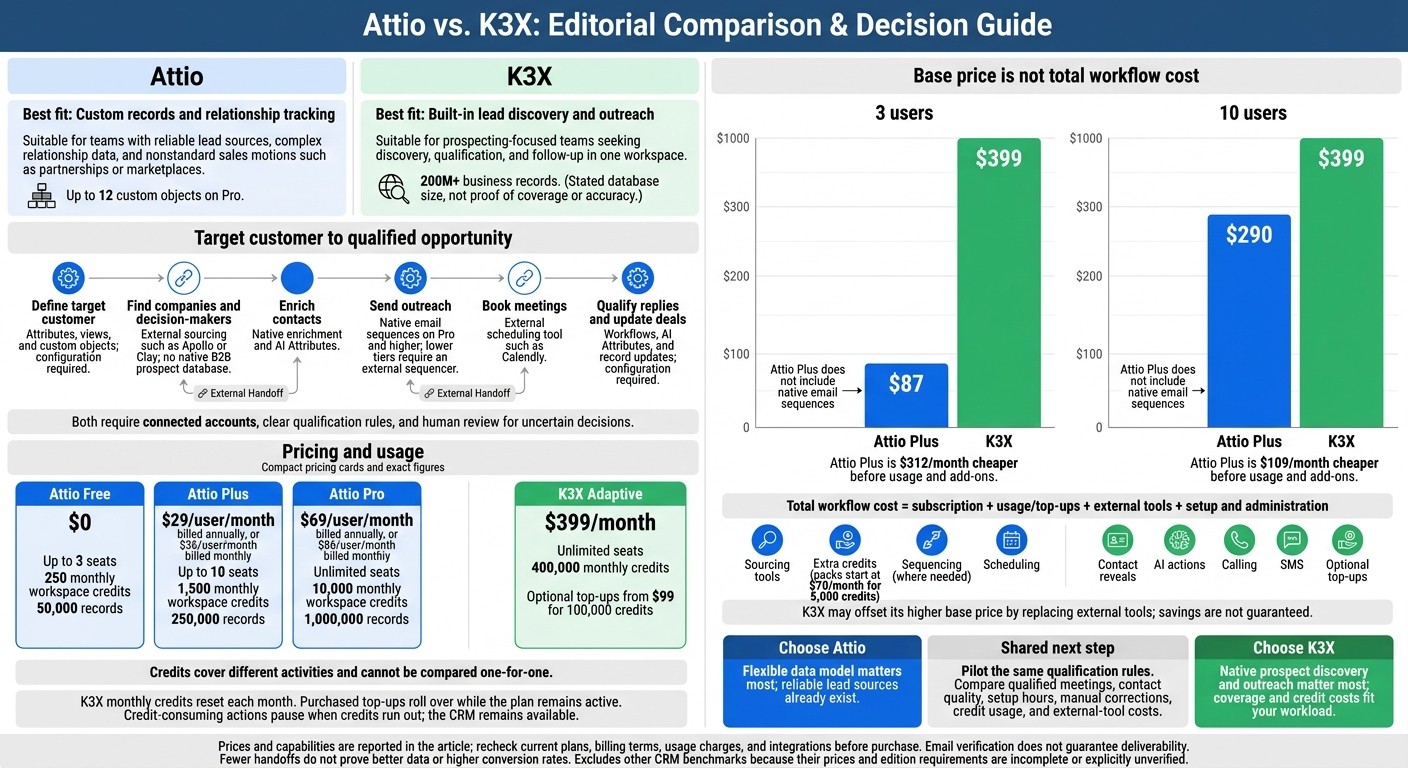
K3X has the edge in built-in prospecting and sales execution; Attio offers more flexibility in CRM structure. K3X keeps prospecting and follow-up in one system, while Attio relies more on external tools.
The difference starts with lead sourcing and carries through to outreach. K3X requires fewer tool handoffs between finding a qualified prospect and taking the first sales action.
Capability | Attio | K3X |
|---|---|---|
Lead discovery | No outbound prospecting database; requires external tools such as Apollo or Clay. | Contact search and contact lookups from its database; lookups consume credits. |
Prospect enrichment | Native enrichment using workspace credits. | Multi-source enrichment and email verification visibility. |
AI automation | AI Attributes and Research Agent; workflows require configuration. | Prompt-driven agents with triggers, actions, and rules. |
Email sequences | Native on Pro and higher; lower tiers need an external sequencer. | Email UI with sequences and auto-replies. |
Customization | Up to 12 custom objects on Pro. | Custom fields, pipelines, and visual workflow editing. |
Pricing model | Free and per-seat paid plans. | Team subscription with unlimited seats and usage credits. |
Both platforms require connected accounts and decisions about how workflows should run. K3X reduces the need for separate tools; Attio gives teams more freedom to organize relationship data.
Plan Prices and Usage Limits
Attio charges per user on paid plans; K3X charges $399 per month for unlimited seats. Both include monthly credits, but those credits cover different activities and cannot be compared one-for-one.
Plan | Price | Seat limit | Monthly credits | Record limit |
|---|---|---|---|---|
Attio Free | $0 | Up to 3 | 250 workspace credits | 50,000 |
Attio Plus | $29/user/month billed annually, or $36/user/month billed monthly | Up to 10 | 1,500 workspace credits | 250,000 |
Attio Pro | $69/user/month billed annually, or $86/user/month billed monthly | Unlimited | 10,000 workspace credits | 1,000,000 |
Attio’s prices and allowances are listed above.[2][4] K3X includes 400,000 monthly credits with its $399/month subscription. Optional one-time top-ups start at $99 for 100,000 credits.
Unlimited seats do not mean unlimited AI actions, contact lookups, calling, or texting. When credits run out, the CRM remains available, but actions that consume credits pause.
For teams running prospect searches, enrichment, and outbound actions, comparing the cost requires looking at usage - not seat count alone.
Attio: Custom Records, Enrichment, and Relationship Data
Attio is better suited to complex relationship data and work that happens after a lead enters the CRM. Teams can shape records around their sales motion rather than fit every relationship into a standard contact-and-deal structure.[1][4][5]
Custom objects can represent subscriptions, workspaces, investors, or partnerships, helping teams track nonstandard sales motions.[5][6]
Teams need to define relationships, required fields, and ownership rules up front to keep reporting clean.[5][6]
Attio connects email and calendar history to help teams see who knows whom. It also enriches existing records, but does not include a native B2B prospect database for finding new leads.[1][4]
Area | Attio advantage | Limitation versus K3X |
|---|---|---|
Records and views | Flexible custom objects, attributes, and CRM views | Requires data-model planning |
Relationship context | Connected email and calendar history | Context depends on connected accounts |
Prospect data | Enriches existing records | External sourcing tools required |
Ask Attio, Workflows, and Outreach
Ask Attio answers natural-language questions and takes action on existing CRM records. AI Attributes can research, classify, summarize, and fill fields, while Research Agent searches the web and writes structured findings onto records.[1][4][5]
Attio’s visual workflows automate routing and follow-up to set up 5-figure CRM workflows using record changes, scheduled times, or field updates. Native sequences and call intelligence require Pro; call intelligence includes recording, transcription, and AI summaries.[1][3][4] These tools support work within the CRM, while top-of-funnel prospecting still requires outside sources.
K3X: Built-In Lead Discovery and Sales Execution
K3X puts lead discovery inside the CRM, while Attio relies on external sourcing. This reduces handoffs between search and outreach. K3X offers 200M+ business records supported by Apollo and Exa data, with plain-language searches for target companies, decision-makers, and growth signals. Credits reveal email addresses and direct phone numbers.[1][4]
K3X also keeps qualification and follow-up in the same system. It shows email verification dates, though verification does not guarantee deliverability. Agents can research and qualify leads, then handle email, SMS, calling, booking, data capture, and pipeline updates. Credit-based actions pause when credits run out.
Buyer consideration | What to check |
|---|---|
Usage fit | Compare contact reveals, AI actions, calls, and texts with expected monthly volume. |
Coverage | Test matches for your industries, locations, and decision-maker roles. |
Accuracy | Check job titles, phone numbers, and email verification dates before outreach. |
Workflow fit | Map qualification rules and pipeline stages to your sales process. |
Integrations | Confirm that each required connection is live and supports the actions you need. |
AI Agents, Workflow Controls, and Activity Tracking
K3X pairs prompt-driven agents with visual workflow controls. Teams can describe an outcome, then set conversational workflow controls with triggers, conditions, branches, and multi-step actions. A single workflow can handle qualification, follow-up, booking, and pipeline updates. Keep human review for uncertain qualification decisions; automation should not mean unchecked outreach.
Dashboards, goal tracking, activity timelines, and agent logs help managers track execution. Compare completed actions with replies, meetings, and pipeline movement. Activity volume alone does not tell you whether prospects are qualified.
Native Claude and ChatGPT links let users search leads, update deals, and launch agents. Agent webhook endpoints support connections through Zapier, Make, and n8n. Treat the 3,000+ integration claim as a general guide, and verify the exact connection and action you need.
Head-to-Head: From Target Customer to Qualified Opportunity
K3X is the more direct fit for finding prospects and acting on them. Attio is stronger when a flexible data model matters more than built-in sourcing, but both need clear qualification rules.
The table follows the path from target account to qualified opportunity. Native means built in; configuration-dependent means rules or connections are still required.
Capability | Attio | K3X |
|---|---|---|
Define the ideal customer profile | Configuration-dependent: attributes, views, and custom objects | Built in + rules required: natural-language targeting and qualification rules |
Find companies and decision-makers | Integration-dependent: Apollo or ZoomInfo for net-new sourcing[4][5] | Native: built-in lead discovery |
Enrich contacts | Native: basic enrichment and AI Attributes | Native: contact lookups and email verification dates |
Send outreach | Native: email, SMS, and calling | |
Book meetings | Integration-dependent: scheduling tools such as Calendly[1][3] | Native: agents book meetings |
Qualify replies and update deals | Configuration-dependent: workflows, AI Attributes, and record updates[1][4] | Built in + rules required: agents qualify replies and update the pipeline |
Agents and branching | Built in + rules required: Ask Attio, Research Agent, and visual workflows[1][4][5] | Built in + rules required: prompt-driven agents and visual logic |
Administration and integrations | Configure the data model and external-tool mappings | Configure agent permissions, rules, and connected apps |
Usage charges | Per-seat fees, credits, and external-tool subscriptions | $399/month, unlimited seats; 400,000 monthly credits; top-ups from $99/100,000 credits; actions pause when credits run out |
Compare seat fees, credit usage, and add-on tools, not sticker price alone. A small-business pilot lets you test the same workflow in both systems.
Example: Selling to Growing U.S. Small Businesses
Use the same qualification test in both systems: industries, U.S. locations, decision-maker roles, and acceptable growth signals. In K3X, discover prospects, look up contacts, automate sales follow-ups, book meetings, and qualify replies in one workspace, reducing handoffs. In Attio, import sourced prospects, map them into Attio fields, enrich records, and use Pro email sequences; connect a scheduling tool for booking.[1][4] Before sending, check titles, verification dates, duplicates, and permissions. Route ambiguous replies to a person, and book only when prospects meet your criteria. Measure qualified meetings, time to launch, manual corrections, K3X credits, and Attio’s external-tool cost to test whether fewer handoffs deliver value - not assume better data or higher conversion rates.
Use the same test when comparing K3X with larger CRM suites.
CRM Benchmarks: Salesforce, HubSpot, and Zoho
Salesforce, HubSpot, and Zoho provide benchmarks for comparing how much setup K3X avoids when prospect discovery, enrichment, and outreach need to work in one system. Check both the available features and the editions, data services, and integrations they require.
Benchmark | Prospecting capabilities | Pricing and access to check | Setup trade-off versus K3X |
|---|---|---|---|
Salesforce | Agentforce and Einstein support account research and outreach drafting; net-new contacts typically require Data Cloud or third-party integrations | Base edition, Agentforce access, usage fees, and data subscriptions | |
HubSpot | Breeze Prospecting Agent provides built-in prospect discovery powered by Apollo[5] | Sales Hub tier, seats, credits, and contract terms | Connected suite; check agent access and usage overhead |
Confirm whether discovery and enrichment find new prospects or only process existing records | CRM edition, Zia eligibility, app subscriptions, and contract terms | Compare custom-module and integration requirements with K3X’s built-in discovery |
Current U.S. starting prices, billing terms, and minimum editions are unverified.
Salesforce: Enterprise Controls and Customization
Agentforce and Einstein can help with sales tasks, but account research is not net-new contact discovery. Compare Salesforce’s external data requirements and heavier administration with K3X’s prompt-to-action flow.[10][12]
HubSpot: Marketing and Sales in One Suite
HubSpot is the strongest suite-level discovery benchmark here because Breeze Prospecting Agent uses Apollo’s database to find net-new prospects. That makes it a direct comparison with K3X’s built-in discovery.[5]
Zoho: Business Apps and Custom CRM Modules
Check the exact edition and Zia entitlements before treating Zoho as a discovery benchmark. Use an edition-level demo to test whether it matches K3X’s discovery path without extra apps or configuration.
Next, test whether lighter sales-first CRMs can close the gap with less overhead. You can also compare CRM software for small sales teams to see how these platforms stack up against more agile alternatives.
Sales Tool Benchmarks: Pipedrive, monday CRM, and Close
Pipedrive fits simple pipelines, monday CRM fits custom workflows, and Close fits phone-heavy outbound. All three focus on sales execution, with lead discovery often handled separately. They provide benchmarks for assessing which workflow steps K3X removes.
Comparison | Pipedrive | monday CRM | Close |
|---|---|---|---|
Primary fit | Simple sales pipelines | Custom sales and operational workflows | Phone-heavy outbound |
Sales execution | Visual pipelines and activity tracking | Custom boards and automation | Built-in calling, SMS, and sequencing |
Lead discovery | Paid LeadBooster add-on [2] | Usually requires external enrichment tools and integrations [8] | No native B2B prospecting database; requires existing lead data [11] |
Additional costs to check | LeadBooster | Data tools and integrations |
Pipedrive: Pipelines and Sales Activity Tracking
Pipedrive gives reps clear deal stages and follow-up tracking without custom data modeling. LeadBooster adds sourcing starting at $32.50 per month.[2] Check whether your team can work with separate sourcing and enrichment steps.
monday CRM: Custom Boards and Sales Workflows
monday CRM suits teams that need custom workflows connecting sales with operational processes.[7] Its flexibility supports those processes, but lead discovery usually depends on separate enrichment tools.[8] Check how CRM follow-up automation covers these workflows rather than assuming it includes net-new prospect discovery.
Close: Calling, SMS, and Sales Sequences
Close suits teams that already have lead data and need fast calling, SMS, and sequencing. Its Power Dialer moves reps through calling lists without requiring them to start each call manually.[11] Check which plan includes sequencing, and include calling and SMS usage charges in your cost estimate.[10][11]
Total Cost: Seats, Usage, Tools, and Setup
Attio costs less to start; K3X may cost less overall if it replaces separate prospecting, enrichment, sequencing, and calling tools. Compare the total workflow cost, not just the price per seat.
Platform and plan | 3 users: monthly base | 10 users: monthly base | Other costs to include |
|---|---|---|---|
K3X Adaptive | $399 | $399 | Contact reveals, AI actions, calling, and SMS consume credits; including automating meeting coordination, optional top-ups |
Attio Plus | $87 | $290 | 1,500 credits included; extra credit packs start at $70/month for 5,000 credits; external prospecting tools[4] |
Salesforce Pro | $240 | $800 | Agentforce usage, prospect data, integrations, and administration[12] |
HubSpot Starter | About $45 | About $150 | Starter pricing is about $15/user/month; AI seat licenses can add to the bill[13] |
Zoho | Not supplied | Not supplied | Confirm edition, enrichment, AI, communications, and integration charges |
Pipedrive Growth | $117 | $390 | LeadBooster and Campaigns add-ons; communications and integration costs[2] |
monday CRM | Not supplied | Not supplied | Confirm seat minimums, workflow automation limits, prospect data tools, and communications |
Close | Not supplied | Not supplied | Plan-dependent sequences, calling, and SMS usage |
Recheck prices at checkout, particularly credits and add-ons. K3X’s combined toolset needs to offset its usage charges and the cost of external tools you would need with Attio.
For 3 users, Attio Plus is $312/month cheaper; for 10 users, the gap is $109/month before usage and add-ons. K3X must replace enough outside tools to cover that gap, plus usage and setup costs. These figures are a starting point, not a forecast.
During a pilot, track qualified contacts found, lead reveals, enrichment attempts, AI actions, emails sent, calling minutes, and SMS segments. Compare the same discovery-to-opportunity workload, including email and provider limits, integration subscriptions, setup hours, and recurring administration. Salesforce’s customization may justify the extra work, but admin or partner costs still belong in the budget[12].
K3X Credits, Trial, and Cancellation
K3X includes 400,000 monthly credits that reset each month. Purchased top-ups start at $99 for 100,000 credits and roll over while the plan remains active; when credits run out, credit-consuming actions pause.
K3X offers a 7-day, no-card trial after a 1:1 demo, with cancel-anytime terms. Use the pilot to test whether it can replace paid tools at an acceptable total cost, not just whether its features fit.
Switching CRMs: Migration and Pilot Testing
Attio fits teams redesigning a complex data model; K3X fits teams bringing prospecting and sales execution into one system. When switching, prioritize lead lists, enrichment data, and workflow history. Attio offers Import2 migrations for Salesforce, HubSpot, and Pipedrive contacts, organizations, deals, and history[2]. K3X supports imports and exports, but confirm which formats it accepts and which history it transfers.
Before importing prospecting data, map custom fields, pipeline stages, owners, and relationships to keep your sales process intact. Test duplicate handling and check whether notes, timestamps, consent, and suppression records transfer. Email and calendar sync does not prove that historical activity migrated.
Once you’ve mapped the data, rebuild only the automations tied to lead routing and qualification. For Attio, use the visual workflow builder[14]. In K3X, test prompt-based agents and triggers against the same workflow. Check permissions, reports, and every required integration - K3X’s integration list does not guarantee that the connector you need is available.
Use K3X’s trial to compare its discovery-to-opportunity workflow with Attio’s, applying the same customer criteria and qualification rules. Track setup hours, duplicate rates, discovered-contact quality, manual intervention, and qualified meetings.
Final Verdict: Choose Attio or K3X
Choose K3X for native lead discovery and outreach; choose Attio for flexible records and relationship tracking. Across discovery, automation, and total cost, the deciding factor is whether your team is prospecting-led or relationship-led.
Attio suits partnership-led sales, marketplaces, and other nonstandard GTM motions that already have reliable lead sources. Its free plan supports up to 3 seats and 50,000 records.[4][5] It has no native lead discovery, so teams seeking net-new leads need tools such as Apollo or Clay.[4][3]
K3X keeps discovery and follow-up in one workflow, combining a 200M+ record database with lead discovery, outreach, and pipeline management. Its $399/month Adaptive plan includes unlimited seats and 400,000 monthly credits. Contact reveals, AI actions, calling, and texting consume those credits.
Compare cost by qualified opportunities and team workload, not subscription price alone. K3X is the better fit for prospecting-focused teams that want one system from target account to qualified opportunity - provided its lead coverage and credit costs match their volume. Attio fits teams whose CRM needs require more customization or whose target leads fall outside K3X’s coverage.
FAQs
How can I estimate K3X credits for my sales volume?
Estimate contact usage and AI workflow actions separately. Contact enrichment or research and AI workflow actions typically have separate usage counters. Check how many credits each action uses, then add a 15–20% buffer because failed lookups often consume credits [1][3].
Compare your projected usage with your plan’s credit limits, particularly for high-volume outbound. If you expect to exceed those limits, compare the cost of credit top-ups with your expected usage; top-ups start at $99 for 100,000 credits [2][1].
How should I test AI-discovered lead quality?
Check leads against your ideal customer profile (ICP) and sales outcomes. Use verified third-party data or manual spot checks to confirm email deliverability and whether job titles match your target roles.
Assess buying intent through website activity and outreach responses - not AI classifications alone. Track pipeline conversion rates, and check whether the AI has complete, unified data, including context on buying committees and real-time changes in prospects’ technology.
When does built-in lead discovery justify switching CRMs?
Switching makes sense when your team needs to generate new pipeline, not just manage existing relationships. Attio supports flexible deal and relationship tracking, but it doesn’t include a native B2B database for finding prospects [1][2].
Consider switching if you need discovery, enrichment, and outreach in one workspace instead of separate tools. This is especially relevant for high-volume outbound or teams that need to log LinkedIn and WhatsApp conversations natively [1][3][4].