


End hours of manual CRM work: use email/call logging, real-time sync, AI enrichment, automated pipelines, smart alerts, and AI note-taking.
Sales teams waste hours every week on manual CRM updates, hurting productivity and accuracy. This article offers 7 practical strategies to eliminate manual data entry, save time, and improve sales performance:
Automate Email, Call, and Meeting Logging: Use AI to automatically log communications and save 5–10 hours per week per rep.
Sync Data in Real Time: Integrate lead sources to ensure instant updates and faster follow-ups.
AI for Data Cleaning: Enrich records and remove duplicates, saving up to 12 hours weekly while improving data quality.
Automate Pipeline and Lead Assignment: Automatically update deal stages and assign leads based on rules, reducing admin work by 2+ hours daily.
Use Smart Notifications: Set up alerts and auto-create follow-up tasks to avoid missed opportunities.
AI Note-Taking: Let AI handle meeting notes and extract key details, reclaiming 10–15 hours weekly.
Switch to AI-Driven CRMs: Platforms like K3X simplify workflows with prompt-based automation and cost-effective pricing.
Quick Comparison:
Feature | Manual Entry | AI Automation (e.g., K3X) |
|---|---|---|
Time Spent on Admin Tasks | High | Reduced by up to 80% |
Data Accuracy | 70–80% | Over 99% |
Setup Time | Weeks | Under 1 hour |
Cost | $100–$300/month | $20/month (usage-based) |
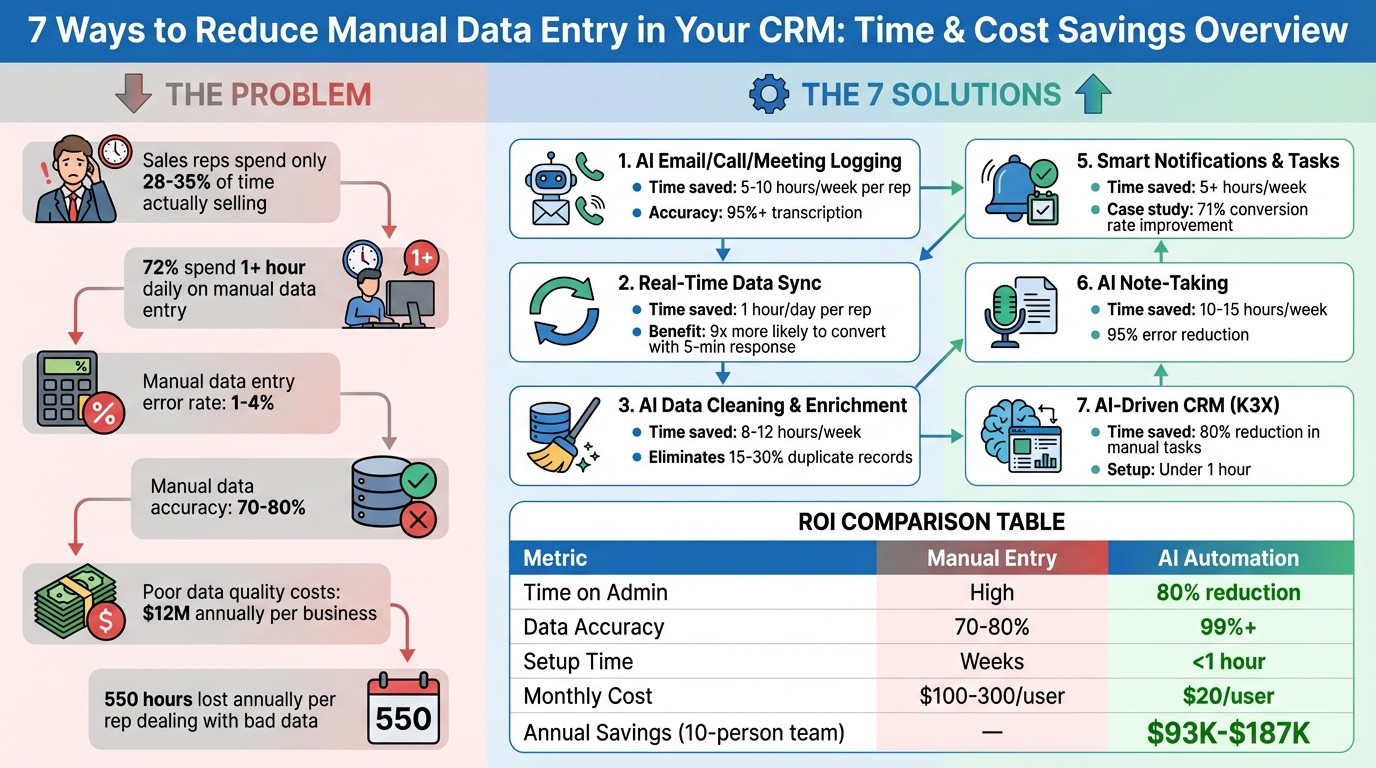
Manual CRM vs AI Automation: Time Savings and Efficiency Comparison
The 5 Best CRM Automations
1. Use AI to Automatically Capture Emails, Calls, and Meetings
The easiest way to cut down on manual data entry? Stop typing altogether. With today's AI, you can automatically log every email, call, and meeting directly into your CRM, letting your team spend more time selling and less time on admin tasks.
Automation Capabilities
AI tools now integrate seamlessly with platforms like Gmail and Outlook to track every email exchanged with CRM contacts. These systems log the subject, body, timestamps, and even attachments automatically into the CRM. For meetings, integrations with tools like Google Calendar, Outlook, Calendly, Zoom, and Microsoft Teams create activity records and link them to the right accounts.
Phone calls are no exception. Voice-to-CRM tools allow reps to dictate notes into an app, where AI transcribes and organizes key details - like budgets or next steps - into specific CRM fields. Some advanced systems even use ambient listening during live calls to transcribe conversations and capture action items in real time. All of this automation adds up to serious time savings for your team.
Time Savings
Just automating email logging can save 2–3 hours per week. Add in voice-to-CRM notes (1–2 hours), calendar and meeting sync (about an hour), and mobile quick capture (around 30 minutes), and you're looking at 5–10 hours saved per rep every week. For a sales team of 10, this could mean annual labor cost savings between $93,600 and $187,200.
Error Reduction
Manual data entry is notoriously error-prone, with error rates ranging from 1% to as high as 4%. AI significantly reduces these mistakes by validating captured data, cross-referencing existing records, and merging duplicates automatically. In fact, AI-powered tools can achieve up to 97.0% precision and 95.5% recall when cleaning up duplicate entries.
Integration Flexibility
The best part? Setting up these AI-driven tools is quick and straightforward. Syncing email and calendar accounts with your CRM often takes just 15–30 minutes using built-in settings or browser extensions. Once that's done, you can add features like voice capture and meeting transcription. Most transcriptions are ready within 24 hours and reach over 95% accuracy. Just remember to inform prospects if you're using ambient AI for call recording to comply with privacy laws.
2. Sync Data Across Platforms in Real Time
To keep things running smoothly, your CRM should connect with every lead source - whether it’s website forms, social media ads, chatbots, or email inquiries. This eliminates the need for tedious copy-pasting and ensures no lead slips through the cracks. At its core, this is all about automated, real-time data syncing.
Automation Capabilities
Real-time syncing means your business tools work together seamlessly. Data from every lead source - like a website contact form or a LinkedIn ad response - flows directly into your CRM without any manual effort. Plus, a two-way sync ensures that updates, such as a change in a contact’s job title or a deal’s progress, are reflected instantly across all teams and tools.
Time Savings
Here’s a staggering fact: 72% of sales professionals spend an hour every day on manual data entry. For a team of 10, that’s 50 hours a week wasted on admin work instead of activities that actually drive revenue. And timing matters - responding to a web lead within five minutes makes you 9 times more likely to convert them compared to waiting longer. Real-time sync removes any lag between capturing a lead and having it appear in your CRM, enabling faster, more effective follow-ups.
Error Reduction
Manual data entry isn’t just time-consuming - it’s error-prone. On average, manual processes introduce a 1% error rate, which can mess up reporting and decision-making. Real-time syncing eliminates these issues by validating email formats, standardizing dropdown options (like industry or lead source), and automatically deduplicating records. The result? Clean, accurate data your team can trust.
Integration Flexibility
Modern sync tools tap into native APIs from platforms like Salesforce, HubSpot, and Microsoft Dynamics to connect your CRM with other essential tools. For example, apps like Slack or Microsoft Teams can send instant notifications when a high-priority lead comes in. You can even link spreadsheets to keep financial data up to date. This level of integration creates a single, unified source of truth for your entire organization.
3. Use AI to Enrich and Remove Duplicate Data
Bad data is a productivity killer. It’s estimated that poor data quality costs businesses around $12 million each year, with duplicate records making up 15% to 30% of a CRM database. On top of that, sales reps lose about 550 hours annually dealing with these issues. AI offers a solution by automatically filling in incomplete records and eliminating duplicates before they cause bigger headaches.
Automation Capabilities
AI leverages techniques like fuzzy matching - using methods such as Levenshtein distance and Jaro-Winkler - to spot similar records. For instance, it can identify that "Jon Smith" and "John Smyth" might be the same person. It then assigns a confidence score: records with scores above 0.95 are merged automatically, while those scoring between 0.70 and 0.94 are flagged for human review.
When merging duplicates, AI consolidates information intelligently. It combines notes, keeps the latest phone number, and selects a master record based on factors like data completeness or recent activity. At the same time, AI enrichment tools pull missing details - like job titles, company profiles, or LinkedIn links - from live web sources, ensuring your data remains accurate and up-to-date.
Time Savings
Instead of relying on occasional manual cleanups, AI works in real time. For example, introducing a 10-minute delay between lead creation and assignment gives AI the chance to enrich incomplete fields and check for duplicates before sales reps even see the lead. This proactive approach prevents embarrassing situations, like two reps unknowingly reaching out to the same prospect. On average, AI-powered automation can save sales reps 8 to 12 hours per week, freeing them up to focus on what they do best - selling.
Error Reduction
AI also minimizes mistakes by standardizing data as it’s entered. For example, it might expand "Inc." to "Incorporated" or format phone numbers consistently, avoiding common errors. This is crucial since 94% of businesses believe their customer data contains inaccuracies. Clean, enriched data doesn’t just look good - it improves forecasting. AI-driven forecasts based on high-quality data can hit up to 95% accuracy, compared to just 20% with older methods. By handling deduplication and enrichment in real time, AI creates a smoother CRM process, paving the way for even more efficiency down the line.
4. Automate Pipeline Updates and Lead Assignment
After automating data capture and enrichment, the next logical step is automating pipeline updates and lead assignments. Manual tasks like updating deal stages or assigning leads can eat up hours of a sales rep's day. Automation streamlines these processes, instantly routing leads to the right person and updating pipeline stages based on real-time actions - like sending a proposal or scheduling a demo.
Automation Capabilities
Modern CRMs take automation to the next level by handling essential sales tasks without human intervention. For instance, if a rep sends a proposal, the system automatically moves the deal to the "Negotiation" stage. Once a contract is signed, it shifts to "Closed Won" and triggers onboarding workflows. A great example of this is Rick, a design agency owner, who in August 2025 automated task creation in Pipeline CRM. When a deal moved to "Proposal Sent", it kicked off a series of follow-up tasks in Asana. The result? A 65% boost in win rates while reducing proposals sent by 40%, thanks to smarter lead qualification.
The same applies to lead assignment. Instead of manually reviewing and distributing leads, automation assigns them based on factors like territory, industry, or workload. AI can even score leads to determine if they're ready for sales, ensuring high-value reps focus on the most promising opportunities. For example, Ace Manufacturing saw a 34% jump in conversion rates after Sales Manager Jon used Zapier and Pipeline CRM to automate lead capture and routing. This intelligent system improved both the speed and accuracy of lead qualification. Streamlining these processes not only saves time but also ensures every lead gets the attention it deserves.
Time Savings
Automating pipeline updates and lead assignments can save sales reps over two hours daily. By cutting down on routine admin work, teams can dedicate more time to activities that directly drive revenue.
Error Reduction
Manual data entry is prone to mistakes, leading to outdated pipelines and missed opportunities. Automation eliminates these errors. For instance, Ashley, a team lead, implemented post-sale handoff automation in Pipeline CRM. When a deal was marked "Closed Won", the system automatically created Trello projects for the onboarding team, complete with customer details. This reduced customer churn by 24% in just one month by avoiding delays in the handoff process. Automated systems deliver 99%+ data accuracy, far surpassing the 70-80% accuracy of manual updates. This precision ensures your pipeline remains up-to-date and reliable, giving teams a clear picture of their progress and opportunities.
5. Set Up Smart Notifications and Automated Tasks
Smart notifications take automation a step further by ensuring no critical follow-ups are overlooked. With real-time updates and automated task creation, your team can stay on top of every action without the need for manual intervention. This eliminates the hassle of creating follow-up tasks or checking statuses manually, keeping the workflow smooth and efficient.
Automation Capabilities
Modern CRMs are designed to handle much more than just data capture - they can automate follow-ups based on specific triggers. For instance, when a deal moves to the "Proposal Sent" stage, the system can automatically schedule a follow-up task in tools like Asana or Trello for three days later. Notifications through Slack or SMS can alert team members instantly when deals are won, lost, or reassigned.
Take Steven's logistics company as an example. In August 2025, they were losing momentum, with 20 out of 31 bids slipping through the cracks. By implementing real-time Slack alerts for "Closed Lost" deals, the team quickly identified four recurring problems during immediate post-mortems. The result? A stabilized conversion rate of 71%.
AI-driven systems also streamline decision-making. After calls, these tools can analyze the conversation context and suggest actions such as "Send pricing" or "Schedule demo." Reps can accept these tasks with a single click, avoiding the need to manually create them. Automated reminders, sent via SMS or email, ensure meetings happen as planned, boosting attendance rates without extra effort.
K3X simplifies the process further with its user-friendly interface, making it easy to set up smart notifications and improve responsiveness.
Integration Flexibility
Modern CRMs don’t operate in isolation - they thrive on integration. Tools like Zapier and Make allow you to connect your CRM with thousands of third-party apps, ensuring seamless data flow. For example, Slack and Gmail can feed information directly into project management platforms like Asana or Trello. Calendar integrations with Google Calendar or Outlook automatically log meetings as CRM activities, saving reps up to 1.25 hours per week.
Time Savings
Did you know that sales professionals spend just 28% to 35% of their time actually selling? By automating activities like task creation, calendar syncing, and notifications, teams can reclaim over 5 hours per week per employee. That’s extra time to focus on what really matters - prospecting, nurturing leads, and closing deals.
6. Let AI Take Notes and Extract Key Information from Conversations
Manual note-taking can be a major time drain. Sales reps often spend 10 to 15 hours every week logging data instead of focusing on selling. AI-powered note-taking tools solve this problem by automatically joining virtual meetings, recording conversations, and pulling out the most important details - like contact information, budget discussions, objections, next steps, and sales qualifiers. Just like automated email and meeting logs, this technology reduces the need for manual input, making your CRM system more efficient and results-driven.
Automation Capabilities
Today’s AI tools go beyond simple transcription - they grasp context. They can accurately identify speakers, differentiate between tentative responses and firm commitments, and even handle follow-up tasks. After a call, these systems can automatically schedule reminders, create follow-up tasks, and draft personalized emails based on the discussion.
For example, a 12-person B2B SaaS team used the time saved from manual note-taking to increase demo calls, ultimately boosting their pipeline revenue. By turning conversation insights directly into actionable CRM updates, AI note-taking builds on other automation benefits.
Error Reduction
Taking notes manually often leads to typos, missed details, or duplicate entries. AI transcription tools, however, achieve over 95% accuracy and reduce manual errors by as much as 95%. Features like speaker tagging and real-time validation ensure that action items are assigned correctly and inconsistencies are flagged before they can disrupt your CRM. Businesses that automate data capture have reported a 22% improvement in forecast accuracy and a 17% reduction in sales cycle length.
Time Savings
By eliminating manual data logging, sales teams can reclaim 10 to 15 hours each week. That’s valuable time that can be redirected toward prospecting, building relationships, and closing deals. Tools like K3X even streamline the review process with a prompt-driven interface, allowing quick approval of AI-generated notes while keeping your CRM accurate - without the hassle of extra busywork.
7. Switch to a Prompt-Driven AI CRM like K3X

Traditional CRMs often rely on rigid workflows that can crumble when a lead behaves unpredictably. Enter K3X, a CRM that flips the script by focusing on outcomes, not pre-programmed steps. Instead of mapping out every possible scenario, you simply tell K3X what you want to achieve using straightforward prompts like, "Book demo calls with every lead who hasn't responded." From there, the AI figures out the steps, adapts to real-time interactions, and keeps your pipeline updated based on results rather than rigid workflows.
Automation Capabilities
With K3X, the days of constant manual input are over. It automatically logs emails, calls, updates, and pipeline changes based on actual conversations. For instance, when Ruby Capital Group adopted K3X in December 2025, they saw a 70% drop in time spent on follow-ups in just 48 hours. Their ticket resolution speed tripled, and tasks like lead qualification and contract routing became fully automated.
"Our sales team was spending half their day on admin work. Now they're talking to customers and closing deals. The automation handles everything from lead qualification to contract routing."
– Michael Chkechkov, CEO, Ruby Capital Group
Integration Flexibility
K3X also excels in how easily it integrates with your existing tools. With built-in support for email, calling, and SMS, you can start using its features right away - no complicated setup required. It even includes a one-click power dialer and unlimited workflow automations, all at no extra cost. Most teams are fully operational in under an hour.
Error Reduction
One of the standout features of K3X is its ability to maintain clean, accurate data. By relying on AI to interpret conversations, it eliminates common issues like duplicate entries and copy-paste mistakes. The platform has achieved a 99.8% compliance accuracy rate, catching errors that often sneak through traditional CRM systems. This approach ensures your data stays reliable, even when leads respond in unexpected ways or ask unanticipated questions.
Time Savings
K3X users report an 80% reduction in manual tasks. In total, the platform has automated more than 245,000 hours of work, saving its clients an estimated $12.4 million in operational costs. At just $20 per seat per month, with pricing that scales based on usage, K3X is also budget-friendly. During slower months, costs automatically adjust to the base rate, so you're never locked into expensive, long-term contracts.
Comparison Table
When picking a CRM, the choice between traditional platforms and AI-native systems like K3X can have a big impact on how much manual work your team faces. Below is a breakdown of the key differences, from data entry methods to monthly costs.
Feature | Traditional CRM Systems | K3X (AI-Native CRM) |
|---|---|---|
Data Entry | Mostly manual; prone to mistakes | Automatically captures data from emails, calls, and transcripts |
Workflow Logic | Fixed "if-then" rules and sequences | Flexible, prompt-driven objectives and outcomes |
Setup Time | Takes weeks or even months | Ready in less than an hour |
Maintenance | Needs IT support or third-party integrations | Self-sufficient; works out of the box |
User Adoption | Often low due to complex interfaces | High; acts as a "sales co-pilot" |
Scalability | Requires more staff as data volume grows | Expands naturally with AI credits and automation |
Base Pricing | $100–$300/user/month (for AI features) | $20/seat/month + usage-based credits |
Contract | Typically requires long-term agreements | No contracts; cancel anytime |
Traditional CRMs often rely on rigid workflows and manual processes, which can lead to inefficiencies and frustration. When leads act unpredictably, these systems frequently fail, requiring manual fixes. In contrast, K3X is built for adaptability. You set your goals, and the AI adjusts dynamically to achieve them.
Another standout feature is pricing. While platforms like Salesforce with Einstein AI can cost over $300 per user each month, K3X offers a much more flexible model. Starting at $20 per seat, it eliminates long-term commitments and adjusts costs based on usage. This ensures you're not overpaying during slower periods.
Conclusion
Minimizing manual data entry isn't just a convenience - it's a game-changer for sales teams. Automation not only improves accuracy but also gives sales professionals more time to focus on what truly matters: selling. Right now, sales reps spend just 28% to 35% of their time on actual sales activities, while CRM users lose a staggering 6 hours per week to manual data management tasks. Automated systems, on the other hand, boast over 99% accuracy, far surpassing the 70–80% range typical of manual entry.
These improvements aren't just about saving time - they're about saving money too. The "1-10-100 rule" highlights the cost of errors: $1 to prevent them, $10 to correct them, and $100 when they lead to bigger failures. Automation tackles these issues at the root, cutting down on costly mistakes.
Take K3X as an example. A recent case study showed it reduced follow-up time by 70% and tripled ticket resolution speed. With its intuitive, prompt-driven design, K3X lets users set goals - like scheduling demo calls with unresponsive leads - and handles the rest. Plus, its straightforward pricing of $20 per seat per month and no long-term commitments makes it accessible for teams looking to maximize efficiency.
If you're ready to eliminate manual entry, streamline workflows, and focus on growth, K3X offers a practical solution to transform your operations.
FAQs
How do I know what to automate first in my CRM?
When looking to streamline your operations, start with time-consuming, repetitive tasks that are error-prone. Begin by mapping out your workflows to pinpoint areas like manual data entry, lead tracking, or follow-up processes. These are perfect candidates for automation, as they not only save time but also minimize errors.
Beyond internal efficiency, focus on automating tasks that enhance the customer experience. For example, set up personalized messaging and timely follow-ups to keep customers engaged while improving overall efficiency. These small changes can make a big difference in both productivity and customer satisfaction.
Will AI automation mess up my CRM data or create duplicates?
AI tools have the potential to streamline CRM data management, making the process more efficient and reliable. Modern systems come equipped with features like advanced duplicate detection, fuzzy matching, and data governance protocols to help maintain clean and accurate records. However, if these tools are not set up correctly or if deduplication rules are too rigid, unexpected problems - like merging unrelated data - can arise. To avoid such pitfalls, it’s crucial to configure these systems thoughtfully and keep a close eye on their performance. When done right, AI can significantly boost data accuracy without introducing unnecessary errors.
What do I need to set up real-time syncing with my lead sources?
To keep your data up-to-date, make sure your CRM is linked to a platform that supports real-time updates. Check that the integration is active and syncing is turned on in your CRM settings. You can use tools like webhooks or automation platforms to connect your lead sources, set sync intervals (such as every 5 minutes), and align fields between systems. Always test with sample data to ensure the setup runs without any issues.