

Learn six common AI email personalization mistakes—over-automation, stale data, tone issues, weak subject lines, poor segmentation—and how to fix them.
AI-powered email personalization can boost open rates by 46%, click-throughs by 50%, and generate $42 for every $1 spent. But many businesses fall into common traps that reduce effectiveness and harm credibility. Here are the key mistakes to avoid:
Over-automation without human review: Emails feel robotic, lack emotional nuance, and often get flagged as spam.
Using outdated or bad data: Poor data leads to irrelevant or incorrect messages, costing businesses millions annually.
Over- or under-personalization: Too much detail feels invasive; too little comes off as generic.
Stiff language and buzzwords: Formal, jargon-heavy emails fail to engage readers or build trust.
Weak subject lines and cluttered content: Bland headlines and overloaded emails get ignored.
Poor segmentation and unclear CTAs: Generic messages and irrelevant calls-to-action lower engagement.
The solution? Combine AI with human oversight, keep data current, focus on professional signals, write naturally, and simplify subject lines and content. Tools like K3X help streamline these processes, ensuring emails stay relevant and effective without complex workflows.
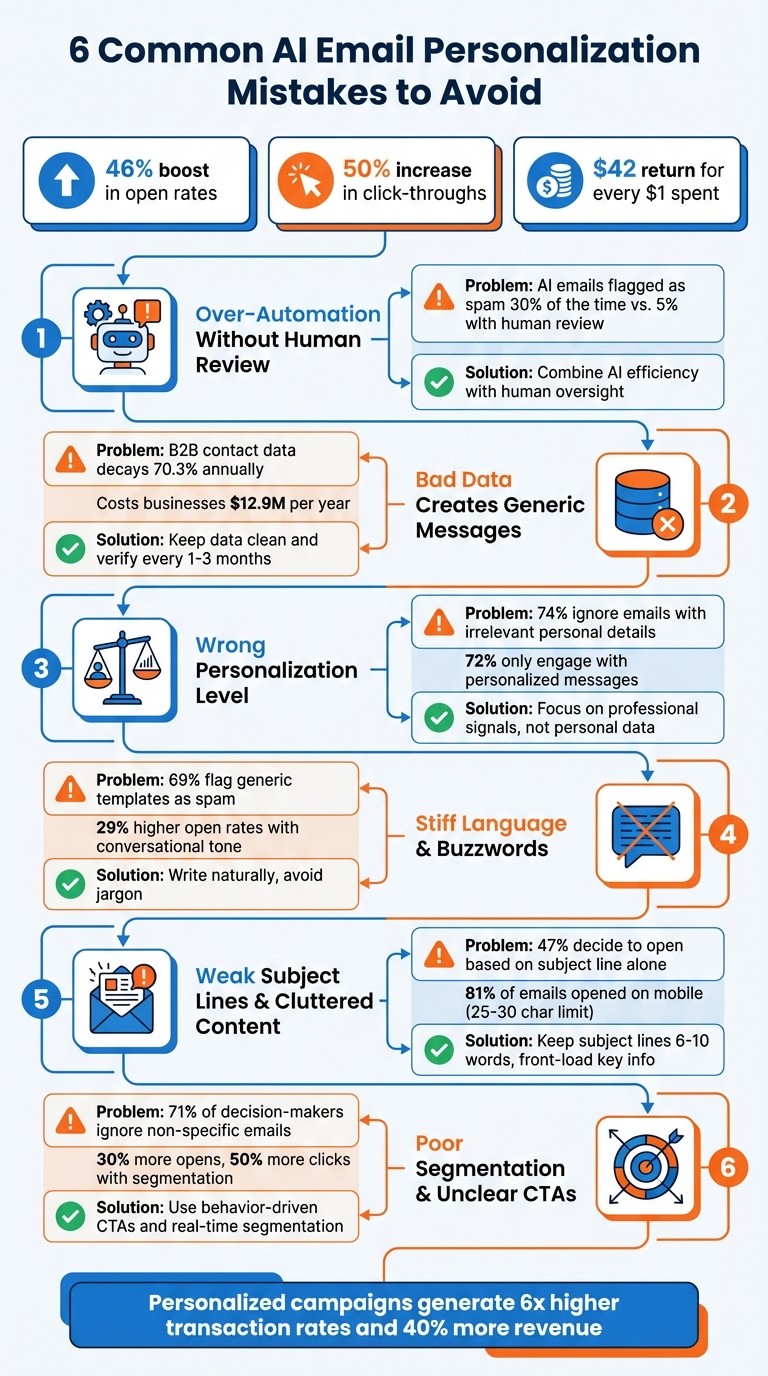
6 Common AI Email Personalization Mistakes and Solutions
The 3 AI Email Mistakes Getting You Banned! (And How to Fix Them)
Mistake 1: Too Much Automation Without Human Review
Relying solely on automation can strip away the human touch that makes personalized communication effective. While automation offers speed and scale, leaving it unchecked can backfire. Businesses that let AI handle email campaigns without oversight risk sending messages that feel impersonal, irrelevant, or even harm their credibility.
Why AI-Generated Emails Feel Robotic
AI-generated emails often follow predictable patterns. They tend to open with generic phrases and suffer from inconsistent tones, sometimes shifting awkwardly within the same sequence. Andrew Bush, Founder & CEO of A17 Technologies, describes these follow-ups as having a "used car salesman" vibe.
AI also struggles with emotional nuance. It can't authentically convey feelings like urgency, frustration, or curiosity, which can leave messages feeling flat and unengaging. To make matters worse, AI can misreport information 3%–8% of the time. For instance, it might reference nonexistent funding rounds or LinkedIn posts, instantly damaging trust.
Another issue is how email platforms like Gmail and Outlook handle AI-generated content. Unreviewed AI emails are flagged as spam up to 30% of the time, compared to less than 5% for those reviewed by humans. These platforms are highly sensitive to the repetitive patterns common in AI-generated messages, often stopping them before they reach the inbox .
These challenges make it clear that relying solely on automation isn’t enough. A balanced approach is essential.
Solution: Combine AI with Human Oversight
The answer isn’t to ditch AI but to combine its speed and efficiency with human review. This hybrid approach ensures that emails maintain a consistent tone, accurate facts, and alignment with the brand’s voice .
"AI handles the volume. Humans ensure the quality. That combination is what makes brand voice work at scale." - Nick Donaldson, Senior Director of Growth, Knak
Tools like K3X take this concept further by learning from human approvals and corrections. Instead of requiring complex workflows, K3X adapts over time to match your brand’s voice. You set goals with simple prompts, and the platform refines its output based on your adjustments. This reduces the need for micromanagement while ensuring the AI aligns with your standards.
This approach reflects the views of 62% of marketers who now emphasize the importance of human content reviews. By blending AI’s efficiency with human insight, businesses can avoid common pitfalls, protect their credibility, and deliver messages that truly resonate with their audience.
Mistake 2: Bad Data Creates Generic Messages
When it comes to personalization, data quality is what makes or breaks your efforts. Even the smartest AI can't perform well if it's fed outdated, incomplete, or incorrect information. The issue isn’t the technology - it’s the data it relies on.
How Poor Data Hurts Email Campaigns
Here’s a reality check: B2B contact data deteriorates at an alarming rate of 70.3% annually. Professional email addresses change at 37.3% per year, and phone numbers become invalid at 42.9% annually. On top of that, 30% of employees change jobs every year, making their contact details obsolete. Throw in company mergers, acquisitions, and promotions, and your database can become outdated almost overnight.
Bad data doesn’t just waste time and money - it can harm your reputation. Imagine sending an email to someone who left their company months ago or referencing an outdated job title. These kinds of mistakes scream "lack of research" and can instantly erode trust. Feeding inaccurate data into AI systems only amplifies these problems.
The financial toll is staggering. Poor data costs businesses an average of $12.9 million annually. Sales teams lose 27.3% of their working hours - roughly 546 hours a year - chasing leads based on bad information. And when you're spending $0.10–$0.30 per AI-personalized email, sending to invalid addresses is like throwing money straight into the void.
Deliverability also takes a hit. Bounce rates over 2% signal to email providers that your domain is low-quality, which can lead to throttling or blacklisting . Spam reports above 0.3% could even get you blocked by platforms like Gmail and Yahoo. Worse yet, 69% of recipients mark emails as spam based solely on irrelevant subject lines.
"The most important aspect of email marketing is the ability to share highly targeted messaging, which depends on having accurate and up-to-date data."
– Bryan Lozano, Vice President of Operations, Ad-Apt
Human errors, like typos or duplicate entries, only add to the chaos . Titles scraped from LinkedIn often come out clunky and impersonal - think "Senior Vice President of Global Strategic Operations" instead of something concise. Encoding issues can garble company names, turning "Manufacturers' News" into "Manufacturers'​ News". These small mistakes can destroy trust before your email even gets opened.
Data Type | Annual Decay Rate | Suggested Refresh Frequency |
|---|---|---|
Professional Email | 37.3% | Every 1–3 months |
Direct Phone Number | 42.9% | Every 1–2 months |
Job Title / Role | ~30.0% | Every 3–6 months |
Company Data (Size, Revenue) | 15–20% | Every 6 months |
Tech Stack | 20–25% | Every 3–6 months |
Solution: Keep Data Clean and Current
The fix? Start by verifying data as soon as it enters your system. Enrich and validate contacts right from the beginning to ensure accuracy. For any segment that’s been inactive for over 90 days, run bulk email verification to keep bounce rates below 2% . Simplify scraped titles - turn "Brand Ambassador for IndustrySelect & IndustryNet MNIs" into just "Brand Ambassador" - to maintain a professional tone.
Regular maintenance is crucial. Every 2–4 weeks, remove inactive subscribers, fix typos, and clean your database to keep AI-driven campaigns effective. Segment contacts by data age, prioritizing re-verification for older entries. Keep an eye on postmaster dashboards and aim to keep spam complaints under 0.1%, never exceeding 0.3%.
Traditional CRMs often require complex workflows, manual updates, and frequent coordination to keep data fresh. That’s where K3X steps in to simplify the process. Instead of juggling systems, you can define goals like "Verify emails before campaigns" or "Keep contact data up-to-date", and K3X handles the rest. It captures data in real time, updates records based on lead activity, and adjusts targeting automatically.
K3X even learns from your corrections, refining its processes over time. Whether it’s a job change or a company merger, K3X updates records instantly and ensures your AI campaigns stay accurate. With this real-time intelligence, you can focus on closing deals while K3X keeps your data clean and your communications relevant.
Mistake 3: Personalizing Too Much or Too Little
Personalization requires a delicate balance. Overdo it, and you risk alienating your audience; underdo it, and your emails might feel like spam. A telling statistic? 72% of customers say they only engage with personalized messages. But here's the flip side: 74% of recipients ignore outreach that includes irrelevant personal details. The challenge is finding that perfect middle ground.
Finding the Right Amount of Personalization
One common mistake is under-personalizing. Simply dropping in placeholders like {{First_Name}} doesn’t cut it anymore - it feels generic. In fact, 71% of decision-makers ignore emails that fail to address their specific needs. And when errors occur - like "Hello {{First_Name}}" - it’s a quick way to lose trust.
On the other hand, too much personalization can feel invasive. Mentioning personal details like someone’s family, hobbies, or social media activity often comes across as creepy, not clever. For instance, sending a follow-up email immediately after someone visits your website can feel intrusive. Instead, a short delay can help avoid that "Big Brother" vibe. Subtlety is key: avoid directly stating observed behaviors and lean into less overt cues.
The best approach? Focus on professional signals. Events like funding announcements, new hires, or product launches are far more effective, generating 3–5× higher engagement than personal references. Stick to details that prospects have willingly shared in a professional context.
"Overpersonalization often feels inauthentic. You lose trust when messaging feels artificially tailored."
– Erik Huberman, Hawke Media
By combining professional insights with subtle behavioral clues, you can hit that personalization sweet spot - engaging your audience while respecting their boundaries.
Solution: Use Behavior-Based Segmentation
The secret lies in personalizing based on actions, not just demographics. Behavior-based segmentation triggers emails based on what people do - like visiting a product page, downloading a whitepaper, or attending a webinar - rather than relying on static data. This method isn’t just effective; it works. Emails driven by behavior see 30% more opens and 50% more clicks compared to generic campaigns.
The challenge? Traditional CRMs make this process complicated. Building workflows with conditional logic and manual triggers can feel overwhelming. That’s where K3X comes in. Instead of managing endless "if-then" rules, K3X lets you set goals like "Send content based on lead activity" or "Adjust messaging for pricing page visitors." It tracks behavior in real time, updates segments automatically, and fine-tunes personalization based on engagement. Whether someone is browsing or actively researching, K3X ensures the content feels relevant - freeing you up to focus on strategy while it handles the execution.
Mistake 4: Stiff Language and Overused Buzzwords
Even with automation and accurate data, the wrong tone can derail an otherwise well-crafted email. Emails loaded with stiff language or overused buzzwords fail to engage readers. AI tools, often trained on formal writing, tend to create emails that feel cold and impersonal. Sure, they may be grammatically perfect, but they lack the warmth and personality needed to connect. Phrases like "I trust this email finds you well" scream automation and almost guarantee your email will be ignored or deleted.
Buzzwords like "synergize", "revolutionize", or "utilize" don’t help either. They sound vague and fail to address concrete business challenges. Worse, when multiple companies rely on similar AI-generated templates, their emails all start to sound the same, eroding brand identity. This lack of originality can lead 69% of prospects to flag such emails as spam.
Ultimately, stiff language and buzzwords don’t just bore readers - they hurt your email’s overall performance.
How Tone Affects Email Performance
Robotic, overly formal language creates what experts call the "digital uncanny valley." It might resemble human communication, but something about it feels off, leaving recipients uneasy. Instead of fostering trust, it can make people defensive. The data confirms this: personalized emails that avoid generic templates can see reply rates jump by up to 30%. Similarly, emails with conversational subject lines enjoy 29% higher open rates compared to their stiff, formal counterparts.
"The result? Writing that's often grammatically perfect but emotionally vacant... It's the linguistic equivalent of a corporate stock photo - technically fine, but completely devoid of personality."
– Pierre Dondin, Content Author, Topo
The solution? Keep it simple. Read your emails out loud. If something sounds awkward or unnatural, rewrite it. Swap out jargon for plain language: say "help" instead of "assist", "use" instead of "utilize", and "improve" instead of "enhance". Adding contractions like "you're" or "it's" can also make your writing feel more conversational. These small tweaks can dramatically improve how your message is received.
Solution: Write More Natural Emails
K3X offers a way to avoid the pitfalls of stiff, overly formal emails. Instead of rigid templates, it uses prompt-driven control to craft messages that feel authentic. You can guide the tone - whether it's a "friendly sales expert" or a "pragmatic advisor" - and explicitly instruct it to skip the jargon. Even better, K3X learns from your best-performing emails, fine-tuning its language based on engagement and recipient behavior.
This approach eliminates the trade-off between automation and authenticity. K3X handles the volume, but your emails still sound human and aligned with your brand voice. Whether you're following up on a lead or reaching out to a cold prospect, the platform adjusts its tone to suit the context - without blending into the sea of generic AI-generated emails. You focus on strategy, while K3X ensures your messages resonate.
Mistake 5: Weak Subject Lines and Too Much Content
Weak subject lines and cluttered email content are two major stumbling blocks in email marketing. Think about it: your subject line has just two seconds to grab attention before it's ignored. With the average U.S. office worker receiving 121 emails daily, that's stiff competition. Yet, many emails still rely on bland, generic subject lines that fail to stand out. Worse, they pack the email body with excessive text, multiple offers, and too many links, leaving readers overwhelmed before they even begin. This poor first impression can derail the entire email campaign.
The stats paint a clear picture: 47% of recipients decide whether to open an email based solely on the subject line. If the subject line doesn’t grab attention, the rest of the email won’t even get a chance. And even if the email gets opened, overloaded content can ruin engagement. Gmail, for instance, clips emails over 102KB, potentially hiding your call-to-action and tracking codes. Plus, too many links can trigger spam filters, damaging your sender reputation.
The dominance of mobile devices adds another layer of complexity. Over 81% of emails are now opened on mobile, where subject lines are truncated to just 25–30 characters. If your key message isn’t upfront, it’s likely to be missed entirely.
What’s Holding Back Subject Lines and Content?
Subject lines often fail because they’re either too vague or too long. Research shows that subject lines with 6–10 words achieve a 21% open rate, compared to just 14% for those with 11–15 words. On mobile, the challenge is even greater: the iPhone Gmail app displays only 37 characters, while a Google Pixel shows 33. If the core message is buried, it simply won’t get noticed.
Another common misstep is relying on superficial personalization, like using a recipient’s first name. This approach can feel impersonal and robotic, leading 69% of recipients to mark such emails as spam. AI-generated subject lines sometimes worsen the issue by sounding more like announcements than engaging messages.
"My only advice for email subject lines is to think of them as starting a conversation rather than making an announcement."
– Samar Owais, SaaS + ecommerce email strategist
Overloading the email body is just as problematic. Emails crammed with multiple calls-to-action, long paragraphs, and excessive links confuse readers and can even trigger spam filters. For longer emails, a good rule of thumb is one link per 125 words. If your email exceeds Gmail’s size limit, your carefully crafted CTA could be clipped, leaving your message incomplete.
Solution: Keep It Short and Relevant
The key to avoiding these pitfalls is simplicity. Start with concise subject lines that front-load the most important information. For example, K3X uses prompt-driven control to craft subject lines optimized for mobile, ensuring key details appear within the first 20–25 characters. By learning from your top-performing emails, K3X fine-tunes subject line length and tone to boost open and response rates.
For the email body, K3X focuses on clarity and brevity. It limits the number of links and keeps emails under the 102KB size limit, ensuring your CTA stays visible - even on mobile. This means no more worrying about Gmail clipping your message or spam filters flagging your email. K3X handles the technical optimization so you can focus on crafting a strategic message.
With K3X’s real-time adjustments, your emails stay concise, engaging, and easy to read - helping them stand out in crowded inboxes.
Mistake 6: Poor Segmentation and Unclear Calls-to-Action
Failing to segment your audience and using vague calls-to-action (CTAs) can seriously hurt your email campaigns. Sending the same generic message to everyone on your list is like shouting into a crowded room - most people won’t even notice. The data backs this up: a large percentage of decision-makers ignore emails that don’t speak directly to their needs. Worse, this "batch and blast" approach can harm your email deliverability and even trigger spam filters.
The issue becomes even more glaring when timing and context are ignored. Without proper segmentation, you could send a discount code to someone who just made a purchase yesterday or pitch a product to a customer in the middle of resolving a support issue. These tone-deaf messages make it clear you’re not paying attention to your audience. This not only reduces response rates but also makes it harder to follow up in a meaningful way.
Why Segmentation and Clear CTAs Matter
Generic email blasts that ignore individual preferences are a waste of time and can tank engagement. In fact, 72% of shoppers expect businesses to recognize them as individuals and understand their interests.
Another problem is email overload. Without proper segmentation, subscribers might find themselves bombarded with multiple campaigns at once - like a welcome email, a webinar invite, and a product update - all hitting their inbox simultaneously. This kind of overload quickly leads to burnout and higher unsubscribe rates. On the flip side, 78% of consumers are more likely to make repeat purchases from brands that deliver personalized experiences. Personalized emails also perform significantly better, generating 2x the replies compared to generic templates. Segmented campaigns see a boost of 30% more opens and 50% more clicks than their unsegmented counterparts.
To achieve these results, you need to move beyond basic demographic data. Real-time behavioral signals - like visits to your pricing page, content downloads, or trial activity - can help you understand your audience’s intent and target them effectively.
Solution: Use Behavior-Driven CTAs
K3X simplifies the process of segmentation by using real-time behavior data. Instead of manually building complex workflows, you just set your goal, and K3X takes care of the rest. For example, if someone visits your pricing page, K3X automatically prioritizes them for follow-up with a high-intent CTA like "Schedule a Demo" instead of a generic "Learn More".
The platform continuously updates audience segments based on user behavior, ensuring that people are moved in and out of campaigns dynamically without any manual effort. It also prevents email overload by focusing on high-priority messages and suppressing less relevant ones.
K3X tailors CTAs to match each recipient’s stage in the customer lifecycle. For instance, it might deliver onboarding guides to trial users, share targeted use cases with active prospects, or pause promotional emails for recent buyers. This behavior-driven approach turns your CRM into a proactive tool that responds intelligently to user signals, boosting 52% more conversions without the hassle of traditional automation.
How K3X Fixes Email Personalization Problems

K3X reimagines email personalization by replacing the rigid, step-by-step automation of older systems with a flexible, prompt-driven model. Instead of requiring users to create intricate workflows that demand technical know-how, K3X simplifies the process. You just describe your goal - like "Follow up with leads who visited the pricing page" - and the platform takes care of the rest. This eliminates the overly mechanical tone often found in static templates, as K3X continuously refines its messaging based on user behavior.
Another major issue it addresses is outdated data. K3X dynamically updates segments in real time, ensuring your campaigns reflect the latest information. For example, if a prospect gets a new job title or a customer makes a purchase, the system adjusts their status and messaging automatically. This replaces the ineffective "set-it-and-forget-it" approach. As one expert aptly notes:
"AI should be the co-pilot, not the pilot. The most effective campaigns combine AI's analytical power with authentic human touches" - Entrepreneur Contributor.
Traditional CRMs vs. K3X
The key difference between K3X and traditional CRM systems lies in how they handle automation. While older platforms require you to meticulously plan every step, trigger, and condition, K3X focuses on the end results you want to achieve.
Feature | Traditional CRMs | K3X |
|---|---|---|
Setup Complexity | High, requires technical expertise | Low, prompt-driven |
Adaptability | Limited, static workflows | Dynamic, real-time learning |
Automation Control | Step-based, manual triggers | Conversational, goal-oriented |
User Involvement | Extensive manual input | Minimal, outcome-focused |
Traditional CRMs often act more like passive record-keeping tools, requiring constant manual updates to stay relevant. K3X, on the other hand, functions as an active partner, analyzing countless data points to adjust your campaigns in real time. This dynamic approach ensures your emails stay relevant as customer behaviors and needs change.
ROI and Growth with K3X
K3X doesn't just simplify automation - it delivers measurable results. By removing the need for complex setups and reducing manual adjustments, it enhances performance while cutting operational costs. With its intuitive, prompt-driven interface, anyone can create campaigns by simply describing their goals, saving time and effort.
The results speak for themselves. Emails personalized through K3X achieve 6x higher transaction rates and generate 40% more revenue compared to generic campaigns. It scales personalization effortlessly, tailoring calls-to-action based on where each recipient is in their customer journey. For example, trial users might receive onboarding guides, while active prospects are sent targeted use cases - all without the need to create separate workflows.
At just $20 per month per seat (including 1,000 AI credits), K3X offers flexible pricing that grows with your needs. It comes packed with built-in tools like email, calling, SMS, and unlimited workflow automations, along with integrations that allow your team to focus on closing deals instead of managing software. This streamlined system not only accelerates campaign execution but also boosts conversion rates, solving the core challenges of email personalization head-on.
Conclusion
AI-powered email personalization can significantly boost engagement and revenue - but only if you steer clear of common mistakes that can derail your campaigns. Missteps like over-automation without human oversight, relying on outdated data, misjudging the level of personalization, robotic-sounding language, weak subject lines, and poor audience segmentation often happen when AI is viewed as an autopilot instead of a collaborative tool. The key isn't to abandon automation but to adopt strategies that focus on outcomes like click-through rates and conversions, rather than vanity metrics that don't contribute to revenue growth.
K3X tackles these challenges head-on by replacing rigid, step-by-step workflows with a prompt-driven system that adapts in real time. Simply define your goal, and the platform dynamically adjusts to stay aligned with your objectives. This flexible approach ensures campaigns remain relevant and effective, avoiding the rapid decline in performance that static methods often face.
The potential here is huge: segmented campaigns can generate up to 760% more revenue, and behavior-triggered emails boast open rates exceeding 50%. Yet, an overwhelming 95% of email marketers still rely on superficial personalization tactics, like adding a recipient's first name, while ignoring deeper behavioral insights that truly drive engagement.
With pricing starting at just $20 per month (including 1,000 AI credits), K3X makes advanced email personalization accessible for businesses of all sizes. It transforms your campaigns from one-size-fits-all broadcasts into dynamic, personalized conversations that grow alongside your business.
FAQs
How can I make AI emails sound less robotic?
To make AI-generated emails feel more natural, start by prompting the AI to adopt a friendly, conversational tone - something like, "Write this as if you're chatting with a colleague." Once the email is drafted, read it out loud. This will help you spot any awkward phrases or sentences that don’t quite flow. Also, steer clear of overly formal language by explicitly asking for a relaxed tone. Following these steps can make your emails sound more personal and relatable.
How often should I refresh my contact data?
To keep your personalized email marketing on point, it's important to update your contact data regularly. Aim to refresh this information every 3 to 6 months. Doing so ensures your data stays current, which can significantly boost the success of your campaigns.
What’s the safest way to personalize without being creepy?
The best way to personalize emails is by respecting boundaries and focusing on trust. Stick to using relevant and verified data to improve the customer’s experience, but avoid including overly sensitive or irrelevant details. Over-personalization can cross lines, so it’s essential to strike the right balance. Having a human review the tone and content ensures the message feels appropriate and considerate. Tools like K3X emphasize ethical, purpose-driven personalization, making sure the content comes across as genuine and useful - never invasive.