

AI-driven workflows automatically advance deals, cut admin time, and make forecasts accurate so reps focus on closing.
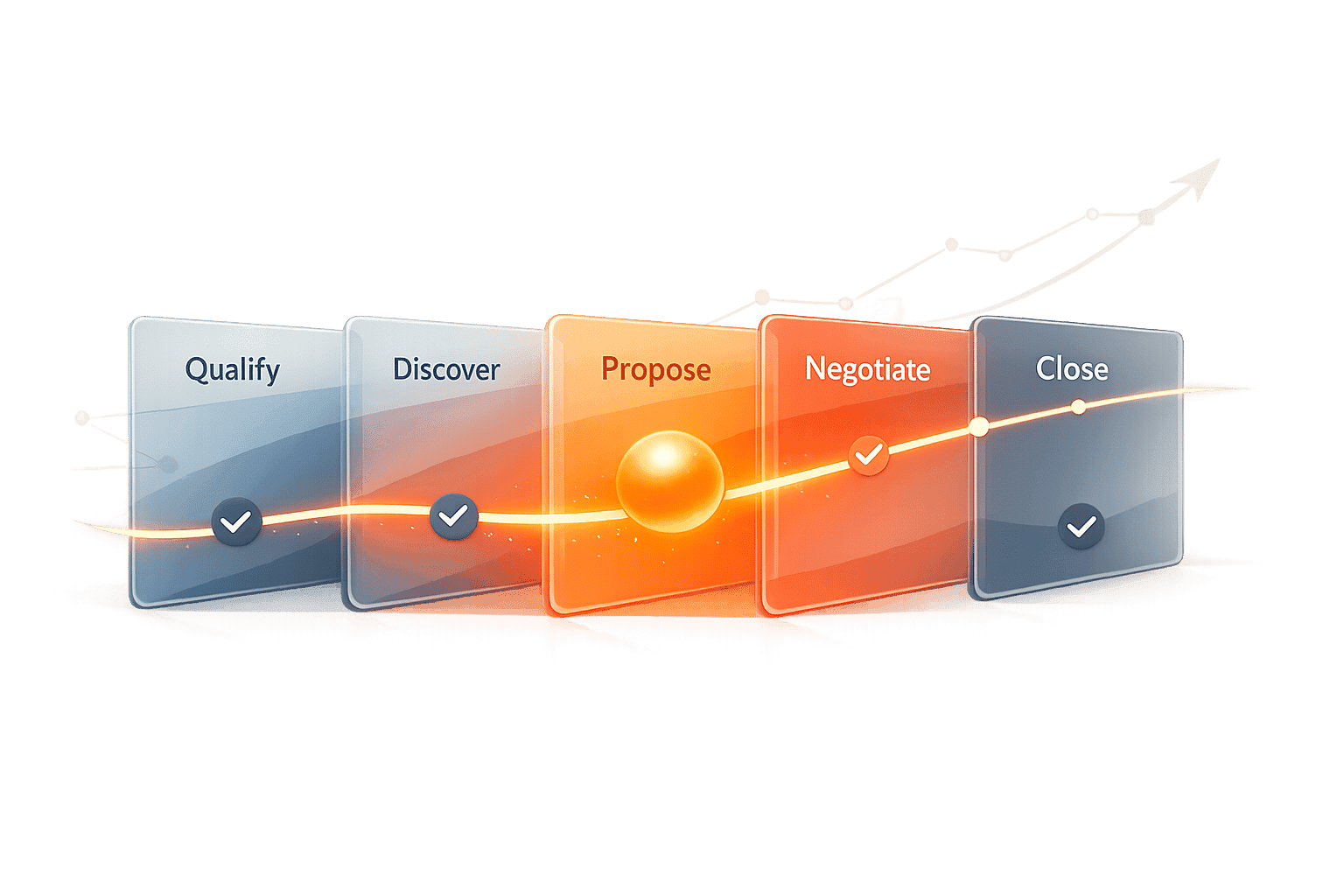
Automated Opportunity Progression is a process where AI and automated workflows manage sales pipelines without manual input. Instead of sales reps updating CRM systems, AI tracks buyer actions - like email replies or document views - and automatically advances deals through stages based on real-time data.
Here’s why it matters:
Sales reps spend only 28–36% of their time selling; automation frees up their time by handling repetitive tasks.
AI improves data accuracy, reducing errors caused by manual entry.
Companies using automation report 70–90% efficiency gains, faster response times, and higher win rates.
Example: Ruby Capital Group cut follow-up times by 70% and tripled resolution speeds in just two days.
How it works:
Triggers: AI detects buyer signals, like pricing inquiries or meeting acceptances, and updates deal stages instantly.
AI Analysis: Unstructured data (emails, calls) is processed to identify next steps.
Goal-Based Prompts: Platforms like K3X allow users to set outcomes in plain language, simplifying automation.
Compared to older CRM systems, automated systems are faster, require less maintenance, and reduce human error. Businesses save time, improve forecasting, and scale sales efforts more efficiently.
I Automated My Entire Sales Pipeline With AI (Live Demo)
What Is Automated Opportunity Progression?
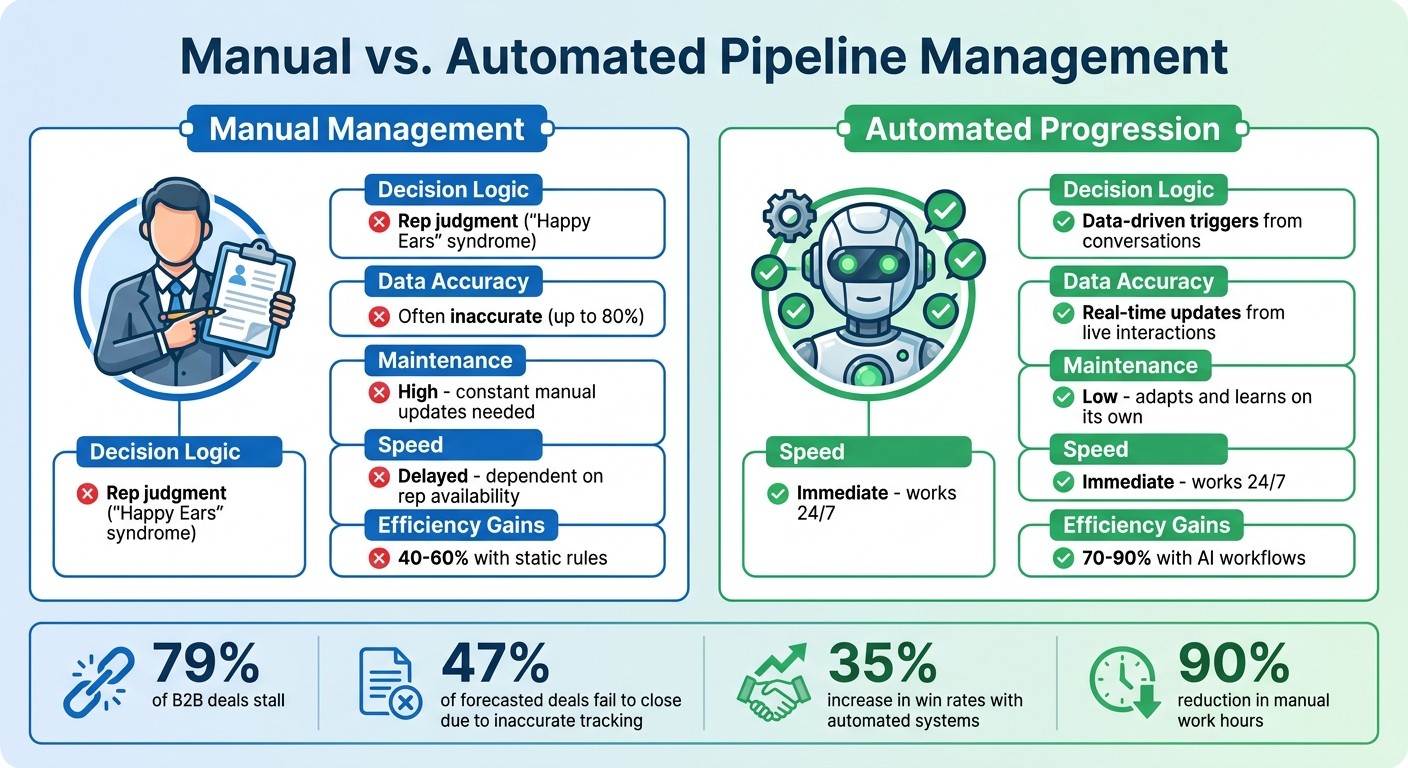
Manual vs Automated Sales Pipeline Management Comparison
Automated opportunity progression uses AI and autonomous workflows to move sales deals through pipeline stages based on real-time data and buyer signals - without needing manual input from sales reps. Instead of relying on reps to update CRM systems after every interaction, the system tracks behaviors and updates opportunities as soon as it detects key signals.
This approach shifts the way pipelines operate. Traditional CRMs act as passive tools, only recording what salespeople manually input. Automated systems, however, actively analyze deals and determine the next steps. This eliminates much of the guesswork and human error that can derail manual pipeline management. Consider this: 79% of B2B deals stall, and 47% of forecasted deals fail to close due to inaccurate tracking.
How It Works
Automated opportunity progression operates using three main components: triggers, AI-driven decisions, and goal-based prompts. Triggers are specific actions that indicate a change in deal status, like a prospect opening a pricing document, accepting a meeting invite, or signing a contract. When these actions occur, the system detects them and updates the pipeline accordingly.
AI takes this a step further by analyzing unstructured data, such as emails or call transcripts. For example, if a prospect says during a call, "Send me the contract", the AI recognizes this intent and updates the deal stage to "Contract Sent". Similarly, repeated visits to a pricing page or downloading a whitepaper can signal interest, prompting the system to adjust the opportunity stage automatically.
Platforms like K3X simplify the process by allowing users to set up automation with straightforward, goal-focused prompts. Instead of programming each workflow step, users can define outcomes in plain language - such as "alert the team when a deal hits $50,000" - and the system takes care of the rest. This flexibility eliminates the need for constant reprogramming, which is common in traditional systems.
The benefits of AI-driven workflows are clear. They can improve efficiency by 70–90%, compared to 40–60% with static, rule-based automation. Additionally, companies that enforce strict criteria for moving deals forward - like requiring budget approval or signed NDAs - can improve forecast accuracy by 23%. These automated processes stand in stark contrast to conventional methods.
Manual vs. Automated Pipeline Management
AI-driven systems vastly outperform traditional manual methods in speed and accuracy. Manual pipeline management relies on sales reps to log activities, update deal stages, and track next steps. This reliance often leads to issues, such as "Happy Ears" syndrome - where reps' optimism inflates forecasts and clogs the pipeline with deals unlikely to close. CRM data also tends to degrade over time, with records becoming 34% outdated annually.
Automated systems eliminate these problems by removing human bias. Opportunities progress based on objective, real-time data from conversations and behaviors. This shift allows sales reps to focus on closing deals rather than administrative tasks.
Feature | Manual Management | Automated Progression |
|---|---|---|
Decision Logic | Rep judgment ("Happy Ears") | Data-driven triggers from conversations |
Data Accuracy | Often inaccurate (up to 80%) | Real-time updates from live interactions |
Maintenance | High; constant manual updates needed | Low; adapts and learns on its own |
Speed | Delayed; dependent on rep availability | Immediate; works 24/7 |
Efficiency Gains | 40–60% with static rules | 70–90% with AI workflows |
The productivity gains are undeniable. AI-driven workflows can cut manual work hours by up to 90%, and companies using these systems report a 35% increase in win rates. By automating the progression of opportunities, sales teams can ensure deals move forward based on concrete buyer actions rather than optimistic guesses.
Benefits of Automated Opportunity Progression
Automating opportunity progression reshapes sales operations, cutting through inefficiencies that slow down deals and drain productivity. It not only increases efficiency but also makes revenue forecasts much more predictable.
Faster Sales Cycles and Higher Productivity
Sales reps spend over 20 hours a week on manual tasks like data entry and CRM updates, which is a huge drain on their time and energy. Automation takes over these repetitive tasks, pulling data directly from emails, calls, and meetings.
Timing is everything in sales. Responding to leads within five minutes can increase conversions by up to 21 times. Automated systems make this possible by working 24/7, engaging prospects instantly instead of waiting for a rep to check their inbox.
Take TechFlow Inc., for example. In April 2024, this small logistics SaaS startup with just 12 employees replaced manual Salesforce updates with automation. The results? Reps cut their daily data entry time from two hours to just 15 minutes. Weekly customer meetings jumped by 50%, win rates improved from 23% to 31%, and annual recurring revenue climbed from $1.2 million to $1.78 million in just six months.
"Our sales team was spending half their day on admin work. Now they're talking to customers and closing deals." - Michael Chkechkov, CEO, Ruby Capital Group
Automation also eliminates the 23-minute recovery period reps need after switching between selling and admin tasks. This reduction in mental switching boosts productivity by as much as 70–90%, compared to just 40–60% with static rule-based systems. AI-powered CRMs can further amplify results, increasing sales rep capacity by 60% and revenue per rep by 30%.
These gains don’t just save time - they also improve the accuracy of your data, which is critical for better forecasting.
Better Data Accuracy and Forecasting
Speed isn’t the only advantage. Automated systems also dramatically improve data accuracy. Manual data entry is not just time-consuming; it’s prone to errors. CRM data decays at a rate of 34% annually, and manual systems can be up to 80% inaccurate. These inaccuracies can cost companies up to 15% of their revenue, and 85% of salespeople admit to losing deals because of bad CRM data.
Automation solves this by capturing data directly from interactions. It transcribes meetings, identifies key details, and updates deal stages automatically. This real-time accuracy improves sales forecast precision by 22%.
Consider this: 94% of business spreadsheets used for tracking have critical errors. Automated systems reduce manual mistakes by 40–75%. For sales managers, this means spending less time cleaning up CRM data - often up to 12 hours a week - and more time focusing on coaching and strategy.
A great example is Avison Young, a real estate advisory firm that consolidated four separate CRMs into one automated platform for its 1,600 brokers in North America. The result? User adoption soared from 23% to 90%, and the firm was able to track 95% of its revenue accurately.
"Your CRM isn't broken; it is starving for truth. Most databases today are essentially data graveyards, clogged with obsolete, incomplete, or flat-out wrong information." - Vincent Roulois, Praiz
With real-time dashboards replacing static reports, managers can identify stalled deals and bottlenecks immediately instead of waiting for end-of-month reviews.
Easier Scaling for Growing Teams
With faster processes and more reliable data, automation makes it easier for sales teams to scale. Growth often introduces complexity, and traditional teams face a tough choice: hire more reps or risk a drop in quality. Automation breaks this cycle, allowing teams to handle more deals without adding headcount. A single rep can manage up to 3,000 contacts when automation takes care of follow-ups, stage updates, and data entry.
Automation also ensures consistent follow-ups and qualification standards across the board. This is crucial, given that 80% of sales require at least five follow-ups, yet nearly half of sales reps give up after just one attempt.
New hires benefit too. Instead of wrestling with complicated admin workflows, they can focus on strategy and customer interactions. Automated systems reduce cognitive load, helping new reps ramp up faster and become productive sooner.
"This manual friction is the silent killer of revenue. It forces representatives to choose between selling and reporting." - Sami AZ, Founder, Klu
Teams using automation capture 95% of leads, compared to just 60% for those relying on manual processes. For every dollar spent on CRM automation, businesses see an average return of $8.71, making it a smart investment for scaling revenue operations.
Modern automated platforms also adapt as businesses grow. Unlike rigid workflows that require constant reprogramming, AI-driven systems like K3X adjust seamlessly to new strategies. This flexibility eliminates the "rigidity tax" that can slow down fast-moving teams, allowing them to evolve their sales processes without missing a beat.
Problems with Legacy CRM Systems
Automation offers undeniable advantages, but traditional CRM platforms like Salesforce and HubSpot often create roadblocks that prevent teams from fully capitalizing on these benefits. Built on rigid, rule-based frameworks, these systems struggle to keep up with the unpredictable nature of modern sales. This is where AI-driven CRMs stand apart, offering a fresh approach to automation that adjusts to real-world dynamics.
Complex Setup and Configuration
Setting up automation in older CRM systems is anything but straightforward. It demands a level of technical expertise that most sales teams simply don't have. Every workflow, trigger, and sequence has to be programmed manually, relying on inflexible rule-based logic. For instance, creating a lead scoring system might involve thousands of painstakingly configured rules to account for every possible scenario.
This complexity often leads to delays. It's no surprise that 55% of traditional CRM implementations fail. Deploying these systems can take weeks or even months, requiring extensive input from IT teams and external consultants. And the costs? License fees for platforms like Salesforce and HubSpot usually represent just 30% to 40% of the total expense over five years. The rest goes toward implementation, training, and customization.
Take Popl, a digital business card platform. In December 2025, they used Zapier to link HubSpot and Salesforce for automated lead routing. While this integration saved them $20,000 annually, it was still dependent on static triggers like company size and region. Every new scenario required manual rule adjustments.
"Your top account executive, the $150,000 seller you hired to close deals, spends less than 30% of their time actually selling. The other 70% of their time? They're a data-entry clerk." - Justin Herrick, Reevo
Static Systems That Don't Adjust
Legacy CRMs are built around fixed rules and scripts, which means they aren't flexible enough to handle the unexpected. If a prospect behaves in an unanticipated way, the automation often breaks down.
This rigidity forces teams into a tough choice: either manually update workflows for each change or live with system failures in unpredictable situations. In fact, businesses often allocate 30% to 40% of their IT resources just to maintain and update these outdated workflows. Even then, 20% to 40% of transactions in these systems still require manual intervention because the scenarios weren’t pre-programmed.
Another issue is unstructured data. Traditional CRMs struggle to process natural language from emails or call transcripts, leaving teams to deal with manual data entry. This creates a vicious cycle: CRM data decays at a rate of 34% annually, leading to systems that are up to 80% inaccurate. Yet, automation continues to operate based on this flawed data.
"Traditional workflow automation, built on state machine logic, is fundamentally incapable of handling the complexity and unpredictability of modern business operations." - Autonoly Team
The consequences are real. Around 58% of business leaders admit to making decisions based on outdated or incomplete data because dashboards in legacy systems can’t keep up with real-time events. Worse, 80% of high-potential leads go cold because these CRMs are focused on logging past actions rather than responding in the moment.
AI-native CRMs like K3X, on the other hand, adjust effortlessly to the ever-changing landscape of sales.
High Maintenance Costs
The costs of legacy CRMs don’t stop at implementation - they pile up over time. A staggering 43% of users report using only half of their system's features due to complexity. This means companies end up paying for tools they can’t fully utilize. Missed follow-ups caused by inefficient manual tracking alone cost businesses an average of $127,000 annually.
Maintenance costs are another major burden. Companies often spend 1.5 to 2.3 times the initial license fees on ongoing expenses like training, customization, and support. Sales managers, for instance, might spend up to 12 hours a week cleaning up CRM data - time that could be better spent coaching their teams.
The complexity of these systems also leads to tool fatigue. Forty-five percent of sales professionals feel overwhelmed by the sheer number of disconnected tools in their tech stack. Many resort to "shadow CRMs" like personal spreadsheets and sticky notes when the primary system becomes too cumbersome.
These challenges don’t just create inefficiencies - they hurt the bottom line. Manual data entry errors cost companies an average of 15% in revenue, and 85% of salespeople admit to losing deals due to incomplete or inaccurate CRM data. The real question isn’t whether legacy systems are expensive - it’s whether businesses can afford to keep relying on them.
How K3X Uses Prompts to Automate Opportunity Progression

K3X takes automation to the next level by using prompt-driven technology to simplify sales processes. Instead of relying on complicated workflows, K3X allows users to express their desired outcomes in plain language. This approach removes the technical challenges that traditional CRMs often impose, making automation more accessible and efficient.
Simplifying Workflow Management
Forget about mapping out sequences, setting up triggers, or programming complex "if-then" logic. With K3X, users just describe their goals in conversational prompts, and the system handles the rest. For example, instead of creating a detailed workflow with multiple steps, a sales manager can simply type: "Book demo calls with leads who haven't responded." The AI then determines the best course of action, whether that's sending a follow-up email, making a call, or adjusting the timing based on engagement patterns.
This streamlined interface means you don’t need technical expertise to get started. Ruby Capital Group proved this in December 2025, when they implemented K3X in just two days. The results? A 70% reduction in follow-up time and a threefold increase in ticket resolution speed.
K3X also excels at handling unstructured data, which traditional systems often struggle with. It can analyze the intent behind sales emails or call transcripts and update pipeline stages automatically. For instance, if a lead inquires about pricing during a sequence, K3X adjusts the process immediately - no manual intervention needed.
Learning and Adapting in Real Time
K3X doesn’t just execute tasks - it learns and adapts. If certain email subject lines boost response rates or if leads in specific industries prefer phone calls over emails, the platform adjusts its approach dynamically.
These real-time adjustments deliver tangible results. While static automation typically achieves efficiency gains of 40% to 60%, K3X’s dynamic workflows boost efficiency by 70% to 90%. Companies using adaptive systems like K3X also report process improvement rates that are 45% faster compared to those relying on rigid configurations.
Using the ReAct framework, K3X analyzes outcomes as they occur and pivots when necessary. For example, if a prospect skips ahead in the sales process, K3X updates the pipeline immediately, avoiding redundant communications that often plague rule-based systems.
Beyond improving workflows, K3X saves employees time - an average of 8 hours per week - by eliminating manual data entry and routine administrative tasks. Across its user base, the platform has automated over 312,000 hours of work, leading to an estimated $12.4 million in operational cost savings.
These adaptive features make K3X a standout option, especially when compared to legacy platforms like Salesforce and HubSpot.
K3X vs. Salesforce and HubSpot
Here’s how K3X stacks up against traditional CRMs:
Feature | K3X | Salesforce/HubSpot |
|---|---|---|
Setup Simplicity | Up and running in under an hour with prompts | Weeks to months of manual setup |
Adaptability | Learns and adjusts in real time | Requires manual updates for static configurations |
Manual Effort | Minimal; AI does the heavy lifting | High; frequent maintenance needed |
Monthly Cost | Starts at $20 per user | $90–$150 per user |
Workflow Logic | Outcome-driven, goal-based | Linear "if-then" sequences |
Unlike legacy CRMs that require teams to anticipate every possible scenario and pre-program responses, K3X focuses on outcomes. This approach eliminates the need for intricate workflows that can break when real-world situations don’t align with expectations. It’s why companies can roll out K3X in hours instead of months, and why it adapts seamlessly to the fast-paced, unpredictable nature of modern sales.
Key Takeaways
AI-driven automation is reshaping sales processes by eliminating repetitive tasks. Instead of spending countless hours on data entry and follow-ups, sales reps can concentrate on selling - saving up to 20 hours per week. This shift has a tangible impact: businesses using AI-native CRMs report a 60% boost in workload capacity per rep and a 30% increase in revenue.
The distinction between older systems and platforms like K3X is clear: it's rigidity versus adaptability. Traditional CRMs such as Salesforce and HubSpot depend on "if-then" workflows, which often fail when leads behave unpredictably. In contrast, K3X uses goal-oriented prompts - just state your objective (e.g., "Book demos with unresponsive leads"), and the AI determines the best way to achieve it. This method delivers 70% to 90% efficiency gains, far outpacing the 40% to 60% improvements seen with static automation.
"Most CRMs record activity. K3X understands outcomes. It listens, knows what changed, and makes the next moves." - Mykyta Samusiev, Co-Founder & CEO, K3X
The results speak for themselves. Ruby Capital Group cut follow-up times by 70% while tripling ticket resolution speeds. TechFlow Inc. slashed daily data entry from 120 minutes to 15 minutes per rep, driving ARR growth from $1.2M to $1.78M in just six months. These aren't minor tweaks - they're game-changing transformations for sales teams.
FAQs
What buyer signals should trigger stage changes?
Buyer signals are specific actions that reveal a prospect's interest or readiness to move forward in the sales process. These can include behaviors like visiting your website, downloading content, opening emails, clicking on links, requesting demos, or attending webinars. Tools like AI-powered CRMs - such as K3X - can analyze these signals in real time. This allows pipelines to update automatically, ensuring timely follow-ups, tailored outreach, and a smoother, more efficient sales process.
How do I keep AI updates accurate and compliant?
To keep AI updates accurate and within legal boundaries, it's crucial to have strong data governance and validation systems in place. Regularly check your data sources to ensure they are reliable, up-to-date, and free from bias. This helps maintain the integrity of your AI models and their outputs.
Compliance with data privacy regulations like GDPR and CCPA is equally important. Following these standards ensures that personal data is handled responsibly and securely.
Platforms like K3X can simplify this process by adapting workflows in real time, monitoring data inputs, and supporting operations that remain both dynamic and compliant. Additionally, conducting regular audits and maintaining transparent practices are key steps to building trust and ensuring ongoing compliance.
How fast can K3X be set up for my team?
K3X is designed to get you up and running in minutes - no need to spend weeks or months on setup. Its streamlined onboarding process allows teams to connect their tools, set goals using prompts, and begin automating workflows almost immediately. With no complicated migrations or rule-based configurations required, K3X ensures a smooth deployment. Teams can quickly benefit from features like automated follow-ups, pipeline updates, and data capture, delivering results with minimal hassle.