The Evolution of AI Agents
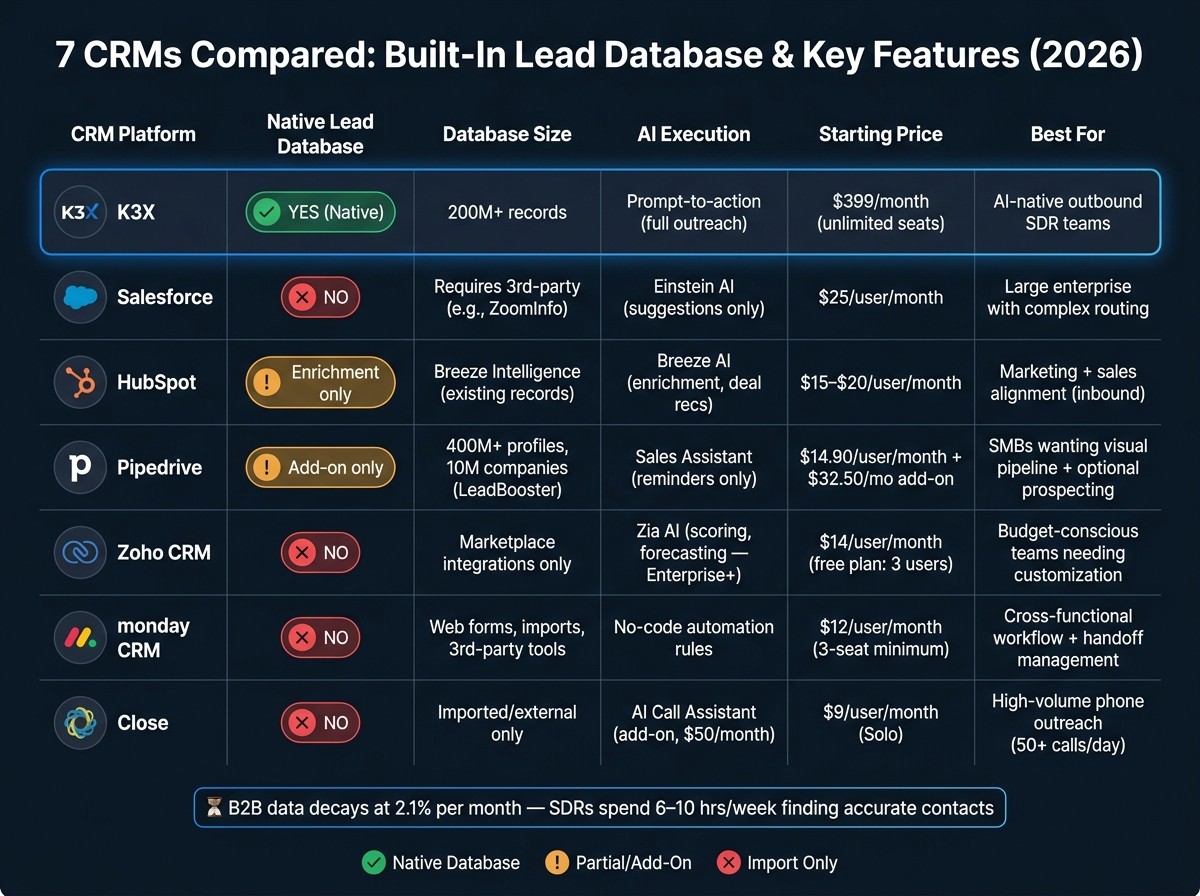
If I answer the main question directly: only K3X, HubSpot, and Pipedrive offer any kind of built-in or native lead-data layer inside the CRM, and only K3X and Pipedrive are framed here as tools for finding net-new outbound leads in-platform. The other four - Salesforce, Zoho CRM, monday CRM, and Close - work better as systems to manage leads after import, form fill, or sync from outside data tools.
My short takeaway is simple: if I need lead sourcing inside the CRM, I’d narrow the list fast. K3X is the most all-in-one option in this article, Pipedrive is the simpler SMB add-on route, and HubSpot is better for enrichment and inbound-led teams than cold outbound list building.
I’d also keep the time-cost issue in view. The article cites B2B data decay at 2.1% per month and says the average SDR spends 6 to 10 hours per week finding accurate contact details [6][7]. That makes the core split clear: some CRMs store lead data, but only a few help reps find and work new leads without leaving the platform.
What I’d use as the decision filter is this: Do I want a CRM that starts with sourcing, or a CRM that starts after sourcing? If sourcing comes first, the shortlist is small. If I already buy data elsewhere, then Salesforce, Zoho CRM, monday CRM, and Close stay in play for workflow, routing, or calling.
For team fit, I’d read the tools this way:
K3X: best match for outbound teams that want database search, outreach, and AI-driven actions in one place.
HubSpot: best for teams where marketing and sales already run together and enrichment matters more than list building.
Pipedrive: best for smaller teams that want sales pipeline management and are fine paying extra for prospecting.
Salesforce: best for larger orgs with admin support, custom routing, and room for add-on spend.
Zoho CRM: best for lower-cost teams willing to do more setup.
monday CRM: best for teams that care more about process flow and handoffs than outbound sourcing.
Close: best for phone-heavy reps who already have lead data.
The article’s bottom line is not about who has the most features. It’s about where lead discovery happens. On that test, most of these tools are still import-first, not database-first.
7 Best CRMs With Built-In Lead Database Compared (2026)
Best CRM for Lead Management | Which CRM Software to Use?
1. K3X
K3X combines a built-in lead database, AI-led outreach, and unlimited-seat pricing in one platform. For sales and revenue teams that want to source, qualify, and contact leads without stitching together separate data tools and a CRM, it stands out as a clear all-in-one option.
Native Lead Database
K3X includes a native database with 200M+ records across contacts and companies, which users can search and add inside the platform [1]. That cuts reliance on outside data vendors and imported prospect lists.
Compared with Salesforce, HubSpot, Zoho CRM, monday CRM, and Close, K3X offers a stronger built-in sourcing layer. Those platforms usually depend on integrations or uploaded lists for prospecting. Against newer CRMs with native data, such as Attio, K3X goes further by adding outbound execution rather than stopping at searchable records.
Filtering and Enrichment
K3X lets reps use plain-language search to find leads. Instead of building rules by hand, a rep can describe the target account or contact, and the AI filters the database and returns matches.
That removes part of the manual setup often seen in Salesforce and HubSpot, where teams may need admin help, field mapping, or third-party enrichment tools to get to the same point [2][9]. For lean RevOps teams, that can mean less setup work before reps start prospecting.
Outreach and AI Execution
K3X can execute outreach inside the same workflow where leads are sourced. Its AI agents can send follow-ups, update pipeline stages, and trigger email, SMS, and voice steps [10].
That is a different model from Zoho's Zia and Salesforce's Einstein, which tend to surface suggestions instead of taking action directly. K3X also includes a built-in dialer and AI campaign flows, so outbound activity stays in one system instead of spreading across multiple tools.
Pricing and Team Fit
K3X has one plan, Adaptive, priced at $399/month. It includes unlimited seats and 400,000 monthly credits.
Those credits cover AI agent actions, calling, texting, and contact reveals from the built-in database. Teams that need more usage can buy one-time credit packs in blocks of 100,000 credits starting at $99 for 100,000 credits, with larger-pack prices available on the in-app purchase screen.
For SDR teams and SMBs, the flat $399/month price is simple to model. There are no per-seat charges, which matters when headcount changes month to month. It also gives RevOps leaders broader access across the team without adding tool sprawl or stacking extra prospecting software.
Next, compare that model with Salesforce and HubSpot, which offer broader ecosystems but need more setup to match this workflow.
2. Salesforce
Salesforce gives teams deep CRM control, but it does not come with a native prospect database. In practice, that means Sales Cloud works best as a system of record, not as the place where reps first find new leads.
Native Lead Database
Salesforce does not include built-in prospect data for outbound list building. Teams usually bring leads in through imports, web forms, or outside data products such as Salesforce Data Cloud, ZoomInfo, Apollo, or LinkedIn Sales Navigator, often connected through AppExchange or another integration.
That setup can add tens of thousands of dollars per year on top of base CRM spend. For teams that need net-new pipeline from outbound, this is a clear limit.
Filtering and Enrichment
Salesforce can store and organize lead data well, but building new lead lists still depends on outside data and manual setup. If enrichment is not running through a separate provider, data quality tends to decay fast as contacts change jobs, titles, emails, or phone numbers.
Put simply, the enrichment layer is not native to the platform. It depends on whatever outside tool the team chooses and pays for.
AI Support and Execution
Salesforce includes AI for scoring, suggestions, and Copilot-style help through Einstein AI. That can help teams sort and prioritize work, but it does not replace a built-in outbound motion.
Sequencing still needs a separate tool. So while AI can support decision-making, execution across prospecting and outreach remains split across products.
Pricing and Team Fit
Salesforce starts at $25/user/month for Sales Cloud, but total cost climbs once teams add data, sequencing, and setup work. That gap between entry price and full operating cost matters, especially for smaller sales teams.
Salesforce is a better fit for large teams that need complex routing, territory rules, and queue-based assignment. Smaller sales orgs that want native prospecting usually find it slower to stand up and more expensive to run. Salesforce gives more control; K3X gives faster native sourcing and execution.
Feature | Salesforce Sales Cloud |
|---|---|
Native Lead Database | No - requires 3rd-party data or Data Cloud |
Filtering / Enrichment | Manual setup; depends on external data providers |
AI Support | Einstein AI (scoring, Copilot, automation) |
Outreach Tools | Requires separate sequencer |
Starting Price | $25/user/month |
Best For | Large teams with complex routing needs |
3. HubSpot
HubSpot is built more for enrichment and inbound lead handling than for cold prospecting. If your team wants a native database inside the CRM to find net-new leads, HubSpot does not go as far as K3X.
Native Lead Database
HubSpot’s native data layer comes from Breeze Intelligence. It gives teams real-time contact and company enrichment, but it does not function as a net-new lead discovery database [7].
In practice, that means HubSpot helps fill in and update records that are already in your CRM. For outbound teams working at scale, that often is not enough on its own. Many teams add tools like Apollo, ZoomInfo, or Cognism to handle prospect data and list building [7].
Compared with K3X, the gap is straightforward: K3X is built for prospecting first, while HubSpot is built for enrichment first. Compared with Attio, HubSpot does more for marketing-led workflows, but it is less centered on prospect-first database search.
So the better fit for HubSpot is cleaning, qualifying, and moving inbound leads forward, not building outbound lists from a native source.
Filtering and Enrichment
HubSpot does scoring and routing well after a contact enters the CRM. It tracks behavior such as page views and email engagement, then uses that data in lead scoring and routing flows.
Predictive lead scoring is available on Enterprise. Automated routing and workflow builders are available on Professional and Enterprise tiers [2][5][8].
That distinction matters. HubSpot is strong once the lead is in the system, but its strength is post-entry scoring and routing, not native list creation.
Outreach and AI Execution
HubSpot Sales Hub covers the basics for email follow-up. Teams get email sequences and lead routing, which is often enough for SMB sales motions.
The limits show up when outreach moves beyond email. HubSpot does not include native LinkedIn or WhatsApp outreach automation, so teams need third-party tools for those channels [8]. Breeze AI adds deal recommendations and auto-enrichment [8][5].
That setup works well for follow-up and pipeline handling. It is less suited to teams that want prospect search, enrichment, and multi-channel outbound execution in one place.
Pricing and Team Fit
HubSpot offers a free CRM, which makes it easy to start. Paid pricing starts around $15–$20 per user per month for Starter, $90–$100 per seat per month for Professional, and about $150 per user per month for Enterprise, with onboarding fees on higher tiers [2][5][8].
For teams that run inbound marketing and sales together, HubSpot can be a good fit. For teams focused on native outbound discovery and prompt-driven prospecting without adding a separate data vendor, K3X is a closer match.
Feature | HubSpot Sales Hub |
|---|---|
Native Lead Database | No - enrichment only via Breeze Intelligence |
Filtering / Enrichment | Real-time enrichment; predictive scoring on Enterprise |
AI Support | Breeze AI (deal recommendations, auto-enrichment) |
Outreach Tools | Email sequences; LinkedIn/WhatsApp require integrations |
Starting Price | $15–$20/user/month (Starter) |
Best For | Mid-market teams running inbound marketing and sales together |
4. Pipedrive
Pipedrive is one of the closest traditional CRM options to K3X, mainly because LeadBooster adds Prospector. Prospector searches a database of 400M+ profiles and 10M companies, but it is still a paid add-on rather than part of the core CRM [5].
That distinction matters for sales teams that want sourcing and pipeline work in the same place. With Pipedrive, prospecting is available, but you pay extra for it and manage it as an add-on rather than a built-in part of the main system.
Native Lead Database
Pipedrive does offer a native prospecting source through Prospector. Reps can search the 400M+ profile database and send contacts straight into the Pipedrive pipeline without manual exports [5]. This efficiency is a key part of how teams automate sales follow-ups to ensure no lead is dropped.
Pipedrive also sells a Web Visitors add-on that shows which companies are visiting your site. That gives teams another lead source, this time from inbound traffic rather than outbound search [5].
Filtering and Enrichment
Pipedrive separates unqualified contacts into Lead Inbox, which helps keep the main pipeline cleaner. That setup works well for basic qualification and early lead review.
Its routing and reporting are still lighter than K3X’s built-in workflow execution. Attribution reporting is also more limited, which can be a problem for revenue teams that need a clearer view of where pipeline is coming from and what is moving deals forward [11].
Outreach and AI Execution
Pipedrive includes Sales Assistant for reminders and deal suggestions. It can help reps stay on top of follow-up automation, but it does not handle action across channels in the same way K3X does [8].
Email sequences are available starting on the Advanced plan, but Pipedrive does not include native LinkedIn or WhatsApp automation [3][8]. So yes, Pipedrive can help teams find leads, but acting on those leads often still means switching tools.
Pricing and Team Fit
Pipedrive’s Essential plan starts at $14.90 per user per month [5]. LeadBooster adds $32.50 per company per month, and Web Visitors is priced on top of that [5].
The entry price looks low at first glance. In practice, teams that need prospecting usually end up paying more once they add the tools required for sourcing.
Feature | Pipedrive (with LeadBooster) |
|---|---|
Native Lead Database | Yes - 400M+ profiles and 10M companies via Prospector [5] |
Filtering / Enrichment | Lead Inbox for qualification; Prospector for ICP-style search [3][5] |
AI Support | Sales Assistant (activity reminders, deal recommendations) [8] |
Outreach Tools | Email sequences (Advanced+); no native LinkedIn/WhatsApp [3][8] |
Starting Price | $14.90/user/month + $32.50/company/month for LeadBooster [5] |
Best For | SMBs that want a visual pipeline with optional prospecting |
Pipedrive fits best for SMB teams that want a visual CRM first and are fine adding prospecting later. It works well when pipeline management is the main need and deeper outbound execution is less central.
5. Zoho CRM
Zoho CRM is stronger at managing leads after capture than at finding net-new prospects. It fits teams that already get leads from other sources and want a lower-cost system for qualification, routing, and follow-up. Compared with K3X, Zoho leans more on outside tools for sourcing and offers less support for prompt-to-action prospecting.
Native Lead Database
Zoho CRM does not include a native prospecting database. Lead capture comes mainly from web forms, SalesIQ chat, and social integrations, so most net-new sourcing happens outside the platform.
For new contact data, teams usually add Marketplace apps such as UpLead, Lead411, or Skrapp.io [1][7][8]. In plain terms, Zoho can take in leads well, but it usually does not generate the list for you.
Filtering and Enrichment
Zoho helps most after records are already in the system. Zia supports scoring, anomaly detection, and forecasting, but these tools are geared more toward working existing records than finding new ones [5][2].
These features are limited to the Enterprise ($40/user/month) and Ultimate ($52/user/month) plans. Zoho also includes built-in contact deduplication with configurable merge rules, which helps clean imported data and cut down on duplicate records [4].
Outreach and AI Execution
Zoho includes workflow automation, but outreach across channels still needs add-ons in many cases. Blueprint, available from the Professional plan ($23/user/month), covers lead routing and workflow automation [5][2].
If your team wants LinkedIn or WhatsApp automation, you'll still need third-party integrations [8]. So while Zoho can route a lead and trigger tasks, it is less suited for all-in-one outbound execution.
Pricing and Team Fit
Zoho's main strength is price and workflow depth, not native sourcing. Pricing ranges from $14 to $52 per user per month, and the entry point is low for small teams.
Zoho also offers a free plan for up to 3 users and 5,000 records [2][5]. For teams that use the broader Zoho stack, Zoho One costs about $45 per user per month and includes 45+ apps, such as Campaigns, Desk, and SalesIQ [2].
Feature | Zoho CRM |
|---|---|
Native Lead Database | No - lead capture comes from web forms, SalesIQ, and Marketplace integrations [5][7] |
Filtering / Enrichment | Zia AI scoring, anomaly detection, and forecasting (Enterprise+); deduplication with configurable merge rules [4][5] |
AI Support | Zia AI - scoring, anomaly detection, forecasting (Enterprise/Ultimate) [5][2] |
Outreach Tools | Blueprint automation (Professional+); LinkedIn/WhatsApp require third-party integrations [5][8] |
Starting Price | $14/user/month (billed annually); free plan up to 3 users and 5,000 records [2][5] |
Best For | Budget-conscious SMBs needing strong customization at a lower price within the Zoho ecosystem |
Zoho works best when lead data comes from outside the CRM and the main job is to manage that data well once it arrives.
6. monday CRM
monday CRM works well as a workflow tool, but it is not a built-in lead database CRM. Unlike K3X, it does not include a native prospecting database, so teams need to bring leads in through web forms, CSV imports, or outside data tools such as Lusha, Cognism, and Clay [5][6][7][12].
That setup changes how teams use it day to day. monday CRM is best used to manage lead flow, rep assignments, follow-up, and handoffs after lead data enters the system, rather than to find net-new prospects inside the product.
Native Lead Database
monday CRM does not have a native lead database. Teams import lead records from other sources and then use the platform to track pipeline activity and ask your CRM for updates on next steps.
The practical result is simple: monday CRM is a workflow layer, not a prospecting source. If your team wants a system that starts with outbound data, K3X and Pipedrive are better fits on that point.
Filtering and Enrichment
monday CRM handles routing and qualification through its no-code automation builder. Teams can set rules to assign leads by region, industry, owner, or stage, which helps keep inbound and imported records moving without manual triage [5].
It does not do built-in enrichment the way prospecting platforms do. If you need firmographic or contact data appended to records, you’ll usually connect a tool like Lusha, Cognism, or Clay and pass that data into monday CRM [5][6][7][12].
Outreach and Execution
monday CRM supports follow-up through automated emails tied to pipeline stage changes [5]. That helps teams keep basic nurture and rep alerts running inside the same workspace.
It also handles cross-team handoffs well. Sales, account management, and onboarding teams can work from one shared system, which is useful if your process depends on clean transitions after a deal closes [5].
Compared with K3X, though, monday CRM stops short of native sourcing and native outbound execution. It manages what happens after a lead arrives, but it does not act as the lead source itself.
Pricing and Team Fit
monday CRM starts at $12/user/month for Basic and $17/user/month for Standard [5]. Standard is the lowest tier that makes sense for most lead routing and automation use cases [5].
All paid plans come with a 3-seat minimum [5]. For small teams, that means a starting floor of $36/month on Basic or $51/month on Standard before annual billing terms or add-ons.
Feature | monday CRM |
|---|---|
Native Lead Database | No - relies on web forms, imports, and third-party enrichment tools [5] |
Filtering / Enrichment | No-code automation rules for lead routing and stage management [5] |
Outreach Tools | Automated follow-up emails; cross-team handoff support [5] |
Starting Price | $12/user/month (Basic); $17/user/month (Standard, minimum for most automation) [5] |
Best For | Teams that want to unify sales, marketing, and post-sale onboarding in one visual workspace |
monday CRM is a good fit for teams that already get leads elsewhere and need a visual system for routing, follow-up, and handoffs. If outbound calling and fast lead action matter more than shared workflow management, Close is the more specialized option.
7. Close
Close is built for outbound execution, not prospect discovery. If your team already has lead data and needs fast calling, SMS, and email inside one CRM, Close fits well. If you need to find net-new prospects in the same system, it does not.
Native Lead Database
Close does not include a native lead database for prospect discovery. Lead data must come from imports, integrations, or outside tools [5].
That changes where Close fits in the workflow. Compared with K3X, which handles discovery and qualification natively, Close becomes useful only after a prospect has already been found. Imported lists also need regular refreshes, so Close starts where sourcing ends.
Filtering and Enrichment
Close can filter, route, and automate work for leads already in the CRM. It does not build new prospect lists or enrich contacts natively.
Higher-tier plans add routing and cadences, but those features apply only to existing records. Teams that need enrichment often use Apollo.io or ZoomInfo before data reaches Close. In practice, that means Close sits downstream from the prospecting stack.
Once the lead is in the system, Close moves fast into calling and follow-up.
Outreach and AI Execution
This is the part Close does well. It combines native calling, SMS, and email inside the CRM, which cuts down on tool switching for high-volume SDR teams [5].
The Growth plan at $99/user/month includes a Power Dialer, while the Scale plan at $139/user/month adds a Predictive Dialer [5]. Close is built for teams making about 50 calls per day per rep [2].
Close also offers an AI Call Assistant add-on for $50/month. Transcription and call summaries cost about $0.02 per minute [2]. Those features help with review and coaching, but they do not add prospect discovery.
Close handles execution well; K3X handles both discovery and execution natively.
Pricing and Team Fit
Close has four annual-billing tiers: Solo at $9/user/month for one user, Essentials at $35/user/month, Growth at $99/user/month, and Scale at $139/user/month [5].
Essentials does not include dialer features. Growth adds the Power Dialer, and Scale adds the Predictive Dialer [5]. Calling and SMS are usage-based, so total per-rep cost will be higher than the base subscription in most outbound setups.
Feature | Close |
|---|---|
Native Lead Database | No - relies on imported or externally connected data [5] |
Filtering / Enrichment | No native enrichment; automated workflows only on existing leads [5] |
Outreach Tools | Native calling, SMS, email; Power Dialer and Predictive Dialer [5][2] |
AI Features | |
Starting Price | $9/user/month (Solo) [5] |
Best For | Outbound SDRs, AEs, and lean SMB sales teams running high-volume phone and email cadences [5][2] |
Close is a good fit for teams that already have a data source and want strong telephony inside their CRM. The trade-off is simple: Close is strong on dialing and follow-up, but weak on native sourcing. That sourcing gap is the main issue to weigh against its dialing depth in the pros and cons below.
Pros and Cons of Each Platform
Use this table to compare the seven tools by fit, not by raw feature count. It shows each CRM’s main upside, main downside, and the kind of team it suits best.
Platform | Biggest Advantage | Biggest Limitation | Best fit | Not fit | Discovery Type |
|---|---|---|---|---|---|
K3X | AI-native workflow with a built-in lead database | Usage-based credits require some monitoring | SDR teams and SMB revenue ops leaders who want prospecting and CRM in one place | Teams that prefer a workflow-first CRM over prompt-driven workflow | Native - built-in database |
Salesforce | Deep configurability and a large AppExchange ecosystem [5] | High total cost of ownership; requires a dedicated admin and a sales team productivity checklist to operate effectively [2][5] | Large enterprises with complex lead routing and governance needs [2] | Teams under 15 people or anyone without dedicated CRM admin capacity [2] | Imported - needs integrations |
HubSpot | Tight marketing and sales connection with Breeze AI [2] | Sharp price jumps at Professional and Enterprise tiers [13] | Teams already using HubSpot Marketing and want sales in the same system [2] | Standalone sales teams on a tight budget [2] | Imported - inbound and add-on discovery |
Pipedrive | Strong visual pipeline clarity [13] | LeadBooster discovery is a paid add-on, not a core feature [2][5] | Small-to-mid sales teams whose main issue is deal visibility, not prospecting [13] | Teams that need deep native marketing or built-in lead sourcing [2] | Imported - add-on discovery |
Zoho CRM | Most capability for the price [13] | Budget-conscious startups that need broad capability without enterprise pricing [13] | Teams prioritizing fast onboarding and a polished user experience [2] | Imported - capture-focused | |
monday CRM | High visual flexibility; easy to configure for non-sales workflows [2][5] | Thin native sales forecasting and lead scoring depth [2] , often requiring external social selling tools for lead scoring | Teams that want to unify sales with project management in one visual tool [2] | Teams needing advanced pipeline automation or native prospecting [2] | Imported - no native database |
Close | Built-in Power Dialer and Predictive Dialer for high-volume phone outreach [2][5] | No native lead discovery database; sourcing has to happen outside the CRM [5] | High-volume SDR and AE teams [2] | Email-led teams or anyone who needs lead discovery inside the CRM [2] | Imported - outreach-focused |
The pattern here is pretty simple. Some CRMs are built to manage leads after they enter the system, while others also help you find those leads in the first place.
If your team runs outbound and wants sourcing inside the CRM, K3X stands apart because its discovery is native. Most of the others depend on imports, forms, integrations, or paid add-ons to get prospects into the system.
Salesforce fits larger teams that can handle admin load and higher spend [2][5]. HubSpot makes the most sense when marketing and sales already live close together, but the pricing jumps matter [2][13].
Pipedrive and Close are more focused choices. Pipedrive is about pipeline visibility [13], while Close is built for reps who spend a big part of the day on the phone [2][5].
Zoho CRM and monday CRM work best when cost control or cross-team workflow matters more than deep outbound sourcing. Zoho gives a lot for the money [13], and monday CRM is easier to bend into non-sales use cases [2][5].
That leaves one final question: which CRM matches your sourcing model and outbound motion? Next, use these trade-offs to choose the best fit for your team.
Which CRM Should You Choose?
Choose based on three things: how much net-new lead data you need, how much setup work your team can handle, and how you want automation to work. The right pick is less about feature count and more about fit.
K3X is the default choice for AI-native outbound. It includes a native database and prompt-to-action execution, so teams can find leads and act on them without adding a separate data vendor. Attio also has native data, but K3X includes built-in outreach execution as well.
Salesforce fits large organizations that need complex routing, approvals, and governance. That usually comes with a longer rollout and steady admin support.
HubSpot makes the most sense when marketing and sales already work in the same CRM and inbound is the main motion. If your funnel depends on handoff between campaigns, forms, and sales follow-up, that alignment matters.
Pipedrive works well for sales-led SMBs that want fast setup and a clear pipeline view. Its LeadBooster add-on costs $32.50 per company per month [5], which matters if lead capture is part of the plan.
Zoho CRM gives teams a lot for the price. It fits budget-conscious teams that are fine spending more time on configuration.
monday CRM suits teams that want sales and post-sale project work in one visual workspace. That can help when the deal process does not stop at closed-won.
Close is built for high-volume phone outreach. It works best for teams that already have, or are willing to buy, lead data from an outside source.
This matrix turns those trade-offs into a simpler choice:
Team Profile | Need for Net-New Lead Data | Preferred Automation Model | Setup Tolerance | Recommended Platform |
|---|---|---|---|---|
AI-native outbound | High (built-in) | Prompt-to-action | Low | K3X |
Enterprise / complex ops | Moderate (integration) | Governance-focused | High | Salesforce |
Marketing + sales alignment | Moderate (inbound/add-on) | Integrated nurture | Moderate | HubSpot |
Sales-first SMB | Moderate (add-on) | Visual pipeline | Low | Pipedrive |
Budget-conscious startup | Moderate (integration) | AI-assisted (Zia) | Moderate | Zoho CRM |
Cross-functional team | Low (process-first) | No-code visual | Moderate | monday CRM |
High-volume phone outreach | High (external) | Communication-centric | Low | Close |
FAQs
Do I need a CRM with built-in lead sourcing?
It depends on your team size, budget, and prospecting volume.
A lead database helps you find new contacts. A CRM tracks relationships with people you’ve already contacted or sold to. They serve different jobs, so the right setup comes down to how your team works day to day.
You do not need both functions in one product. What matters is that the two systems connect well, so your team can avoid manual entry, duplicate records, and copy-and-paste mistakes.
For small to mid-sized teams, a tool with built-in sourcing is often the simpler option. It cuts down on tool switching and keeps outbound work in one place. For larger enterprise teams with more layered workflows, a specialized CRM paired with a dedicated data provider may be a better fit.
How current is the lead data inside the CRM?
Lead data freshness depends on how each provider deals with decay. In B2B databases, contact data decays by about 2.1% per month or 22.5% per year, so no vendor keeps records at 100% accuracy all the time.
That’s why refresh methods matter more than broad accuracy claims. Some providers update records weekly. Others verify data at the moment of export. Some use a mix of automation and human review to cut down on stale records.
For CRM-native tools, HubSpot’s Breeze Intelligence enriches leads in real time as new contacts enter the system. That approach helps reduce lag between when data changes and when the CRM reflects it.
What extra costs come with built-in prospecting?
Built-in prospecting often costs more than the base subscription. In many CRMs, the sticker price is only part of the bill, because prospecting features are metered separately.
A common model is credit-based pricing. That means actions such as email lookups, mobile number searches, exports, and sometimes bulk imports each use credits at different rates, so costs can climb fast if your team works at scale.
There are other charges to watch for as well. Some vendors require paid onboarding, meter AI usage through separate credit pools, or sell prospecting features as add-ons, such as Pipedrive’s LeadBooster.
There’s also the labor cost inside your own team. Admin time spent on deduplication, field mapping, and data governance can add hours of setup and cleanup work that never shows up in the base software price.