
The Evolution of AI Agents
A Sales Development Representative (SDR) finds potential buyers, checks whether they fit the business, and arranges sales conversations; an Account Executive handles the deal through closing [2][4][7]. I view AI as support for research, outreach, and recordkeeping - not a substitute for deciding whether a buyer is ready [3][5]. When evaluating tools such as K3X, Salesforce, and HubSpot, I focus on cost per accepted opportunity and <u>human review before handoff</u>, rather than message volume.
AI Won’t Replace Your SDRs | The Ultimate Sales Automation Strategy
The SDR Workflow: From First Contact to AE Handoff
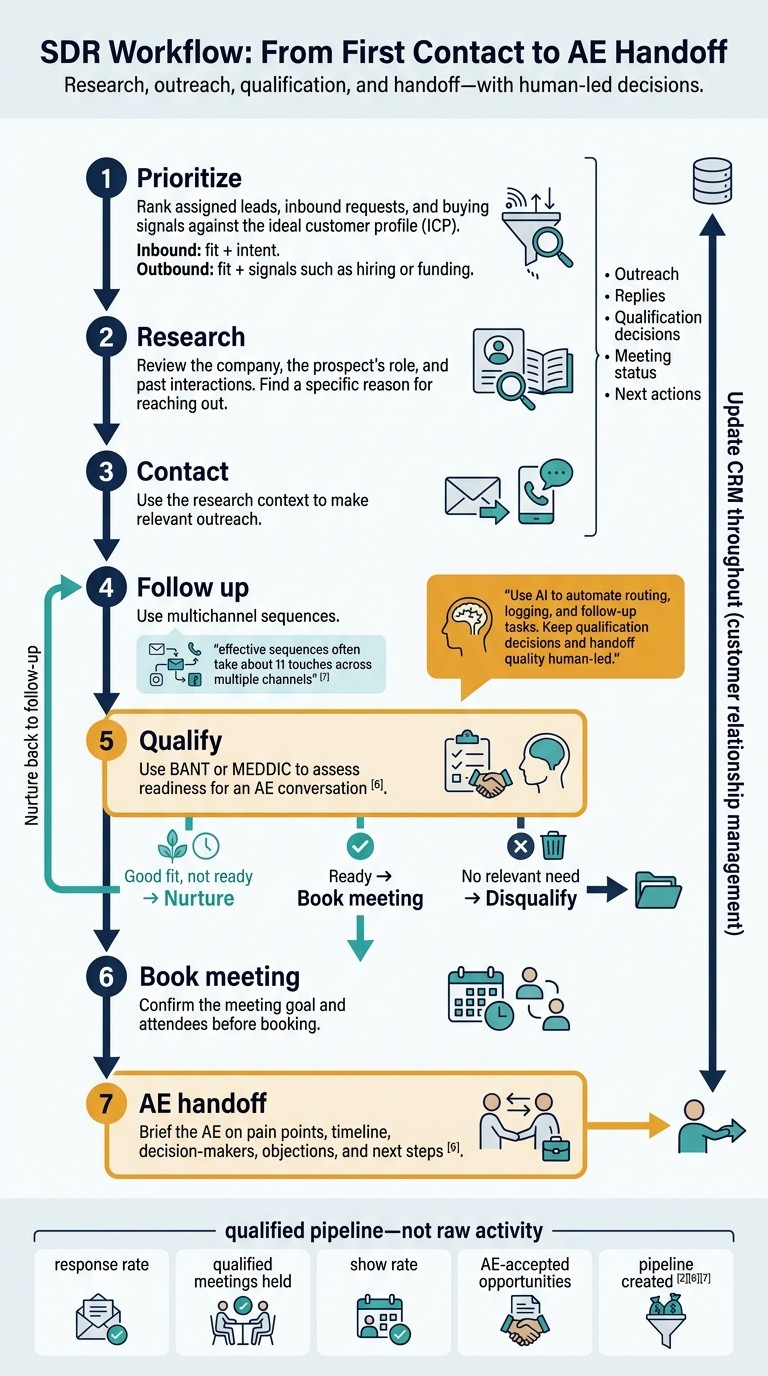
SDR Workflow: From First Contact to AE Handoff
An SDR’s workflow covers prioritization, research, outreach, follow-up, qualification, and AE handoff. Brief the AE, update records, and measure qualified pipeline - not raw activity. The next section explains which steps AI can automate and which still need human judgment.
Prioritize, Research, and Contact Prospects
Rank assigned leads, inbound requests, and buying signals against your ideal customer profile (ICP). For inbound leads, weigh fit and intent; for outbound accounts, weigh fit alongside signals such as hiring or funding [2][6].
Before making contact, review the company, the prospect’s role, and past interactions. Use that context to give a specific reason for reaching out.
Follow Up, Qualify, and Book Meetings
Most pipeline comes from follow-up rather than first contact; effective sequences often take about 11 touches across multiple channels [7]. Use BANT or MEDDIC to assess whether the prospect is ready for an AE conversation [6].
Nurture good-fit prospects who aren’t ready yet, and disqualify those without a relevant need [6][8]. Before booking, confirm the meeting goal and attendees.
Brief the AE on pain points, timeline, decision-makers, objections, and next steps [6]. Automation can save time here without taking over the SDR’s judgment calls.
Update Records and Measure Results
Log outreach, replies, qualification decisions, meeting status, and next actions in the customer relationship management (CRM) system. Track response rate, qualified meetings held, show rate, AE-accepted opportunities, and pipeline created - not activity volume [2][6][7].
Use AI to automate routing, logging, and follow-up tasks. Keep qualification decisions and handoff quality human-led.
AI Automation vs. Human Judgment in SDR Work
AI can research, draft, schedule, and log work; SDRs still own accuracy, qualification, and buyer trust. An AI agent uses context and connected tools to choose its next approved action. Predefined automation follows fixed “if-then” rules, while agents choose actions within approved boundaries and can access or update Salesforce or HubSpot records [1][8].
The main decision is which tasks to delegate and which decisions SDRs must keep.
AI-assisted task | Human decision |
|---|---|
Summarize accounts; prioritize leads | Verify sources and choose targets. |
Draft outreach and follow-ups | Approve accuracy, relevance, and tone. |
Extract needs and timing | Resolve ambiguity and exceptions. |
Coordinate calendars; book meetings | Decide whether the buyer is ready. |
Update fields; draft handoff notes | Validate key changes and buyer context. |
AI for Research, Outreach, and Follow-Ups
K3X can speed up prospect research and follow-up with natural-language search and contact verification. Its email, SMS, and calling tools support outreach, but SDRs still approve messages [3].
Treat hiring and funding signals as research inputs, not confirmed facts. Verify the source, the contact’s role, and when the details were last checked. Use only verifiable details in outreach, confirm permissions, and stop follow-ups when someone opts out.
Check credit rules before scaling research, verification, SMS, or calling [3]. Once the contact list is verified, human review shifts to qualification and handoff.
AI for Qualification, Booking, and CRM Updates
AI can classify replies, extract needs and timing, coordinate meetings, and draft AE handoff summaries [1][8]. K3X agents can also update records and pipelines and log their actions for review [9].
Require human approval for high-impact changes, especially opportunity-stage updates. People should handle unclear replies, pricing objections, stakeholder dynamics, and qualification exceptions. A booking confirms time, not fit; before handoff, keep the buyer’s words separate from the agent’s interpretation [9].
How AI Changes the SDR’s Daily Focus
Automation changes how much time SDR tasks take, not the tasks themselves. AI can flag stalled leads and conversion patterns for review, but those patterns do not establish cause and effect.
Measure meeting and handoff quality rather than assuming more activity means better results. Use the time AI saves for discovery and higher-quality live buyer conversations [3].
K3X vs. Other CRM Platforms for SDR Work
Compare CRM platforms by how much of the SDR workflow they complete before human review and how much manual setup they need. Assess research, outreach, follow-up, qualification, and CRM updates, then check how AI access and pricing work.
Once the workflow is defined, test which platform supports it with the least setup. Salesforce also supports natural-language instructions and guardrails through Agent Builder [1].
K3X: Prospecting, AI Agents, and CRM in One Platform
K3X combines prospecting, AI agents, outreach, and CRM, backed by a 200M+ record database. Workflow actions use credits, so unlimited seats do not mean unlimited usage.
Teams can configure agents with prompts or visual tools and review tasks, dashboards, and action logs. Native MCP connections work with Claude or ChatGPT; webhooks connect tools such as Zapier, Make, and n8n. K3X’s advertised 3,000+ direct integrations are still rolling out, so confirm the connections your team needs.
AI actions, contact reveals, calling, and texting consume credits. Keep human approval enabled for outreach and record changes that affect pipeline. For SDR teams, the main test is whether prospecting, outreach, qualification, and CRM updates work together in one flow.
Platform | Core strength | SDR workflow coverage | Setup | Pricing model |
|---|---|---|---|---|
K3X | Prospecting and AI agents that turn prompts into actions | Research, outreach, qualification, meetings, and CRM updates | Set agent boundaries, connections, and approval rules | $399/month per team, unlimited seats, 400,000 credits/month. Optional 100,000-credit top-ups start at $99 |
Salesforce | Extensive customization and enterprise ecosystem | Full-cycle CRM plus Agentforce-assisted lead qualification and scheduling | Requires Agent Builder setup and clean data | Per-user plans; advanced AI and Data Cloud features usually require higher tiers |
HubSpot | Connected marketing and sales suite | Strong inbound lead management and sequencing | Configure routing, sequences, and seat access | Tiered Sales Hub seats; confirm feature eligibility |
Pipedrive | Visual pipeline management | Deal tracking and sales activity management | Relatively straightforward pipeline setup; assess prospecting-data needs | Per-user plans; assess add-ons |
Zoho CRM | Broad business-suite coverage | Multichannel sales and CRM workflows | Configure CRM processes and suite connections | Per-user plans; compare standalone CRM with Zoho One |
Flexible workspace design | Sales tracking and configurable workflows | Often requires building SDR workflows from scratch | Per-seat plans; check minimum seats | |
Close | Built-in calling, email, and SMS | Communication-centered outreach and follow-up | Configure communication channels and lead imports | Per-user plans; confirm telephony usage charges |
Attio | Flexible data model | Relationship management and configurable processes | Map records, relationships, and workflows | Per-user plans; check record and automation limits |
Comparison date: October 1, 2026. K3X pricing reflects the supplied first-party information. Competitor pricing and AI limits can change; check official pricing pages before budgeting.
K3X vs. Salesforce, HubSpot, Pipedrive, and Zoho CRM
K3X is a fit when the priority is combining research and execution in one platform. Compare that need with the workflow each alternative supports best, rather than choosing by its AI label.
Salesforce supports extensive customization and enterprise sales processes, though using AI at scale usually requires more admin oversight.
HubSpot fits inbound-heavy SDR teams that need connected marketing and sales.
Pipedrive suits teams that want simple pipeline management.
Zoho CRM fits SDR teams that use the broader Zoho business suite.
For all four, distinguish core CRM features from prospecting, automation, and AI features that may require higher tiers or add-ons.
K3X vs. monday.com, Close, and Attio
monday.com CRM, Close, and Attio fit different SDR needs. Compared with K3X, each puts more setup work on users when connecting prospect discovery, agent actions, and handoff.
monday.com CRM suits teams that want to build configurable SDR workflows around existing processes.
Close may fit calling-led SDR teams better when outreach and follow-up are the focus.
Attio supports flexible records and relationships for prospect tracking. Data mapping needs careful setup but is not developer-heavy.
Before switching, test whether the alternative requires separate prospecting data, enrichment, or scheduling tools. Confirm current AI availability instead of assuming every advertised capability is included.
Compare SDR Tool Costs and Workflow Fit
Compare total SDR workflow cost, not just CRM seats. Include subscriptions, usage, enrichment, integrations, onboarding, and recurring administration so pricing, usage caps, and setup effort all inform your decision.
K3X Pricing and Credit Limits
K3X costs $399/month for the team, with unlimited seats and 400,000 monthly credits. AI actions, contact reveals, calling, and texting consume credits.
Optional one-time top-ups start at $99 for 100,000 credits. Purchased credits roll over while the plan stays active; monthly credits do not. If credits run out, credit-consuming actions stop, but CRM access remains available.
K3X offers a 7-day free trial after a 1:1 demo, with no credit card required. Check current terms at K3X pricing.
Choose a Tool Based on Your Workflow
K3X is an easy sales CRM that runs on prompts for teams that want one system with flat team pricing and metered usage. Choose based on how much of your workflow each platform covers without extra add-ons or administration.
Platform | Workflow fit | Pricing and setup factors |
|---|---|---|
K3X | Prospecting through CRM updates | Flat team pricing; metered usage |
Salesforce | Custom qualification and handoffs | Seats, AI usage, implementation, and commitments |
HubSpot | Inbound qualification and follow-up | Seats, required tier, setup, and commitments |
Pipedrive | Pipeline and activity tracking | Seats and automation limits |
Zoho CRM | Multichannel follow-up | CRM versus suite licensing; AI eligibility |
monday CRM | Workflow coordination | Seat minimums, automation limits, and billing term |
Close | Calling-led outreach | Seats and telephony usage |
Attio | Prospect records and workflows | Seats, enrichment, and automation usage |
Salesforce and HubSpot can cost more after accounting for per-seat pricing, minimum seats, annual billing, and separate enrichment or AI add-ons. K3X covers prospecting, outreach, qualification, and CRM updates in one system. Salesforce and HubSpot suit teams willing to spend more time on setup for deeper customization or more suite features.
Beyond sticker prices, compare implementation time and recurring administration. Measure setup time through the first approved AE handoff, then track weekly administration, meeting attendance, and AE acceptance.
Include subscriptions, usage, connected tools, and allocated setup and administration costs. Apply the same qualification standard across platforms, then compare cost per accepted opportunity. Lower software costs or faster setup alone do not guarantee better pipeline.
Set Up an AI-Assisted SDR Workflow With Human Oversight
After comparing tools and choosing a CRM, set guardrails before automating SDR tasks. Define what AI can handle and require human approval at outreach, qualification, handoff, and CRM-change checkpoints. This lets the team work faster while people control fit, timing, and handoff.[1][5]
Start with a small pilot to test those rules before expanding.
Set Rules and Run a Small Pilot
Limit the pilot to one lead source or segment. Document your ideal customer profile, target roles, disqualifiers, permitted channels, and qualification standards. Use one qualification framework, such as BANT or MEDDIC, and require human approval before initial outreach and AE handoff.[6][10]
Before sending, check research sources, verification dates, contact details, personalization, and suppression lists. Review applicable U.S. CAN-SPAM and TCPA requirements, then test approved follow-ups, automating meeting coordination, reminders, and record updates within the pilot’s scope.[10] Use the pilot to find errors before expanding the workflow.
Audit Results and Refine the Workflow
Measure results and inspect the interactions behind them. Track qualified meetings, show rates, AE-accepted opportunities, pipeline conversion, and CRM accuracy.
Review reply quality, opt-outs, incorrect CRM updates, and automation failures. Read the actual emails and replies and review calls - not just dashboard totals. Adjust prompts, routing, permissions, and qualification rules when errors appear, while keeping complex discovery, objections, and relationship-sensitive replies human-led.[1][10]
Once the workflow is stable, turn the approved rules into a final operating checklist.
Final Setup Checklist
Before launch, confirm that AI permissions, opt-out controls, activity audits, and outcome measures are in place. These checks should cover AI-assisted prospecting, outreach, qualification, and CRM updates.[5][10]
FAQs
What skills do SDRs need as AI takes over routine tasks?
As AI automates list-building, data enrichment, and initial outreach drafts, SDRs need AI literacy to guide workflows and check accuracy and tone. They also need sound judgment to prioritize accounts and qualify leads, plus strong communication skills for live calls, handling objections, and building rapport.
SDRs must know how to use CRM, sales engagement, and enrichment tools. They also need resilience to handle rejection and the ability to adjust outreach based on performance data.
How do I resolve disagreements over lead qualification?
Use BANT or MEDDIC to make lead qualification clearer. When teams disagree about a lead, check your disqualification criteria - such as no confirmed pain, budget, or authority - to decide whether the meeting merits an account executive’s (AE’s) time.
AI can support data-driven scoring, but human judgment is still needed to assess nuance, internal politics, and urgency. Disqualify poor-fit leads early to protect AE time and maintain trust between sales development and closing teams.
How can I tell if AI improves SDR results?
Measure outcomes, not activity volume. Compare sequence-to-meeting rates, meeting show rates, qualified meetings per activity, and pipeline generated against your baseline. Check whether AI cuts research and data-entry time so SDRs can spend more time on meaningful conversations.
Use CRM dashboards to compare AI-assisted and manual workflows. K3X’s prompt-to-action approach can reduce administrative work compared with Salesforce or HubSpot. If reply rates or meeting quality stall, check for tool sprawl.