
The Evolution of AI Agents
I’d choose Close for calling-heavy outreach, HubSpot for sales and marketing together, and K3X for prospect sourcing and agent-led follow-ups in one CRM. For high-volume cold email, I’d assess the sending tool separately: CRM automation alone does not ensure inbox placement.
I’d compare total cost, not just seat prices. K3X lists $399/month for unlimited seats and 400,000 monthly credits, with outreach actions consuming credits; other options may add charges for prospect data, sequencing, calling, and setup.
Before choosing, I’d test <u>reply-stop behavior, unsubscribe handling, and CRM sync</u> using the same outreach flow in each finalist.
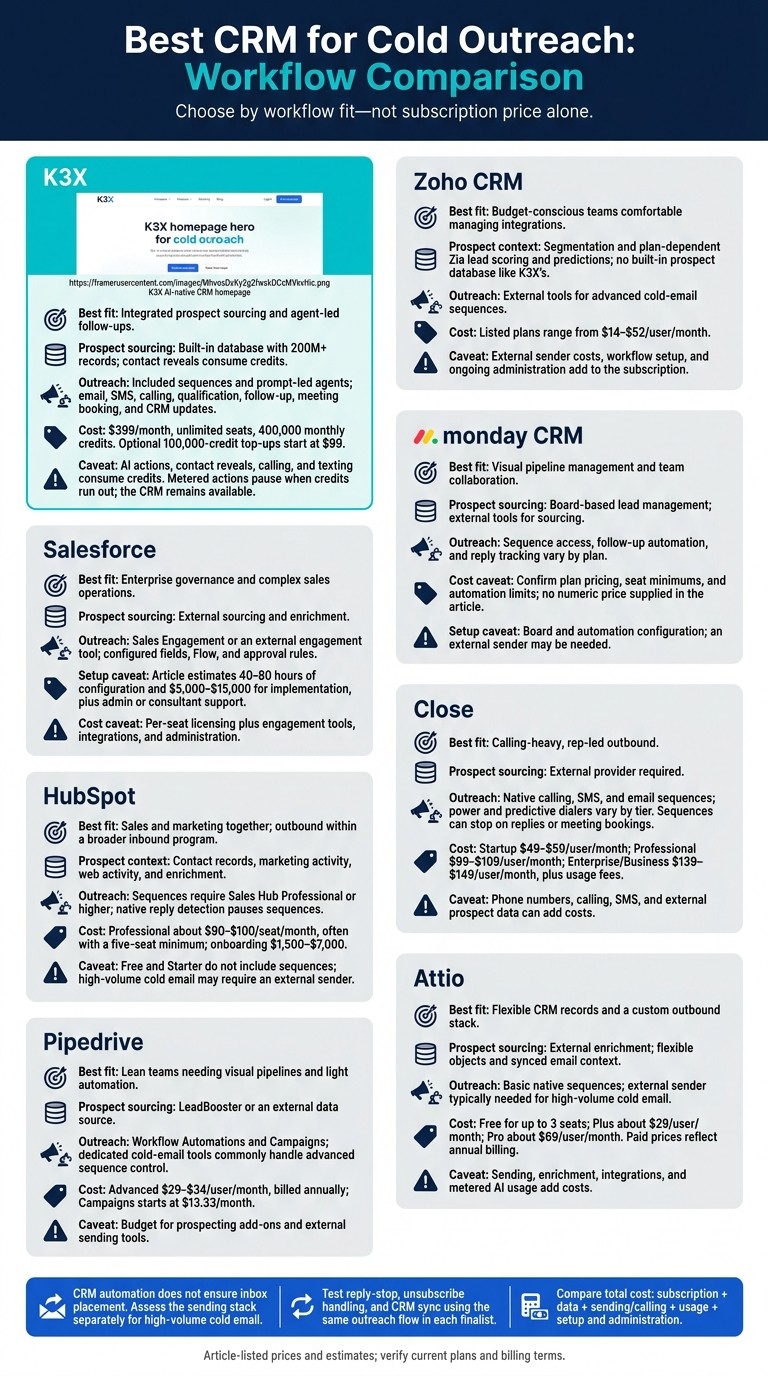
Best CRM for Cold Outreach: Workflow Comparison
The BEST CRM for Cold Calling? (Close Review)
1. K3X
K3X combines prospecting, outreach, and CRM updates in one system. It fits teams that own the full process, from sourcing prospects to keeping the pipeline current.
Prospecting and personalization
K3X uses prompt-to-action agents and a built-in database of 200M+ records to find prospects based on a plain-language description of your ideal customer. Growth signals flag likely-fit prospects and help tailor messages.
Contact reveals use credits to access email addresses and direct numbers. Unlike Close, K3X has its own prospecting database rather than relying on separate enrichment tools.
Sequences and response tracking
K3X moves prospects from sourcing into outreach without switching workflows. It handles email, SMS, calling, qualification, follow-up, meeting booking, and CRM updates in the same workflow.
Agents can collect information, update records, and log activity so teams can review actions and response history. Salesforce and HubSpot split more of this work across modules and tiers.
Feature | K3X | Salesforce | HubSpot |
|---|---|---|---|
Setup effort | Designed to reduce manual prospecting and CRM work | More control, but usually more admin work than K3X | Sequences require Sales Hub Professional or higher |
Pricing model | $399/month for the whole team, plus metered credits | Pro Suite starts at $165/user/month | Sales Hub Professional starts at $90/seat/month; 5-user minimum |
Deliverability safeguards
K3X uses verification dates to support data hygiene. The available materials do not advertise native inbox rotation, warmup, or dedicated deliverability monitoring.
Setup and total cost
K3X Adaptive costs $399/month for unlimited team seats and 400,000 monthly credits. AI actions, contact reveals, calling, and texting use credits; optional 100,000-credit top-ups start at $99 (pricing).
Outreach volume matters more than seat count because heavier use consumes more credits. When credits run out, the CRM stays available, but credit-consuming actions pause until more credits are added.
MCP connections let teams search leads, update deals, and trigger agents through Claude or ChatGPT. Webhooks connect external tools.
2. Salesforce
Salesforce suits larger cold-outreach teams with enterprise compliance requirements, but connecting prospecting, outreach, and pipeline updates takes more configuration than K3X. It offers more governance controls, with slower setup and execution. [2][3]
Prospecting and personalization
Sales Cloud stores leads, contacts, and account data; it does not provide a built-in prospecting database. Salesforce AI supports personalization, but deeper customization depends on custom fields, Flow, and external data. [2][3][8]
Sequences and response tracking
Sales Cloud does not include cadences by default. Sales Engagement adds multistep email and task sequences with conditional branching; tools such as Outreach or Salesloft require integrations. Reply-based exits and opt-out handling usually need careful configuration or two-way sync. [3][5][2]
Deliverability safeguards
Salesforce supports SPF/DKIM, but administrators must configure them. It lacks native warmup and mailbox rotation, and its sending limits are low for cold outreach. High-volume teams often connect a dedicated sender such as Smartlead or Instantly. [2][3]
Setup and total cost
Plan for 40–80 hours of configuration and $5,000–$15,000 for implementation, plus a dedicated admin or consultant. Enrichment requirements and integrations affect the scope and cost. [2][7][3]
Decision point | Salesforce | K3X |
|---|---|---|
Outreach automation | Sales Engagement or an external engagement tool | Built-in agents and sequences |
Workflow control | Configured fields, Flow, and approval rules | Prompt-led agents and visual workflows |
Pricing | Edition-based licensing plus add-ons | $399/month, unlimited seats, 400,000 credits included |
Best fit | Complex sales operations with admin support | Integrated prospecting and outreach |
3. HubSpot
HubSpot suits teams that want inbound context and outbound automation in one CRM; K3X is faster for prompt-led prospecting and AI execution. Most cold-outreach automation requires paid Sales Hub tiers rather than the free CRM. [7][8] HubSpot is a better fit when outbound is part of a broader inbound program.
Prospecting and personalization
HubSpot connects contact records with form submissions and web activity so reps can tailor first-touch messages and follow-ups. Breeze AI adds enrichment and AI assistance, while some marketing automation remains in Marketing Hub. [8][5]
Sequences and response tracking
Sequences require Sales Hub Professional or higher; Free and Starter don’t include them. Sequences automate follow-ups and create call or LinkedIn tasks, but they don’t send LinkedIn messages. Native reply detection pauses a sequence when a contact responds, and workflow-triggered enrollment starts on Professional. [5][9]
Teams with lighter outreach needs may prefer a simpler, pipeline-first CRM.
Deliverability safeguards
HubSpot caps native sequence sending at 500 emails per user per day on Professional and offers inbox rotation. Treat that cap as a limit, not a target. HubSpot manages sequences but doesn’t include automated warm-up or real-time inbox health scoring. [8][9]
At higher volumes, many teams route sending through a dedicated outreach tool such as Smartlead.
Setup and total cost
Sales Hub Professional starts at about $90–$100 per seat per month, often with a five-seat minimum; Enterprise costs about $150 per seat per month. Onboarding adds $1,500–$7,000, while lifecycle rules, handoffs, and integrations add setup time. [7][8][13]
Decision point | HubSpot | K3X |
|---|---|---|
Prospecting context | Contact records plus marketing and web activity | Built-in database of 200M+ records plus growth signals |
Outreach automation | Sequences on Professional or Enterprise | Sequences and prompt-based agents included |
Setup approach | Configure properties, workflows, and sequences | Prompt-led agents with visual configuration |
Pricing | About $90–$100/seat/month for Professional; about $150/seat/month for Enterprise | $399/month, unlimited seats, 400,000 monthly credits |
Additional costs | Onboarding and integrations | Credit-consuming actions; optional top-up packs |
4. Pipedrive
Pipedrive suits lean teams that need simple pipeline management and light automation. It handles outreach tasks but lacks K3X’s built-in prospect discovery, prompt-led agents, and end-to-end outreach execution. The main differences are in prospecting, sequencing, and deliverability.
Prospecting and personalization
Pipedrive’s Advanced plan and higher include two-way email sync, personalized templates, and open/click tracking. Essential does not include full email integration.[14][15]
For prospecting and enrichment, teams usually need LeadBooster or an external data source. K3X includes a prospect database, reducing the need to connect a separate tool before starting outreach.[5][2][7]
Sequences and response tracking
Pipedrive uses Workflow Automations for simple follow-ups and the Campaigns add-on for multi-step email sequences.[5] This setup supports warm follow-ups rather than full cold-email outreach; K3X runs outreach through built-in sequences and agents.
Most outbound teams pair Pipedrive with Smartlead or Instantly for reply handling and sequence control.[2][8] Pipedrive has no native warm-up or inbox-health monitoring, so deliverability controls require a dedicated sending tool. K3X also does not advertise these safeguards.[2][9]
Setup and total cost
Advanced is listed at $29–$34 per user per month, billed annually; Professional is listed at $49 per user per month.[14][15][2][5] Campaigns starts at $13.33 per month, while LeadBooster is a separate add-on.[5]
Compare Pipedrive’s per-seat fees, add-ons, and external-tool costs with K3X’s team-wide subscription and credit usage.
Decision point | Pipedrive | K3X |
|---|---|---|
Pipeline management | Built-in visual, activity-based pipeline | Built-in pipelines with agent-driven updates |
Prospect discovery | LeadBooster add-on or external provider | Built-in database with 200M+ records; contact reveals use credits |
Outreach execution | Workflow automations plus Campaigns add-on; external tools for cold-email control | Included sequences and prompt-led agents |
Cost structure | Per-seat pricing plus add-ons and integrations | $399/month for unlimited seats and 400,000 monthly credits |
Workflow burden | Maintain workflows and sync data across tools | Configure agents and monitor credits |
5. Zoho CRM
Zoho CRM is a lower-cost suite CRM, but advanced cold outreach requires external tools. It suits teams willing to manage more integrations in their outreach stack.[2]
Prospecting and personalization
Zoho uses segmentation to help teams target relevant contacts. Zia supports AI lead scoring and predictions, but it does not provide a built-in prospect database like K3X’s. These features help prioritize leads; sequencing still relies on external tools.[2]
Sequences and response tracking
Zoho often needs an external sender, such as Smartlead or Instantly, for cold-email sequences.[2] These integrations can sync leads, record engagement, and update deal stages based on replies.[2]
K3X includes sequences and prompt-based agents, so teams rely less on external outreach tools.
Deliverability safeguards
Zoho does not advertise native warmup, advanced deliverability monitoring, or native mailbox rotation.[2] K3X does not advertise these safeguards either.
Setup and total cost
Zoho’s listed prices range from $14 to $52 per user per month. Cold outreach automation adds external sender costs and workflow setup costs.[2] Teams also need to account for the admin work required to maintain that stack.
Decision point | Zoho CRM | K3X |
|---|---|---|
Prospecting | Zia lead scoring and segmentation; no built-in prospect database[2] | Built-in business contact database; email and phone reveals use credits |
Sequences and reply tracking | External sender for advanced sequences; integrations sync engagement and replies[2] | Included sequences and prompt-based agents; activity and response history |
Deliverability | No advertised native warmup, advanced monitoring, or mailbox rotation[2] | These safeguards are not advertised |
Total outreach cost | Standard: $14; Ultimate: $52 per user per month, plus external sender and workflow setup costs[2] | $399 per month for unlimited seats and 400,000 monthly credits; optional top-ups start at $99 |
6. monday CRM
monday CRM is better suited to visual pipeline management and team collaboration. K3X puts prospecting and outreach execution in one workspace, while monday focuses more on coordination than native cold outreach.
Prospecting and personalization
monday organizes lead data through boards. K3X’s built-in database and prompt-to-action workflow reduce the steps needed to find prospects, build lists, and start follow-up actions.
Sequences and response tracking
monday CRM’s native cold-email sequences, automated follow-ups, and reply tracking are not available across all plans. High-volume outreach usually requires a dedicated sender, while K3X includes sequences, campaign flows, and activity timelines inside the CRM.
Deliverability safeguards
Before choosing monday, verify mailbox rotation, sending limits, and outbound integration requirements, especially for higher-volume outreach. K3X does not advertise warmup or mailbox rotation, but it displays email verification dates so teams can check how recently contact emails were verified.
Setup and total cost
monday requires board and automation setup; K3X offers prompt-based agents and visual configuration. This includes optimizing AI timing for sales follow-ups to increase response rates. monday’s pricing and automation limits vary by plan, so budget for an external sender if needed and continued workflow maintenance.
Decision point | monday CRM | K3X |
|---|---|---|
Prospecting | Board-based lead management | Built-in database and prompt-based prospecting |
Outreach automation | Sequence availability, follow-up automation, and reply tracking vary by plan | Included sequences, campaign flows, and activity timelines |
Pricing | Plan-based pricing; confirm seat minimums and automation limits | $399/month for unlimited seats; 400,000 monthly credits; optional 100,000-credit top-ups start at $99 |
7. Close
Close is a better fit for call-heavy outbound teams; K3X combines prospecting with prompt-to-action automation. Close’s native calling, SMS, sequences, and activity logging reduce the need for separate outreach tools.
Prospecting and personalization
Close has no native prospecting database, so teams usually source leads through tools such as Apollo or Clay and then import them. K3X combines prospecting and outreach in one workflow, removing the need for an external prospect source.
Sequences and response tracking
Close supports email, SMS, and call sequences, with tasks, automatic activity logging, and response reporting. Sequences can stop when a prospect replies or books a meeting.
K3X also keeps sequencing and activity logging in one workflow. It does not advertise power or predictive dialing like Close.
Deliverability safeguards
Email deliverability depends more on the sending stack than on the CRM. For higher-volume cold email, teams often pair Close with a dedicated sender for warmup and mailbox rotation.
K3X displays email verification dates to help assess data quality. Those dates do not show inbox placement.
Setup and total cost
Close requires teams to connect mailboxes, import leads, and configure sequences. Seat pricing is not the all-in cost: budget separately for phone numbers, calling, SMS, and external prospect data.
Decision point | Close | K3X |
|---|---|---|
Prospect sourcing | External provider required | Built-in database |
Outreach execution | Native sequences, SMS, and calling. Startup includes calling and email sequences; Professional adds the Power Dialer; Enterprise/Business adds the Predictive Dialer | Sequences, campaign flows, and prompt-based agents |
Response tracking | Automatic communication logging and response reporting | Activity timelines and agent logs |
Subscription | Startup: $49–$59/user/month; Professional: $99–$109/user/month; Enterprise/Business: $139–$149/user/month, plus usage fees[2][8][12] | $399/month with unlimited seats and 400,000 monthly credits |
Additional costs | Unlimited US/Canada calling typically adds about $25–$35/user/month; SMS is usage-based[12][6]. Phone numbers and external prospect data cost extra | Metered actions; optional one-time top-ups of 100,000 credits start at $99 |
For teams that need flexible data models more than calling depth, Attio is the next comparison.
8. Attio
Attio fits teams that want flexible CRM records and a central place to track activity across their outreach tools. K3X fits teams that want prospecting and outreach execution in one workspace.
Prospecting and personalization
Attio supports custom objects, attributes, and relationships on every plan. Synced email activity adds context for personalization[4].
Attio works with enrichment tools, but outreach at scale still requires separate sending tools[4]. K3X includes a built-in prospect database and prompt-based agents for lead discovery and outreach.
Sequences and response tracking
Attio includes basic sequences, workflows, and API access, but high-volume cold email usually requires a dedicated sender such as Smartlead or Instantly[4]. Synced email activity keeps prospect conversations visible in the CRM[4].
Deliverability safeguards
Attio does not include warmup or inbox rotation. Teams sending cold email at volume need a separate sending tool for those functions[4].
Setup and total cost
Attio is quick to set up, but a full outreach stack still requires separate sending, enrichment, and automation tools. Its subscription price is only part of the total cost.
Decision point | Attio | K3X |
|---|---|---|
Prospecting and personalization | Flexible records and synced email; external enrichment[4] | Built-in prospect database and prompt-based agents |
Outreach | Basic native sequences; external sender for high volume[4] | Built-in sequences, campaign flows, and agents |
Subscription | Free for up to 3 seats; Plus about $29/user/month; Pro about $69/user/month; Enterprise custom pricing[4] | $399/month; unlimited seats and 400,000 monthly credits |
Additional costs | Sending, enrichment, and metered AI usage[4] | Optional 100,000-credit top-ups start at $99 |
Paid Attio prices shown reflect annual billing[4].
Compare Outreach Features, Deliverability, and Costs
Compare these CRMs on sourcing, sequencing, deliverability, and total cost. K3X combines prospect sourcing, AI agents, and outreach in a $399/month team plan with unlimited seats; the other platforms split that workflow across different features and tools.
For high-volume cold email, use a dedicated sender. Keep the CRM as the system for records, routing, and reporting.
Prospecting and personalization
Prospect sourcing affects how soon reps can start outreach. Compare built-in data access with the cost and setup of external sourcing tools.
Platform | Prospect sourcing | Personalization |
|---|---|---|
K3X | Built-in database with 200M+ records | Prompt-led agents; actions use credits |
Salesforce | External sourcing and enrichment | Paid Einstein features depend on entitlement [3] |
HubSpot | Contact enrichment | AI content tools with plan and usage limits |
Pipedrive | Smart Data enrichment | |
Zoho CRM | Lead capture and enrichment | Zia lead scoring and predictions [2] |
monday CRM | Lead management through boards; external tools for sourcing | AI workflows require configuration |
Close | External prospect sourcing | AI help through integrations |
Attio | Flexible records with external enrichment | External AI drafting tools [9] |
Sequences and response tracking
Sequence controls and reply handling keep outreach organized after sourcing. Check which plans include sequences, how branching works, and whether replies stop follow-ups.
Platform | Sequences and branching | Reply-stop and activity logging |
|---|---|---|
K3X | Included sequences and prompt-led agents | Reply-stop with CRM timelines and agent logs |
Salesforce | Sales Engagement or third-party tools [3] | Reply handling and logging depend on engagement configuration and sync [3][4] |
HubSpot | ||
Pipedrive | Sequencing split between Campaigns and workflow automations; limited branching [5][9] | |
Zoho CRM | Automation varies by edition [2] | Reply-stop and logging require configuration [2] |
monday CRM | Native workflows; sequence access varies by plan | Connected-email logging and configured follow-ups |
Close | ||
Attio | Basic native sequences; external sender for high volume [4] | Synced email activity; external reply-stop for sender-led outreach [4][9] |
Test both replies and unsubscribes to confirm they stop follow-ups and sync back to the CRM.
Deliverability safeguards
Sending volume only helps if messages reach recipients. Check domain authentication, sending limits, and suppression across every connected tool.
Platform | Authentication and sending limits | Suppression and opt-outs |
|---|---|---|
K3X | Confirm sender setup and channel limits | Verify suppression across email, calls, and texts |
Salesforce | Authentication and limits depend on the sending stack | Sync CRM preferences with engagement-tool suppression [2][4] |
HubSpot | Authenticate domains; reported limits range from 500–2,000 emails/day by entitlement [2] | Verify opt-outs across sales and marketing tools |
Pipedrive | Connected-mailbox limits apply [2] | Check workflow exclusions and Campaigns subscription status |
Zoho CRM | Confirm authentication and edition-specific limits [2] | Sync suppression across connected tools |
monday CRM | Confirm mailbox authentication and limits | Ensure opt-out fields block automated sends |
Close | Mailbox/provider limits apply [2] | Test unsubscribe suppression alongside reply-stop [2] |
Attio | External sender sets high-volume sending limits | Sync sender suppression to CRM records [9] |
Configure SPF, DKIM, and DMARC, clean your lists, and verify opt-outs. Calls and texts require separate consent and Do Not Call (DNC) compliance.
Setup and total cost
Compare the full cost, not just the subscription price. Seat fees, usage charges, add-ons, and setup work all affect the budget as your team grows.
Platform | Subscription starting point | Outreach-automation cost and setup |
|---|---|---|
K3X | $399/month per team | Unlimited seats; 400,000 monthly credits; prompt-based setup |
Salesforce | Pro Suite starts at $165/user/month | Budget for Sales Engagement or third-party tools and administration [4][12] |
HubSpot | Free tier; Starter about $20/seat/month [4] | Professional starts around $90/seat/month for sequences [5][9] |
Pipedrive | About $14/seat/month [1] | Advanced about $29/seat/month; Campaigns and external senders cost extra [3][1] |
Zoho CRM | About $14/seat/month [2] | Up to about $52/seat/month, plus external sending and setup [2] |
monday CRM | Tier-based pricing | Confirm seat minimums, automation limits, and integration costs |
Close | Higher tiers roughly $99–$149/user/month, plus communication charges [2][12] | |
Attio | Free for up to 3 seats; Plus about $29/seat/month [4] | Pro about $69/seat/month, plus external sending and enrichment [4] |
K3X meters AI actions, communications, and contact reveals. Optional 100,000-credit top-ups start at $99. Purchased credits roll over while the account stays active; monthly credits do not.
If credits run out, metered actions pause, but the CRM remains available. A 7-day free trial follows a one-to-one demo, with no credit card required.
Pros and Cons for Each Sales Workflow
Use the matrix above to narrow your options. The trade-offs below show which outreach workflow each CRM fits best.
Platform | Strength | Limitation and workflow trade-off |
|---|---|---|
K3X | Built-in discovery and prompt-led agents handle follow-ups and CRM updates | Credit-metered usage makes costs variable. |
Salesforce | Deep customization, account hierarchies, and approval controls | |
HubSpot | Easy-to-use interface connects sales and marketing | Sequences require Sales Hub Professional, increasing per-seat costs. [1][5] |
Pipedrive | Clear visual pipelines support activity-based selling | |
Zoho CRM | Broad feature set at a budget-friendly price | Requires more configuration and admin work. [2] |
monday CRM | Shared boards help teams work together | Less focused on cold outreach automation than dedicated sequencing tools. |
Close | Native calling, SMS, and email sequences | No native nurture or lead-scoring engine. [8] |
Attio | Flexible data modeling supports custom sales processes | Native sequencing is limited; higher-volume outreach needs external tools. [4][9] |
A key distinction is whether agents execute outreach or reps lead the calls.
K3X vs. Close: Agent Execution or Rep-Led Outreach?
K3X centers on agent-led execution; Close centers on rep-led outreach. Close also offers Chloe for autonomous discovery calls, qualification, and scheduling. [10]
Workflow factor | K3X | Close |
|---|---|---|
Prospect sourcing | Built-in database with 200M+ records; reveals consume credits | |
AI-agent execution | Prompt-led qualification, follow-ups, meeting booking, and record updates | Rep-led workflows plus Chloe’s autonomous call capabilities [10] |
Calling/SMS | Supported; usage consumes credits | Native calling, SMS, and power/predictive dialers |
Sequence depth | Included sequences with configurable triggers, actions, and logic | |
Administration | Prompt-based setup, with agent logs and permissions to review | Configure mailboxes, calling, and sequences in one workspace |
Outbound approach | Delegate repetitive discovery and execution to agents | Give reps tools for high-volume conversations |
If two platforms remain, test the same outreach flow in both: source a contact, start follow-ups, log a reply, and review the record. Compare manual touches and usage cost, not just send volume.
Choose a CRM for Your Team and Budget
Choose K3X to combine prospecting, outreach, and CRM updates; Close for calling-heavy outbound; HubSpot for sales and marketing together; or Attio for a custom outbound stack.
Match each option to your team size, outreach volume, and budget using the matrix below.
Platform | Best fit: team, volume, budget | Native capabilities | Key add-on | Setup / limitation | Cost model |
|---|---|---|---|---|---|
K3X | Teams delegating work to AI agents with a budget for metered usage | Prospecting database, AI agents, sequences, calling, and texting | External workflows through webhooks as needed | Prompt-led setup; limited direct integrations | $399/month per team, including 400,000 credits; top-ups start at $99 per 100,000 credits. High fixed cost for solo founders; unlimited seats support team growth |
Salesforce | Enterprises with complex governance needs | Flow automation, Einstein AI | Sales Engagement, Outreach, or Salesloft | Admin-heavy setup | Per-seat fees, engagement tools, and AI usage; Enterprise about $165–$175/seat/month [4][12] |
HubSpot | Teams connecting inbound and outbound | Sequences on Professional+, Breeze AI | Enrichment or an external sender for high-volume cold email | Onboarding fees and seat requirements can increase costs | |
Pipedrive | Small teams seeking a low entry price | Visual pipeline, light email automation | Smartlead/Instantly; Aircall for dialing | Low setup effort; limited outbound features | Essential about $14–$15/seat/month; Professional about $50–$59/seat/month [3][11][12] |
Zoho CRM | Budget-conscious small teams | Automation and plan-dependent Zia features | Cold-email sender and telephony tools | Configuration required | Standard $14/seat/month; Ultimate about $52/seat/month [11][12] |
Close | Phone-heavy SDR teams with steady outbound volume | Tier-dependent dialers, SMS, sequences | Prospect data provider | Low setup effort; limited marketing and inbound features | Growth $99/month; telephony usage extra, about $0.02/minute [16] |
Attio | Technical teams building a custom outbound stack | Flexible objects, API-first data model | Smartlead/Instantly and enrichment tools | Low initial setup effort; integrations still require work |
For HubSpot, budget for Sales Hub Professional or higher to use sequences; Free doesn’t include them. [4][16]
When two CRMs fit, favor the one that removes the most tools from your outbound stack. If the choice is still close, pilot both for 2–4 weeks with 3–5 reps and compare actual usage costs. [12]
FAQs
How can I estimate my K3X credit usage?
Estimate monthly K3X credit usage using your planned lead volume, AI-generated touchpoints per lead, and enrichment or data-cleansing steps. Credit usage depends on prompt-to-action tasks and automated sequence steps - not just seat count - so track consumption against your plan limits [1].
Heavy enrichment workflows can use 3 to 5 times the base credits. Budget for projected high-volume activity rather than baseline outreach [1].
How do I prevent duplicate outreach across tools?
Deduplicate existing CRM records before connecting your outreach tool. During setup, configure deduplication rules using email addresses [1]. Most modern CRMs and sending tools, including Smartlead, support automatic duplicate detection during synchronization [1].
Legacy CRMs often need complex manual workflows or third-party middleware to handle synchronization. K3X automates data hygiene and deduplication through its AI-native, prompt-to-action workflow, reducing the risk of contacting the same person more than once across tools.
Which metrics should I track during a CRM trial?
Track calls made, emails sent, meetings booked, and response rates for each rep to assess how well the CRM supports daily workflows and productivity. Measure the time needed to import leads, create sequences, and send initial outreach. Evaluate pipeline velocity using days-to-close and conversion rates at each stage.
Check that integrations automatically and accurately sync sequence statuses - replied, bounced, or opted out - to CRM contact records.