
The Evolution of AI Agents
I would shortlist Salesforce for enterprise permission controls, HubSpot for sales and marketing teams, and Attio for CRM updates that require confirmation when connecting ChatGPT or Claude through MCP. I would also evaluate K3X for prospecting and outreach, but its advertised external-assistant actions need verification before purchase.
MCP support does not mean every CRM action is available. I would test record lookup, contact edits, and task creation separately, then check <u>write permissions, approval prompts, and activity logs</u>.
For cost, K3X lists $399 per month for unlimited seats and 400,000 monthly credits on its pricing page. I would compare that with each alternative’s CRM fees, assistant subscription, and usage charges - not seat price alone. The best choice is the CRM that supports your required actions with controls your team can verify.
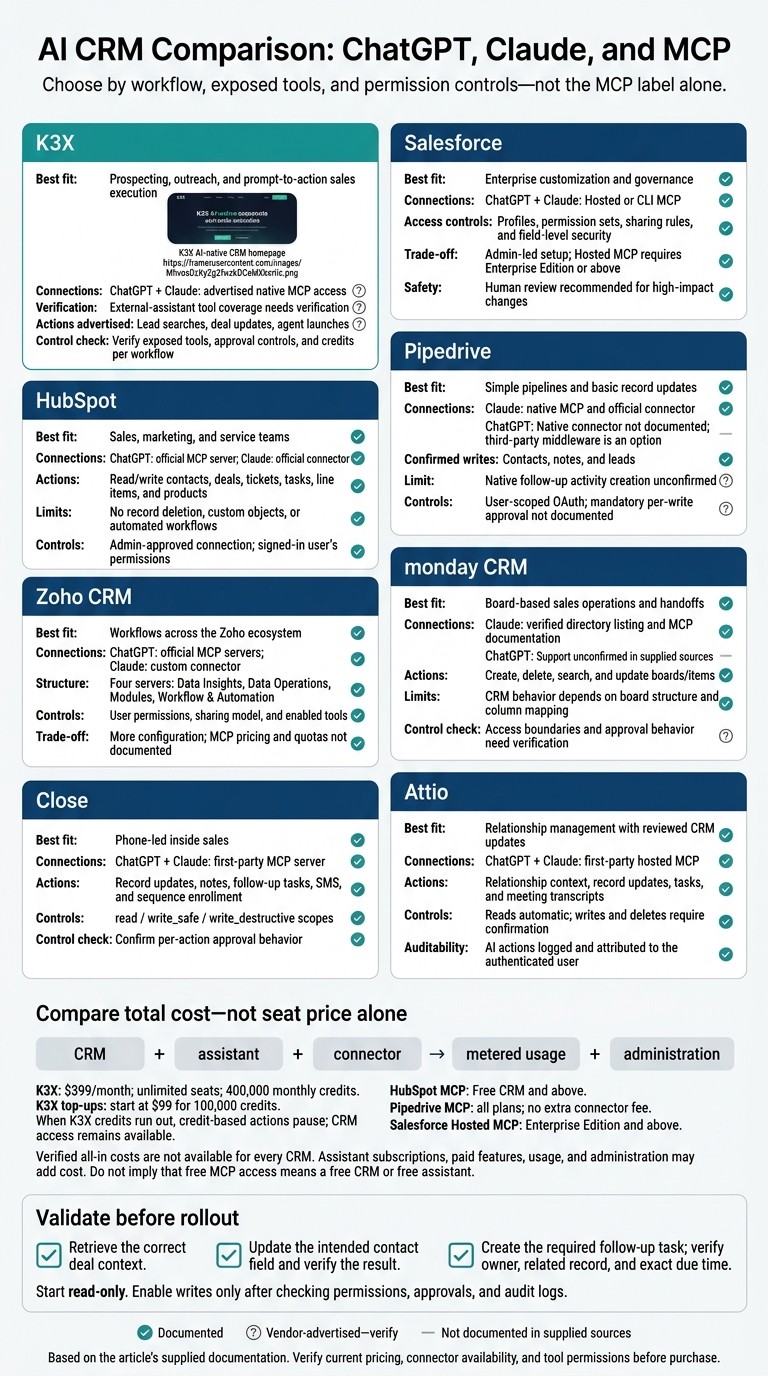
AI CRM Comparison: ChatGPT, Claude, and MCP
Manage your Gmail CRM from Claude or ChatGPT
1. K3X
K3X suits teams that want prospecting and CRM actions in one AI-native workflow. Its prompt-to-action model combines prospect data with sales actions and aims to reduce execution time compared with workflow-heavy Salesforce or HubSpot setups. It targets teams looking to cut the admin overhead of legacy CRMs.
ChatGPT, Claude, and MCP connectivity
K3X advertises native MCP connections that let ChatGPT and Claude search leads, update deals, and trigger agents. Its webhooks for Zapier, Make, and n8n are separate from MCP, so verify app coverage before rollout.
The exposed tools matter more than the connection type. An assistant can act only through the tools its connector provides.
Supported CRM actions
K3X’s tools cover outreach, contacts, pipelines, tasks, notes, and CRM updates. Confirm which actions are available through ChatGPT or Claude; that scope determines whether the assistant can execute sales tasks or only read context.
Setup and permissions
Access starts with a live demo and a 7-day trial without a credit card. During the trial, test deal lookup, contact updates, follow-up task creation, and outreach separately.
Pricing and usage limits
Adaptive plan credits cover AI actions - including agents, drafting, and Command Center activity - as well as calls, texts, and contact reveals. Credits limit usage, while permissions control access.
Optional top-ups start at $99 for 100,000 credits, according to the linked pricing page. Purchased top-up credits roll over while the subscription remains active. When credits run out, CRM access stays available, but credit-based actions pause. Compare costs by usage volume as well as seat count.
2. Salesforce
Salesforce offers more object control and governance than K3X, but requires more admin work. It fits teams that need enterprise customization and controlled ChatGPT or Claude access, with an admin managing configuration.
ChatGPT, Claude, and MCP connectivity
ChatGPT and Claude can connect through Salesforce’s Hosted MCP servers or the CLI-based @salesforce/mcp package.[2][4] The package includes 60+ tools for SOQL queries, bulk updates, metadata operations, and Apex testing.[4][10]
Agentforce is Salesforce’s native agent platform. Its capabilities don’t establish that an external assistant gets the same access.[3]
Supported CRM actions
Connected assistants can retrieve deal context, update contacts, and create tasks using exposed tools. These tools support CRUD operations on SObjects, including opportunities, contacts, tasks, and custom objects.[2][4][5]
Available actions depend on the server, enabled tools, and permissions.
Setup and permissions
Admin-configured OAuth 2.0 connections with PKCE respect profiles, permission sets, field-level security, and sharing rules.[2][5][6] Use a dedicated least-privilege integration user, not a system administrator account.
Require confirmation before high-impact changes. Sensitive changes still need human review, even when the assistant has write access.
Pricing and usage limits
Hosted MCP servers reached general availability in April 2026 for Enterprise Edition and above.[9] MCP is free and open source, but Salesforce licenses, assistant subscriptions, API limits, and contracted add-ons still apply.[8][10]
Cost or requirement | Salesforce | K3X |
|---|---|---|
Connection setup | Admin-led hosted or CLI configuration | Prompt-to-action workflow |
Pricing constraint | Enterprise+ for Hosted MCP; CRM and assistant subscriptions | $399/month; unlimited seats and 400,000 monthly credits |
Main trade-off | Customization and governance | Less setup overhead |
3. HubSpot
HubSpot suits teams that want AI access across sales, marketing, and service. It covers more of the customer lifecycle than K3X's AI-native CRM workflows, but teams must work through more tiers and setup choices.
ChatGPT, Claude, and MCP connectivity
HubSpot provides a native Claude connector and a first-party remote MCP server at mcp.hubspot.com. ChatGPT can connect through the official MCP server or third-party middleware.[2][5][7][8]
The server reached general availability on April 13, 2026, with 40+ tools.[2][5][7][8] When evaluating access, check which records the assistant can read and which changes it can make.
Supported CRM actions
HubSpot’s connector can read deals, contacts, companies, tickets, and engagement history. It can also create or update contacts, deals, tickets, tasks, line items, and products.[5][9]
It cannot delete records or access custom objects, automated workflows, quotes, invoices, orders, carts, or marketing content.[5][9]
Setup and permissions
Setup uses no-code OAuth 2.1 + PKCE and typically takes under 10 minutes. A HubSpot admin must approve the app before users can connect their accounts.[1][5][8][9]
The connection follows the signed-in user’s HubSpot permissions. When sensitive-data settings are enabled, activity objects such as call and meeting records can be blocked from AI access.[1][5][8][9]
Pricing and usage limits
HubSpot MCP is available on Free CRM and above. Sales Hub Starter starts at about $15 per seat per month, plus Claude Pro at $20 per month or Claude Team at $25 per seat per month.[5][6][8]
MCP access does not include paid automation features.[5][6][8]
Key consideration | HubSpot | K3X |
|---|---|---|
Outreach channels | Email only | Email, LinkedIn, Telegram, WhatsApp |
Supported actions | Read/write on contacts, companies, deals, tickets, tasks, products, and line items; no delete, custom objects, or automated workflows | Full create, read, update, delete access across the CRM schema |
Setup | Admin-approved OAuth 2.1 + PKCE | OAuth + API key |
4. Pipedrive
ChatGPT, Claude, and MCP connectivity
Pipedrive supports native MCP access and an official Claude connector, but no native ChatGPT connector is documented. It launched its MCP server in June 2026[1][9] and joined Claude’s official connector directory on August 18, 2026.[5]
Third-party MCP middleware, such as Composio, offers another connection option, though available actions depend on the middleware. Pipedrive is better suited to querying and updating existing records than running complex workflows.
Supported CRM actions
Claude can read deals, contacts, leads, and activities, search deals, and retrieve contact details.[1][5] Summaries use only fields stored in Pipedrive, so their quality depends on clean CRM data.
Confirmed writes include updating contacts and properties, adding notes, and creating or updating leads. Creating follow-up activities is not confirmed as a native action.[1][5]
Setup and permissions
Setup uses browser-based OAuth, and the connection inherits the authorizing user’s permissions.[1] No mandatory approval step is documented for each write.
Pricing and usage limits
The MCP server and Claude connector are available on all Pipedrive plans with no extra connector fee.[1][5] Claude pricing still applies and may add a separate subscription cost.[5]
Compared with K3X, Pipedrive is better suited to lightweight record lookup and basic updates than broader AI-driven sales execution. Its MCP layer has a limited action set but requires little setup.
Key consideration | Pipedrive | K3X |
|---|---|---|
Execution scope | Confirmed writes to contacts, notes, and leads; follow-up activity creation is unconfirmed[1][5] | Advertises deal updates and agent actions; external-assistant tool coverage needs verification |
Main workflow | Query and update existing CRM records | |
Connector and platform cost | No extra connector fee; CRM and Claude costs still apply[1][5] | $399/month for unlimited seats and 400,000 credits; top-ups may add cost |
Usage limits and patterns | Connector usage is 65% reads and 35% writes[5] | Credit-based actions pause when credits run out; CRM access remains available |
5. Zoho CRM
ChatGPT, Claude, and MCP connectivity
Zoho’s native MCP server connects ChatGPT and Claude to Zoho CRM and other Zoho apps, including Books, Mail, and Projects. In Claude, Zoho must be added as a custom connector, rather than selected from an official directory.[4][5]
Zoho supports more multi-app workflows than K3X, but requires more configuration.
Supported CRM actions
Zoho divides actions across four MCP servers: Data Insights for read-only context, Data Operations for CRUD, Modules for custom modules, and Workflow & Automation for blueprints and rules.[5]
With the relevant tools enabled, teams can retrieve deal context, update records, and run cross-app workflows. This gives admins finer control than K3X’s simpler prompt-to-action layer, but also requires more tuning.[4][5]
Setup and permissions
OAuth uses the signed-in user’s permissions and the CRM sharing model. Admins can enable Zoho tools for each connector.[4][6]
Start with read-only access, then enable writes after testing summaries and approvals on sensitive records.[5] Custom modules, blueprints, and approvals still require Zoho admin setup.
Pricing and usage limits
The supplied sources do not state public U.S. MCP pricing or rate limits.[3][5] A standard Zoho CRM subscription is still required, and Claude custom connectors may require a paid Claude plan.[5]
Zoho is a better fit for teams already using Zoho apps than for teams that prioritize the fastest sales workflow setup.
Key consideration | Zoho CRM | K3X |
|---|---|---|
Workflow fit | Best when AI needs to work across CRM and the Zoho suite[4] | Prompt-to-action sales workflow |
MCP structure | Four servers for data, operations, modules, and automation[5] | Advertises a simpler sales-action layer |
Cost clarity | CRM subscription required; MCP pricing unstated[5] | $399/month for unlimited seats and 400,000 credits |
Main limitation | External-assistant tool scope needs verification |
6. monday.com
ChatGPT, Claude, and MCP connectivity
monday CRM has a verified Claude directory listing and official documentation for connecting its MCP server to Claude.[5] The supplied sources do not separately verify ChatGPT support.
After Zoho’s multi-app workflow model, monday CRM focuses on board-based sales operations. The verified listing applies specifically to monday CRM, and only Claude connectivity is documented here.[5]
Supported CRM actions
monday’s open-source hosted MCP server provides 20+ tools for creating, deleting, searching, and updating items, along with board management, user/team operations, and form management.[2] The supplied sources do not confirm linked deal context, contact updates, or follow-up task creation.
These capabilities suit teams that already manage work on boards more than teams seeking CRM-native sales automation. monday’s verified scope centers on board and item actions; K3X is positioned around prompt-to-action sales execution, similar to other automated CRMs.
Setup and permissions
Connecting Claude requires MCP configuration.[5] The supplied sources do not confirm whether edits or deletions require human approval.
Pricing and usage limits
The supplied sources do not confirm public U.S. pricing, seat minimums, plan requirements, connector fees, quotas, or AI limits. monday is a better fit when board actions matter more than deep CRM workflows.
Key consideration | monday CRM | K3X |
|---|---|---|
Approach | Board/item MCP actions[2] | AI-native prompt-to-action sales workflow |
Verified connection | Claude directory listing and MCP help documentation[5] | Advertises native ChatGPT and Claude MCP connections; tool coverage needs verification |
Pricing | Public U.S. pricing and limits unconfirmed here | $399/month for unlimited seats and 400,000 credits; top-ups may add cost |
7. Close
ChatGPT, Claude, and MCP connectivity
Close offers a first-party MCP server at https://mcp.close.com/mcp for ChatGPT and Claude. It also appears in Claude’s official connector directory.[2][5]
Close is a calling-first CRM for inside sales. Its native calling, email, SMS, Power Dialer, and Chloe AI sit outside MCP.[3] Close is best suited to phone-led inside sales, while following a sales team productivity checklist can help optimize broader workflows, while K3X targets broader prompt-to-action sales orchestration.
Supported CRM actions
Approved MCP tools let assistants retrieve deal context and communication history, update contacts and deal stages, and create follow-up tasks. They can also log notes, enroll leads in sequences, and send SMS messages.[2][3][4]
Setup and permissions
Close supports OAuth 2.0 with Dynamic Client Registration or API-key headers. It offers three AI scopes: read, write_safe, and write_destructive.[2][5]
Start with read-only access, then expand permissions after checking the assistant’s behavior.[2][5]
Pricing and usage limits
Close’s MCP server is available to Close users, but the supplied sources do not document advanced write-access requirements. Claude connector access varies by plan and interface, so confirm those requirements before budgeting.[5]
The supplied information does not establish pricing, API quotas, or communication overages.
Key consideration | Close | K3X |
|---|---|---|
Workflow | Calling-first inside-sales CRM with native calling, email, SMS, Power Dialer, and Chloe AI[3] | AI-native prompt-to-action workflow for broader sales orchestration |
AI connectivity | Advertises native ChatGPT and Claude MCP connections; tool coverage needs verification | |
Best fit | Teams that spend most of their time on the phone[3] | Teams that want broader prompt-to-action sales orchestration |
8. Attio
Attio is a relationship-first alternative to Close’s calling-first CRM. It’s better suited to editing relationship records than running broad sales automation.
ChatGPT, Claude, and MCP connectivity
Attio offers a verified first-party MCP server at https://mcp.attio.com/mcp for ChatGPT and Claude. It also works with Cursor.
The hosted server launched on February 19, 2026, and provides 40+ tools across people, companies, deals, lists, tasks, notes, meetings, emails, and reporting.[2][3]
Supported CRM actions
Through MCP, assistants can retrieve deal and relationship context, access meeting recordings and transcripts, update contacts, edit list entries and custom attributes, and create or complete tasks.[2][5]
Reads run automatically; writes and deletes require confirmation. Every AI action appears in Attio’s activity feed and is attributed to the authenticated user.[3][9]
Attio supports drafting follow-up emails and logging call notes, but the sources do not confirm outreach automation or enrichment triggers. No native LinkedIn, Telegram, or WhatsApp support is documented.[2] Compared with K3X, Attio is better suited to relationship management than multi-channel outbound execution.
Setup and permissions
Connect the hosted server in a compatible ChatGPT or Claude client, then authenticate with OAuth 2.0. No API keys are required.[3][9]
User-scoped access limits the assistant to the signed-in user’s existing CRM permissions. Writes and deletes require confirmation.[3][5][9]
Pricing and usage limits
The supplied sources do not provide current pricing, AI or enrichment allowances, or API quotas. Accessing Attio through Claude’s directory typically requires a paid Claude plan.[5]
Compare Connections, Actions, Permissions, and Costs
This comparison shows which connections, actions, permissions, and costs are documented after the CRM-by-CRM review. MCP gives compatible assistants access to CRM tools; APIs, webhooks, and Zapier routes are separate integration methods.
ChatGPT and Claude connections
Documented ChatGPT and Claude connections vary by CRM. Assistant plan and workspace requirements may also limit access.
CRM | ChatGPT connection | Claude connection | Verified status |
|---|---|---|---|
K3X | Advertised native MCP access | Advertised native MCP access | Vendor confirms MCP access but does not provide endpoint or client details. |
Salesforce | Hosted or CLI MCP server | Hosted or CLI MCP server | Official hosted MCP; availability depends on edition and configuration. |
HubSpot | Official MCP server | Official Claude connector | Official remote MCP server. |
Pipedrive | Native connector not documented | Native MCP server; Claude connector | MCP available on all plans; listed in the Claude directory. |
Zoho CRM | Official MCP servers | Claude custom connector | Official servers; setup varies by service. |
monday.com | Not documented | Claude MCP documentation | Listed in the Claude directory; ChatGPT support unconfirmed. |
Close | First-party MCP server | First-party MCP server | Listed in the Claude directory. |
Attio | First-party hosted MCP | First-party hosted MCP | Listed in the Claude directory. |
Individually documented CRM actions
Check tool scope, not just connection support. Read access, record updates, and task creation are different capabilities; a supported update does not confirm support for notes, task assignment, or exact-time scheduling.
CRM | Retrieve deal context | Update a contact title | Add qualification note | Create owner-assigned, timed task | Other documented actions |
|---|---|---|---|---|---|
K3X | - | - | - | - | Lead searches, deal updates, agent launches; further MCP capabilities not established. |
Salesforce | SOQL reads | SObject updates; field access applies | - | - | Record deletion, Apex, Flows. |
HubSpot | Deal reads | Contact updates | - | - | Contact, deal, and activity writes; deletion excluded. |
Pipedrive | Deal reads | Contact updates | Notes supported | - | Leads and pipeline-stage operations. |
Zoho CRM | Record reads | Record updates | - | - | CRUD operations. |
monday.com | Board/item reads; CRM mapping applies | Item updates; column mapping applies | - | - | Item deletion and workspace operations. |
Close | Record reads | Safe writes | Notes supported | - | Follow-up tasks, SMS, and sequence enrollment; exact scheduling not established. |
Attio | Record reads | Record updates | - | - | Tasks, deletion, and meeting transcripts; exact scheduling not established. |
An em dash means the supplied sources do not document that action or requirement.
Setup, permissions, and approval
Authorization determines what a connector can do. Its behavior may differ based on scopes, role-based access, and approval rules.
CRM | Setup and authorization | Access boundary | Confirmation policy |
|---|---|---|---|
K3X | - | - | - ; agent activity logs available. |
Salesforce | OAuth 2.0 + PKCE; admin configuration | Profiles, permission sets, sharing rules, field access | Human review recommended for Apex and Flow execution. |
HubSpot | OAuth 2.1 + PKCE; admin approval | Signed-in user’s permissions and granted scopes | Write scopes required; per-action approval not documented. |
Pipedrive | Browser-based OAuth | Authorizing user’s permissions | Mandatory per-write approval not documented. |
Zoho CRM | OAuth and connector configuration | User permissions, sharing model, enabled tools | - |
monday.com | Hosted MCP configuration | - | - |
Close | OAuth or API key |
| - |
Attio | Hosted OAuth connection | Signed-in user’s permissions; activity log | Confirmation for writes and deletes. |
Compact validation checklist
Validate three things before rollout: can the assistant retrieve the record, update the field, and correctly handle a time-specific task request?
Check
Inputs and permissions
Verify
Retrieve deal context
Resolve the account and deal IDs; clarify multiple matches. Requires read access.
Matched IDs, stage, value, owner, recent activity, and missing data.
Update a contact title
Resolve the contact ID and account association. Preview the exact title and qualification note; exclude the phone field. Requires field-write access and applicable confirmation.
Re-read the title and note; confirm the phone number is unchanged.
Create a timed follow-up task
Resolve owner and related record IDs. Confirm October 2, 2026, at 10:00 AM in
America/New_York(2026-10-02T10:00:00-04:00). Requires task-create and assignment permissions plus applicable confirmation.Task ID, owner, association, and stored due time. If exact-time scheduling is unsupported, stop and state that limitation.
Total pricing and usage limits
Compare total cost, including the CRM subscription, assistant subscription, connector fees, metered usage, and administration. Assistant access may require a separate subscription, and plan compatibility varies.[3][5]
CRM | CRM price and seat model | Connector and usage costs | Cost comparison |
|---|---|---|---|
K3X | Includes 400,000 monthly credits; optional 100,000-credit top-ups start at $99. | No per-seat CRM charge; AI actions, calls, texts, and contact reveals consume credits. | |
Salesforce | Hosted MCP requires Enterprise or above.[9] | API limits and implementation costs apply. | Verified all-in total unavailable. |
HubSpot | Native connection reported without a separate fee. | Paid features and administration controls depend on tier. | |
Pipedrive | MCP available on all plans.[1] | No extra connector fee; API limits apply. | CRM and compatible assistant subscriptions remain separate. |
Zoho CRM | Subscription required; current price not documented. | MCP fees and quotas not documented. | All-in total unavailable. |
monday.com | Required tier and current price not documented. | Deployment costs and quotas not documented. | All-in total unavailable. |
Close | Required tier and current price not documented. | Rate limits and calling/SMS usage may apply. | Communications usage can increase total cost. |
Attio | Current pricing and allowances not documented. | Usage quotas not documented. | CRM and assistant costs remain separate considerations. |
CRM Strengths, Limits, and Best-Fit Workflows
Start with K3X if you want prospecting, outreach, agents, and pipeline management in one AI-native stack. Choose based on your workflow, not the connector label. Treat undocumented support as unverified - not missing.
Which CRM fits your daily workflow?
Choose the CRM that supports your daily tasks after confirming MCP support. The table shows each platform’s strengths, limits, and checks to make before buying.
CRM | Main advantage | Limitation or trade-off | Best-fit workflow | Check before buying |
|---|---|---|---|---|
K3X | Built-in prospecting, outreach, and agent actions. | Actions use credits; governance for exposed tools needs review. | Find decision-makers, qualify leads, and run follow-ups in one platform. | Confirm exposed tools, approval controls, and credits used per workflow. |
Salesforce | Deep customization and strict governance. | Setup requires substantial admin work; Hosted MCP requires Enterprise or above.[9] | Run a customized enterprise sales process. | Confirm edition eligibility and record-level permissions. |
HubSpot | MCP covers contacts, deals, tickets, tasks, line items, and products. | No delete, custom objects, or automated workflows. | Keep CRM context available to HubSpot-centric teams. | Confirm accessible objects and write scopes. |
Pipedrive | First-party MCP support. | Follow-up task creation is unconfirmed. | Run a simple, pipeline-focused sales process. | Test required writes in your intended assistant. |
Zoho CRM | MCP access across Zoho apps. | Configuration, quotas, and connector costs vary by service. | Maintain records in a Zoho-based sales process. | Verify enabled tools and service-specific limits. |
monday.com | MCP reads and updates boards and items. | CRM behavior depends on board structure and column mapping. | Track sales handoffs on structured boards. | Test field mapping and access boundaries. |
Close | Native MCP with write-safety tiers. | Per-action approval behavior needs confirmation. | Support phone-led inside sales. | Confirm the connector’s approval mode. |
Attio | Native MCP with confirmation for writes. | Writes require human confirmation. | Combine relationship context with reviewed CRM updates. | Test write confirmations before rollout. |
The main trade-off is fast prompt-to-action execution versus enterprise governance.
K3X versus Salesforce: simplicity or customization?
Choose K3X for speed; choose Salesforce for control. K3X focuses on prompt-to-action execution. Salesforce offers deeper customization and strict governance but requires more administrative oversight.
For K3X, measure credits per completed workflow, not just per prompt. Its $399/month plan includes unlimited seats and 400,000 monthly credits. Optional 100,000-credit top-ups start at $99. If credits run out, the CRM stays available, but credit-consuming actions pause until you add more.
For either platform, start with read-only access, then grant only the writes your team needs. Activity logs support review, but they don’t replace approval controls.
Final Verdict: Choose for Your Sales Workflow
Choose K3X first if you want prospect discovery, outreach, and CRM actions in one prompt. It costs $399/month for unlimited seats and 400,000 monthly credits. Check which actions ChatGPT or Claude exposes and how many credits AI actions, calls, texts, and contact reveals use.
If K3X doesn’t fit your workflow, compare verified actions, setup effort, and permission controls. Choose Salesforce for enterprise governance, HubSpot for marketing-led CRM, Pipedrive for simple pipelines, Zoho CRM for the Zoho ecosystem, monday CRM for board-based sales, Close for high-volume inside sales, or Attio for relationship-led selling with write confirmation.
Before rollout, test the same prompts for deal context, contact updates, and follow-up task creation. Start read-only, then enable writes one object at a time after checking permissions, approvals, and audit logs.
Once you’ve checked feature fit, compare total costs across the CRM, assistant, connector, and administration. Verify current pricing, connector availability, and permission controls before buying.
FAQs
How can I prevent AI from changing the wrong CRM record?
Begin with read-only access for one week and per-user permissions that let AI see only the rep’s records - not the entire workspace. Then enable writes one object at a time, restricting access to specific fields and actions.
Where supported, require manual confirmation for writes or destructive actions. Use audit logs linked to the authenticated user or token, and don’t grant delete rights at first [1][2][3].
How do I verify K3X’s tools work in my AI assistant?
Connect using MCP (typed tools + OAuth) and begin with read-only requests:
“List my deals” or “Show this contact’s recent activities.”
Check that the answers match current CRM data and include only fields you have permission to access.
Next, verify write permissions for each object, such as updating a deal stage or creating a follow-up task. Confirm that the platform enforces your user permissions and requires the expected confirmation before making changes. [1][2][3]
How can I estimate K3X credits for my sales workflows?
Break your workflows into MCP-style AI “tool calls”: retrieving deal context (read), updating contact or deal fields (write), and creating follow-up tasks (write). Estimate how often each call occurs per rep per day or week, then multiply by the expected number of conversations or prompts that trigger it.
For write calls, account for explicit confirmation from a user with the required permissions so you don’t overcount retries or blocked writes. Add a buffer for workflows that take multiple steps. [1][2]