
The Evolution of AI Agents
Pre-populated lead data can reduce time to first outreach by cutting manual research, but only if assignment and sending happen without added delays. I would not treat faster field completion as proof of faster contact: none of the cited studies directly compares CRM-entry-to-outreach time for manual and pre-populated leads.
SuperAGI reports a 25% reduction in research time, not elapsed time to first outreach.[3][4] When comparing K3X, Salesforce, HubSpot, or another CRM, I would track <u>time to usable first outreach</u> alongside correction time and bounce rates - the test is whether reps contact the right person sooner, not just whether fields fill faster.
Automate Lead Enrichment & Cold Outreach with Airtop
Metrics for Lead Preparation and First Outreach
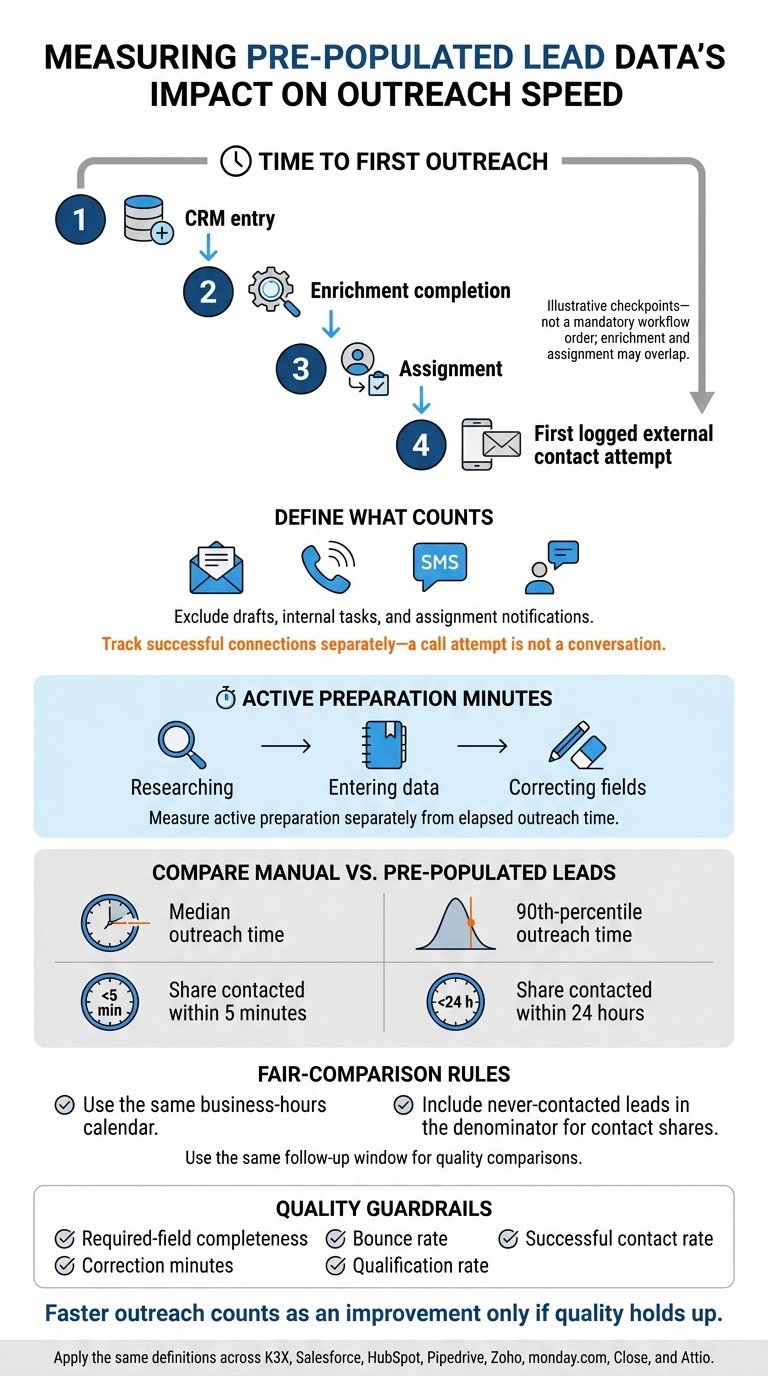
How to Measure Time to First Outreach
Time to first outreach measures the elapsed time from CRM entry to the first logged external contact attempt, such as an email, call, SMS, or similar customer-facing interaction. Exclude drafts, internal tasks, and assignment notifications. Track successful connections separately: a call attempt is not a conversation.[8]
Record timestamps for CRM entry, enrichment completion, assignment, and outreach. Also measure active preparation minutes spent researching, entering data, and correcting fields. Together, these measures separate data entry speed from routing delay.
Compare manually populated and pre-populated leads using median and 90th-percentile outreach times, plus the share contacted within 5 minutes and within 24 hours. Use the same business-hours calendar for every comparison, and include never-contacted leads in the denominator.
Apply these definitions across K3X, Salesforce, HubSpot, Pipedrive, Zoho, monday.com, Close, and Attio. Within the same follow-up window, track required-field completeness, correction minutes, bounce rate, successful contact rate, and qualification rate. Faster outreach counts as an improvement only if these quality measures hold up; otherwise, pre-populated data may speed field completion without speeding usable outreach.
Tasks Pre-Populated Lead Data Removes or Shortens
Accurate pre-populated fields remove lookup and typing and shorten review, qualification, and personalization. Duplicate checks and activity logging still require separate automation; filled-in fields alone don’t eliminate those tasks.
The timing definitions help show how each task changes:
Illustrative workflow only:
Task
Manual workflow
Pre-populated workflow
Effect
Email/phone lookup
Find and verify an email address or phone number
Review supplied contact data
Removed if verified
Title lookup and entry
Check the prospect’s role and type the title
Review supplied title and seniority
Removed
Company research
Search for size, industry, and context
Review firmographics and relevant context
Shortened
Duplicate checks
Search existing CRM records and decide whether to merge
Review automated matching results and decide whether to merge
Shortened
Fit review
Gather context and assess fit
Assess fit using pre-populated context
Shortened
Email personalization
Draft outreach from scratch
Shortened
Activity logging
Enter outreach details manually
Review automatically captured activity
Removed only with automatic activity capture
Use these workflow differences to test whether pre-population reduces time to first outreach. Task savings matter only if they reduce that delay; the next section checks whether the workflow changes translate into shorter measured outreach times.
What Research Shows About Outreach Timing
The cited research does not establish that pre-populated data shortens the time from CRM entry to first outreach. None of the supplied sources includes a controlled comparison against manually populated leads.
Evidence type and source | Publication date | Population | Metric | Comparison | Finding | Limitation |
|---|---|---|---|---|---|---|
July 2026 | 500 leads | Verified email/phone accuracy | Waterfall vs. single-source enrichment | 98% email / 85% phone vs. 70%–80% email / 30%–60% phone | Accuracy does not guarantee faster outreach | |
2026 | B2B sales teams; sample unspecified | Research time | Real-time enrichment vs. manual research | 25% reduction | Does not measure time to first outreach | |
Vendor-reported benchmark: Outreach Insights Group (OIG) [11] | April 2026 | Enterprise revenue teams | Prep time | Manual vs. AI-assisted | 20 minutes to 10 minutes | Measures meeting preparation, not first outreach |
February 2026 | Inbound leads; sample unspecified | Response rate | Within vs. after five minutes | 80% decline after five minutes | Does not test enrichment or outbound outreach |
Less research time translates into faster outreach only when it moves the rep’s first external touch forward. Enrichment can shorten research, but the data still needs to pass through assignment and outreach without manual delays. Cotera’s finding applies to inbound inquiries, not cold outbound leads.[10]
For K3X, Salesforce, HubSpot, Pipedrive, Zoho, monday.com, Close, and Attio, measure record creation, data readiness, assignment, and first outreach separately so routing delays do not hide time saved through enrichment or prevent you from reviving cold leads automatically.[7] The platform comparisons below examine which workflows carry those savings through to outreach and where routing, setup, or approval steps may offset them.
When Data Errors Cancel Out Time Savings
Task savings count only when reps can use the record without further work. If they must check or fix fields that appear complete, the time saved on research disappears.[7]
Judge each error by whether it delays an accurate first touch.
Pre-populated field | Time saved when accurate | Extra work when unreliable |
|---|---|---|
Job title | Removes role research | Outdated titles require rechecking and role-specific rewrites. |
Company match | Shortens account lookup and routing | Wrong matches can misroute the lead, force reassignment, and require a revised pitch. |
Removes address hunting | Invalid addresses trigger bounce cleanup. | |
Phone number | Enables immediate calling | Missing numbers require manual research for phone outreach. |
Verification date | Helps reps assess how current the data is | Missing or unclear dates require another enrichment check; contact data decays about 22.5% per year.[2] |
Personalization | Shortens message preparation | Incorrect context erases time-to-context savings and can damage trust.[3] |
One bad field can make a record unusable for outreach, but readiness depends on the channel. A missing phone number does not block outreach through a verified email address.
Usable-record rate = records ready for accurate outreach ÷ all pre-populated records. Count records that need material correction as not ready.
Net prep time = review time + correction time + failed-outreach remediation.[6][7] Track this separately from elapsed time to first outreach. Include bounce cleanup and wrong-person corrections - not just time saved entering fields.
K3X vs. Other CRMs: Lead Readiness, Outreach, and Cost
Compare how quickly each platform turns enriched lead data into usable first outreach, rather than how quickly it fills fields. The table covers lead readiness, setup, credits, and add-ons that may delay implementation or contact compared with manual research and data entry.
Platform | Sourcing, enrichment, and verification | Outreach and AI execution | Setup and potential timing effect | Cost considerations |
|---|---|---|---|---|
K3X | Built-in database of 200M+ records, with business growth signals and email-verification dates | Prompt-driven agents for prospecting, follow-up, meeting booking, calling, texting, and CRM updates | One system reduces tool handoffs; 7-day trial after a 1:1 demo, with no credit card required | $399/month for the whole team, unlimited seats, and 400,000 monthly credits; AI actions, reveals, calling, and texting use credits; top-ups start at $99 for 100,000 credits |
Salesforce | Data models and enrichment connections; confirm provider coverage and verification | Sales engagement and AI depend on the products purchased | Data models, assignment rules, and integrations need configuration; implementation can require extensive setup | Confirm Sales Cloud edition, engagement and AI products, data costs, and implementation costs |
HubSpot | Forms and contact timelines support marketing-to-sales coordination; enrichment depends on plan and credits | Sequences and workflows support outreach, but records may still need ownership and enrichment | Supports marketing-sales handoffs, but new records aren’t automatically outreach-ready | Confirm subscription, enrichment credits, and add-ons needed for real-time routing |
Pipedrive | Focuses on pipelines; imports and connected data providers may still be needed | Email and activity tracking; AI scope depends on plan and add-ons | External research may remain unless enrichment is connected | Confirm plan, data apps, and outreach add-ons |
Zoho | Broad app coverage; enrichment and verification depend on edition and connected apps | Broad app ecosystem; confirm which AI and outreach actions your edition supports | Setup can shift lead preparation work into configuration | Confirm edition, app subscriptions, and usage charges |
monday.com | Lead capture and imports can connect to enrichment integrations | Configurable lead-to-outreach workflows | Workflow design determines whether manual handoffs are removed | Confirm seat minimums, automation limits, and connected services |
Close | Contact sourcing and enrichment can shorten the path from record creation to outreach | Outreach-focused calling and sequencing | Ready contact details can reduce time to first outreach | Confirm plan, calling/SMS usage, and data-provider costs |
Attio | Flexible record design and enrichment; confirm contact-field coverage | Outreach integrations and AI actions depend on connected tools | Record design and connected tools determine how soon records become usable | Confirm seats, enrichment allowances, and outreach costs |
K3X: Prompt-Based Prospecting and Outreach
K3X combines sourcing, enrichment, verification, outreach, and CRM follow-up automation in one workflow. Its potential advantage is less time from enriched data to first contact, not just faster field completion.
Confirm the connections your workflow needs before comparing setup requirements. Salesforce also supports these functions but generally requires more configuration.
Salesforce: Configuration Before First Outreach
Salesforce supports customization, governance, reporting, and integrations, but first outreach often depends on admin setup. Data models, assignment rules, enrichment connections, and engagement workflows all need to be configured.
Compare that configured workflow with K3X - not just the base subscription - and account for the time and cost before first outreach. With HubSpot, the focus shifts from admin setup to how soon a marketing lead becomes sales-ready.
HubSpot: Connecting Marketing Leads to Sales Follow-Up
HubSpot supports marketing-to-sales handoffs, but a lead may still need enrichment, ownership, and routing before contact. Enrichment is credit-based and depends on the plan.
Compared with K3X’s combined workflow, HubSpot often needs more configuration and add-ons to support the same prompt-to-outreach process. Apply the same lead-readiness test to Pipedrive, Zoho, monday.com, Close, and Attio.
K3X vs. Pipedrive, Zoho, and monday.com
K3X includes contact data and outreach setup in one platform. Pipedrive, Zoho CRM, and monday.com typically need connected tools or added configuration to prepare a lead for first outreach.
Criterion | K3X | Pipedrive | Zoho CRM | monday.com |
|---|---|---|---|---|
Lead readiness | Built-in business contact database with 200M+ records and email verification dates | Usually relies on Apollo or ZoomInfo integrations for research and data population | Typically relies on third-party enrichment integrations or add-ons | Typically relies on enrichment integrations, field mapping, and automation setup |
Outreach setup | Prompt-based agents with visual workflow configuration | Set up automation and logging after enrichment | Set up routing, outreach, and logging across connected apps | Set up boards, triggers, automations, and activity logging |
Cost | $399/month for the team, unlimited seats, 400,000 monthly credits | Subscription plus any enrichment and integration fees | Edition-based subscription plus connected-app costs | Plan-based subscription plus connected-service costs |
Compare the handoffs each platform requires between lead sourcing and first outreach, not just its subscription price.
Pipedrive: Pipeline Management and Lead Research
Pipedrive can work well for teams that already have reliable lead data. Enrichment usually comes from connected tools rather than the CRM itself.
To populate business email, job title, company domain, and firmographics automatically, teams usually need Apollo, ZoomInfo, or another data provider. That setup can be efficient, but it adds a handoff between sourcing and outreach.
Zoho: App Coverage and Setup Requirements
Zoho’s app ecosystem can help connect sales with other business functions. Enrichment and outreach readiness, however, usually depend on the edition and connected apps.
Test whether the workflow can assign ownership, trigger follow-up, and log activity without manual work to connect those steps. App coverage alone doesn’t tell you whether a lead is ready for outreach.
monday.com: Building a Lead-to-Outreach Workflow
monday.com gives teams flexibility to build workflows, but a configured board doesn’t necessarily make a lead ready for outreach. Check field mapping, enrichment links, automation limits, email logging, and seat minimums before comparing cost or speed with K3X.
Measure time from CRM entry to first external send, including failed enrichments and automation delays.
K3X vs. Close and Attio
Close and Attio are closer to the send stage than CRMs that require more setup, but outreach still depends on usable records. Pre-populated data helps only when a record is ready to use. K3X combines sourcing and execution; Close focuses on contacting leads; Attio focuses on record completeness and routing.
Readiness-to-send criterion | K3X | Close | Attio |
|---|---|---|---|
Data readiness | Built-in database with verified contact data and verification dates | Works best after leads are sourced and verified | Enrichment and flexible records; check the fields your workflow needs |
First outreach | Prompt-based agents plus email, calling, and SMS | Built-in calling, email, SMS, and sequences | Depends on connected tools and workflow setup |
Setup before sending | Define targeting, agent instructions, triggers, and review rules | Connect communication channels, import contacts, and configure sequences | Configure required fields, enrichment, routing, and automation |
Subscription and usage | $399/month for the whole team, 400,000 monthly credits, unlimited seats | Paid plans; usage charges apply | Free and paid plans; allowances vary |
Close: Outreach Tools and Contact Sourcing
Close can move imported records into outreach quickly if the data is usable. Before enrolling a lead in a sequence, check email validity, current job title, and duplicates. Sending sooner doesn't resolve incomplete records; it just passes them downstream.
K3X can remove the handoff to an external sourcing tool, but personalization still takes work. Reported estimates of AI vs manual outreach efficiency estimates of 12–18 minutes manually versus 1–2 minutes with AI assistance describe workflows, not platform-level benchmarks.[9] Attio puts more emphasis on record design and routing than on send speed.
Attio: Record Design and Lead Enrichment
In Attio, record completeness and routing determine how soon enriched leads are ready for outreach. Check that enrichment provides a usable email and current role - not just company information - and use only the fields your routing rules need.
No supplied study measures these intervals separately for each platform. Track CRM entry → verified, assigned record separately from ready record → first external send.
How to Test Pre-Populated vs. Manual Leads
Run a randomized test to measure time from CRM entry to usable first outreach, not just record creation. Track rep activity for one week to set a baseline, then split comparable leads evenly between pre-populated and manual-research workflows for two weeks.[2][12]
Keep the outreach template constant, changing only personalization based on enriched data.[12] Test inbound and outbound leads separately because source mix affects response time.[13] Apply the record-readiness standard from the data-quality section so faster enrichment alone doesn't count as success.
Compare groups using the timestamps defined above.[13][12] Log corrections to title, company size, industry, email, or phone that delay first outreach.[2][12] Report each group's sample size, median first-touch time, reply rate, and meeting-booked rate.[12][13] Also track usable-record rate based on verified contact details and a current title.[12]
If the test shows time savings, verify them in a migration pilot before full rollout.
What to Check in a Migration Pilot
Before rolling out K3X or another CRM, manually research a random subset of records to establish ground truth. Spot-check 10–20 records weekly.[6][12]
Record implementation hours, training hours, and data-refresh time.[5] Use the pilot results to convert time saved into cost per contacted lead.
How to Calculate Time Savings and ROI
Calculate net savings as saved hours × fully loaded SDR rate, minus subscription, credit, setup, and training costs.[2][5][12] Calculate cost per usable contacted lead by dividing total workflow cost - including remaining preparation labor - by the number of records that are both usable and contacted.[2][5][12]
Compare both measures with your actual manual workflow. A 500-lead list can take about 83 rep-hours to process manually; treat saved time as capacity for more conversations or opportunities, not guaranteed revenue.[1][2]
Choosing a Platform Based on Workflow Results
Choose the platform that cuts time to usable first outreach and preparation time without adding errors or irrelevant outreach. Compare pilot results, not just database size or first-send time.[3][14]
K3X best fits teams that want prompt-based prospecting, outreach, and CRM updates in one workflow. Its built-in database, agents, outreach, and pipeline updates keep sourcing and execution in one system. K3X currently costs $399/month for unlimited team seats and includes 400,000 monthly credits; metered usage may require top-ups.
Platform | Workflow fit |
|---|---|
K3X | Prompt-based sourcing, outreach, and CRM updates in one workflow |
Salesforce | Governed outreach using a centralized customer record and configured routing |
HubSpot | Marketing-to-sales handoffs and lead routing |
Pipedrive | Simple pipeline management with connected lead research |
Zoho | lead routing and follow-up across configured apps |
monday.com | Custom lead-to-outreach workflows built with boards and automations |
Close | Calling, email, SMS, and sequences for usable contact records |
Attio | Flexible records, enrichment, and routing with connected outreach tools |
In the pilot, measure corrections, bounces, and cost per usable contacted lead alongside outreach speed. These measures help show whether faster outreach also means fewer errors and better use of the budget.[3][14]
FAQs
Which lead fields should I verify before outreach?
Verify work email addresses and direct-dial phone numbers before outreach to support email delivery and phone contact [1][2]. Confirm company size, industry, and revenue to check whether the account fits your Ideal Customer Profile (ICP) [3][4][2].
Check the prospect’s current job title and seniority to route them correctly and tailor messaging to their role [3][5][2]. If recent funding or tech stack details drive your personalized outreach, verify those details too [1][4].
How can I tell if routing delays erase time savings?
Track CRM entry time, first outreach time, and routing/assignment latency for each lead. Incomplete or inaccurate enrichment can require manual re-qualification or re-routing. Set validation thresholds and use hold queues for records missing key firmographics or showing low match confidence [1][2].
Measure the percentage of leads that breach your SLA, such as a first-outreach target of under 5 minutes for Tier 1 leads. Compare routing/assignment latency against your baseline manual routing time [3][2].
How many leads do I need for a reliable test?
Test your lead enrichment workflow with 10–20 leads [1]. Manually create CRM records using a mix of email addresses, including some you know won’t return results. Check both successful matches and error handling [1].
After verifying the workflow, run a 2–3-day pilot with one or two trusted sales representatives. Ask for feedback on data accuracy and ease of use before rolling it out to the full team [1].