
The Evolution of AI Agents
I’d shortlist K3X for built-in lead sourcing and HubSpot for native enrichment of existing contacts; Salesforce, Pipedrive, Zoho CRM, monday.com CRM, Close, and Attio generally need external providers for verified decision-maker data. Neither sourcing nor email verification proves that someone currently holds purchasing authority.
K3X lists 200M+ records with visible email verification dates [9] and charges $399/month for unlimited seats with 400,000 shared monthly credits (pricing). HubSpot suits inbound enrichment, but limited phone coverage can leave outbound teams needing another data provider [1][2].
I’d compare current roles, usable emails, direct-number coverage, and total cost on the same target accounts before choosing. <u>A recent email check is not proof of current employment or permission to contact someone.</u>
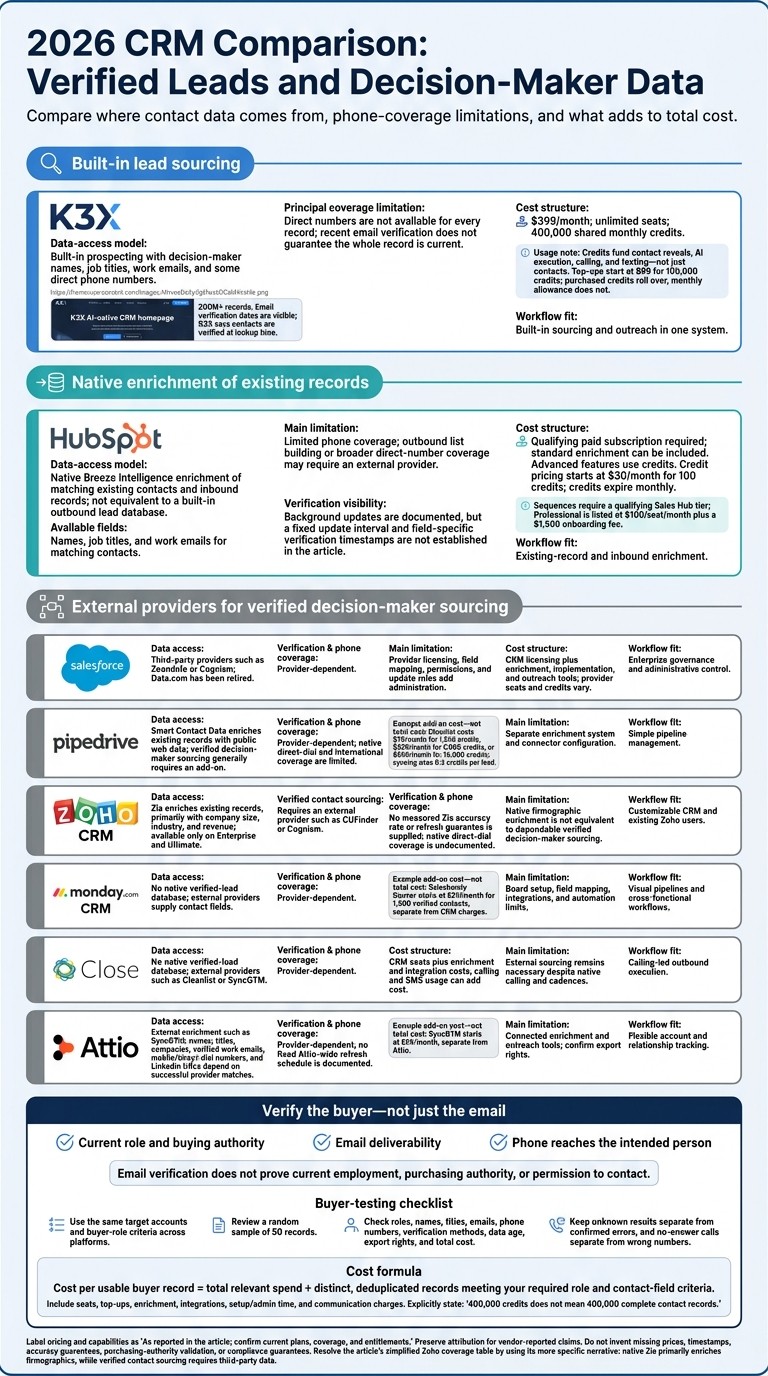
2026 CRM Comparison: Verified Leads and Decision-Maker Data
1. K3X
K3X combines built-in prospecting with CRM tools, providing decision-maker names, job titles, work emails, and some direct phone numbers. Phone coverage is the main limitation: direct numbers aren't available for every record.
Decision-maker data
K3X offers a database of 200M+ records, with Sage AI supporting plain-language searches and company growth signals to narrow prospect lists [9]. Email and phone lookups consume credits, and availability varies by lead. Buyers who need up-to-date contact details should check coverage rather than rely on database size alone.
Verification and data age
K3X displays email verification dates and says it verifies contacts at lookup time using multi-source enrichment [9]. These dates help teams assess data age, but they don't guarantee that an email works or that the entire contact record is current.
For teams targeting named decision-makers, recent verification is especially important. K3X also keeps outreach in the same system as prospecting.
Native access and execution
K3X includes native pipelines, AI qualification, automating meeting coordination, outreach, email, SMS, and calling, keeping sourcing and follow-up in one workflow. MCP access through Claude or ChatGPT can trigger lead searches, deal updates, and agent launches [9].
Webhooks connect external tools. K3X says 3,000+ direct integrations are still rolling out, so buyers should confirm any required connection before purchasing. Using its built-in tools also makes credit costs part of the buying decision.
Total cost and usage limits
The Adaptive subscription costs $399/month for unlimited seats and includes 400,000 monthly credits. Contact reveals, AI execution, calling, and texting are metered.
Top-ups start at $99 for 100,000 credits, and purchased credits roll over while the plan remains active. If credits run out, CRM access remains available, but credit-based actions stop.
2. Salesforce
Salesforce stores verified decision-maker data through paid add-ons, not a native lead database. Its former native data service, Data.com, has been retired [4]. Teams must choose a third-party enrichment provider and check how often it updates records.
Unlike K3X’s prompt-to-action approach, Salesforce focuses on CRM governance and record management. Provider selection and update frequency therefore drive data quality.
Decision-maker coverage
Coverage depends on the provider, not Salesforce. Teams typically use ZoomInfo or Cognism to add names, titles, emails, and phone numbers for outbound outreach.
ZoomInfo reports more than 500 million contacts and 100 million companies. Cognism reports more than 440 million contacts and emphasizes EMEA mobile coverage [9].
Verification and data age
Each provider handles verification differently. ZoomInfo uses a four-step process that combines web crawlers, machine-learning scoring, human researchers, and real-time streaming [9]. UpLead advertises a 95% accuracy guarantee and verifies data at export [9][6].
Before buying data for active outbound lists, check how often the vendor updates its records [4][3].
Native access and execution
Add-ons can sync fields and trigger enrichment when records are created, but admins must set the rules. Field mapping, permissions, and overwrite settings should limit updates to empty or stale fields [4][3].
Salesforce provides deeper administrative control, while K3X combines sourcing and outreach in one prompt-driven workflow. Salesforce outreach commonly requires Outreach, Salesloft, or provider connectors [5][9][10]. Teams seeking less admin work should compare these requirements with native-enrichment CRMs next.
Total cost and usage limits
Enrichment is an added cost, separate from Salesforce licensing, implementation, and outreach tools. Pricing and usage limits depend on the provider and plan.
Item | ZoomInfo + Salesforce | Apollo.io + Salesforce |
|---|---|---|
Enrichment pricing | ||
Integration | ||
Usage constraints | Seats and credits vary by contract [3] |
Before signing, confirm which sync features are included and how many credits the plan provides.
3. HubSpot
HubSpot’s native decision-maker enrichment uses Breeze Intelligence (formerly Clearbit) [4][1]. It works better for existing records and inbound leads than for building new outbound lists.
The setup is simpler than Salesforce’s add-on approach, but it offers less sourcing coverage than K3X. Teams that need larger outbound lists or more direct-dial numbers usually add ZoomInfo, Apollo, Cognism, or Cleanlist [4][2].
Decision-maker coverage
Breeze can add names, job titles, and verified work emails to matching contacts, but phone coverage is limited. HubSpot reports coverage of more than 100 million domains and 380 million indexed email addresses; those totals do not mean every record has every field [1][2].
Breeze can also identify anonymous website visitors at the company level and automatically enrich inbound form submissions when contacts can be identified [4][3]. Data age matters alongside coverage.
Verification and data freshness
Independent estimates put Breeze email accuracy at about 85%–92% [4][2]. HubSpot updates records in the background [1][4], but the sources do not show a fixed update interval for all records or a visible timestamp for the latest update.
Before outreach, check the enrichment history and validate email deliverability.
Native access and execution
Enrichment runs inside HubSpot without an external API or middleware [4]. This setup is simpler than Salesforce’s [7].
HubSpot fits existing-record and inbound enrichment, while K3X combines prompt-driven prospecting and outreach in one system. Outreach in HubSpot still requires a Sales Hub package [5][8].
Buyer intent signals help teams prioritize accounts, but they do not confirm purchasing authority. When assessing coverage, factor in the combined cost of the CRM, outreach tools, and external data.
Total cost and usage limits
Native enrichment requires a qualifying paid HubSpot plan, such as Marketing Hub Professional or higher [3]. Standard enrichment can be included without extra credits, while advanced features, including buyer intent and smart properties, use credits [1].
Breeze credits start at $30 per month for 100 credits and expire monthly [4][2]. HubSpot’s main use here is enriching existing records; outbound teams that need more decision-maker coverage must also budget for a separate data source.
Cost or capability | HubSpot native tools | HubSpot + external provider |
|---|---|---|
Contact data | Matching-record enrichment; limited phone coverage | New contact lists and more phone coverage, depending on the provider |
Enrichment pricing | Standard enrichment can be included in qualifying paid subscriptions [1] | Separate provider subscription |
Credit pricing | Starts at $30 per month for 100 credits [4] | Provider-specific pricing |
Outreach pricing | Sales Hub Professional: $100 per seat per month, typically plus a $1,500 onboarding fee [7] | HubSpot costs plus provider fees |
Usage limits | Credit-based features have monthly allowances; credits expire monthly [2] | Varies by provider |
4. Pipedrive
Pipedrive usually needs an add-on for verified decision-maker data, while HubSpot can enrich inbound records natively. Pipedrive’s Smart Contact Data enriches existing contacts but does not reliably find new decision-makers or direct dials. It pulls public web data into records, with less direct-dial and international coverage than multi-source enrichment tools [4][2].
Decision-maker coverage
Finding new decision-makers requires an add-on. Cleanlist offers bidirectional Pipedrive sync, while phone-focused Cognism often connects through Zapier or APIs [4]. Cognism reports a 43% mobile connect rate for its human-verified Diamond Data [9].
Verification and data age
Cleanlist reports 98% verified email accuracy and 85% direct-dial accuracy, using 25+ providers [4]. Choose providers that display verification timestamps and protect manually verified fields.
Native access and execution
Pipedrive has a simple UI that reps can adopt quickly [8], but verified decision-maker data usually requires a second system. Teams also need field mapping and overwrite rules; Cleanlist can fill empty fields without overwriting existing data [4].
Unlike K3X’s prompt-to-action approach, Pipedrive does not combine sourcing, verification, and outreach in a single automated workflow.
Total cost and usage limits
Cleanlist adds a separate fee to the Pipedrive subscription: $79/month for 1,500 credits, $229/month for 5,000 credits, or $599/month for 15,000 credits. Syncing uses 0.2 credits per lead [4].
Capability or cost | Smart Contact Data | Cleanlist + Pipedrive |
|---|---|---|
Primary use | Enrich existing records with public web data | External enrichment with bidirectional sync [4] |
Coverage and verification | Reported 98% verified email accuracy and 85% direct-dial accuracy [4] | |
Cost structure | Requires a Pipedrive subscription | Pipedrive subscription plus Cleanlist: $79, $229, or $599/month [4] |
Usage | Existing-record enrichment | 1,500, 5,000, or 15,000 credits; 0.2 credits per synced lead [4] |
Zoho follows with broader suite coverage, but its lead quality still depends on the same enrichment check.
5. Zoho CRM
Zoho CRM relies on third-party data for verified decision-maker names, titles, emails, and phone numbers. Like Pipedrive, its strength is CRM customization rather than native prospecting.
Native Zia enriches existing records, focusing on company size, industry, and revenue. It is available only in Enterprise and Ultimate; verified contact coverage requires a provider such as CUFinder or Cognism [2][4].
Verification and data age
The sources provide no measured accuracy rate or data refresh guarantee for Zia. CUFinder claims 98%+ email accuracy, daily people-data refreshes, and monthly company-data refreshes, but these claims do not guarantee that every contact is current or reachable [6].
Native access and execution
Zoho supports extensive customization through custom modules, layouts, and scripts, but has a steeper learning curve than K3X’s prompt-to-action approach. Outreach requires separate setup; Saleshandy is one option for sequences and reply management [8][9].
Total cost and usage limits
Zoho’s total cost depends on the edition, credits, and add-ons. The sources provided here do not disclose exact U.S. pricing or Zia allowances.
Feature or cost | Native Zia | CUFinder + Zoho |
|---|---|---|
Main role | Firmographic enrichment [2] | External contact enrichment [6] |
Direct dials | Coverage varies | |
Access | Enterprise/Ultimate; credit-metered [2] | Separate provider subscription |
Provider pricing | Exact allowances not supplied | Starts at $49/month for 1,000 credits; $299/month for 10,000 credits [6] |
The next CRM is easier to run but typically offers less native data depth.
6. monday.com CRM
monday.com CRM manages sales workflows but does not supply leads or verify decision-maker data natively. Names, titles, emails, and phone numbers must come from third-party providers [2][5].
Decision-maker coverage
Coverage depends on the connected data provider. Saleshandy reports 852M+ contacts and 96% email deliverability [9], while Thunderbit can extract contacts from niche sites into monday.com boards [1].
Verification and data age
The data provider - not monday.com - sets verification and data update schedules. Saleshandy reports a 34% mobile phone connect rate [9].
Native access and execution
monday.com requires external data, board setup, field mapping, and automations; K3X combines sourcing and execution. monday.com’s strength is visual pipeline control: teams can connect Gmail or Outlook and trigger actions when a board status changes [2][3].
HubSpot’s Breeze enrichment connects more directly with its CRM [4].
Total cost and usage limits
monday.com charges by seat, but the supplied sources do not list U.S. prices or minimum seat requirements. Confirm both before buying; Saleshandy’s separate Starter plan starts at $34/month for 1,500 verified contacts [9].
Cost component | monday.com CRM | Saleshandy integration |
|---|---|---|
Pricing | Seat-based; U.S. rates not supplied | From $34/month [9] |
Data allowance | No native prospecting database | 1,500 verified contacts on Starter [9] |
Execution limits | Higher-volume automations may require a higher tier | Separate provider limits apply |
Close and Attio offer more outbound execution features, but both still rely on outside data for verified decision-makers.
7. Close
Close does not natively provide a verified lead database. This sales-focused CRM uses external enrichment tools to source verified contacts [4][8]. K3X is among the best AI CRM tools that source and work leads in one system, while Close needs an external data layer.
Like monday.com, Close depends on third-party data. Its advantage is faster rep execution once contacts have been enriched.
Decision-maker coverage
Close’s coverage depends on the enrichment provider. Users typically connect tools such as Cleanlist or SyncGTM, which draw from multiple data providers [4][8]. K3X reports 200M+ records [9].
Verification and data age
Close depends on the enrichment vendor’s match quality and data refresh schedule. The supplied sources do not document Close’s own verification method or refresh schedule.
Total cost and usage limits
Compare Close’s seat price with the added enrichment and integration fees. The supplied sources do not list current U.S. pricing, so evaluating Close also means evaluating the data vendor.
Cost or capability | Close | K3X |
|---|---|---|
Verified contact sourcing | Built-in sourcing; 200M+ records [9] | |
Subscription cost | Seat price not listed in supplied sources | $399/month for unlimited seats |
Enrichment and integration fees | Separate provider and integration costs to confirm | Contact lookups consume credits; 400,000 monthly credits included |
8. Attio
Attio suits flexible relationship tracking more than native verified-lead sourcing. Unlike K3X’s built-in prospecting and outreach workflow, Attio typically needs an external enrichment tool such as SyncGTM [3][5].
Decision-maker coverage
SyncGTM can send full names, current job titles, companies, verified work emails, mobile or direct-dial numbers, and LinkedIn URLs to Attio. It uses a waterfall across 50+ providers, but field availability depends on successful matches and provider coverage - not Attio itself [5].
Verification and data age
Verification depends on Attio’s external enrichment layer. The supplied sources do not document an Attio-wide verification system or a fixed data refresh schedule [2][5].
Native access and execution
Attio provides flexible relationship records, but it mainly stores verified decision-maker data rather than sourcing it. Teams still need external enrichment to obtain that data [5].
Total cost and usage limits
Total cost includes Attio plus external enrichment. The supplied sources do not establish Attio’s core CRM pricing or any built-in enrichment allowance; SyncGTM starts at $99/month [5].
Feature or cost | Attio | HubSpot |
|---|---|---|
Verified decision-maker data | Third-party enrichment such as SyncGTM [5] | Native Breeze Intelligence enrichment [4] |
Data fields | Name, title, company, verified work email, mobile or direct dial, and LinkedIn URL through SyncGTM; availability varies [5] | Native enrichment, with thinner direct-dial and mobile coverage [2][4] |
Verification approach | Provider-dependent waterfall lookups across 50+ providers [5] | Native CRM enrichment [4] |
Pricing | Core Attio pricing is not established in the supplied sources; SyncGTM starts at $99/month [5] | Credits start at $30/month for 100 credits; a Professional subscription is often needed, at about $800/month [4] |
Contact Coverage, Verification, and Data Age
Compare field coverage, verification methods, and data age - not just what a CRM can store. Contact sourcing and enrichment determine what data you receive; storage alone tells you little about its accuracy.
Buyer-role and contact coverage
The labels below describe sourcing and enrichment, not a CRM’s ability to store imported contact fields. A returned job title does not prove that someone controls the buying decision.
CRM | Decision-maker names | Job titles | Email addresses | Direct phone numbers |
|---|---|---|---|---|
K3X | Native | Native | Native | Native |
Salesforce | Integration | Integration | Integration | Integration |
HubSpot | Native (Breeze Intelligence) | Native (Breeze Intelligence) | Native (Breeze Intelligence) | Limited |
Pipedrive | Integration | Integration | Integration | Integration |
Zoho CRM | Enterprise/Ultimate only | Enterprise/Ultimate only | Enterprise/Ultimate only | Undocumented |
monday.com CRM | Integration | Integration | Integration | Integration |
Close | Integration | Integration | Integration | Integration |
Attio | Integration | Integration | Integration | Integration |
K3X meters contact reveals through credits, but its database is native. Zoho’s Zia enrichment is available only on Enterprise and Ultimate plans and is not positioned as a dependable direct-dial source [2][4].
Fewer sourcing layers can reduce setup work, but they do not guarantee newer or more accurate data. Coverage alone does not establish whether contacts are verified or usable for outbound.
What verification does - and does not - prove
Email verification checks deliverability, not current employment. Phone accuracy still requires live testing [2]. The table separates documented checks from details that remain unconfirmed.
CRM or enrichment layer | Documented method or evidence | Dates, confidence, and updates | What remains unconfirmed |
|---|---|---|---|
K3X | Email verification dates | Last-verified email date is visible | Current employment and phone accuracy |
HubSpot Breeze Intelligence | Native enrichment [4] | Automatic enrichment is documented; field-specific verification dates and confidence definitions are not established here [4] | Direct-phone accuracy |
Salesforce + ZoomInfo | Human research, AI, and email checks [11] | Accuracy indicators are reported; the cited 60-day update cycle applies to technographics [11] | A Salesforce-wide verification standard |
Pipedrive + Cleanlist | Waterfall enrichment and email verification [4] | Verification is described at the point of reveal [4] | Employment and phone accuracy |
Zoho Zia | AI enrichment on selected plans [2] | Credit-based access; field-level dates and confidence indicators are undocumented [2] | Native direct-dial verification |
monday.com CRM / Close | Integration-dependent | Methods, dates, and update practices depend on the connected provider | A CRM-wide verification standard |
Attio + SyncGTM | Waterfall enrichment [5] | Field availability depends on matches; a fixed update schedule is undocumented [5] | Consistent role and phone accuracy across providers |
Test coverage and freshness separately
Test K3X and competing enrichment stacks on the same target accounts over several weeks, using the same buyer-role criteria. Compare usable outbound contacts by measuring verified roles, email hard bounces, and calls that reach the intended person separately [2][6][11][12].
Keep unknown results separate from confirmed errors, and no-answer calls separate from wrong-number calls. With those checks in place, the next section compares prospecting, outreach, and total cost to assess whether the data is practical to use.
Prospecting, Outreach, and Total Cost
K3X bundles prospecting, outreach, and CRM updates for $399/month. Salesforce, HubSpot, Pipedrive, Zoho CRM, monday.com CRM, Close, and Attio can support the same workflows, but total cost depends on seats, add-ons, integrations, and usage. Compare what it costs to reach usable buyers - not just store contacts.
Execution: from finding buyers to updating the CRM
Each CRM takes a different route from finding buyers to contacting them and updating records. Some include sourcing or enrichment; others rely on outside providers.
Platform | Native vs. integrated sourcing and enrichment | AI-driven outreach and CRM updates | Setup and access notes |
|---|---|---|---|
K3X | Built-in sourcing; credit-metered contact reveals | Prompt-based agents handle outreach and CRM updates in one flow | Prompt-based and visual setup; imports/exports included; reveals and execution consume credits |
Salesforce | Requires third-party sourcing and admin-managed sync | Einstein/Agentforce; outreach depends on products and integrations | Provider licensing, field mapping, and permissions add setup work |
HubSpot | Native enrichment | Breeze; sequences require a qualifying Sales Hub tier | Native updates reduce integration work; verify enrichment and export entitlements |
Pipedrive | External sourcing | AI Sales Assistant; outreach and automation depend on plan and integrations | Straightforward pipeline setup; connectors require configuration |
Zoho CRM | Zia on Enterprise/Ultimate | Zia and CRM automation; outreach requires configuration | Confirm enrichment quotas, field coverage, and export permissions |
monday.com CRM | External sourcing and enrichment | Workflow automation; outreach depends on connected tools | Board and integration setup; check automation limits and export permissions |
Close | External sourcing required | Native calling, cadences, and activity logging | Outreach-focused; provider reveal limits remain separate |
Attio | Provider-based sourcing and enrichment | Workflow automation and connected outreach | Flexible data model; review connectors and export rights |
Test permissions and compliance separately from workflow execution. Check who can reveal, export, call, edit, and suppress records, along with agent-action logging and opt-out propagation across connected tools.
K3X documents agent activity logs, but detailed permissions and suppression behavior still need a demonstration. Competitors’ controls vary by plan and integration. Third-party DNC tools help with list hygiene, but they do not establish CRM-wide compliance [4][5]. For U.S. outreach, verify applicable CAN-SPAM, TCPA, and Do Not Call requirements before launching campaigns.
Pricing: separate seats from consumption
Compare seat fees separately from usage charges and add-ons. The prices below use the cited sources [7]; K3X reflects current site pricing.
Platform | Seat cost | Usage charges and add-on costs |
|---|---|---|
K3X | $399/month; unlimited seats | 400,000 monthly credits shared across reveals, AI actions, calling, and texting; top-ups start at $99 for 100,000 credits; purchased credits roll over while subscribed; 7-day trial after demo; no card required; cancel anytime |
Salesforce | Starter $25/user/month; Enterprise $175/user/month | Data, AI, implementation, and communications can add cost |
HubSpot | Starter $20/seat/month; Professional $100/seat/month | Professional is required for sequences and includes a $1,500 onboarding fee; enrichment, calling, and usage limits can add cost |
Pipedrive | Starts at $14/user/month | Higher tiers and connected tools add cost |
Zoho CRM | Starts at $14/user/month; Enterprise $40/user/month | Zia and communication costs depend on configuration |
monday.com CRM | Starts at $12/user/month | Automation limits and connected providers add cost |
Close | Starts at $9/user/month | Calling/SMS usage and external sourcing add cost |
Attio | Free for up to 3 users; paid plans start at $29/user/month | Enrichment and connected outreach add cost |
Check current K3X pricing for larger top-up packs rather than extrapolating. Rollover applies to purchased credits, not the monthly allowance.
Compare cost per usable buyer record
Cost per usable buyer record is a better comparison than list price alone. Divide total relevant spend by the number of distinct, deduplicated records that include the required buyer role, name, title, verified email, and usable phone number.
Include seats, top-ups, enrichment, integrations, setup/admin time, and communication charges in that spend. Do not divide $399 by 400,000 to calculate a contact price: credits also fund execution, and the source material does not specify credits per complete record. Use observed cost per usable record rather than nominal allowances.
Pros, Cons, and Best-Fit Sales Teams
K3X is the strongest shortlist option for teams that want verified lead discovery and AI execution in one system. Salesforce leads on governance, while the other CRMs rely more on add-ons and integrations. Once coverage and cost are clear, workflow fit becomes the deciding factor.
The table separates each CRM’s general strengths from its ability to provide access to verified decision-makers.
CRM | Main advantage | Limitation | Best-fit workflow | Key buying risk |
|---|---|---|---|---|
K3X | Built-in discovery with prompt-based AI agents | Discovery and execution use shared credits | Outbound teams seeking less manual CRM work | Target-buyer coverage |
Salesforce | Governance for integrated buyer data | Provider sync requires admin setup | Enterprise governance | Implementation costs |
HubSpot | Native enrichment for existing records | Limited direct-dial coverage | Marketing-led sales and inbound sales | Phone availability |
Pipedrive | Simple pipeline UI | Verified sourcing requires add-ons | Pipeline-focused teams | Connector depth |
Zoho CRM | Low-cost CRM with third-party enrichment | Zia focuses more on firmographics | Price-sensitive Zoho users | Contact-field coverage |
monday.com CRM | Configurable boards for imported leads | No native verified-lead database | Cross-functional sales processes | Provider sync depth |
Close | Native dialer and cadences | Verified sourcing requires an external provider | Calling-led outbound teams | Calling usage charges |
Attio | Flexible account and relationship model | Requires connected enrichment and outreach tools | Custom account and partner workflows | Export rights |
Test coverage against your target accounts before choosing. Manually review a random sample of 50 records, checking current roles, names, titles, emails, phone numbers, verification methods, data age, export rights, and total cost [11].
FAQs
How can I confirm a contact has purchasing authority?
Job title alone isn’t enough. Use enrichment fields or filters to check decision-maker status and seniority, then confirm that the contact’s email address and phone number are current.
Ask whether email validation covers syntax, MX/DNS, and SMTP checks, including catch-all handling. For phone numbers, check whether they’re connect-verified, not just scraped. Also confirm whether the data is reverified at lookup or was verified recently, rather than pulled from a stale cache.
How often should I reverify leads before outreach?
Reverify or re-enrich leads at least quarterly before outreach, or monthly for high-velocity outbound lists. B2B data is often about 30% inaccurate after a year, so year-old records likely contain some errors.
If your workflow supports it, verify records at send time, especially to protect email deliverability. Don’t rely solely on stored verification results. [1][2]
How can I estimate credit usage for my sales team?
Estimate monthly costs from your tool’s credit rules, not just its advertised price. Count the records that need enrichment or re-enrichment, then check whether phone lookups use more credits than email lookups - sometimes at a 10:1 ratio - and whether failed lookups consume credits.
Deduplicate or flag existing contacts to avoid spending credits on records you already have. Before choosing a plan, test 50 to 100 actual records with each shortlisted tool to measure match rates and credit usage.