
The Evolution of AI Agents
I’d shortlist K3X and Salesflare for built-in prospect search, and Attio and HubSpot for enriching existing CRM records. Salesforce, Zoho CRM, monday CRM, and Close need closer checks on plan access or outside data tools; record enrichment is not the same as a searchable lead database.
I’d compare <u>total data and outreach cost</u>, not just seat prices. For example, K3X lists $399/month for unlimited seats and 400,000 shared monthly credits, so the cost depends on how much data, AI, calling, and texting your team uses.
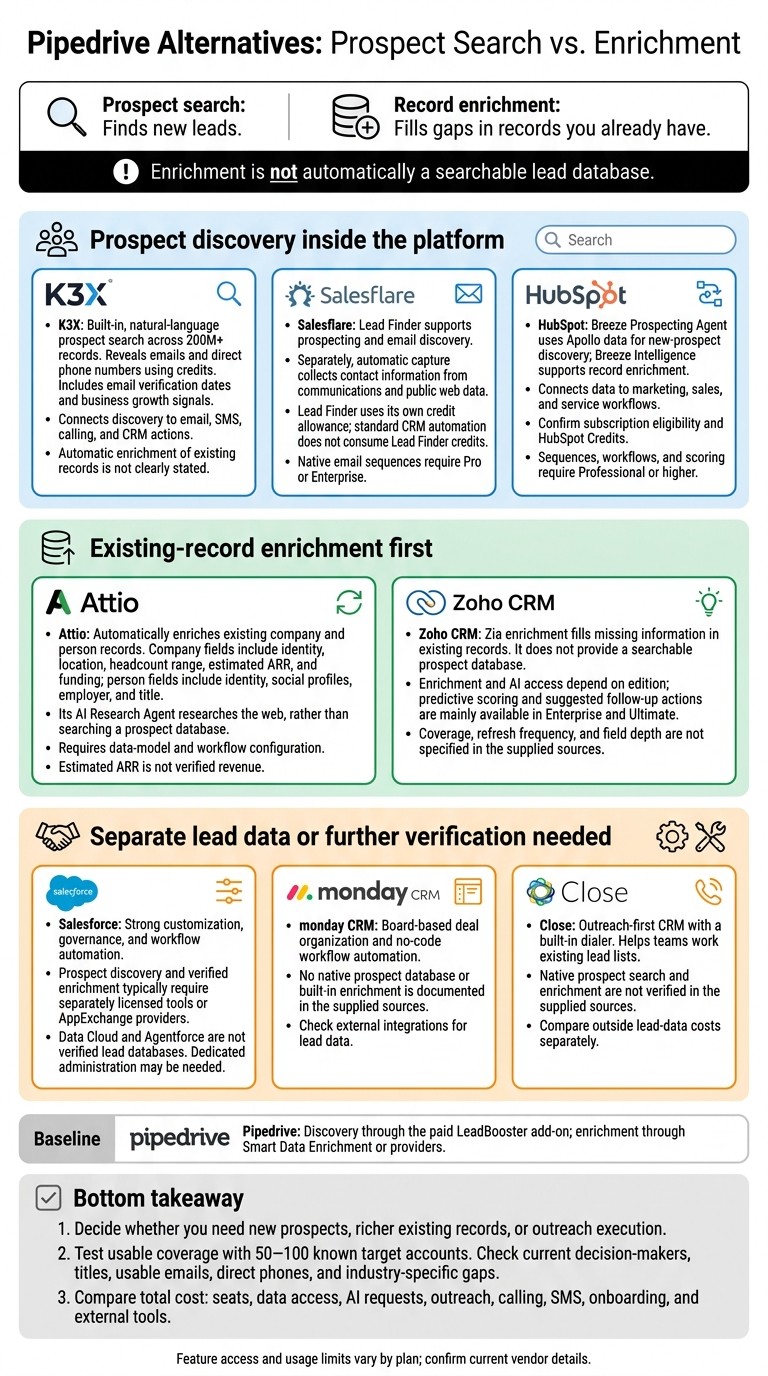
Pipedrive Alternatives: Prospect Search vs. Enrichment
1. K3X
Built-in prospect search
K3X combines prospect search and CRM actions in one system. According to K3X, users can search 200M+ records using natural language to find companies and decision-makers.
Revealing email addresses and direct phone numbers uses credits. Growth signals help rank prospects, while verification dates show when emails were last checked.
Search versus enrichment
K3X focuses on finding leads before they enter the CRM, while Attio and HubSpot mainly enrich existing records. That makes K3X a stronger fit for teams that want searchable lead data and sales actions within the CRM.
HubSpot also supports prospect discovery through its Breeze Prospecting Agent. K3X does not clearly state whether it automatically enriches existing records.
From data to sales actions
K3X is a CRM that updates itself while keeping prospect search and outreach in the same workflow, reducing handoffs compared with Pipedrive. It combines contacts, pipelines, custom fields, tasks, notes, and activity timelines with email, SMS, and calling.
Its AI agents turn prompts into actions and can help qualify prospects, follow up, schedule meetings, and update the CRM.
Pricing and usage limits
K3X uses one credit pool for data access and outreach actions. This reduces reliance on separate tools, but teams need to budget for both types of usage.
The Adaptive plan costs $399 per month for the whole team, with unlimited seats and 400,000 monthly credits. Optional top-ups start at $99 for 100,000 credits; purchased top-up credits roll over while the subscription remains active.
When credits run out, the CRM remains available, but credit-based actions pause. K3X offers a 7-day free trial after a demo, with no credit card required.
2. Attio
Attio suits teams that want flexible records and built-in enrichment for contacts and companies already in their CRM. It uses communication history and public web data, making it a better fit for CRM-native enrichment than top-of-funnel prospect search. [1][2]
Flexible records and relationship signals
Attio’s linked records let teams organize investors, partners, and product workspaces, then use enriched records to route leads. Custom-object limits depend on the plan. [1][2]
Two-way email and calendar sync show communication history and relationship signals. Reps can use that context to find warm paths to a lead. [1][2]
Automatic company and person enrichment
Attio enriches company records with identity, location, headcount range, estimated ARR, and funding. Person records get identity, social profiles, employer, and title. [1][2][3]
Enrichment runs in real time when a record is added, with bidirectional email and calendar sync providing more context. Estimated ARR is an estimate, not verified revenue. [1][2][3]
Prospect research and sales actions
Attio’s AI Research Agent can research ICP fit and find decision-makers. To turn that research into sales actions, teams need to configure objects, views, routing, and workflows. [1][2][3]
Key area | Attio | Pipedrive |
|---|---|---|
Lead-data approach | Built-in record enrichment plus AI research | Relies more on manual entry; LeadBooster is a paid add-on [2][4][8] |
Data model | Relational, with plan-based custom-object limits | |
Relationship context | Email and calendar sync show communication history and relationship signals |
Pricing and usage limits
Attio uses two credit pools: seat credits for Ask Attio and workspace credits for automation and enrichment workflows. Plan limits and annual-billing prices are: [1][8]
Free: 3 seats, 50,000 records, and 250 workspace credits per month.
Plus: Starts at $29 per user per month, billed annually, with 1,500 workspace credits per month.
Pro: Starts at $69 per user per month, billed annually, with 10,000 workspace credits per month. [1][8]
Teams with heavier enrichment or automation needs should budget for extra monthly credit blocks: about $70 for 5,000 credits or $595 for 50,000 credits. [1][8]
Salesflare takes a simpler, autofill-first approach.
3. Salesflare
Salesflare suits small B2B teams that need automatic contact capture and lead search with monthly credit limits. Automatic data capture and Lead Finder serve separate purposes, so teams should budget for them separately. [1]
Automatic contact and company data
Salesflare collects names, titles, phone numbers, and social profiles from emails, signatures, calendar events, and public web data. Autofill is available on Growth, but records may remain incomplete when source data is missing or poor. [1]
Its focus is on collecting data from communications to keep CRM records current. Active prospecting still relies on Lead Finder. [1]
Lead Finder and LinkedIn prospecting
Lead Finder supports prospecting and email discovery, with five monthly credits on Growth. The Chrome sidebar lets users create contacts from LinkedIn profiles in one click; email discovery draws from the same credit pool. [1]
Once a lead is found, Salesflare adds it to reminders, scoring, and pipeline tracking. [1]
Follow-up and pipeline automation
Salesflare reduces manual CRM work through automatic email and meeting logging, follow-up reminders, lead scoring, and pipeline automation. Suggested contacts identify people from your interactions who aren't yet saved in the CRM. [1]
Native email sequences require Pro or Enterprise. Salesflare's main strengths are zero-touch data entry and LinkedIn-based prospecting, particularly for teams whose usage fits within their monthly credit allowance. [1]
Pricing and lead-credit limits
Annual-billing prices and monthly credit limits are shown below. Sources differ on Enterprise: one lists 100 monthly credits, while another lists a custom allowance. [1]
Plan | Price, billed annually | Monthly Lead Finder credits | Key features |
|---|---|---|---|
Growth | $29/user/month | 5 | Autofill, reminders, scoring |
Pro | $49/user/month | 100 | Sequences, dashboards |
Enterprise | $99/user/month; five-user minimum | Custom | Account management, migration |
Additional monthly credit packages cost $39 for 250 credits, $69 for 500, or $129 for 1,000. Standard CRM automation does not use Lead Finder credits. [1]
Compared with K3X, Salesflare offers less native discovery and puts more emphasis on autofill to keep CRM records current.
4. HubSpot with Native Enrichment
HubSpot connects enrichment to its CRM, marketing, and support stack. Compared with Salesflare’s autofill-first model, it puts more emphasis on using enriched data across revenue workflows. [3][8]
What HubSpot enriches
HubSpot adds employee counts and social profiles to company records, alongside activity from emails, forms, and support tickets. Logged engagement is activity, not verified contact data. [3][8]
Buyer intent and new prospect discovery
Breeze Prospecting Agent uses Apollo data to find new prospects and can draft outreach sequences. Buyer intent signals help identify accounts showing buying intent. [3][10]
Attio and Salesflare focus on record enrichment, while Pipedrive offers discovery and enrichment through separate add-ons. [1][2][4][10]
Scoring, workflows, sequences, and reporting
HubSpot connects enriched properties and engagement signals to scoring, workflows, outreach, and reporting. Sequences, workflows, and scoring require Professional or higher. [8]
Compared with Salesflare, HubSpot usually takes longer to configure and needs more setup. [1][3]
Pricing, credits, and onboarding
HubSpot’s total cost goes beyond the seat price. Credit-based Breeze features and mandatory onboarding add to the subscription cost. [3][8]
Requirement | HubSpot | Pipedrive |
|---|---|---|
Record enrichment | ||
New prospect discovery | ||
Indicative subscription | Sales Hub Professional: $90–$100/seat/month; Enterprise: about $150/seat/month [8] | |
Additional costs | Mandatory onboarding: $1,500 for Professional; $3,500 for Enterprise; HubSpot Credits for credit-based features [8] | |
Total cost drivers | Seats, onboarding, and usage credits | Seats plus discovery add-on |
Teams that need more customization than HubSpot can consider Salesforce next.
5. Salesforce
Salesforce puts customization first, while prospect data usually comes through add-ons. Sales Cloud manages customer records, but prospect discovery and verified enrichment typically require separately licensed tools or AppExchange providers. It’s better suited to process control than native lead discovery or AI-powered lead scoring. [9][3]
Standard records and custom data models
Sales Cloud organizes customer data around Accounts, Contacts, and Opportunities. Custom objects and relationships support more complex workflows. [9]
Discovery and enrichment access
Salesforce usually relies on external providers for sourced lead data. Data Cloud unifies customer data, and Agentforce automates actions, but neither serves as a verified lead database. Teams typically add ZoomInfo, Apollo, or similar AppExchange tools for direct dials, technographics, and intent signals. [9][3]
Automation and administrator requirements
Salesforce combines Flow Builder with Agentforce, but connecting enrichment, routing, and outreach often takes dedicated admin support. It suits teams that need governance, territory management, and multi-product forecasting, though it requires more admin work than K3X’s prompt-to-action approach. These controls provide flexibility but add setup time and licensing costs. [5][9][11]
Subscription costs and usage limits
Agentforce uses conversation-based pricing, so costs can vary with usage. External lead data requires another license. [9][3]
Requirement | Salesforce | K3X |
|---|---|---|
Automation | Flow Builder plus licensed Agentforce [9] | Prompt-to-action approach [11] |
External lead data | Usually requires separately licensed tools or AppExchange providers [3][9] | Built-in prospect search; check included fields and coverage [11] |
Pricing | Agentforce usage and separate data licenses may add cost [9][3] | Review current plan details |
Administration | Lighter setup [11] |
6. Zoho CRM
Zoho CRM enriches existing records rather than providing a searchable prospect database. Compared with Salesforce’s heavier setup, it offers a simpler option for teams focused on cleaning up records they already have. This places Zoho on the record-enrichment side of the article’s comparison.
Standard records and available fields
Zia enrichment fills missing record data using Zoho’s proprietary database [2]. The available sources do not specify coverage, data refresh frequency, or field depth.
Discovery and enrichment access
Zoho’s broader suite helps SMBs keep more tools in one system, but it does not provide a searchable lead database [9][8]. Zoho fits existing-lead enrichment; K3X is better suited to finding new prospects and acting on them in the same system [2][11].
Requirement | Zoho CRM | K3X |
|---|---|---|
Lead-data approach | Zia fills missing data in existing records [2] | Built-in prospect search across 200M+ records [11] |
Turning data into action | Edition-dependent Zia features and configured workflows [2] | AI agents support automated CRM workflows for prospect qualification, outreach, and updates [11] |
Pricing and limits | Current U.S. pricing, seat minimums, and usage limits are not verified in the available sources | $399/month; unlimited seats; 400,000 monthly credits shared across data access and outreach (K3X) |
Automation and setup requirements
Zia’s predictive scoring and follow-up automation actions are mainly available in Enterprise and Ultimate [2]. Teams still need to configure workflows to act on those scores and suggestions.
Subscription costs and usage limits
The available sources do not verify current U.S. pricing, seat minimums, or usage limits. Total cost depends on the edition and deployment.
Teams looking for a more workflow-centered alternative can consider monday.com next.
7. monday.com
monday CRM is a workflow-first alternative to Pipedrive for managing existing deals. The supplied sources confirm board-based records and automation, but they do not document a native prospect database or built-in enrichment.
Unlike K3X's native integrations, monday does not document native prospect search or AI-driven lead actions. Its documented features support deal organization rather than reducing lead research.
Standard records and available fields
monday CRM uses four primary boards: Contacts, Companies, Deals, and Activity tracking. These boards support a relational data model [1][7]. Pipedrive uses People, Organizations, Deals, and Activities [2].
Discovery and enrichment access
monday CRM’s board structure does not provide prospect search. Teams that need lead data should check whether external integrations meet their requirements.
Requirement | monday CRM | Pipedrive |
|---|---|---|
Record structure | Contacts, Companies, Deals, and Activity tracking boards [1][7] | People, Organizations, Deals, and Activities [2] |
Lead data | No native prospect database or enrichment documented |
Automation and setup requirements
monday CRM’s no-code recipe builder automates stage moves and internal notifications [1][7]. The supplied sources do not verify native enrichment or email automation.
Subscription costs and usage limits
The supplied sources do not verify U.S. pricing, minimum seat commitments, automation quotas, or AI allowances.
For teams focused on outbound calling and sequences, Close is the next comparison.
8. Close
Close is an outreach-first CRM with a built-in dialer. Unlike Attio, Salesflare, and HubSpot, it does not appear in the supplied sources as a CRM with built-in lead data. Those sources do not verify native prospect search, enrichment, or automatic population of contact and company records. [9]
Close helps reps carry out outreach, while K3X combines built-in lead search and sales actions in one system. [11]
Discovery and enrichment access
Close supports outbound sales, but the supplied sources do not verify a native prospect database or enrichment layer. Its role is to help reps work leads they already have, rather than replace lead research.
Attio enriches existing company and person records, while K3X supports searches for new prospects. [2][11]
Automation and setup requirements
Calling is Close’s main verified strength; the supplied sources do not establish it as a lead-data source. Pipedrive, by contrast, emphasizes visual pipeline management. [9]
Subscription costs and usage limits
The supplied sources do not verify current subscription rates. Compare seat costs, calling charges, phone numbers, SMS, and external lead-data costs separately.
Prospect Search vs. Record Enrichment
Prospect search finds new leads; enrichment fills gaps in records you already have. Salesflare offers Lead Finder. Attio’s AI Research Agent researches the web rather than searching a prospect database, while HubSpot offers Breeze prospecting and enrichment with plan and credit requirements. [1][3]
Enrichment typically starts with an email address, company domain, or existing record. It doesn’t necessarily replace a prospecting database or a separate email-verification tool. Salesforce and Zoho scoring rank existing leads; they don’t find new prospects. [3][6][7]
The table separates new-lead discovery from record enrichment and shows where extra data tools or costs may apply.
Platform | Company/contact discovery | Enrichment and fields | Verification signals | Sales execution and separate-data needs |
|---|---|---|---|---|
K3X | Built-in, prompt-based database search | Reveals emails and direct phones; updates CRM records | Email verification dates; business growth signals | Agents, email, SMS, calling, and pipeline updates |
Attio | AI Research Agent; web-based discovery | Automatic record enrichment; firmographics and social information | Web signals, not proof of email deliverability | Sequences and configurable automation; deeper contact data may require integrations [1] |
Salesflare | Lead Finder | Autofill from email signatures and LinkedIn; email, phone, and social fields where available | Email-finder verification signals | Native email sequences; Lead Finder uses separate credits [1] |
HubSpot | Breeze Prospecting Agent | Breeze Intelligence enrichment; company information and supported contact fields | Review the source and last update time | Native sequences; confirm subscription eligibility and HubSpot Credits [3][8] |
Pipedrive | Paid LeadBooster discovery | Fields depend on the add-on or provider | Check the underlying data source | Pipeline management; discovery adds subscription cost [2][4] |
Salesforce / Zoho CRM | Scoring is not database search | Salesforce commonly uses external providers; Zoho enrichment depends on tier | Depends on the provider | |
monday.com / Close | No native prospect database is documented; external data tools are usually required | Specific enrichment features are not established | Not established | Close includes calling and automation [4] |
Test usable coverage with 50–100 known target accounts. Compare current decision-makers, titles, usable emails, direct phones, and gaps in industry-specific fields across each candidate. [3][7] Then assess how current the sources are and how much detail the fields provide - not just the record count.
Check each field’s source and whether updates happen automatically, on request, or through a workflow. Attio requires data-model decisions; Salesflare starts with email and LinkedIn connections. [1] Verification dates don’t guarantee deliverability, so recheck addresses with an email-verification tool before sending. [7]
Pros and Cons: Data, Automation, and Total Cost
K3X bundles prospect discovery and sales execution; most rivals enrich existing records or need add-ons. With the data sources established, compare what it costs to run your workflows - not just the price per seat.
Platform | Main advantage | Main limitation | Best-fit team | Extra cost or setup |
|---|---|---|---|---|
K3X | Built-in discovery and prompt-based sales execution | Credit-based actions; integration ecosystem is still expanding | Outbound teams selling to small businesses | $399/month includes unlimited seats and 400,000 credits; 100,000-credit top-ups start at $99 (K3X pricing) |
Attio | Flexible records with automatic enrichment | AI web research is not a searchable prospect database | Startups with custom sales or product-led workflows | Data-model setup and separate AI/workspace credit pools [1] |
Salesflare | Automatic contact capture plus Lead Finder | Less flexible data model; discovery credit limits | Small B2B teams using email and LinkedIn | |
HubSpot | Enrichment connected to marketing, sales, and service | Higher-tier and usage costs | Teams coordinating inbound marketing and sales | Onboarding, HubSpot Credits, and marketing-contact pricing tiers [3][7] |
Salesforce | Extensive customization and enterprise controls | More administration; external lead data needed | Enterprises with dedicated RevOps resources | Implementation, AI add-ons, and external data providers [6][7] |
Zoho CRM | Existing-record enrichment within a broader suite | Enrichment and AI depend on edition | Budget-conscious SMBs using Zoho apps | |
monday.com | Visual coordination across teams | External lead data usually needed | Teams prioritizing shared project visibility | External-data integration cost and setup |
Close | Calling, SMS, and sales automation | Execution tools do not replace prospect discovery | High-volume inside sales teams | Phone numbers, call minutes, SMS, and outside lead data [2][6] |
Estimate costs from actual usage: enrichment, AI requests, outreach, calling, SMS, onboarding, and outside data. Match those expenses to your prospecting volume and sales motion.
For K3X, check how many credits each action uses before estimating top-ups (K3X pricing).
Which CRM Fits Your Prospecting Needs?
Choose K3X if you need prospect discovery and outreach in one system, especially for an SMB outbound team. Using the database-vs-enrichment split above, check usage costs: seats are unlimited, but AI actions, calling, texting, and contact reveals are metered.
Attio fits teams that use product usage signals and relationship tracking. Its AI research and enrichment do not provide a searchable prospect database. Salesflare fits small B2B teams that want automatic contact capture and Lead Finder for new-lead discovery. [1][2]
HubSpot fits teams that want marketing, sales, and service in one CRM; check discovery and enrichment eligibility, plan tiers, and credit limits. Salesforce suits enterprises that need governance and customization and have admin resources, but it typically requires external lead data. Zoho CRM fits teams already using Zoho Books and Desk that can work with enrichment rather than prospect search. [3][6][7][12]
monday.com fits visual lead workflows but usually requires external lead data. Close supports outreach to an existing lead list rather than replacing prospect discovery. Compare credits, onboarding, and external data costs against your monthly volume. [4][6][7]
Test discovery, enrichment depth, and total usage cost with your own accounts. [3]
FAQs
How can I test lead data quality before switching CRMs?
Test a workflow with your own data before migrating. Use Attio’s or HubSpot’s free tier or trial to import sample contacts and companies, then check how complete and accurate the enriched records are.
Their enrichment draws on public sources or communication history rather than proprietary databases. It may lack verified direct-dial numbers or the detailed technographic data available in tools like ZoomInfo. Check whether the available fields meet your team’s needs before moving your CRM data.
How do I estimate monthly data and outreach costs?
Calculate total cost by adding per-seat licensing, required add-ons, and projected usage overages for automated enrichment and AI queries. Salesflare offers flat-rate pricing. Attio uses separate seat and workspace credits, so usage can push costs beyond the subscription price [1].
For Pipedrive, HubSpot, and Salesforce, include add-on fees and the cost of higher-tier plans needed for advanced features [2][3][4][5].
Will built-in lead data replace my separate prospecting tools?
Not fully. CRMs like Attio and Salesflare add basic company information to existing records. Dedicated tools like ZoomInfo are still needed for verified direct-dial numbers, detailed org charts, and real-time buying intent signals at scale [1].
CRMs manage records and pipelines, not high-volume cold email. You’ll still need separate tools for multi-inbox rotation and deliverability management [2].