
The Evolution of AI Agents
Poor lead quality can cause outreach to fail, but low reply rates alone do not prove the leads are bad. I check delivery and follow-up first, then separate poor buyer fit from problems with messaging, timing, or booking.
I start by tracing 10 recent leads through the CRM and reviewing 50–100 records for company fit, contact accuracy, buyer role, and buying intent. The article recommends investigating bounce rates above 2% before changing copy [3]; I treat that threshold as a check, not a diagnosis.
My rule is simple: <u>fix the first failed stage before adding volume or comparing outbound CRMs</u>. Repeated fit failures call for tighter sourcing; qualified buyers who stall call for better outreach or handoffs.
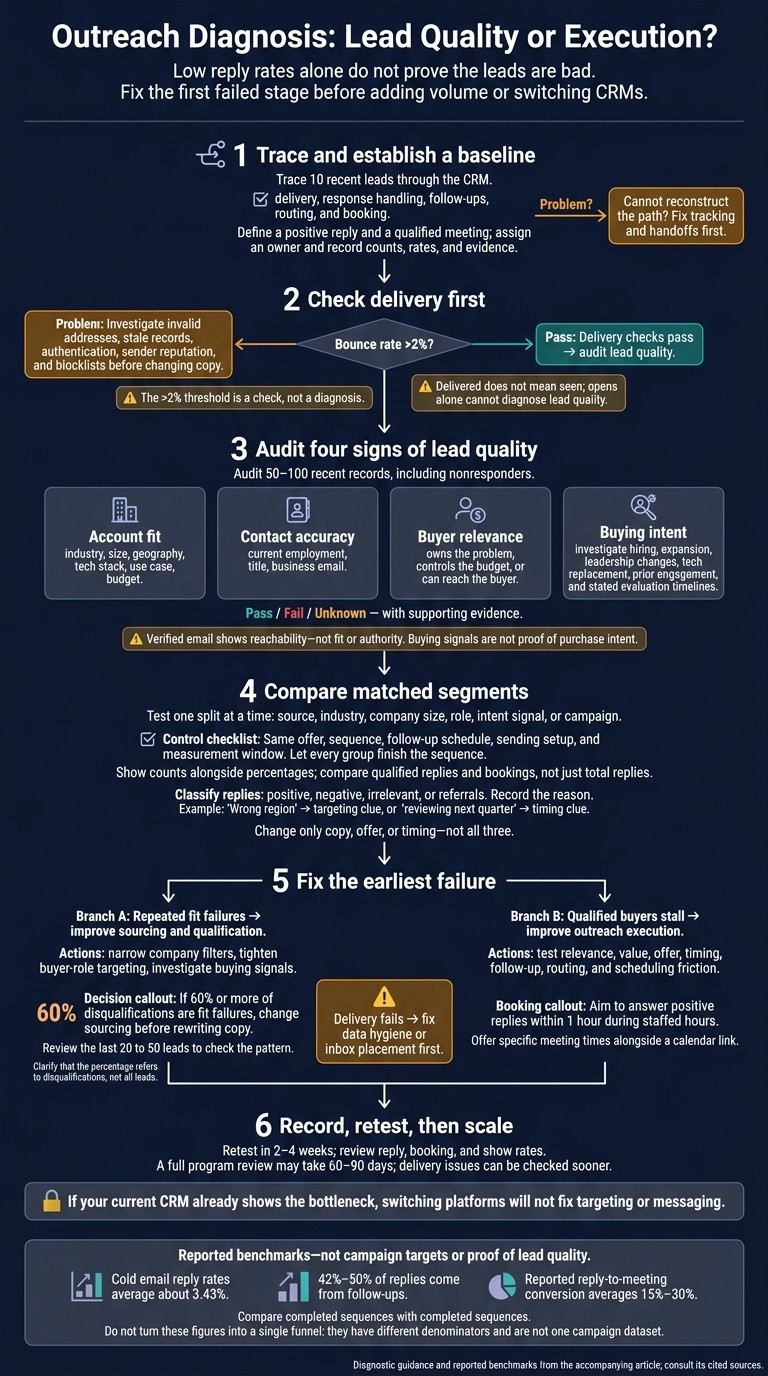
Outreach Diagnosis: Lead Quality or Execution?
How to Find High-Quality Leads for Cold Email Outreach (Step-by-Step Guide)
Find Where Outreach Breaks Down
Find the first broken stage before blaming lead quality. Check delivery, then targeting, messaging, sequence, and conversion. Treat each symptom as a clue - not a verdict - to separate poor leads from poor execution. [3][5]
Use this table to choose your first test, not your final diagnosis.
Symptom | Likely bottleneck | Check first |
|---|---|---|
High bounce rate (>2%) | Data quality / infrastructure | Invalid addresses, stale records [3] |
Low reply rate after valid delivery | Messaging or targeting | First-line relevance, value clarity [5] |
Opens, no replies | Messaging or targeting | First-line relevance, clear value [5] |
Replies, few qualified meetings | Targeting / ICP | ICP match, job level [5] |
Positive replies, few booked calls | Conversion / handoff | |
Meetings book, but fail first-call qualification | Qualification |
Check Contact Data and Email Delivery First
Start with bounce rate and domain reputation. If bounce rates exceed 2%, fix data quality or deliverability before rewriting copy. Check SPF, DKIM, DMARC, sender reputation, and blocklist status. Email authentication is required, but it does not guarantee inbox placement. [3][7]
Delivered does not mean seen. An email can reach a recipient’s mailbox but land in spam. Privacy features and preloaded tracking pixels can also record opens without anyone reading the message, so open rate alone cannot diagnose lead quality. [7]
Move to targeting and message fit only after delivery checks pass. If they fail, address delivery first.
Separate Targeting From Outreach Execution
After delivery checks pass, compare recipients with closed-won deals from the last 12 months. Check whether their roles match the problem you solve, and review rejection wording for signs of targeting errors:
not the right contact
Investigate timing objections separately. Check whether follow-ups were completed and whether each message gives the buyer a clear reason to reply. [3][6][11]
When replies are positive, check response delays and the booking path. Can prospects find a suitable time without filling out unnecessary form fields? Test a direct booking link against a form-first flow. Define a qualified meeting before treating bookings as success, so curiosity calls do not count as wins. [3][6]
If positive replies stall before booking, test the booking path next. If replies are weak, test targeting and message fit first to determine whether sourcing or outreach execution needs work.
Check 4 Signs of Lead Quality
After delivery checks pass, audit 50–100 recent records for fit, accuracy, relevance, and intent before blaming the leads. Include nonresponders as well as replies, and mark each check as pass, fail, or unknown with supporting evidence. Verified email data shows reachability - not fit or authority. [10][8][9]
Check Account Fit and Contact Accuracy
Check whether the company matches your agreed ideal customer profile and whether the contact’s details are current. These checks help separate lead-quality issues from execution issues.
For account fit, review industry, size, geography, tech stack, use case, and budget. For contact accuracy, manually verify current employment, title, and business email rather than relying on the database’s last update. Use booked meetings and closed deals as benchmarks for drift: an accurate contact at an unsuitable company is still a poor-fit lead. [7][8]
When both company and contact fit, check buyer relevance and intent.
Check Buyer Relevance and Buying Intent
Confirm whether the contact owns the problem, controls the budget, or can reach the buyer. Then assess buying intent using AI lead-scoring tools, treating hiring, expansion, leadership changes, tech replacement, and prior engagement as signals to investigate - not proof of purchase intent. [10][12][3]
Record any stated evaluation timeline, and distinguish a good-fit contact who is not in market from the wrong buyer. Log the exact rejection reason rather than using a generic label. These flags separate active buyers from good-fit contacts who are not ready. [10][12][3]
Use K3X to Support the Lead Audit
Use K3X to speed up the audit, not replace judgment. Its built-in database of 200M+ records, contact lookup, business growth signals, and email-verification dates support sourcing and accuracy checks. Its prompt-to-action workflow lets teams define ICP filters and audit steps in plain English, but people still need to review fit, authority, and timing. [12][8]
Platform | Audit-support functions |
|---|---|
K3X | Built-in prospect database and prompt-to-action workflow help teams find and review leads. |
Salesforce | Custom fields, reports, and Flow support structured audits; configuration is required. |
HubSpot | Contact and company properties, segmentation, and reporting support audits; workflow access depends on the plan. |
Pipedrive | Custom fields, filters, and Insights support lead-segment reviews. |
Zoho CRM | Custom fields, reports, and workflow rules support configured qualification checks. |
monday CRM | Customizable boards and automations support audit-flag tracking. |
Close | Smart Views and custom fields support contact segmentation for review. |
Attio | Custom attributes, filtered views, and workflows help organize audit evidence. |
K3X’s $399/month team plan includes unlimited seats and 400,000 monthly credits. Contact lookups and AI actions consume credits, so audit a sample before expanding the list. Database size and verification dates do not guarantee campaign-ready contacts.
Group audited leads by their pass/fail results before comparing response rates across segments.
Compare Results by Lead Segment
After scoring fit, accuracy, relevance, and intent, compare matched segments, not overall averages. Group audited contacts by source, industry, company size, role, intent signal, or campaign. Test one split at a time so groups don’t become too small to compare. [11][10]
Define Metrics and Compare Similar Groups
Keep the offer, sequence, follow-up schedule, and sending setup the same across groups. Measure each group over the same window from first outreach, and let every group finish the sequence.
A full program review may take 60–90 days, though you can check delivery issues sooner. Show counts alongside percentages, and use the sample to spot patterns rather than declare a winner. [5][3]
Use this scorecard for each matched segment. [11][8]
Metric | Count to show | Rate denominator |
|---|---|---|
Volume | Unique contacts attempted | Count only |
Delivery | Contacts with at least one accepted email | Contacts attempted |
Bounce | Contacts whose first email bounced | Contacts attempted |
Reply | Human replies | Contacts attempted |
Qualified reply | Replies meeting agreed qualification criteria | Contacts attempted |
Booked | Contacts booking a meeting | Contacts attempted |
Show rate | Booked contacts who attended | Booked contacts |
Opportunity | Held meetings accepted as opportunities | Held meetings |
Disqualification | Assessed responders ruled out | Responders assessed |
Count unique contacts and agree on qualification criteria before testing. “Delivered” means the receiving server accepted the email. Once segment data is consistent, isolate the variable that changed results. [11][8]
Review Replies and Test 1 Variable at a Time
Classify replies as positive, negative, irrelevant, or referrals, and record the reason. Within the same segment, change only copy, offer, or timing - not all three.
A reply such as:
“Wrong region”
points to targeting, while:
“reviewing next quarter”
Cold email reply rates average about 3.43%, and 42%–50% of replies come from follow-ups. Comparing completed sequences with first-touch results can therefore distort the diagnosis. [10][3][7]
Compare qualified replies and bookings, not just total replies. Reported reply-to-meeting conversion averages 15%–30%, but a low rate alone doesn’t prove the leads are poor. [3]
Trace the last 10 leads through response handling, follow-ups, and routing. If the CRM can’t reconstruct that path, fix the process before blaming lead quality. [1] Use the largest gap to determine whether to change sourcing and qualification or messaging, timing, and booking.
Choose Between Better Leads and Better Outreach
Repeated fit failures point to sourcing and qualification problems. Qualified buyers who stall point to outreach execution. Use your audit scores for fit, accuracy, relevance, and intent to decide what to fix next. [5][13]
Evidence from the audit | Priority action |
|---|---|
Companies fail basic fit criteria, such as size or location | Narrow sourcing filters and enforce basic fit requirements. [4][5] |
Repeated bounces show poor data hygiene | Clean the source list before changing messaging. [13] |
Buyers fit but have no current need | Use buying signals, such as executive hires, expansion, or CRM migrations. [8][9] |
Valid emails still land in spam | Reduce sending volume while investigating inbox placement. [13] |
Replies show a buyer-role mismatch | |
Qualified replies rarely lead to meetings | Improve the calendar link and route replies for faster responses. [5] |
Choose the next action based on the most frequent failure, not the symptom that draws the most attention.
When to Change Sourcing and Qualification
Change sourcing before rewriting copy if 60% or more of disqualifications are fit failures. Review the last 20 to 50 leads to check that pattern. [4]
Tighten company filters and target roles with relevant responsibility. Use buying signals rather than assuming a good fit means the buyer is ready. Before expanding the revised segment, confirm that it produces more qualified replies using the same outreach sequence. [8][9]
When to Fix Messaging, Timing, and Booking
Fix outreach when fit and inbox placement are sound. Lead with the buyer’s problem, then test one change to the offer, call to action, or cadence. [5][10][13]
Qualified prospects who reject the price need clearer value and positioning. Interested prospects who disappear before booking need a better handoff. Aim to answer positive replies within 1 hour during staffed hours, and offer specific meeting times alongside a calendar link. [5][10][13]
Record specific disqualification reasons and booking status in your CRM. Fix measurement before deciding whether sourcing or outreach needs work. [1][10]
If your CRM cannot track these fields and handoffs, compare platforms next.
Compare K3X and Other CRMs for Outreach Diagnosis
Choose a CRM that separates poor lead fit from execution failures, rather than just logging activity. Compare platforms only if your current system cannot show where leads stall, and judge them by how quickly they identify the first failure: fit, delivery, routing, or booking.
K3X combines built-in prospecting with prompt-based actions. Salesforce, HubSpot, Pipedrive, Zoho CRM, monday CRM, Close, and Attio offer different levels of reporting, workflow control, and outreach support.
K3X: Prompt-Based Actions and Team Pricing
K3X lets teams use plain-language prompts to direct agents for prospecting, qualification, follow-up timing, and CRM updates. This reduces manual steps when checking lead fit, delivery, and handoffs.
Its built-in database includes 200M+ records, business growth signals, and email-verification dates for lead audits. The K3X Adaptive plan costs $399/month for the team, with unlimited seats and 400,000 monthly credits. AI actions, contact reveals, calling, and texting consume credits. Source: K3X pricing.
Use the matrix below to compare how each platform supports diagnosis - not how many features it offers.
Audit capability | K3X | Salesforce | HubSpot | Pipedrive | Zoho CRM | monday CRM | Close | Attio |
|---|---|---|---|---|---|---|---|---|
Prospecting data | Built-in database; credit-based reveals | Requires external data source | Enrichment depends on plan and credits | LeadBooster prospecting add-on | Enrichment through extensions or integrations | Import or integrate prospect data | Import or integrate prospect data | Flexible record model; enrichment varies |
Verification visibility | Email-verification dates | Connect verification provider | Connect verification provider | Connect verification provider | Connect verification provider | Store verification results in columns | Connect verification provider | Enrichment does not establish inbox placement |
Segmentation | Prompt-based targeting and custom fields | Custom fields and report filters | Segments and properties | Custom fields and filters | Modules and filters | Boards and filters | Smart Views and custom fields | Custom attributes and filtered views |
Reporting | AI-generated dashboards and action logs | Custom reports for qualification and handoffs | Funnel and activity reports; depth varies by tier | Insights for activity and conversion | Reports across qualification and activity fields | Dashboards summarize audit flags and status | Outbound activity and conversion reporting | Reports based on configured records and attributes |
Outreach | Email, calling, SMS, and agents | Sequences and calling depend on edition or add-ons | Sequences and calling depend on tier | Email sync and sequences depend on plan | Email and configured follow-up; telephony integrations | Email and follow-up require configured workflows | Native calling, email, and SMS | Email and sequences; calling through integrations |
Automation | Prompts and visual configuration | Configured flows | Configured workflows | Configured automations | Configured workflows | Board automations | Outbound workflows | Configured workflows |
Integrations and setup | MCP and webhooks; prompt-led agents | Extensive ecosystem; complex routing often needs administration | Connected ecosystem; workflow setup required | Pipeline-first setup; configure audit fields | Broad app ecosystem; configure qualification and routing | Configure boards, status fields, and routing | Configure Smart Views and outbound workflows | Configure flexible records, relationships, and workflows |
Pricing model | $399/month for the team; metered credits | Tiered, per-user | Tiered, per-user | Tiered, per-user | Tiered, per-user | Tiered, per-user | Tiered, per-user | Tiered, per-user |
K3X vs. Salesforce, HubSpot, Pipedrive, and Zoho CRM
Compare all five platforms against the same criteria: fit, verification, segmentation, reporting, and routing. K3X uses prompts to direct prospecting and execution, while the other platforms rely on configured fields, reports, and workflows.
Salesforce supports deep customization but requires more administration. HubSpot connects marketing and sales through workflows that depend on the subscription tier. Pipedrive focuses on pipeline visibility and straightforward outbound tracking, while Zoho CRM offers broad qualification and routing controls that need configuration.
K3X’s prompt-based approach does not remove the need to set up reporting. Teams that need deeper customization may find the additional administration worthwhile.
Check the edition that includes the reporting, sequences, enrichment, automation, and integration access you need. Confirm requirements on the official Salesforce, HubSpot, Pipedrive, and Zoho CRM pricing pages.
K3X vs. monday CRM, Close, and Attio
monday CRM fits shared tracking of qualification and handoffs; Close fits calling-and-email-heavy outbound diagnosis; Attio fits flexible records for account fit and buyer relationships. Consider K3X when separate prospecting tools and repetitive CRM updates slow diagnosis.
If your current CRM already shows the bottleneck, switching platforms will not fix targeting or messaging. Compare total costs, including required seats, data tools, communication usage, implementation, and migration.
Confirm seat minimums and billing commitments on the official monday CRM, Close, and Attio pricing pages.
Run the Audit and Fix the First Bottleneck
Use the diagnosis above to identify one bottleneck and fix it first. Score the last 50–100 leads for fit, accuracy, relevance, and intent using one scorecard, and record the evidence behind each rating. [10][8][9]
Once you’ve scored the sample, check the failure points in this order:
Check delivery first, then compare reply and booking rates across similar segments. [3][7]
Classify replies as wrong contact, not relevant, price, or timing. [10]
Fix the earliest failure: delivery, targeting, messaging, or conversion. [3][7][10]
Tighten sourcing when fit is weak. When qualified leads stall, fix follow-up, routing, or booking. [6]
Record Results Before Scaling or Switching CRMs
Record a baseline before changing anything. Assign an owner, agree on what counts as a positive reply and qualified meeting, and set a review date. Log counts, rates, and notes. [10]
Run the audit in your current CRM before switching to K3X. If your CRM cannot trace each lead from assignment to handoff, it is hiding the bottleneck. [1]
Change volume, messaging, or systems only after the audit. Retest in 2–4 weeks and review reply, booking, and show rates. [6]
FAQs
What if my leads fail multiple quality checks?
When leads fail multiple quality checks, find the first major drop before changing messaging. Check ideal customer profile (ICP) fit, account coverage, contact accuracy, and delivery health before drawing conclusions from replies.
If contacts are reachable and deliverability is stable, group failure reasons and review disqualification patterns weekly. Fix the highest-priority bottleneck, hold everything else constant, and rerun diagnostics before considering changes to lead sources. [1][2][3][4]
How can I audit leads with missing intent data?
Review your latest 20–50 leads or meetings now rather than waiting for intent signals. Check ideal-customer fit, buyer relevance, and contact accuracy, along with how each lead was handled: response time, follow-up attempts, meeting outcomes, and rejection reasons.
Compare response rates and meeting-to-opportunity conversion rates by segment and source. Separate qualified replies from generic or automated replies, then fix the earliest funnel leak - usually targeting or data quality, handoff response time, or your definition of a qualified lead.
How do I know an outreach improvement is real?
An outreach change works when it fixes the first measurable drop-off in the funnel and improves results further down. Track your last 10–50 leads through each stage and compare conversion rates by segment. Check delivery health first, followed by lead fit, contact quality, and relevance to the buyer.
Look for a lasting improvement in meeting-to-opportunity conversion, not just more booked meetings. Make one controlled change, then repeat the diagnostic. [1][2][3][4]